

一、環境準備,安裝requests庫
1.安裝命令(終端執行)
 #安裝requests庫
pip install requests -i https://pypi.tuna.tsinghua.edu.cn/simple/
#(該方式是臨時指定的,每次下載需要去cmd終端下載庫 相對來説比較麻煩,每次添加庫的時候就要去cmd終端去下載)
2.解決安裝超時的問題(配置國內鏡像源)
pip config set global.index-url https://pypi.tuna.tsinghua.edu.cn/simple
説明:默認連接Python官方倉庫,國內鏡像源(如清華源)可提升下載速度。
二、基本用法:發起GET請求
1.導入模塊與基礎請求
import requests #導入requests庫
# 在要獲取數據的瀏覽器頁面裏,找到目標URL(以疾病查詢頁面為例),鍵盤按下Fn+F12,查看是什麼請求方式
url = 'https://www.youlai.cn/dise'
# 發起get請求,獲取響應對象 將獲取到的響應對象的結果給到變量res
res = requests.get(url)
# 打印響應內容(如果響應結果是HTML文本內容)
print("響應內容:",res.text)
2.處理中文亂碼問題
import requests
url = 'https://www.tjwenming.cn/'
res = requests.get(url)
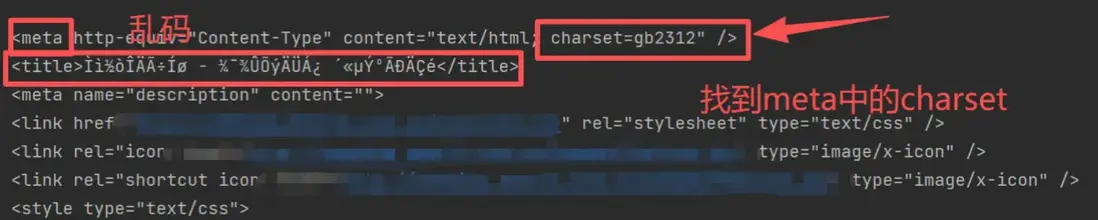
# 手動指定編碼(根據目標網頁的meta標籤設置,此處以gb2312為例)
res.encoding = 'gb2312'
print('處理後的中午內容:',res.text)
調用encoding前
調用encoding後

關鍵步驟:
- 檢查網頁源碼中的\<metacharset="xxx">標籤,獲取編碼格式(如utf-8、gbk、gb2312)。
- 通過response.encoding設置編碼,確保中文正常顯示。
三、帶參數的GET請求
1.參數傳遞方式
方式一:URL拼接參數(直接在URL中攜帶參數)
import requests
#包含參數的完整URL(從瀏覽器複製)
url='https://careers.tencent.com/tencentcareer/api/post/Query?timestamp=1763364793381&countryId=&cityId=&bgIds=&productId=&categoryId=&parentCategoryId=&attrId=2,3&keyword=&pageIndex=1&pageSize=10&language=zh-cn&area=cn'
res = requests.get(url)
print(res.text)
方式二:通過params參數傳遞
url = 'https://careers.tencent.com/tencentcareer/api/post/Query' # 注意寫基礎的URL 不帶後面的請求參數
params = { # 將請求參數通過字典的形式存起來,給到params
    'timestamp': 1763364793381,
    'ountryId': '',
    'cityId': '',
    'bgIds': '',
    'productId': '',
    'categoryId': '',
    'parentCategoryId': '',
    'attrId': '2,3', # 注意參數為字符串類型
    'keyword': '',
    'pageIndex': 1,
    'pageSize': 10,
    'language': 'zh-cn',
    'area': 'cn'
}
# 發起請求時傳遞params參數
res = requests.get(url,params=params)
print(res.text)
四、獲取二進制數據(圖片、視頻等)
:下載網絡圖片並保存
import requests
url = 'http://pic.enorth.com.cn/005/026/920/00502692031_21660ab6.jpg'
res = requests.get(url)
#如果請求網址對應的數據為圖片視頻音頻
#獲取數據的方式:響應對象.content--->字節數據
res_img = res.content
with open('1.jpg','wb') as f:
    f.write(res_img)
關鍵點:
- 二進制數據通過response.content獲取,而非text。
- 文件擴展名需與內容類型匹配(如.gif、.mp4、.jpg)。
