

作者:櫰木
1 HBASE 安裝部署
| hbase組件 | 部署主機 |
|---|---|
| HMaster | hd1.dtstack.com,hd2.dtstack.com |
| HRegionServer | hd3.dtstack.com,hd2.dtstack.com,hd1.dtstack.com |
2 創建hbase Kerberos主體
在每台機器上進行生成
bash /data/kerberos/getkeytabs.sh /etc/security/keytab/hbase.keytab hbase
bash /data/kerberos/getkeytabs.sh /etc/security/keytab/hbase.keytab HTTP
3 安裝
在hd1.dtstack.com主機root權限下執行
-
解壓安裝包
[root@hd1.dtstack.com software]# pwd [root@hd1.dtstack.com software]#tar -zvxf hbase-2.1.0-bin.tar.gz -
設置環境變量
[root@hd3.dtstack.com software]# cat >>/etc/profile<<EOF export HBASE_HOME=/opt/hbase export HBASE_CONF_DIR=/opt/hbase/conf EOF [root@hd3.dtstack.com software]# source /etc/profile - 修改配置文件
注意,在hadoop開啓kerberos情況下,需要在core-site.xml添加以下參數
cat /opt/hadoop/etc/hadoop/core-site.xml
    <property>
      <name>hadoop.rpc.protection</name>
      <value>authentication,privacy</value>
</property>
在hdfs-site.xml中修改和添加以下參數
cat /opt/hadoop/etc/hadoop/core-site.xml
   <property>
        <name>dfs.data.transfer.protection</name>
        <value>authentication,privacy</value>
    </property>
    <property>
      <name>dfs.encrypt.data.transfer.cipher.suites</name>
      <value>AES/CTR/NoPadding</value>
    </property>
如果你的Hadoop已經有HA,或者你已經有一個獨立的ZooKeeper集羣,那麼你就需要在hbase-env.sh中把HBase自帶的ZooKeeper關掉以防止端口衝突
[root@hd1.dtstack.com conf]# cat >hbase-env.sh<<EOF
HBASE_ROOT_LOGGER=INFO,DRFA
export JAVA_HOME=/opt/java
export HBASE_MANAGES_ZK=false
#export HBASE_OPTS="-XX:+UseConcMarkSweepGC"
export HBASE_OPTS="$HBASE_OPTS -Djava.security.auth.login.config=/opt/hbase/conf/zk-jaas-client.conf -Dzookeeper.sasl.client=true -Dzookeeper.sasl.client.username=zookeeper -Dzookeeper.sasl.clientconfig=Client"
export HBASE_MASTER_OPTS="$HBASE_MASTER_OPTS -Djava.security.auth.login.config=/opt/hbase/conf/zk-jaas.conf  -Djavax.security.auth.useSubjectCredsOnly=false -javaagent:/opt/prometheus/jmx_prometheus_javaagent-0.3.1.jar=9530:/opt/prometheus/hbase_master.yml"
export HBASE_REGIONSERVER_OPTS="$HBASE_REGIONSERVER_OPTS -Djava.security.auth.login.config=/opt/hbase/conf/zk-jaas.conf  -Djavax.security.auth.useSubjectCredsOnly=false -javaagent:/opt/prometheus/jmx_prometheus_javaagent-0.12.0.jar=9531:/opt/prometheus/hbase_regionserver.yml"
EOF
cat >zk-jaas-client.conf<<EOF
Client {
com.sun.security.auth.module.Krb5LoginModule required
useKeyTab=false
useTicketCache=true;
};
EOF
cat >zk-jaas.conf<<EOF
Client {
com.sun.security.auth.module.Krb5LoginModule required
useKeyTab=true
storeKey=true
useTicketCache=false
keyTab="/etc/security/keytab/hbase.keytab"
principal="hbase/hd1.dtstack.com@DTSTACK.COM";
};
com.sun.security.jgss.krb5.initiate {
com.sun.security.auth.module.Krb5LoginModule required
renewTGT=false
doNotPrompt=true
useKeyTab=true
storeKey=true
useTicketCache=false
keyTab="/etc/security/keytab/hbase.keytab"
principal ="hbase/hd1.dtstack.com@DTSTACK.COM";
};
EOF
説明:
- 啓動參數值可根據具體情況調整
修改hbase-site.xml,內容如下:
<?xml version="1.0" encoding="UTF-8" standalone="no"?>
<?xml-stylesheet type="text/xsl" href="configuration.xsl"?>
<!--
/*
 * Licensed to the Apache Software Foundation (ASF) under one
 * or more contributor license agreements.  See the NOTICE file
 * distributed with this work for additional information
 * regarding copyright ownership.  The ASF licenses this file
 * to you under the Apache License, Version 2.0 (the
 * "License"); you may not use this file except in compliance
 * with the License.  You may obtain a copy of the License at
 *
 *     http://www.apache.org/licenses/LICENSE-2.0
 *
 * Unless required by applicable law or agreed to in writing, software
 * distributed under the License is distributed on an "AS IS" BASIS,
 * WITHOUT WARRANTIES OR CONDITIONS OF ANY KIND, either express or implied.
 * See the License for the specific language governing permissions and
 * limitations under the License.
 */
-->
<configuration>
  <!--
    The following properties are set for running HBase as a single process on a
    developer workstation. With this configuration, HBase is running in
    "stand-alone" mode and without a distributed file system. In this mode, and
    without further configuration, HBase and ZooKeeper data are stored on the
    local filesystem, in a path under the value configured for `hbase.tmp.dir`.
    This value is overridden from its default value of `/tmp` because many
    systems clean `/tmp` on a regular basis. Instead, it points to a path within
    this HBase installation directory.

    Running against the `LocalFileSystem`, as opposed to a distributed
    filesystem, runs the risk of data integrity issues and data loss. Normally
    HBase will refuse to run in such an environment. Setting
    `hbase.unsafe.stream.capability.enforce` to `false` overrides this behavior,
    permitting operation. This configuration is for the developer workstation
    only and __should not be used in production!__

    See also https://hbase.apache.org/book.html#standalone_dist
  -->
  <property>
    <name>hbase.rootdir</name>
    <value>/hbase/</value>
  </property>
  <!--指定hbase集羣為分佈式集羣-->
  <property>
    <name>hbase.cluster.distributed</name>
    <value>true</value>
  </property>
  <property>
    <name>hbase.zookeeper.property.clientPort</name>
    <value>2181</value>
  </property>
  <property>
    <name>hbase.zookeeper.quorum</name>
    <value>hd1.dtstack.com,hd2.dtstack.com,hd3.dtstack.com</value>
  </property>
  <property>
    <name>hbase.unsafe.stream.capability.enforce</name>
    <value>false</value>
  </property>
  <property>
    <name>zookeeper.znode.parent</name>
    <value>/hbase1</value>
  </property>
  <property>
    <name>hbase.master.info.port</name>
    <value>16010</value>
  </property>
  <property>
    <name>hbase.master.maxclockskew</name>
    <value>150000</value>
  </property>
  <property>
    <name>hbase.rpc.timeout</name>
    <value>300000</value>
  </property>
  <property>
    <name>hbase.master.logcleaner.ttl</name>
    <value>600000</value>
  </property>
  <property>
    <name>hbase.regionserver.handler.count</name>
    <value>25</value>
  </property>
  <property>
    <name>hbase.regionserver.optionalcacheflushinterval</name>
    <value>3600000</value>
  </property>
  <!--Client configurations-->
  <property>
    <name>hbase.client.write.buffer</name>
    <value>2097152</value>
  </property>
  <property>
    <name>hbase.client.pause</name>
    <value>100</value>
  </property>
  <property>
    <name>hbase.client.retries.number</name>
    <value>20</value>
  </property>
  <property>
    <name>hbase.client.keyvalue.maxsize</name>
    <value>10485760</value>
  </property>
  <property>
    <name>hbase.server.keyvalue.maxsize</name>
    <value>10485760</value>
  </property>
  <property>
    <name>hbase.client.perserver.requests.threshold</name>
    <value>2147483647</value>
  </property>
  <!--其他配置-->
  <property>
    <name>hfile.format.version</name>
    <value>3</value>
  </property>
  <property>
    <name>hbase.master.balancer.maxRitPercent</name>
    <value>1</value>
  </property>
  <property>
    <name>hbase.hregion.memstore.flush.size</name>
    <value>134217728</value>
  </property>
  <property>
    <name>hbase.regionserver.offheap.global.memstore.size</name>
    <value>0</value>
  </property>
  <property>
    <name>hbase.hregion.max.filesize</name>
    <value>10737418240</value>
  </property>
  <property>
    <name>hbase.hstore.compactionThreshold</name>
    <value>3</value>
  </property>
  <property>
    <name>hbase.hstore.compaction.kv.max</name>
    <value>10</value>
  </property>
  <property>
    <name>hfile.block.cache.size</name>
    <value>0.4</value>
  </property>
  <property>
    <name>io.storefile.bloom.block.size</name>
    <value>131072</value>
  </property>
  <property>
    <name>hbase.rpc.timeout</name>
    <value>60000</value>
  </property>
  <property>
    <name>hbase.client.operation.timeout</name>
    <value>120000</value>
  </property>
  <property>
    <name>hbase.table.max.rowsize</name>
    <value>1073741824</value>
  </property>
  <!-- 開啓kerberos配置  -->
  <!--hbase security-->
  <property>
    <name>hbase.security.authentication</name>
    <value>kerberos</value>
  </property>
  <property>
    <name>hbase.regionserver.kerberos.principal</name>
    <value>hbase/_HOST@DTSTACK.COM</value>
  </property>
  <property>
    <name>hbase.regionserver.keytab.file</name>
    <value>/etc/security/keytab/hbase.keytab</value>
  </property>
  <property>
    <name>hbase.master.kerberos.principal</name>
    <value>hbase/_HOST@DTSTACK.COM</value>
  </property>
  <property>
    <name>hbase.master.keytab.file</name>
    <value>/etc/security/keytab/hbase.keytab</value>
  </property>
  <property>
    <name>hbase.rpc.protection</name>
    <value>authentication</value>
  </property>
</configuration>
注意:
- zk-jaas.conf因為連接zk配置
- 添加環境變量
export HBASE_HOME=/opt/hbase
export HBASE_CONF_DIR=/opt/hbase/conf-
修改regionserver,添加具體節點
[root@hd1.dtstack.com conf]# cat >regionservers<<EOF hd3.dtstack.com hd1.dtstack.com hd2.dtstack.com EOF -
在conf目錄下創建backup-masters
[root@hd1.dtstack.com conf]# cat >backup-masters<<EOF hd2.dtstack.com EOF - 將配置好的文件發送到其他機器
[root@hd1.dtstack.com software]# scp conf/hbase-site.xml hd2:/opt/hbase/conf/
scp conf/hbase-site.xml hd3:/opt/hbase/conf/
[root@hd1.dtstack.com software]#scp conf/hbase-env.sh hd2:/opt/hbase/conf/
scp conf/hbase-env.sh hd3:/opt/hbase/conf/
4 hbase啓動
[hbase@hd1.dtstack.com ~]$ sh start-habse.sh默認日誌路徑為$HBASE_HOME/logs
如果啓動過程中遇到這個錯誤
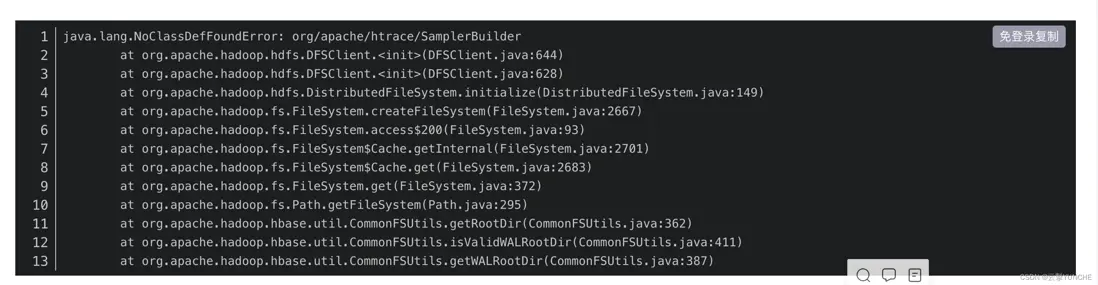
使用
cd $HBASE_HOME
cp lib/client-facing-thirdparty/htrace-core-3.1.0-incubating.jar lib/
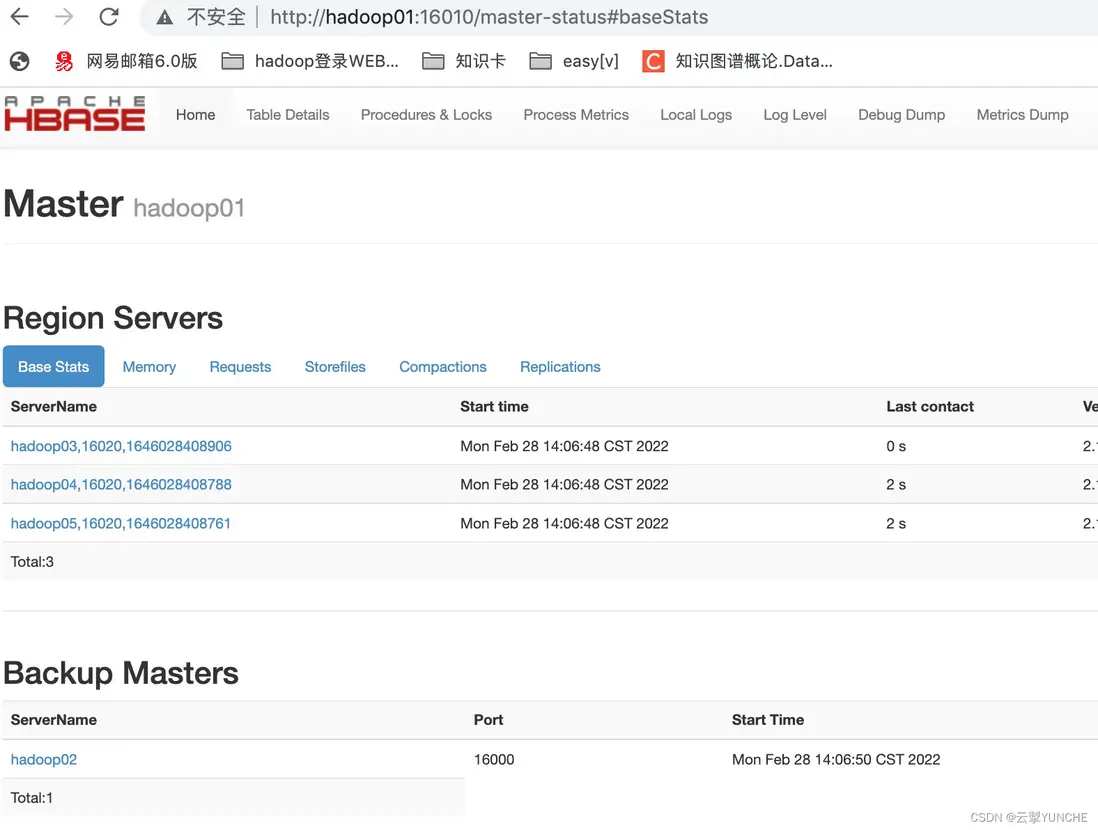
5 hbase頁面
訪問地址:http://hd1.dtstack.com:16010/master-status
6 hbase驗證
進行kerberos驗證
kinit hbase

使用hbase shell
cd $HBASE_HOME./bin/hbase shell
建表
create 'user','base_info'put數據
put 'user', 'rowkey_10', 'base_info:birthday', '2014-07-10'scan數據
scan 'user'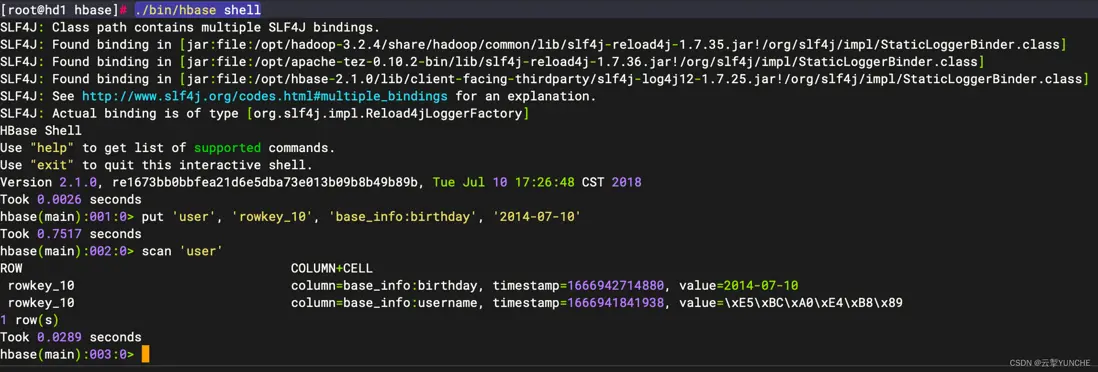
更多技術信息請查看雲掣官網https://yunche.pro/?t=yrgw
