
一.安裝
1.安裝node.js
下載地址:https://nodejs.org/en/
2.查看版本,修改npm鏡像地址
node -v        # v12.13.0
npm -v        # 6.12.0

# 查看並修改npm鏡像地址
npm congfig get registry    # http://registry.npmjs.org
npm config set registry http://registry.npm.taobao.org

# 安裝cnpm
npm install -g cnpm --registry==https://registry.npm.taobao.org

# 安裝angular,-g代表全局安裝
cnpm install -g @angular/cli

# 檢驗是否安裝成功
ng version
生成完整項目代碼(可直接運行)
3.安裝vscode插件
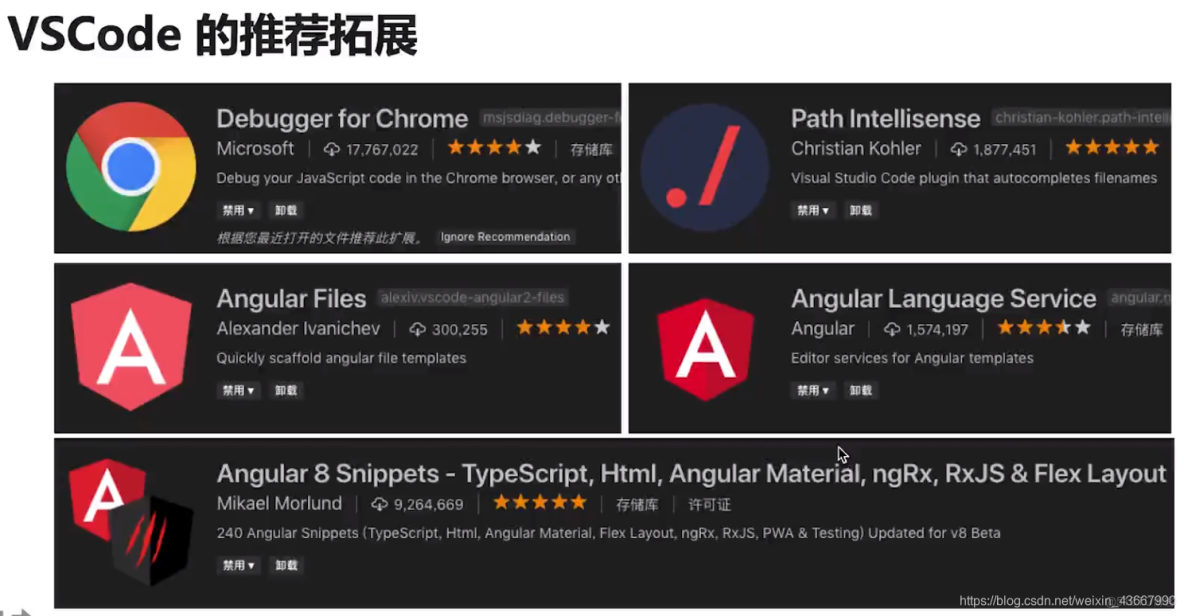
二.啓動項目
ng new my-app --skip-install    # 新建項目,但取消依賴庫的安裝(npm安裝依賴時可能出錯)
cd my-app
cnpm install    # 使用cnpm安裝依賴
ng serve --port=4200 --host 0.0.0.0    # 啓動服務:http://0.0.0.0:4200/ ,4200為默認端口
項目結構
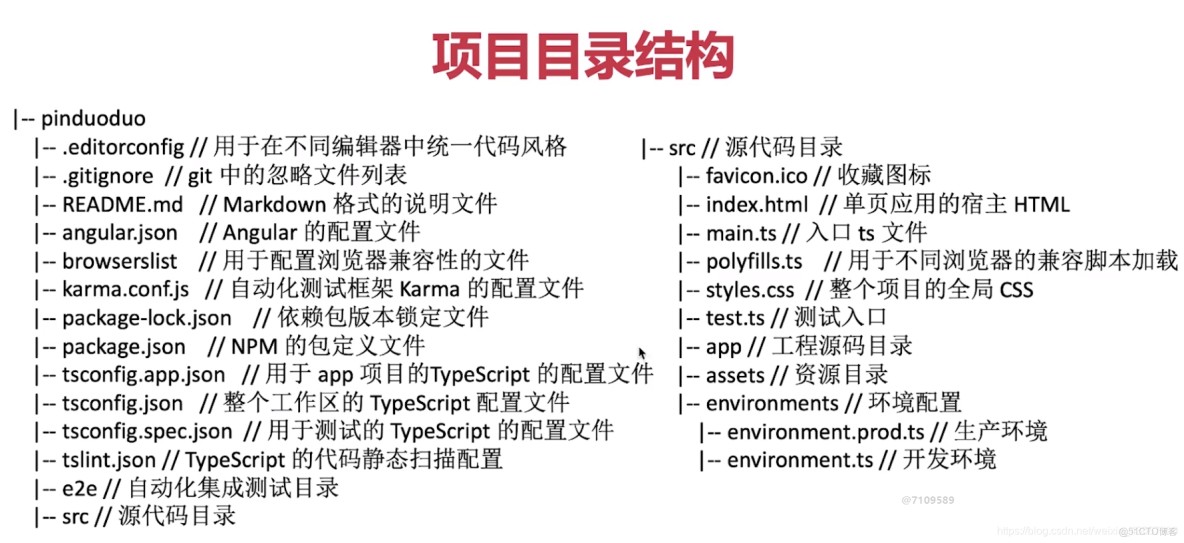
三.常用語法
1.創建組件
# 在src/app目錄中創建組件,組件目錄中已自動生成html,css和ts文件
ng g component components/news
生成完整項目代碼(可直接運行)
shell
news.component.ts

import { Component, OnInit } from '@angular/core'; /*引入angular 核心*/

@Component({
	selector: 'app-header', /*使用這個組件的名稱*/
	templateUrl: './header.component.html', /*html 模板*/
	styleUrls: ['./header.component.css'] /*css 樣式*/
})
export class HeaderComponent implements OnInit { /*實現接口*/
	// 可在此處定義屬性數據和對象

	constructor() { /*構造函數*/
	}
	ngOnInit() { /*初始化加載的生命週期函數*/
	}
}
生成完整項目代碼(可直接運行)
2.數據綁定
1.組件的ts文件中定義屬性和對象
import { Component, OnInit } from '@angular/core';

@Component({
  selector: 'app-news',
  templateUrl: './news.component.html',
  styleUrls: ['./news.component.scss']
})
export class NewsComponent implements OnInit {
  // 在組件種定義屬性(數據),默認為public,所有類均能訪問
  title="this is news title";
  public msg="news component msg";
  // ts中建議在定義屬性時寫上屬性類型
  username:string="kzzf";
  // any表示任意類型,protected 只能在此類和此類的子類中使用
  protected age:any='23';

  // 定義一個私有的對象,只能在這個類中使用
  private userinfo:object={
    username: "skkk",
    age: 18,
  }

  // 僅定義一個屬性,不賦值,在構造方法或初始化方法中再賦值
  message:any;

  // 定義一個html片段
  htmlContent:string="<h2>這是一個html標籤</h2>"

  // 定義一個數組
  public arr:any=[111,222,"333"];
  // 數組的第二種定義方式
  list:Array<number>=[123,456,789]

  userlist:any=[
    {
      username: '張三',
      age: 22,
    },
    {
      username: '李四',
      age: 28,
    },
  ]

  constructor() {
    this.message="屬性賦值或改變屬性值";
    this.msg="改變msg屬性的值";
  }

  ngOnInit() {

  }

}
生成完整項目代碼(可直接運行)
2.組件的html文件中進行引用
<h1>angular模板中綁定數據</h1>
    <h2>綁定變量{{title}}</h2>
    <h2>username={{username}}, age={{age}}</h2>
    <h4>{{userinfo.username}}-{{userinfo.age}}</h4>

<h1>angular模板中綁定html屬性</h1>
    <!-- 給div的title綁定動態屬性值 -->
    <div [title]="msg">
        張三
    </div>

<h1>angular模板中綁定html片段</h1>
    <div [innerHTML]="htmlContent"></div>
    {{htmlContent}}    <!-- 這樣寫的話html標籤不會被瀏覽器解析 -->

<h1>angular模板中允許簡單的運算</h1>
    <h2>1+1={{1+1}}</h2>

<h1>angular中的數據循環</h1>
    <ol>
        <li *ngFor="let item of arr">
            {{item}}
        </li>
    </ol>

    <ul>
        <li *ngFor="let item of userlist">
            {{item.username}} -
            {{item.age}}
        </li>
    </ul>
生成完整項目代碼(可直接運行)
3.圖片的引入,判斷循環和動態屬性
1.組件的ts文件中定義屬性和對象
export class HomeComponent implements OnInit {

  public picUrl = "https://www.baidu.com/img/bd_logo1.png?where=super";

  public list:any[]=[
    {"title": "新聞1"},
    {"title": "新聞2"},
    {"title": "新聞3"},
  ];

  public attr:string="orange";
  public orderStatus:number=0;
生成完整項目代碼(可直接運行)
2.組件的html文件中進行引用
<h1>引入圖片</h1>
    <!-- 將圖片放入assets目錄中 -->
    <img src="assets/images/123.jpg" alt="">
	<!-- 網絡圖片,直接綁定picUrl屬性 -->
    <img [src]="picUrl" alt="">

<h1>循環數據,獲取列表索引</h1>
    <ul>
        <!-- 循環遍歷的過程中,把索引賦值給變量key -->
        <li *ngFor="let item of list;let key=index">
            <!-- 條件判斷if,angular中沒有else -->
            <span *ngIf="key==1" class="red">{{key+1}}--{{item.title}}</span>
            <span *ngIf="key!=1">{{key+1}}--{{item.title}}</span>
        </li>
    </ul>

<h1>條件判斷 ngswitch</h1>
	<!-- 根據orderStatus的值,動態選擇顯示的內容 -->
    <span [ngSwitch]="orderStatus">
     <p *ngSwitchCase="1">已付款</p>
     <p *ngSwitchCase="2">已發貨</p>
     <p *ngSwitchCase="3">已完成</p>
     <p *ngSwitchDefault>無效訂單</p>
    </span>
生成完整項目代碼(可直接運行)
4.管道
<!-- today為ts中定義的一個日期對象 -->
{{today | date:"yyyy-MM-dd HH:mm:ss"}}
生成完整項目代碼(可直接運行)
5.事件
<h1>事件</h1>
	<!-- 監聽click事件,觸發run方法並傳入參數 -->
    <button (click)="run(1)">按鈕</button>

<h1>表單元素的事件對象</h1>
    <!-- $event 傳入當前的事件 -->
    <input type="text" (keydown)="keyDown($event)">

    <button (click)="runEvent($event)">執行方法獲取事件對象</button>
生成完整項目代碼(可直接運行)
keyDown(e:any){
    // 若輸入回車,則彈出input框當前的value
    if(e.keyCode==13){
      alert(e.target.value);
    }else{
      console.log(e.target);  // 獲取當前事件的dom節點
      console.log(e.key);    // 獲取輸入的值
      console.log(e.keyCode);    // 獲取字符對應的編碼
    }
  }

  runEvent(e:any) {
    var dom:any=e.target;    // 獲取當前的事件對象
    dom.style.color="red";    // 改變事件對象的css屬性
  }
生成完整項目代碼(可直接運行)
6.雙向數據綁定
先在app.module.ts中引入FormsModule並引用
import { FormsModule } from '@angular/forms';

@NgModule({
  declarations: [
    AppComponent,
  ],
  imports: [
    BrowserModule,
    FormsModule    // 引用
  ],
  providers: [],
  bootstrap: [AppComponent]
})
export class AppModule { }
生成完整項目代碼(可直接運行)
在組件中使用
<h1>雙向數據綁定 MVVM(模型和視圖相互影響)  僅針對表單元素</h1>
	<!-- ngModel 將input框的value和keyword屬性進行動態綁定 -->
    <input type="text" [(ngModel)]="keyword">
    {{keyword}}
	<!-- 調用方法改變keyword屬性值 -->
    <button (click)="getKeyword()">獲取keyword</button>
    <button (click)="changeKeyword()">改變keyword</button>
生成完整項目代碼(可直接運行)
html
changeKeyword() {
    this.keyword="改變後的值";
  }

  getKeyword() {
    alert(this.keyword);
  }
生成完整項目代碼(可直接運行)
四、模板語法
1.ng-if
if和else的用法
<!-- else後面跟的是模板名 -->
<span class="indicator" *ngIf="i==selectIndex else elseContent"></span>

<!-- 定義一個模板,模板名為:elseContent -->
<ng-template #elseContent>
  <span>123</span>
</ng-template>
生成完整項目代碼(可直接運行)
.ng-for
<li *ngFor="let menu of menus; let i=index">
  <a
  [class.active]="i==selectIndex"    <!-- 應用單個class的常用技巧 -->
  (click)="handleSelected(i)"
  href="#">{{ menu.title }}</a>
</li>
生成完整項目代碼(可直接運行)
常用的循環變量
# 判斷是否為第一個或最後一個元素,布爾值
let f = first
let l = last

# 布爾值,索引是否為奇數或偶數
let odd = odd;
let even = even;
生成完整項目代碼(可直接運行)
3.樣式綁定
class.className,ngClass和ngStyle

[class.active]="i==selectIndex"    <!-- 應用單個class的常用技巧 -->

<h1>ngStyle</h1>
    <!-- 加引號則為字符串,不加時對應了一個屬性變量,屬性變量可以在ts中定義或由父組件傳入 -->
    <p [ngStyle]="{'color': 'red'}">這是一個p標籤</p>
    <p [ngStyle]="{'color': attr}">這是一個p標籤</p>
    <a [ngStyle]="{'color': i==selectIndex ? titleActiveColor : titleColor}"></a>

<h1>ngClass,根據bool值動態選擇class樣式,這裏的even和odd對應了css中的類樣式</h1>
	<li
     *ngFor="let menu of menus; let i = index; let even = even; let odd = odd"
     [ngClass]="{ 'even': even,
