
一、路由器
(1)路由器概述
1.路由:從源主機到目標主機的轉發過程
2.路由器:能夠將數據包轉發到正確的目的地,並在轉發過程中選擇最佳路徑的設備(路由器的工作原理:根據路由錶轉發數據)
如圖:主機1.1(網段1.0)要發送數據到4.1(網段4.0),首先數據會通過E0接口到達路由器A,發現數據內包含源IP地址主機1.1,目的IP地址主機4.1,為4.0網段,這時路由器A會查詢路由表,發現4.0網段應該往S0接口上發送,即通過S0接口到達路由器B,路由器B收到數據包,看到目的IP為4.1,為4.0網段,然後查詢自己的路由表,發現需要往E0接口上發送,隨後通過E0接口發送到主機4.1。
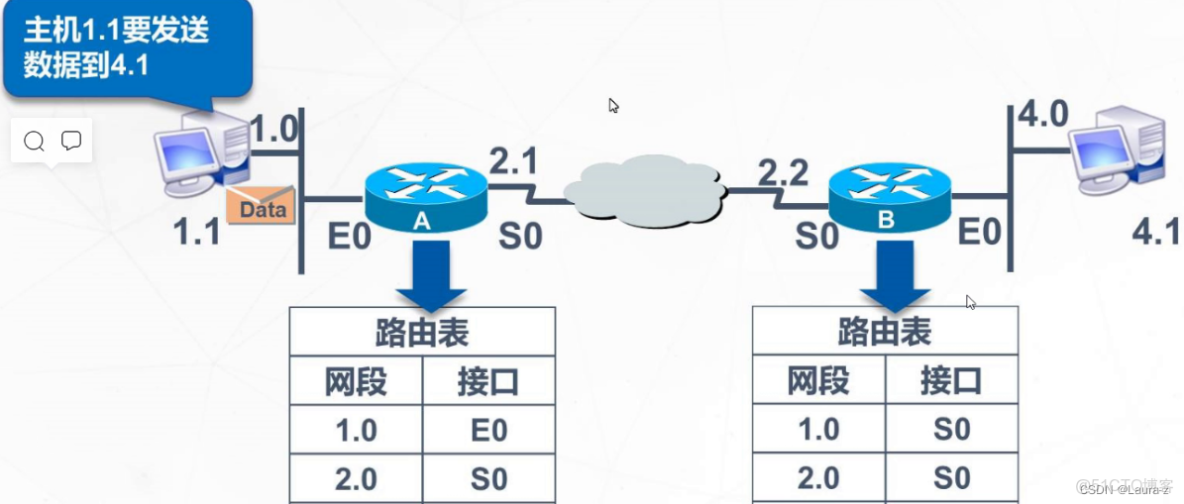
3.路由表:1.路由器中維護的路由條目的集合 2.路由器根據路由表做路徑選擇
4.直連網段:與路由器直連網段,配置IP地址端口up狀態自動學習
非直連網段:需要靜態路由或動態路由配置加入路由表
5.選取最優路徑標準
a.子網掩碼長度最長的最優先匹配
b.選取路由協議中優先級最小的最優先匹配
c.相同路由協議的情況下選取metric值最小的最優先匹配
每個路由協議metric值定義的都不相同靜態路由和路由優先級有關,這個人為指定的,RIP協議和跳數有關,跳數越小越優先,OSPF協議和帶寬有關,帶寬越大越優先,metric度量值時cost花銷
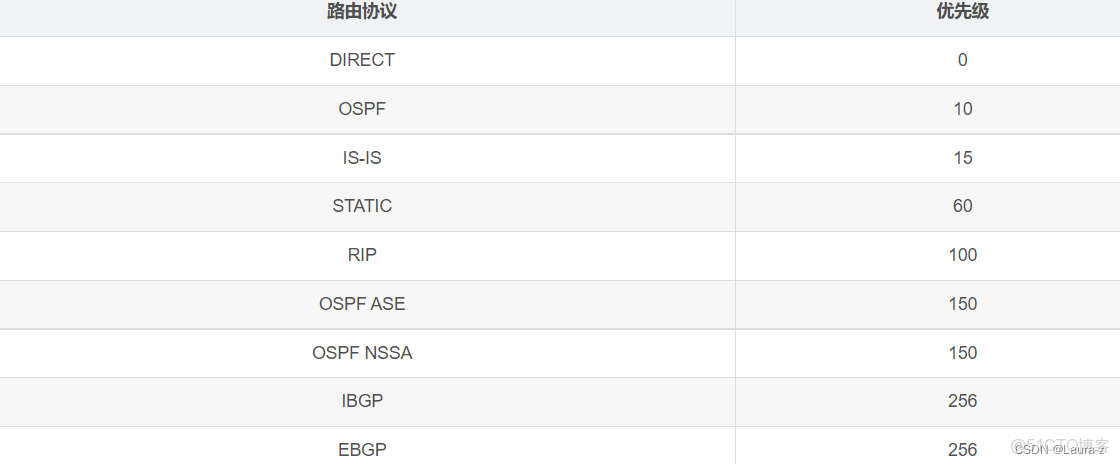
(2)路由器工作過程(源IP目標IP不變,MAC地址變得)
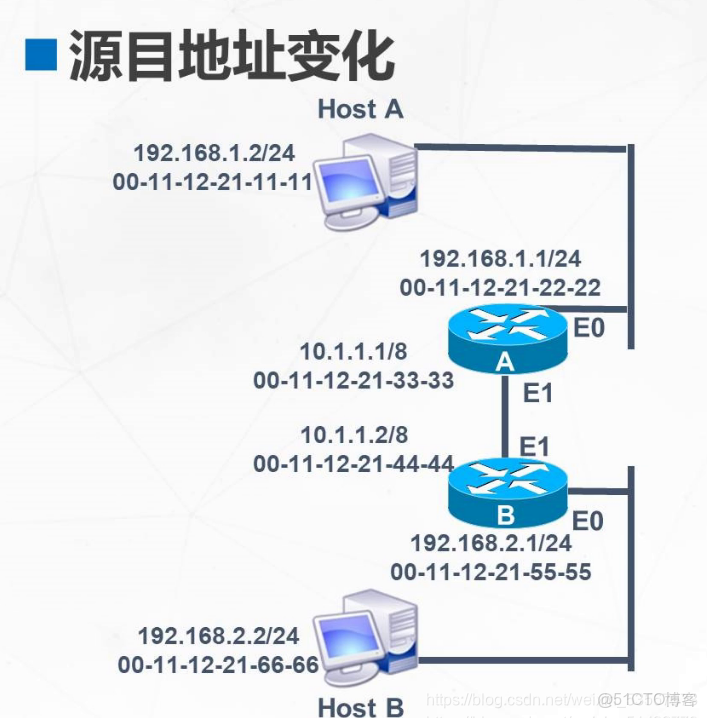
上圖,以下簡稱主機A 主機B 網關為AE0 路由接口AE1,BE1,BE0 主機只知道網關IP地址 網關為路由器A的E0接口
若主機A想要發送數據包給主機B,但是兩台主機不在同一網段,所以需要經過網關。
主機A查詢自己的ARP緩存表,沒有網關的MAC地址,所以要進行一次ARP請求。
源IP地址與源MAC地址是主機A自己的,目標IP地址為AE0的IP地址,目的MAC地址為AE0的MAC地址(廣播地址),網關接收到後進行迴應,得到網關AE0的MAC地址。數據加上源IP與源MAC為主機A的,目的IP為主機B, 目的MAC為AE0的進行封裝,這時數據包到達路由器A,解封裝後數據包含主機A的源IP地址,目的IP地址為主機B的IP地址,路由器查詢路由表發現應該通過E1接口轉發到路由器B。
進行ARP請求,源IP地址和源MAC地址為AE1的,目的IP目的MAC地址為BE1的IP地址和MAC地址(廣播地址),路由器BE1響應回覆,得到BE1的MAC地址,然後將數據加上源IP地址為主機A的IP地址,源MAC地址為AE1的MAC地址,目的IP為主機B的IP地址,目的MAC地址為BE1的MAC地址進行封裝
數據到路由器B,路由器B解封裝,內包含目的IP為主機B的IP地址,路由器B查詢路由表,發現為直連路由應該走E0出口,E0向主機B發送ARP請求,源IP地址源MAC地址的為BE0的,目標IP為主機B的IP地址,目的MAC地址為廣播地址,主機B響應回覆,得到主機B的MAC地址,這時,數據加上源IP為主機A的IP地址,源MAC地址為BE0的MAC地址,目的IP和目的MAC地址為主機B的IP和MAC地址,數據到達主機B
二、靜態路由(小型網絡建議5條內)
(1)相關概念
1.靜態路由由管理員手工配置是單向的
2.缺乏靈活性
3.命令配置
默認路由:ip route-static 0.0.0.0 0.0.0.0 192.168.12.1
IP route-static 目標網段 子網掩碼 下一跳
靜態路由:ip route-static 192.168.10.0 255.255.255.0 192.168.12.1
查看路由表
display ip routing-table
4.默認路由:是靜態路由的一種特數形態,它屬於靜態路由的一種,使用條件只能在末梢末節網絡,相連的路由不能設置默認路由會產生信令風暴造成數據反覆傳輸佔用帶寬
(2)靜態路由配置

RI配置
u t m
undo terminal m
Info: Current terminal monitor is off.
sys
Enter system view, return user view with Ctrl+Z.
[Huawei]sysname r1
[r1]user-interface console 0
[r1-ui-console0]idle-timeout 0 0
[r1-ui-console0]q
[r1]int loopb
[r1]int LoopBack 0
[r1-LoopBack0]ip add 192.168.1.10 24
[r1-LoopBack0]q
[r1]int g0/0/0
[r1-GigabitEthernet0/0/0]ip add 10.1.1.2 24
[r1-GigabitEthernet0/0/0]q
[r1]ip route-static 10.1.2.1 24 10.1.1.3
Info: The destination address and mask of the configured static route mismatched
, and the static route 10.1.2.0/24 was generated.
[r1]int g0/0/0
[r1-GigabitEthernet0/0/0]undo shutd
[r1-GigabitEthernet0/0/0]undo shutdown
Info: Interface GigabitEthernet0/0/0 is not shutdown.
[r1-GigabitEthernet0/0/0]q
[r1]ping 10.1.1.3
PING 10.1.1.3: 56 data bytes, press CTRL_C to break
Reply from 10.1.1.3: bytes=56 Sequence=1 ttl=255 time=70 ms
Reply from 10.1.1.3: bytes=56 Sequence=2 ttl=255 time=40 ms
Reply from 10.1.1.3: bytes=56 Sequence=3 ttl=255 time=50 ms
Reply from 10.1.1.3: bytes=56 Sequence=4 ttl=255 time=30 ms
Reply from 10.1.1.3: bytes=56 Sequence=5 ttl=255 time=40 ms
R2配置
與R1配置相同添加192.168.1.0 的網段和172.168.1.0網段
的靜態路由
undo terminal monitor
Info: Current terminal monitor is off.
user-inte
sys
Enter system view, return user view with Ctrl+Z.
[Huawei]sysname r2
[r2]user-int
[r2]user-interface co
[r2]user-interface console 0
[r2-ui-console0]idle-t
[r2-ui-console0]idle-timeout 0 0
[r2-ui-console0]int g0/0/0
[r2-GigabitEthernet0/0/0]ip add 10.1.1.3 24
[r2-GigabitEthernet0/0/0]undo shut
[r2-GigabitEthernet0/0/0]undo shutdown
Info: Interface GigabitEthernet0/0/0 is not shutdown.
[r2-GigabitEthernet0/0/0]int g0/0/1
[r2-GigabitEthernet0/0/1]ip add 10.1.2.3 24
[r2-GigabitEthernet0/0/1]q
r2]int g0/0/0
[r2-GigabitEthernet0/0/0]undo s
[r2-GigabitEthernet0/0/0]undo static-route
^
Error:Incomplete command found at ‘^’ position.
[r2-GigabitEthernet0/0/0]undo sht
[r2-GigabitEthernet0/0/0]undo shut
[r2-GigabitEthernet0/0/0]undo shutdown
Info: Interface GigabitEthernet0/0/0 is not shutdown.
[r2-GigabitEthernet0/0/0]int g 0/0/1
[r2-GigabitEthernet0/0/1]undo shut
[r2-GigabitEthernet0/0/1]undo shutdown
Info: Interface GigabitEthernet0/0/1 is not shutdown.
[r2-GigabitEthernet0/0/1]q
[r2]ip rou
[r2]ip route-
[r2]ip route-static 192.168.1.10 24 10.1.1.2
Info: The destination address and mask of the configured static route mismatched
, and the static route 192.168.1.0/24 was generated.
[r2]ip rou
[r2]ip route-s
[r2]ip route-static 172.16.1.10 24 10.1.2.4
Info: The destination address and mask of the configured static route mismatched
, and the static route 172.16.1.0/24 was generated.
R3配置
undo terminal m
undo terminal monitor
Info: Current terminal monitor is off.
sys
system-view
Enter system view, return user view with Ctrl+Z.
[Huawei]sysname sw3
[sw3]user-in
[sw3]user-interface co
[sw3]user-interface console 0
[sw3-ui-console0]idle-t
[sw3-ui-console0]idle-timeout 0 0
[sw3-ui-console0]int g0/0/0
[sw3-GigabitEthernet0/0/0]ip add 10.1.2.4 24
[sw3-GigabitEthernet0/0/0]q
[sw3]int loopb
[sw3]int LoopBack 0
[sw3-LoopBack0]ip add 172.16.1.10 24
[sw3-LoopBack0]q
[sw3]int g0/0/0
[sw3-GigabitEthernet0/0/0]undo shutdown
Info: Interface GigabitEthernet0/0/0 is not shutdown.
[sw3-GigabitEthernet0/0/0]q
[sw3]ip rou
[sw3]ip route-s
[sw3]ip route-static 10.1.1.0 24 10.1.2.3
[sw3]ip rou
[sw3]ip route-
[sw3]ip route-static 192.168.1.10 24 10.1.2.3
Info: The destination address and mask of the configured static route mismatched
and the static route 192.168.1.0/24 was generated.
168.1.10 24 10.1.2.3
Info: The destination address and mask of the configured static route mismatched
and the static route 192.168.1.0/24 was generated.
