
前言
1 變量和簡單數據類型
變量命名格式:變量名 = “賦值”
1.1 變量使用規範
使用變量時,需要遵守一些規則。違反這些規則將引發錯誤。
~變量名只能包含數字、字母、下劃線。變量名不能以數字開頭以及不能包含空格。
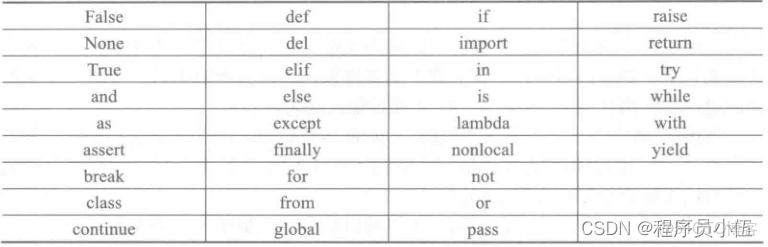
~變量名不能將Python保留字和函數名作為變量名。如print等
如下是python3的33個保留字列表:
變量名要簡單又具有描述性。如name比n好,user_name比u_n好。
~慎用大寫字母I和O,避免看錯成數字1和0。
1.2 字符串
字符串就是一系列字符。在Python中,用引號括起的都是字符串,其中引號包括單引號和雙引號。這種靈活性能夠在字符串中包含引號和撇號,如:
>>> str = "I'm David"
>>> str1 = 'I told my friend,"i love Python"'
常用字符串操作方法
以首字母大寫的方式顯示每個單詞:
>>> name = "hello python world"
>>> print(name.title())
Hello Python World
將字符串改為全部大寫或全部小寫:
>>> str1 = "I love python"
>>> print(str1.upper())  #將字符串改為全部大寫
I LOVE PYTHON
>>> print(str1.lower())   #將字符串改為全部小寫
i love python
字符串合拼(拼接)
Python使用加號(+)來合拼字符串,如:
>>> first_name = "Guido"
>>> last_name = "van Rossum"
>>> full_name = first_name + " " + last_name
>>> print(full_name)
Guido van Rossum
使用製表符\t或換行符\n添加空白:
>>> print("Languages:\n\tPython\n\tC++\n\tPHP")
Languages:
    Python
    C++
    PHP
刪除字符串的空格:
>>> name = " p y t h o n "
>>> print(name.rstrip()) #刪除字符串右端空格
 p y t h o n
>>> print(name.lstrip())  #刪除字符串左端空格
p y t h o n
>>> print(name.strip())   #刪除字符串兩端空格
p y t h o n
>>> print(name.replace(' ',''))  #刪除字符串全部空格包括製表符和換行符
python
字符串的序號
字符串是字符的序列,可以按照單個字符或字符片段進行索引。
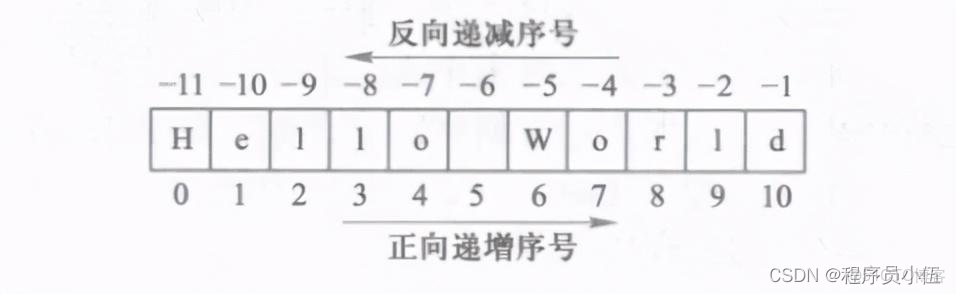
>>> name = "Hello World"
>>> print(name[0])
H
>>> print(name[0:-1])
Hello Worl
>>> print(name[-1])
d
>>> print(name[::])
Hello World
>>> print(name[0:11])
Hello World
找到字符串中最低字符索引號:S.find(sub [,start [,end]]) -> int
失敗時返回-1
>>> name = "hello world"
>>> print(name.find('d'))
10
返回某些字符出現的次數:S.count(sub[, start[, end]]) -> int
>>> name = "hello world"
>>> print(name.count('l'))
3
把字符串由分隔符返回一個列表:S.split([sep [,maxsplit]]) -> list of strings,如果給定maxsplit,則最多為maxsplit
>>> name = "hello world"
>>> print(name.split(' '))
['hello', 'world']
>>> print(name.split(' ',0))
['hello world']
字符串格式化輸出(format和%用法)
%方法格式代碼
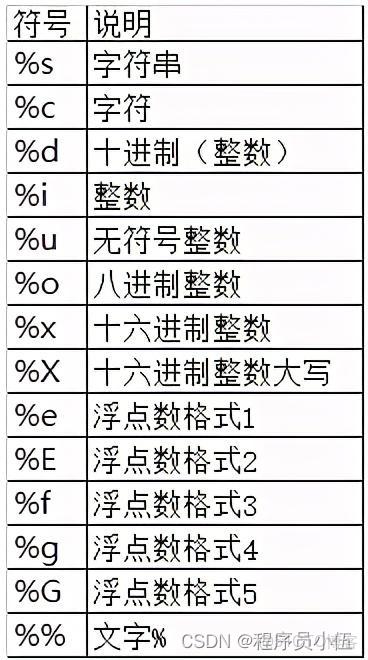
>>> "{}:計算機{}的CPU佔用率為{}%".format('2019-03-25','python',10)  #S.format(*args, **kwargs) -> string
'2019-03-25:計算機python的CPU佔用率為10%'
>>> "%s:計算機%s的CPU佔用率為%d%%" % ('2019-03-25','python',10)   #%用法
'2019-03-25:計算機python的CPU佔用率為10%
小結:可以用help函數查看字符串的相關操作,比如help(str.find)
2 組合數據類型
2.1 集合類型
集合的定義及操作
~集合用大括號{}表示,元素間用逗號分隔;
~建立集合類型用{}或set();
~建立空集合類型,必須用set();
~集合元素之間無序;
~集合中每個元素唯一,不存在相同元素
>>> A = {"python",'666',("wenwei-blog",666)}
{'python', '666', ('wenwei-blog', 666)}
>>> B = set("pypy")
{'y', 'p'}
>>> C = {"python",123,"python",123}
{'python', 123}
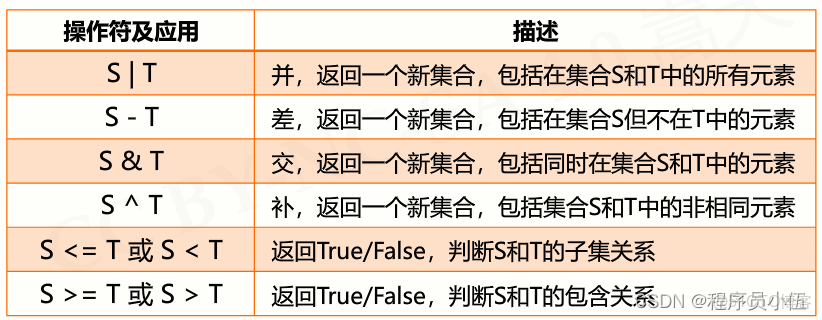
集合操作符
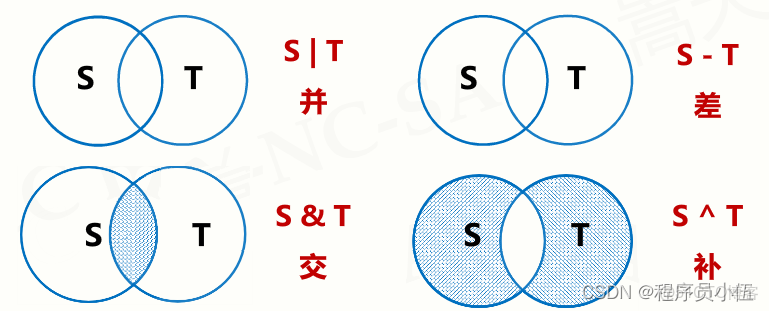
6個操作符
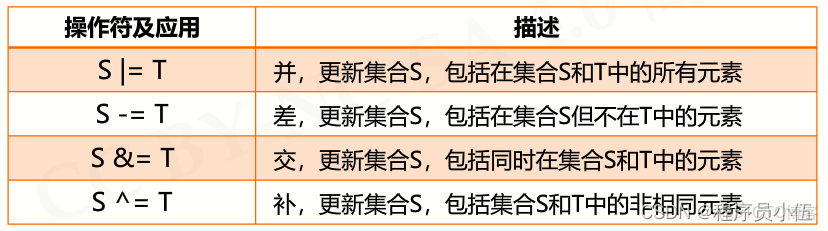
4個增強操作符
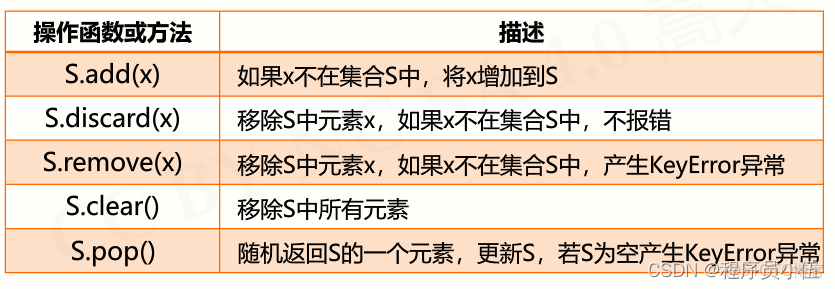
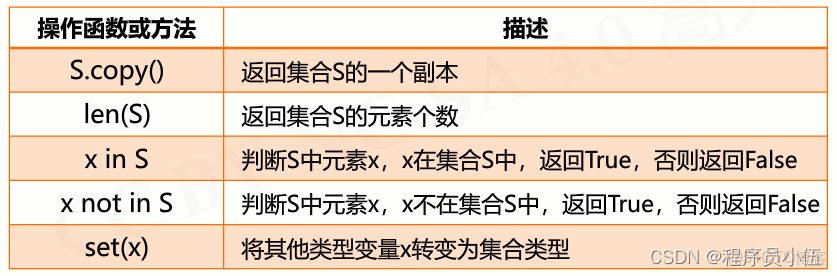
集合操作方法
集合應用場景
包含關係比較;數據去重。
2.1 序列類型定義
~序列是具有先後關係的一組元素
~序列是一個基類類型(基本數據類型)
~序列類型分為字符串、列表、元組類型
2.2 序列類型之列表
列表由一系列按特定順序排列的元素組成,用方括號[]來表示列表。
列表的增刪改查相關操作
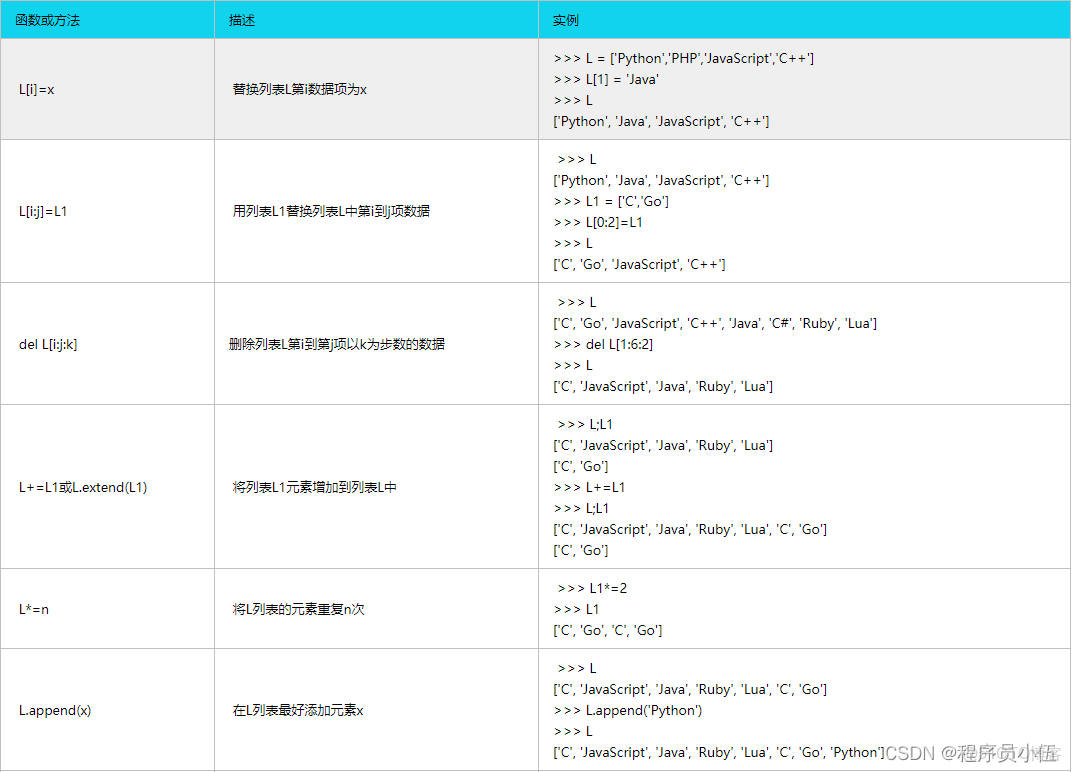
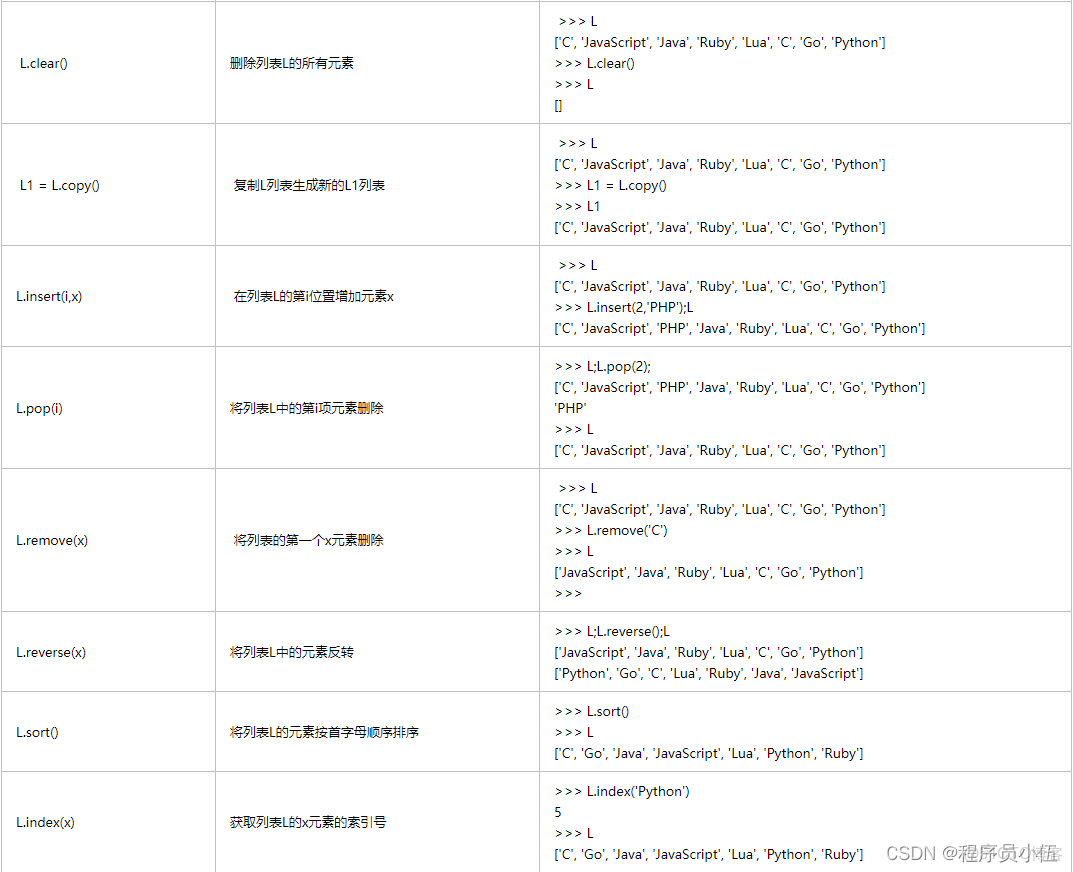
對列表數字執行簡單統計計算
>>> digits = [1,23,434,55,44,67]
>>> min(digits)
1
>>> max(digits)
434
>>> sum(digits)
624
列表相關練習
練習1:創建一個列表,其中包含數字1-100並打印出來然後計算列表數字的總值。
>>> digits = [value for value in range(1,101)];sum(digits)
5050
練習2:求1-20的奇數
>>> for i in range(1,21,2):
    print(i)

1
3
5
7
9
11
13
15
17
19
練習3: 輸出3-30以內能被3整除的數字
>>> lists = [n for n in range(3,31)]
>>> lists
[3, 4, 5, 6, 7, 8, 9, 10, 11, 12, 13, 14, 15, 16, 17, 18, 19, 20, 21, 22, 23, 24, 25, 26, 27, 28, 29, 30]
>>> for i in lists:
    if i % 3 == 0:
        print(i)


3
6
9
12
15
18
21
24
27
30
2.3 序列類型之元組
元組其實跟列表差不多,也是存一組數據,只不過它一旦創建便不能修改,所以又叫只讀列表
它只有兩個方法,一個是count(統計元組某個元素出現的次數tuple.count(‘str’)),一個是index(查看某個元素的索引號tuple.index(‘str’))
>>> names = ('zhiwenwei','zhouyouxian')
>>> names.index('zhiwenwei')
0
>>> names.count('zhiwenwei')
1
元組練習題
有如下變量,請實現要求的功能
tu = (“alex”, [11, 22, {“k1”: ‘v1’, “k2”: [“age”, “name”], “k3”: (11,22,33)}, 44])
a. 請問tu變量中的第一個元素 “alex” 是否可被修改?
元組不可直接被修改,需要轉換成列表或字典
b. 請問tu變量中的"k2"對應的值是什麼類型?是否可以被修改?如果可以,請在其中添加一個元素 “Seven”
k2是字典的鍵,對應的值是列表可修改:tu[1][2][‘k2’]=‘Seven’
c. 請問tu變量中的"k3"對應的值是什麼類型?是否可以被修改?如果可以,請在其中添加一個元素 “Seven”
k3是字典的鍵,對應的值是元組不可修改
2.4 字典類型
字典是包含0個或多個鍵值對的集合,沒有長度限制,可以根據鍵索引值的內容。
Python語言中通過字典實現映射,通過大括號{}建立,建立模型如下:
{鍵1:值1,鍵2:值2,…}
>>> city = {'中國':'北京','美國':'紐約','法國':'巴黎'}
>>> city
{'中國': '北京', '美國': '紐約', '法國': '巴黎'}
拓展:字典是無序的。python語言中,字符串、列表、元組都是採用數字索引,字典採用字符索引。
字典的函數和方法

字典的基本原則
字典是一個鍵值對的集合,該集合以鍵為索引,一個鍵對應一個值信息
字典中的元素以鍵信息為索引訪問
字典長度是可變的,可以通過對鍵信息賦值實現增加或修改鍵值對。
2.5 jieba庫基本介紹
jieba庫提供三種分詞模式,最簡單隻需要掌握一個函數;
jieba是優秀的中文分詞第三方庫,需額外安裝
jieba庫的安裝方法
pip install jiebajieba分詞的三種模式
精確模式:把文本精確切分,不存冗餘單詞
>>> word1 = jieba.lcut("python無所不能!除了生不出孩子,我們應該學習使用它!")
Building prefix dict from the default dictionary ...
Dumping model to file cache /tmp/jieba.cache
Loading model cost 1.832 seconds.
Prefix dict has been built succesfully.
>>> print(word1,type(word1))
['python', '無所不能', '!', '除了', '生不出', '孩子', ',', '我們', '應該', '學習', '使用', '它', '!'] <class 'list'>
2.6 實例:文本詞頻統計
英文文本:hamlet,統計出現最多的英文單詞
https://python123.io/resources/pye/hamlet.txt
代碼實現:
#Hamlet詞頻統計
def getText():
    txt = open("hamlet",'r').read()
    txt = txt.lower() #大寫字母轉換小寫
    for word in '~!@#$%^&*()_+-={}[],./:";<>?':
        txt = txt.replace(word," ")#把多餘符號轉換為空格
    return txt
hamletTxt = getText()
words = hamletTxt.split() #以空格拆分為列表
counts = {}
for word in words:
    counts[word] = counts.get(word,0) + 1 #以每個詞為鍵,值默認0,,每出現一次累加1
items = list(counts.items())
items.sort(key=lambda x:x[1],reverse=True) #[1]按照第二維排序,reverse=True表示降序
for i in range(10):
    word,count = items[i]
    print("{0:<10}{1:5}".format(word,count))
中文文本:三國,分析人物
https://python123.io/resources/pye/threekingdoms.txt
import jieba
txt = open("Threekingdoms", 'r', encoding="utf-8").read()
excludes = {'將軍','卻説','荊州','二人','不可','不能','如此'}
words = jieba.lcut(txt)
counts = {}
for word in words:
    if len(word) == 1:
        continue
    #書中同一人物多個名字統一改為一個名字
    elif word == '諸葛亮' or word == '空明日':
        rword = "孔明"
    elif word == '關公' or word == '雲長':
        rword = "關羽"
    elif word == '玄德' or word == '玄德日':
        rword = "劉備"
    elif word == '孟德' or word == '丞相':
        rword = "曹操"
    else:
        rword = word
    counts[word] = counts.get(word, 0) + 1
for word in excludes:
    del counts[word]  #去重
items = list(counts.items())
items.sort(key=lambda x:x[1],reverse=True)
for i in range(10):
    word,count = items[i]
    print("{0:<10}{1:>5}".format(word,count))
3 程序的控制結構
3.1 程序的分支結構
根據判斷條件結果而選擇不同向前路徑的運行方式
單分支結構
if <條件> :

  <語句塊>
示例:
guess = eval(input("請輸入數字:"))
if guess == 88:
    print("猜對了")
二分支結構
if <條件> :

  <語句塊>

else:

  <語句塊>
guess = eval(input("請輸入數字:"))
if guess == 88:
print("猜對了")
else:
print("猜錯了")多分支結構
if <條件1> :

  <語句塊1>

elif <條件2> :

  <語句塊2>

...

else:

  <語句塊N>
示例
age = 25
count = 0
while count < 3:
    guess_age = int(input("guess_age:"))
    if guess_age == age:
        print("yes,you got it!!!")
        break
    elif guess_age > age:
        print("think smaller...")
    else:
        print("think bigger...")
    count += 1
3.2 程序的循環結構
遍歷循環
語法結構:
for <循環變量> in <循環結構>:
<語句塊>
無限循環
由條件控制的循環運行方式
語法結構:
while <條件>:
<語句塊>
循環控制保留字
break 和 continue
-break 跳出並結束當前整個循環,執行循環後的語句
-continue 結束當次循環,繼續執行後續次數循環
循環的拓展

當循環沒有被break語句退出時,執行else語句。
else語句作為“正常”完成循環的獎勵
3.3 異常處理
異常處理的基本使用
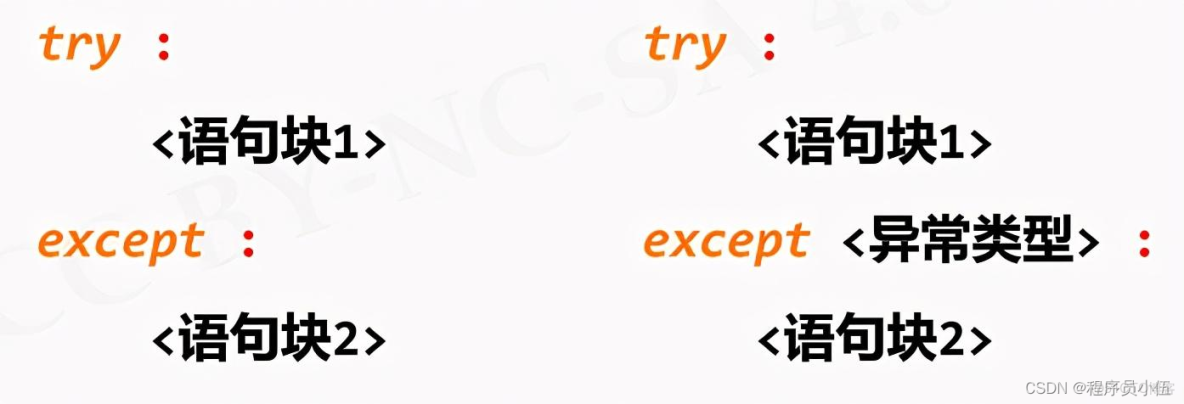
示例
try:
    num = eval(input("請輸入數字"))
    print(num**2)
except:
    print("你輸入的不是數字")
異常處理的高級使用
try:

  語句塊1

except:

  語句塊2

else:

  語句塊3(不發生異常時執行)

finally

  語句塊4(最終會執行)
3.4 實例:身體質量指數BMI
體質指數(BMI)= 體重(kg)÷ 身高²(m)
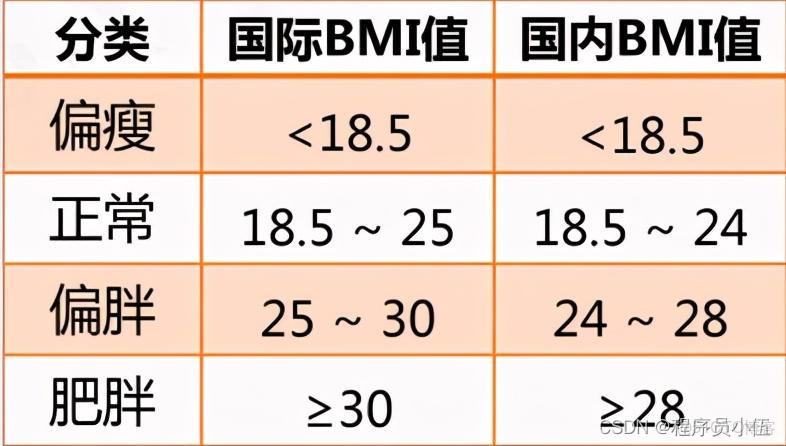
代碼實例:
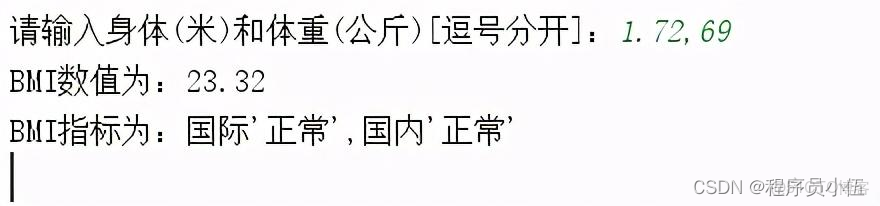
height,weight = eval(input("請輸入身體(米)和體重(公斤)[逗號分開]:"))
bmi = weight / pow(height,2)
print("BMI數值為:{:.2f}".format(bmi))#.2f#保留兩位小數
who,nat = "",""
if bmi < 18.5:
    who,nat = "偏瘦","偏瘦"
elif 18.5 <= bmi < 24:
    who,nat = "正常","正常"
elif 24 <= bmi < 25:
    who,nat = "正常","偏胖"
elif 25 <= bmi < 28:
    who,nat = "偏胖","偏胖"
elif 28 <= bmi <30:
    who,nat = "偏胖","肥胖"
else:
    who,nat = "肥胖","肥胖"
print("BMI指標為:國際'{}',國內'{}'".format(who,nat))
結果展示:
4 函數和代碼複用
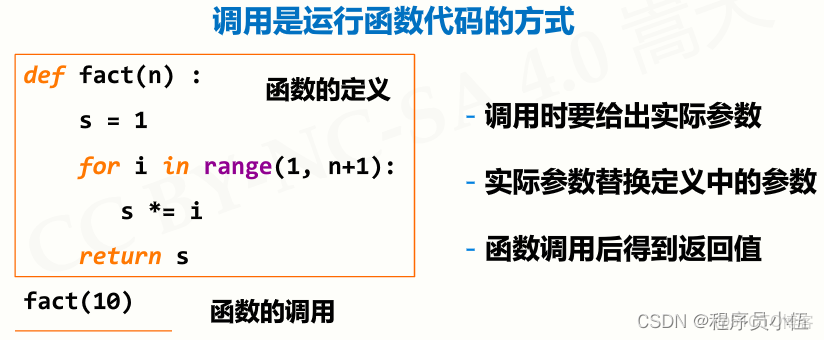
4.1 函數的定義和作用
def 函數名(o個或多個參數):
函數體
return 返回值
-函數是一段代碼的表示
-函數是一段具有特定功能的、可重用的語句組
-函數是一種功能的抽象,一般函數表達特定功能
兩個作用:降低編程難度和代碼重用
函數的調用
4.2 函數的參數傳遞
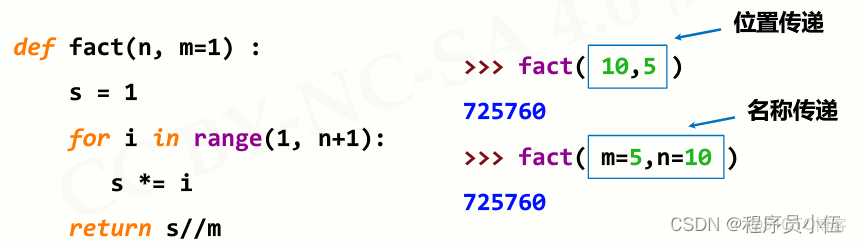
可選參數傳遞
函數定義時可以為某些參數定義默認值,構成可選參數。
def test(n,m=1): #m為可選參數
    s = 1
    for i in range(1,n+1):
        s *= i
    print(s//m)
test(10)
test(10,2)
結果:

可變參數傳遞
def test(n,*args):#args為可變參數,也可以命名其他值
s = 1
for i in range(1,n+1):
s += i
for item in args:
s += item
print(s)
test(10,3)
test(10,3,1,5)
函數執行結果:

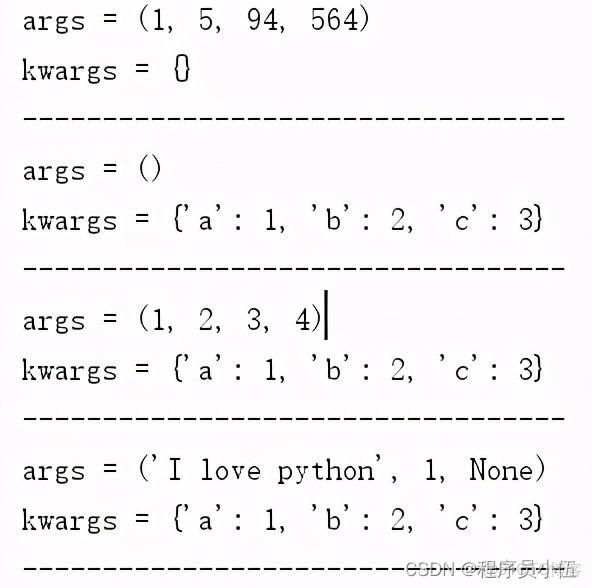
參數組合:*args和**kwargs
def test(*args,**kwargs):
    print("args =",args)
    print("kwargs =",kwargs)
    print("----------------------------------")
if __name__ == '__main__':
    test(1,5,94,564)
    test(a=1,b=2,c=3)
    test(1,2,3,4,a=1,b=2,c=3)
    test('I love python',1,None,a=1,b=2,c=3)
函數執行結果:
參數傳遞的兩種方式:位置傳遞和名稱傳遞
小結:
函數可以有參數也可以沒有,但必須保持括號。args是可變參數,args接收的是一個tuple;**kw是關鍵字參數,kw接收的是一個dict。在同時使用args和kwargs時,必須*args參數列要在kwargs前面。
4.3 lambda函數
lambda函數是一種匿名函數,即沒有名字的函數;lambda函數用於定義簡單的、能夠在一行內表示的函數。
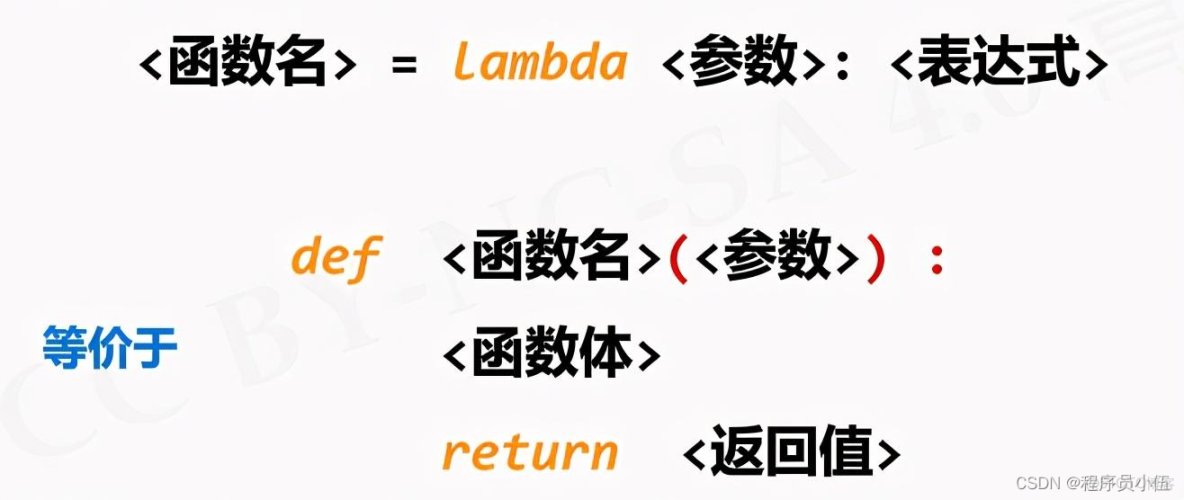
g = lambda x,y:x*y
print(g(4,5))
6 文件和數據格式化
5.1 文件的使用
Python open() 方法用於打開一個文件,並返回文件對象,在對文件進行處理過程都需要使用到這個函數,如果該文件無法被打開,會拋出 OSError。
常用語法格式
變量名 = open(文件路徑(相對或絕對路徑),打開模式,encoding=None)
打開模式
打開的文件模式描述 ‘r’只讀模式,默認值,文件不存在返回FileNotFoundError ‘w’ 覆蓋寫模式,文件不存在則創建,存在則完全覆蓋 ‘x’ 創建寫模式,文件不存在則創建,存在則返回FileExistsError ‘a’ 追加寫模式,文件不存在則創建,存在則在文件最後追加內容 ‘b’ 二進制文件模式 ‘t’ 文本文件模式,默認值 ‘+’ 與r/w/x/a一同使用,在原功能基礎上增加同時讀寫功能
file對象
file 對象使用 open 函數來創建,下表列出了 file 對象常用的函數
file對象描述f.read(size)讀入全部內容,如果給出參數,讀入前size長度f.readline() 讀取整行,包括 “\n” 字符。f.readlines(sizeint) 讀取所有行並返回列表,若給定sizeint>0,則是設置一次讀多少字節,這是為了減輕讀取壓力。f.write(s) 將字符串或字節流寫入文件f.writelines(lines) 將元素全為字符串的列表寫入文件f.close() 關閉文件f.seed(offset) 調整當前文件操作指針的位置,0-文件開頭;1-文件當前位置;2-文件末尾位置 f.flush() 刷新文件內部緩衝,數據立刻寫入文件
5.2 wordcloud庫的使用
詞雲以詞語為基本單位,更加直觀和藝術第展示文件。
wordcloud庫官網:https://amueller.github.io/word_cloud/
github地址:https://github.com/amueller/word_cloud
wordcloud下載安裝
pip install wordcloudwordcloud常規方法
w = wordcloud.WordCloud()
方法描述例子w.generate(text)向wordcloud對象w加載文本text
w.generate("Python by WordCloud")w.to_file(filename) 將詞雲輸出.png或.jpg圖像文件
w.to_file("outfile.png")實例
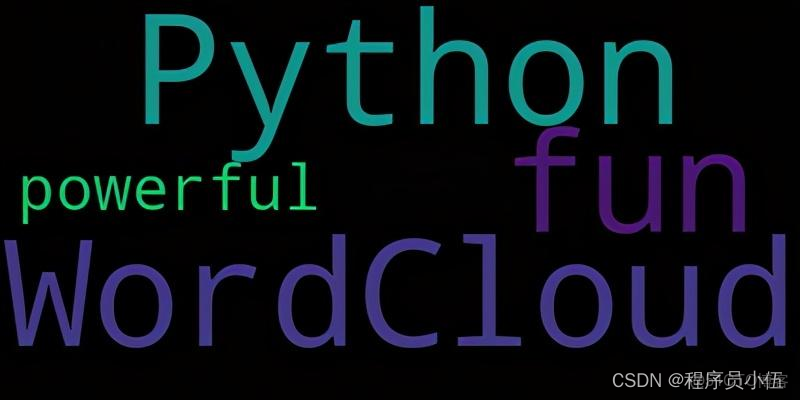
import wordcloud
w = wordcloud.WordCloud()  #設置wordcloud對象
w.generate("Python by WordCloud,is fun and powerful!") #配置對象參數並加載詞雲文本
w.to_file("outfile.png") #輸出詞雲文件
執行生成圖片:
程序執行過程報錯:ModuleNotFoundError: No module named ‘matplotlib’
解決報錯:安裝python畫圖工具第三方庫matplotlib:pip install matplotlib
wordcloud工作流程
分割:以空格分割單詞統計:單詞出現次數並過濾字體:根據統計配置字號佈局:顏色環境尺寸
配置對象參數
w.wordcloud.WordCloud(<參數>)
參數描述例子 width 指定生成圖片寬度,默認400像素
width=500height 指定生成圖片高度,默認200像素
height=300min_font_size 指定詞雲字體最小字號,默認4號
min_font_size=20max_font_size 指定詞雲字體最大字號,根據高度自動調節
max_font_size=40font_step 指定詞雲單詞步進間隔,默認1
font_step=6font_path 指定文件字體的路徑,默認None font_path=“msyh.ttc” max_words 指定詞雲顯示最多單詞數量,默認200
max_words=5stopwords 指定詞雲排除列表,即不顯示的單詞列表 stopwords={“python”} mask 指定詞雲形狀,默認長方形,修改需應用imread函數
from scripy.misc import imread
mk=imread(“pic.png”)
mask=mk
background_color 指定詞雲圖片背景顏色,默認黑色
background_color="white"實例1
import wordcloud
w = wordcloud.WordCloud()
text = "life is short, you need python"
w = wordcloud.WordCloud(background_color="white",width=500,height=300,
                        min_font_size=20,max_font_size=40,font_step=6,
                        max_words=5)
w.generate(text)
w.to_file("outfile2.png")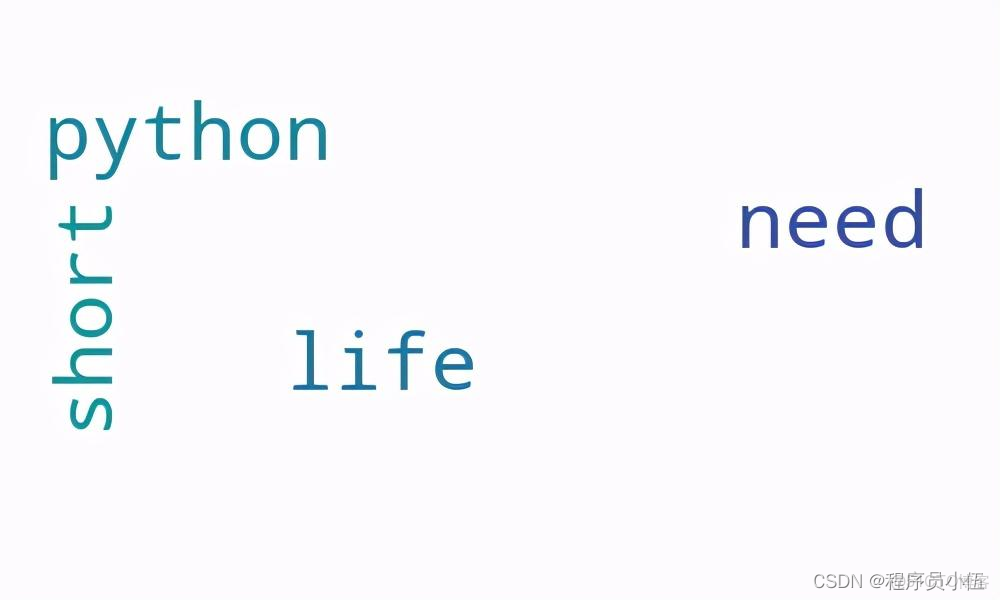
實例2
import wordcloud
import jieba
text = """
wordcloud是python非常優秀的第三方庫,詞雲以詞語為基本單位更加直觀和藝術的展示文本詞雲圖,\
也叫文字雲,是對文本中出現頻率較高的關鍵詞予以視覺化的展現,詞雲圖過濾掉大量的低頻低質的文本信息,\
使得瀏覽者只要一眼掃過文本就可領略文本的主旨。基於Python的詞雲生成類庫,好用功能強大。\
在做統計分析的時候有着很好的應用。
"""
w = wordcloud.WordCloud(width=800,height=400,font_path="msyh.ttc")
w.generate(" ".join(jieba.lcut(text))) #中文需要先分詞並組成空格分隔字符串
w.to_file("outfile3.png")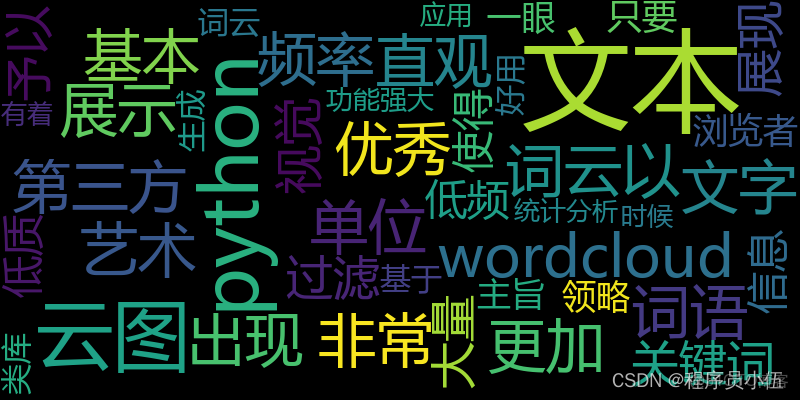
實例3
常規圖詞雲
https://python123.io/resources/pye/新時代中國特色社會主義.txt
import wordcloud
import jieba
f = open("新時代中國特色社會主義","r",encoding="utf-8")
text = jieba.lcut(f.read())
text = " ".join(text)
f.close()
w = wordcloud.WordCloud(background_color='white',width=800,height=400,font_path="msyh.ttc")
w.generate(text)
w.to_file("outfile4.png")
實例4
不常規圖詞雲:生成下圖五角星形狀

import wordcloud
import jieba
from scipy.misc import imread
#圖片必須是白色背景色
mask = imread('five-pointed star.png')
f = open("新時代中國特色社會主義","r",encoding="utf-8")
text = jieba.lcut(f.read())
text = " ".join(text)
f.close()
w = wordcloud.WordCloud(background_color='white',width=1000,height=700,font_path="msyh.ttc",mask=mask)
w.generate(text)
w.to_file("outfile5.png")
效果
