
文章目錄
- 首頁數據加載
- 登錄校驗成功
- 路由跳轉
- 用户管理頁面
- 頁面加載請求後台數據
- getList()
- 前端listUser請求
- 後端代碼
- getTreeselect()
- 後端
- 新增用户數據
- 點擊添加按鈕
- 點擊提交按鈕 前端代碼
- 點擊提交按鈕 後端代碼
- 修改用户數據
- 點擊修改按鈕之後
- 點擊提交之後 前端代碼
- 點擊提交之後 後端代碼
- 刪除按鈕操作
- 刪除後端代碼
- 異步任務管理器
- 代碼自動生成
首頁數據加載
登錄校驗成功
this.$store.dispatch("Login", this.loginForm).then(() => {
 //登錄校驗成功後進行路由跳轉到“/”目錄 去到router中尋找
   this.$router.push({ path: this.redirect || "/" }).catch(()=>{});
 }).catch(() => {
   this.loading = false;
   if (this.captchaOnOff) {
     this.getCode();
   }
 });
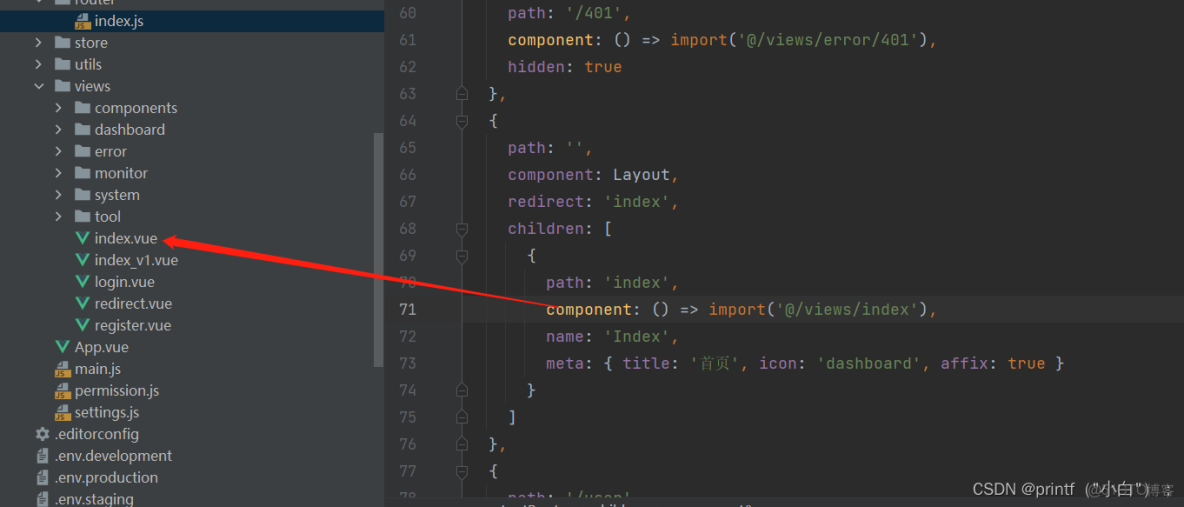
路由跳轉
{
    path: '',
    component: Layout,
    redirect: 'index',
    children: [
      {
        path: 'index',
        component: () => import('@/views/index'),
        name: 'Index',
        meta: { title: '首頁', icon: 'dashboard', affix: true }
      }
    ]
  },
用户管理頁面
頁面加載請求後台數據
created() {
    //獲取用户數據 用户信息表
    this.getList();
    //獲取部門樹狀圖 左邊公司結構樹狀圖
    this.getTreeselect();
    //獲取初始化密碼
    this.getConfigKey("sys.user.initPassword").then(response => {
      this.initPassword = response.msg;
    });
  },
getList()
前端listUser請求
/** 查詢用户列表 */
    getList() {
      this.loading = true;
      listUser(this.addDateRange(this.queryParams, this.dateRange)).then(response => {
          this.userList = response.rows;
          this.total = response.total;
          this.loading = false;
        }
      );
    },
後端代碼
/**
     * 獲取用户列表
     */
    //權限判斷
    @PreAuthorize("@ss.hasPermi('system:user:list')")
    @GetMapping("/list")
    public TableDataInfo list(SysUser user)
    {
        //設置分頁
        startPage();
        //根據條件分頁查詢用户列表
        List<SysUser> list = userService.selectUserList(user);
        return getDataTable(list);
    }
getTreeselect()
/** 查詢部門下拉樹結構 */
    getTreeselect() {
      treeselect().then(response => {
        this.deptOptions = response.data;
      });
    },
後端
/**
     * 獲取部門下拉樹列表
     */
    @GetMapping("/treeselect")
    public AjaxResult treeselect(SysDept dept)
    {
        List<SysDept> depts = deptService.selectDeptList(dept);
        return AjaxResult.success(deptService.buildDeptTreeSelect(depts));
    }
新增用户數據
點擊添加按鈕
/** 新增按鈕操作 */
    handleAdd() {
      //表單重置,先清掉數據
      this.reset();
      //獲取部門樹狀圖,添加部門信息的時候需要樹狀圖
      this.getTreeselect();
      //崗位和角色需要選擇兩張表要查
      getUser().then(response => {
        this.postOptions = response.posts;
        this.roleOptions = response.roles;
        this.open = true;
        this.title = "添加用户";
        this.form.password = this.initPassword;
      });
    },
點擊提交按鈕 前端代碼
/** 提交按鈕 */
    submitForm: function() {
      this.$refs["form"].validate(valid => {
        if (valid) {
          //判斷有沒有userId有的話就是修改,沒有userId就是新增
          //有userId
          if (this.form.userId != undefined) {
            updateUser(this.form).then(response => {
              this.$modal.msgSuccess("修改成功");
              this.open = false;
              this.getList();
            });
          }
          //沒有userId
          else {
            addUser(this.form).then(response => {
              this.$modal.msgSuccess("新增成功");
              this.open = false;
              this.getList();
            });
          }
        }
      });
    },
點擊提交按鈕 後端代碼
/**
     * 新增用户
     */
    @PreAuthorize("@ss.hasPermi('system:user:add')")
    @Log(title = "用户管理", businessType = BusinessType.INSERT)
    @PostMapping
    public AjaxResult add(@Validated @RequestBody SysUser user)
    {
        //判斷用户名是否存在
        if (UserConstants.NOT_UNIQUE.equals(userService.checkUserNameUnique(user.getUserName())))
        {
            return AjaxResult.error("新增用户'" + user.getUserName() + "'失敗,登錄賬號已存在");
        }
        //判斷電話是否存在
        else if (StringUtils.isNotEmpty(user.getPhonenumber())
                && UserConstants.NOT_UNIQUE.equals(userService.checkPhoneUnique(user)))
        {
            return AjaxResult.error("新增用户'" + user.getUserName() + "'失敗,手機號碼已存在");
        }
        else if (StringUtils.isNotEmpty(user.getEmail())
                && UserConstants.NOT_UNIQUE.equals(userService.checkEmailUnique(user)))
        {
            return AjaxResult.error("新增用户'" + user.getUserName() + "'失敗,郵箱賬號已存在");
        }
        //用户是誰創建的記錄下來
        user.setCreateBy(getUsername());
        //傳密碼,並且加密
        user.setPassword(SecurityUtils.encryptPassword(user.getPassword()));
        //處理好的user封裝進去
        return toAjax(userService.insertUser(user));
    }
修改用户數據
點擊修改按鈕之後
/** 修改按鈕操作 */
    handleUpdate(row) {
      this.reset();
      this.getTreeselect();
      const userId = row.userId || this.ids;
      getUser(userId).then(response => {
        this.form = response.data;
        this.postOptions = response.posts;
        this.roleOptions = response.roles;
        this.form.postIds = response.postIds;
        this.form.roleIds = response.roleIds;
        this.open = true;
        this.title = "修改用户";
        this.form.password = "";
      });
    },
點擊提交之後 前端代碼
- 和新增相同區分邏輯
點擊提交之後 後端代碼
/**
     * 修改用户
     */
    @PreAuthorize("@ss.hasPermi('system:user:edit')")
    @Log(title = "用户管理", businessType = BusinessType.UPDATE)
    @PutMapping
    public AjaxResult edit(@Validated @RequestBody SysUser user)
    {
        userService.checkUserAllowed(user);
        if (StringUtils.isNotEmpty(user.getPhonenumber())
                && UserConstants.NOT_UNIQUE.equals(userService.checkPhoneUnique(user)))
        {
            return AjaxResult.error("修改用户'" + user.getUserName() + "'失敗,手機號碼已存在");
        }
        else if (StringUtils.isNotEmpty(user.getEmail())
                && UserConstants.NOT_UNIQUE.equals(userService.checkEmailUnique(user)))
        {
            return AjaxResult.error("修改用户'" + user.getUserName() + "'失敗,郵箱賬號已存在");
        }
        user.setUpdateBy(getUsername());
        return toAjax(userService.updateUser(user));
    }
刪除按鈕操作
/** 刪除按鈕操作 */
handleDelete(row) {
  const userIds = row.userId || this.ids;
  this.$modal.confirm('是否確認刪除用户編號為"' + userIds + '"的數據項?').then(function() {
    return delUser(userIds);
  }).then(() => {
    this.getList();
    this.$modal.msgSuccess("刪除成功");
  }).catch(() => {});
},
刪除後端代碼
/**
 * 刪除用户
 */
@PreAuthorize("@ss.hasPermi('system:user:remove')")
@Log(title = "用户管理", businessType = BusinessType.DELETE)
@DeleteMapping("/{userIds}")
public AjaxResult remove(@PathVariable Long[] userIds)
{
    //判斷用户是否可以被刪除,當前登錄用户不能刪除自己
    if (ArrayUtils.contains(userIds, getUserId()))
    {
        return error("當前用户不能刪除");
    }
    //在這裏面驗證是否有權限
    return toAjax(userService.deleteUserByIds(userIds));
}
異步任務管理器
- 提高線程執行效率,不用等待
- 異步任務管理器,內部定義了一個線程池,然後根據業務創建添加日誌的任務,交給線程池來處理,這樣做到日誌和業務的抽象,解耦合,日誌全部統一處理。
//異步任務管理器
//AsyncManager.me()獲取一個對象,用來分配任務
//執行execute(task對象)方法,執行任務,傳入的是一個task對象,實現了runbable接口,是一個任務,有線程Tread去執行
//recordLogininfor()封裝了用户的登錄信息,並執行添加操作,這裏不會添加進數據庫,交給execute(task對象)
AsyncManager.me().execute(AsyncFactory.recordLogininfor(username, Constants.LOGIN_FAIL, e.getMessage()));
代碼自動生成
視頻
本文章為轉載內容,我們尊重原作者對文章享有的著作權。如有內容錯誤或侵權問題,歡迎原作者聯繫我們進行內容更正或刪除文章。
