
【MyBatis筆記】 - 4 - 緩存 + 逆向工程 + 分頁插件
一、MyBatis的緩存
1、MyBatis的一級緩存
- 一級緩存是SqlSession級別的,通過同一個SqlSession查詢的數據會被緩存,下次查詢相同的數據,就會從緩存中直接獲取,不會從數據庫重新訪問
- 使一級緩存失效的四種情況:
- 不同的SqlSession對應不同的一級緩存
- 同一個SqlSession但是查詢條件不同
- 同一個SqlSession兩次查詢期間執行了任何一次增刪改操作
- 同一個SqlSession兩次查詢期間手動清空了緩存
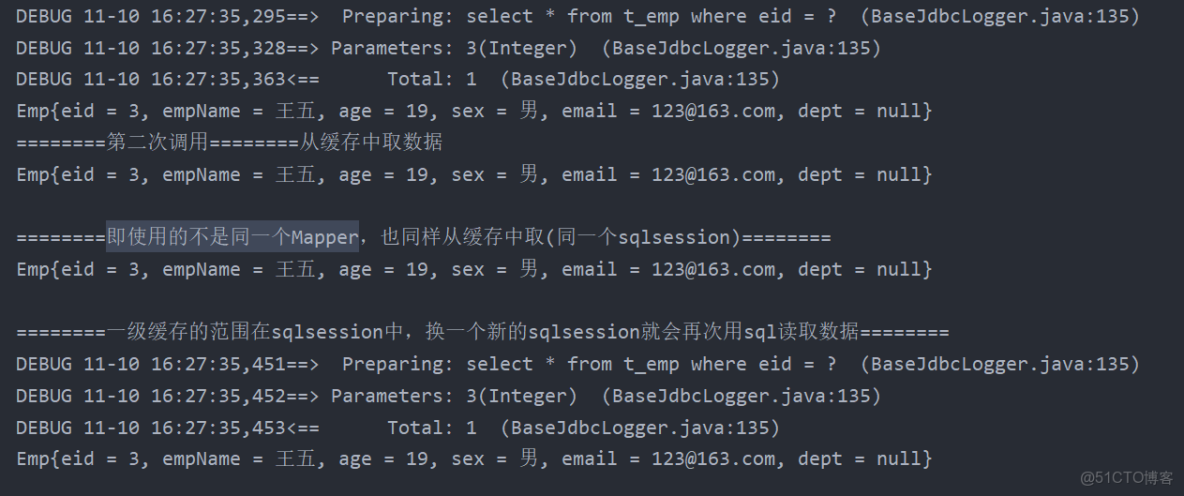
1.不同的SqlSession對應不同的一級緩存
@Test
    public void testOneCache1() throws IOException {
        SqlSession sqlSession = SqlSessionUtils.getSqlSession();
        CacheMapper mapper = sqlSession.getMapper(CacheMapper.class);
        Emp emp1 = mapper.getEmpById(3);
        System.out.println(emp1);
        System.out.println("========第二次調用========從緩存中取數據");
        Emp emp2 = mapper.getEmpById(3);
        System.out.println(emp2);

        System.out.println("\n========即使用的不是同一個Mapper,也同樣從緩存中取(同一個sqlsession)========");
        CacheMapper mapper2 = sqlSession.getMapper(CacheMapper.class);
        Emp empByMapper2 = mapper2.getEmpById(3);
        System.out.println(empByMapper2);

        System.out.println("\n========一級緩存的範圍在sqlsession中,換一個新的sqlsession就會再次用sql讀取數據========");
        SqlSession sqlSession2 = SqlSessionUtils.getSqlSession();
        CacheMapper mapper2BySqlSession2 = sqlSession2.getMapper(CacheMapper.class);
        System.out.println(mapper2BySqlSession2.getEmpById(3));
    }
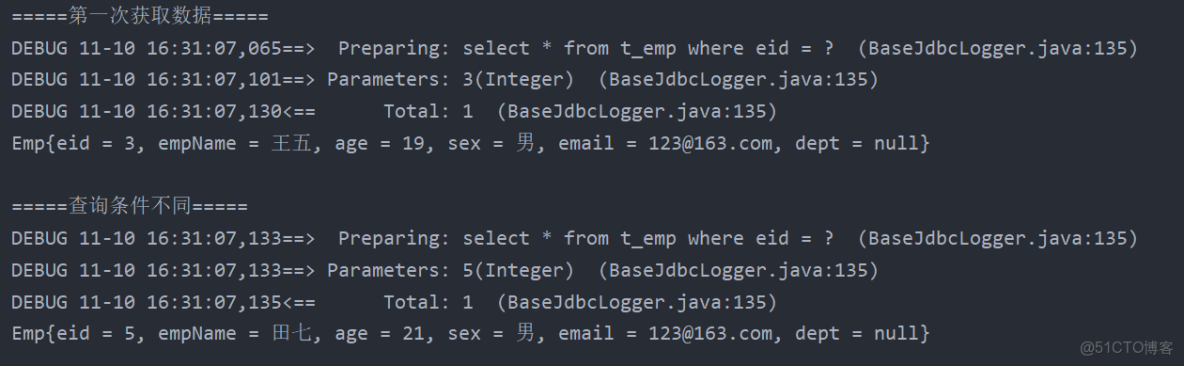
2.同一個SqlSession但是查詢條件不同
@Test
public void testCache3(){
    SqlSession sqlSession = SqlSessionUtils.getSqlSession();
    CacheMapper mapper = sqlSession.getMapper(CacheMapper.class);

    System.out.println("=====第一次獲取數據=====");
    Emp emp1 = mapper.getEmpById(3);
    System.out.println(emp1);

    System.out.println("\n=====查詢條件不同=====");
    Emp emp2 = mapper.getEmpById(5);
    System.out.println(emp2);
}
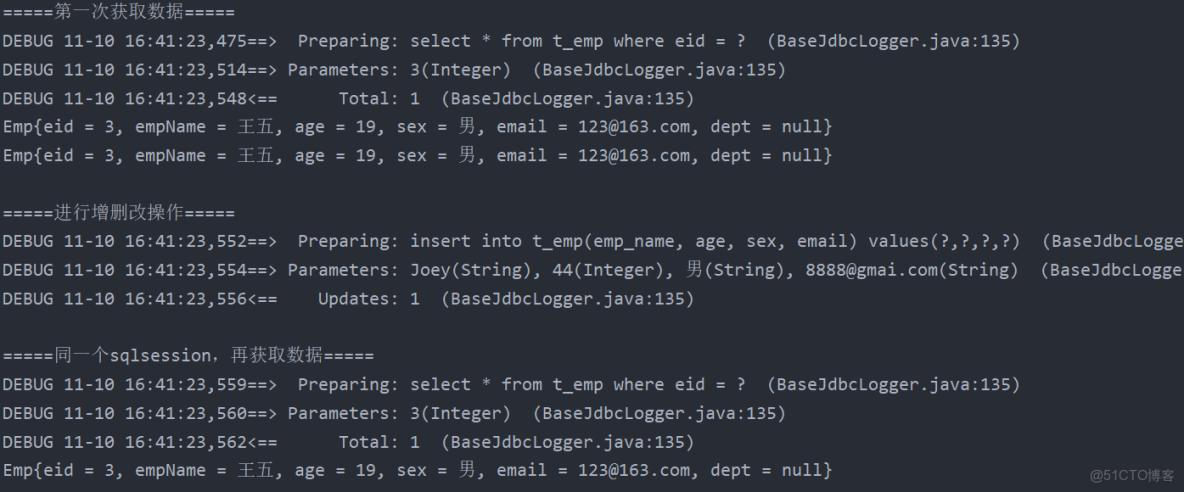
3.同一個SqlSession兩次查詢期間執行了任何一次增刪改操作
@Test
public void testCache2(){
    SqlSession sqlSession = SqlSessionUtils.getSqlSession();
    CacheMapper mapper = sqlSession.getMapper(CacheMapper.class);

    System.out.println("=====第一次獲取數據=====");
    Emp emp1 = mapper.getEmpById(3);
    System.out.println(emp1);
    Emp emp2 = mapper.getEmpById(3);
    System.out.println(emp2);

    System.out.println("\n=====進行增刪改操作=====");
    mapper.insetEmp(new Emp(null, "Joey", 44, "男", "8888@gmai.com"));

    System.out.println("\n=====同一個sqlsession,再獲取數據=====");
    Emp emp3 = mapper.getEmpById(3);
    System.out.println(emp3);
}
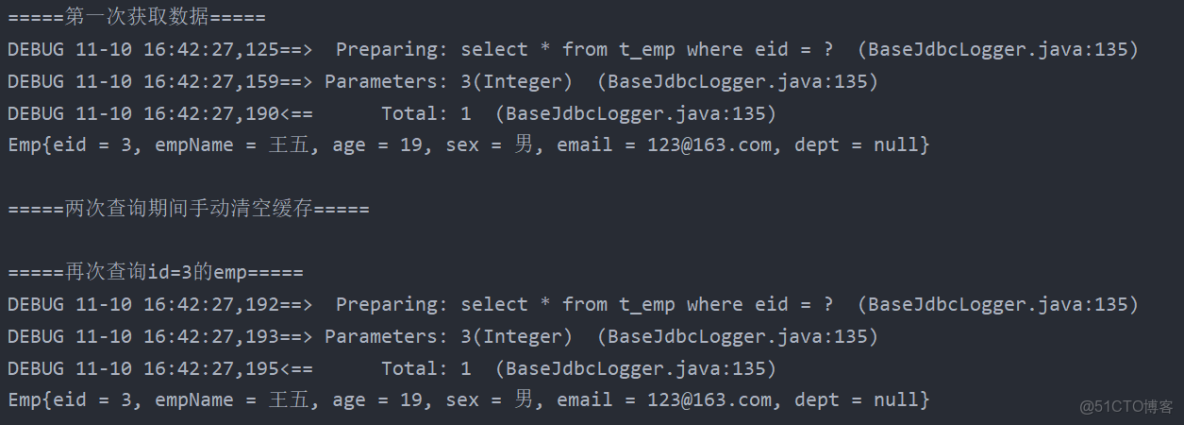
4.同一個SqlSession兩次查詢期間手動清空了緩存
@Test
public void testCache4() throws IOException {
    SqlSession sqlSession = SqlSessionUtils.getSqlSession();
    CacheMapper mapper = sqlSession.getMapper(CacheMapper.class);

    System.out.println("=====第一次獲取數據=====");
    Emp emp1 = mapper.getEmpById(3);
    System.out.println(emp1);

    System.out.println("\n=====兩次查詢期間手動清空緩存=====");
    sqlSession.clearCache();

    System.out.println("\n=====再次查詢id=3的emp=====");
    Emp emp2 = mapper.getEmpById(3);
    System.out.println(emp2);
}
2、MyBatis的二級緩存
- 二級緩存是SqlSessionFactory級別,通過同一個SqlSessionFactory創建的SqlSession查詢的結果會被緩存;此後若再次執行相同的查詢語句,結果就會從緩存中獲取
- 二級緩存開啓的條件
- 在核心配置文件中,設置全局配置屬性cacheEnabled=“true”,默認為true,不需要設置
- 在映射文件中設置標籤
- 二級緩存必須在SqlSession關閉或提交之後有效
- 查詢的數據所轉換的實體類類型必須實現序列化的接口
- 使二級緩存失效的情況:兩次查詢之間執行了任意的增刪改,會使一級和二級緩存同時失效
沒有提交sqlsession時,數據會保存在一級緩存中,提交後,會保存在二級緩存中。
1.在映射文件中設置標籤<cache />
<?xml version="1.0" encoding="UTF-8" ?>
<!DOCTYPE mapper
        PUBLIC "-//mybatis.org//DTD Mapper 3.0//EN"
        "http://mybatis.org/dtd/mybatis-3-mapper.dtd">
<mapper namespace="com.zzz.mapper.CacheMapper">

    <cache/>

    <select id="getEmpById" resultType="Emp">
        select * from t_emp where eid = #{eid}
    </select>

    <insert id="insertEmp" useGeneratedKeys="true" keyProperty="eid">
        insert into t_emp(emp_name, age, sex, email)
        values(#{empName},#{age},#{sex},#{email})
    </insert>

</mapper>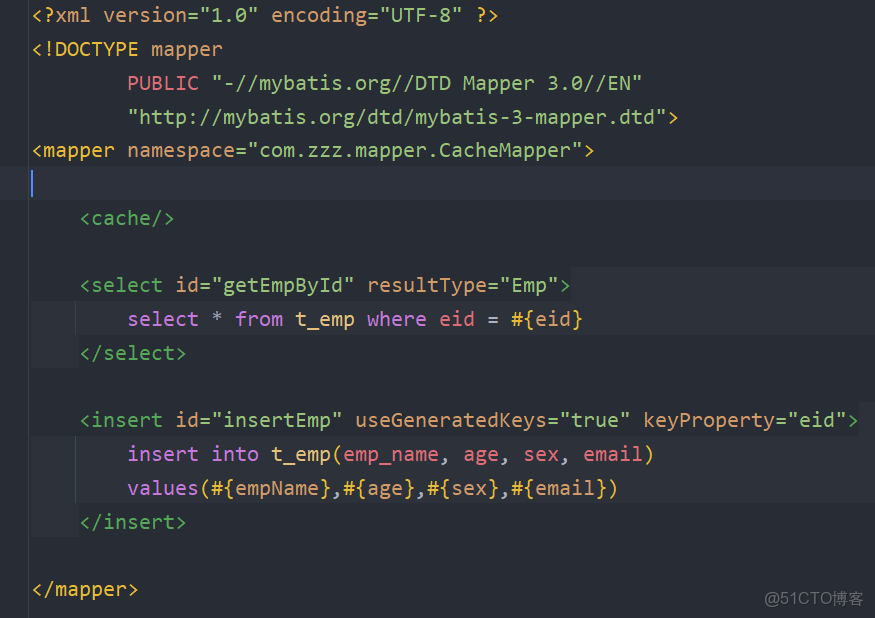
2.要把Emp類加上implements Serializable
public class Emp  implements Serializable {
  ......
}
@Test
public void testTwoCache() throws IOException {
try {
InputStream is = Resources.getResourceAsStream("mybatis-config.xml");
SqlSessionFactory sqlSessionFactory = new SqlSessionFactoryBuilder().build(is);
SqlSession sqlSession1 = sqlSessionFactory.openSession(true);
CacheMapper mapper1 = sqlSession1.getMapper(CacheMapper.class);
System.out.println(mapper1.getEmpById(1));
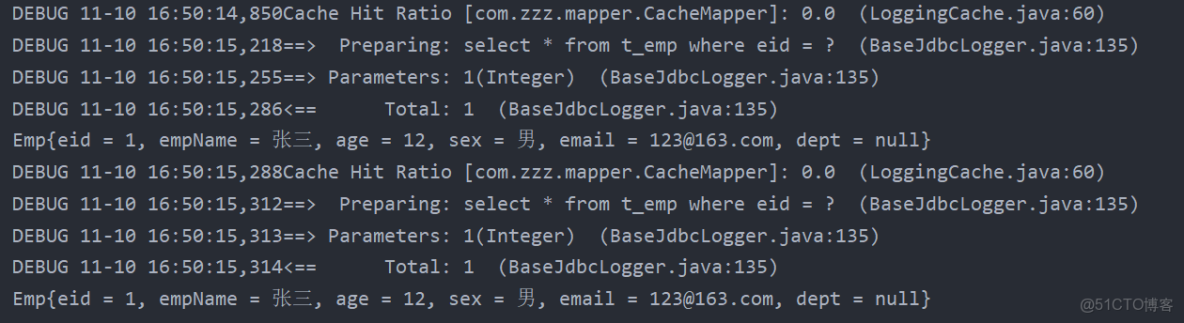
System.out.println("Cache Hit Ratio:緩存命中率,指的是在緩存中有沒有這條數據");
System.out.println("=====二級緩存未打開,沒從緩存中獲取數據=====");
SqlSession sqlSession2 = sqlSessionFactory.openSession(true);
CacheMapper mapper2 = sqlSession2.getMapper(CacheMapper.class);
System.out.println(mapper2.getEmpById(1));
} catch (IOException e) {
e.printStackTrace();
}
}
@Test
public void testTwoCache() throws IOException {
    try {
        InputStream is = Resources.getResourceAsStream("mybatis-config.xml");
        SqlSessionFactory sqlSessionFactory = new SqlSessionFactoryBuilder().build(is);
        SqlSession sqlSession1 = sqlSessionFactory.openSession(true);
        CacheMapper mapper1 = sqlSession1.getMapper(CacheMapper.class);
        System.out.println(mapper1.getEmpById(1));
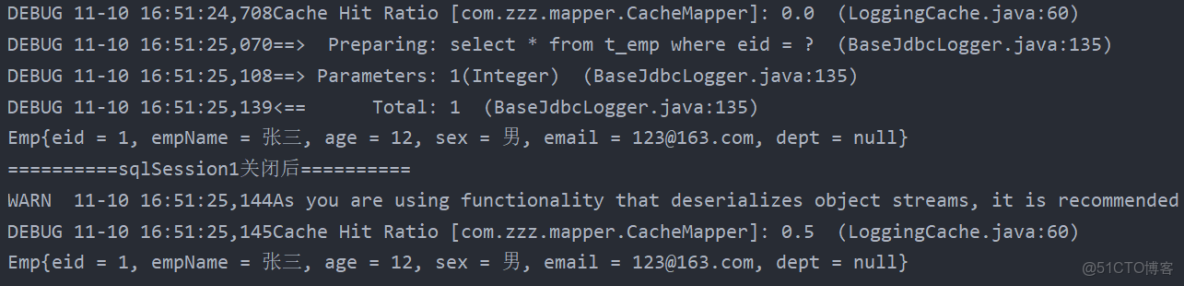
        System.out.println("==========sqlSession1關閉後==========");
        sqlSession1.close();

        System.out.println("再次查看命中率:");
        SqlSession sqlSession2 = sqlSessionFactory.openSession(true);
        CacheMapper mapper2 = sqlSession2.getMapper(CacheMapper.class);
        System.out.println(mapper2.getEmpById(1));
        sqlSession2.close();
    } catch (IOException e) {
        e.printStackTrace();
    }

}
3、二級緩存的相關配置
在mapper配置文件中添加的cache標籤可以設置一些屬性
(1) eviction屬性:緩存回收策略
- LRU(Least Recently Used) – 最近最少使用的:移除最長時間不被使用的對象。
- FIFO(First in First out) – 先進先出:按對象進入緩存的順序來移除它們。
- SOFT – 軟引用:移除基於垃圾回收器狀態和軟引用規則的對象。
- WEAK – 弱引用:更積極地移除基於垃圾收集器狀態和弱引用規則的對象。
- 默認的是 LRU
(2) flushInterval屬性:刷新間隔,單位毫秒
默認情況是不設置,也就是沒有刷新間隔,緩存僅僅調用語句(增刪改)時刷新
(3) size屬性:引用數目,正整數
代表緩存最多可以存儲多少個對象,太大容易導致內存溢出
(4) readOnly屬性:只讀,true/false
- true:只讀緩存;會給所有調用者返回緩存對象的相同實例。因此這些對象不能被修改。這提供了很重要的性能優勢。
- false:讀寫緩存;會返回緩存對象的拷貝(通過序列化)。這會慢一些,但是安全,因此默認是false
4、MyBatis緩存查詢的順序
- 先查詢二級緩存,因為二級緩存中可能會有其他程序已經查出來的數據,可以拿來直接使用
- 如果二級緩存沒有命中,再查詢一級緩存
- 如果一級緩存也沒有命中,則查詢數據庫
- SqlSession關閉之後,一級緩存中的數據會寫入二級緩存
5、整合第三方緩存EHCache
只能代替二級緩存!
1.添加依賴
<!-- Mybatis EHCache整合包 -->
<dependency>
	<groupId>org.mybatis.caches</groupId>
	<artifactId>mybatis-ehcache</artifactId>
	<version>1.2.1</version>
</dependency>
<!-- slf4j日誌門面的一個具體實現 -->
<dependency>
	<groupId>ch.qos.logback</groupId>
	<artifactId>logback-classic</artifactId>
	<version>1.2.3</version>
</dependency>
2.各個jar包的功能
|
jar包名稱
|
作用
|
|
mybatis-ehcache
|
Mybatis和EHCache的整合包
|
|
ehcache
|
EHCache核心包
|
|
slf4j-api
|
SLF4J日誌門面包
|
|
logback-classic
|
支持SLF4J門面接口的一個具體實現
|
3.創建EHCache的配置文件ehcache.xml
- 名字必須叫
ehcache.xml
<?xml version="1.0" encoding="utf-8" ?>
<ehcache xmlns:xsi="http://www.w3.org/2001/XMLSchema-instance"
         xsi:noNamespaceSchemaLocation="../config/ehcache.xsd">
    <!-- 磁盤保存路徑 -->
    <diskStore path="D:\atguigu\ehcache"/>
    <defaultCache
            maxElementsInMemory="1000"
            maxElementsOnDisk="10000000"
            eternal="false"
            overflowToDisk="true"
            timeToIdleSeconds="120"
            timeToLiveSeconds="120"
            diskExpiryThreadIntervalSeconds="120"
            memoryStoreEvictionPolicy="LRU">
    </defaultCache>
</ehcache>"../config/ehcache.xsd”報錯,則創建這個文件
4.設置二級緩存的類型
- 在xxxMapper.xml文件中設置二級緩存類型
<cache type="org.mybatis.caches.ehcache.EhcacheCache"/>5.加入logback日誌
- 存在SLF4J時,作為簡易日誌的log4j將失效,此時我們需要藉助SLF4J的具體實現logback來打印日誌。創建logback的配置文件
logback.xml,名字固定,不可改變
<?xml version="1.0" encoding="UTF-8"?>
<configuration debug="true">
    <!-- 指定日誌輸出的位置 -->
    <appender name="STDOUT"
              class="ch.qos.logback.core.ConsoleAppender">
        <encoder>
            <!-- 日誌輸出的格式 -->
            <!-- 按照順序分別是:時間、日誌級別、線程名稱、打印日誌的類、日誌主體內容、換行 -->
            <pattern>[%d{HH:mm:ss.SSS}] [%-5level] [%thread] [%logger] [%msg]%n</pattern>
        </encoder>
    </appender>
    <!-- 設置全局日誌級別。日誌級別按順序分別是:DEBUG、INFO、WARN、ERROR -->
    <!-- 指定任何一個日誌級別都只打印當前級別和後面級別的日誌。 -->
    <root level="DEBUG">
        <!-- 指定打印日誌的appender,這裏通過“STDOUT”引用了前面配置的appender -->
        <appender-ref ref="STDOUT" />
    </root>
    <!-- 根據特殊需求指定局部日誌級別 -->
    <logger name="com.atguigu.crowd.mapper" level="DEBUG"/>
</configuration>
6.EHCache配置文件説明
|
屬性名
|
是否必須
|
作用
|
|
maxElementsInMemory
|
是
|
在內存中緩存的element的最大數目
|
|
maxElementsOnDisk
|
是
|
在磁盤上緩存的element的最大數目,若是0表示無窮大
|
|
eternal
|
是
|
設定緩存的elements是否永遠不過期。 如果為true,則緩存的數據始終有效, 如果為false那麼還要根據timeToIdleSeconds、timeToLiveSeconds判斷
|
|
overflowToDisk
|
是
|
設定當內存緩存溢出的時候是否將過期的element緩存到磁盤上
|
|
timeToIdleSeconds
|
否
|
當緩存在EhCache中的數據前後兩次訪問的時間超過timeToIdleSeconds的屬性取值時, 這些數據便會刪除,默認值是0,也就是可閒置時間無窮大
|
|
timeToLiveSeconds
|
否
|
緩存element的有效生命期,默認是0.,也就是element存活時間無窮大
|
|
diskSpoolBufferSizeMB
|
否
|
DiskStore(磁盤緩存)的緩存區大小。默認是30MB。每個Cache都應該有自己的一個緩衝區
|
|
diskPersistent
|
否
|
在VM重啓的時候是否啓用磁盤保存EhCache中的數據,默認是false
|
|
diskExpiryThreadIntervalSeconds
|
否
|
磁盤緩存的清理線程運行間隔,默認是120秒。每個120s, 相應的線程會進行一次EhCache中數據的清理工作
|
|
memoryStoreEvictionPolicy
|
否
|
當內存緩存達到最大,有新的element加入的時候, 移除緩存中element的策略。 默認是LRU(最近最少使用),可選的有LFU(最不常使用)和FIFO(先進先出
|
二、MyBatis的逆向工程
- 正向工程:先創建Java實體類,由框架負責根據實體類生成數據庫表。Hibernate是支持正向工程的
- 逆向工程:先創建數據庫表,由框架負責根據數據庫表,反向生成如下資源:
- Java實體類
- Mapper接口
- Mapper映射文件
1、創建逆向工程的步驟
1.添加依賴和插件
<dependencies>
	<!-- MyBatis核心依賴包 -->
	<dependency>
		<groupId>org.mybatis</groupId>
		<artifactId>mybatis</artifactId>
		<version>3.5.9</version>
	</dependency>
	<!-- junit測試 -->
	<dependency>
		<groupId>junit</groupId>
		<artifactId>junit</artifactId>
		<version>4.13.2</version>
		<scope>test</scope>
	</dependency>
	<!-- MySQL驅動 -->
	<dependency>
		<groupId>mysql</groupId>
		<artifactId>mysql-connector-java</artifactId>
		<version>8.0.27</version>
	</dependency>
	<!-- log4j日誌 -->
	<dependency>
		<groupId>log4j</groupId>
		<artifactId>log4j</artifactId>
		<version>1.2.17</version>
	</dependency>
</dependencies>
<!-- 控制Maven在構建過程中相關配置 -->
<build>
	<!-- 構建過程中用到的插件 -->
	<plugins>
		<!-- 具體插件,逆向工程的操作是以構建過程中插件形式出現的 -->
		<plugin>
			<groupId>org.mybatis.generator</groupId>
			<artifactId>mybatis-generator-maven-plugin</artifactId>
			<version>1.3.0</version>
			<!-- 插件的依賴 -->
			<dependencies>
				<!-- 逆向工程的核心依賴 -->
				<dependency>
					<groupId>org.mybatis.generator</groupId>
					<artifactId>mybatis-generator-core</artifactId>
					<version>1.3.2</version>
				</dependency>
				<!-- 數據庫連接池 -->
				<dependency>
					<groupId>com.mchange</groupId>
					<artifactId>c3p0</artifactId>
					<version>0.9.2</version>
				</dependency>
				<!-- MySQL驅動 -->
				<dependency>
					<groupId>mysql</groupId>
					<artifactId>mysql-connector-java</artifactId>
					<version>8.0.27</version>
				</dependency>
			</dependencies>
		</plugin>
	</plugins>
</build>
2.創建MyBatis的核心配置文件
<?xml version="1.0" encoding="UTF-8" ?>
<!DOCTYPE configuration
        PUBLIC "-//mybatis.org//DTD Config 3.0//EN"
        "http://mybatis.org/dtd/mybatis-3-config.dtd">
<configuration>
    <properties resource="jdbc.properties"/>
    <typeAliases>
        <package name=""/>
    </typeAliases>
    <environments default="development">
        <environment id="development">
            <transactionManager type="JDBC"/>
            <dataSource type="POOLED">
                <property name="driver" value="${jdbc.driver}"/>
                <property name="url" value="${jdbc.url}"/>
                <property name="username" value="${jdbc.username}"/>
                <property name="password" value="${jdbc.password}"/>
            </dataSource>
        </environment>
    </environments>
    <mappers>
        <package name=""/>
    </mappers>
</configuration>
3.創建逆向工程的配置文件
- 文件名必須是:
generatorConfig.xml
<?xml version="1.0" encoding="UTF-8"?>
<!DOCTYPE generatorConfiguration
        PUBLIC "-//mybatis.org//DTD MyBatis Generator Configuration 1.0//EN"
        "http://mybatis.org/dtd/mybatis-generator-config_1_0.dtd">
<generatorConfiguration>
    <!--
    targetRuntime: 執行生成的逆向工程的版本
    MyBatis3Simple: 生成基本的CRUD(清新簡潔版)
    MyBatis3: 生成帶條件的CRUD(奢華尊享版)
    -->
    <context id="DB2Tables" targetRuntime="MyBatis3Simple">
        <!-- 數據庫的連接信息 -->
        <jdbcConnection driverClass="com.mysql.cj.jdbc.Driver"
                        connectionURL="jdbc:mysql://localhost:3306/mybatis"
                        userId="root"
                        password="123456">
        </jdbcConnection>
        <!-- javaBean的生成策略-->
        <javaModelGenerator targetPackage="com.atguigu.mybatis.pojo" targetProject=".\src\main\java">
            <property name="enableSubPackages" value="true" />
            <property name="trimStrings" value="true" />
        </javaModelGenerator>
        <!-- SQL映射文件的生成策略 -->
        <sqlMapGenerator targetPackage="com.atguigu.mybatis.mapper"
                         targetProject=".\src\main\resources">
            <property name="enableSubPackages" value="true" />
        </sqlMapGenerator>
        <!-- Mapper接口的生成策略 -->
        <javaClientGenerator type="XMLMAPPER"
                             targetPackage="com.atguigu.mybatis.mapper" targetProject=".\src\main\java">
            <property name="enableSubPackages" value="true" />
        </javaClientGenerator>
        <!-- 逆向分析的表 -->
        <!-- tableName設置為*號,可以對應所有表,此時不寫domainObjectName -->
        <!-- domainObjectName屬性指定生成出來的實體類的類名 -->
        <table tableName="t_emp" domainObjectName="Emp"/>
        <table tableName="t_dept" domainObjectName="Dept"/>
    </context>
</generatorConfiguration>
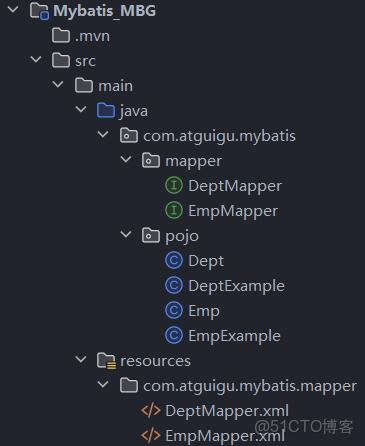
4.執行MBG插件的generate目標
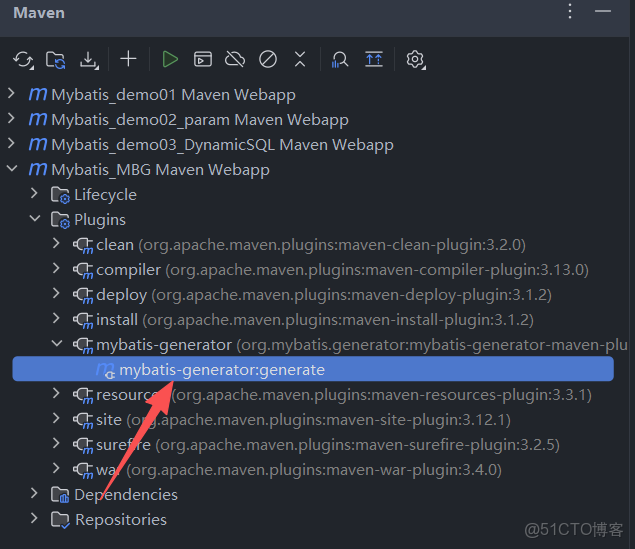
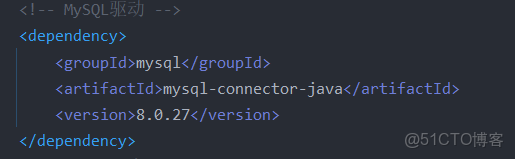
如果出現報錯:Exception getting JDBC Driver,可能是pom.xml中,數據庫驅動配置錯誤
dependency中的驅動
mybatis-generator-maven-plugin插件中的驅動
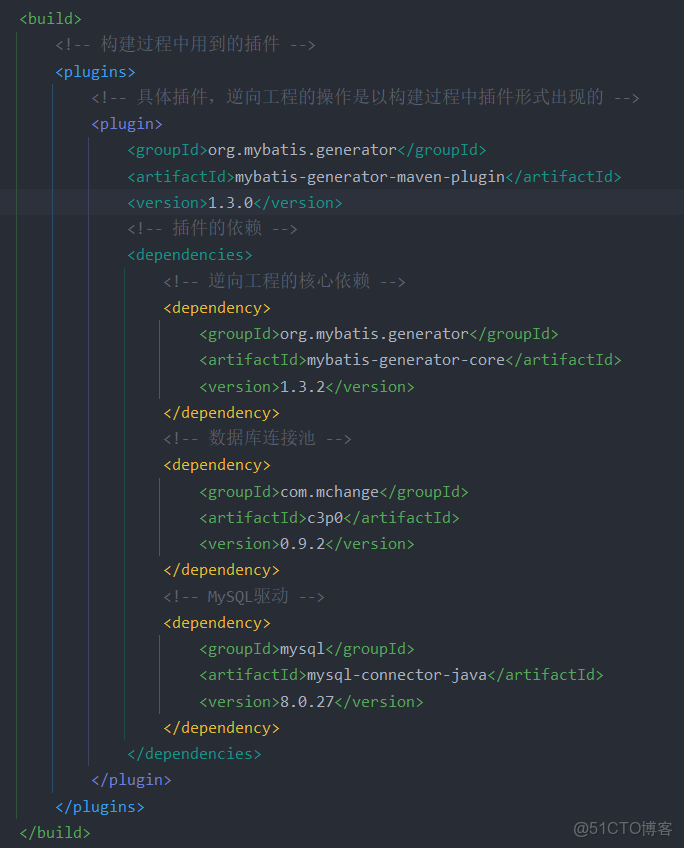
兩者的驅動版本應該相同
執行結果
2、QBC
1.查詢
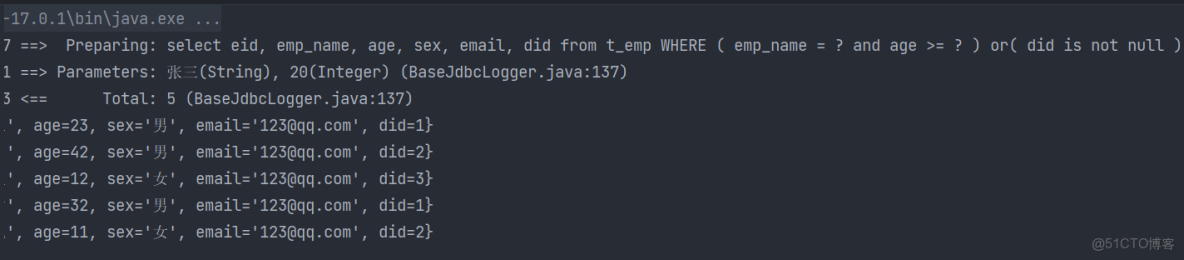
selectByExample:按條件查詢,需要傳入一個example對象或者null;如果傳入一個null,則表示沒有條件,也就是查詢所有數據example.createCriteria().xxx:創建條件對象,通過andXXX方法為SQL添加查詢添加,每個條件之間是and關係example.or().xxx:將之前添加的條件通過or拼接其他條件
@Test public void testMBG() throws IOException {
	InputStream is = Resources.getResourceAsStream("mybatis-config.xml");
	SqlSessionFactoryBuilder sqlSessionFactoryBuilder = new SqlSessionFactoryBuilder();
	SqlSessionFactory sqlSessionFactory = sqlSessionFactoryBuilder.build(is);
	SqlSession sqlSession = sqlSessionFactory.openSession(true);
	EmpMapper mapper = sqlSession.getMapper(EmpMapper.class);
	EmpExample example = new EmpExample();
	//名字為張三,且年齡大於等於20
	example.createCriteria().andEmpNameEqualTo("張三").andAgeGreaterThanOrEqualTo(20);
	//或者did不為空
	example.or().andDidIsNotNull();
	List<Emp> emps = mapper.selectByExample(example);
	emps.forEach(System.out::println);
}
2.增改
updateByPrimaryKey:通過主鍵進行數據修改,如果某一個值為null,也會將對應的字段改為nullmapper.updateByPrimaryKey(new Emp(1,"admin",22,null,"456@qq.com",3));updateByPrimaryKeySelective():通過主鍵進行選擇性數據修改,如果某個值為null,則不修改這個字段mapper.updateByPrimaryKeySelective(new Emp(2,"admin2",22,null,"456@qq.com",3));
三、分頁插件
分頁原理
limit index,pagesize
index 當前頁的起始索引
pageSize 每頁顯示的條數
pageNum 當前頁的頁碼
當前頁的起始索引 = (當前頁碼 - 1) * 每頁條數
index = (pageNum - 1) * pageSize
通過索引獲得數據 索引從0開始
比如 pageSize = 5
第一頁 0 - 4
第二頁 5 - 9
第三頁 10 - 14
…
1、分頁插件使用步驟
1.添加依賴
<!-- https://mvnrepository.com/artifact/com.github.pagehelper/pagehelper -->
<dependency>
	<groupId>com.github.pagehelper</groupId>
	<artifactId>pagehelper</artifactId>
	<version>5.2.0</version>
</dependency>
2.配置分頁插件
在MyBatis的核心配置文件(mybatis-config.xml)中配置插件
<plugins>
	<!--設置分頁插件-->
	<plugin interceptor="com.github.pagehelper.PageInterceptor"></plugin>
</plugins>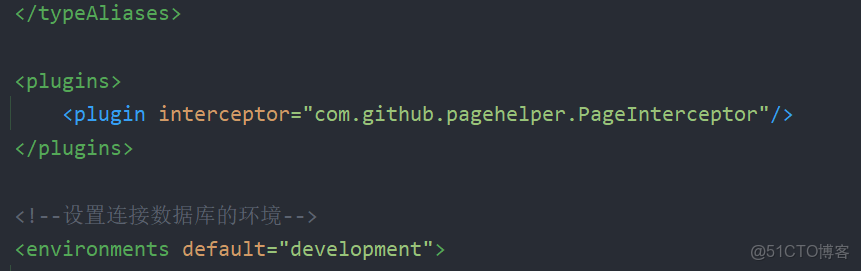
2、分頁插件的使用
1.開啓分頁功能
- 在查詢功能之前使用
PageHelper.startPage(int pageNum, int pageSize)開啓分頁功能 - pageNum:當前頁的頁碼
- pageSize:每頁顯示的條數
@Test
public void testPageHelper() throws IOException {
	InputStream is = Resources.getResourceAsStream("mybatis-config.xml");
	SqlSessionFactoryBuilder sqlSessionFactoryBuilder = new SqlSessionFactoryBuilder();
	SqlSessionFactory sqlSessionFactory = sqlSessionFactoryBuilder.build(is);
	SqlSession sqlSession = sqlSessionFactory.openSession(true);
	EmpMapper mapper = sqlSession.getMapper(EmpMapper.class);
	//訪問第一頁,每頁四條數據
	PageHelper.startPage(1,4);
	List<Emp> emps = mapper.selectByExample(null);
	emps.forEach(System.out::println);
}
2.分頁相關數據
方法一:直接輸出
在查詢功能之前使用PageHelper.startPage(int pageNum, int pageSize)開啓分頁功能
- pageNum:當前頁的頁碼
- pageSize:每頁顯示的條數
@Test
public void testPageHelper() throws IOException {
	InputStream is = Resources.getResourceAsStream("mybatis-config.xml");
	SqlSessionFactoryBuilder sqlSessionFactoryBuilder = new SqlSessionFactoryBuilder();
	SqlSessionFactory sqlSessionFactory = sqlSessionFactoryBuilder.build(is);
	SqlSession sqlSession = sqlSessionFactory.openSession(true);
	EmpMapper mapper = sqlSession.getMapper(EmpMapper.class);
	//訪問第一頁,每頁四條數據
	Page<Object> page = PageHelper.startPage(1, 4);
	List<Emp> emps = mapper.selectByExample(null);
	//在查詢到List集合後,打印分頁數據
	System.out.println(page);
}- 分頁相關數據:
Page{count=true, pageNum=1, pageSize=4, startRow=0, endRow=4, total=8, pages=2, reasonable=false, pageSizeZero=false}[Emp{eid=1, empName='admin', age=22, sex='男', email='456@qq.com', did=3}, Emp{eid=2, empName='admin2', age=22, sex='男', email='456@qq.com', did=3}, Emp{eid=3, empName='王五', age=12, sex='女', email='123@qq.com', did=3}, Emp{eid=4, empName='趙六', age=32, sex='男', email='123@qq.com', did=1}]方法二使用PageInfo
- 在查詢獲取list集合之後,使用
PageInfo<T> pageInfo = new PageInfo<>(List<T> list, intnavigatePages)獲取分頁相關數據 - list:分頁之後的數據
- navigatePages:導航分頁的頁碼數
@Test
public void testPageHelper() throws IOException {
	InputStream is = Resources.getResourceAsStream("mybatis-config.xml");
	SqlSessionFactoryBuilder sqlSessionFactoryBuilder = new SqlSessionFactoryBuilder();
	SqlSessionFactory sqlSessionFactory = sqlSessionFactoryBuilder.build(is);
	SqlSession sqlSession = sqlSessionFactory.openSession(true);
	EmpMapper mapper = sqlSession.getMapper(EmpMapper.class);
	PageHelper.startPage(1, 4);
	List<Emp> emps = mapper.selectByExample(null);
	PageInfo<Emp> page = new PageInfo<>(emps,5);
	System.out.println(page);
}- 分頁相關數據:
PageInfo{
pageNum=1, pageSize=4, size=4, startRow=1, endRow=4, total=8, pages=2,
list=Page{count=true, pageNum=1, pageSize=4, startRow=0, endRow=4, total=8, pages=2, reasonable=false, pageSizeZero=false}[Emp{eid=1, empName='admin', age=22, sex='男', email='456@qq.com', did=3}, Emp{eid=2, empName='admin2', age=22, sex='男', email='456@qq.com', did=3}, Emp{eid=3, empName='王五', age=12, sex='女', email='123@qq.com', did=3}, Emp{eid=4, empName='趙六', age=32, sex='男', email='123@qq.com', did=1}],
prePage=0, nextPage=2, isFirstPage=true, isLastPage=false, hasPreviousPage=false, hasNextPage=true, navigatePages=5, navigateFirstPage=1, navigateLastPage=2, navigatepageNums=[1, 2]}
其中list中的數據等同於方法一中直接輸出的page數據
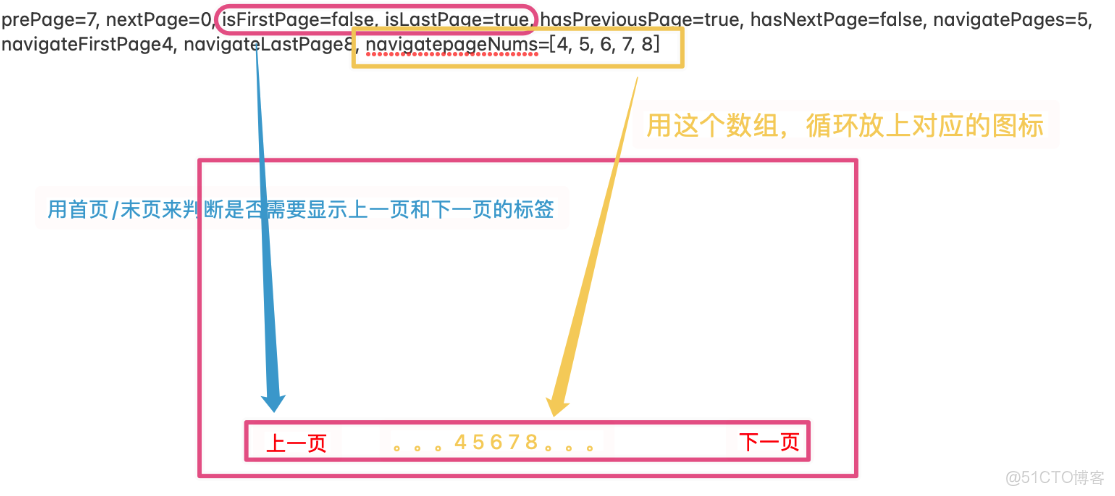
常用數據:
- pageNum:當前頁的頁碼
- pageSize:每頁顯示的條數
- size:當前頁顯示的真實條數
- total:總記錄數
- pages:總頁數
- prePage:上一頁的頁碼
- nextPage:下一頁的頁碼
- isFirstPage/isLastPage:是否為第一頁/最後一頁
- hasPreviousPage/hasNextPage:是否存在上一頁/下一頁
- navigatePages:導航分頁的頁碼數
• x=‘男’, email=‘456@qq.com’, did=3}, Emp{eid=3, empName=‘王五’, age=12, sex=‘女’, email=‘123@qq.com’, did=3}, Emp{eid=4, empName=‘趙六’, age=32, sex=‘男’, email=‘123@qq.com’, did=1}],

prePage=0, nextPage=2, isFirstPage=true, isLastPage=false, hasPreviousPage=false, hasNextPage=true, navigatePages=5, navigateFirstPage=1, navigateLastPage=2, navigatepageNums=[1, 2]}