
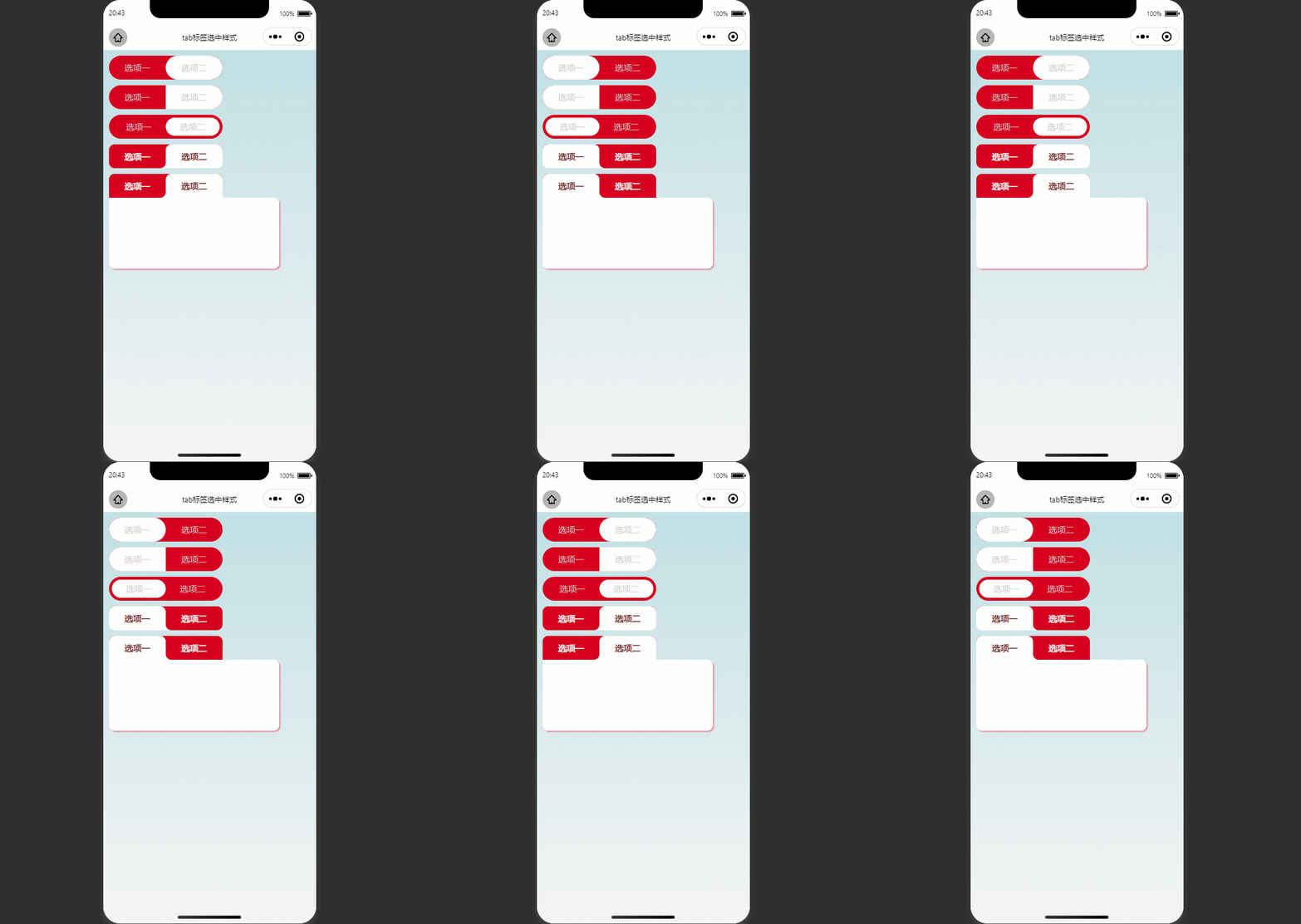
1.實現效果
2.實現原理
前3個常規設置即可,這裏説下第四個樣式
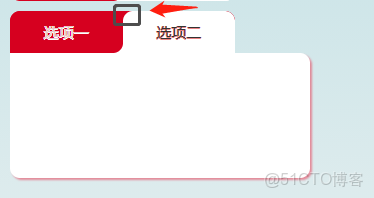
可以看到,這邊有個超出的圓角樣式。
兩種思路:
- 將整個父元素設置線性漸變色背景,上下兩部分。
- 設置單個元素的偽元素,偽元素部分設置徑向漸變
思路一:
- 為父元素設置線性漸變背景
background: linear-gradient(180deg, #d6001f 50%, #fff 50%);
- 將子元素設置相應的border-radius,不同的背景色,這一步已經可以看到我們想要的特殊圓角了,接着把選中與不選中的顏色,設置與背景色一致即可。

- 最後得到的結果如下
思路二:
- 先正常寫個圓角矩形
.web_tab1 {
  position     : relative;
  background   : #d6001f;
  border-radius: 10px 0 10px 0;
  z-index      : 10;
}
- 添加偽元素
.web_tab1::after {
  content   : "";
  position  : absolute;
  width     : 20px;
  height    : 20px;
  right     : -20px;
  top       : 0;
  background: radial-gradient(circle at 100% 100%, transparent 20px, #d6001f 21px);
}
設置正確的定位位置,結果如下:

當然,設置mask漸變等其他方法,也能實現同樣效果。
3.實現代碼
<!--pages/cssCase/newTab/index.wxml-->
<view class="mb20">
  <view class="head_tab_one ">
    <block wx:for="{{tab}}" wx:key="tab">
      <view catchtap="navTab" class=" head_item {{index==nav_type&&'head_item_active'}}" data-index="{{index}}">{{item.name}}</view>
    </block>
  </view>
</view>
<view class="mb20">
  <view class="head_tab_two ">
    <block wx:for="{{tab}}" wx:key="tab">
      <view catchtap="navTab" class=" head_item {{index==nav_type&&'head_item_active'}}" data-index="{{index}}">{{item.name}}</view>
    </block>
  </view>
</view>
<view class="mb20">
  <view class="head_tab_three ">
    <block wx:for="{{tab}}" wx:key="tab">
      <view catchtap="navTab" class=" head_item {{index==nav_type&&'head_item_active'}}" data-index="{{index}}">{{item.name}}</view>
    </block>
  </view>
</view>
<view class="mb20">
  <view class="head_tab head_tab_four ">
    <block wx:for="{{tab}}" wx:key="tab">
      <view catchtap="navTab" class=" head_item {{index==nav_type&&'head_item_active'}}" data-index="{{index}}">{{item.name}}</view>
    </block>
  </view>
</view>
<view class="mb20">
  <view class="head_tab ">
    <block wx:for="{{tab}}" wx:key="tab">
      <view catchtap="navTab" class=" head_item {{index==nav_type&&'head_item_active'}}" data-index="{{index}}">{{item.name}}</view>
    </block>
  </view>
  <view class="head_con"></view>
</view>
// pages/cssCase/newTab/index.js
Page({
/**
* 頁面的初始數據
*/
data: {
tab: [
{
name: "選項一"
},
{
name: "選項二"
},
],
nav_type: 0,
},
navTab(e) {
let {
index
} = e.currentTarget.dataset;
if (this.data.type === index || index === undefined) {
return false;
} else {
this.setData({
nav_type: index,
})
}
},
})page {
background: linear-gradient(180deg, #c0e0e4 0%, #F4F4F4 100%);
padding : 20rpx;
}
.head_tab {
width : 450rpx;
text-align : center;
height : 85rpx;
line-height : 85rpx;
display : flex;
background : linear-gradient(180deg, #d6001f 50%, #fff 50%);
border-radius: 20rpx 20rpx 0 0;
color : #ccc;
font-size : 30rpx;
overflow : hidden;
&_four {
border-radius: 20rpx;
}
.head_item {
flex : 1;
text-align : center;
background : #d6001f;
color : rgb(231, 199, 199);
border-radius: 20rpx 20rpx 20rpx 0;
text-shadow : -1rpx 0 #fff, 0 1rpx #fff, 1rpx 0 #fff, 0 -1rpx #fff;
&:last-child {
border-radius: 20rpx 20rpx 0 20rpx;
}
&_active {
background : #fff;
color : #333;
text-shadow: -1rpx 0 #e98383, 0 1rpx #e98383, 1rpx 0 #e98383, 0 -1rpx #e98383;
}
}
}
.head_con {
width : 600rpx;
height : 250rpx;
background : #fff;
border-radius: 0 20rpx 20rpx;
box-shadow : 5rpx 5rpx 5rpx rgba(235, 41, 70, 0.5);
}
.head_tab_one {
width : 450rpx;
text-align : center;
height : 85rpx;
line-height : 85rpx;
display : flex;
border-radius : 43rpx;
color : #ccc;
font-size : 30rpx;
overflow : hidden;
background-color: #d6001f;
.head_item {
flex : 1;
border-radius: 43rpx;
&_active {
background-color: #fff;
}
}
}
.head_tab_two {
width : 450rpx;
text-align : center;
height : 85rpx;
line-height : 85rpx;
display : flex;
border-radius : 43rpx;
color : #ccc;
font-size : 30rpx;
overflow : hidden;
background-color: #d6001f;
.head_item {
flex: 1;
&_active {
background-color: #fff;
}
}
}
.head_tab_three {
width : 450rpx;
text-align : center;
height : 85rpx;
line-height : 85rpx;
display : flex;
border-radius : 43rpx;
color : #ccc;
font-size : 30rpx;
overflow : hidden;
background-color: #d6001f;
padding : 10rpx;
box-sizing : border-box;
.head_item {
flex : 1;
border-radius : 43rpx;
display : flex;
align-items : center;
justify-content: center;
&_active {
background-color: #fff;
}
}
}本文章為轉載內容,我們尊重原作者對文章享有的著作權。如有內容錯誤或侵權問題,歡迎原作者聯繫我們進行內容更正或刪除文章。
