
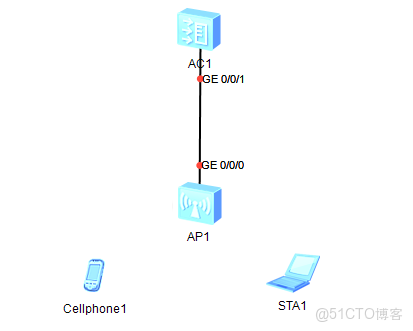
想要完成這樣的部署,需要完成幾步走
1 配置AP-AC之間的二層互通,
2 配置AP-AC的三層互通
3 配置AP上線
4 配置模板
5 下發配置
1 配置ap-ac的二層互通
其實就是保證AC-AP在一個廣播域內,因為默認就是以這種形式AP來發現AC的,
在如下情況,AP會發送Discovery Request廣播報文自動發現同一網段中的AC,然後通過AC響應的Discovery Response報文選擇一個待關聯的AC開始建立CAPWAP隧道。
但需要注意的是,如果AP-AC直接相連,最好不用使用ac上的VLAN1 (儘可能的避免後續的廣播流量)
所以應該全用另外的VLAN,
[AC6005]vlan batch 100 200 //100為capwap 的管理vlan,200為業務 vlan
[AC6005]inter g0/0/1
[AC6005-GigabitEthernet0/0/1]por li tr
[AC6005-GigabitEthernet0/0/1]por tr pvid vlan 100 //設置PVID為100
[AC6005-GigabitEthernet0/0/1]port tr all vlan 100 200 //放行的vlan,(這裏還要取決於後續的轉發方式,共有兩種,直接轉發發和隧道轉發,原理不同,放行的VLAN也不同)
然後配置VLAN100的vlan-if,並且配置dhcp server
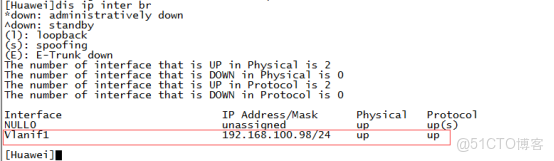
2 配置AP-AC的三層互通(保證AP可以獲得IP地址)
[AC6005]dhcp enable
[AC6005-Vlanif100]inter vlan 100
[AC6005-Vlanif100]ip add 192.168.100.1 24
[AC6005-Vlanif100]dhcp se in //偷個懶,直接從接口調用
3 配置AP上線
有了IP之後,就可以和AC進行通信了,來配置AP上線
3-1 配置AC源地址(capwap隧道的源)
[AC6005]capwap source interface vlan 100
3-2 配置AP上線
[AC6005]wlan
[AC6005-wlan-view]ap-group name wfy //ap組名字叫做wfy
[AC6005-wlan-view]ap-id 0 ap-mac?
ap-mac AP MAC address
[AC6005-wlan-view]ap-id 0 ap-mac ? //添加ap, 從0 開始排數,
MAC_ADDR<XXXX-XXXX-XXXX> AP MAC address
[AC6005-wlan-view]ap-id 0 ap-mac 00e0-fc37-5060 //指定AP的MAC<
Ap的mac就不用我説了吧,到AP上去查一下,
[AC6005-wlan-ap-0]ap-name wfy
[AC6005-wlan-ap-0]ap-group wfy
Warning: This operation may cause AP reset. If the country code changes, it will clear channel, power and antenna gain configurations of the radio, Whether to continue? [Y/N]:y
Info: This operation may take a few seconds. Please wait for a moment.. done.

在AP上可以看到這樣的消息,capwap隧道建立完成
4 配置模板
包括安全模板,ssid 模板 vap模板
[AC6005-wlan-view]security-profile name wfy //安全模板
[AC6005-wlan-sec-prof-wfy]security wpa-wpa2 psk pass-phrase 12345678 aes
Warning: The current password is too simple. For the sake of security, you are advised to set a password containing at least two of the following: lowercase letters a to z, uppercase letters A to Z, digits, and special characters. Continue? [Y/N]:y
[AC6005-wlan-view]ssid-profile name wfy //ssid 模板
[AC6005-wlan-ssid-prof-wfy]ssid wfy
Info: This operation may take a few seconds, please wait.done.
[AC6005-wlan-ssid-prof-wfy]q
[AC6005-wlan-view]vap-profile name wfy //vap 模板
[AC6005-wlan-vap-prof-wfy]ssid-profile wfy //調用SSID模板
Info: This operation may take a few seconds, please wait.done.
[AC6005-wlan-vap-prof-wfy]security-profile wfy //調用安全模板
Info: This operation may take a few seconds, please wait.done.
[AC6005-wlan-vap-prof-wfy]service-vlan vlan-id 200 //定義業務vlan
[AC6005-wlan-vap-prof-wfy]forward-mode tunnel //設置轉發模板
Info: This operation may take a few seconds, please wait.done.
5 配置下發
[AC6005]wlan
[AC6005-wlan-view]ap-group name wfy
[AC6005-wlan-ap-group-wfy]vap-profile wfy wlan 1 radio all
Info: This operation may take a few seconds, please wait...done.
最後不要忘了配置業務 VLAN
[AC6005]inter vlan 200
[AC6005-Vlanif200]ip add 192.168.200.1 24
[AC6005]ip pool vlan200
[AC6005-ip-pool-vlan200]network 192.168.200.0 mas 24
[AC6005-ip-pool-vlan200]gateway-list 192.168.200.1
[AC6005]inter vlan 200
[AC6005-Vlanif200]dhcp se glo
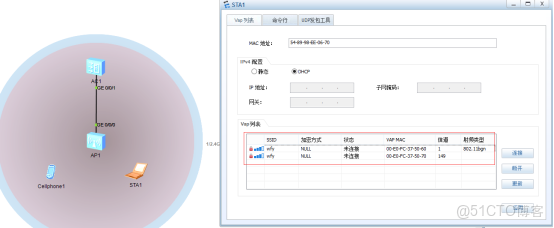

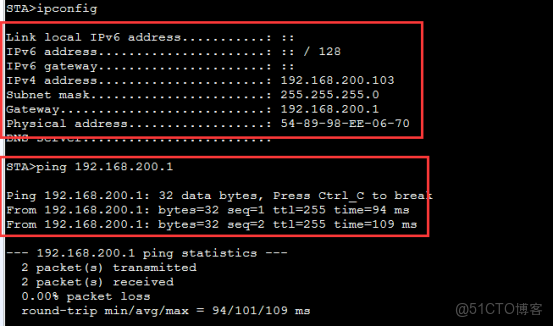
這是最基本的環境
如果説當出現網絡問題,有沒有思路去排錯呢?
不難吧,
先二層,再三層,AP上線,配置模板,下發配置。
