
精靈圖的使用
Spirit,精靈圖,也叫雪碧圖的用法:解決服務器的過多的請求的問題。
現在的網絡越來越快,網速已經不是人們所需要考慮的第一因素了,而隨之帶來的大量的請求卻是給服務器帶來大量的負荷,Spirit的出現就是為了解決當頁面之中出現大量背景圖的請求時的方案。當網頁之中有大量的圖片,每取一次零碎的圖片資源便向服務器請求一次,這無疑不斷的加重服務器的負荷,所以如何將大量的圖片一次性加載到網頁之中,便是我們解決問題的方案之一。所以Spirit的關鍵就是將大量且零碎的圖片整合到一張圖片之中,具體的實現方法如下:
<!DOCTYPE html>
<html lang="en">
<head>
    <meta charset="UTF-8">
    <title>Title</title>
    <style>
        span {
            display: inline-block;
            background: url("img/img.jpg") no-repeat;
            vertical-align: middle;
        }
        .w {
            background-position: -115px bottom;
            width: 138px;
            height: 115px;
        }
        .h {
            background-position: -216px -140px;
            width: 108px;
            height: 109px;
        }
        .o {
            background-position: -369px -275px;
            width: 114px;
            height: 113px;
        }
        .n {
            background-position: -251px -273px;
            width: 117px;
            height: 117px;
        }
        .e {
            background-position: -480px -5px;
            width: 101px;
            height: 112px;
        }

    </style>
</head>
<body>
    <div>
        <span class="w"></span>
        <span class="h"></span>
        <span class="o"></span>
        <span class="n"></span>
        <span class="e"></span>
        <span class="n"></span>
        <span class="o"></span>
        <span class="w"></span>
    </div>
</body>
</html>
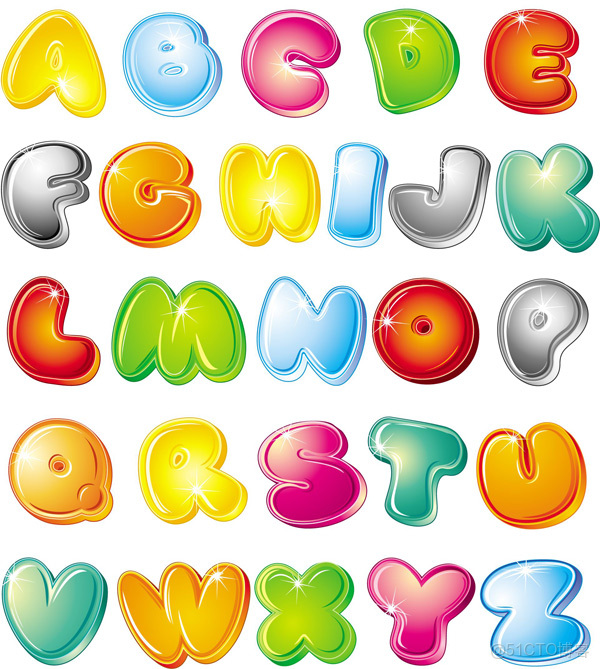
下圖便是用來定位的圖片
以下是實現的效果

如代碼所示,精靈圖的關鍵便是圖片的定位,如何在一張大的圖片之中找到自己想要的那張圖片,便是實現精靈圖的方法。
明天開始繼續學習爬蟲的知識,之前有學過這方面的,不過只學了一點便放下了。學習的路途永無止境,願我們不忘初心。
本文章為轉載內容,我們尊重原作者對文章享有的著作權。如有內容錯誤或侵權問題,歡迎原作者聯繫我們進行內容更正或刪除文章。
