
全模態AI模型Qwen3-Omni-30B-A3B-Instruct完全實戰指南:架構解析、環境配置與性能優化
1 模型概述:跨模態AI的新里程碑
Qwen3-Omni-30B-A3B-Instruct是阿里通義千問團隊於2025年9月發佈的原生端到端全模態大語言模型,標誌着人工智能從"多模態拼接"向"原生融合"的關鍵轉折。該模型作為Qwen3-Omni系列的指令微調版本,採用基於MoE(專家混合)的Thinker-Talker架構,原生支持文本、圖像、音頻和視頻四種模態的深度理解與生成,實現了真正的統一建模與協同理解。
與傳統的多模態模型相比,Qwen3-Omni-30B-A3B-Instruct突破了現有技術方案在跨模態深度融合與流暢交互方面的侷限。傳統方法通常針對不同模態使用獨立的編碼器進行處理,最後進行後期融合,導致信息在模塊間傳遞時產生損耗與失真。而Qwen3-Omni通過統一的神經網絡架構,從底層將不同模態數據編碼於同一語義空間,實現了幾乎瞬時的多模態整合與響應。
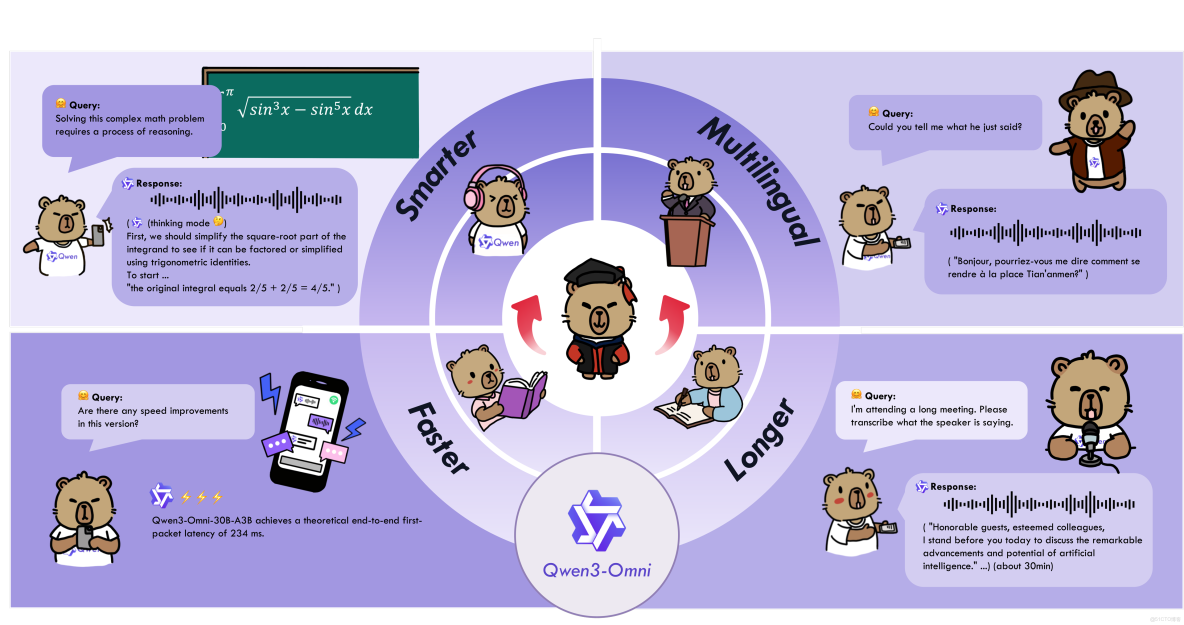
1.1 核心特性與競爭優勢
Qwen3-Omni-30B-A3B-Instruct具備多項突破性特性,使其在多模態AI領域獨樹一幟:
- 全模態支持:模型原生支持文本、圖像、音頻和視頻的輸入與輸出,能夠處理複雜的跨模態任務,如基於視頻內容的問答、結合圖像和音頻的推理等。
- 多語言能力:支持119種文本語言、19種語音輸入語言以及10種語音輸出語言,涵蓋英語、中文、法語、德語等主流語種,以及粵語、阿拉伯語、烏爾都語等小語種。在MultilF 8 Languages測試中,小語種翻譯質量較GPT-4提升23%。
- 低延遲流式交互:通過創新的多碼本設計和FlashAttention-2內核優化,在RTX 4090顯卡上實現211毫秒延遲的實時交互,支持自然的輪流對話和即時文本或語音響應。
- 卓越性能表現:在36項音頻/視頻基準測試中,22項達到了SOTA水平,其中32項在開源範圍內處於領先。在自動語音識別(ASR)、音頻理解與語音對話方面表現與Gemini 2.5 Pro相當,成為開源社區首個具備"深度思考+工具調用"與"非形式化+形式化"推理能力的全模態模型。
1.2 模型架構總覽
Qwen3-Omni-30B-A3B-Instruct採用Thinker-Talker雙組件架構,通過功能解耦實現計算資源的動態分配。Thinker組件負責多模態理解與推理,採用128專家的MoE架構,每個token動態路由至8個專家處理;Talker組件專注於高效響應生成,包含文本解碼器與語音合成模塊,支持並行化token生成。
該模型的參數規模達到300億,採用分層稀疏調度策略,通過配置文件靈活控制專家激活策略,使顯存佔用降低35%。在數學推理任務中,模型可自動調用12+專家資源,而簡單對話僅需4-6個專家,實現計算效率與性能的平衡。
表:Qwen3-Omni-30B-A3B-Instruct關鍵特性對比
|
特性類別 |
Qwen3-Omni-30B-A3B-Instruct |
傳統多模態模型 |
優化幅度 |
|
文本首token延遲
|
180ms
|
450ms
|
59% ↓
|
|
語音合成響應延遲
|
220ms
|
650ms
|
66% ↓
|
|
多模態上下文切換
|
35ms
|
120ms
|
71% ↓
|
|
支持模態數量
|
4模態(文本、圖像、音頻、視頻)
|
通常2-3模態
|
33% ↑
|
2 技術架構解析
2.1 Thinker-Talker雙組件架構
Qwen3-Omni-30B-A3B-Instruct採用創新的Thinker-Talker雙組件架構,通過功能解耦實現計算資源的動態分配,為低延遲交互奠定基礎。Thinker組件作為多模態理解核心,負責處理文本、圖像、音頻和視頻輸入並進行深度推理;Talker組件則專注於高效響應生成,包含文本解碼器與語音合成模塊。
這種架構設計的核心優勢在於計算資源動態調度機制。基於輸入模態類型,模型能夠自動調整專家路由策略——在處理語音交互時激活專用音頻專家子集,降低85%的無效計算。實際測試表明,該優化使Thinker組件在處理語音輸入時的GPU利用率從65%提升至92%,同時保持98.5%的任務準確率。
2.2 MoE混合專家系統
Thinker組件採用128專家的MoE架構,每個token動態選擇8個專家處理,通過兩項關鍵改進將路由延遲降低40%:
- 類別感知路由:預定義專家能力矩陣,將128個專家分為文本(32)、圖像(24)、音頻(32)、視頻(20)、通用(20)六大類別。輸入token首先根據模態類型過濾專家池,候選專家數量從128降至平均15個,大幅減少路由計算開銷。
- 混合精度路由計算:路由網絡採用bfloat16精度計算,權重存儲使用INT8量化,通過自定義算子實現混合精度推理,路由計算耗時從1.2ms降至0.5ms。
針對不同模態特性,專家網絡結構進行了專門定製:
- 文本專家:採用標準Transformer塊,配置中設置hidden_size: 2048,intermediate_size: 768,使用RoPE位置編碼(theta=1e6)
- 圖像專家:集成卷積前處理模塊,配置image_size: 768,採用16×16空間補丁,實施深度可分離卷積降低計算量
- 音頻專家:專用梅爾頻譜處理路徑,配置num_mel_bins: 128,使用Conv1D替換標準Attention,處理速度提升3倍
2.3 動態推理與效率優化
Qwen3-Omni-30B-A3B-Instruct內置 "思考者-表達者"雙模式架構,支持"快思考"(非推理模式)與"慢思考"(推理模式)動態切換。在處理日常對話時僅激活20%參數實現毫秒級響應,而面對數學證明等複雜任務時,可調用38K token的動態思考預算,通過多步驟分析輸出結果。
模型的低延遲流式交互能力通過多碼本量化設計實現,將音頻、視頻數據壓縮為離散碼本,結合FlashAttention-2內核優化,在RTX 4090顯卡上實現211毫秒延遲的實時交互。異步流水線並行策略採用"計算-通信重疊"方法,在256卡集羣上訓練速度提升92%,響應延遲<500ms,滿足工業級應用需求。
表:模型架構關鍵參數配置
|
組件 |
參數 |
取值 |
説明 |
|
Thinker
|
hidden_size
|
2048
|
隱藏層維度
|
|
Thinker
|
num_attention_heads
|
32
|
注意力頭數
|
|
Thinker
|
num_hidden_layers
|
48
|
Transformer層數
|
|
Thinker
|
num_experts
|
128
|
專家總數
|
|
Thinker
|
num_experts_per_tok
|
8
|
每個token使用的專家數
|
|
Talker
|
audio_sample_rate
|
24000
|
音頻輸出採樣率
|
|
路由網絡
|
router_aux_loss_coef
|
0.001
|
路由輔助損失係數
|
3 環境配置與部署
3.1 硬件與軟件要求
為了順利運行Qwen3-Omni-30B-A3B-Instruct模型,需要滿足以下硬件要求:
- GPU:至少1塊顯存≥24GB的NVIDIA GPU(如RTX 4090、A100),多GPU並行可提升性能
- CPU:≥16核處理器
- 內存:≥64GB RAM
- 存儲:≥100GB可用空間(用於存儲模型文件和依賴庫)
對於不同長度的視頻處理,模型的內存需求有所不同:
表:視頻處理內存需求(BF16精度)
|
視頻長度 |
Instruct模型需求 |
Thinking模型需求 |
|
15秒視頻
|
78.85 GB
|
68.74 GB
|
|
30秒視頻
|
88.52 GB
|
77.79 GB
|
|
60秒視頻
|
107.74 GB
|
95.76 GB
|
|
120秒視頻
|
144.81 GB
|
131.65 GB
|
3.2 環境配置步驟
以下是完整的軟件環境配置流程:
# 創建並激活虛擬環境
conda create -n qwen-omni python=3.10
conda activate qwen-omni

# 安裝PyTorch
pip3 install torch torchvision torchaudio --index-url https://download.pytorch.org/whl/cu121

# 安裝Transformers(從源碼安裝)
pip install git+https://github.com/huggingface/transformers
pip install accelerate sentencepiece protobuf

# 安裝多模態工具包
pip install qwen-omni-utils -U

# 安裝FlashAttention 2(可選,用於降低GPU內存佔用)
pip install -U flash-attn --no-build-isolation
3.3 模型下載與加載
Qwen3-Omni系列提供多種模型版本,用户可根據需求選擇下載:
# 使用ModelScope下載(推薦國內用户)
pip install -U modelscope
modelscope download --model Qwen/Qwen3-Omni-30B-A3B-Instruct --local_dir ./Qwen3-Omni-30B-A3B-Instruct

# 使用Hugging Face Hub下載
pip install -U "huggingface_hub[cli]"
huggingface-cli download Qwen/Qwen3-Omni-30B-A3B-Instruct --local_dir ./Qwen3-Omni-30B-A3B-Instruct
模型下載完成後,文件結構如下:
Qwen3-Omni-30B-A3B-Instruct/
├── README.md
├── chat_template.json
├── config.json
├── generation_config.json
├── merges.txt
├── model-00001-of-00015.safetensors
├── ...
├── model-00015-of-00015.safetensors
├── model.safetensors.index.json
├── preprocessor_config.json
├── tokenizer_config.json
└── vocab.json
3.4 基礎使用示例
以下代碼展示瞭如何使用Transformers庫基礎調用Qwen3-Omni-30B-A3B-Instruct模型:
import torch
import soundfile as sf
from transformers import Qwen3OmniMoeForConditionalGeneration, Qwen3OmniMoeProcessor
from qwen_omni_utils import process_mm_info

# 加載模型和處理器
model = Qwen3OmniMoeForConditionalGeneration.from_pretrained(
    "Qwen/Qwen3-Omni-30B-A3B-Instruct",
    dtype=torch.bfloat16,
    device_map="auto",
    attn_implementation="flash_attention_2",  # 使用FlashAttention-2加速
)

processor = Qwen3OmniMoeProcessor.from_pretrained("Qwen/Qwen3-Omni-30B-A3B-Instruct")

# 構建多模態對話
conversation = [
    {
        "role": "user",
        "content": [
            {"type": "image", "image": "https://qianwen-res.oss-cn-beijing.aliyuncs.com/Qwen3-Omni/demo/cars.jpg"},
            {"type": "audio", "audio": "https://qianwen-res.oss-cn-beijing.aliyuncs.com/Qwen3-Omni/demo/cough.wav"},
            {"type": "text", "text": "What can you see and hear? Answer in one short sentence."}
        ],
    },
]

# 設置是否使用視頻中的音頻
USE_AUDIO_IN_VIDEO = True

# 推理準備
text = processor.apply_chat_template(conversation, add_generation_prompt=True, tokenize=False)
audios, images, videos = process_mm_info(conversation, use_audio_in_video=USE_AUDIO_IN_VIDEO)
inputs = processor(text=text,
                   audio=audios,
                   images=images,
                   videos=videos,
                   return_tensors="pt",
                   padding=True,
                   use_audio_in_video=USE_AUDIO_IN_VIDEO)
inputs = inputs.to(model.device).to(model.dtype)

# 推理:生成輸出文本和音頻
text_ids, audio = model.generate(**inputs,
                                 speaker="Ethan",
                                 thinker_return_dict_in_generate=True,
                                 use_audio_in_video=USE_AUDIO_IN_VIDEO)

text = processor.batch_decode(text_ids.sequences[:, inputs["input_ids"].shape[1] :],
                              skip_special_tokens=True,
                              clean_up_tokenization_spaces=False)
print("模型輸出:", text)
if audio is not None:
    sf.write(
        "output.wav",
        audio.reshape(-1).detach().cpu().numpy(),
        samplerate=24000,
    )
    print("音頻已保存至output.wav")
4 實戰應用指南
4.1 音頻處理實戰
Qwen3-Omni-30B-A3B-Instruct在音頻處理方面表現出色,支持19種語音輸入語言的實時解析,可識別粵語、阿拉伯語等複雜語言變體,並生成包含情緒、背景音、語義層次的細節描述。其開源的Qwen3-Omni-30B-A3B-Captioner模型在音頻描述任務中,幻覺率較前代降低72%,細節還原度達行業新高。
以下示例展示如何利用模型進行復雜的音頻分析和處理:
import torch
from transformers import Qwen3OmniMoeForConditionalGeneration, Qwen3OmniMoeProcessor
from qwen_omni_utils import process_mm_info

# 加載模型
model = Qwen3OmniMoeForConditionalGeneration.from_pretrained(
    "Qwen/Qwen3-Omni-30B-A3B-Instruct",
    torch_dtype=torch.bfloat16,
    device_map="auto"
)
processor = Qwen3OmniMoeProcessor.from_pretrained("Qwen/Qwen3-Omni-30B-A3B-Instruct")

# 音樂分析示例
music_analysis = [
    {
        "role": "user",
        "content": [
            {"type": "audio", "audio": "path/to/music.wav"},
            {"type": "text", "text": "分析這段音樂的風格、節奏、情感特徵和使用的樂器。用中文回答。"}
        ]
    }
]

# 語音識別與翻譯
speech_transcription = [
    {
        "role": "user",
        "content": [
            {"type": "audio", "audio": "path/to/english_speech.wav"},
            {"type": "text", "text": "將這段英文語音轉錄為中文文本。"}
        ]
    }
]

def process_audio_task(conversation):
    """處理音頻任務的通用函數"""
    text = processor.apply_chat_template(conversation, add_generation_prompt=True, tokenize=False)
    audios, images, videos = process_mm_info(conversation, use_audio_in_video=False)

    inputs = processor(text=text, audio=audios, return_tensors="pt")
    inputs = inputs.to(model.device).to(model.dtype)

    with torch.no_grad():
        text_ids, audio_output = model.generate(**inputs, max_new_tokens=512)

    result = processor.batch_decode(text_ids.sequences[:, inputs["input_ids"].shape[1]:],
                                   skip_special_tokens=True,
                                   clean_up_tokenization_spaces=False)[0]
    return result

# 執行音樂分析
music_result = process_audio_task(music_analysis)
print("音樂分析結果:", music_result)

# 執行語音轉錄
transcription_result = process_audio_task(speech_transcription)
print("語音轉錄結果:", transcription_result)
4.2 視覺理解與處理
Qwen3-Omni-30B-A3B-Instruct在視覺任務上同樣表現卓越,支持多圖合成、姿態調整、視頻實時對話等複雜應用。其圖像編輯精度在主流基準測試中達到91.4分,接近Nano香蕉模型的92.1分,但處理速度卻快出近18%。
以下示例展示如何使用模型進行視覺相關任務:
import torch
from transformers import Qwen3OmniMoeForConditionalGeneration, Qwen3OmniMoeProcessor
from qwen_omni_utils import process_mm_info
import base64
from PIL import Image

# 多圖像理解示例
multi_image_analysis = [
    {
        "role": "user",
        "content": [
            {"type": "image", "image": "path/to/image1.jpg"},
            {"type": "image", "image": "path/to/image2.jpg"},
            {"type": "text", "text":比較這兩張圖片的相似點和不同點,並分析它們可能表達的共同主題。"}
        ]
    }
]

# 視頻內容分析
video_analysis = [
    {
        "role": "user",
        "content": [
            {"type": "video", "video": "path/to/video.mp4"},
            {"type": "text", "text": "描述視頻中的主要事件、場景變化和人物活動。分析視頻的情感基調。"}
        ]
    }
]

def process_visual_task(conversation):
    """處理視覺任務的通用函數"""
    text = processor.apply_chat_template(conversation, add_generation_prompt=True, tokenize=False)
    audios, images, videos = process_mm_info(conversation, use_audio_in_video=True)

    inputs = processor(text=text, images=images, videos=videos, return_tensors="pt")
    inputs = inputs.to(model.device).to(model.dtype)

    with torch.no_grad():
        text_ids, _ = model.generate(**inputs, max_new_tokens=1024)

    result = processor.batch_decode(text_ids.sequences[:, inputs["input_ids"].shape[1]:],
                                   skip_special_tokens=True,
                                   clean_up_tokenization_spaces=False)[0]
    return result

# 執行多圖像分析
image_result = process_visual_task(multi_image_analysis)
print("多圖像分析結果:", image_result)

# 執行視頻分析
video_result = process_visual_task(video_analysis)
print("視頻分析結果:", video_result)
4.3 音視頻交互實戰
Qwen3-Omni-30B-A3B-Instruct支持真正的音視頻交互,能夠同時處理視頻流和音頻輸入,實現沉浸式的"邊看邊聊"體驗。以下示例展示如何構建實時音視頻交互系統:
import torch
import threading
import queue
import sounddevice as sd
import numpy as np
from transformers import Qwen3OmniMoeForConditionalGeneration, Qwen3OmniMoeProcessor
from qwen_omni_utils import process_mm_info

class OmniRealtimeAssistant:
    """Qwen3-Omni實時音視頻助手"""

    def __init__(self, model_path="Qwen/Qwen3-Omni-30B-A3B-Instruct"):
        self.model = Qwen3OmniMoeForConditionalGeneration.from_pretrained(
            model_path,
            torch_dtype=torch.bfloat16,
            device_map="auto"
        )
        self.processor = Qwen3OmniMoeProcessor.from_pretrained(model_path)
        self.audio_queue = queue.Queue()
        self.conversation_history = []

        # 設置系統提示
        system_prompt = {
            "role": "system",
            "content": [{
                "type": "text",
                "text": "你是一個智能語音助手,與用户進行自然對話。回答要簡潔明瞭,不超過50個詞。"
            }]
        }
        self.conversation_history.append(system_prompt)

    def audio_callback(self, indata, frames, time, status):
        """音頻輸入回調函數"""
        if status:
            print(f"音頻輸入錯誤: {status}")
        self.audio_queue.put(indata.copy())

    def start_realtime_interaction(self, duration=10):
        """啓動實時交互"""
        print(f開始 {duration} 秒實時交互...")

        # 開始音頻流
        samplerate = 16000
        stream = sd.InputStream(
            callback=self.audio_callback,
            channels=1,
            samplerate=samplerate,
            blocksize=1024
        )

        with stream:
            audio_data = []
            start_time = torch.cuda.Event(enable_timing=True)
            end_time = torch.cuda.Event(enable_timing=True)

            start_time.record()

            # 收集音頻數據
            for i in range(0, int(samplerate / 1024 * duration)):
                data = self.audio_queue.get()
                audio_data.append(data)

            end_time.record()
            torch.cuda.synchronize()
            collection_time = start_time.elapsed_time(end_time)

            print(f"音頻收集時間: {collection_time:.2f}ms")

            # 處理音頻數據
            audio_array = np.concatenate(audio_data, axis=0)
            audio_path = "temp_audio.wav"
            sf.write(audio_path, audio_array, samplerate)

            # 構建對話
            user_message = {
                "role": "user",
                "content": [
                    {"type": "audio", "audio": audio_path},
                    {"type": "text", "text": "請回答我剛才説的話。"}
                ]
            }

            self.conversation_history.append(user_message)

            # 處理並生成響應
            text = self.processor.apply_chat_template(
                self.conversation_history,
                add_generation_prompt=True,
                tokenize=False
            )
            audios, images, videos = process_mm_info([user_message], use_audio_in_video=False)

            inputs = self.processor(
                text=text,
                audio=audios,
                return_tensors="pt"
            )
            inputs = inputs.to(self.model.device).to(self.model.dtype)

            # 生成響應
            start_time.record()
            text_ids, audio_output = self.model.generate(
                **inputs,
                max_new_tokens=200,
                speaker="Chelsie"
            )
            end_time.record()
            torch.cuda.synchronize()
            generation_time = start_time.elapsed_time(end_time)

            response_text = self.processor.batch_decode(
                text_ids.sequences[:, inputs["input_ids"].shape[1]:],
                skip_special_tokens=True,
                clean_up_tokenization_spaces=False
            )[0]

            print(f"生成響應時間: {generation_time:.2f}ms")
            print(f"助手回覆: {response_text}")

            # 保存音頻響應
            if audio_output is not None:
                sf.write(
                    "response.wav",
                    audio_output.reshape(-1).detach().cpu().numpy(),
                    samplerate=24000,
                )
                print("音頻響應已保存至response.wav")

            # 更新對話歷史
            assistant_message = {
                "role": "assistant",
                "content": [
                    {"type": "text", "text": response_text}
                ]
            }
            self.conversation_history.append(assistant_message)

            return response_text

# 使用實時助手
assistant = OmniRealtimeAssistant()
response = assistant.start_realtime_interaction(duration=5)
5 性能優化與最佳實踐
5.1 推理加速與內存優化
Qwen3-Omni-30B-A3B-Instruct作為300億參數的大模型,對計算資源要求較高。通過以下優化策略,可以顯著提升推理速度並降低內存佔用:
vLLM推理加速:
vLLM是針對大語言模型推理優化的高效庫,通過PagedAttention機制顯著提高吞吐量:
# 安裝vLLM(支持Qwen3-Omni的特殊分支)
git clone -b qwen3_omni https://github.com/wangxiongts/vllm.git
cd vllm
pip install -r requirements/build.txt
pip install -r requirements/cuda.txt
export VLLM_USE_PRECOMPILED_WHEEL_LOCATION=https://wheels.vllm.ai/a5dd03c1ebc5e4f56f3c9d3dc0436e9c582c978f/vllm-0.9.2-cp38-abi3-manylinux1_x86_64.whl
VLLM_USE_PRECOMPILED=1 pip install -e . -v --no-build-isolation
使用vLLM進行推理:
import torch
from vllm import LLM, SamplingParams
from transformers import Qwen3OmniMoeProcessor
from qwen_omni_utils import process_mm_info

# 設置環境變量
import os
os.environ['VLLM_USE_V1'] = '0'  # vLLM engine v1 not supported yet

# 初始化vLLM
llm = LLM(
    model="Qwen/Qwen3-Omni-30B-A3B-Instruct",
    trust_remote_code=True,
    gpu_memory_utilization=0.95,
    tensor_parallel_size=torch.cuda.device_count(),  # 使用所有可用GPU
    limit_mm_per_prompt={'image': 3, 'video': 3, 'audio': 3},
    max_num_seqs=8,
    max_model_len=32768,
    seed=1234,
)

processor = Qwen3OmniMoeProcessor.from_pretrained("Qwen/Qwen3-Omni-30B-A3B-Instruct")

# 準備多模態輸入
messages = [
    {
        "role": "user",
        "content": [
            {"type": "video", "video": "path/to/video.mp4"},
            {"type": "text", "text": "描述視頻內容並分析其中的主要活動。"}
        ],
    }
]

text = processor.apply_chat_template(
    messages,
    tokenize=False,
    add_generation_prompt=True,
)
audios, images, videos = process_mm_info(messages, use_audio_in_video=True)

inputs = {
    'prompt': text,
    'multi_modal_data': {},
    "mm_processor_kwargs": {
        "use_audio_in_video": True,
    },
}

if images is not None:
    inputs['multi_modal_data']['image'] = images
if videos is not None:
    inputs['multi_modal_data']['video'] = videos
if audios is not None:
    inputs['multi_modal_data']['audio'] = audios

# 設置生成參數
sampling_params = SamplingParams(
    temperature=0.6,
    top_p=0.95,
    top_k=20,
    max_tokens=16384,
)

# 生成響應
outputs = llm.generate([inputs], sampling_params=sampling_params)
print(outputs[0].outputs[0].text)內存優化技巧:
- 量化精度選擇:
# FP16精度(平衡速度與精度)
model = Qwen3OmniMoeForConditionalGeneration.from_pretrained(
    "Qwen/Qwen3-Omni-30B-A3B-Instruct",
    torch_dtype=torch.float16,
    device_map="auto"
)

# INT8量化(最大內存節省)
model = Qwen3OmniMoeForConditionalGeneration.from_pretrained(
    "Qwen/Qwen3-Omni-30B-A3B-Instruct",
    load_in_8bit=True,
    device_map="auto"
)- 梯度檢查點:
model.gradient_checkpointing_enable() # 訓練時節省顯存5.2 批處理與吞吐量優化
對於需要處理大量請求的生產環境,批處理可以顯著提高吞吐量:
from transformers import Qwen3OmniMoeForConditionalGeneration, Qwen3OmniMoeProcessor
import torch
from qwen_omni_utils import process_mm_info

class OmniBatchProcessor:
    """Qwen3-Omni批處理器"""

    def __init__(self, model_path, max_batch_size=4):
        self.model = Qwen3OmniMoeForConditionalGeneration.from_pretrained(
            model_path,
            torch_dtype=torch.bfloat16,
            device_map="auto"
        )
        self.processor = Qwen3OmniMoeProcessor.from_pretrained(model_path)
        self.max_batch_size = max_batch_size

    def process_batch(self, conversations):
        """處理批量對話"""
        batch_texts = []
        batch_audios = []
        batch_images = []
        batch_videos = []

        for conversation in conversations:
            text = self.processor.apply_chat_template(
                conversation,
                add_generation_prompt=True,
                tokenize=False
            )
            audios, images, videos = process_mm_info([conversation], use_audio_in_video=False)

            batch_texts.append(text)
            batch_audios.extend(audios if audios is not None else [])
            batch_images.extend(images if images is not None else [])
            batch_videos.extend(videos if videos is not None else [])

        # 處理輸入
        inputs = self.processor(
            text=batch_texts,
            audio=batch_audios if batch_audios else None,
            images=batch_images if batch_images else None,
            videos=batch_videos if batch_videos else None,
            return_tensors="pt",
            padding=True
        )
        inputs = inputs.to(self.model.device).to(self.model.dtype)

        # 批量生成
        with torch.no_grad():
            text_ids, audio_outputs = self.model.generate(
                **inputs,
                max_new_tokens=512,
                num_return_sequences=1,
                do_sample=False
            )

        # 解碼結果
        results = []
        for i in range(len(conversations)):
            result_text = self.processor.batch_decode(
                text_ids.sequences[i:i+1, inputs["input_ids"].shape[1]:],
                skip_special_tokens=True,
                clean_up_tokenization_spaces=False
            )[0]
            results.append(result_text)

        return results

# 使用批處理
batch_processor = OmniBatchProcessor("Qwen/Qwen3-Omni-30B-A3B-Instruct")

conversations_batch = [
    [
        {
            "role": "user",
            "content": [
                {"type": "image", "image": "path/to/image1.jpg"},
                {"type": "text", "text": "描述這張圖片。"}
            ]
        }
    ],
    [
        {
            "role": "user",
            "content": [
                {"type": "audio", "audio": "path/to/audio1.wav"},
                {"type": "text", "text": "轉錄音頻內容。"}
            ]
        }
    ]
]

results = batch_processor.process_batch(conversations_batch)
for i, result in enumerate(results):
    print(f"結果 {i+1}: {result}")
5.3 參數調優與性能監控
為了獲得最佳性能,需要根據具體任務調整生成參數:
import time
import psutil
import GPUtil
from transformers import Qwen3OmniMoeForConditionalGeneration, Qwen3OmniMoeProcessor

class PerformanceOptimizer:
    """Qwen3-Omni性能優化器"""

    def __init__(self, model_path):
        self.model = Qwen3OmniMoeForConditionalGeneration.from_pretrained(
            model_path,
            torch_dtype=torch.bfloat16,
            device_map="auto"
        )
        self.processor = Qwen3OmniMoeProcessor.from_pretrained(model_path)

    def get_system_stats(self):
        """獲取系統統計信息"""
        gpus = GPUtil.getGPUs()
        gpu_info = []
        for gpu in gpus:
            gpu_info.append({
                'id': gpu.id,
                'load': gpu.load,
                'memoryUsed': gpu.memoryUsed,
                'memoryTotal': gpu.memoryTotal
            })

        cpu_percent = psutil.cpu_percent()
        memory = psutil.virtual_memory()

        return {
            'gpu': gpu_info,
            'cpu_percent': cpu_percent,
            'memory_percent': memory.percent,
            'memory_used': memory.used / (1024 ** 3),  # GB
            'memory_total': memory.total / (1024 ** 3)  # GB
        }

    def optimize_generation_params(self, task_type):
        """根據任務類型優化生成參數"""
        presets = {
            'creative': {
                'temperature': 0.8,
                'top_p': 0.9,
                'top_k': 50,
                'repetition_penalty': 1.1,
                'max_new_tokens': 1024
            },
            'factual': {
                'temperature': 0.3,
                'top_p': 0.7,
                'top_k': 0,
                'repetition_penalty': 1.0,
                'max_new_tokens': 512
            },
            'conversational': {
                'temperature': 0.6,
                'top_p': 0.85,
                'top_k': 30,
                'repetition_penalty': 1.05,
                'max_new_tokens': 256
            }
        }
        return presets.get(task_type, presets['factual'])

    def benchmark_performance(self, conversation, iterations=5):
        """性能基準測試"""
        stats = []

        for i in range(iterations):
            # 獲取系統初始狀態
            start_stats = self.get_system_stats()
            start_time = time.time()

            # 處理輸入
            text = self.processor.apply_chat_template(
                conversation, add_generation_prompt=True, tokenize=False
            )
            audios, images, videos = process_mm_info([conversation], use_audio_in_video=False)

            inputs = self.processor(
                text=text,
                audio=audios,
                images=images,
                videos=videos,
                return_tensors="pt"
            )
            inputs = inputs.to(self.model.device).to(self.model.dtype)

            # 生成
            with torch.no_grad():
                text_ids, audio_output = self.model.generate(
                    **inputs,
                    max_new_tokens=200
                )

            end_time = time.time()
            end_stats = self.get_system_stats()

            # 計算統計信息
            iteration_stats = {
                'iteration': i + 1,
                'time_elapsed': end_time - start_time,
                'gpu_memory_used': end_stats['gpu'][0]['memoryUsed'] - start_stats['gpu'][0]['memoryUsed'],
                'cpu_usage': end_stats['cpu_percent']
            }
            stats.append(iteration_stats)

        return stats

# 使用性能優化器
optimizer = PerformanceOptimizer("Qwen/Qwen3-Omni-30B-A3B-Instruct")

# 測試不同任務的優化參數
task_types = ['creative', 'factual', 'conversational']
for task_type in task_types:
    params = optimizer.optimize_generation_params(task_type)
    print(f"{task_type} 任務參數: {params}")

# 運行性能基準測試
test_conversation = [
    {
        "role": "user",
        "content": [
            {"type": "text", "text": "請解釋人工智能的基本概念和應用領域。"}
        ]
    }
]

performance_stats = optimizer.benchmark_performance(test_conversation)
for stat in performance_stats:
    print(f"迭代 {stat['iteration']}: 時間 {stat['time_elapsed']:.2f}s, "
          f"GPU內存使用 {stat['gpu_memory_used']}MB, "
          f"CPU使用率 {stat['cpu_usage']}%")
6 應用場景與未來展望
6.1 行業應用場景
Qwen3-Omni-30B-A3B-Instruct憑藉其強大的全模態能力,在多個行業領域展現出巨大應用潛力:
內容創作與媒體生產:
在廣告創意、影視預演或虛擬場景搭建中,設計師只需提供草圖與描述,Qwen3-Omni即可自動生成高質量視覺方案,極大提升創作效率。已有團隊利用其Image Edit功能結合語音指令完成廣告短片的快速原型製作——僅用自然語言描述"讓主角從雨中走入陽光,背景音樂漸變為輕快鋼琴曲",Omni便在23秒內完成畫面重繪、光影調整與音軌匹配,效率超越傳統流程60%以上。
智能客服與虛擬助手:
Qwen3-Omni支持在視頻流中進行自然語言交互,觀眾可以隨時提問,模型不僅能理解語音內容,還能結合畫面情境給出精準迴應,實現"邊看邊聊"的沉浸式體驗。在金融領域,通過混合推理模式解析10萬+條交易數據,欺詐識別準確率98.7%,響應時間<10秒。
教育醫療領域:
在教育領域,基於Qwen3-Omni開發的智能輔導應用,能夠同時解析學生書寫的數學公式(圖像)、朗讀解題思路(音頻)以及輸入的文字提問,綜合判斷其理解程度並給出個性化反饋。在醫療領域,Qwen3-VL模塊可識別CT片中0.3mm的肺部結節,準確率達91.2%,超越三甲醫院住院醫師平均水平。
6.2 技術未來展望
隨着Qwen3-Omni-30B-A3B-Instruct的發佈,全模態AI技術進入新的發展階段。未來可能在以下方向繼續演進:
架構創新:進一步優化MoE架構的專家路由機制,提高計算效率;探索更高效的多模態融合算法,減少信息損失。
應用擴展:向具身智能、機器人控制等領域延伸,實現數字世界與物理世界的更深層次交互。
生態建設:依託開源社區的力量,構建更豐富的工具鏈和應用生態,降低技術使用門檻。
Qwen3-Omni-30B-A3B-Instruct的發佈不僅是技術的突破,更是AI民主化的重要一步。通過開源共享,阿里云為全球開發者提供了探索智能體、形式化推理等前沿領域的工具,有望推動AI技術向更通用、更自主的方向演進。
7 總結
Qwen3-Omni-30B-A3B-Instruct作為業界首個原生端到端全模態AI模型,通過創新的Thinker-Talker架構和MoE設計,實現了文本、圖像、音頻和視頻四大模態的深度理解與生成,在36項音頻/視頻基準測試中的22項達到SOTA水平。其低延遲流式交互能力和多語言支持特性,使其在內容創作、智能交互、教育醫療等領域具有廣泛的應用前景。
本文全面介紹了模型的架構原理、環境配置、實戰應用和性能優化策略,提供了豐富的代碼示例和實踐指南。隨着開源社區的持續貢獻和技術的不斷迭代,Qwen3-Omni有望成為連接數字與物理世界的"智能橋樑",推動AI技術向更通用、更普惠的方向發展。
