
IP路由基礎配置
一、配置公網的IPv4 FRR功能示例
通過配置公網IPv4 FRR,主鏈路故障時,流量可以快速切換到備份鏈路。
組網需求
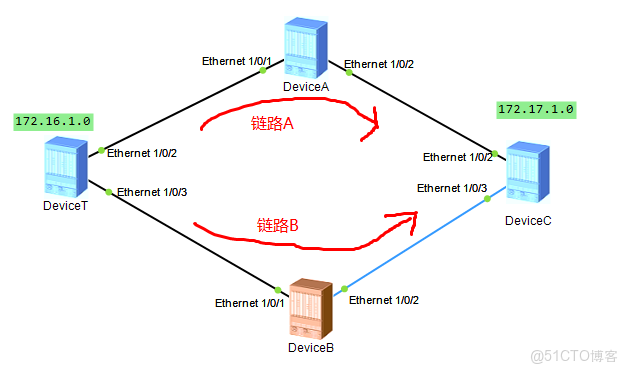
如下圖所示,要求在DeviceT上備份出接口和備份下一跳,使得鏈路B為鏈路A的備份,當鏈路A出現故障時,流量可以快速切換至鏈路B上。
配置公網IPv4 FRR功能組網圖
配置思路
1、在DeviceT、DeviceA和DeviceC上使能OSPF基本功能
2、在DeviceT、DeviceB和DeviceC上使能ISIS基本功能
3、在DeviceT上使能公網IPv4 FRR功能,查看備份出接口和備份下一跳的信息。
4、IPv4 Frr去使能後,查看備份出接口和備份下一跳的信息。
操作步驟
1、配置各個接口的IP地址
|
設備名稱 |
接口 |
IP地址 |
|
DeviceT |
Ethernet1/0/1 |
172.16.1.1/24 |
|
Ethernet1/0/2 |
192.168.10.1/24 |
|
|
Ethernet1/0/3 |
192.168.20.1/24 |
|
|
DeviceA |
Ethernet1/0/1 |
192.168.10.2/24 |
|
Ethernet1/0/2 |
192.168.11.2/24 |
|
|
DeviceB |
Ethernet1/0/1 |
192.168.20.2/24 |
|
Ethernet1/0/2 |
192.168.21.2/24 |
|
|
DeviceC |
Ethernet1/0/1 |
172.17.1.1/24 |
|
Ethernet1/0/2 |
192.168.11.1/24 |
|
|
Ethernet1/0/3 |
192.168.21.1/24 |
2、在DeviceT、DeviceA和DeviceC上配置OSPF
DeviceT
ospf 1
area 0.0.0.0
network 192.168.10.0 0.0.0.255
area 0.0.0.1
network 172.16.1.0 0.0.0.255
DeviceA
ospf 1
area 0.0.0.0
network 192.168.10.0 0.0.0.255
network 192.168.11.0 0.0.0.255
DeviceC
ospf 1
area 0.0.0.0
network 192.168.11.0 0.0.0.255
network 192.168.21.0 0.0.0.255
area 0.0.0.2
network 172.17.1.0 0.0.0.255
3、在DeviceT、DeviceB和DeviceC上配置IS-IS
DeviceT
#
isis 1
network-entity 10.0000.0000.0001.00
#
interface GigabitEthernet1/0/3
undo shutdown
ip address 192.168.20.1 255.255.255.0
isis enable 1
#
DeviceB
#
isis 1
network-entity 10.0000.0000.0002.00
#
interface Ethernet1/0/1
undo shutdown
ip address 192.168.20.2 255.255.255.0
isis enable 1
#
interface GigabitEthernet1/0/2
undo shutdown
ip address 192.168.21.2 255.255.255.0
isis enable 1
#
DeviceC
#
isis 1
network-entity 10.0000.0000.0003.00
#
interface Ethernet1/0/1
undo shutdown
ip address 172.17.1.1 255.255.255.0
isis enable 1
#
interface Ethernet1/0/3
undo shutdown
ip address 192.168.21.1 255.255.255.0
isis enable 1
#
4、查看路由信息
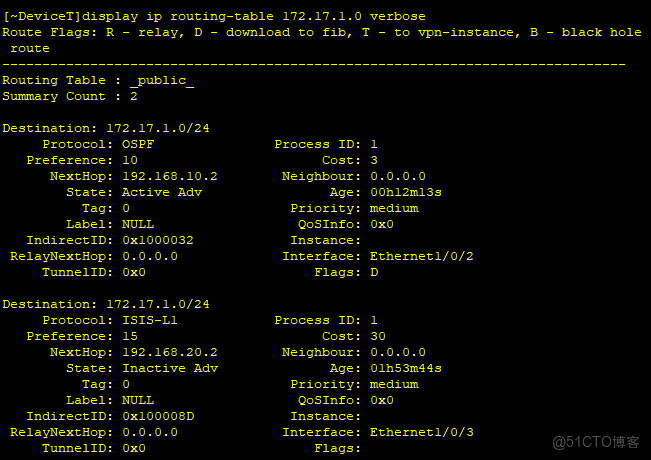
(因為OSPF路由的優先級比IS-IS路由的優先級高一些)。
5、使能公網IPv4 FRR功能
#在DeviceT上使能FRR功能
#
ip frr
#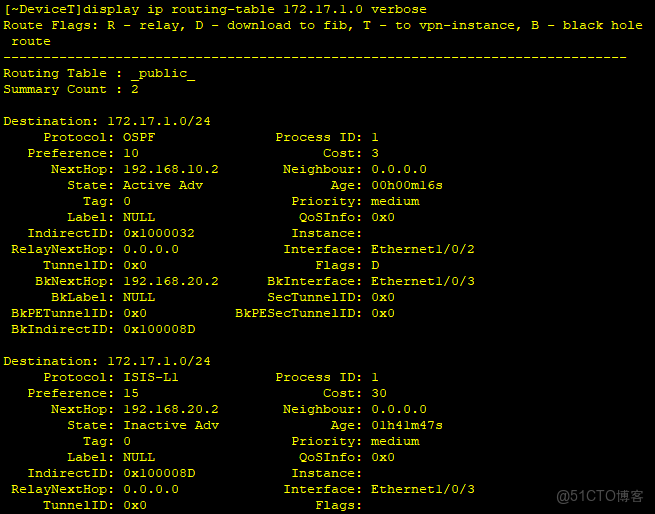
從路由表中可以看到:到達目的地址172.17.1.0/24的路由有備份出接口和備份下一跳(IS-IS路由成為了備份路由)。
6、檢查配置結果
在DeviceT上模擬鏈路故障
[~DeviceT]interface Ethernet 1/0/2
[~DeviceT-Ethernet1/0/2]shutdown
[*DeviceT-Ethernet1/0/2]commit
[~DeviceT-Ethernet1/0/2]quit
在DeviceT上查看到172.17.1.0/24路由的路由信息
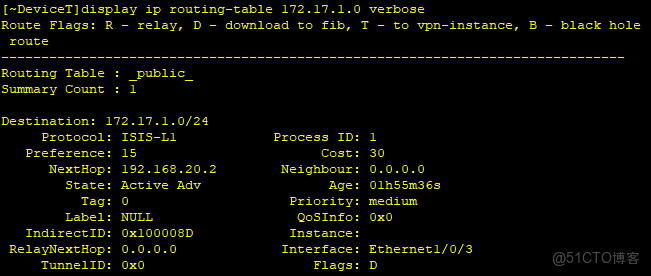
可以看到當鏈路A發生故障時,轉發路徑會快速切換到鏈路B上去。
