

前言
目前接觸最多的登錄方式是使用用户名和密碼進行登錄,現在嘗試寫了使用阿里雲短信通道完成手機驗證碼登錄,參考歷史上老師和學長寫過的代碼,將基本流程進行完成。
準備工作
首先參考阿里雲官方文檔進行準備工作
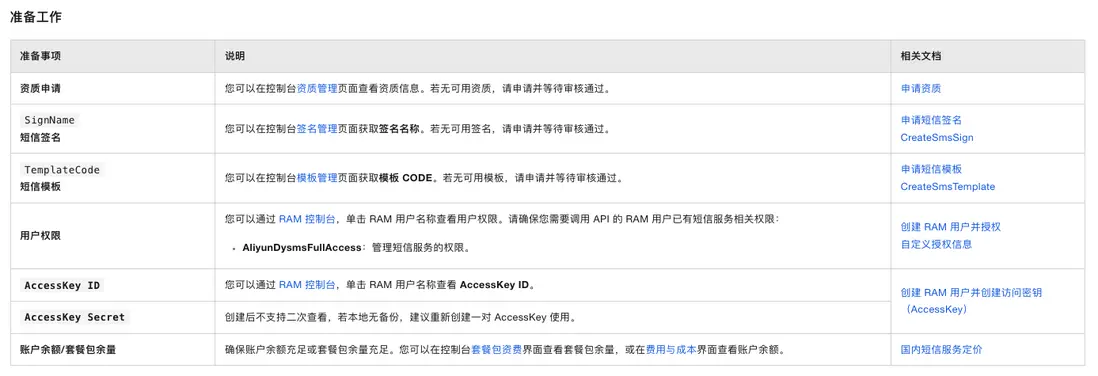
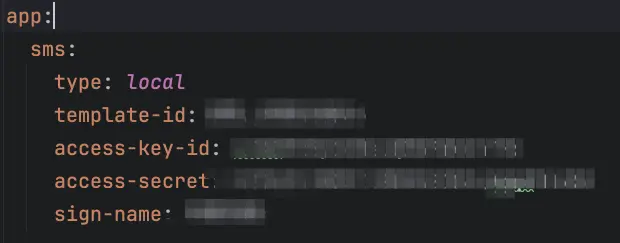
本文方便後續統一更改,將這些信息放到了application中進行配置。
在該配置中,可以配置使用不同的服務,目前先使用本地測試,待基本邏輯打通後便可以改成其他方式進行測試。
我的項目暫時使用阿里雲 Java SDK 的核心功能,所以添加這個 Maven 依賴來引入 SDK。
<dependency>
    <groupId>com.aliyun</groupId>
    <artifactId>aliyun-java-sdk-core</artifactId>
    <version>4.0.3</version>
</dependency>
短信服務工廠與實現類
採用工廠模式 + 策略模式 ,短信服務選擇流程如下:
策略模式:
抽象策略接口
/**
 * 短信服務接口
 */
public interface ShortMessageService {
    /**
     * 獲取當前驗證碼的實現類型
     */
    Short getType();

    /**
     * 發送驗證碼
     *
     * @param phoneNumber 手機號(僅支持大陸手機號)
     * @param code        驗證碼
     */
    void sendValidateCode(String phoneNumber, String code);

    void sendValidateCode(String phoneNumber);
}
多個可互換的策略實現
- 本地控制枱策略
/**
 * 本地打印短信服務實現類
 */
@Service
public class ConsoleShortMessageServiceImpl implements ShortMessageService {
    private static final Logger logger = LoggerFactory.getLogger(ConsoleShortMessageServiceImpl.class);

    @Override
    public Short getType() {
        return ShortMessageType.local.getCode();
    }

    @Override
    public void sendValidateCode(String phoneNumber, String code) {
        Assert.isTrue(Utils.isMobile(phoneNumber), "傳入的手機號格式不正確");
        logger.info("目標手機號: {}, 驗證碼: {}", phoneNumber, code);
    }

    @Override
    public void sendValidateCode(String phoneNumber) {
        this.sendValidateCode(phoneNumber, Utils.generateRandomNumberCode(4));
    }
}
本地打印:

- 阿里雲短信策略
創建阿里雲客户端、構造請求、填充模板、併發送短信,並且會把錯誤輸出日誌
@Service
public class AliShortMessageServiceImpl implements ShortMessageService {
    private static final Logger logger = LoggerFactory.getLogger(AliShortMessageServiceImpl.class);

    private final ShortMessageProperties shortMessageProperties;

    public AliShortMessageServiceImpl(ShortMessageProperties shortMessageProperties) {
        this.shortMessageProperties = shortMessageProperties;
    }

    @Override
    public Short getType() {
        return ShortMessageType.ali.getCode();
    }

    /**
     * 發送驗證碼
     * @param phoneNumber 手機號(僅支持大陸手機號)
     * @param code        驗證碼
     */
    @Async
    @Override
    public void sendValidateCode(String phoneNumber, String code) {
        JsonObject jsonObject = new JsonObject();
        jsonObject.addProperty("code", code);
        this.sendShortMessage(jsonObject, phoneNumber, this.shortMessageProperties.getTemplateId());
    }

    @Async
    @Override
    public void sendValidateCode(String phoneNumber) {
        this.sendValidateCode(phoneNumber, Utils.generateRandomNumberCode(4));
    }

    private void sendShortMessage(JsonObject jsonObject, String phoneNumber, String templateCode) {
        // 校驗手機號格式
        Assert.isTrue(Utils.isMobile(phoneNumber), "傳入的手機號格式不正確");

        // 創建阿里雲通信客户端,連接阿里雲短信服務器的客户端
        DefaultProfile profile = DefaultProfile.getProfile(
                this.shortMessageProperties.getRegionId(),
                this.shortMessageProperties.getAccessKeyId(),
                this.shortMessageProperties.getAccessSecret());

        IAcsClient client = new DefaultAcsClient(profile);

        // 構建一個短信請求對象
        CommonRequest request = new CommonRequest();
        request.setMethod(MethodType.POST);
        request.setDomain(this.shortMessageProperties.getDomain());
        request.setAction("SendSms");
        request.setVersion("2017-05-25");
        request.putQueryParameter("RegionId", this.shortMessageProperties.getRegionId());
        request.putQueryParameter("PhoneNumbers", phoneNumber);
        request.putQueryParameter("SignName", this.shortMessageProperties.getSignName());
        request.putQueryParameter("TemplateCode", templateCode);
        request.putQueryParameter("TemplateParam", jsonObject.toString());
        try {
            CommonResponse response = client.getCommonResponse(request);
            Gson gson = new Gson();
            JsonObject jsonResponse = gson.fromJson(response.getData(), JsonObject.class);
            if (!jsonResponse.get("Code").getAsString().equals("OK")) {
                logger.error(phoneNumber + "發送短信發生錯誤:" + response.getData());
            }

        } catch (ServerException e) {
            logger.error(String.format("驗證碼發送發生服務端錯誤:%s,手機號:%s,內容:%s", e.getMessage(), phoneNumber, jsonObject.toString()));
            e.printStackTrace();
            throw new RuntimeException("驗證碼發送失敗(服務端錯誤)", e);
        } catch (ClientException e) {
            logger.error(String.format("驗證碼發送發生客户端錯誤:%s,手機號:%s,內容:%s", e.getMessage(), phoneNumber, jsonObject.toString()));
            e.printStackTrace();
            throw new RuntimeException("驗證碼發送失敗(客户端錯誤)", e);
        }
    }
}
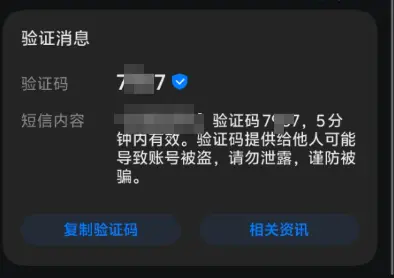
阿里雲發送模式:
工廠模式:
短信服務工廠類用於統一管理並選擇短信發送策略。
通過掃描所有短信實現類,將其按照類型映射到一個 Map 中,並根據配置文件或傳入參數返回對應的短信發送實現類。
/**
 * 短信服務工廠類
 */
@Component
public class ShortMessageServiceFactory {
    private static final Logger logger = LoggerFactory.getLogger(ShortMessageServiceFactory.class);

    private final Short smsTypeValue;

    private final Map<Short, ShortMessageService> serviceMap;

    public ShortMessageServiceFactory(ShortMessageProperties shortMessageProperties,
                                      List<ShortMessageService> shortMessageServices) {
        this.serviceMap = shortMessageServices.stream()
                .collect(Collectors.toConcurrentMap(
                        ShortMessageService::getType,
                        Function.identity(),
                        (existing, replacement) -> {
                            logger.warn("發現重複的 ShortMessageService type: {}, 保留第一個", existing.getType());
                            return existing;
                        }
                ));
        this.smsTypeValue = shortMessageProperties.getType().getCode();
        logger.info("短信服務工廠完成初始化,默認類型:{}", smsTypeValue);
    }

    /**
     * 根據配置文件獲取默認類型的service
     */
    public ShortMessageService getDefaultService() {
        return serviceMap.get(this.smsTypeValue);
    }

    public ShortMessageService getService(short type) {
        ShortMessageService service = serviceMap.get(type);
        if (service == null) {
            throw new RuntimeException("不支持的短信類型:" + type);
        }
        return service;
    }
}
發送驗證碼與登錄實現
需要前後台進行對接,時序圖如下:
請求手機發送驗證碼及收到響應
涉及到手機驗證碼的安全問題,我們增加一個CodeCache,一個驗證碼的小型生命週期管理器。
主要解決以下問題:
1.防止同一個手機號在短時間內瘋狂發送驗證碼(限制發送頻率)
2.防止驗證碼無限試錯(限制用户嘗試次數)
3.驗證碼必須過期(安全要求)
4.對每一個手機號保存單獨的驗證碼狀態(需要一個容器)
public static class CodeCache {
    // 驗證碼
    private String code;

    // 存入的時間
    private Calendar time;

    /**
     * 被獲取的次數
     * 驗證碼每被獲取1次,該值加1
     */
    private int getCount = 0;

    public CodeCache(String code) {
        this(code, Calendar.getInstance());
    }

    public CodeCache(String code, Calendar time) {
        this.code = code;
        this.time = time;
    }

    public String getCode() {
        this.getCount++;
        return this.code;
    }

    public void setCode(String code) {
        this.code = code;
    }

    public Calendar getTime() {
        return this.time;
    }

    public void setTime(Calendar time) {
        this.time = time;
    }

    boolean isEffective(int effectiveTimes) {
        if (this.time == null) {
            return false;
        }

        return Math.abs(this.time.getTimeInMillis() - Calendar.getInstance().getTimeInMillis()) <= effectiveTimes;
    }

    /**
     * 校驗碼是否有效
     *
     * @param effectiveTimes 有效時間
     * @param maxGetCount    最大獲取次數
     */
    boolean isEffective(int effectiveTimes, int maxGetCount) {
        if (this.getCount >= maxGetCount) {
            return false;
        }
        return this.isEffective(effectiveTimes);
    }

    /**
     * 校驗碼是否過期
     *
     * @param expiredTimes 過期時間
     * @param maxGetTimes  最大獲取次數
     */
    public boolean isExpired(int expiredTimes, int maxGetTimes) {
        return !this.isEffective(expiredTimes, maxGetTimes);
    }
}
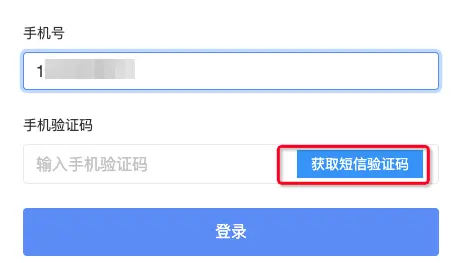
發送短信對接前台:
@PostMapping("sendCode")
public void sendCode(@RequestBody ShortMessageDto.SendCodeRequest request) {
    this.validationCodeService.sendCode(request.getPhone());
}
public String sendCode(String phoneNumber) {
Assert.isTrue(Utils.isMobile(phoneNumber), "電話號碼格式不正確");
if (!this.validateSendInterval(phoneNumber)) {
throw new CallingIntervalIllegalException(String.format("該手機號%s發送頻率過於頻繁", phoneNumber));
}
String code = Utils.generateRandomNumberCode(this.codeLength);
// 調用該方法,在工廠類判斷是那種方式,如果是local,則本地調用發送,如果是ali,則執行實際發送短信邏輯
this.shortMessageService.sendValidateCode(phoneNumber, code);
this.cacheData.put(phoneNumber, new CodeCache(code));
return code;
}
private boolean validateSendInterval(String phoneNumber) {
if (!this.cacheData.containsKey(phoneNumber)) {
return true;
}
return !this.cacheData.get(phoneNumber).isEffective(this.minSendInterval);
}登錄功能:
前台需要傳入手機號和獲取到的驗證碼:
/**
  * 根據手機驗證碼進行登錄
  */
loginBySms(): void {
    const payload = {
      phone: this.formGroup.get('phone')?.value,
      code: this.formGroup.get('code')?.value
    };

    this.userService.loginBySms(payload).pipe(takeUntil(this.ngOnDestroy$))
      .subscribe({
        next: () => {
          this.errorInfo.set([]);
          this.router.navigate(['/']).then();
        }
      });
  }
手機號驗證碼進行登錄相當於是免密登錄:
@PostMapping("/loginBySms")
@JsonView(LoginBySmsJsonView.class)
public User loginBySms(@RequestBody ShortMessageDto.LoginBySmsRequest loginBySmsRequest,
                       HttpServletRequest request) {

    String phone = loginBySmsRequest.getPhone();
    String code = loginBySmsRequest.getCode();

    // 1. 校驗驗證碼
    boolean valid = this.validationCodeService.validateCode(phone, code);
    if (!valid) {
        throw new ValidationException("驗證碼錯誤或已過期");
    }

    // 2.根據手機號查詢該手機號是否與用户進行綁定
    User user = this.userRepository.findByPhoneAndDeletedIsFalse(phone)
            .orElseThrow(() -> new ValidationException("該手機號未綁定用户,請聯繫管理員"));

    // 3.通過用户構建 Authentication
    // 手機驗證碼相當於是免密登錄
    // 只要能提供一個合法的 Authentication,它就認為你登錄了。
    UsernamePasswordAuthenticationToken authToken =
            new UsernamePasswordAuthenticationToken(
                    user,
                    null,  // 沒有密碼
                    user.getAuthorities()
            );

    // 4.創建 SecurityContext 並設置認證信息
    // Spring Security 每次請求都是從 SecurityContext 裏取“當前登錄用户”
    SecurityContext securityContext = SecurityContextHolder.createEmptyContext();
    securityContext.setAuthentication(authToken);

    // 5.將 SecurityContext 存入 session
    request.getSession(true).setAttribute("SPRING_SECURITY_CONTEXT", securityContext);

    return user;
}
檢驗驗證碼是否有效,主要做以下事情:
- 判斷是否為空,為空則無效
- 檢驗緩存中是否存在該手機號,不存在則無效
- 獲取驗證碼,判斷驗證碼是否過期或獲取次數過多
- 如果驗證碼相等則通過,驗證成功後立即刪除,防止二次使用
/**
 * 校驗驗證碼是否有效
 *
 * @param key  鍵
 * @param code 驗證碼
 */
@Override
public boolean validateCode(String key, String code) {
    // 判斷是否為空,為空則無效
    if (code == null) {
        return false;
    }

    // 檢驗緩存中是否存在該手機號,不存在則無效
    if (!this.cacheData.containsKey(key)) {
        return false;
    }

    CodeCache codeCache = this.cacheData.get(key);

    // 判斷驗證碼是否過期或獲取次數過多
    if (codeCache.isExpired(this.expiredTimes, this.maxGetCount)) {
        this.cacheData.remove(key);
        return false;
    }

    this.clearCacheRandom();

    if (code.equals(codeCache.getCode())) {
        this.cacheData.remove(key); // 驗證成功後立即刪除
        return true;
    }
    return false;
}
至此,手機驗證碼登錄功能基本已經實現。
結語
感謝老師和學長提供的學習環境,當團隊中存在示例後作為小白的我們學起來才會顯示輕鬆一點。通過閲讀本文,可以簡單瞭解到利用手機驗證碼登錄的一些知識,如果存在問題,歡迎指出!
