

很多人第一次看到 AI Agent 自己編輯文件、跑代碼、修 bug,還能一直運行下去的時候,都覺得挺神奇。其實遠沒有想象中那麼複雜。這裏沒什麼秘密算法,也沒有什麼"智能體大腦"這種玄學概念。
AI Agent核心就三件事:循環 + LLM + 工具函數。
如果你會寫個
while True循環?那基本就算成功一半了。
這篇文章會完整展示怎麼用 Gemini 3 搭一個真正能用的 Agent:從最基礎的 API 調用,到一個能讀寫文件、理解需求的命令行助手。
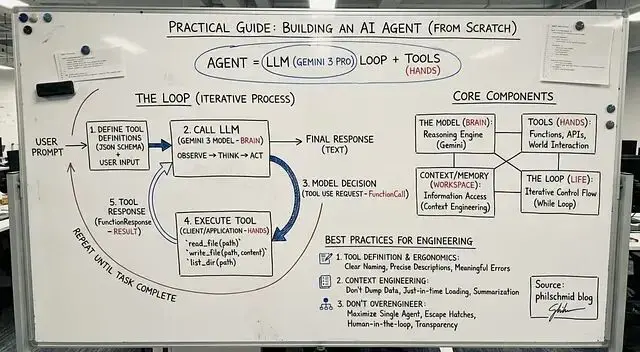
Agent 到底是什麼
傳統程序就是流程圖那一套:步驟 A → 步驟 B → 步驟 C → 結束。
而Agent 不一樣,它會根據當前狀況決定下一步幹什麼。可以理解成圍繞 LLM 搭的一個小系統,比如説:
- 規劃任務
- 執行操作
- 根據結果調整
- 循環往復直到搞定
所以不是寫死的腳本,更像是個會思考的循環。
不管多複雜的 Agent,都逃不開這四個部分:
1、模型 負責思考
這裏用的是 Gemini 3 Pro。它可以分析用户需求,決定接下來該做什麼。
2、工具 負責執行
就是一堆函數:讀文件、列目錄、發郵件、調 API...想加什麼加什麼。
3、上下文工作記憶
模型當前能看到的所有信息,怎麼管理這塊內容,業內叫 Context Engineering。
4、循環 運轉機制
觀察 → 思考 → 行動 → 重複,一直到任務完成。
就這麼四塊,沒別的了。
循環的運行邏輯
幾乎所有 Agent 都是這個流程:
先把可用的工具描述給模型看,然後把用户請求和工具定義一起發給模型。模型會做決策:要麼直接回復,要麼調用某個工具並傳參數。
但是你要寫代碼負責在 Python 裏執行這個工具。
執行完把結果喂回給 Gemini。
模型拿到新信息後繼續判斷下一步。
就這樣循環,直到模型覺得任務完成了。
下面我們開始寫:
第一步:基礎聊天機器人
先寫個 Gemini 3 API 的簡單封裝 ,其實就是個能記住對話的類。
 from google import genai
from google.genai import types

class Agent:
    def __init__(self, model: str):
        self.model = model
        self.client = genai.Client()
        self.contents = []

    def run(self, contents: str):
        self.contents.append({"role": "user", "parts": [{"text": contents}]})

        response = self.client.models.generate_content(
            model=self.model,
            contents=self.contents
        )

        self.contents.append(response.candidates[0].content)
        return response

agent = Agent(model="gemini-3-pro-preview")

response1 = agent.run(
    "Hello, what are the top 3 cities in Germany to visit? Only return the names."
)
 print(response1.text)
上面代碼能跑,但是就是個聊天機器人。它啥也幹不了,因為沒有"手"。
第二步:加入工具函數
工具其實就是 Python 函數 + 一段 JSON schema 描述。描述是給 Gemini 看的,讓它知道這個函數能幹啥。
這裏加三個簡單的:
read_file- 讀文件write_file- 寫文件list_dir- 列目錄
先寫定義:
 read_file_definition = {
    "name": "read_file",
    "description": "Reads a file and returns its contents.",
    "parameters": {
        "type": "object",
        "properties": {
            "file_path": {"type": "string"}
        },
        "required": ["file_path"],
    },
}

list_dir_definition = {
    "name": "list_dir",
    "description": "Lists the files in a directory.",
    "parameters": {
        "type": "object",
        "properties": {
            "directory_path": {"type": "string"}
        },
        "required": ["directory_path"],
    },
}

write_file_definition = {
    "name": "write_file",
    "description": "Writes contents to a file.",
    "parameters": {
        "type": "object",
        "properties": {
            "file_path": {"type": "string"},
            "contents": {"type": "string"},
        },
        "required": ["file_path", "contents"],
    },
 }
然後是實際的 Python 實現:
 def read_file(file_path: str) -> dict:
    with open(file_path, "r") as f:
        return f.read()

def write_file(file_path: str, contents: str) -> bool:
    with open(file_path, "w") as f:
        f.write(contents)
    return True

def list_dir(directory_path: str) -> list[str]:
     return os.listdir(directory_path)
打包一下就搞定了:
 file_tools = {
     "read_file": {"definition": read_file_definition, "function": read_file},
     "write_file": {"definition": write_file_definition, "function": write_file},
     "list_dir": {"definition": list_dir_definition, "function": list_dir},
 }
第三步:真正的 Agent
現在把 Agent 類擴展一下,讓它能:
- 識別工具調用
- 在 Python 裏執行對應的函數
- 把結果傳回 Gemini
- 繼續循環直到完成
 class Agent:
    def __init__(self, model: str, tools: dict,
                 system_instruction="You are a helpful assistant."):
        self.model = model
        self.client = genai.Client()
        self.contents = []
        self.tools = tools
        self.system_instruction = system_instruction

    def run(self, contents):
        # Add user input to history
        if isinstance(contents, list):
            self.contents.append({"role": "user", "parts": contents})
        else:
            self.contents.append({"role": "user", "parts": [{"text": contents}]})

        config = types.GenerateContentConfig(
            system_instruction=self.system_instruction,
            tools=[types.Tool(
                function_declarations=[
                    tool["definition"] for tool in self.tools.values()
                ]
            )],
        )

        response = self.client.models.generate_content(
            model=self.model,
            contents=self.contents,
            config=config
        )

        # Save model output
        self.contents.append(response.candidates[0].content)

        # If model wants to call tools
        if response.function_calls:
            functions_response_parts = []

            for tool_call in response.function_calls:
                print(f"[Function Call] {tool_call}")

                if tool_call.name in self.tools:
                    result = {"result": self.tools[tool_call.name]["function"](**tool_call.args)}
                else:
                    result = {"error": "Tool not found"}

                print(f"[Function Response] {result}")

                functions_response_parts.append(
                    {"functionResponse": {"name": tool_call.name, "response": result}}
                )

            # Feed tool results back to the model
            return self.run(functions_response_parts)

         return response
這樣就可以跑一下試試了:
 agent = Agent(
    model="gemini-3-pro-preview",
    tools=file_tools,
    system_instruction="You are a helpful Coding Assistant. Respond like Linus Torvalds."
)

response = agent.run("Can you list my files in the current directory?")
 print(response.text)
如果沒問題,Gemini 會調工具,拿到結果,然後給出最終回覆。
到這一步,一個能用的 Agent 就搭好了。
第四步:包裝成命令行工具
最後我們在再套個輸入循環就行:
 agent = Agent(
    model="gemini-3-pro-preview",
    tools=file_tools,
    system_instruction="You are a helpful Coding Assistant. Respond like Linus Torvalds."
)

print("Agent ready. Type something (or 'exit').")
while True:
    user_input = input("You: ")
    if user_input.lower() in ['exit', 'quit']:
        break

    response = agent.run(user_input)
     print("Linus:", response.text, "\n")
代碼很少但是效果已經相當不錯了。
總結
搭 Agent 一開始看着挺唬人,但理解了結構之後,會發現簡單得有點無聊。往簡單了説,它就是個循環。一個裏面跑着聰明模型的循環。明白這點之後,你就能造出看起來"有生命"的 Agent 了。
如果想繼續擴展的話,可以加這些:
網絡搜索、數據庫查詢、執行 shell 命令、調用雲服務、長期記憶、工作流編排、任務調度、多步規劃...
但不管怎麼加,底層還是那個簡單結構:
觀察 → 思考 → 行動 → 重複
https://avoid.overfit.cn/post/67cef1690eb14d2fb3ecc0ff7bdf91f8
這就是現代 Agent 的核心。
