

使用命令行方式搭建uni-app + Vue3 + Typescript + Pinia + Vite + Tailwind CSS + uv-ui開發腳手架
項目代碼以上傳至碼雲,項目地址:https://gitee.com/breezefaith/uniapp-vue3-ts-scaffold
一、前言
近日心血來潮想做一個開源項目,目標是做一款可以適配多端、功能完備的模板工程,包含後台管理系統和前台系統,開發者基於此項目進行裁剪和擴展來完成自己的功能開發。但前台系統花樣繁多,可能是PC端瀏覽器,可能是微信網頁,微信小程序,安卓,鴻蒙……因此筆者只能從個人的開發需求出發,搭建了原生vue3版、原生微信小程序版、原生React版和uniapp版的前台系統模板。
創建uniapp項目可以使用官方提供的IDE工具HBuilderX可視化的創建,但項目結構與普通的vue項目有所不同;而使用命令行方式創建的項目,是傳統的node項目結構。工程代碼在src目錄下,編譯器在項目下,編譯結果在dist目錄下。這樣的項目結構更符合筆者的開發習慣。
本文內容主要就是來介紹使用命令行方式搭建uniapp版的前台系統模板工程的完整過程。
二、腳手架技術棧簡介
2.1 uni-app
uni-app 是一個使用 Vue.js 開發所有前端應用的框架,開發者編寫一套代碼,可發佈到iOS、Android、Web(響應式)、以及各種小程序(微信/支付寶/百度/頭條/飛書/QQ/快手/釘釘/淘寶)、快應用等多個平台。
uniapp官方文檔:https://uniapp.dcloud.net.cn/
2.2 vue3
Vue 3 是一個流行的開源JavaScript框架,用於構建用户界面和單頁面應用。Vue 3與Vue 2的主要區別包括:
- 構建:Vue 3使用monorepo架構,更容易管理和維護。
- API:Vue 3引入了新的組合式API,它提供了更靈活的代碼組織方式。
- 性能:Vue 3提供了更好的性能,包括更快的渲染速度和更小的打包大小。
- TypeScript:Vue 3提供了更好的TypeScript支持。
Vue3官方文檔:https://cn.vuejs.org/
2.3 TypeScript
TypeScript是由 Microsoft 開發並維護的開源編程語言,它是在 JavaScript的基礎上增加了靜態類型、類和接口等特性,從而將其提升為一個功能更為豐富的開發平台。TypeScript 通過編譯器將 TypeScript 代碼轉換為 JavaScript 代碼,確保這些代碼能夠在支持 JavaScript 的各種設備和平台上運行。這種設計允許開發者利用 TypeScript 的靜態類型檢查以及類、接口和其他 OOP 功能來構建大型、複雜的 Web 應用,同時享受 JavaScript 本身的高靈活性和易於使用的特點。
Typescript官網文檔:https://www.typescriptlang.org/
2.4 Pinia
Pinia 是 Vue 的存儲庫,它允許您跨組件/頁面共享狀態。 如果您熟悉 Composition API,您可能會認為您已經可以通過一個簡單的 export const state = reactive({}). 這對於單頁應用程序來説是正確的,但如果它是服務器端呈現的,會使您的應用程序暴露於安全漏洞。 但即使在小型單頁應用程序中,您也可以從使用 Pinia 中獲得很多好處:
-
dev-tools 支持
- 跟蹤動作、突變的時間線
- Store 出現在使用它們的組件中
- time travel 和 更容易的調試
-
熱模塊更換
- 在不重新加載頁面的情況下修改您的 Store
- 在開發時保持任何現有狀態
- 插件:使用插件擴展 Pinia 功能
- 為 JS 用户提供適當的 TypeScript 支持或 autocompletion
- 服務器端渲染支持
Pinia 目前也已經是 vue 官方正式的狀態庫。適用於 vue2 和 vue3。可以簡單的理解成 Pinia 就是 Vuex5。也就是説, Vue3 項目,建議使用Pinia。
Pinia官方文檔:https://pinia.web3doc.top/
2.5 Tailwind CSS
Tailwind是一個原子類方式命名的CSS工具集。Tailwind CSS 是一個功能類優先的 CSS 框架,它集成了諸如 flex, pt-4, text-center 和 rotate-90 這樣的的類,它們能直接在腳本標記語言中組合起來,構建出任何設計。它將所有的css屬性全部封裝成語義化的類,比如你想要一個float:left,它已經幫你封裝好了,你直接使用一個float-left就可以。需要一個寬度為12像素,只需要寫w-3就可以。
使用tailwindcss極大的減少代碼量,能輕鬆完成響應式設計,不需要再寫單獨的css,也不需要再為class取個什麼名字而苦惱。
tailwindcss官方文檔:https://tailwindcss.com/
2.6 uv-ui
説到uv-ui,就不得不先從uni-ui和uView説起。uni-ui、uView和uv-ui都是uni-app生態下專用的組件庫。
-
uni-ui 是DCloud官方提供的跨端ui庫,它是基於vue組件的、flex佈局的、無dom的跨全端ui框架。
但此組件庫組件相對較少,設計風格略顯滯後,筆者本人並不是很喜歡。
uni-ui官方文檔:https://uniapp.dcloud.net.cn/component/uniui/uni-ui.html
-
uView從2018年初發布以來,是uni-app生態最優秀的UI框架,全面的組件和便捷的工具會讓您信手拈來,如魚得水。uView2.0,全面兼容了uni-app生態下的nvue開發模式,對1.x進行了架構重構,細節和性能都有極大提升。
但uView是基於vue2實現,在vue3框架下使用會存在諸多問題。
uView官方文檔:https://uviewui.com/
-
uv-ui是兼容vue3+2、nvue、app、h5、多端小程序的uni-app生態框架,大部分組件基於uView2.x,在經過改進後全面支持vue3,部分組件做了進一步的優化,支持單獨導入,方便開發者選擇導入需要的組件。
uv-ui官方文檔:https://www.uvui.cn/
結合本項目的實際情況,筆者最終選擇uv-ui作為項目的ui庫。
2.7 vite
Vite是Vue的作者尤雨溪開發的Web開發構建工具,它是一個基於瀏覽器原生ES模塊導入的開發服務器,在開發環境下,利用瀏覽器去解析import,在服務器端按需編譯返回,完全跳過了打包這個概念,服務器隨啓隨用。同時不僅對Vue文件提供了支持,還支持熱更新,而且熱更新的速度不會隨着模塊增多而變慢。Vue3默認使用Vite作為項目腳手架工具。
Vite官方文檔:https://vitejs.cn/
三、詳細步驟
3.1 Node.js安裝
Vite需要 Node.js 版本 14.18+,16或更高版本。
Tailwind CSS 需要 Node.js 12.13.0 或更高版本。
可使用 node -v命令查看當前node版本,如果不符合要求請先升級Nodejs。
3.2 創建以 typescript 開發的uniapp工程
npx degit dcloudio/uni-preset-vue#vite-ts uniapp-vue3-ts-scaffold項目創建成功後執行以下命令安裝npm依賴。
npm install --registry=https://registry.npmmirror.com
或
yarn install
或
pnpm install
依賴安裝完成後,執行以下命令可運行代碼。
npm run dev:h5
或
npm run dev:mp-weixin
項目創建過程中遇到問題可參考官方文檔https://uniapp.dcloud.net.cn/quickstart-cli.html#clidiff
3.3 集成Pinia
3.3.1 安裝pinia
npm install --registry=https://registry.npmmirror.com pinia@2.0.33
或
yarn add pinia@2.0.33
或
pnpm install pinia@2.0.33
3.3.2 修改main.ts
將src/main.ts修改為以下內容:
import { createSSRApp } from "vue";
import App from "./App.vue";
import * as Pinia from 'pinia';

export function createApp() {
  const app = createSSRApp(App);
  app.use(Pinia.createPinia());

  return {
    app,
    Pinia, // 此處必須將 Pinia 返回
  };
}
3.3.3 創建一個store
// stores/counter.ts
import { defineStore } from 'pinia';

export const useCounterStore = defineStore('counter', {
    state: () => {
        return { count: 0 };
    },
    // 也可以這樣定義
    // state: () => ({ count: 0 })
    actions: {
        increment() {
            this.count++;
        },
    },
});
3.3.4 在組件中使用store
以下代碼template中使用的view、image、text元素是uniapp內置元素,因為uniapp要兼容瀏覽器、小程序和app等多種環境,不建議在uniapp中直接使用瀏覽器所支持的div、span等元素,也不建議在uniapp項目中使用window、document、navigator等只有瀏覽器支持的API。
<template>
  <view>
    <!-- 直接從 store 中訪問 state -->
    <text>Current Count: {{ counter.count }}</text>
  </view>
</template>

<script setup lang="ts">
  import { ref } from 'vue'
  import { useCounterStore } from '@/stores/counter'

  const counter = useCounterStore();
  counter.count++
  // 自動補全!
  counter.$patch({ count: counter.count + 1 })
  // 或使用 action 代替
  counter.increment()
</script>

<style>
</style>
3.4 集成Tailwind CSS
Tailwind CSS 需要 Node.js 12.13.0 或更高版本。對於大多數實際項目,建議將 Tailwind 作為 PostCSS 插件安裝,本文使用的也是該方式。
3.4.1 安裝postcss、sass、autoprefixer、tailwindcss和@uni-helper/vite-plugin-uni-tailwind以及相關依賴
- Sass 是一款強化 CSS 的輔助工具,它在 CSS 語法的基礎上增加了變量 (variables)、嵌套 (nested rules)、混合 (mixins)、導入 (inline imports) 等高級功能,這些拓展令 CSS 更加強大與優雅。使用 Sass 以及 Sass 的樣式庫(如 Compass)有助於更好地組織管理樣式文件,以及更高效地開發項目。
- autoprefixer是一款自動管理瀏覽器前綴的插件,它可以解析CSS文件並且添加瀏覽器前綴到CSS內容裏,使用Can I Use(caniuse網站)的數據來決定哪些前綴是需要的。把autoprefixe添加到資源構建工具(例如Grunt)後,可以完全忘記有關CSS前綴的東西,只需按照最新的W3C規範來正常書寫CSS即可。如果項目需要支持舊版瀏覽器,可修改browsers參數設置 。
- @uni-helper/vite-plugin-uni-tailwind支持在 uni-app 中使用 TailwindCSS 3 原有語法開發小程序。支持 vite v2,v3 和 v4,要求 node >= 14.18。使用這個插件後無需禁用 preflight,也無需調整原有語法(如 .w-[200.5rpx] 等),你只需要正常書寫類名,該插件會替你處理剩下的事情。
執行以下命令安裝依賴:
npm install --registry=https://registry.npmmirror.com --save-dev @uni-helper/vite-plugin-uni-tailwind autoprefixer postcss postcss-comment postcss-html postcss-import postcss-scss sass sass-loader tailwindcss
或
yarn add --save-dev @uni-helper/vite-plugin-uni-tailwind autoprefixer postcss postcss-comment postcss-html postcss-import postcss-scss sass sass-loader tailwindcss
或
pnpm install --save-dev @uni-helper/vite-plugin-uni-tailwind autoprefixer postcss postcss-comment postcss-html postcss-import postcss-scss sass sass-loader tailwindcss
3.4.2 創建配置文件postcss.config.js和tailwind.config.js
3.4.2.1 創建配置文件
使用命令行可以自動創建postcss.config.js和tailwind.config.js配置文件,也可以手動創建。
npx tailwindcss init -p3.4.2.2 修改tailwind.config.js
/** @type {import('tailwindcss').Config} */

module.exports = {
  darkMode: "class",
  content: ["./index.html", "./src/**/*.{vue,js,ts,jsx,tsx}"],
  // 兼容小程序,將 : 替換成 __
  separator: '__',
  theme: {
    // 兼容小程序,將默認配置裏帶 .和/ 清除
  },
  variants: {},
  plugins: [],
  corePlugins: {
    // 兼容小程序,將帶有 * 選擇器的插件禁用
    preflight: false,
    space: false,
    divideColor: false,
    divideOpacity: false,
    divideStyle: false,
    divideWidth: false
  }
};
3.4.2.3 修改postcss.config.js
在postcss配置中主動添加tailwindcss配置文件。
const path = require("path");
const comment = require("postcss-comment");
const tailwindcss = require("tailwindcss");
const autoprefixer = require("autoprefixer");
const postcssImport = require("postcss-import");

module.exports = {
  parser: comment,
  plugins: [
    postcssImport({
      resolve(id, basedir, importOptions) {
        if (id.startsWith("~@/")) {
          return path.resolve(process.env.UNI_INPUT_DIR, id.substr(3));
        } else if (id.startsWith("@/")) {
          return path.resolve(process.env.UNI_INPUT_DIR, id.substr(2));
        } else if (id.startsWith("/") && !id.startsWith("//")) {
          return path.resolve(process.env.UNI_INPUT_DIR, id.substr(1));
        }
        return id;
      },
    }),
    tailwindcss({
      config: "./tailwind.config.js",
    }),
    autoprefixer({
      remove: true,
    }),
  ],
};
3.4.3 修改vite.config.js
在vite配置中主動添加potcss配置文件。
import { defineConfig } from "vite";
import postcssConfig from './postcss.config'
import uni from "@dcloudio/vite-plugin-uni";
import uvtw from '@uni-helper/vite-plugin-uni-tailwind'

// https://vitejs.dev/config/
export default defineConfig({
  css: {
    postcss: postcssConfig,
  },
  plugins: [
    uni(),
    uvtw(),
  ],
});
3.4.4 創建並引入tailwind.css
3.4.4.1 創建tailwind.css
在src目錄下創建styles目錄,在styles目錄下創建tailwind.css。
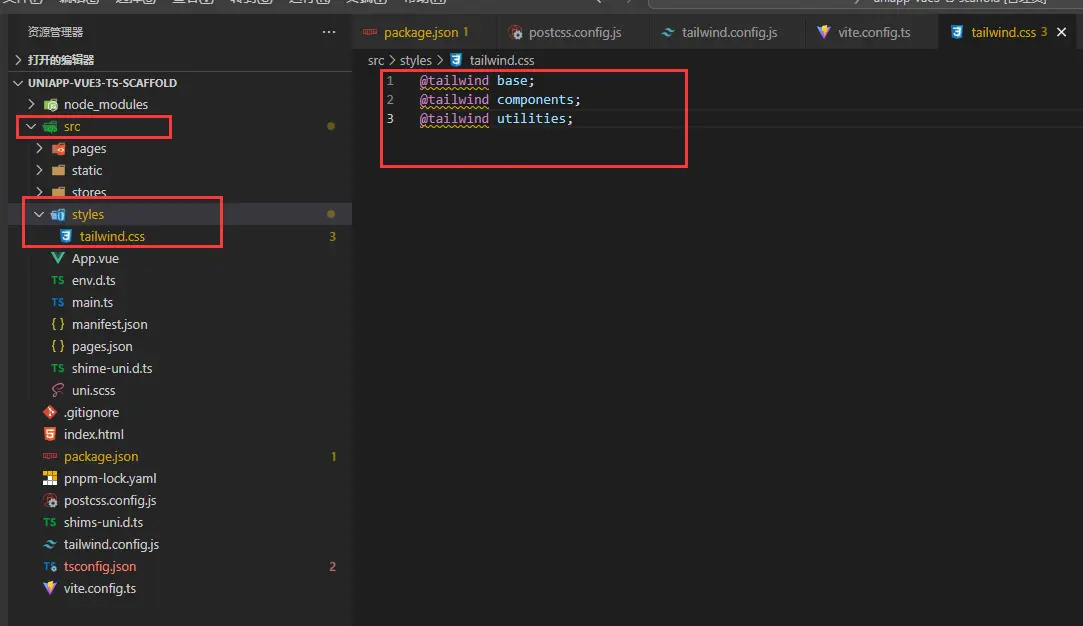
tailwind.css文件內容如下:
@tailwind base;
@tailwind components;
@tailwind utilities;
3.4.4.2 App.vue中引入tailwind.css
配置完成後需要引入tailwindcss,注意不要在main.ts中引入,這會導致APP端不生效,需要在App.vue中引入,這一點上與原生Vue有所區別。
修改src/App.vue內容如下:
<script setup lang="ts">
import { onLaunch, onShow, onHide } from "@dcloudio/uni-app";
onLaunch(() => {
  console.log("App Launch");
});
onShow(() => {
  console.log("App Show");
});
onHide(() => {
  console.log("App Hide");
});
</script>
<style>
@import url('styles/tailwind.css');
</style>
3.4.5 在組件中使用tailwindcss
<template>
    <view class="w-full h-[100px] bg-red flex justify-center items-center">
    <text>Hello Tailwind CSS</text>
    </view>
</template>
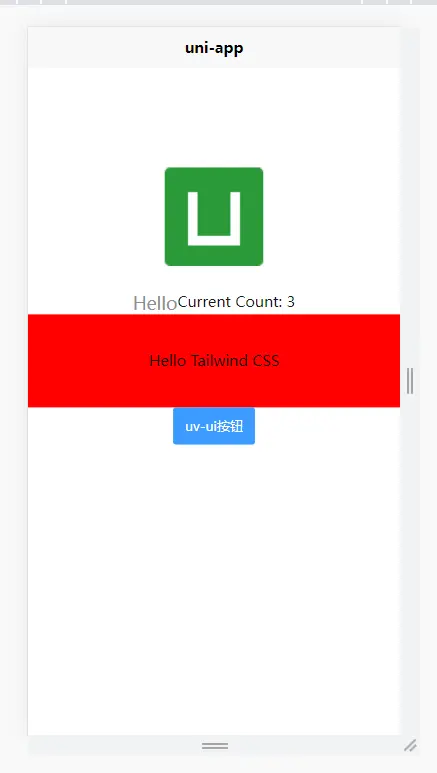
以上代碼定義了一個寬度100%,高度100px,背景是紅色,使用flex佈局,垂直方向和水平方向內容都居中的區域,區域中有一個文本元素,顯示Hello Tailwind CSS。
3.5 集成uv-ui
3.5.1 安裝uv-ui
uv-ui官方推薦使用HbuilderX 方式進行安裝。
插件市場下載入口:https://ext.dcloud.net.cn/plugin?name=uv-ui
使用 Hbuilder X 開發的用户,可以在 uni-app 插件市場通過 uni_modules 的形式進行安裝,此安裝方式可以方便後續在 uni_modules 對 uv-ui 進行一鍵升級,右鍵uni_modules目錄或右鍵某組件,均可進行一鍵升級。
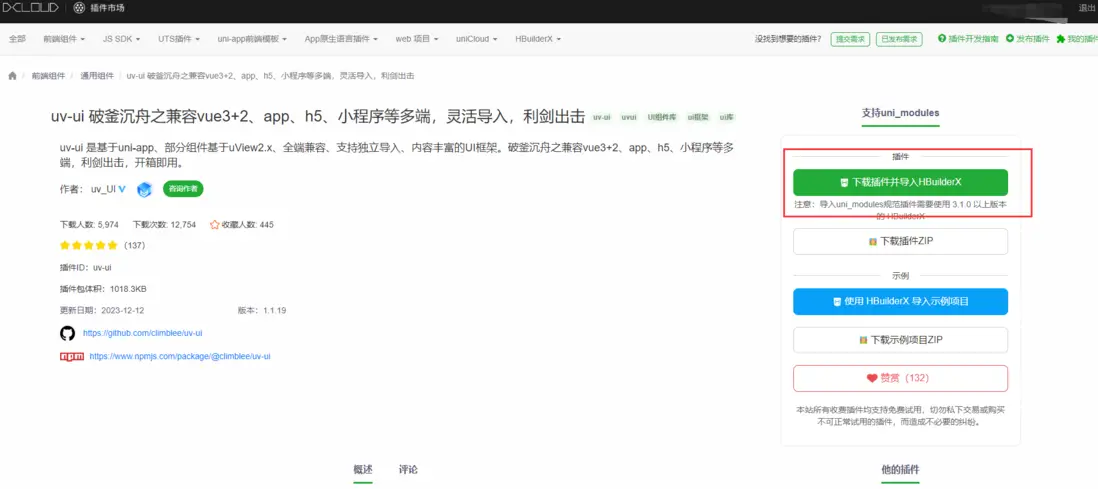
在uni-app插件市場右上角選擇 下載插件並導入HBuilderX,導入到對應的項目中即可。
使用該方式需要註冊並登錄Hbuilder X。下載安裝uv-ui還需要觀看廣告,如果介意可使用其他方式安裝。
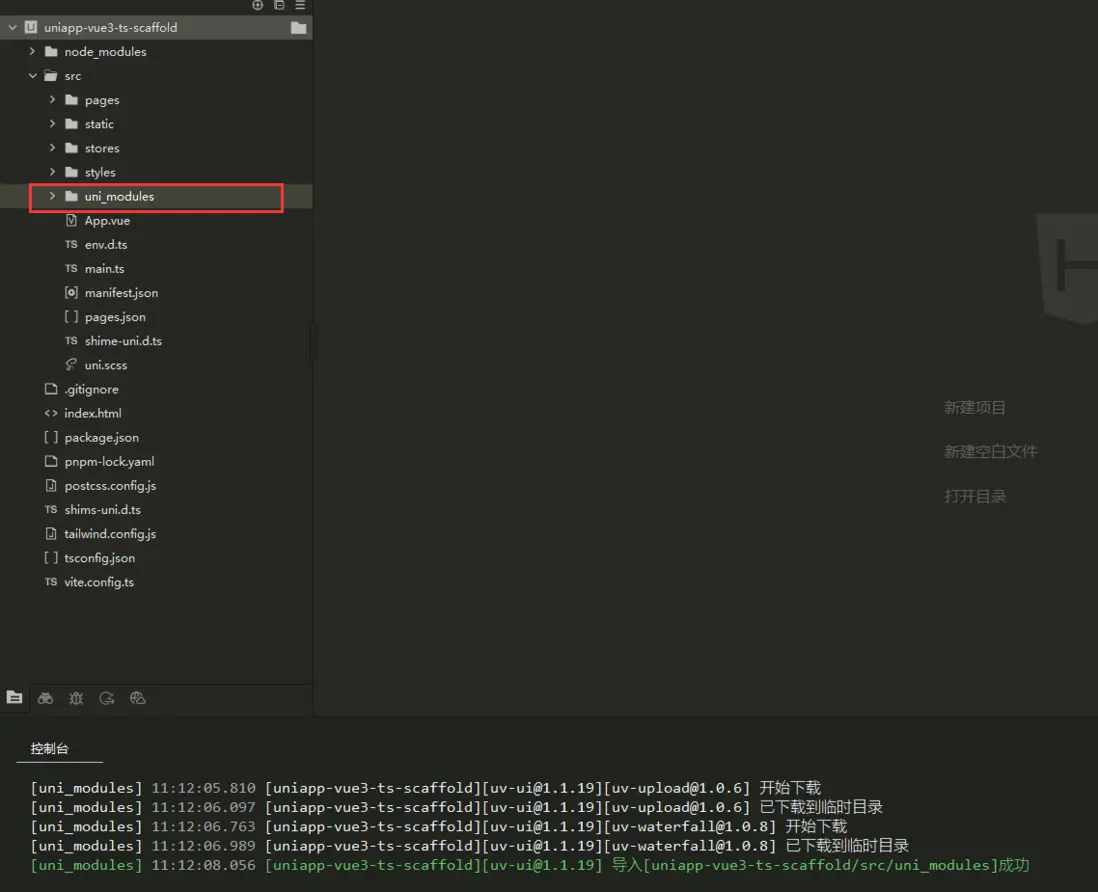
安裝成功後會在src目錄下生成一個uni_modules目錄,目錄下內容都是uv-ui的組件,可以在代碼中直接使用。
3.5.2 在組件中使用uv-ui
<template>
  <view>
      <uv-button type="primary" text="uv-ui按鈕"></uv-button>
    </view>
</template>
以上代碼就是在view中添加了一個uv-ui組件庫的按鈕。
四、總結
在本文中介紹了基於命令行方式搭建一個uniapp工程腳手架的完整過程,希望本文能對您有所幫助。
項目代碼以上傳至碼雲,項目地址:https://gitee.com/breezefaith/uniapp-vue3-ts-scaffold
