
vue表單vxe-form如何多字段聯動校驗,對一個控件校驗多個關聯字段。正常的表單場景是一個控件一個字段,那麼配置起來非常任意,一個字段對應一個校驗規則。當時某些複雜場景就不一樣了,比如用户控件,有id/code/role等。比如範圍日期選擇,一個控件是對應2個字段的,開始日期和結束日期。這個時候就可以使用 rule 規則中 to 屬性來指定複雜的多字段校驗。
https://vxetable.cn
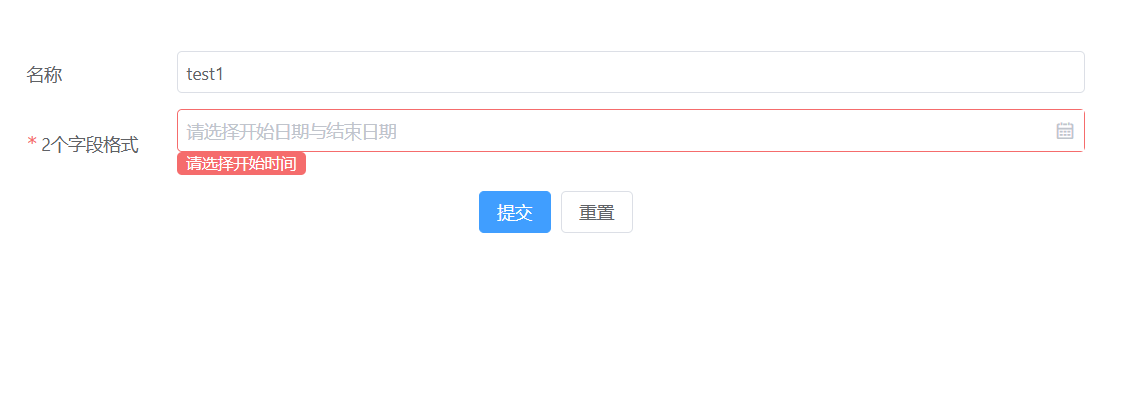
表單-日期範圍-多字段校驗
舉個例子,比如日期範圍選擇,有2個字段,先給控件綁定一個不存在的字段,然後在這個字段裏面配置2條規則,分別校驗多個字段;當某個字段為空時都能被直接校驗並提示出來
<template>
  <div>
    <vxe-form v-bind="formOptions" v-on="formEvents" ></vxe-form>
  </div>
</template>

<script setup>
import { reactive } from 'vue'
import { VxeUI } from 'vxe-pc-ui'

const formOptions = reactive({
  titleWidth: 120,
  data: {
    name: 'test1',
    startDate: '',
    endDate: ''
  },
  rules: {
    _startAndEnd: [
      { to: 'startDate', required: true, message: '請選擇開始時間' },
      { to: 'endDate', required: true, message: '請選擇結束時間' }
    ]
  },
  items: [
    { field: 'name', title: '名稱', span: 24, itemRender: { name: 'VxeInput' } },
    { field: '_startAndEnd', title: '2個字段格式', span: 24, itemRender: { name: 'VxeDateRangePicker', startField: 'startDate', endField: 'endDate' } },
    {
      align: 'center',
      span: 24,
      itemRender: {
        name: 'VxeButtonGroup',
        options: [
          { type: 'submit', content: '提交', status: 'primary' },
          { type: 'reset', content: '重置' }
        ]
      }
    }
  ]
})

const formEvents = {
  submit () {
    VxeUI.modal.message({ content: '保存成功', status: 'success' })
  },
  reset () {
    VxeUI.modal.message({ content: '重置事件', status: 'info' })
  }
}
</script>
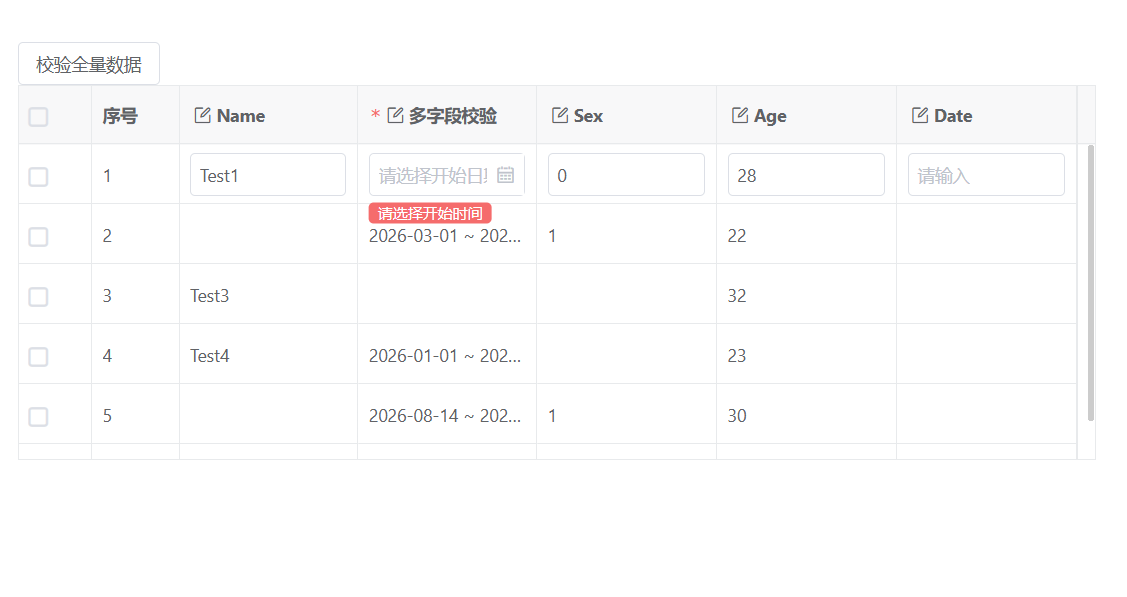
表格-日期範圍-多字段校驗
同樣先給控件綁定一個不存在的字段,然後在這個字段裏面配置2條規則,分別校驗多個字段
<template>
  <div>
    <vxe-button @click="fullValidEvent">校驗全量數據</vxe-button>

    <vxe-grid ref="gridRef" v-bind="gridOptions"></vxe-grid>
  </div>
</template>

<script setup>
import { ref, reactive } from 'vue'
import { VxeUI } from 'vxe-table'

const gridRef = ref()

const gridOptions = reactive({
  border: true,
  showOverflow: true,
  keepSource: true,
  height: 300,
  editConfig: {
    trigger: 'click',
    mode: 'row',
    showStatus: true
  },
  editRules: {
    _startAndEnd: [
      { to: 'startDate', required: true, message: '請選擇開始時間' },
      { to: 'endDate', required: true, message: '請選擇結束時間' }
    ]
  },
  columns: [
    { type: 'checkbox', width: 60 },
    { type: 'seq', width: 70 },
    { field: 'name', title: 'Name', editRender: { name: 'VxeInput' } },
    { field: '_startAndEnd', title: '多字段校驗', editRender: { name: 'VxeDateRangePicker', startField: 'startDate', endField: 'endDate' } },
    { field: 'sex', title: 'Sex', editRender: { name: 'VxeInput' } },
    { field: 'age', title: 'Age', editRender: { name: 'VxeInput' } },
    { field: 'date', title: 'Date', editRender: { name: 'VxeInput' } }
  ],
  data: [
    { id: 10001, name: 'Test1', startDate: '', endDate: '', sex: '0', age: 28, address: 'test abc' },
    { id: 10002, name: '', startDate: '2026-03-01', endDate: '2026-04-01', sex: '1', age: 22, address: 'Guangzhou' },
    { id: 10003, name: 'Test3', startDate: '', endDate: '', sex: '', age: 32, address: 'Shanghai' },
    { id: 10004, name: 'Test4', startDate: '2026-01-01', endDate: '2026-01-10', sex: '', age: 23, address: 'test abc' },
    { id: 10005, name: '', startDate: '2026-08-14', endDate: '2026-08-26', sex: '1', age: 30, address: 'Shanghai' },
    { id: 10006, name: 'Test6', startDate: '2026-10-10', endDate: '026-12-10', sex: '1', age: 21, address: 'test abc' }
  ]
})

const fullValidEvent = async () => {
  const $grid = gridRef.value
  if ($grid) {
    const errMap = await $grid.validate(true)
    if (errMap) {
      VxeUI.modal.message({ status: 'error', content: '校驗不通過!' })
    } else {
      VxeUI.modal.message({ status: 'success', content: '校驗成功!' })
    }
  }
}
</script>
https://gitee.com/x-extends/vxe-table
