

前言
Vite 在2.0版本提供了Library Mode(庫模式),讓開發者可以使用Vite來構建自己的庫以發佈使用。正好我準備封裝一個React組件並將其發佈為npm包以供日後方便使用,同時之前也體驗到了使用Vite帶來的快速體驗,於是便使用Vite進行開發。
背景
在開發完成後進行打包,出現瞭如圖三個文件:
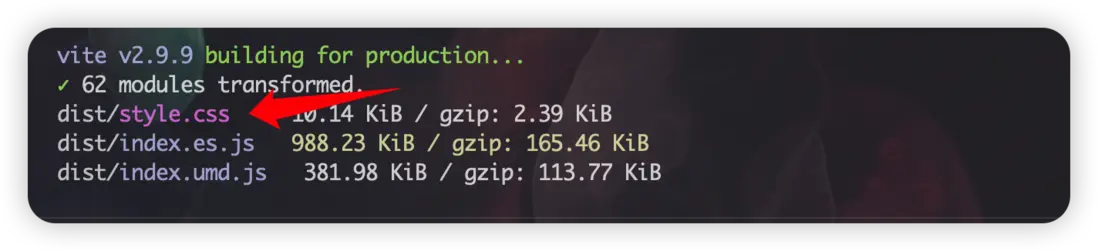
其中的style.css文件裏面包含了該組件的所有樣式,如果該文件單獨出現的話,意味着在使用時需要進行單獨引入該樣式文件,就像使用組件庫時需在主文件引入其樣式一樣。
import xxxComponent from 'xxx-component';
import 'xxx-component/dist/xxx.css'; // 引入樣式
但我封裝的只是單一組件,樣式不多且只應用於該組件上,沒有那麼複雜的樣式系統。
所以打包時比較好的做法是配置構建工具將樣式注入到JS文件中,從而無需再多一行引入語句。我們知道Webpack打包是可以進行配置來通過一個自執行函數在DOM上創建style標籤並將CSS注入其中,最後只輸出JS文件,但在Vite的官方文檔中似乎並沒有告訴我們怎麼去配置。
讓我們先來看一下官方提供的配置:
// vite.config.js
import { resolve } from 'path'
import { defineConfig } from 'vite'

export default defineConfig({
  build: {
    lib: {
      entry: resolve(__dirname, 'lib/main.js'),
      name: 'MyLib',
      // the proper extensions will be added
      fileName: 'my-lib'
    },
    rollupOptions: {
      // make sure to externalize deps that shouldn't be bundled
      // into your library
      external: ['vue'],
      output: {
        // Provide global variables to use in the UMD build
        // for externalized deps
        globals: {
          vue: 'Vue'
        }
      }
    }
  }
})
首先要開啓build.lib選項,配置入口文件和文件名等基本配置,由於Vite生產模式下打包採用的是rollup,所以需要開啓相關選項,當我們的庫是由Vue或React編寫的時候,使用的時候一般也是在該環境下,例如我的這個組件是基於React進行編寫,那麼使用時無疑也是在React中進行引入,這樣就會造成產物冗餘,所以需要在external配置中添加上外部化的依賴,以在打包時給剔除掉。output選項是輸出產物為umd格式時(具體格式查看build.lib.formats選項,umd為Universal Module Definition,可以直接script標籤引入使用,所以需要提供一個全局變量)。
配置完上述提及到的後,我接着尋找與打包樣式相關的內容,然而並沒有發現。。。
沒關係,我們還可以去倉庫issues看看,説不定有人也發現了這個問題。搜索後果不其然,底下竟有高達47條評論:

點進去後,提問者問到如何才能不生成CSS文件,尤回答説:進行樣式注入的DOM環境會產生服務端渲染的不兼容問題,如果CSS代碼不多,使用行內樣式進行解決。
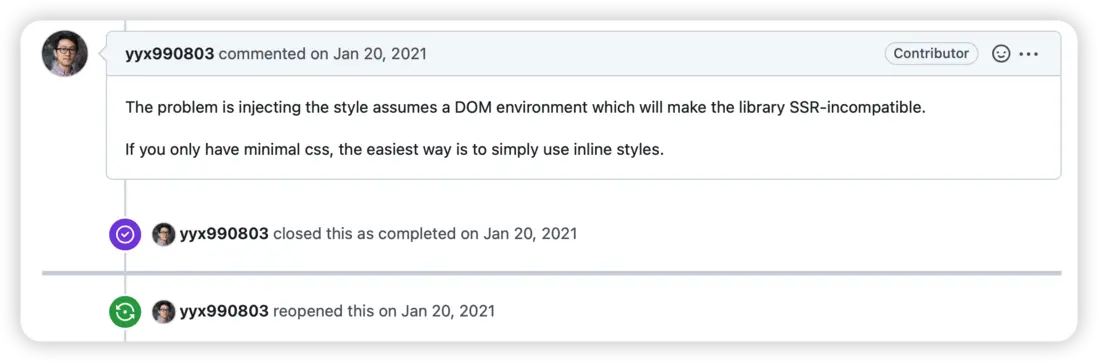
這個回答顯然不能讓很多人滿意(這可能是該issue關閉後又重新打開的原因),因為帶樣式的庫在編寫過程中幾乎不會採用行內的寫法,提問者也回覆説道那樣自己就不能使用模塊化的Less了,依舊希望能夠給出更多的庫模式options,然後下面都各抒己見,但都沒有一種很好的解決方案被提出。
因此,為了解決我自己的問題,我決定寫一個插件。
Vite Plugin API
Vite插件提供的API實際上是一些hook,其劃分為Vite獨有hook和通用hook(Rollup的hook,由Vite插件容器進行調用)。這些hook執行的順序為:
- Alias
- 帶有
enforce: 'pre'的用户插件 - Vite 核心插件
- 沒有 enforce 值的用户插件
- Vite 構建用的插件
- 帶有
enforce: 'post'的用户插件 - Vite 後置構建插件(最小化,manifest,報告)
Vite核心插件基本上是獨有hook,主要用於配置解析,構建插件基本上都是Rollup的hook,這才是真正起構建作用的hook,而我們現在想要將獲取構建好的CSS和JS產物並將其合二為一,所以編寫的插件執行順序應該在構建的插件執行之後,也就是“帶有 enforce: 'post' 的用户插件”(輸出階段)這一階段執行。
打開Rollup官網,裏面的輸出鈎子章節有這麼一張圖:
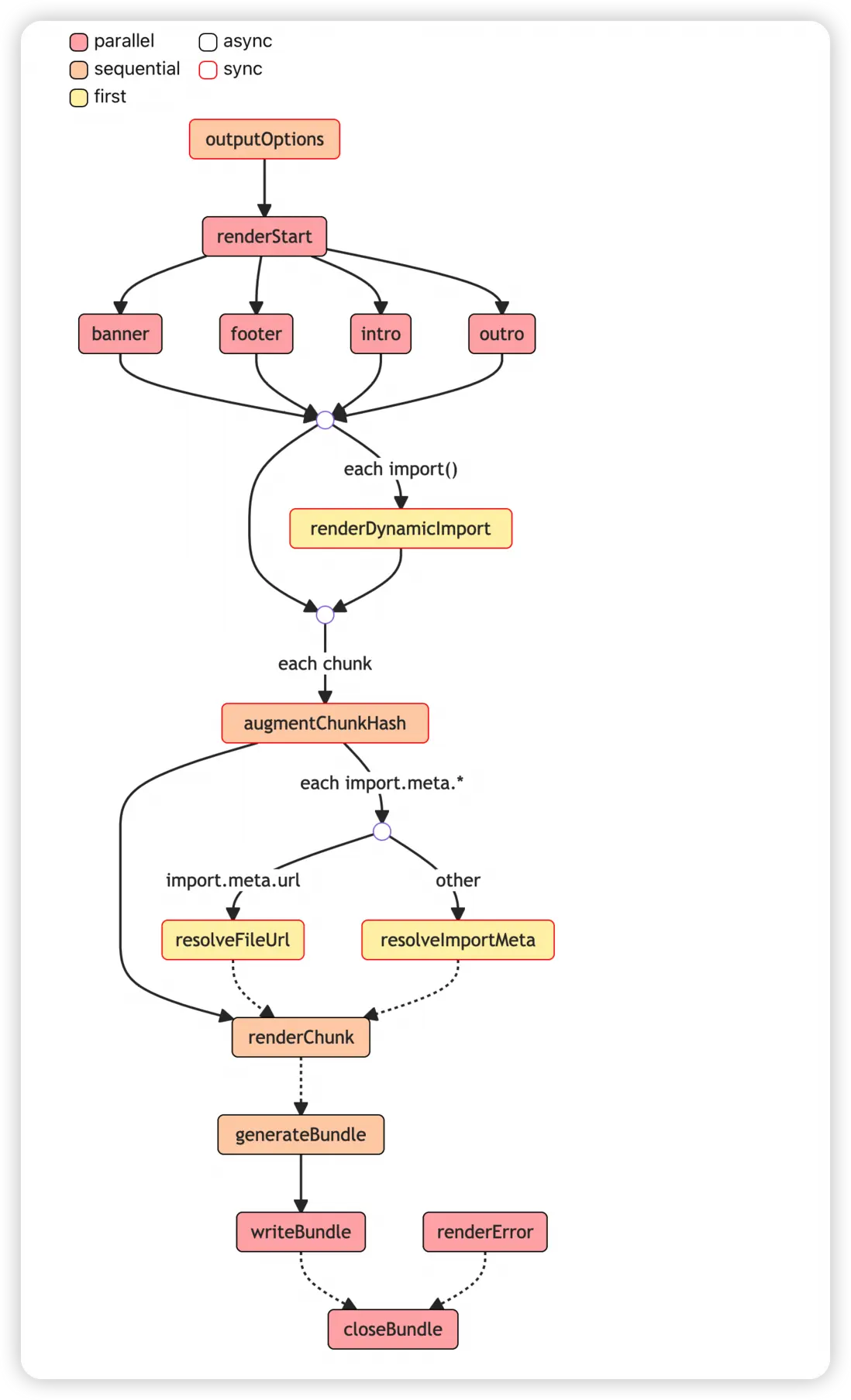
根據上圖可以看到輸出階段鈎子的執行順序及其特性,而我們只需要在寫入之前拿到輸出的產物進行拼接,因此就得用到上面的generateBundle這個hook。
實現
官方推薦編寫的插件是一個返回實際插件對象的工廠函數,這樣做的話可以允許用户傳入配置選項作為參數來自定義插件行為。
基本結構如下:
import type { Plugin } from 'vite';

function VitePluginStyleInject(): Plugin {

  return {
    name: 'vite-plugin-style-inject',
    apply: 'build', // 應用模式
    enforce: 'post', // 作用階段
    generateBundle(_, bundle) {

    }
  };
}Vite默認的formats有es和umd兩種格式,假設不修改該配置將會有兩個Bundle產生,generateBundle鈎子也就會執行兩次,其方法的簽名及其參數類型為:
type generateBundle = (options: OutputOptions, bundle: { [fileName: string]: AssetInfo | ChunkInfo }, isWrite: boolean) => void;

type AssetInfo = {
  fileName: string;
  name?: string;
  source: string | Uint8Array;
  type: 'asset';
};

type ChunkInfo = {
  code: string;
  dynamicImports: string[];
  exports: string[];
  facadeModuleId: string | null;
  fileName: string;
  implicitlyLoadedBefore: string[];
  imports: string[];
  importedBindings: { [imported: string]: string[] };
  isDynamicEntry: boolean;
  isEntry: boolean;
  isImplicitEntry: boolean;
  map: SourceMap | null;
  modules: {
    [id: string]: {
      renderedExports: string[];
      removedExports: string[];
      renderedLength: number;
      originalLength: number;
      code: string | null;
    };
  };
  name: string;
  referencedFiles: string[];
  type: 'chunk';
};我們只用到其中的bundle參數,它是一個鍵由文件名字符串值為AssetInfo或ChunkInfo組成的對象,其中一段的內容如下:
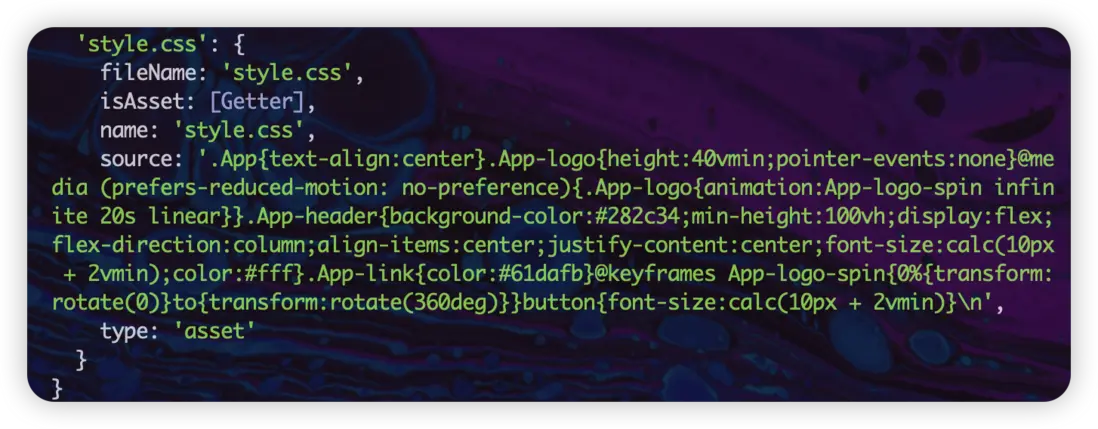
上圖看出CSS文件的值屬於AssetInfo,所以我們需要把它提取出來:
import type { Plugin } from 'vite';

function VitePluginStyleInject(): Plugin {
  let styleCode = '';

  return {
    name: 'vite-plugin-style-inject',
    apply: 'build', // 應用模式
    enforce: 'post', // 作用階段
    generateBundle(_, bundle) {
      // + 遍歷bundle
      for (const key in bundle) {
        if (bundle[key]) {
          const chunk = bundle[key]; // 拿到文件名對應的值
          // 判斷+提取+移除
          if (chunk.type === 'asset' && chunk.fileName.includes('.css')) {
            styleCode += chunk.source;
            delete bundle[key];
          }
        }
      }
    }
  };
}現在StyleCode存儲的就是構建後的所有CSS代碼,因此我們需要一個能夠實現創建style標籤並將styleCode添加其中的自執行函數,然後把它插入到ChunkInfo.code當中即可:
import type { Plugin } from 'vite';

function VitePluginStyleInject(): Plugin {
  let styleCode = '';

  return {
    name: 'vite-plugin-style-inject',
    apply: 'build', // 應用模式
    enforce: 'post', // 作用階段
    generateBundle(_, bundle) {
      // 遍歷bundle
      for (const key in bundle) {
        if (bundle[key]) {
          const chunk = bundle[key]; // 拿到文件名對應的值
          // 判斷+提取+移除
          if (chunk.type === 'asset' && chunk.fileName.includes('.css')) {
            styleCode += chunk.source;
            delete bundle[key];
          }
        }
      }

      // + 重新遍歷bundle,一次遍歷無法同時實現提取注入,例如'style.css'是bundle的最後一個鍵
      for (const key in bundle) {
        if (bundle[key]) {
          const chunk = bundle[key];
          // 判斷是否是JS文件名的chunk
          if (chunk.type === 'chunk' &&
            chunk.fileName.match(/.[cm]?js$/) !== null &&
            !chunk.fileName.includes('polyfill')
          ) {
            const initialCode = chunk.code; // 保存原有代碼
            // 重新賦值
            chunk.code = '(function(){ try {var elementStyle = document.createElement(\'style\'); elementStyle.appendChild(document.createTextNode(';
            chunk.code += JSON.stringify(styleCode.trim());
            chunk.code += ')); ';
            chunk.code += 'document.head.appendChild(elementStyle);} catch(e) {console.error(\'vite-plugin-css-injected-by-js\', e);} })();';
            // 拼接原有代碼
            chunk.code += initialCode;
            break; // 一個bundle插入一次即可
          }
        }
      }
    }
  };
}最後,我們給這個style標籤加上id屬性以方便用户獲取操作:
import type { Plugin } from 'vite';

// - function VitePluginStyleInject(): Plugin {
function VitePluginStyleInject(styleId: ''): Plugin {
  let styleCode = '';

  return {
    name: 'vite-plugin-style-inject',
    apply: 'build', // 應用模式
    enforce: 'post', // 作用階段
    generateBundle(_, bundle) {
      // 遍歷bundle
      for (const key in bundle) {
        if (bundle[key]) {
          const chunk = bundle[key]; // 拿到文件名對應的值
          // 判斷+提取+移除
          if (chunk.type === 'asset' && chunk.fileName.includes('.css')) {
            styleCode += chunk.source;
            delete bundle[key];
          }
        }
      }

      // 重新遍歷bundle,一次遍歷無法同時實現提取注入,例如'style.css'是bundle的最後一個鍵
      for (const key in bundle) {
        if (bundle[key]) {
          const chunk = bundle[key];
          // 判斷是否是JS文件名的chunk
          if (chunk.type === 'chunk' &&
            chunk.fileName.match(/.[cm]?js$/) !== null &&
            !chunk.fileName.includes('polyfill')
          ) {
            const initialCode = chunk.code; // 保存原有代碼
            // 重新賦值
            chunk.code = '(function(){ try {var elementStyle = document.createElement(\'style\'); elementStyle.appendChild(document.createTextNode(';
            chunk.code += JSON.stringify(styleCode.trim());
            chunk.code += ')); ';
            // + 判斷是否添加id
            if (styleId.length > 0)
              chunk.code += ` elementStyle.id = "${styleId}"; `;
            chunk.code += 'document.head.appendChild(elementStyle);} catch(e) {console.error(\'vite-plugin-css-injected-by-js\', e);} })();';
            // 拼接原有代碼
            chunk.code += initialCode;
            break; // 一個bundle插入一次即可
          }
        }
      }
    }
  };
}
至此,這個插件就寫好了,代碼比較簡單。
使用
在項目中使用該插件:
// vite.config.js
import { defineConfig } from 'vite';
import VitePluginStyleInject from 'vite-plugin-style-inject';

export default defineConfig({
  plugins: [VitePluginStyleInject()],
})
執行構建命令後,只輸出兩個文件:

引入打包後的文件發現其能正常運行,終於搞定啦~
尾言
完成後回到該issue下厚着臉皮放上項目地址 😁
最後整理了下寫了這篇文章,這是我第一次將記錄發表成文,感謝您的閲讀,覺得有幫助的話就點個👍吧。
