

前言
對於一個從事7年Java的開發者來説,Spring依賴注入已經變成日常開發工作的一部分,尤其是最近三年切換Go技術棧更是懷念,儘管有些老員工總是忽悠我Go不是面向對象的語言,所以不需要依賴注入。
示例
為什麼説他們在忽悠?以下面代碼 demo_controller.go 為例:
func NewDemoController(demoService DemoService) *DemoController {
  return &DemoController{
    demoService: demoService
  }
}

struct DemoController {
  demoService DemoService
}

func (d *DemoController) Hello() Response {
  id := d.Ctx.getString(":id")
  if person, err := d.demoService.GetPerson(id); err != nil {
    return Reponse.Error(404, "can not this person")
  }
  return Response.Success(fmt.Sprintf("hello, %s", person.name))
}
然後編寫單元測試用例 demo_controller_test.go
struct FakeDemoService {
  person: *Person
  err: error
}

func (f *FakeDemoService) GetPerson(id: string) (*Person, error) {
  return f.person, f.err
}

func Test_demoController_Hello_Success(t *testing.T) {
  fakeDemoService := &FakeDemoService{
    person: &Person{Name: "Joe"},
    err: nil
  }
  controller := NewDemoController(fakeDemoService)
  resp := controller.Hello("1234")
  assert.Equalf(t, resp.code, 200, "status code should be 200")
  assert.Equalf(t, resp.msg, "hello, ", "status code should be 200")
}

func Test_demoController_Hello_Failed(t *testing.T) {
  fakeDemoService := &FakeDemoService{
    person: nil,
    err: fmt.Errorf("Not Found")
  }
  controller := NewDemoController(fakeDemoService)
  resp := controller.Hello("1234")
  assert.Equalf(t, resp.code, 404, "status code should be 404")
}
以上的測試用例,充分説明依賴注入的重要性,尤其是在追求高代碼測試覆蓋率的前提下。
儘管是手動依賴注入,但遠比給測試代碼 打樁 優雅多了,所以那些嘲笑 Java 開發者離開 Spring 就無法寫出優雅代碼的人可以閉嘴了!
例外
然而有些場景使用全局變量或有副作用的函數,就必須對有副作用的函數使用打樁工具,才能保證測試用例可重複執行。如下:
// 如果file文件剛好存在就不會返回錯誤,但無法保證每次執行的結果都一致
func DeleteFile(file: string) error {
  return os.Rm(file)
}
由此可見,那些宣稱 只有面向對象才需要依賴注入 的人都是在裝瘋賣傻,嚴格來説 打樁 也是一種非常不優雅的依賴注入。
小結
在我看來,面向對象 OOP 編程思想最大的貢獻是把 全局變量 這個萬惡之源給釘死在恥辱柱上,這個恰恰是許多初學者在接觸 面向過程 最容易染上的陋習。
許多宣稱面向過程不需要依賴注入的人,恰恰是使用全局變量代替依賴注入。
Spring 則是把這個陋習給公開化,儘管 Spring 的單例模式也有全局變量的意思,但在 ThreadLocal 的支持下,也部分解決多線程併發環境單例模式可能會存在的線程安全風險,最典型的例子就是Java八股文經常會問到的日期格式化工具 要怎麼解決線程安全問題
然而受到面向對象的侷限,Spring雖然能解決全局變量的問題,但依然無法做到盡善盡美,因為面向對象的思想忽略了非常關鍵且致命的 Side Effect 副作用。
React 代碼複用之路
當React 推出 Hooks 時,社區的評價可以分為兩類:一是 Mixin 和 HOC 的替代品,二是 Monad 的替代品。
先説 Mixin 和 HOC 的替代品,其實當我第一眼看到 Mixin 的時候,我的第一反應是 面向對象 和 依賴注入 都誕生這麼多年,前端搞代碼複用為啥不借鑑一下?
例子
假設要你寫一個計算兩點之間距離的函數,以下是面向過程的寫法:
// 求實數軸上兩點之間的距離
function distance(p1: number, p2: number): number {
    return Math.abs(p1 - p2)
}
然後,需求又變了,要求增加對平面二維、立體三維的支持:
// 求二維平面上兩點之間的距離
function distance2(x1: number, y1: number, x2: number, y2: number): number {
    return Math.sqrt(Math.pow(x1 - x2, 2) + Math.pow(y1 - y2, 2))
}
// 求三維空間中兩點之間的距離
function distance3(x1: number, y1: number, z1: number, x2: number, y2: number, z2: number): number {
    return Math.sqrt(Math.pow(x1 - x2, 2) + Math.pow(y1 - y2, 2) + Math.pow(z1 - z2, 2))
}
但説實話,這樣寫法看起來實在太蠢了,於是寫了個通用的計算距離的函數:
// 通用函數
// 缺點:不同的類型不能比較,無法在編譯期報錯,只能在運行期拋出異常
function genericDistance(p1: number[], p2: number[]): number
    if (p1.length == 0 || p2.length == 0) {
        throw Error("length must greater then zero.")
    }
    if (p1.length != p2.length) {
        throw Error("p1's length must equals p2's length.")
    }

    let sum = 0;
    for (let i = 0; i < p1.length; i++) {
        sum += Math.pow(p1[i] - p1[i], 2)
    }
    return Math.sqrt(sum)
    }
這樣一來,問題是解決了,但當 p1 和 p2 的長度不同時編譯器應該報錯,而不是到運行時才拋出異常。
面向對象
既然 面向過程 無計可施,那麼我們可以用 面向對象 來試試
// 定義接口
interface Distance {
    distance(p: P): number
}
// 二維平面點
class Point implements Distance {
x: number
y: number
constructor(x: number, y: number) {
this.x = x;
this.y = y;
}
distance(p: Point): number {
return Math.sqrt(
Math.pow(this.x - p.x, 2)
+ Math.pow(this.y- p.y, 2)
)
}
}// 三維立體點
class Cubic implements Distance {
x: number
y: number
z: number
constructor(x: number, y: number, z: number) {
this.x = x;
this.y = y;
this.z = z;
}
distance(c: Cubic): number {
return Math.sqrt(
Math.pow(this.x - c.x, 2)
+ Math.pow(this.y- c.y, 2)
+ Math.pow(this.z - c.z, 2)
)
}
}看起來很簡單,但卻很好地解決 一維、二維 和 三維 的點明明不能直接比較卻還能編譯,還在運行時拋出異常的問題。
代碼複用
然後還可以輕鬆實現代碼複用,假如説需求更改了,要求你把計算距離的算法換成 “曼哈頓距離”:
// 平面曼哈頓距離
class ManhattanPoint extends Point implements Distance{
    distance(mp: ManhattanPoint): number {
        return Math.abs(this.x - mp.x) + Math.abs(this.y- mp.y)
    }
}
// 立體曼哈頓距離
class ManhattanCubic extends Cubic implements Distance{
    distance(mc: ManhattanCubic): number {
        return Math.abs(this.x - mc.x) + Math.abs(this.y- mc.y) + Math.abs(this.z - mc.z)
    }
}
Class Component
如果到了這裏,你還是有疑問,畢竟不能直接套用到真實的前端開發中,那麼請看以下代碼:
假設我們要寫一個 Button 組件,然後複用它的代碼,派生出一個 IconButton
import { Component, ReactNode } from "react";

export class Button extends Component {
    onClick?: () => void
    children?: ReactNode
    constructor(onClick?: () => void, children?: ReactNode) {
        super({});
        this.onClick = onClick ?? () => {};
        this.children = children;
    }
    render() {
        return {this.children};
    }
}

export class IconButton extends Button {
    constructor(icon: string, onClick?: () => void, children?: ReactNode) {
        super(onClick, children);
        this.children = <><i>icon</>{this.children}</>;
    }
}
這樣的寫法可比 Mixin 優雅多了,和 HOC 寫法差不多,但 HOC 的缺點是嵌套層數太多,面向對象的寫法也有類似的問題,但是別忘了 面向對象 還有一招 依賴注入 。
困難
對 Spring 熟悉的人,很容易想到通過依賴注入不同的 children 就得到不同的 Button 實例,注入帶 Icon 的 children 就可以得到 IconButton ,比 HOC 還優雅!
説起來容易但做起來卻非常困難,且不説 TypeScript 的 Decoration 獲取具體的類型非常困難,而且 Spring 要求構造函數的參數必須為空,就和現有的前端代碼產生非常大的衝突;
更令人難受的是 React 項目默認開啓 use strict; , this 全變成 undefined ,class component都沒辦法寫,所以照搬 Spring 肯定是不行的。
代數效應
山重水複疑無路,柳暗花明又一村
React 官方介紹 Hooks 還提到 Algebraic Effects 代數效應,在查詢相關資料的過程,有人評價:簡單理解,代數效應就是依賴注入。
我心中暗喜,既然React 官方還是回到依賴注入的康莊大道,那我背 Spring 八股文就有用武之地了。
通過Hook實現依賴注入
約束
首先,必須説清 Spring 依賴注入已知的限制:
- 被注入對象的構造函數參數必須為空
- 一般情況,一個application只有一個context
為了解決以上問題,因此對Hook實現依賴注入進行以下限制:
- 被注入IoC容器的不再是實例,而是構造函數,構造函數的參數只有一個,必須是Object類型
- 每個組件都會綁定一個獨立的context,在組件樹中父級組件可以影響向子組件注入的依賴
第一點的限制,完全兼容 React 官方的 FunctionComponent 約束,所以鐵子們不能擔心兼容性問題;
第二點的限制,更確切的説法是增強,目的為了解決組件套娃的情況下,可以輕鬆向層層套娃的子組件注入依賴,同時只對直系組件有影響,不會影響到旁系的組件。
具體實現
以下是 useIoC 的具體實現:
import { v4 as uuidv4 } from 'uuid';
// 組件的構造函數定義
export type Func = (args: I) => O
// IoC容器的接口定義
export interface Container {
    /**
     * 將組件註冊到IoC容器中
     * @param key 組件ID
     * @param val 組件構造函數
     */
    register(key: string, val: any): void
    /**
     * 從IoC容器獲取組件的構造函數
     * @param key 組件ID
     */
    get(key: string): T
}
// IoC容器的具體實現
function IoCContainer(): Container {
    let storage = new Map()
    return {
        register: function(key, val) {
            storage.set(key, val)
        },
        get: function(key: string): T {
            return storage.get(key)
        }
    }
}
// IoC容器的上下文接口定義
export interface Context {
    /**
     * 定義組件:將組件註冊到IoC容器,如果參數subType不為空就組件的原始構造函數替換為subType
     * @param component 組件:原型鏈必須存在componentId
     * @param subType 組件構造函數的子類型,可以為空
     */
    define(component: Func, subType?: Func): Func
    /**
     * 從IoC容器中,根據componentId獲取原始構造函數
     * @param component 組件:原型鏈必須存在componentId
     * @param props 父組件傳遞過來的IoC容器上下文
     */
    inject(component: Func, props?: any): Func
}
/**
 * 包裝組件的構造函數
 * @param originFunction 組件的原生構造函數
 * @param container 組件的IoC容器上下文
 * @returns 返回包裝函數
 */
function wrap(originFunction: Func, container: Container): Func {
    const wrapped = function (props: I) {
        // 將當前組件的IoC容器上下文加入到組件參數中,傳遞給子組件
        const newProps = {ioCContainer: container, ...props}
        return originFunction(newProps)
    }
    // 由於typescript編譯到js過程中會丟失類型信息,這裏使用唯一的uuid代替原本的類型信息
    wrapped.prototype.componentId = uuidv4()
    // 原型鏈增加originFunction字段指向原始構造函數
    wrapped.prototype.originFunction = originFunction
    return wrapped
}
// IoC容器上下文的具體實現
function IoCContext(): Context {
    const container = IoCContainer()
    return {
        define: function(component: Func, subType?: Func): Func {
            const originFunction = subType ?? component
            if (subType) {
                // 如果參數subType不為空就將IoC容器中的componentId對應的原始構造函數替換為subType
                const componentId = component.prototype.componentId
                componentId && container.register(componentId, originFunction)
            }
            return wrap(originFunction, container)
        },
        inject: function(component: Func, props?: any): Func {
            const componentId = component.prototype.componentId
            if (componentId) {
                // 如果父級組件傳遞過來的參數中包含了IoC容器,就直接從父級IoC容器中獲取組件的構造函數
                if (props && props.ioCContainer) {
                    const iocContainer: Container = props.ioCContainer
                    const originFunction: Func = iocContainer.get(componentId)
                    if (originFunction) {
                        return wrap(originFunction, container)
                    }
                }
                // 如果父級IoC容器為空,或者不存在componentId對應的構造函數,則嘗試在當前的IoC容器中獲取
                let originFunction: Func = container.get(componentId)
                if (!originFunction) {
                    // 如果父級或當前IoC容器找不到componentId對應的構造函數,則直接返回原型鏈上的originFunction
                    originFunction = component.prototype.originFunction ?? component
                }
                return wrap(originFunction, container)
            }
            // 如果componentId為空,就直接返回component
            return component
        }
    }
}
// 每次調用都會產生一個新的IoCContext實例,
// 通過define函數將組件註冊到IoCContext
// 然後再通過inject函數將註冊的組件注入到其他組件中
export const useIoC = function(): Context {
    return IoCContext()
}
以上的代碼實現,只引用一個第三方依賴:uuid,之所以不用React.useId(),目的是為了減少遷移到 Vue 等其他框架的成本,理論上只需要修改 Func 的定義即可。
簡單例子
先定義一個 Button 組件:
import { FC, ReactNode } from "react"
import {useIoC} from "Com/app/hooks/ioc"

const {define, inject} = useIoC()

export const ButtonChildren: FC<{label: string}> = define((props: {label: string})  => {
    return (<span>{props.label}</span>)
})

type ButtonType = "primary" | "second" | "grey"

type ButtonProps = {
    onClick?: () => void
    type?: ButtonType
    children?: ReactNode
}

export const Button: FC<ButtonProps> = define(function(props) {
    const child = inject(ButtonChildren, props);
    return (
        <a className={`${props.type ?? "primary"} button`} onClick={(e: any) => props.onClick && props.onClick()}>
            {props.children || child({label: "Click Me!"})}
        </a>
    );
})
然後定義一個 IconButton ,注入帶有 Icon 的 children ,如下所示:
import { useIoC } from "Com/app/hooks/ioc"
import { Button, ButtonChildren } from "./button"
import { FC } from "react"

const {define, inject} = useIoC()

export const IconButtonChild = define(ButtonChildren, () => <span><i>🎨</i>圖標按鈕</span>)

export const IconButton: FC<{onClick?: () => void}> = define((props) => {
    const button = inject(Button, props)
    return <>{button(props)}</>
})
最後,編寫一個頁面:
"use client";

import { Button } from "./components/basic/button";
import { IconButton } from "./components/basic/iconButton";

export default function Home() {
  return (
    <div>
      <p>Icon Button: <IconButton></IconButton></p>
      <p>Normal Button: <Button>普通按鈕</Button></p>
    </div>
  );
}
顯示效果:
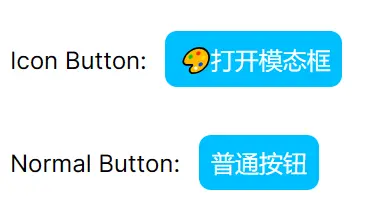
即便 IconButton 組件內部也引用 Button 組件,但由於 普通按鈕 和 打開模態框 在組件樹上是旁系不是直系,所以沒有相互影響,這就是和傳統的 Spring 依賴注入最大的不同之一!
複雜例子
如果到了這裏,你還是覺得通過 useIoC 依賴注入子組件,並沒有比通過 children 傳遞子組件更優雅,那就來個更復雜的例子,比如實現一個 Modal 組件:
import { useIoC } from "Com/app/hooks/ioc";
import { FC } from "react";
import { Button } from "../basic/button";

const {define, inject} = useIoC()

export const Header: FC<{title: string}> = define((props) => {
    return (
        <h3>{props.title}</h3>
    )
})

export const Body: FC = define(() => {
    return (<></>)
})

export const Footer: FC<{confirm: string, cancel: string}> = define((props) => {
    return (<div className="two buttons">
            <Button type="primary">{props.confirm}</Button>
            <Button type="grey">{props.cancel}</Button>
        </div>)
})

export const Modal: FC = define((props) => {
    const header = inject(Header, props)
    const body = inject(Body, props)
    const footer = inject(Footer, props)
    return <div className="dimmer">
        <div className="modal">
            <div className="header">{header({title: ""})}</div>
            <div className="body">{body({})}</div>
            <div className="center footer">{footer({confirm: "Confirm", cancel: "Cancel"})}</div>
        </div>
    </div>
})
"use client";
import { FC, useState } from "react";
import { Button } from "./components/basic/button";
import { IconButton } from "./components/basic/iconButton";
import { Body, Footer, Header, Modal } from "./components/modal/modal";
import { useIoC } from "./hooks/ioc";
const {define, inject} = useIoC()
define(Header, () => <p className="title">注入成功!</p>)
define(Body, () => <div>我是被注入的內容</div>)
const CustomFooter: FC<{onConfirm: () => void, onCancel: () => void}> = (props) => {
return (<div className="two buttons">
<a className="primary button" onClick={props.onConfirm}>確定</a>
<a className="grey button" onClick={props.onCancel}>取消</a>
</div>);
}
export default function Home() {
const [visible, toggleVisible] = useState(false)
const [open, close] = [() => toggleVisible(true), ()=>toggleVisible(false), ]
define(Footer, () => <CustomFooter onConfirm={close} onCancel={close}></CustomFooter>)
const modal = inject(Modal)
return (
<div>
<p>Icon Button: <IconButton onClick={open}></IconButton></p>
<p>Normal Button: <Button>普通按鈕</Button></p>
{ visible && modal({}) }
</div>
);
}通過依賴注入,可以把大量無關的內容放到方法體以外,做到 關注點分離 ,代碼可讀性答大幅提升。
顯示效果:
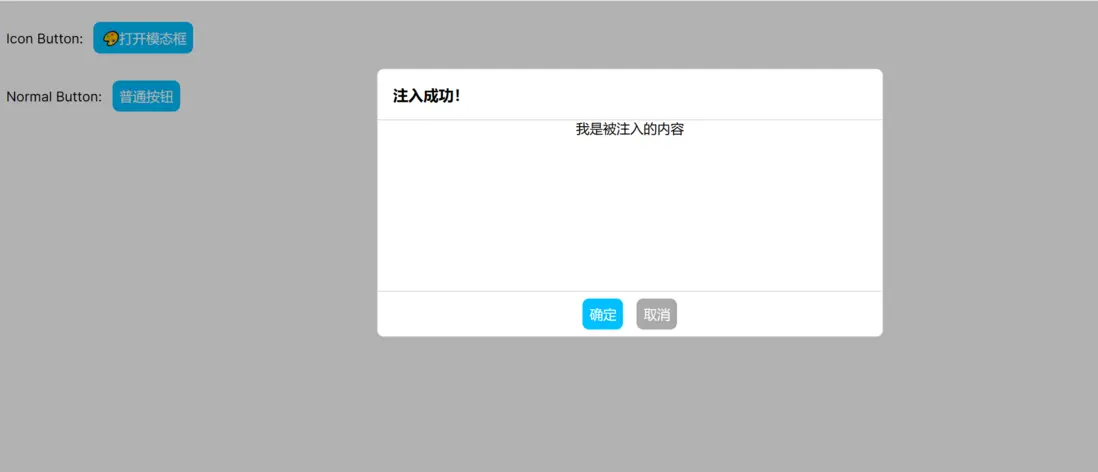
像 Modal 和 Tab 等組件往往需要多個children,這時候React是無能為力的,即便像 Vue 、Qwik 等框架選擇 Web Component 規範的 Named Slot 勉強解決上述問題,但 Named Slot 還存在 不支持類型檢查 和 個數有限 兩個已知問題。
以 Tab 為例,除了 TabHead 一個 Named Slot 以外,還有無限個的 TabContent Slot,再説如果要實現 TabContent 內部一個按鈕被點擊後關閉當前Tab,用Slot實現起來非常麻煩,跟優雅完全不沾邊。
分離視圖和邏輯控制
在寫 useIoC 之前,我用過不少開源的第三方封裝UI庫,比如 Element UI 、Ant Design 和 Materi UI ,它們提供的組件使用起來都不順手。
下面就用 Notification 組件,來展示一下理想中的UI庫組件:
import { useIoC } from "Com/app/hooks/ioc";
import { FC, ReactNode, useEffect, useState } from "react";

const {define, inject} = useIoC()

export interface Notifier {
    info(msg: string, timeout?: number): void
    warn(msg: string, timeout?: number): void
    error(msg: string, timeout?: number): void
}

export type MsgType = "info" | "warn" | "error";
export type Msg = {
    type: MsgType,
    text: string
    expiredAt: number
}

function newMsg(type: MsgType, msg: string, timeout = 1000): Msg {
    const now = new Date().getTime()
    return {type: type, text: msg, expiredAt: now + timeout}
}

export const Notification: FC<{msgs: Msg[], remove: (id: number) => void}> = define((props) => {
    return <ul className="notification">
        {
            props.msgs.map(msg => (
                <li key={msg.expiredAt} className={`${msg.type} item`}>
                    <span>{msg.text}</span>
                    <a className="icon" onClick={() => props.remove(msg.expiredAt)}>x</a>
                </li>
            ))
        }
    </ul>
})

export const useNotification: (props?: any) => [ReactNode, Notifier] = (props: any) => {
    const notification = inject(Notification, props)
    const [msgs, list] = useState(new Array<Msg>())
    useEffect(() => {
        const interval =setInterval(() => {
            const now = new Date().getTime()
            list(old => old.filter(msg => msg.expiredAt > now))
        }, 1000)
        return () => clearInterval(interval)
    }, [])

    const remove = function(id: number) {
        list(old => old.filter(msg => msg.expiredAt != id))
    }

    const notifier: Notifier = {
        info: function(msg: string, timeout = 5000) {
            list((old)=> [...old, newMsg("info", msg, timeout)])
        },
        warn: function(msg: string, timeout = 5000) {
            list((old)=> [...old, newMsg("warn", msg, timeout)])
        },
        error: function(msg: string, timeout = 5000) {
            list((old)=> [...old, newMsg("error", msg, timeout)])
        }
    }
    return [notification({msgs: msgs, remove: remove}), notifier]
}
使用:
"use client";

import { Button } from "./components/basic/button";
import { useNotification } from "./components/notification";

export default function Home() {
  const [notification, notifier] = useNotification()
  return (
      <Button onClick={() => notifier.info("info")}>通知</Button>
      <Button onClick={() => notifier.warn("warn")}>警告</Button>
      <Button onClick={() => notifier.error("error")}>錯誤</Button>
      {notification}
  );
}
這裏,我把視圖 notification 和 邏輯控制 notifier 分開,真正做到 高內聚、低耦合 。
我知道前端常見的做法是使用 zustand 這類狀態管理框架,通過 dispatchEvent 方式來實現,但對於我來説,多少有點本末倒置了。
同樣的,之前的 Modal 也應該有個 useModal 的hook:
"use client";

import { Button } from "./components/basic/button";
import { useModal } from "./components/modal";

export default function Home() {
  const [dimmer, modal] = useModal()
  modal.onConfirm(() => console.log("確定"))
  modal.onCancel(() => console.log("取消"))
  return (<div>
    <Button onClick={()=>modal.open()}>打開</Button>
    {dimmer}
  </div>);
}
除此之外,還應該有 useTab 、 useTable 、useMenu 等hook,複雜組件應該把視圖和邏輯控制分開,而不是通過 visible && modal({}) 這樣方式進行控制。
總結
之所以寫這篇文章,主要原因是之前和別人吹牛,説要把設計模式帶到前端,網友都嘲笑我 talk is cheap, show me the code 。
儘管我在公司的代碼已經能體現我的思路,但保密協議限制我不能把它放到網上給大家看,而且為了寫出的代碼和文章容易看懂,我經常需要強迫自己進入 沙雕兼容 模式,否則在別人眼中,我就成了孔乙己。
