

作者:俊達
引言
上一篇我們使用了RPM進行安裝部署,這是一種安裝快速、簡化部署和管理過程、與操作系統提供的包管理工具緊密集成的部署方法。此外,當你需要更高的靈活性和自定義性,並且願意承擔一些額外的手動配置和管理工作,那麼二進制安裝是一個值得考慮選擇。
以下是二進制安裝的一些優勢:
- 處理單機多實例:在某些情況下,希望在一台計算機上開啓多個不同的服務器 ,運行多個MySQL服務進程,同時保持現有的生產設置不受干擾。使用二進制方式可以在單台機器上部署多個實例,無需額外的配置。
- 簡化升級過程:在生產環境中,MySQL的升級是一個重要且敏感的操作。使用二進制安裝,原地升級的方式更加方便。只需關閉舊的 MySQL 服務器、用新的替換舊的 MySQL 二進制文件或軟件包、在現有數據目錄上重新啓動 MySQL,以及升級現有安裝中需要升級的任何剩餘部分即可。
-
自定義編譯:有時候,可能需要對MySQL進行一些特定的定製或打補丁,以滿足特定的業務需求。通過自己編譯二進制文件,可以靈活地添加或修改功能,並滿足特殊需求。這種自定義編譯的方式可以讓MySQL更好地適應不同的環境和需求。
1 下載二進制文件
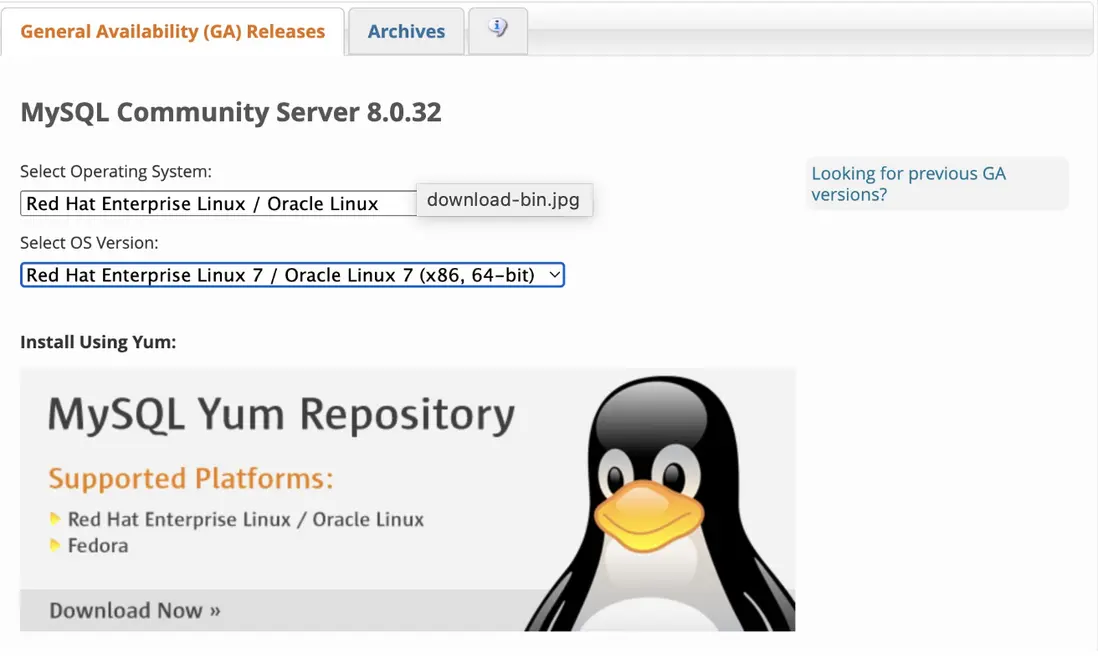
根據操作系統版本,下載二進制包
下載其中的Compressed TAR,如:
2 解壓
將下載的二進制文件下載到某個目錄。
一般我們會將mysql二進制文件放到/usr/local/mysql 或者 /opt/mysql。

tar xvf mysql-8.0.32-linux-glibc2.12-x86_64.tar.xz -C /opt
mv  mysql-8.0.32-linux-glibc2.12-x86_64 mysql
ls /opt/mysql/
bin docs include lib LICENSE man README share support-files3 準備配置文件
我們規劃將MySQL數據庫文件放在/data/mysql01路徑下。
mysql數據目錄: /data/mysql01/
配置文件:/data/mysql01/my.cnf
[mysqld]
#dir
basedir=/opt/mysql
lc_messages_dir=/opt/mysql/share

datadir=/data/mysql01/data
tmpdir=/data/mysql01/tmp
log-error=/data/mysql01/log/alert.log
slow_query_log_file=/data/mysql01/log/slow.log
general_log_file=/data/mysql01/log/general.log

socket=/data/mysql01/run/mysql.sock


#innodb
innodb_data_home_dir=/data/mysql01/data
innodb_log_group_home_dir=/data/mysql01/data
innodb_data_file_path=ibdata1:128M:autoextend
配置文件核心內容是[mysqld]下的相關路徑配置:
basedir: mysql二進制文件路徑
datadir: mysql數據目錄
這裏只配置了啓動MySQL需要的最基本的參數。
真實環境中,需要根據業務需求和服務器配置優化配置,後續單獨講。
4初始化數據庫
-- 創建mysql用户
groupadd mysql
useradd mysql -g mysql


-- 創建相關目錄
mkdir -p /data/mysql01/{data,binlog,log,run,tmp}
chown -R mysql:mysql /data/mysql01


-- 初始化數據庫
./bin/mysqld --defaults-file=/data/mysql01/my.cnf --initialize --user=mysql
初始化完成後,查看alert.log中的臨時密碼
tail /data/mysql01/log/alert.log

2021-03-29T11:20:45.693865Z 0 [Warning] InnoDB: New log files created, LSN=45790
2021-03-29T11:20:45.789596Z 0 [Warning] InnoDB: Creating foreign key constraint system tables.
2021-03-29T11:20:45.865865Z 0 [Warning] No existing UUID has been found, so we assume that this is the first time that this server has been started. Generating a new UUID: ce7101f3-9080-11eb-9d26-080027475f71.
2021-03-29T11:20:45.869311Z 0 [Warning] Gtid table is not ready to be used. Table 'mysql.gtid_executed' cannot be opened.
2021-03-29T11:20:46.234753Z 0 [Warning] CA certificate ca.pem is self signed.
2021-03-29T11:20:46.286920Z 1 [Note] A temporary password is generated for root@localhost: kguRrCbXw9;
5 啓動實例
mysql服務器進程是mysqld, 可以通過執行mysqld命令直接啓動數據庫,當然通常我們會使用一些封裝過的腳本來啓動mysql。
mysqld_safe就是一個常用的腳本,它能啓動mysqld,並在mysqld異常退出後重新啓動mysqld
[root@box1 ~]# ./bin/mysqld_safe --defaults-file=/data/mysql01/my.cnf &
[1] 27896


[root@box1 ~]# 2021-03-29T11:24:31.202499Z mysqld_safe Logging to '/data/mysql01/log/alert.log'.
通過ps,可以看到mysqld進程,以及命令行參數,mysqld_safe是mysqld的父進程。
[root@box1 mysql]# ps -elf | grep mysqld
4 S root      6445  2276  0  80   0 - 28354 do_wai 05:20 pts/0    00:00:00 /bin/sh /usr/local/mysql/bin/mysqld_safe --defaults-file=/data/mysql01/my.cnf
4 S mysql     6738  6445  0  80   0 - 518211 poll_s 05:20 pts/0   00:00:00 /usr/local/mysql/bin/mysqld --defaults-file=/data/mysql01/my.cnf --basedir=/usr/local --datadir=/data/mysql01/data --plugin-dir=/usr/local/mysql/lib/plugin --user=mysql --log-error=/data/mysql01/log/alert.log --pid-file=box1.pid --socket=/data/mysql01/run/mysql.sock
0 S root      6784  2276  0  80   0 - 28206 pipe_w 05:21 pts/0    00:00:00 grep --color=auto mysqld
可以看到mysqld命令行的關鍵參數
–defaults-file: 啓動參數文件
–basedir: mysql軟件的basedir
–datadir: 數據目錄
–plugin-dir: mysql插件lib庫路徑
–user: 運行mysql的OS賬號
–log-error: 錯誤日誌路徑
–socket: socket連接文件
如果不提供這些參數,mysqld會使用編譯時的默認參數。
默認參數:
[root@box1 mysql]# ./bin/mysqld  --print-defaults
./bin/mysqld would have been started with the following arguments:
--datadir=/var/lib/mysql --socket=/var/lib/mysql/mysql.sock --symbolic-links=0
默認參數文件路徑:
[root@box1 mysql]# ./bin/mysqld  --verbose --help | more
2021-03-31T09:33:30.820738Z 0 [ERROR] COLLATION 'latin1_swedish_ci' is not valid for CHARACTER SET 'utf8mb4'
./bin/mysqld  Ver 5.7.32-debug for Linux on x86_64 (lazybug)
Copyright (c) 2000, 2020, Oracle and/or its affiliates. All rights reserved.

Oracle is a registered trademark of Oracle Corporation and/or its
affiliates. Other names may be trademarks of their respective
owners.

Starts the MySQL database server.

Usage: ./bin/mysqld [OPTIONS]

Default options are read from the following files in the given order:
/etc/my.cnf /etc/mysql/my.cnf /usr/local/mysql/etc/my.cnf ~/.my.cnf
The following groups are read: mysqld server mysqld-5.7
The following options may be given as the first argument:
--print-defaults        Print the program argument list and exit.
--no-defaults           Don't read default options from any option file,
                        except for login file.
--defaults-file=#       Only read default options from the given file #.
通過mysqld --verbose --help可以看到參數文件搜索路徑:
/etc/my.cnf, /etc/mysql/my.cnf, /usr/local/mysql/etc/my.cnf, ~/.my.cnf
在運維多實例mysql時,我們通常會指定my.cnf的路徑,而不使用默認路徑的配置文件。
避免讀取默認配置參數文件中的配置,引起各種問題。
加了–defaults-file後,就只會從defaults-file指定文件中讀取配置。
日誌文件
如果啓動過程中有問題,可以通過alert日誌文件查看具體的問題
$ tail -100 /data/mysql01/log/alert.log

2021-03-29T11:24:31.229330Z mysqld_safe Starting mysqld daemon with databases from /data/mysql01/data
2021-03-29T11:24:31.407665Z 0 [Note] /usr/local/mysql/bin/mysqld (mysqld 5.7.32-debug) starting as process 28189 ...
2021-03-29T11:24:31.412908Z 0 [Note] InnoDB: PUNCH HOLE support available
2021-03-29T11:24:31.412934Z 0 [Note] InnoDB: !!!!!!!! UNIV_DEBUG switched on !!!!!!!!!
2021-03-29T11:24:31.412939Z 0 [Note] InnoDB: Mutexes and rw_locks use GCC atomic builtins
2021-03-29T11:24:31.412942Z 0 [Note] InnoDB: Uses event mutexes
2021-03-29T11:24:31.412947Z 0 [Note] InnoDB: GCC builtin __atomic_thread_fence() is used for memory barrier
2021-03-29T11:24:31.412950Z 0 [Note] InnoDB: Compressed tables use zlib 1.2.11
2021-03-29T11:24:31.412954Z 0 [Note] InnoDB: Using Linux native AIO
2021-03-29T11:24:31.413276Z 0 [Note] InnoDB: Number of pools: 1
2021-03-29T11:24:31.413391Z 0 [Note] InnoDB: Using CPU crc32 instructions
2021-03-29T11:24:31.414823Z 0 [Note] InnoDB: Initializing buffer pool, total size = 512M, instances = 1, chunk size = 128M
2021-03-29T11:24:31.589281Z 0 [Note] InnoDB: Completed initialization of buffer pool
2021-03-29T11:24:31.594759Z 0 [Note] InnoDB: If the mysqld execution user is authorized, page cleaner thread priority can be changed. See the man page of setpriority().
2021-03-29T11:24:31.611389Z 0 [Note] InnoDB: Highest supported file format is Barracuda.
2021-03-29T11:24:31.667674Z 0 [Note] InnoDB: Creating shared tablespace for temporary tables
2021-03-29T11:24:31.667861Z 0 [Note] InnoDB: Setting file '/data/mysql01/data/ibtmp1' size to 12 MB. Physically writing the file full; Please wait ...
2021-03-29T11:24:31.680116Z 0 [Note] InnoDB: File '/data/mysql01/data/ibtmp1' size is now 12 MB.
2021-03-29T11:24:31.685528Z 0 [Note] InnoDB: 96 redo rollback segment(s) found. 96 redo rollback segment(s) are active.
2021-03-29T11:24:31.685540Z 0 [Note] InnoDB: 32 non-redo rollback segment(s) are active.
2021-03-29T11:24:31.689004Z 0 [Note] InnoDB: Waiting for purge to start
2021-03-29T11:24:31.741474Z 0 [Note] InnoDB: 5.7.32 started; log sequence number 2746702
2021-03-29T11:24:31.742643Z 0 [Note] InnoDB: Loading buffer pool(s) from /data/mysql01/data/ib_buffer_pool
2021-03-29T11:24:31.742725Z 0 [Note] Plugin 'FEDERATED' is disabled.
2021-03-29T11:24:31.752433Z 0 [Note] InnoDB: Buffer pool(s) load completed at 210329  7:24:31
2021-03-29T11:24:31.757409Z 0 [Note] Found ca.pem, server-cert.pem and server-key.pem in data directory. Trying to enable SSL support using them.
2021-03-29T11:24:31.757426Z 0 [Note] Skipping generation of SSL certificates as certificate files are present in data directory.
2021-03-29T11:24:31.758133Z 0 [Warning] CA certificate ca.pem is self signed.
2021-03-29T11:24:31.758185Z 0 [Note] Skipping generation of RSA key pair as key files are present in data directory.
2021-03-29T11:24:31.758504Z 0 [Note] Server hostname (bind-address): '*'; port: 3306
2021-03-29T11:24:31.759379Z 0 [Note] IPv6 is available.
2021-03-29T11:24:31.759408Z 0 [Note]   - '::' resolves to '::';
2021-03-29T11:24:31.759434Z 0 [Note] Server socket created on IP: '::'.
2021-03-29T11:24:31.796451Z 0 [Note] Event Scheduler: Loaded 0 events
2021-03-29T11:24:31.796935Z 0 [Note] /usr/local/mysql/bin/mysqld: ready for connections.
Version: '5.7.32-debug'  socket: '/data/mysql01/run/mysql.sock'  port: 3306  lazybug
日誌文件最後一行顯示啓動成功,提示本地socket文件路徑和監聽端口。
6 修改密碼
mysql 5.7開始,需要先修改密碼,才能正常訪問數據庫:
[root@box1 run]# /usr/local/mysql/bin/mysql -uroot -h127.0.0.1 -p
Enter password:
Welcome to the MySQL monitor.  Commands end with ; or \g.
Your MySQL connection id is 4
Server version: 5.7.32-debug

Copyright (c) 2000, 2020, Oracle and/or its affiliates. All rights reserved.

Oracle is a registered trademark of Oracle Corporation and/or its
affiliates. Other names may be trademarks of their respective
owners.

Type 'help;' or '\h' for help. Type '\c' to clear the current input statement.

mysql> select 1;
ERROR 1820 (HY000): You must reset your password using ALTER USER statement before executing this statement.


mysql> alter user 'root'@'localhost' identified by 'helloworld';
Query OK, 0 rows affected (0.00 sec)

mysql> select 1;
+---+
| 1 |
+---+
| 1 |
+---+
1 row in set (0.00 sec)
更多技術信息請查看雲掣官網https://yunche.pro/?t=yrgw
