

本文深入探討了 Python 全局解釋器鎖(GIL)的內部機制,揭示其對多線程性能的影響,幫助開發者理解如何在多線程環境中優化 Python 應用。原文:Tearing Off the GIL Veil: A Deep Dive into Python Multithreading's Inner Mechanics

Python 全局解釋器鎖(GIL,Global Interpreter Lock)引發的討論比其他任何語言功能都多。不止你一個人在看到 CPU 核心閒置,而 Python 腳本緩慢運行時,會覺得疑惑。你也不是唯一一個想知道為什麼增加線程有時會讓代碼變慢。這不僅是學術上的好奇心,而是因為理解 GIL 決定了你是在構建可擴展的系統還是在高負載下會崩潰的系統。
説實話,大多數 Python 開發者都誤解了 GIL。他們要麼把 GIL 當作致命因素,要麼完全忽視,而這兩種想法都是錯誤的。事實更為複雜,也更有趣。
揭開 GIL 面紗 —— 這到底是什麼?
要真正掌握 Python 多線程,必須先征服 GIL 系統,這是無法迴避的。
GIL 實質
GIL 是 CPython 解釋器內部的一個互斥鎖。它的工作看似簡單:確保任何時刻只有一個線程執行 Python 字節碼。可以把它看作是一次性後台通行證 —— 無論有多少表演者(線程),同一時間只能有一個上台。
這裏有個大多數教程都會忽略的關鍵見解:GIL 保護的是解釋器,而不是應用業務代碼。它存在於應用邏輯之下的一個層級。
為什麼需要 GIL?
GIL 並非為了折磨開發者,而是基於 Python 內存管理架構的務實工程決策。
參考計數問題
Python 內存管理依賴引用計數。每個對象都維護一個 ob_refcnt 變量,跟蹤指向它的引用數量。當計數歸零時,對象會被垃圾回收。聽起來很簡單,對吧?
混亂由此開始。考慮沒有 GIL 的情景:
# 偽代碼演示競態條件下的危險性
# 線程 1:
a = "Hello"  # 讀取 ob_refcnt = 1, 準備增加

# 線程 2 (併發):
del a       # 讀取 ob_refcnt = 1, 準備減少

# 如果沒有同步,最終結果可能是 0, 1, 或 2
# 結果: 內存泄漏或災難性崩潰
沒有保護,併發線程會損壞引用計數,導致內存泄漏(對象未被釋放)或分段錯誤(對象過早釋放)。CPython 團隊面臨抉擇:
- 細粒度鎖定:為每個對象和操作添加鎖
- 全局鎖:一個主鎖控制解釋器訪問
他們選擇了第二個選項。為什麼?因為細粒度鎖定會讓 Python 的單線程性能(常見情況)大幅下降,而與 C 擴展集成也會變成一場噩夢。
GIL 的實際性能影響
大多數文章都説錯了真相:GIL 並不是永久鎖。解釋器會策略性的進行釋放:
- 在執行字節碼指令後,現代 Python(3.2+)採用基於時間的切換 —— 默認每 5ms 一次
- 在 I/O 操作期間:文件讀取、網絡請求和數據庫查詢都會觸發 GIL 釋放
- 在調用 C 擴展時,許多 NumPy/SciPy 函數會釋放 GIL
- 在
time.sleep()期間:明確釋放 GIL
性能影響可以明確劃分:
- CPU 密集型任務:線程開銷增加,但沒有並行性。線程花更多時間用於爭奪 GIL 而非計算。上下文切換成本高昂,性能通常比單線程代碼差 。
- I/O 密集型任務:線程在這裏大放異彩。當某個線程等待網絡響應時,其他線程可以執行。這就是為什麼網頁服務器、網頁爬蟲器和 API 客户端從線程中獲益巨大。
內部機制 —— Python 如何調度線程
當代碼調用 thread.start() 時,底層實際上在幹什麼?我們一層層剝開。
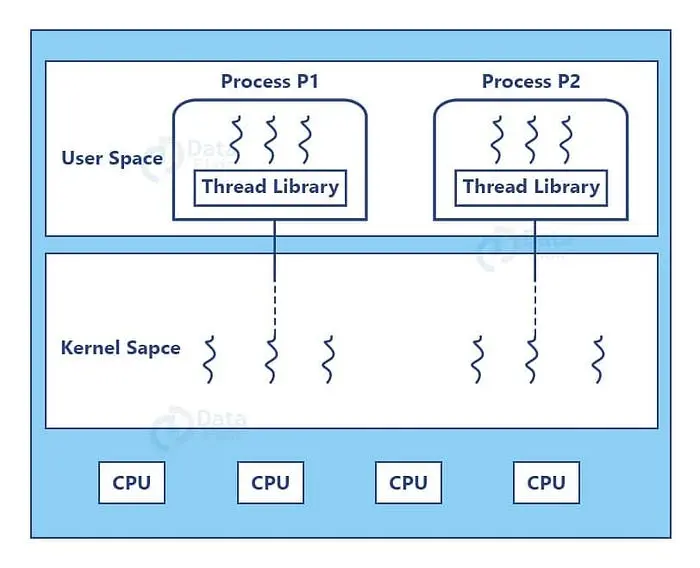
用户空間與內核空間:線程所在
Python 的 threading 模塊會封裝本地操作系統線程,理解這一點至關重要:
- 每個 Python 線程對應一個真實的操作系統線程(Unix 上的 POSIX 線程,Windows 上的 Windows 線程)
- 操作系統調度器給線程分配 CPU 時間
- Python 解釋器在操作系統調度之上管理 GIL 分發
這形成了雙層系統,操作系統決定哪個線程獲得 CPU 時間 ,而 GIL 決定哪個線程能執行 Python 代碼。
搶佔式調度及其陷阱
CPython 使用搶佔式線程調度,以下是 Python 3.2+ 的時間線:
在 Python 3.2 之前,解釋器每 100 字節指令發佈一次 GIL(可通過現已棄用的 sys.setcheckinterval() 配置)。
Python 3.2 起,改用 sys.setswitchinterval(),改為基於時間的間隔,默認 5ms。
import sys

# 檢查當前切換間隔 (Python 3.2+)
interval = sys.getswitchinterval()
print(f"Switch interval: {interval}s")  # 默認: 0.005

# 如果需要,請調整(很少需要調整)
sys.setswitchinterval(0.001)  # 1ms - 響應更及時,但開銷更高
飢餓問題:如果代碼執行沒有 I/O 的長時間事務,可能會長時間壟斷 GIL,其他線程則會“飢餓”,無助的等待。
GIL 超時(Python 3.2+改進版)
David Beazley 的研究揭示了 Python 3.2 之前的一個關鍵缺陷:當 CPU 和 I/O 限制線程競爭時,系統會因上下文切換而卡頓,每次切換增加 5ms 的開銷。
Python 3.2 引入了超時機制。當線程想要 GIL 但無法獲得時,會啓動超時並等待。如果超時結束(5ms),線程會設置“gil drop request”標誌。當前線程定期檢查該標誌並生成 GIL。
儘管並未完全消除 GIL 的爭議開銷,但極大提升了公平性,
核心參數與同步原語的實際應用
沒有實踐的理論是沒用的。接下來我們深入探討實際生產環境的同步代碼。
線程核心參數解析
import threading
import time
from typing import List

def worker(name: str, delay: float, result_list: List[str]) -> str:
    """
    線程工作函數。

    關鍵洞察:返回值被線程對象忽略。
    使用共享數據結構(如result_list)來收集結果。
    """
    print(f"🎬 Thread-{name}: starting")
    time.sleep(delay)  # Simulates I/O-GIL released here
    result = f"✅ Thread-{name} completed after {delay}s"
    result_list.append(result)
    return result  # This return value is lost!
# 共享結果存儲
results: List[str] = []
# 使用所有參數創建線程
t = threading.Thread(
    target=worker,
    args=("A", 2),              # 位置參數
    kwargs={"result_list": results},  # 關鍵字參數
    name="Worker-A",             # 🔥 對調試至關重要
    daemon=True                  # 🔥 守護進程的行為將在後面解釋
)
t.start()  # 啓動線程
t.join(timeout=3)  # 最多等待 3s 完成
print(f"Results: {results}")
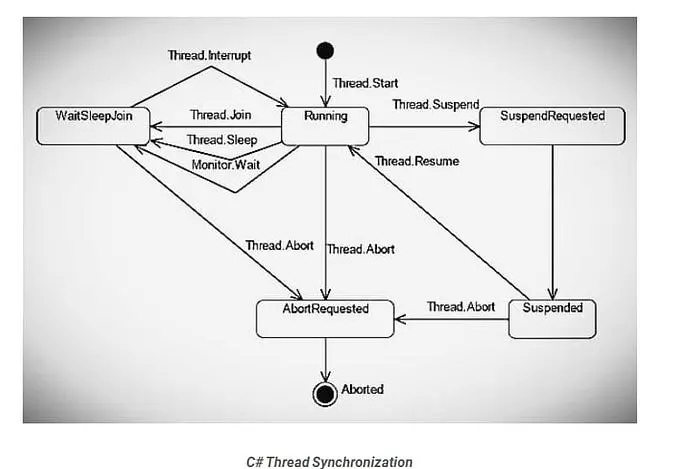
理解 daemon=True:
daemon=False(默認):主線程等待所有子線程完成後退出daemon=True:主線程強制終止所有守護線程
何時使用守護線程:
- ✅ 後台任務:心跳監測、緩存刷新、日誌輪換
- ❌ 關鍵操作:數據庫寫入、文件保存、財務交易
守護線程可能在運行中被中斷,可能導致數據損壞或事務不完整。
五個基本同步原語
1. 鎖定(互斥)
基本構建模塊,一次只能有一個線程獲得鎖。
import threading

balance = 0
lock = threading.Lock()
def deposit(amount: int, iterations: int) -> None:
    global balance
    for _ in range(iterations):
        with lock:  # 自動獲取和釋放
            balance += amount
def withdraw(amount: int, iterations: int) -> None:
    global balance
    for _ in range(iterations):
        with lock:
            balance -= amount
# 測試競態條件保護
t1 = threading.Thread(target=deposit, args=(1, 100000))
t2 = threading.Thread(target=withdraw, args=(1, 100000))
t1.start()
t2.start()
t1.join()
t2.join()
print(f"💰 Final balance: {balance}") # 鎖定時應為 0,未鎖定時隨機生產環境小貼士:始終使用上下文管理器(with lock:),而不是手動操作 lock.acquire() 和 lock.release(),讓其自動處理異常。
2. RLock(可重入鎖)
允許同一線程多次獲得鎖 —— 這對遞歸函數至關重要。
import threading

rlock = threading.RLock()

def recursive_func(n: int) -> None:
    with rlock:  # 同一線程可以多次獲取鎖
        if n > 0:
            print(f"🔁 Level {n}")
            recursive_func(n - 1)  # 重新獲取鎖
# 啓動測試
threading.Thread(target=recursive_func, args=(5,)).start()
何時使用 RLock:調用同一對象內其他同步方法的方法。
3. 信號(計數鎖)
控制同時訪問資源的線程數量。
import threading
import time

# 允許最多 3 個併發工作線程
semaphore = threading.Semaphore(3)

def access_resource(worker_id: int) -> None:
    print(f"⏳ Worker {worker_id} waiting...")
    with semaphore:
        print(f"👷 Worker {worker_id} acquired semaphore")
        time.sleep(2)  # 模擬工作
        print(f"✅ Worker {worker_id} released semaphore")
# 啓動 10 個工作線程,但只有 3 個可以同時運行
threads = [
    threading.Thread(target=access_resource, args=(i,))
    for i in range(10)
]
for t in threads:
    t.start()
for t in threads:
    t.join()
實際應用場景:限制併發數據庫連接、API 速率限制和資源池管理。
4. 事件(線程協調)
允許線程等待信號後再繼續。
import threading
import time
import random
from typing import List

# 共享事件和結果
start_event = threading.Event()
results: List[str] = []
def worker(worker_id: int) -> None:
    print(f"⏳ Worker {worker_id} waiting for start signal...")
    start_event.wait()  # Block until event is set

    # 模擬時間可變的工作
    time.sleep(random.random())
    results.append(f"Worker {worker_id} completed")
    print(f"✅ Worker {worker_id} finished")
# 創建 5 個工作線程,全部等待
workers = [
    threading.Thread(target=worker, args=(i,))
    for i in range(5)
]
for w in workers:
    w.start()
# 主線程準備資源
print("🔧 Preparing resources...")
time.sleep(2)
# 同時釋放所有工作線程
print("🚀 Releasing all workers!")
start_event.set()
for w in workers:
    w.join()
print(f"📊 Results: {results}")
模式:非常適合需要多個線程同時啓動並“準備就緒”的場景。
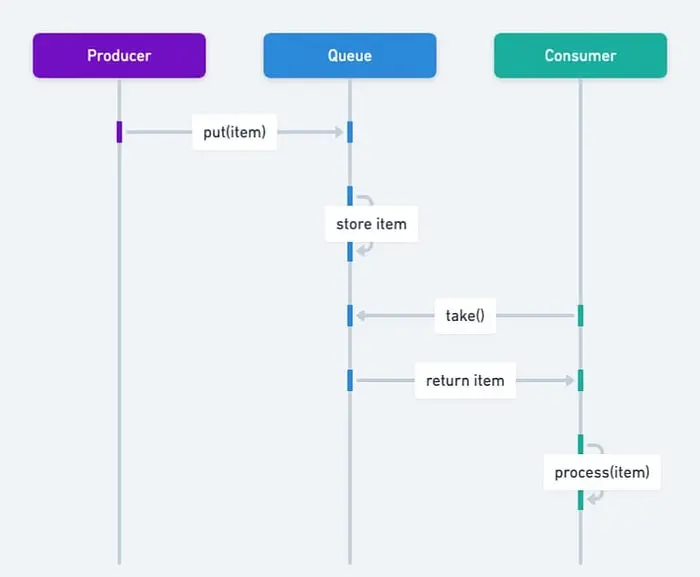
5. 條件(複雜協調)
最強大的原語 —— 將鎖與等待/通知機制結合。
import threading
import time
from collections import deque
from typing import Deque, TypeVar

T = TypeVar('T')

class BoundedBuffer:
    """
    線程安全的帶邊界緩衝區,實現生產者-消費者模式。
    展示現實中 Condition 的使用情況。
    """
    def __init__(self, capacity: int):
        self.capacity = capacity
        self.buffer: Deque[T] = deque()
        self.lock = threading.Lock()
        # 兩個條件變量共享同一個鎖
        self.not_empty = threading.Condition(self.lock)
        self.not_full = threading.Condition(self.lock)
    def put(self, item: T) -> None:
        """生產者將數據添加到緩衝區。"""
        with self.not_full:  # 自動獲取鎖
            while len(self.buffer) >= self.capacity:
                print("📦 Buffer full, producer waiting...")
                self.not_full.wait()  # 釋放鎖並等待

            self.buffer.append(item)
            print(f"📦 Produced: {item} (buffer size:...})")
            self.not_empty.notify()  # 喚醒一個消費者
    def get(self) -> T:
        """消費者從緩衝區移除數據。"""
        with self.not_empty:
            while len(self.buffer) == 0:
                print("📥 Buffer empty, consumer waiting...")
                self.not_empty.wait()

            item = self.buffer.popleft()
            print(f"📥 Consumed: {item} (buffer size: {len(self.buffer)})")
            self.not_full.notify()  # 喚醒生產者
            return item
# 測試生產者-消費者模式
buffer = BoundedBuffer(capacity=3)
def producer() -> None:
    for i in range(10):
        buffer.put(f"Item-{i}")
        time.sleep(0.1)  # 模擬生產時間
def consumer() -> None:
    for _ in range(10):
        item = buffer.get()
        time.sleep(0.2)  # 模擬處理時間
t1 = threading.Thread(target=producer, name="Producer")
t2 = threading.Thread(target=consumer, name="Consumer")
t1.start()
t2.start()
t1.join()
t2.join()
Condition 強大的原因:用高效的睡眠通知取代了忙碌等待(在循環中檢查標誌)的狀態。
生產級最佳實踐
接下來我們談談生產環境中的代碼,特別是那種能處理數百萬請求、支持橫向擴展,而且不會在凌晨 3 點吵醒你的代碼。
擁抱 concurrent.futures — 棄用手動線程管理
原始線程是用來學習的,生產代碼使用 concurrent.futures。
from concurrent.futures import ThreadPoolExecutor, as_completed, wait
import requests
from typing import List, Dict, Tuple
import time

def fetch_url(url: str, timeout: int = 2) -> Tuple[str, str]:
    """
    獲取 URL 內容,並帶錯誤處理。
    返回 (url, result_message).
    """
    try:
        response = requests.get(url, timeout=timeout)
        return (url, f"✅ {len(response.content)} bytes")
    except requests.Timeout:
        return (url, "❌ Timeout")
    except requests.RequestException as e:
        return (url, f"❌ {type(e).__name__}")
# 測試 URL
urls = [
    "https://httpbin.org/delay/1",
    "https://httpbin.org/delay/2",
    "https://httpbin.org/status/404",
    "https://invalid-url-that-does-not-exist.com",
]
# 方法 1: as_completed - 結果一到就處理
print("🎯 Method 1: as_completed (real-time processing)")
with ThreadPoolExecutor(max_workers=3) as executor:
    future_to_url = {
        executor.submit(fetch_url, url): url
        for url ..._to_url[future]
        try:
            url, result = future.result(timeout=1)
            print(f"  {result}")
        except Exception as e:
            print(f"  ⚠️ {url} generated exception: {e}")
# 方法 2: map - 保持輸入順序
print("\n📊 Method 2: map (maintains order)")
with ThreadPoolExecutor(max_workers=3) as executor:
    results = executor.map(fetch_url, urls, timeout=5)
    for url, result in zip(urls, results):
        print(f"  {url}: {result}")
# 方法 3: wait - 策略性批量控制
print("\n⏱️ Method 3: wait (flexible completion strategy)")
with ThreadPoolExecutor(max_workers=3) as executor:
    futures = [executor.submit(fetch_url, url) for url in urls]

    # 策略性批量控制, 或者基於 FIRST_COMPLETED, FIRST_EXCEPTION
    done, not_done = wait(futures, timeout=3, return_when="ALL_COMPLETED")

    print(f"  Completed: {len(done)}, Pending: {len(not_done)}")
    for future in done:
        url, result = future.result()
        print(f"  {result}")
線程池大小計算:
import os

num_cores = os.cpu_count() or 4

# CPU 密集型任務
cpu_pool_size = num_cores + 1

# I/O 密集型任務(來自Brian Goetz的公式)
wait_time = 0.050  # 50ms 等待 API 響應
service_time = 0.005  # 5ms 處理響應
io_pool_size = num_cores * (1 + wait_time / service_time)
print(f"CPU pool size: {cpu_pool_size}")
print(f"I/O pool size: {int(io_pool_size)}")
生產洞察:使用兩個獨立線程池 —— 一個用於 CPU 密集型任務,一個用於 I/O 密集型任務。混合使用會導致性能不佳。
避免常見死亡陷阱
陷阱 1:非同步共享可變狀態
from queue import Queue
import threading

# ❌ 錯誤: 競態條件
shared_list = []
def unsafe_append(value: int) -> None:
    for i in range(1000):
        shared_list.append(value)  # 數據丟失是必然的

# ✅ 正確: 使用線程安全隊列
def safe_producer(q: Queue, items: List[int]) -> None:
    for item in items:
        q.put(item)
    q.put(None)  # 標識結束的哨兵值

def safe_consumer(q: Queue) -> None:
    while True:
        item = q.get()
        if item is None:
            q.put(None)  # 將哨兵傳遞給其他消費者
            break
        print(f"Consumed: {item}")

# 用法
q: Queue = Queue()
producer = threading.Thread(target=safe_producer, args=(q, range(10)))
consumer = threading.Thread(target=safe_consumer, args=(q,))
producer.start()
consumer.start()
producer.join()
consumer.join()
黃金法則:切勿在未同步的情況下共享可變狀態。使用 Queue 進行通信。
陷阱 2:線程池死鎖
from concurrent.futures import ThreadPoolExecutor

# ❌ 死鎖: 線程等待其自身的池
def deadlock_example():
    def wait_on_future():
        future = executor.submit(pow, 5, 2)
        return future.result()  # Blocks forever

    executor = ThreadPoolExecutor(max_workers=1)
    executor.submit(wait_on_future)

# ✅ 解決方案: 區分不同的池,或者增加工作線程
executor = ThreadPoolExecutor(max_workers=2)
來自 PEP 3148,有經驗的開發者也會出錯。
陷阱 3:異常消失
# ❌ 錯誤: 異常消失
def silent_failure():
    raise ValueError("This exception vanishes")

t = threading.Thread(target=silent_failure)
t.start()
t.join()

# 沒有明顯錯誤 - 異常被吞噬了
# ✅ 正確: 使用帶異常處理的執行器
with ThreadPoolExecutor() as executor:
    future = executor.submit(silent_failure)
    try:
        future.result()
    except ValueError as e:
        print(f"Caught exception: {e}")
線程異常不會傳播到主線程,務必檢查 future.result()。
線程安全日誌
import logging
from logging.handlers import RotatingFileHandler
import threading

# 配置線程安全的日誌記錄
logging.basicConfig(
    level=logging.INFO,
    format='%(asctime)s - %(threadName)s - %(levelname)s - %(message)s',
    handlers=[
        RotatingFileHandler(
            'app.log',
            maxBytes=10*1024*1024,  # 10MB
            backupCount=5
        ),
        logging.StreamHandler()
    ]
)

logger = logging.getLogger(__name__)
def thread_work(thread_id: int) -> None:
    logger.info(f"Thread {thread_id} started")
    # 業務邏輯
    logger.info(f"Thread {thread_id} finished")

# 多線程同時記錄日誌 - 無損壞
threads = [
    threading.Thread(target=thread_work, args=(i,), name=f"Worker-{i}")
    for i in range(5)
]
for t in threads:
    t.start()
for t in threads:
    t.join()
Python 的日誌模塊設計上是線程安全的,在生產環境中用它代替 print()。
高級話題 —— 被忽略的細節
GIL 釋放時間深度解析
import sys
import threading
import time

def demonstrate_gil_release():
    """展示哪些操作會釋放GIL。"""

    print("1. Pure Python computation (GIL held)")
    for i in range(1000000):
        _ = i ** 2  # CPU 密集型,最小化 GIL 釋放

    print("2. I/O operation (GIL released)")
    with open('/tmp/test.txt', 'w') as f:
        f.write('test' * 10000)  # 文件 I/O 釋放 GIL

    print("3. time.sleep() (GIL released)")
    time.sleep(0.1)  # 總是釋放 GIL

    print("4. C extension calls (varies)")
    import numpy as np
    # 許多 NumPy 操作會釋放 GIL
    arr = np.random.rand(1000000)
    result = np.sum(arr)  # 計算過程中釋放 GIL

demonstrate_gil_release()
關鍵見解:像 NumPy/SciPy 這樣的 C 擴展在計算過程中常常釋放 GIL,即使用 threading 也能實現真正的並行。
線程本地存儲(TLS)
每個線程都有自己的私有數據命名空間。
import threading

# 創建線程本地存儲
thread_local = threading.local()

def show_thread_data():
    """每個線程看到自己的數據。"""
    try:
        data = thread_local.data
    except AttributeError:
        data = "default"
        thread_local.data = data

    print(f"{threading.current_thread().name}: {data}")
def worker(custom_data: str):
    thread_local.data = custom_data
    show_thread_data()

# 用不同的數據啓動線程
threads = [
    threading.Thread(target=worker, args=(f"data-{i}",), name=f"Thread-{i}")
    for i in range(3)
]

for t in threads:
    t.start()

for t in threads:
    t.join()
用例:數據庫連接、請求上下文、事務狀態。
性能對決:線程 vs. 進程 vs. 異步
import time
import threading
import multiprocessing
import asyncio
from concurrent.futures import ProcessPoolExecutor

def cpu_bound_task(n: int) -> int:
    """CPU 密集型:斐波那契計算"""
    count = 0
    for i in range(n):
        count += i * i
    return count

async def async_io_task() -> str:
    """使用 asyncio 進行 I/O 模擬。"""
    await asyncio.sleep(0.1)
    return "async done"

def benchmark():
    """比較 threading, multiprocessing, 和 async."""
    n = 1000000
    tasks = 8

    # 單線程基線
    start = time.perf_counter()
    for _ in range(tasks):
        cpu_bound_task(n)
    baseline = time.perf_counter() - start
    print(f"Single-threaded: {baseline:.2f}s")

    # 多線程(受 GIL 限制)
    start = time.perf_counter()
    threads = [
        threading.Thread(target=cpu_bound_task, args=(n,))
        for _ in range(tasks)
    ]
    for t in threads:
        t.start()
    for t in threads:
        t.join()
    threaded = time.perf_counter() - start
    print(f"Multi-threaded: {threaded:.2f}s (slowdown: {threaded/baseline:.2f}x)")

    # 多進程(真正的並行)
    start = time.perf_counter()
    with ProcessPoolExecutor(max_workers=tasks) as executor:
        futures = [executor.submit(cpu_bound_task, n) for _ in range(tasks)]
        for f in futures:
            f.result()
    multiproc = time.perf_counter() - start
    print(f"Multi-processing: {multiproc:.2f}s (speedup: {baseline/multiproc:.2f}x)")

benchmark()
4 核 CPU(典型)的結果:
- 單線程: 8.5s
- 多線程:11.2s(因 GIL 開銷導致慢了 1.3 倍)
- 多進程:2.3s(真正的並行快了 3.7 倍)
Python 3.13 與未來 —— 自由線程的到來
2024 年 10 月標誌着歷史性里程碑:Python 3.13 引入了實驗性的自由線程模式。
實現自由線程
從源代碼構建(支持自由線程必不可少):
# 下載 Python 3.13 源碼
wget https://www.python.org/ftp/python/3.13.0/Python-3.13.0.tgz
tar -xf Python-3.13.0.tgz
cd Python-3.13.0

# 配置 --disable-gil
./configure --disable-gil --prefix=$HOME/python3.13

# 編譯安裝
make
make altinstall
運行時控制:
# 通過命令行禁用 GIL
python -X gil=0 script.py

# 或者通過環境變量
export PYTHON_GIL=0
python script.py
檢測 GIL 狀態:
import sys
import sysconfig

def check_gil_status():
    """檢查是否啓用了 GIL (Python 3.13+)."""
    if sys.version_info >= (3, 13):
        if hasattr(sys, '_is_gil_enabled'):
            status = sys._is_gil_enabled()
            print(f"GIL enabled: {status}")
        else:
            print("Free-threading build not available")
    else:
        print("Python 3.13+ required for GIL control")

check_gil_status()
性能特徵
單線程性能下降:
- 自由線程模式在單線程代碼中慢了 6–15%
- 由禁用的自適應解釋器引起(尚未支持線程安全)
- 來自單對象鎖定和原子操作的額外開銷
多線程 CPU 密集型增益:
- 4 線程:3.5 倍加速(斐波那契基準測試從 0.42s 到 0.12s)
- 8 線程:CPU 密集型任務的近線性擴展
- 純 Python 代碼終於解鎖了真正的並行
內存影響:
- 垃圾回收開銷增加了約 14%
- Mimalloc 分配器生效(默認包含)
- 更復雜的內存協調以實現線程安全
建議:生產環境等待 Python 3.14 以上版本,3.13 的自由線程模式是實驗性的,處理邊界條件還比較粗糙。
總結與反模式指南
Python 多線程黃金法則
✅ 線程用於:
- 網頁請求處理(API,爬蟲)
- 文件 I/O 操作(批處理)
- 數據庫查詢聚合
- 實時數據收集
- 網絡任務
❌ 避免用線程處理:
- 科學計算
- 圖像/視頻處理
- 加解密
- 機器學習訓練
- 純 CPU 密集型工作
對於 CPU 密集型任務,可以使用 multiprocessing 或 asyncio。
必知原則
- 一定要用線程池,絕不要手動管理線程
- 共享可變狀態必須同步(鎖或
Queue) - 謹慎設置
daemon—— 理解終止語義 - 用
Queue進行線程間通信 - 檢查
future.result()以捕捉異常 - 用正確的鎖層級監控死鎖
常見的陷阱
🚨 死鎖:
- 無序嵌套鎖
- 線程池的自我等待
- GC 期間訪問
__del__
🚨 競態條件:
- 非同步共享變量
- 對列表/指令的非原子操作
- 對
balance += 1這樣的操作沒有鎖定
🚨 線程泄露:
- 在非守護線程中忘記
join() - 長期運行的線程正在累積內存
- 解決方案:週期性回收
🚨 異常丟失:
- 線程異常不會自動傳播
- 一定要使用執行程序或顯式錯誤處理
新時代:自由線程 Python
Python 3.13 的可選移除 GIL 只是開始,生態系統影響:
- 庫:NumPy、Pandas、scikit-learn 需要更新
- 性能調優:自由線程代碼需要新的配置文件
- 遷移時間表:預計 Python 3.14–3.15 版本將實現生產準備
GIL 定義了 Python 的 30 年,它的移除將定義未來 30 年。
延伸閲讀:
Python 線程官方文檔:https://docs.python.org/3/library/threading.html
David Beazley 的 GIL 深度分析:https://www.dabeaz.com/python/UnderstandingGIL.pdf
真實的 Python 線程指南:https://realpython.com/intro-to-python-threading
PEP 703(自由線程提案):https://peps.python.org/pep-0703
Hi,我是俞凡,一名兼具技術深度與管理視野的技術管理者。曾就職於 Motorola,現任職於 Mavenir,多年帶領技術團隊,聚焦後端架構與雲原生,持續關注 AI 等前沿方向,也關注人的成長,篤信持續學習的力量。在這裏,我會分享技術實踐與思考。歡迎關注公眾號「DeepNoMind」,星標不迷路。也歡迎訪問獨立站 www.DeepNoMind.com,一起交流成長。
本文由mdnice多平台發佈
