

腳本步驟
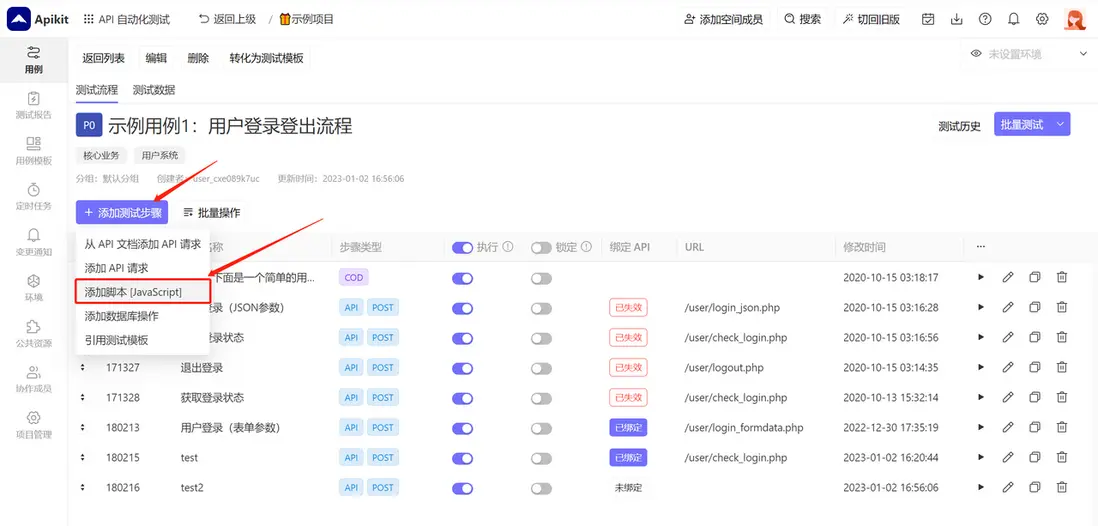
在流程測試用例界面,進入用例管理,點擊 添加腳本[Javascript] 按鈕:
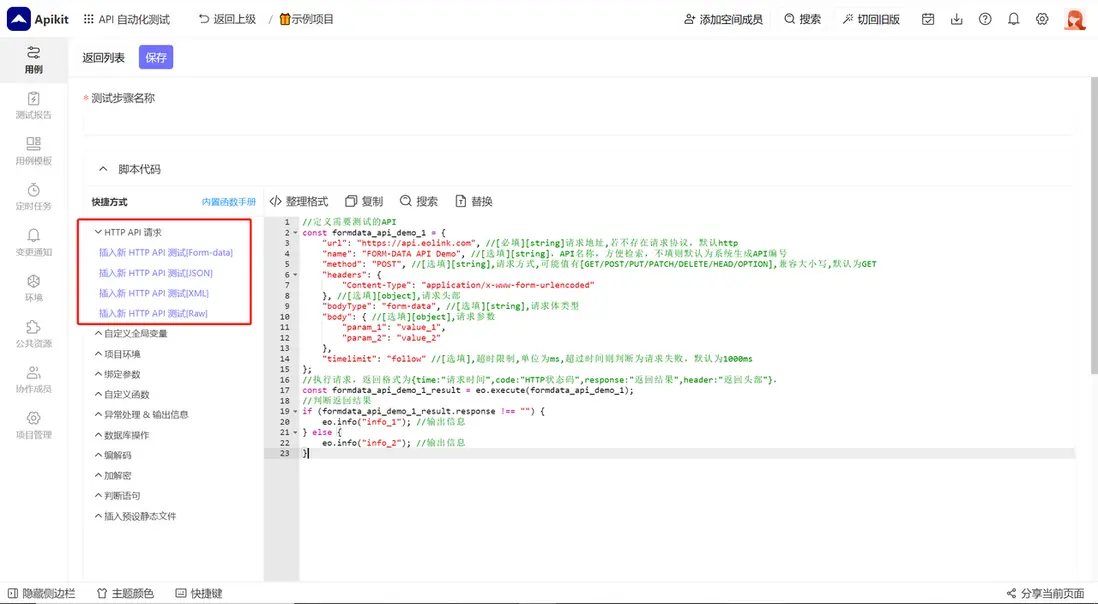
進入編輯用例頁面,點擊 新API測試 新建一個 API 請求。
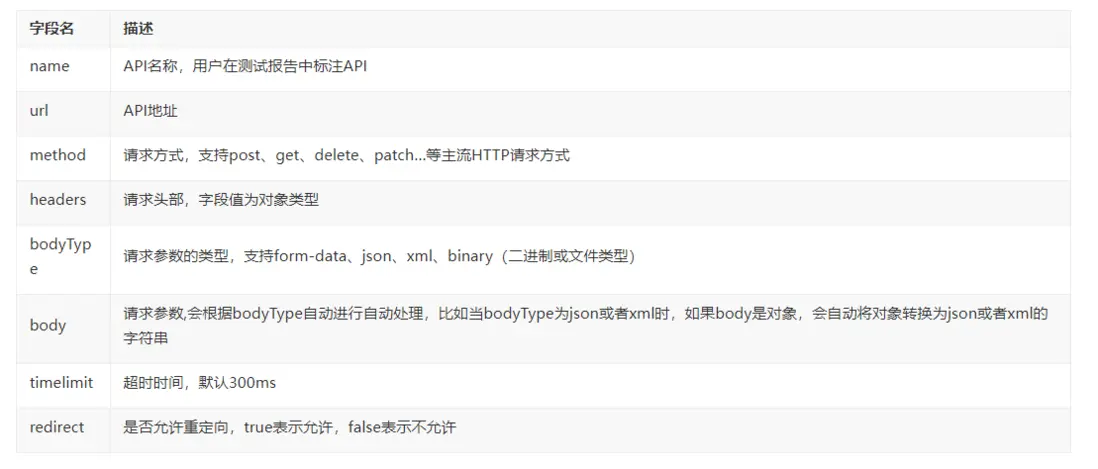
API 自動化測試平台為代碼模式的測試用例設計了一套簡單的API信息模板,因此只需要極少的代碼即可完整地描述API信息,模板中各個字段含義如下:
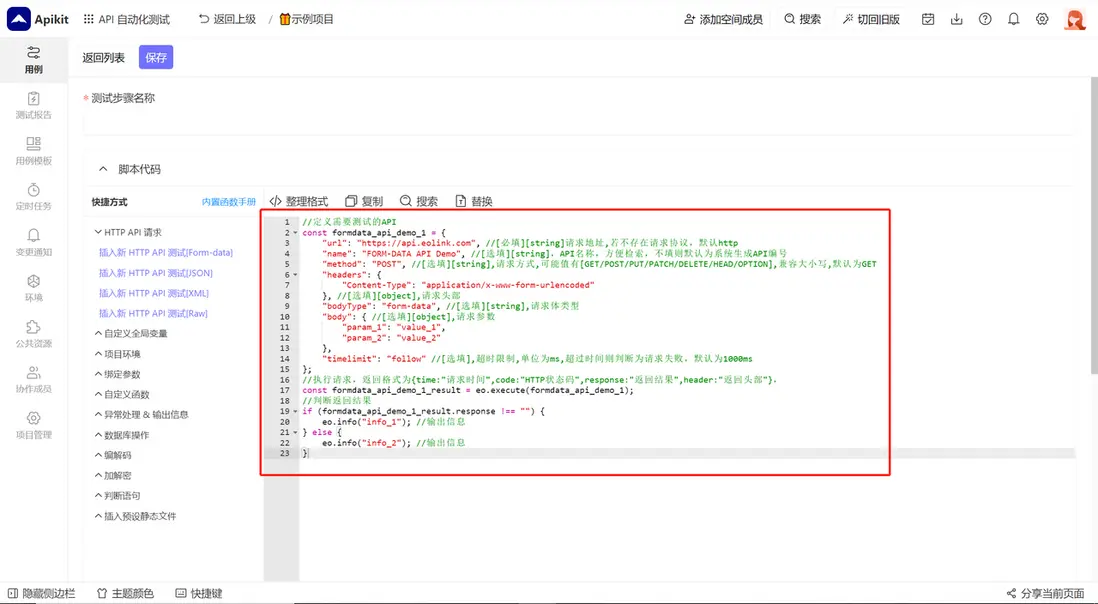
如下圖所示即為一個完整的API請求信息,表示:
請求url:https://www.eolinker.com/
請求方式:POST
請求頭部:空
請求參數:form-data類型(默認),name=hello,password=world
超時限制:300毫秒
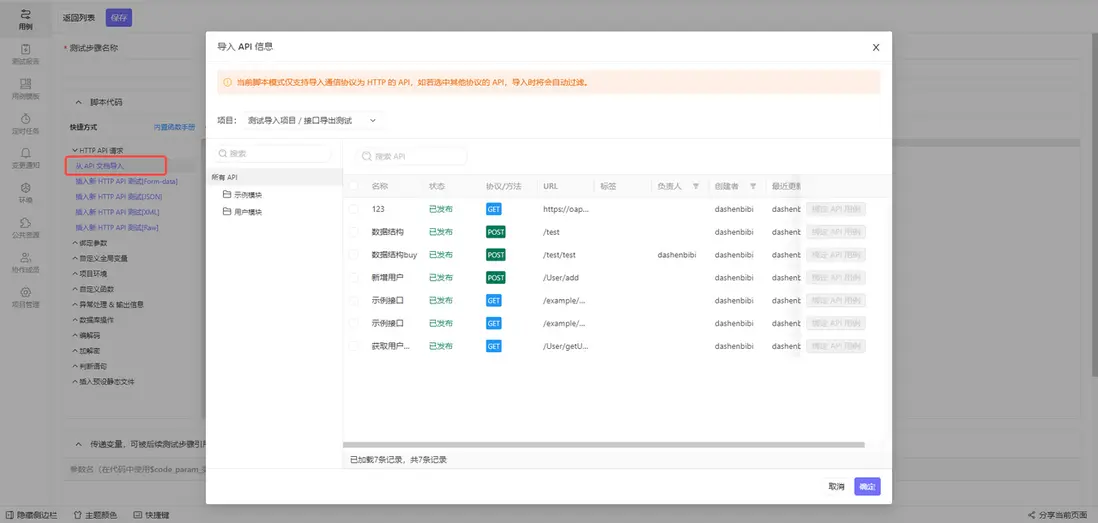
從API文檔中引用API作為測試步驟(API)
進入編輯用例頁面,點擊 從API文檔導入 ,在新的頁面中,選擇項目、分組以及需要導入的API文檔,然後點擊保存即可。API 自動化測試平台 通過這種方式將API文檔管理與自動化測試關聯起來,能夠幫助測試人員節省大量的測試時間:
設置測試步驟(API)的請求參數
代碼模式中的請求參數在一般情況下需要結合請求頭部的Content-Type字段來設置請求參數的類型。
在默認不設置請求頭部的Content-Type參數的情況下,請求參數的類型為Form-data,此時的請求參數字段params的值為對象類型,表示Form-data裏的鍵值對,比如以下代碼中,請求參數為user_name和password:
var api_1={
    "url":"/user/register",
    "name":"用户註冊",
    "method":"POST",
    "headers":{},
    "params":{
        "user_name":"jackliu",
        "password":eo.md5("123456")
    },
    "timelimit":300
};
//發送測試並將返回結果賦值給result_api_1
//eo.execute(api_name)是固定的方法,用於執行一次測試
var result_api_1=eo.execute(api_1);
如果需要發送Json、XML、Raw等類型的數據,需要設置請求頭部的Content-Type字段,以下是發送Json的代碼,其他參數類型的代碼類似:
var json_params = "{'user_name':'jackliu','password':'"+eo.md5("123456")+"'}"
//設置請求信息
var api_1={
    "url":"/user/register",
    "name":"用户註冊",
    "method":"POST",
    "headers":{
        "Contet-Type":"application/json"  //設置Json的請求頭部
    },
    "params":json_params,
    "timelimit":300
};
//發送測試並將返回結果賦值給result_api_1
//eo.execute(api_name)是固定的方法,用於執行一次測試
var result_api_1=eo.execute(api_1);
設置測試步驟(API)之間的數據關聯
代碼模式中使用變量來傳遞參數值,以下是使用變量vf_code傳遞參數的代碼,您可以在其中額外添加對vf_code的處理代碼:
var api_1={
    "url":"/user/login",
    "name":"用户登錄",
    "method":"POST",
    "headers":{},
    "params":{
        "user_name":"jackliu",
        "password":eo.md5("123456")
    },
    "timelimit":300
};

var result_api_1=eo.execute(api_1);

//獲取用户登錄的返回結果(Json格式),並且賦值給vf_code變量
var vf_code = JSON.parse(result_api_1.response)['verify_code'];

//編寫代碼對vf_code的變量值進行處理
...

var api_2={
    "url":"/user/check_login",
    "name":"校驗登錄狀態",
    "method":"POST",
    "headers":{
    },
    "params":{
        "verify_code":verify_code //將vf_code變量的值傳遞給verify_code
    },
    "timelimit":300
};

var result_api_2=eo.execute(api_2);
設置測試步驟(API)的返回頭部(Response Header)校驗規則
返回結果中,使用.header表示返回頭部。以下是獲取返回頭部並且判斷Content-Type是否等於”text/html; charset=UTF-8”的代碼:
var api_1={
    "url":"api.eolinker.com",
    "name":"用户登錄",
    "method":"POST",
    "headers":{},
    "params":{
        "user_name":"jackliu",
        "password":eo.md5("123456")
    },
    "timelimit":300
};

var result_api_1=eo.execute(api_1);

//判斷請求頭部的content-type
if(result_api_1.header['content-type']=="text/html; charset=UTF-8")
{
    eo.info("OK!");
}
設置測試步驟(API)的返回內容(Response Body)校驗規則
返回結果中,使用.response表示返回內容。返回內容默認是字符串類型,如果返回的數據是Json等格式,需要編寫代碼進行解析。以下是獲取返回內容並且判斷是否等於”helloworld”的代碼:
//返回內容為字符串
var api_1={
    "url":"api.eolinker.com",
    "name":"用户登錄",
    "method":"POST",
    "headers":{},
    "params":{},
    "timelimit":300
};

var result_api_1=eo.execute(api_1);

//返回內容為字符串:helloworld
if(result_api_1.response=="helloworld")
{
    eo.info("OK!");
}


//返回內容為Json
var api_2={
    "url":"api.eolinker.com",
    "name":"用户登錄",
    "method":"POST",
    "headers":{},
    "params":{
        "user_name":"jackliu",
        "password":eo.md5("123456")
    },
    "timelimit":300
};

var result_api_2=eo.execute(api_1);

//返回內容為Json:{"content":"helloworld"}
if(JSON.parse(result_api_2.response)['content']=="helloworld")
{
    eo.info("OK!");
}
代碼模式的測試結果中包含的字段
除了上面提到的.header和.response,返回結果中還包含了以下的內容:
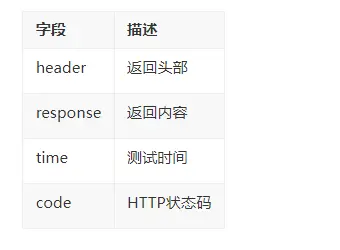
以下是判斷測試時間和HTTP狀態碼的代碼:
var api_1={
    "url":"api.eolinker.com",
    "name":"用户登錄",
    "method":"POST",
    "headers":{},
    "params":{
        "user_name":"jackliu",
        "password":eo.md5("123456")
    },
    "timelimit":300
};

var result_api_1=eo.execute(api_1);

//判斷請求的時間是否大於100ms
if(result_api_1.time>100)
{
    eo.info("error!");
}

//判斷請求的狀態碼是否不等於200
if(result_api_1.code!=200)
{
    eo.info("error!");
}