

定義
Service 是一種可在後台執行長時間運行操作而不提供界面的應用組件。服務可由其他應用組件啓動,而且即使用户切換到其他應用,服務仍將在後台繼續運行。此外,組件可通過綁定到服務與之進行交互,甚至是執行進程間通信 (IPC)。例如,服務可在後台處理網絡事務、播放音樂,執行文件 I/O 或與內容提供程序進行交互。
服務類型
-
前台服務
前台服務必須顯示通知,一般用於執行一些需要用户注意的操作。例如音頻播放器使用前台服務來播放音樂。
-
後台服務
後台服務用於執行用户不會直接注意的操作。通過startService()啓動
-
綁定服務
綁定服務會提供客户端-服務器接口,以便組件與服務進行交互、發送請求、接收結果,甚至是利用進程間通信 (IPC) 跨進程執行這些操作。僅當與另一個應用組件綁定時,綁定服務才會運行。多個組件可同時綁定到該服務,但全部取消綁定後,該服務即會被銷燬。
創建Service
1.全局配置文件聲明
<manifest ... >
  ...
  <application ... >
      <service android:name=".ExampleService"
               android:exported="false"/>
      ...
  </application>
</manifest>
添加\<service>標籤並使用android:name指定service實現類,android:exported置為false可以確保當前service只被當前應用使用,如果其他應用也要使用到此service,則應該置為true。
2.代碼實現
public class ExampleService extends Service {
    public ExampleService() {
    }

    @Override
    public int onStartCommand(Intent intent, int flags, int startId) {
        return START_STICKY;
    }

    @Override
    public IBinder onBind(Intent intent) {
        // TODO: Return the communication channel to the service.
        throw new UnsupportedOperationException("Not yet implemented");
    }
}
onStartCommand():每次調用startService()接口啓動服務時,都會觸發服務的該回調方法onBind():定義與客户端交互的接口並返回用於通信的IBinder實例,可以通過擴展 Binder 類、使用 Messenger、使用 AIDL三種方式定義
運行Service
1.啓動服務
// 啓動服務
private void startLocalService() {
    Intent intent = new Intent(this, ExampleService.class);
    startService(intent);
}

// 停止服務
private void stopLocalService() {
    Intent intent = new Intent(this, ExampleService.class);
    stopService(intent);
}
2.前台服務
定義notification,運行前台服務
Intent notificationIntent = new Intent(this, ExampleActivity.class);
PendingIntent pendingIntent =
        PendingIntent.getActivity(this, 0, notificationIntent, 0);

Notification notification =
          new Notification.Builder(this, CHANNEL_DEFAULT_IMPORTANCE)
    .setContentTitle(getText(R.string.notification_title))
    .setContentText(getText(R.string.notification_message))
    .setSmallIcon(R.drawable.icon)
    .setContentIntent(pendingIntent)
    .setTicker(getText(R.string.ticker_text))
    .build();

startForeground(ONGOING_NOTIFICATION_ID, notification);
3.綁定服務
綁定服務需要使用ServiceConnection來監聽服務的連接狀態,並在連接成功的回調方法onServiceConnected()中獲取到可以用以與服務通信的Binder實例
// 監聽服務綁定狀態
private ServiceConnection serviceConnection = new ServiceConnection() {
    @Override
    public void onServiceConnected(ComponentName name, IBinder service) {
    }

    @Override
    public void onServiceDisconnected(ComponentName name) {
    }
};

// 綁定服務
private void bindLocalService() {
    Intent intent = new Intent(this, ExampleService.class);
    bindService(intent, serviceConnection, Context.BIND_AUTO_CREATE);
}

// 解綁服務
private void unbindLocalService() {
    unbindService(serviceConnection);
}
生命週期
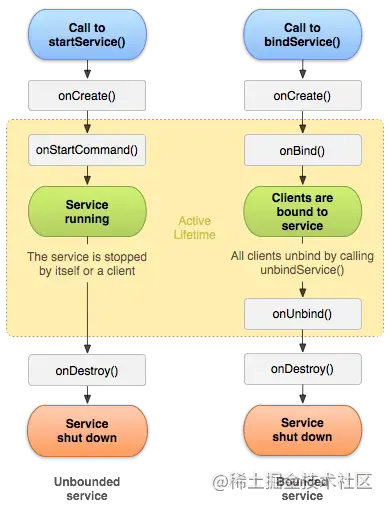
對於不同的服務啓動方式,服務的生命週期也有所不同。如上圖,左邊時通過startService()啓動服務的生命週期,右邊時通過bindService()啓動服務的生命週期。
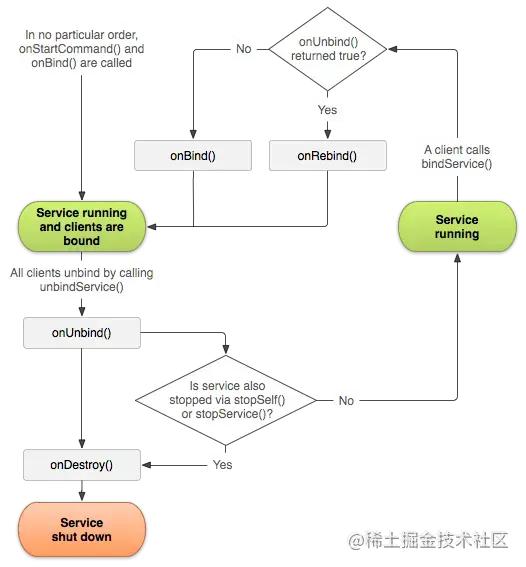
如果是bindService()方式啓動服務,當onUnbind()返回true,客户端再次bindService()時會觸發到onRebind()回調
-
onCreate()
首次創建服務時,會調用該方法,如果服務已在運行,則不會被調用,該方法在服務的整個生命週期中只會被調用一次。
-
onStartCommand()
當另一個組件通過
startService()方法啓動服務時,會調用到該方法 -
onBind()
當另一個組件通過
bindService()方法綁定服務時,會調用到該方法 -
onUnbind()
當另一個組件通過unbindSevice()方法解綁服務時,會調用到該方法
-
onRebind()
當舊的組件已與服務解綁後,新的組件綁定服務時,如果
onUnbind()返回true,則會調用該方法 -
onDestory()
當綁定服務的所有組件均已解綁或者服務停止時,會調用到該方法
