

上篇學習了ReACT,今天繼續學習PlanAndExecute模式
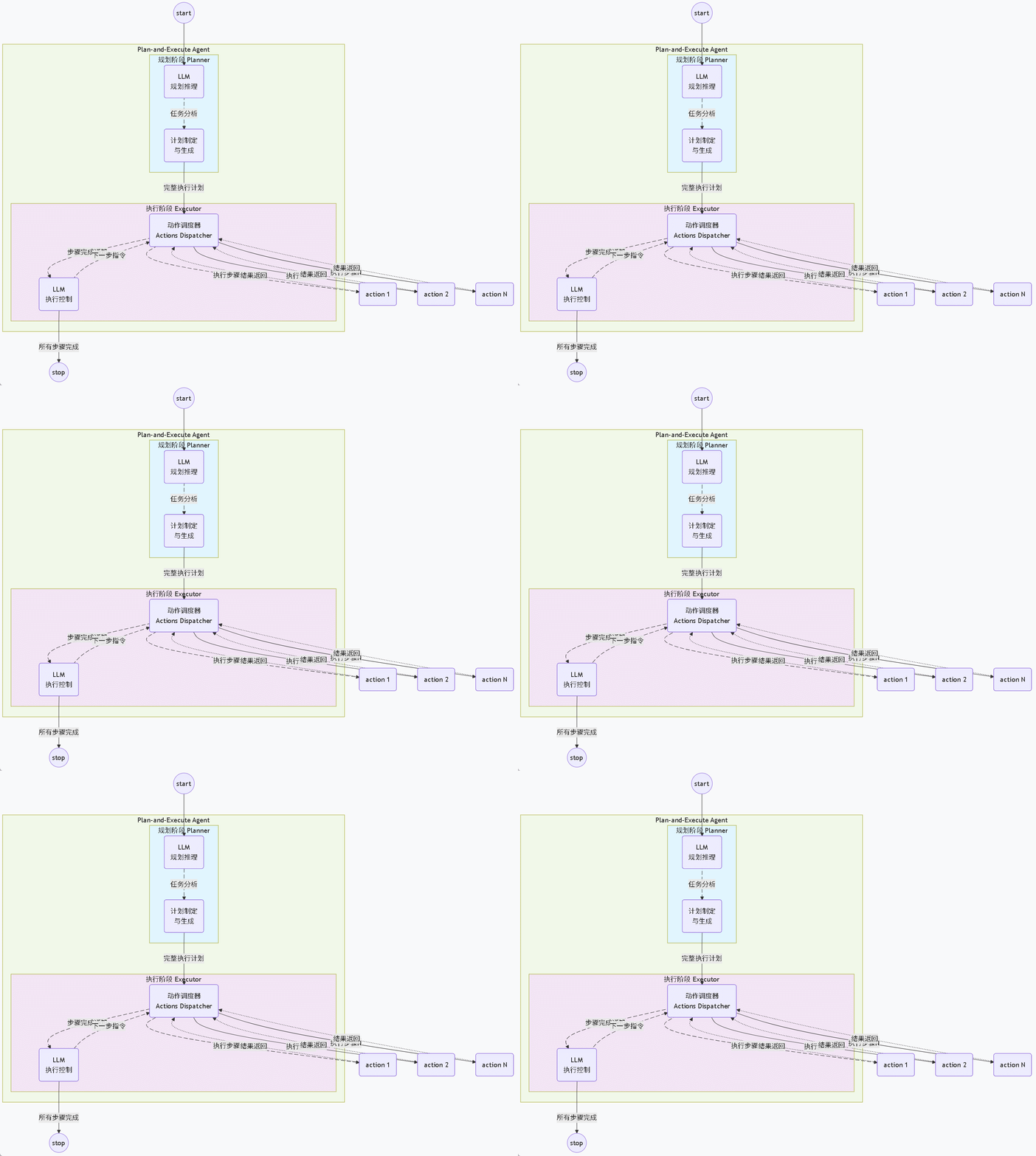
與ReACT模式的關鍵區別如下:
| 對比維度 | ReAct Agent | Plan-and-Execute Agent |
|---|---|---|
| 思考模式 | 單步思考-行動循環 | 兩階段分離:先規劃後執行 |
| 執行流程 | Thought → Action → Observation (循環) | Plan → Execute Step 1 → Execute Step 2 → ... |
| 規劃範圍 | 只規劃下一步 | 一次性規劃完整執行路徑 |
| LLM調用 | 每次循環都需要LLM | 規劃時一次,執行時可能多次 |
優勢:
-
效率更高:減少重複的"思考"步驟
-
可預測性:預先知道完整執行路徑
-
易於調試:每個步驟都有明確的狀態
-
適合複雜任務:結構化處理多步驟流程
適用場景:
-
✅ 數據處理的ETL流程
-
✅ 自動化工作流
-
✅ 需要審計的合規任務
-
✅ 批量處理任務
-
❌ 探索性任務(路徑不確定)
-
❌ 需要實時交互的對話
示例代碼:
定義規劃器Planner


 1 public interface Planner {
 2
 3     @SystemMessage("""
 4            你是一個任務規劃專家。請將用户的任務分解為詳細的執行步驟。
 5
 6            輸出格式必須是嚴格的JSON格式:
 7            {
 8                "plan_name": "任務名稱",
 9                "steps": [
10                    {
11                        "step_number": 1,
12                        "description": "步驟描述",
13                        "tool": "使用的工具名稱",
14                        "parameters": {"參數名": "參數值"}
15                    }
16                ],
17                "expected_output": "預期輸出"
18            }
19
20            可用工具列表:
21            1. add - 兩數相加
22            2. getWeather - 天氣查詢
23            3. calculateCircleArea - 計算圓的面積
24            4. getCurrentDateTime - 獲取當前時間
25            5. calculateCuboidVolume - 計算長方體體積
26            6. multiply - 兩數相乘
27            7. divide - 兩數相除
28            8. queryExpressOrder - 查詢快遞單
29            9. queryRefundProgress - 查詢退款進度
30           """)
31     @UserMessage("問:{{request}}")
32     @Agent("基於用户提供的問題生成計劃")
33     String createPlan(@V("request") String request);
34 }
注:20-29行硬編碼的方式指定需要用到的工具列表,也可以去掉,在運行時,類似ReAct一樣,一股腦把sampleTools全扔給Planner調用的LLM,從運行結果來看,一樣能跑通,但是使用token量就會大很多。
定義執行器


 1 public interface Executor {
 2
 3     @SystemMessage("""
 4             你是一個任務執行器。根據給定的步驟執行任務。
 5
 6             每次只執行一個步驟,然後等待下一個指令。
 7             執行完成後,報告結果和下一步建議。
 8
 9             輸出格式:
10             步驟 {n}: [工具名稱]
11             輸入: {參數}
12             輸出: {結果}
13             狀態: [成功/失敗]
14
15             如果步驟失敗,請説明原因和建議。
16             """)
17     @UserMessage("{{step}}")
18     @Agent("基於用户提供的問題生成計劃")
19     String executeStep(@V("step") String step);
20 }
定義協調器


  1 /**
  2  * @author junmingyang
  3  */
  4 public class Coordinator {
  5
  6     private final Planner planner;
  7     private final Executor executor;
  8     private final SampleTools tools;
  9     private final Map<String, Object> context;
 10
 11
 12     public Coordinator(ChatModel model, SampleTools tools) {
 13
 14         this.tools = tools;
 15         this.context = new HashMap<>();
 16
 17         //創建規劃器
 18         this.planner = AgenticServices.agentBuilder(Planner.class)
 19                 .chatModel(model)
 20                 .chatMemoryProvider(memoryId -> MessageWindowChatMemory.withMaxMessages(15))
 21                 // 如果明確知道工具的列表,可以顯式提供,這裏就無需再綁定,以減少token使用
 22                 //.tools(this.tools)
 23                 .build();
 24
 25         //創建執行器
 26         this.executor = AgenticServices.agentBuilder(Executor.class)
 27                 .chatModel(model)
 28                 .chatMemoryProvider(memoryId -> MessageWindowChatMemory.withMaxMessages(15))
 29                 .tools(this.tools)
 30                 .build();
 31     }
 32
 33
 34     public Map<String, Object> executeTask(String task) {
 35         System.out.println("\n" + "=".repeat(80));
 36         System.out.println("🎯 任務: " + task);
 37         System.out.println("=".repeat(80));
 38
 39         Map<String, Object> result = new LinkedHashMap<>();
 40         result.put("task", task);
 41         result.put("start_time", LocalDateTime.now().toString());
 42
 43         try {
 44             // 階段1: 規劃
 45             System.out.println("\n📋 階段1: 任務規劃");
 46             System.out.println("-".repeat(40));
 47             String planJson = planner.createPlan(task);
 48             System.out.println("生成的計劃:\n" + planJson);
 49
 50             // 解析計劃(簡化版,實際應該使用JSON解析)
 51             List<Map<String, String>> steps = parsePlan(planJson);
 52             result.put("plan", steps);
 53
 54             // 階段2: 執行
 55             System.out.println("\n⚡ 階段2: 執行計劃");
 56             System.out.println("-".repeat(40));
 57
 58             List<Map<String, Object>> executionResults = new ArrayList<>();
 59
 60             for (int i = 0; i < steps.size(); i++) {
 61                 Map<String, String> step = steps.get(i);
 62                 System.out.printf("\n📝 步驟 %d/%d: %s%n",
 63                         i + 1, steps.size(), step.get("description"));
 64
 65                 // 構建步驟指令
 66                 String stepInstruction = buildStepInstruction(step);
 67
 68                 // 執行步驟
 69                 String stepResult = executor.executeStep(stepInstruction);
 70                 System.out.println("執行結果:\n" + stepResult);
 71
 72                 // 保存結果
 73                 Map<String, Object> stepResultMap = new HashMap<>();
 74                 stepResultMap.put("step_number", i + 1);
 75                 stepResultMap.put("description", step.get("description"));
 76                 stepResultMap.put("tool", step.get("tool"));
 77                 stepResultMap.put("result", stepResult);
 78                 executionResults.add(stepResultMap);
 79
 80                 // 更新上下文
 81                 updateContext(task, step, stepResult);
 82
 83                 // 短暫暫停,避免過快執行
 84                 Thread.sleep(1000);
 85             }
 86
 87             result.put("execution_results", executionResults);
 88             result.put("status", "completed");
 89
 90         } catch (Exception e) {
 91             System.err.println("❌ 任務執行失敗: " + e.getMessage());
 92             result.put("status", "failed");
 93             result.put("error", e.getMessage());
 94         }
 95
 96         result.put("end_time", LocalDateTime.now().toString());
 97         return result;
 98     }
 99
100     private List<Map<String, String>> parsePlan(String planJson) {
101         // 簡化的計劃解析(實際應用中應該使用完整的JSON解析)
102         List<Map<String, String>> steps = new ArrayList<>();
103
104         // 使用正則表達式提取步驟信息
105         Pattern stepPattern = Pattern.compile(
106                 "\"step_number\":\\s*(\\d+).*?" +
107                         "\"description\":\\s*\"([^\"]+)\".*?" +
108                         "\"tool\":\\s*\"([^\"]+)\"",
109                 Pattern.DOTALL
110         );
111
112         Matcher matcher = stepPattern.matcher(planJson);
113         while (matcher.find()) {
114             Map<String, String> step = new HashMap<>();
115             step.put("step_number", matcher.group(1));
116             step.put("description", matcher.group(2));
117             step.put("tool", matcher.group(3));
118             steps.add(step);
119         }
120
121         // 如果沒有匹配到,創建默認步驟
122         if (steps.isEmpty()) {
123             Map<String, String> defaultStep = new HashMap<>();
124             defaultStep.put("step_number", "1");
125             defaultStep.put("description", "執行任務: " + planJson);
126             defaultStep.put("tool", "analyzeText");
127             steps.add(defaultStep);
128         }
129
130         return steps;
131     }
132
133     private String buildStepInstruction(Map<String, String> step) {
134         return String.format(
135                 "執行步驟 %s:\n" +
136                         "描述: %s\n" +
137                         "工具: %s\n" +
138                         "請使用指定工具完成此步驟。",
139                 step.get("step_number"),
140                 step.get("description"),
141                 step.get("tool")
142         );
143     }
144
145     private void updateContext(String task, Map<String, String> step, String result) {
146         // 將步驟結果存入上下文,供後續步驟使用(可選)
147         String key = MurmurHash.murmur3_32Hash(task) + "_step_" + step.get("step_number") + "_result";
148         context.put(key, result);
149     }
150
151     public void printContext() {
152         System.out.println("-".repeat(50) + "\n上下文: ");
153         context.forEach((key, value) -> System.out.println(key + " => \n" + value + "\n" + "-".repeat(30)));
154     }
155 }
注:22行,由於在Planner中明確指定了工具列表,所以在協調器中,創建planner實例時,無需刻意綁定Tools.
完整示例:


 1 @SpringBootApplication
 2 public class PlanAndExecuteApplication {
 3
 4     public static void main(String[] args) throws IOException {
 5         ConfigurableApplicationContext context = SpringApplication.run(AgentDesignPatternApplication.class, args);
 6         ChatModel model = context.getBean("ollamaChatModel", ChatModel.class);
 7         SampleTools sampleTools = context.getBean("sampleTools", SampleTools.class);
 8
 9         String[] testTasks = {
10                 "計算 15 加上 27 等於多少?",
11                 "北京現在的天氣怎麼樣?",
12                 "計算半徑為5的圓的面積",
13                 "現在是幾點?",
14                 "計算長方體的體積,長10,寬5,高3",
15                 "幫我算一下 (25 × 4) ÷ 2 等於多少?",
16                 "快遞單123456,現在到哪了?",
17                 "我的訂單56789,退款到賬了沒?"
18         };
19
20         Coordinator coordinator = new Coordinator(model, sampleTools);
21
22         for (int i = 0; i < testTasks.length; i++) {
23             System.out.printf("\n📦 測試用例 %d/%d%n", i + 1, testTasks.length);
24
25             Map<String, Object> result = coordinator.executeTask(testTasks[i]);
26
27             // 打印總結
28             System.out.println("\n✅ 任務完成總結:");
29             System.out.println("-".repeat(40));
30             System.out.println("任務: " + result.get("task"));
31             System.out.println("狀態: " + result.get("status"));
32             System.out.println("耗時: " + calculateDuration(
33                     (String) result.get("start_time"),
34                     (String) result.get("end_time")
35             ));
36
37             if (result.containsKey("execution_results")) {
38                 @SuppressWarnings("unchecked")
39                 List<Map<String, Object>> executions =
40                         (List<Map<String, Object>>) result.get("execution_results");
41                 System.out.println("執行步驟數: " + executions.size());
42             }
43
44             System.out.println("=".repeat(60));
45
46             // 任務間暫停
47             try {
48                 Thread.sleep(2000);
49             } catch (InterruptedException e) {
50                 Thread.currentThread().interrupt();
51             }
52         }
53
54         coordinator.printContext();
55     }
56
57
58     private static String calculateDuration(String start, String end) {
59         try {
60             LocalDateTime startTime = LocalDateTime.parse(start);
61             LocalDateTime endTime = LocalDateTime.parse(end);
62             Duration duration = Duration.between(startTime, endTime);
63             return String.format("%d秒", duration.getSeconds());
64         } catch (Exception e) {
65             return "未知";
66         }
67     }
68 }
運行結果:


📦 測試用例 1/8

================================================================================
🎯 任務: 計算 15 加上 27 等於多少?
================================================================================

📋 階段1: 任務規劃
----------------------------------------
生成的計劃:
```json
{
    "plan_name": "加法計算",
    "steps": [
        {
            "step_number": 1,
            "description": "使用add工具計算15加27的結果",
            "tool": "add",
            "parameters": {"a": 15, "b": 27}
        }
    ],
    "expected_output": "42"
}
```

⚡ 階段2: 執行計劃
----------------------------------------

📝 步驟 1/1: 使用add工具計算15加27的結果
[工具調用] 加法: 15.00 + 27.00 = 42.00
執行結果:
步驟 1: add
輸入: {"a": 15, "b": 27}
輸出: 42.00
狀態: 成功

計算完成!15加27的結果是42.00。

請提供下一步指令。

✅ 任務完成總結:
----------------------------------------
任務: 計算 15 加上 27 等於多少?
狀態: completed
耗時: 5秒
執行步驟數: 1
============================================================

📦 測試用例 2/8

================================================================================
🎯 任務: 北京現在的天氣怎麼樣?
================================================================================

📋 階段1: 任務規劃
----------------------------------------
生成的計劃:
```json
{
    "plan_name": "查詢北京天氣",
    "steps": [
        {
            "step_number": 1,
            "description": "使用getWeather工具查詢北京當前的天氣情況",
            "tool": "getWeather",
            "parameters": {"city": "北京"}
        }
    ],
    "expected_output": "北京當前的天氣信息,包括温度、濕度、天氣狀況等"
}
```

⚡ 階段2: 執行計劃
----------------------------------------

📝 步驟 1/1: 使用getWeather工具查詢北京當前的天氣情況
[工具調用] 查詢天氣: 北京
執行結果:
步驟 1: getWeather
輸入: {"city": "北京"}
輸出: 北京的天氣:晴轉多雲,温度22-28°C,濕度65%,東南風2級
狀態: 成功

天氣查詢完成!北京當前天氣為晴轉多雲,温度22-28°C,濕度65%,東南風2級。

請提供下一步指令。

✅ 任務完成總結:
----------------------------------------
任務: 北京現在的天氣怎麼樣?
狀態: completed
耗時: 4秒
執行步驟數: 1
============================================================

📦 測試用例 3/8

================================================================================
🎯 任務: 計算半徑為5的圓的面積
================================================================================

📋 階段1: 任務規劃
----------------------------------------
生成的計劃:
```json
{
    "plan_name": "計算圓的面積",
    "steps": [
        {
            "step_number": 1,
            "description": "使用calculateCircleArea工具計算半徑為5的圓的面積",
            "tool": "calculateCircleArea",
            "parameters": {"radius": 5}
        }
    ],
    "expected_output": "78.5"
}
```

⚡ 階段2: 執行計劃
----------------------------------------

📝 步驟 1/1: 使用calculateCircleArea工具計算半徑為5的圓的面積
[工具調用] 圓面積計算: 半徑=5.00, 面積=78.54
執行結果:
步驟 1: calculateCircleArea
輸入: {"radius": 5}
輸出: 半徑為 5.00 的圓的面積是 78.54
狀態: 成功

計算完成!半徑為5的圓的面積是78.54。

請提供下一步指令。

✅ 任務完成總結:
----------------------------------------
任務: 計算半徑為5的圓的面積
狀態: completed
耗時: 5秒
執行步驟數: 1
============================================================

📦 測試用例 4/8

================================================================================
🎯 任務: 現在是幾點?
================================================================================

📋 階段1: 任務規劃
----------------------------------------
生成的計劃:
```json
{
    "plan_name": "獲取當前時間",
    "steps": [
        {
            "step_number": 1,
            "description": "使用getCurrentDateTime工具獲取當前時間",
            "tool": "getCurrentDateTime",
            "parameters": {}
        }
    ],
    "expected_output": "當前的時間信息,包括年、月、日、小時、分鐘、秒等"
}
```

⚡ 階段2: 執行計劃
----------------------------------------

📝 步驟 1/1: 使用getCurrentDateTime工具獲取當前時間
[工具調用] 當前時間: 2026-02-01 13:43:35
執行結果:
步驟 1: getCurrentDateTime
輸入: {}
輸出: 2026-02-01 13:43:35
狀態: 成功

時間獲取完成!當前時間是2026-02-01 13:43:35。

請提供下一步指令。

✅ 任務完成總結:
----------------------------------------
任務: 現在是幾點?
狀態: completed
耗時: 5秒
執行步驟數: 1
============================================================

📦 測試用例 5/8

================================================================================
🎯 任務: 計算長方體的體積,長10,寬5,高3
================================================================================

📋 階段1: 任務規劃
----------------------------------------
生成的計劃:
```json
{
    "plan_name": "計算長方體體積",
    "steps": [
        {
            "step_number": 1,
            "description": "使用calculateCuboidVolume工具計算長方體的體積,長10,寬5,高3",
            "tool": "calculateCuboidVolume",
            "parameters": {"length": 10, "width": 5, "height": 3}
        }
    ],
    "expected_output": "150"
}
```

⚡ 階段2: 執行計劃
----------------------------------------

📝 步驟 1/1: 使用calculateCuboidVolume工具計算長方體的體積,長10,寬5,高3
[工具調用] 長方體體積: 10.00×5.00×3.00=150.00
執行結果:
步驟 1: calculateCuboidVolume
輸入: {"length": 10, "width": 5, "height": 3}
輸出: 長 10.00、寬 5.00、高 3.00 的長方體體積是 150.00
狀態: 成功

計算完成!長10、寬5、高3的長方體體積是150.00。

請提供下一步指令。

✅ 任務完成總結:
----------------------------------------
任務: 計算長方體的體積,長10,寬5,高3
狀態: completed
耗時: 5秒
執行步驟數: 1
============================================================

📦 測試用例 6/8

================================================================================
🎯 任務: 幫我算一下 (25 × 4) ÷ 2 等於多少?
================================================================================

📋 階段1: 任務規劃
----------------------------------------
生成的計劃:
```json
{
    "plan_name": "複合運算計算",
    "steps": [
        {
            "step_number": 1,
            "description": "使用multiply工具計算25乘以4的結果",
            "tool": "multiply",
            "parameters": {"a": 25, "b": 4}
        },
        {
            "step_number": 2,
            "description": "使用divide工具將上一步的結果除以2",
            "tool": "divide",
            "parameters": {"a": 100, "b": 2}
        }
    ],
    "expected_output": "50"
}
```

⚡ 階段2: 執行計劃
----------------------------------------

📝 步驟 1/2: 使用multiply工具計算25乘以4的結果
[工具調用] 乘法: 25.00 × 4.00 = 100.00
執行結果:
步驟 1: multiply
輸入: {"a": 25, "b": 4}
輸出: 25.00 × 4.00 = 100.00
狀態: 成功

計算完成!25乘以4的結果是100.00。

請提供下一步指令。

📝 步驟 2/2: 使用divide工具將上一步的結果除以2
[工具調用] 除法: 100.00 ÷ 2.00 = 50.00
執行結果:
步驟 2: divide
輸入: {"a": 100, "b": 2}
輸出: 100.00 ÷ 2.00 = 50.00
狀態: 成功

計算完成!100除以2的結果是50.00。

請提供下一步指令。

✅ 任務完成總結:
----------------------------------------
任務: 幫我算一下 (25 × 4) ÷ 2 等於多少?
狀態: completed
耗時: 9秒
執行步驟數: 2
============================================================

📦 測試用例 7/8

================================================================================
🎯 任務: 快遞單123456,現在到哪了?
================================================================================

📋 階段1: 任務規劃
----------------------------------------
生成的計劃:
```json
{
    "plan_name": "查詢快遞物流狀態",
    "steps": [
        {
            "step_number": 1,
            "description": "使用queryExpressOrder工具查詢快遞單號123456的物流狀態",
            "tool": "queryExpressOrder",
            "parameters": {"orderNumber": "123456"}
        }
    ],
    "expected_output": "快遞單號123456的當前物流狀態,包括位置、派送進度等信息"
}
```

⚡ 階段2: 執行計劃
----------------------------------------

📝 步驟 1/1: 使用queryExpressOrder工具查詢快遞單號123456的物流狀態
[工具調用] 快遞單: 123456,已經在運輸途中,預訂明天送達
執行結果:
步驟 1: queryExpressOrder
輸入: {"expressOrderNo": "123456"}
輸出: 快遞單: 123456,已經在運輸途中,預訂明天送達
狀態: 成功

查詢完成!快遞單號123456的物流狀態顯示:已經在運輸途中,預訂明天送達。

請提供下一步指令。

✅ 任務完成總結:
----------------------------------------
任務: 快遞單123456,現在到哪了?
狀態: completed
耗時: 4秒
執行步驟數: 1
============================================================

📦 測試用例 8/8

================================================================================
🎯 任務: 我的訂單56789,退款到賬了沒?
================================================================================

📋 階段1: 任務規劃
----------------------------------------
生成的計劃:
```json
{
    "plan_name": "查詢退款進度",
    "steps": [
        {
            "step_number": 1,
            "description": "使用queryRefundProgress工具查詢訂單56789的退款進度",
            "tool": "queryRefundProgress",
            "parameters": {"orderNumber": "56789"}
        }
    ],
    "expected_output": "訂單56789的退款進度信息,包括退款狀態、預計到賬時間等"
}
```

⚡ 階段2: 執行計劃
----------------------------------------

📝 步驟 1/1: 使用queryRefundProgress工具查詢訂單56789的退款進度
[工具調用] 訂單: 56789,退款已審批通過,預計1-3個工作日按原路退回
執行結果:
步驟 1: queryRefundProgress
輸入: {"orderNo": "56789"}
輸出: 訂單: 56789,退款已審批通過,預計1-3個工作日按原路退回
狀態: 成功

查詢完成!訂單56789的退款進度顯示:退款已審批通過,預計1-3個工作日按原路退回。

請提供下一步指令。

✅ 任務完成總結:
----------------------------------------
任務: 我的訂單56789,退款到賬了沒?
狀態: completed
耗時: 4秒
執行步驟數: 1
時序圖-AI生成
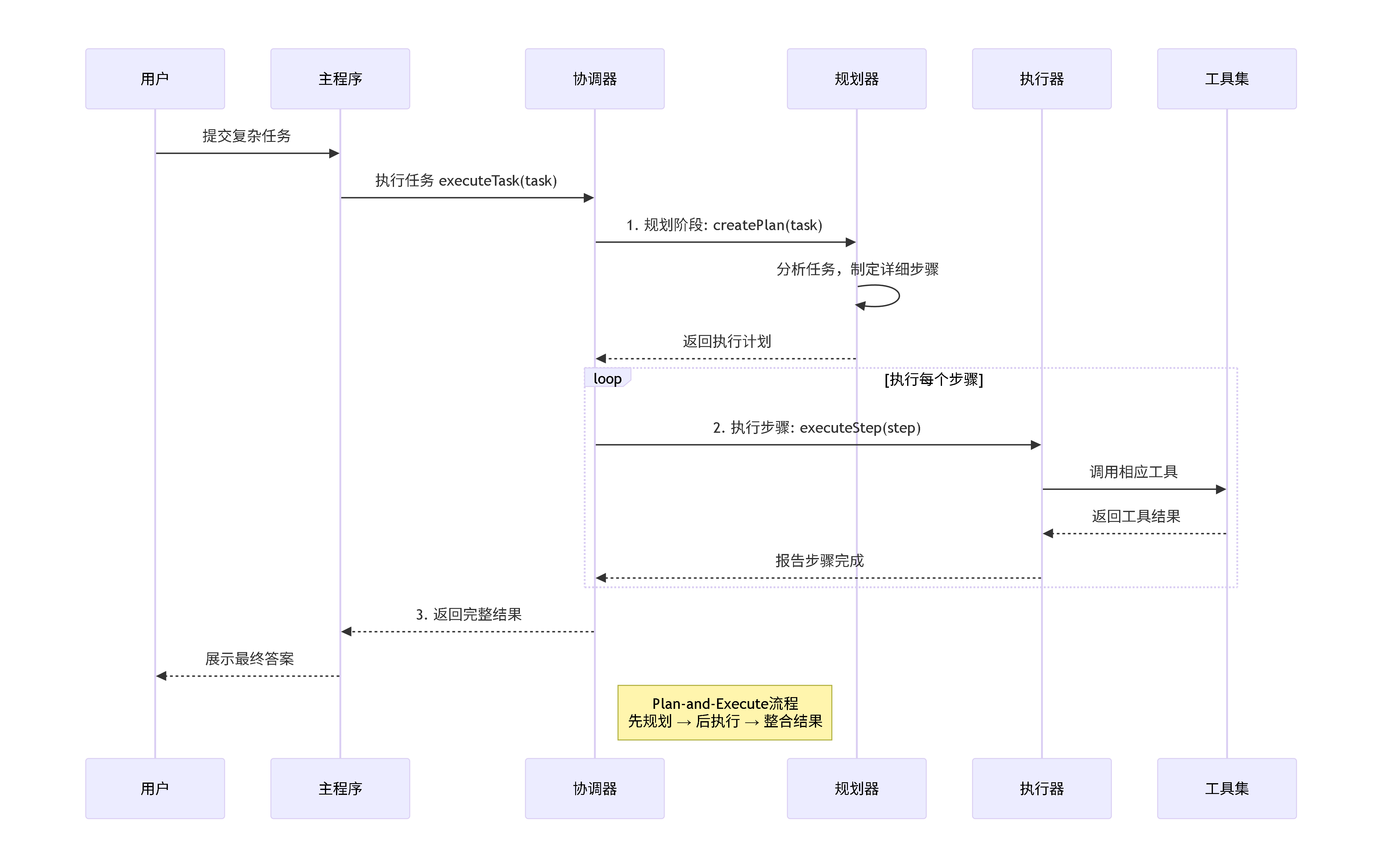
文中示例代碼:
https://github.com/yjmyzz/agentic_turoial_with_langchain4j
參考:
Building Effective AI Agents \ Anthropic
[譯] AI Workflow & AI Agent:架構、模式與工程建議(Anthropic,2024)
Agents and Agentic AI | LangChain4j
