什麼是盒模型
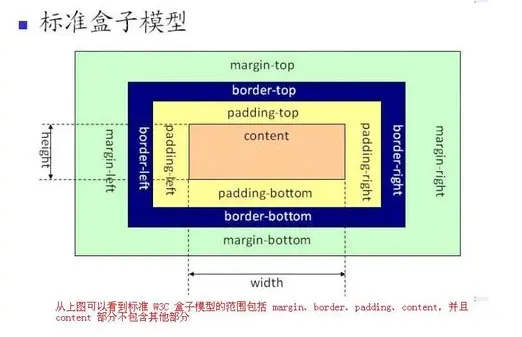
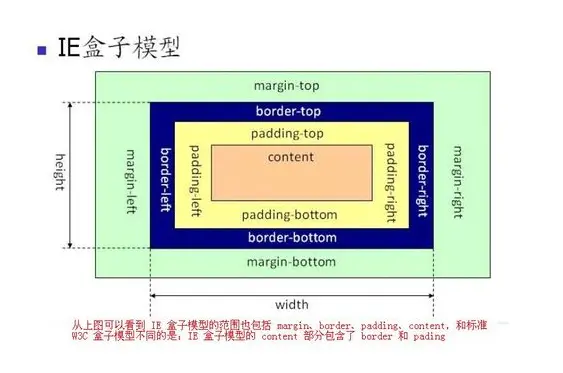
一個CSS盒模型由content、border、padding、margin組成,盒模型又分為標準模型和IE模型。標準模型和IE模型區別就是就是計算盒子的寬度和高度的不同
標準模型
標準模型的寬度和高度指的是content
實際例子
<style type="text/css">
.box{
    width: 200px;
    height: 200px;
    border: 20px solid #FF9800;
    padding: 50px;
    margin: 50px;
}
</style>
<div class="box"></div>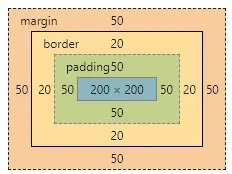
最外面橙色的就是外邊距區域(margin area ),往裏黃色的是邊框區域(border area),再往裏的綠色的是內邊距區域(padding area ),最裏面綠色的就是內容區域(content area)了
即在標準模式下的盒模型:
盒子實際內容(content)的width/height=我們設置的width/height;
盒子總寬度/高度=width/height+padding+border+margin
IE模型
IE模型的寬度高度包括padding+border
實際例子
box{
    width: 200px;
    height: 200px;
    border: 20px solid #FF9800;
    padding: 50px;
    margin: 50px;
    box-sizing: border-box; // 添加box-sizing 將其盒子設置為IE盒模型
}
</style>
<div class="box"></div>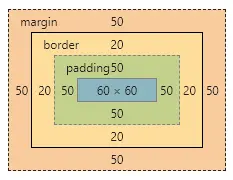
即在IE盒模型
盒子的(content)寬度+內邊距padding+邊框border寬度=我們設置的width(height也是如此)
盒子總寬度/高度=width/height + margin = 內容區寬度/高度 + padding + border + margin
box-sizing
box-sizing 屬性允許您以特定的方式定義匹配某個區域的特定元素,默認值是content-box,設置或檢索對象的盒模型組成模式,對應的腳本特性為boxSizing
語法:box-sizing:content-box | padding-box | border-box
content-box(默認)
佈局所佔寬度Width:
Width = width + padding-left + padding-right + border-left + border-right
佈局所佔高度Height:
Height = height + padding-top + padding-bottom + border-top + border-bottom
padding-box
佈局所佔寬度Width:
Width = width(包含padding-left + padding-right) + border-top + border-bottom
佈局所佔高度Height:
Height = height(包含padding-top + padding-bottom) + border-top + border-bottom
border-box
佈局所佔寬度Width:
Width = width(包含padding-left + padding-right + border-left + border-right)
佈局所佔高度Height:
Height = height(包含padding-top + padding-bottom + border-top + border-bottom)
JS獲取盒模型對應的寬和高
document.getElementById('dom').style.width/height //(只適用獲取內聯元素的寬和高-寫在標籤上的)
document.getElementById('dom').currentStyle.width/height //(獲取渲染後的寬高,但是僅IE支持)
window.getComputedStyle(dom).width/height //(與2原理相似,但是兼容性,通用性會更好一些)
document.getElementById('dom').getBoundingClientRect().widht/height //(計算元素絕對位置,獲取到6個元素left,top,bottom,right,width,height,x,y)
BFC 的基本概念
Block Formatting Context, 塊級格式化上下文,一個獨立的塊級渲染區域,該區域擁有一套渲染規格來約束塊級盒子的佈局,且與區域外部無關
BFC 的原理
1、內部的Box會在垂直方向,一個接一個地放置。
2、Box垂直方向的距離由margin決定。屬於同一個BFC的兩個相鄰Box的margin會發生重疊。
3、每個盒子(塊盒與行盒)的margin box的左邊,與包含塊border box的左邊相接觸(對於從左往右的格式化,否則相反)。即使存在浮動也是如此。
4、BFC的區域不會與float box重疊。
5、BFC就是頁面上的一個隔離的獨立容器,容器裏面的子元素不會影響到外面的元素。反之也如此。
6、計算BFC的高度時,浮動元素也參與計算
如何創建BFC
1、postion 為absolute 和fixed的元素
2、float不為none的元素
3、overflow不為visible的元素
4、彈性元素(display為 flex 或 inline-flex元素的直接子元素)
5、網格元素(display為 grid 或 inline-grid 元素的直接子元素)
6、內聯塊元素,即display的值為inline-block的元素;
7、流式佈局根元素,display值為flow-root的元素;
8、表格單元格(元素的 display為 table-cell,HTML表格單元格默認為該值)
利用BFC避免margin重疊
<!DOCTYPE html>
<html lang="en">
<head>
    <meta charset="UTF-8">
    <meta name="viewport" content="width=device-width, initial-scale=1.0">
    <meta http-equiv="X-UA-Compatible" content="ie=edge">
    <title>防止margin重疊</title>
</head>
<style>
    *{
        margin: 0;
        padding: 0;
    }
    p {
        color: #f55;
        background: yellow;
        width: 200px;
        line-height: 100px;
        text-align:center;
        margin: 30px;
    }
</style>
<body>
    <p>看看我的 margin是多少</p>
    <p>看看我的 margin是多少</p>
</body>
</html>
頁面效果
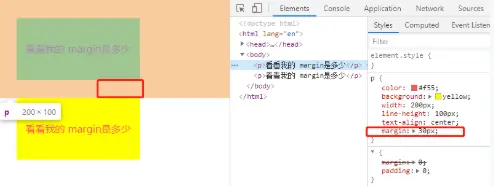
根據BFC規則,屬於同一個BFC的兩個相鄰的Box會發生margin重疊,所以我們可以設置,兩個不同的BFC,也就是我們可以讓把第二個p用div包起來,然後激活它使其成為一個BFC
<div style="overflow: hidden;"><p>看看我的 margin是多少</p></div>
自適應兩欄佈局
<!DOCTYPE html>
<html lang="en">
<head>
    <meta charset="UTF-8">
    <meta name="viewport" content="width=device-width, initial-scale=1.0">
    <meta http-equiv="X-UA-Compatible" content="ie=edge">
    <title>Document</title>
</head>
<style>
    *{
        margin: 0;
        padding: 0;
    }
    body {
        width: 100%;
        position: relative;
    }
    .left {
        width: 100px;
        height: 100px;
        float: left;
        background: rgb(139, 214, 78);
        text-align: center;
        font-size: 20px;
    }

    .right {
        height: 200px;
        background: rgb(170, 54, 236);
        text-align: center;
        font-size: 40px;
    }
</style>
<body>
    <div class="left">LEFT</div>
    <div class="right">RIGHT</div>
</body>
</html>
頁面呈現效果
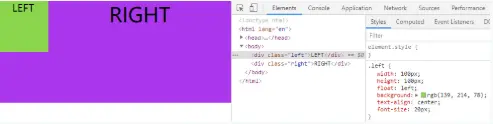
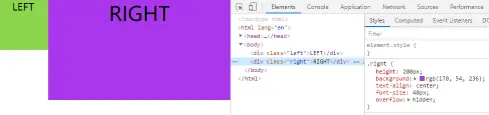
因為BFC的區域不會與float box重疊,所以讓right,形成一個bfc,即添加 overflow: hidden;
.right {
   height: 200px;
   background: rgb(170, 54, 236);
   text-align: center;
   font-size: 40px;
   overflow: hidden; // 添加此行代碼
}
清楚浮動
我們在開發者中,常常遇到,當我們不給父節點設置高度,子節點設置浮動的時候,會發生高度塌陷,這個時候我們就要清楚浮動
<!DOCTYPE html>
<html lang="en">
<head>
    <meta charset="UTF-8">
    <meta name="viewport" content="width=device-width, initial-scale=1.0">
    <meta http-equiv="X-UA-Compatible" content="ie=edge">
    <title>清除浮動</title>
</head>
<style>
    .par {
        border: 5px solid rgb(91, 243, 30);
        width: 300px;
    }

    .child {
        border: 5px solid rgb(233, 250, 84);
        width:100px;
        height: 100px;
        float: left;
    }
</style>
<body>
    <div class="par">
        <div class="child"></div>
        <div class="child"></div>
    </div>
</body>
</html>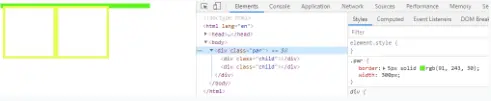
根據BFC規則,計算BFC的高度時,浮動元素也參與計算
.par {
    border: 5px solid rgb(91, 243, 30);
    width: 300px;
    overflow: hidden;
}
margin塌陷
<!DOCTYPE html>
<html lang="en">
<head>
    <meta charset="UTF-8">
    <meta name="viewport" content="width=device-width, initial-scale=1.0">
    <meta http-equiv="X-UA-Compatible" content="ie=edge">
    <title>Document</title>
    <style>
       *{
           margin: 0;
           padding: 0;
       }
    .outer{
        width: 200px;
        height: 200px;
        background: red;
    }
    .inner{
        width: 50px;
        height: 50px;
        background: blue;
        margin-top:50px;

    }
    </style>
</head>
<body>

    <div class="outer">
        <div class="inner"></div>
    </div>
</body>
</html>
頁面呈現效果如下,顯然效果不一致,我們想要的效果是inner的margin-top相對.outer
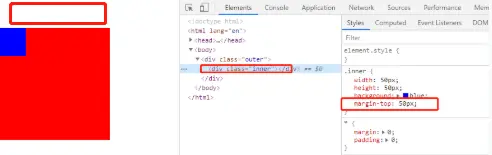
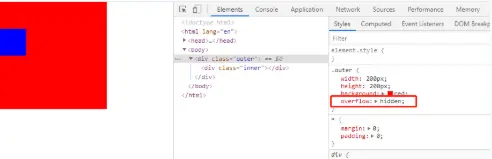
解決問題,讓outer盒子變成BFC元素,讓裏面inner單獨處於一個BFC環境
.outer{
  width: 200px;
  height: 200px;
  background: red;
  overflow: hidden;
}
參看文章
CSS盒模型
什麼是BFC?BFC的規則是什麼?如何創建BFC?