
以下展示了四種方式進行清除浮動
先看一段代碼
css
.box {
    border: 1px solid #f00;
}

.fl {
    float: left;
    width: 50px;
    height: 50px;
    background: #0f0;
    margin: 5px;
}
html
<div class="box">
    <div class="fl"></div>
    <div class="fl"></div>
    <div class="fl"></div>
</div>
下面是結果
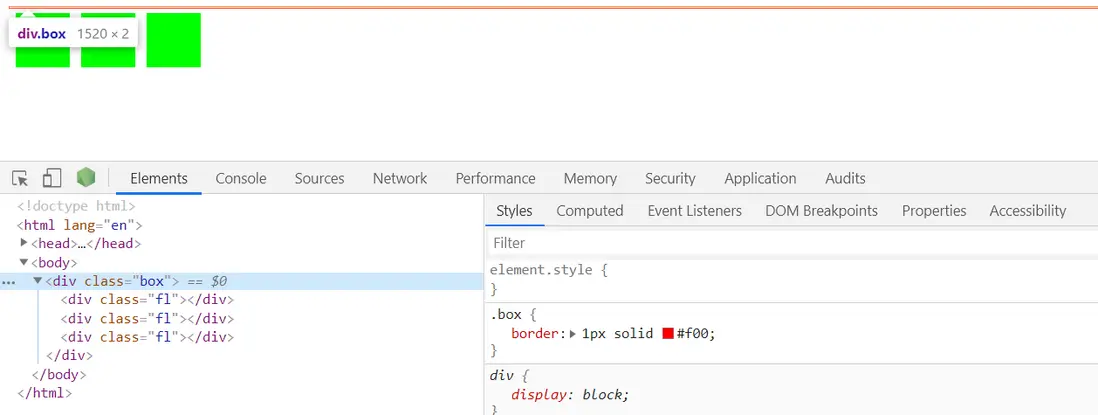
因為沒有清除浮動,所以子元素沒有將父元素撐開,出現上面的情況。
下面是幾種清除浮動的方法
1.額外標籤法
在最後一個浮動標籤後,新加一個標籤,給其設置clear:both;(不推薦)
css
.box {
    border: 1px solid #f00;
}

.fl {
    float: left;
    width: 50px;
    height: 50px;
    background: #0f0;
    margin: 5px;
}
.clearfix {
    clear: both;
}
html
<div class="box">
    <div class="fl"></div>
    <div class="fl"></div>
    <div class="fl"></div>
    <!-- 添加額外標籤  設置clear: both;-->
    <div class="clearfix"></div>
</div>
效果展示

2.使用after偽元素清除浮動
.clearfix:after{
    display: block;
    clear: both;
    content: '';
    visibility: hidden;
}
.clearfix {
    *zoom: 1;
}
3.使用before和after雙偽元素清除浮動
.clearfix:after,.clearfix:before{
    content: "";
    display: table;
}
.clearfix:after{
    clear: both;
}
.clearfix{
    *zoom: 1;
}
4.BFC法
✨不知道BFC的參考我的另外一篇文章,這是一個比較重要的概念
css
.box {
    border: 1px solid #f00;
}

.fl {
    float: left;
    width: 50px;
    height: 50px;
    background: #0f0;
    margin: 5px;
}

.clearfix {
    // 觸發BFC, 以下任意一種
    overflow: hidden;
    /* overflow: auto; */
    /* position: absolute; */
    /* position: fixed; */
    /* display: table; */
    /* display: flex; */
}
html
<div class="box clearfix">
    <div class="fl"></div>
    <div class="fl"></div>
    <div class="fl"></div>
</div>
將 clearfix作為全局使用的類名, 這樣在項目各處使用清除浮動就大大方便啦~~~~
參考
- https://blog.csdn.net/h_qingy...
