

項目背景
最近項目裏有個webpack版本較老的項目,由於升級和換框架暫時不被leader層接受o(╥﹏╥)o,只能在現有條件進行優化。
webpack3 + react16
webpack v3配置檢查
很明顯項目的配置是從v1繼承過來的,v1->v3的升級較為簡單,參考官網https://webpack.js.org/migrat... 即可。
loaders變為rules
不再支持鏈式寫法的loader,json-loader不需要配置
UglifyJsPlugin插件需要自己開啓minimize
分析現有包的問題
使用webpack-bundle-analyzer構建包後,如圖
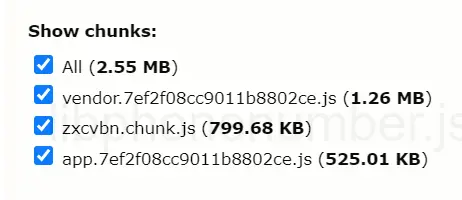
問題非常明顯:
除了zxcvbn這個較大的包被拆出來,代碼就簡單的打包為了vender和app,文件很大。
動態import拆分vender
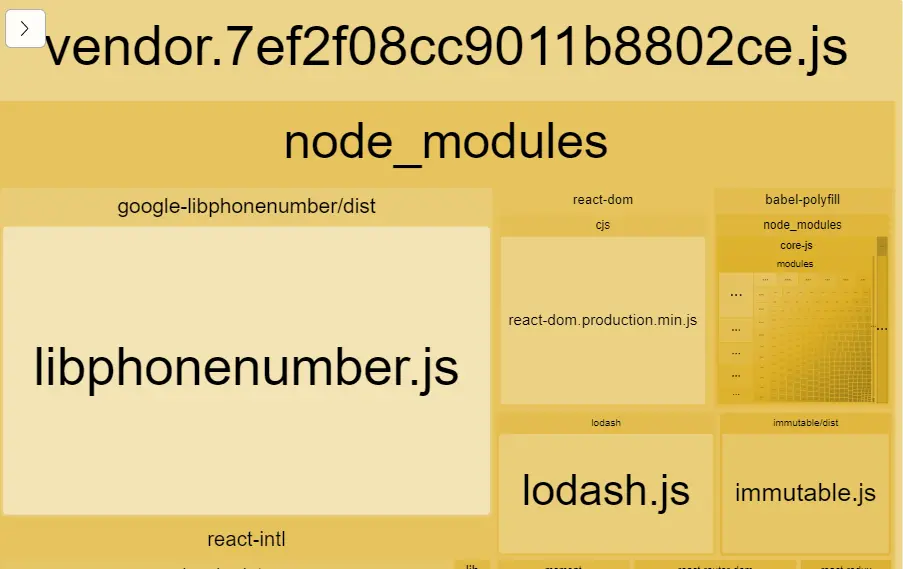
分析vender的代碼,某些大包,例如libphonenumber.js,使用場景不是很頻繁,將它拆出來,當使用到相關特性時再請求。
參考react官方代碼分割指南,https://react.docschina.org/d...
import { PhoneNumberUtil } from 'google-libphonenumber'
function usePhoneNumberUtil(){
    // 使用PhoneNumberUtil
}
修改為動態 import()方式,then和async/await都支持用來獲取異步數據
const LibphonenumberModule = () => import('google-libphonenumber')
function usePhoneNumberUtil(){
    LibphonenumberModule().then({PhoneNumberUtil} => {
        // 使用PhoneNumberUtil
    })
}
當 Webpack 解析到該語法時,會自動進行代碼分割。
修改後的效果:
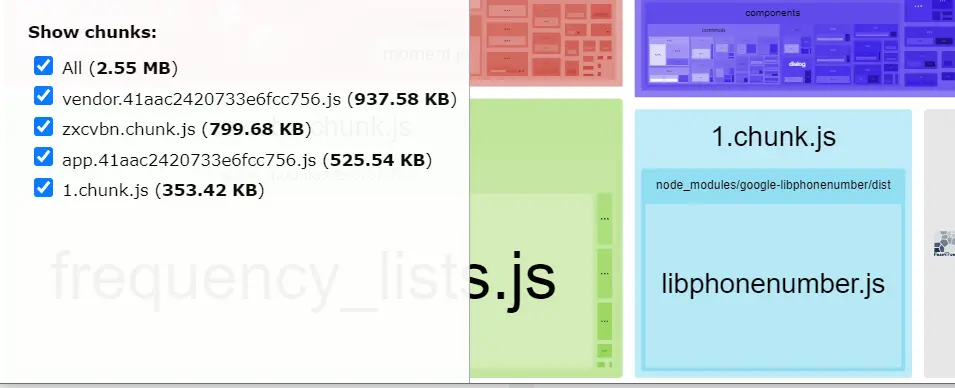
libphonenumber.js(1.chunk.js)從vender中拆分出來了,並且在項目實際運行中,只有當進入usePhoneNumberUtil流程時,才會向服務器請求libphonenumber.js文件。
基於路由的代碼分割
React.lazy
參考react官方代碼分割指南-基於路由的代碼分割,https://react.docschina.org/d...。
拆分前示例:
import React from 'react';
import { Route, Switch } from 'react-router-dom';
const Home = import('./routes/Home');
const About = import('./routes/About');

const App = () => (
<Router>
  <Suspense fallback={<div>Loading...</div>}>
    <Switch>
      <Route exact path="/" component={Home}/>
      <Route path="/about" component={About}/>
    </Switch>
  </Suspense>
</Router>
);
拆分後示例:
import React, { lazy } from 'react';
import { Route, Switch } from 'react-router-dom';
const Home = lazy(() => import('./routes/Home'));
const About = lazy(() => import('./routes/About'));

const App = () => (
// 路由配置不變
)
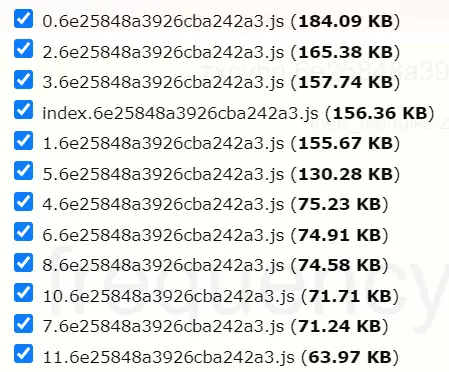
拆分後效果:
app.js按照路由被webpack自動拆分成了不同的文件,當切換路由時,才會拉取目標路由代碼文件。
命名導出
該段引用自https://react.docschina.org/d...。
React.lazy 目前只支持默認導出(default exports)。如果你想被引入的模塊使用命名導出(named exports),你可以創建一箇中間模塊,來重新導出為默認模塊。這能保證 tree shaking 不會出錯,並且不必引入不需要的組件。
// ManyComponents.js
export const MyComponent = /* ... */;
export const MyUnusedComponent = /* ... */;
// MyComponent.js
export { MyComponent as default } from "./ManyComponents.js";// MyApp.js
import React, { lazy } from 'react';
const MyComponent = lazy(() => import("./MyComponent.js"));自己實現AsyncComponent
React.lazy包裹的懶加載路由組件,必須要添加Suspense。如果不想強制使用,或者需要自由擴展lazy的實現,可以定義實現AsyncComponent,使用方式和lazy一樣。
import AsyncComponent from './components/asyncComponent.js'
const Home = AsyncComponent(() => import('./routes/Home'));
const About = AsyncComponent(() => import('./routes/About'));
// async load component
function AsyncComponent(getComponent) {
return class AsyncComponent extends React.Component {
static Component = null
state = { Component: AsyncComponent.Component }
componentDidMount() {
if (!this.state.Component) {
getComponent().then(({ default: Component }) => {
AsyncComponent.Component = Component
this.setState({ Component })
})
}
}
// component will be unmount
componentWillUnmount() {
// rewrite setState function, return nothing
this.setState = () => {
return
}
}
render() {
const { Component } = this.state
if (Component) {
return <Component {...this.props} />
}
return null
}
}
}common業務代碼拆分
在完成基於路由的代碼分割後,仔細看包的大小,發現包的總大小反而變大了,2.5M增加為了3.5M。
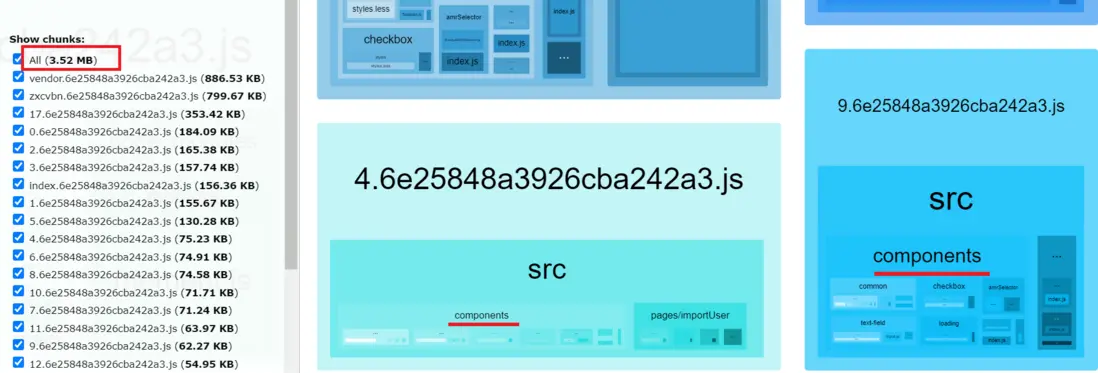
從webpack分析工具中看到,罪魁禍首就是每一個單獨的路由代碼中都單獨打包了一份components、utils、locales一類的公共文件。
使用webapck的配置將common部分單獨打包解決。
components文件合併導出
示例是將components下的所有文件一起導出,其他文件同理
function readFileList(dir, filesList = []) {
  const files = fs.readdirSync(dir)
  files.forEach((item) => {
    let fullPath = path.join(dir, item)
    const stat = fs.statSync(fullPath)
    if (stat.isDirectory()) {
      // 遞歸讀取所有文件
      readFileList(path.join(dir, item), filesList)
    } else {
      /\.js$/.test(fullPath) && filesList.push(fullPath)
    }
  })
  return filesList
}
exports.commonPaths = readFileList(path.join(__dirname, '../src/components'), [])
webpack配置抽離common
import conf from '**';
module.exports = {
  entry: {
    common: conf.commonPaths,
    index: ['babel-polyfill', `./${conf.index}`],
  },
  ... //其他配置
  plugins:[
    new webpack.optimize.CommonsChunkPlugin('common'),
    ... // other plugins
  ]
}在webpack3中使用CommonsChunkPlugin來提取第三方庫和公共模塊,傳入的參數common是entrty已經存在的chunk, 那麼就會把公共模塊代碼合併到這個chunk上。
提取common後的代碼
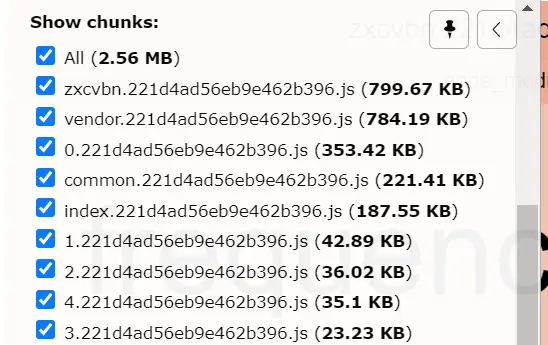
將各個路由重複的代碼提取出來後,包的總大小又變為了2.5M。多出了一個common的bundle文件。(common過大,其實還可以繼續拆分)
總結
webpack打包還有很多可以優化的地方,另外不同webpack版本之間也有點差異,拆包思路就是提取公共,根據使用場景按需加載。
