

背景
團隊最近有一個 Node.js 全新的模塊需要開發,涉及多進程的管理和通訊,簡化模型可以理解為需要頻繁從 master 進程調用 worker 進程的某些方法,簡單設計實現了一個 event-invoke 的庫,可以簡單優雅進行調用。
Node.js 提供了 child_process 模塊,在 master 進程通過 fork / spawn 等方法調用可以創建 worker 進程並獲取其對象(簡稱 cp)。父子進程會建立 IPC 通道,在 master 進程中可以使用 cp.send() 給 worker 進程發送 IPC 消息,而在 worker 進程中也可以通過 process.send() 給父進程發送 IPC 消息,達到雙工通信的目的。(進程管理涉及更復雜的工作,本文暫不涉及)
最小實現
基於以上前提,藉助 IPC 通道和進程對象,我們可以通過事件驅動的方式實現進程間的通信,只需要簡單的幾行代碼,就能實現基本調用邏輯,例如:
// master.js
const child_process = require('child_process');
const cp = child_process.fork('./worker.js');

function invoke() {
    cp.send({ name: 'methodA', args: [] });
  cp.on('message', (packet) => {
      console.log('result: %j', packet.payload);
  });
}

invoke();

// worker.js
const methodMap = {
  methodA() {}
}

cp.on('message', async (packet) => {
  const { name, args } = packet;
  const result = await methodMap[name)(...args);
  process.send({ name, payload: result });
});
仔細分析上述代碼實現,直觀感受 invoke 調用並不優雅,並且當調用量較大時,會創建很多的 message 監聽器,並且要保證請求和響應是一一對應,需要做很多額外的設計。希望設計一個簡單理想的方式,只需提供 invoke 方法,傳入方法名和參數,返回一個 Promise,像調用本地方法那樣進行 IPC 調用,而不用考慮消息通信的細節。
// 假想中的 IPC 調用
const res1 = await invoker.invoke('sleep', 1000);
console.log('sleep 1000ms:', res1);
const res2 = await invoker.invoke('max', [1, 2, 3]); // 3
console.log('max(1, 2, 3):', res2);
流程設計
從調用的模型看,可以將角色抽象為 Invoker 和 Callee,分別對應服務調用方和提供方,將消息通訊的細節可以封裝在內部。parent_process 和 child_process 的通信橋樑是操作系統提供的 IPC 通道,單純從 API 的視角看,可以簡化為兩個 Event 對象(主進程為 cp,子進程為 process)。Event 對象作為中間的雙工通道兩端,暫且命名為 InvokerChannel 和 CalleeChannel。
關鍵實體和流程如下:
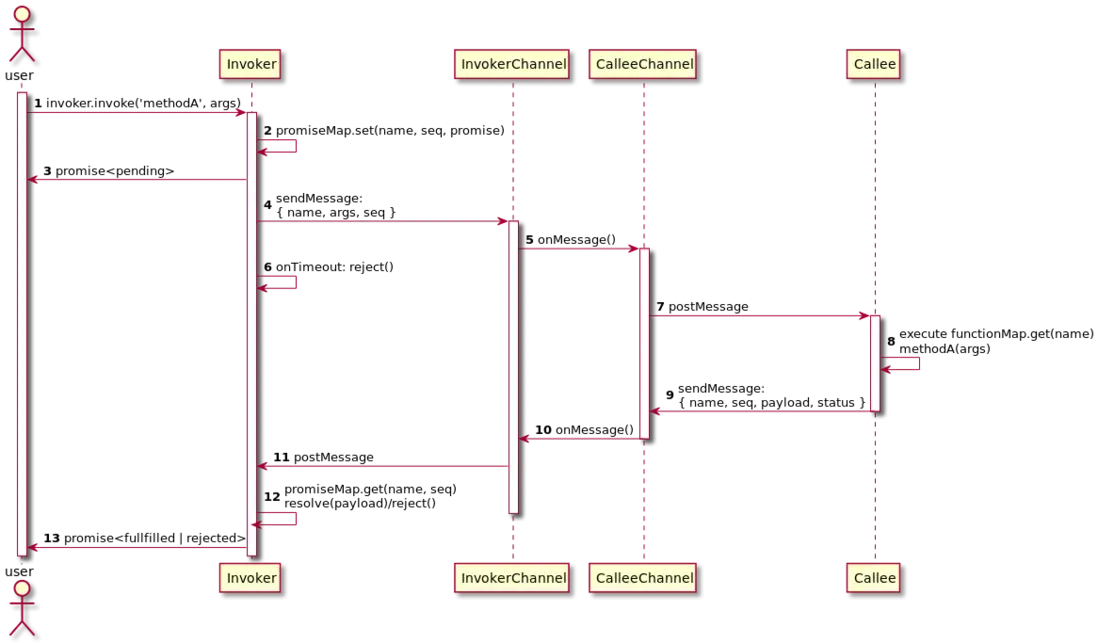
- Callee 中註冊可被調用的所有方法,並保存在 functionMap
-
用户調用 Invoker.invoke() 時:
- 創建一個 promise 對象,返回給用户,同時將其保存在 promiseMap 中
- 每次調用生成一個 id,保證調用和執行結果是一一對應的
- 進行超時控制,超時的任務直接執行 reject 該 promise
- Invoker 通過 Channel 把調用方法消息發送給 Callee
- Callee 解析收到的消息,通過 name 執行對應方法,並將結果和完成狀態(成功 or 異常)通過 Channel 發送消息給 Invoker
- Invoker 解析消息,通過 id+name 找到對應的 promise 對象,成功則 resolve,失敗則 reject
實際上,這個設計不僅適用 IPC 調用,在瀏覽器的場景下也能直接得到很好的應用,比如説跨 iframe 的調用可以包裝 window.postMessage(),跨標籤頁調用可以使用 storage 事件,以及 Web worker 中可藉助 worker.postMessage() 作為通信的橋樑。
快速開始
基於以上設計,實現編碼必然不在話下,趁着非工作時間迅速完成開發和文檔的工作,源代碼:https://github.com/x-cold/event-invoke
安裝依賴
npm i -S event-invoke父子進程通信實例
示例代碼:Example code
// parent.js
const cp = require('child_process');
const { Invoker } = require('event-invoke');

const invokerChannel = cp.fork('./child.js');

const invoker = new Invoker(invokerChannel);

async function main() {
  const res1 = await invoker.invoke('sleep', 1000);
  console.log('sleep 1000ms:', res1);
  const res2 = await invoker.invoke('max', [1, 2, 3]); // 3
  console.log('max(1, 2, 3):', res2);
  invoker.destroy();
}

main();
// child.js
const { Callee } = require('event-invoke');
const calleeChannel = process;
const callee = new Callee(calleeChannel);
// async method
callee.register(async function sleep(ms) {
return new Promise((resolve) => {
setTimeout(resolve, ms);
});
});
// sync method
callee.register(function max(...args) {
return Math.max(...args);
});
callee.listen();自定義 Channel 實現 PM2 進程間調用
示例代碼:Example code
// pm2.config.cjs
module.exports = {
  apps: [
    {
      script: 'invoker.js',
      name: 'invoker',
      exec_mode: 'fork',
    },
    {
      script: 'callee.js',
      name: 'callee',
      exec_mode: 'fork',
    }
  ],
};
// callee.js
import net from 'net';
import pm2 from 'pm2';
import {
Callee,
BaseCalleeChannel
} from 'event-invoke';
const messageType = 'event-invoke';
const messageTopic = 'some topic';
class CalleeChannel extends BaseCalleeChannel {
constructor() {
super();
this._onProcessMessage = this.onProcessMessage.bind(this);
process.on('message', this._onProcessMessage);
}
onProcessMessage(packet) {
if (packet.type !== messageType) {
return;
}
this.emit('message', packet.data);
}
send(data) {
pm2.list((err, processes) => {
if (err) { throw err; }
const list = processes.filter(p => p.name === 'invoker');
const pmId = list[0].pm2_env.pm_id;
pm2.sendDataToProcessId({
id: pmId,
type: messageType,
topic: messageTopic,
data,
}, function (err, res) {
if (err) { throw err; }
});
});
}
destory() {
process.off('message', this._onProcessMessage);
}
}
const channel = new CalleeChannel();
const callee = new Callee(channel);
// async method
callee.register(async function sleep(ms) {
return new Promise((resolve) => {
setTimeout(resolve, ms);
});
});
// sync method
callee.register(function max(...args) {
return Math.max(...args);
});
callee.listen();
// keep your process alive
net.createServer().listen();// invoker.js
import pm2 from 'pm2';
import {
Invoker,
BaseInvokerChannel
} from 'event-invoke';
const messageType = 'event-invoke';
const messageTopic = 'some topic';
class InvokerChannel extends BaseInvokerChannel {
constructor() {
super();
this._onProcessMessage = this.onProcessMessage.bind(this);
process.on('message', this._onProcessMessage);
}
onProcessMessage(packet) {
if (packet.type !== messageType) {
return;
}
this.emit('message', packet.data);
}
send(data) {
pm2.list((err, processes) => {
if (err) { throw err; }
const list = processes.filter(p => p.name === 'callee');
const pmId = list[0].pm2_env.pm_id;
pm2.sendDataToProcessId({
id: pmId,
type: messageType,
topic: messageTopic,
data,
}, function (err, res) {
if (err) { throw err; }
});
});
}
connect() {
this.connected = true;
}
disconnect() {
this.connected = false;
}
destory() {
process.off('message', this._onProcessMessage);
}
}
const channel = new InvokerChannel();
channel.connect();
const invoker = new Invoker(channel);
setInterval(async () => {
const res1 = await invoker.invoke('sleep', 1000);
console.log('sleep 1000ms:', res1);
const res2 = await invoker.invoke('max', [1, 2, 3]); // 3
console.log('max(1, 2, 3):', res2);
}, 5 * 1000);下一步
目前 event-invoke 具備了優雅調用“IPC”調用的基本能力,代碼覆蓋率 100%,同時提供了相對完善的類型描述。感興趣的同學可以直接使用,有任何問題可以直接提 Issue。
另外一些後續仍要持續完善的部分:
- 更豐富的示例,覆蓋跨 Iframe,跨標籤頁,Web worker 等使用場景
- 提供開箱即用通用 Channel
- 更友好的異常處理
