本文目標
- 通過此項目來完成 SVG 的基礎學習
- 完成此項目,會對 SVG 有個清晰的認識並能繪製出一些簡易及稍微複雜的圖案
工具
- SVG 在線編輯器
- SVG 在線編譯器
文檔
- SVG 參考手冊
- MDN 學習參考
SVG 基礎
SVG,可縮放矢量圖形(Scalable Vector Graphics),是一種用於描述二維圖形的 XML 標記語言。
SVG 常見屬性
SVG 不但可以通過 class、style 來間接的變化樣式,還可以直接用對應的屬性修改。
| 常見屬性 | 描述 |
|---|---|
| id | 元素的唯一標識符 |
| class | 元素的類名,用於CSS樣式 |
| style | 元素的內聯樣式 |
| transform | 應用到元素上的變換 |
| x, y | 元素的位置 |
| width, height | 元素的尺寸 |
| fill | 填充顏色 |
| stroke | 描邊顏色 |
| stroke-width | 描邊寬度 |
| opacity | 透明度 |
| visibility | 元素的可見性 |
SVG 在 HTML 頁面的使用方式
- SVG 的
代碼可以直接嵌入到 HTML 頁面中 通過 HTML 的特定標籤,將 SVG 圖像作為圖片或文件嵌入到 HTML 頁面中。通過 CSS 的 background-image 屬性,可以將 SVG 圖像作為背景圖嵌入到 HTML 元素中。-
示例如下:
-
代碼直接嵌入
<svg xmlns="http://www.w3.org/2000/svg" version="1.1"> <circle cx="100" cy="50" r="40" stroke="black" stroke-width="2" fill="red" /> </svg> -
< img> 標籤嵌入
<img src="example.svg" alt="SVG Image" width="200" height="200" > -
< object> 標籤嵌入
<object data="example.svg" type="image/svg+xml" width="200" height="200"> Your browser does not support SVG </object> -
< iframe> 標籤嵌入
<iframe src="example.svg" width="200" height="200"></iframe> -
< a> 標籤嵌入
<a href="example.svg">查看 SVG 文件</a> -
CSS 背景圖嵌入
.svg-bg {
 width: 200px;
 height: 200px;
 background-image: url('example.svg');
 background-size: cover;
}
-
本文項目
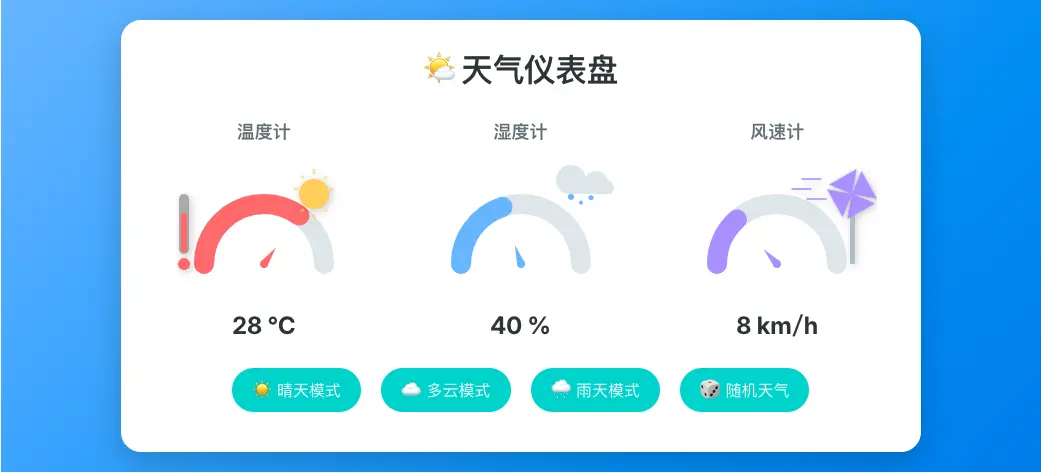
交互式天氣儀表盤主要包含温度計、濕度計、風速計三部分。
通用儀表盤
温度計、濕度計、風速計本質都是儀表盤的變化,儀表盤背景、填充和指針部分都是通用的,可以封裝一個組件 <GuageBox />,主要代碼如下:
<svg width="200" height="150" viewBox="0 0 200 150">
    <!-- 儀表盤背景 -->
    <path
    fill="none"
    stroke="#dfe6e9"
    stroke-width="20"
    stroke-linecap="round"
    d="M 40,110 A 60,60 0 1,1 160,110"
    />
    <!-- 儀表盤填充 -->
    <path
    fill="none"
    :stroke="color"
    stroke-width="20"
    stroke-linecap="round"
    transition="stroke-dashoffset 1s ease-in-out"
    d="M 40,110 A 60,60 0 1,1 160,110"
    :stroke-dasharray="dasharray"
    :stroke-dashoffset="dashoffset"
    />
    <slot />
    <!-- 指針 -->
    <g :fill="color">
        <path
            transform-origin="center 110"
            :transform="transform"
            style="transition: transform 1s ease-in-out"
            d="M100,90 l-4,20 l8,0 Z"
        />
        <circle cx="100" cy="110" r="4" />
    </g>
</svg>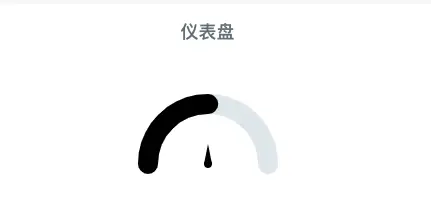
⚠️ 組件裏面存在變量,如果直接複製使用,需把變量替換成對應屬性的值。
這裏我們只關注 SVG 部分,整個組件其實還有其他元素組成。通過這個組件,我們需要知道一些知識:
svg 元素
svg 的繪製需要在 svg 標籤內進行。
width, height屬性:共同決定SVG畫布的顯示區域。單位默認為像素(px)即 width="200" 等於 width="200px",也可使用百分比(%)表示相對尺寸。-
viewBox屬性:它的值是一個包含 4 個參數的列表min-x, min-y, width and height,以空格或者逗號分隔開。它定義了SVG的座標系範圍,與width/height配合可實現縮放。示例如下:<svg width="400" height="300" viewBox="0 0 200 150"> <!-- 內容 --> </svg>表示
200x150區域內的內容放大了兩倍。
path 元素
SVG 中的 <path> 元素用於創建路徑,可以繪製直線、曲線、弧線等各種複雜的圖形,並且可以通過設置路徑命令來控制路徑的形狀和樣式。
fill屬性:路徑的填充顏色。stroke屬性:路徑的描邊顏色。stroke-width屬性:路徑的描邊寬度。stroke-linecap屬性:開放自路徑兩端的形狀。可選butt|round|square|inheritstroke-dasharray屬性:用於繪製形狀輪廓的虛線段和間隙的排列形式。可選實,虛,實,虛......|nonestroke-dashoffset屬性:虛線與路徑起點之間的偏移量。相對於虛線當前所在位置,正數往左移動,負數往右移動,利用這個特性可模擬“繪製”路徑的過程。-
d屬性:路徑的路徑數據,是一個路徑命令組成的列表。-
常用的路徑命令
命令是大小寫敏感的。大寫的命令指定絕對座標,而小寫命令指定相對(於當前位置的)座標。
路徑命令類型 路徑命令 舉🌰 MoveTo M、mM10,10 新的繪畫起點座標(10,10) LineTo L、l🍎H、h🍎V、vL20,20 當前位置與點(20,20)繪製一條直線
H20 當前位置與點(20,當前位置y)繪製一條水平線
V20 當前位置與點(當前位置x,20)繪製一條垂直線三次貝塞爾曲線 C、c🍎S、s參考常用的路徑命令 二次貝塞爾曲線 Q、q🍎T、t參考常用的路徑命令 橢圓曲線 A、a參考常用的路徑命令 ClosePath Z、z當前子路徑通過起點和終點閉合 -
d 是一個表現屬性,該屬性可以通過 CSS 採用
path() 或 none進行修改。示例如下:svg:hover path { d: path( "M10,30 A20,20 0,0,1 50,30 A20,20 0,0,1 90,30 Q90,60 50,90 Q10,60 10,30 z M5,5 L90,90" ); }
-
g 元素
SVG 中的 g 元素主要有兩個功能:一是作為容器,用於將其他 SVG 元素進行分組;二是設置屬性值讓子元素繼承。
circle 元素
SVG中的 circle 元素用於繪製圓形.
<circle
  cx="x-coordinate"      <!-- 圓心的 x 座標 -->
  cy="y-coordinate"      <!-- 圓心的 y 座標 -->
  r="radius"             <!-- 圓的半徑 -->
  fill="fill-color"      <!-- 圓的填充顏色 -->
  stroke="stroke-color"  <!-- 圓的描邊顏色 -->
  stroke-width="width"   <!-- 圓的描邊寬度 -->
/>
温度計
基於儀表盤 <GuageBox /> 組件增加了温度計🌡️、太陽🌞等元素。
<template>
  <GuageBox title="温度計" :value="weather" :maxValue="maxValue" :color="color" unit="°C">
    <!-- 温度計圖標 -->
    <g style="filter: drop-shadow(2px 2px 4px rgba(0,0,0,0.2))">
      <!-- 温度計主體 -->
      <rect x="15" y="40" width="10" height="60" rx="5" fill="#a9a9a9" />
      <!-- 温度計底部 -->
      <circle cx="20" cy="110" r="6" fill="#ff7675" />
      <!-- 温度計液體 -->
      <rect x="17" :y="y" width="6" :height="height" rx="3" :fill="color" />
      <!-- 太陽 -->
      <g stroke="#fdcb6e" stroke-width="3">
        <circle cx="150" cy="40" r="15" fill="#fdcb6e" stroke-width="0" />
        <line class="sun-ray" x1="150" y1="20" x2="150" y2="15" />
        <line class="sun-ray" x1="165" y1="35" x2="170" y2="35" />
        <line class="sun-ray" x1="150" y1="60" x2="150" y2="65" />
        <line class="sun-ray" x1="135" y1="35" x2="130" y2="35" />
        <line class="sun-ray" x1="140" y1="25" x2="137" y2="22" />
        <line class="sun-ray" x1="160" y1="25" x2="163" y2="22" />
        <line class="sun-ray" x1="160" y1="55" x2="163" y2="58" />
        <line class="sun-ray" x1="140" y1="55" x2="137" y2="58" />
      </g>
    </g>
  </GuageBox>
</template>
line 元素
SVG 中的 line 元素用於繪製直線。
<line
  x1="x1-coordinate"     <!-- 起點的 x 座標 -->
  y1="y1-coordinate"     <!-- 起點的 y 座標 -->
  x2="x2-coordinate"     <!-- 終點的 x 座標 -->
  y2="y2-coordinate"     <!-- 終點的 y 座標 -->
  stroke="stroke-color"  <!-- 直線的顏色 -->
  stroke-width="width"   <!-- 直線的寬度 -->
/>
rect 元素
SVG中的 rect 元素用於繪製矩形.
<rect
  x="x-coordinate"        <!-- 矩形左上角的 x 座標 -->
  y="y-coordinate"        <!-- 矩形左上角的 y 座標 -->
  width="width-value"     <!-- 矩形的寬度 -->
  height="height-value"   <!-- 矩形的高度 -->
  rx="rx-value"           <!-- 矩形的圓角半徑(水平方向) -->
  ry="ry-value"           <!-- 矩形的圓角半徑(垂直方向) -->
  fill="fill-color"       <!-- 矩形的填充顏色 -->
  stroke="stroke-color"   <!-- 矩形的描邊顏色 -->
  stroke-width="width-value" <!-- 矩形的描邊寬度 -->
/>
濕度計
基於儀表盤 <GuageBox /> 組件增加了雲☁️、小雨滴🌧️等元素。
<template>
  <GuageBox title="濕度計" :value="value" :maxValue="maxValue" :color="color" unit="%">
    <!-- 水滴和雲圖標 -->
    <g style="drop-shadow(2px 2px 4px rgba(0,0,0,0.2))">
      <!-- 雲 -->
      <path
        fill="#dfe6e9"
        d="M 145,40
          A 15,15 0 1,1 155,40
          A 10,10 0 1,1 170,40
          A 12,12 0 1,1 180,40
          A 8,8 0 1,1 190,40
          Z"
      />
      <!-- 小雨滴 -->
      <circle cx="150" y="40" r="3" fill="#74b9ff">
        <animate attributeName="cy" from="40" to="50" dur="1.5s" repeatCount="indefinite" />
      </circle>
      <circle cx="160" y="45" r="2" fill="#74b9ff">
        <animate
          attributeName="cy"
          from="45"
          to="55"
          dur="1.2s"
          repeatCount="indefinite"
          begin="0.3s"
        />
      </circle>
      <circle cx="170" y="43" r="2.5" fill="#74b9ff">
        <animate
          attributeName="cy"
          from="43"
          to="53"
          dur="1.8s"
          repeatCount="indefinite"
          begin="0.6s"
        />
      </circle>
    </g>
  </GuageBox>
</template>
animate 元素
SVG 中的動畫元素,將其放在形狀元素的內部,用來定義一個元素的某個屬性如何改變。
attributeName屬性:動畫屬性。values屬性:作用取決於使用的上下文。可以是值序列、顏色矩陣的數字列表等。from/to屬性:動畫屬性的值從 from 屬性的值到 to 屬性的值。作用和 values 屬性類似。dur屬性:動畫的簡單持續時間。repeatCount屬性:動畫將發生的次數。可選numbernumber 需大於0 |indefinitebegin/end屬性:動畫何時開始/結束。fill屬性:動畫在持續時間結束後,是否保留當前動畫。可選remove移除 |freeze保留
風速計
基於儀表盤 <GuageBox /> 組件增加了風吹線條、風車等元素。
<template>
  <GuageBox title="風速計" :value="value" :maxValue="maxValue" :color="color" unit="km/h">
    <!-- 風車圖標 -->
    <g style="filter: drop-shadow(2px 2px 4px rgba(0,0,0,0.2))">
      <!-- 風車杆 -->
      <rect x="173" y="40" width="5" height="70" fill="#b2bec3" />
      <!-- 風車葉片 -->
      <g transform="translate(175, 40)">
        <g class="windmill"  fill="#a29bfe" :style="{'--dur': `${3 - (value / 15)}s`}">
          <path d="M 0,0 L 25,-5 L 0,-25 Z" transform="rotate(0)" />
          <path d="M 0,0 L 25,-5 L 0,-25 Z" transform="rotate(90)" />
          <path d="M 0,0 L 25,-5 L 0,-25 Z" transform="rotate(180)" />
          <path d="M 0,0 L 25,-5 L 0,-25 Z" transform="rotate(270)" />
        </g>
      </g>
      <!-- 風吹線條 -->
      <line class="wind-line" x1="120" y1="25" x2="140" y2="25" />
      <line class="wind-line" x1="110" y1="35" x2="130" y2="35" />
      <line class="wind-line" x1="125" y1="45" x2="145" y2="45" />
    </g>
  </GuageBox>
</template>
整體效果
前面主要部分已完成,整體項目還需要加上一些輔助元素,如:標題、數據交互按鈕等。至此,交互式天氣儀表盤項目已完成,相信你對 SVG 有了基礎的瞭解。接下來我們來做個總結:
path 元素比較複雜,基本上覆雜的圖形都由它來完成,裏面涉及到橢圓曲線、貝塞爾曲線等,對於這種複雜的圖形可以先用編輯器畫好再複製路徑到項目中- SVG 的
動畫可以使用 animate 元素,也可以增加類名在 CSS 中定義動畫 - SVG 零基礎的同學剛接觸可能感覺無從下手,相信我,堅持完成這個項目,定有收穫