
Azure Kubernetes Service (AKS) 部署 Gateway API 實戰指南:突破傳統 Ingress 侷限
在雲原生領域,服務暴露一直是核心議題。傳統的 Kubernetes Ingress 雖然解決了基礎的 HTTP/HTTPS 路由需求,但在多團隊協作、流量策略精細化、跨命名空間路由等場景下逐漸顯現侷限。而 Gateway API 作為 Kubernetes 官方推出的新一代流量管理標準,憑藉其角色分離、強類型定義、靈活擴展等優勢,正在逐步替代傳統 Ingress。
本文將結合 Kubernetes Gateway API 中的核心理念,帶大家從零開始在 Azure Kubernetes Service (AKS) 中部署 Gateway API,實現更靈活、可管控的服務暴露方案。
Gateway API 核心優勢:為何替代傳統 Ingress?
在開始實操前,我們先明確 Gateway API 相比傳統 Ingress 的核心優勢:
- 角色分離,適配多團隊協作:傳統 Ingress 將“網關配置”和“路由規則”耦合在一個資源中,導致運維團隊和開發團隊權限難以隔離。Gateway API 拆分出 GatewayClass(網關類型)、Gateway(網關實例)、HTTPRoute(路由規則)等資源,運維團隊負責部署網關,開發團隊只需管理路由規則,符合“最小權限原則”。
- 強類型定義,減少配置錯誤:Gateway API 採用更精細的 CRD 定義,支持對 HTTP 方法、路徑、header、查詢參數等進行精準匹配,且通過類型校驗減少無效配置。相比之下,傳統 Ingress 依賴註解(annotation)實現擴展功能,配置混亂且易出錯。
- 跨命名空間路由支持:傳統 Ingress 通常只能路由同一命名空間內的服務,而 Gateway API 支持通過“引用策略”(ReferencePolicy)實現跨命名空間服務路由,適配大型集羣多團隊部署場景。
- 標準化擴展,生態更豐富:Gateway API 是 Kubernetes SIG-Network 官方標準,主流網關實現(如 NGINX、Traefik、Istio)均已支持,避免了傳統 Ingress 各廠商註解不兼容的問題。
對於 AKS 用户而言,部署 Gateway API 不僅能享受上述優勢,還能無縫集成 Azure 的雲原生服務(如 Azure DNS、Azure 應用網關),進一步提升流量管理的穩定性和可觀測性。
部署前置條件
在開始部署前,請確保滿足以下條件:
- Azure 賬號及足夠權限(需創建 AKS 集羣、管理網絡資源);
- 本地已安裝
az(Azure CLI)、kubectl(Kubernetes 命令行工具); - AKS 集羣版本 ≥ 1.24(Gateway API 從 Kubernetes 1.24 開始進入 Beta 階段,AKS 1.24+ 已默認支持);
- 集羣已啓用 RBAC(AKS 默認啓用)。
驗證本地工具版本:
# 驗證 Azure CLI 版本
az version

# 驗證 kubectl 版本
kubectl version --client
AKS 部署 Gateway API 完整步驟
步驟 1:創建/連接 AKS 集羣
若已有 AKS 集羣,可直接跳過創建步驟,執行連接命令;若無,先創建一個標準 AKS 集羣:
# 1. 登錄 Azure 賬號
az login

# 2. 設置訂閲(替換為你的訂閲 ID)
az account set --subscription <your-subscription-id>

# 3. 創建資源組(替換為你的資源組名稱和區域)
az group create --name aks-gateway-api-rg --location eastus

# 4. 創建 AKS 集羣(版本指定 1.26,啓用 RBAC)
az aks create \
  --resource-group aks-gateway-api-rg \
  --name aks-gateway-api-cluster \
  --kubernetes-version 1.26 \
  --node-count 2 \
  --enable-rbac \
  --generate-ssh-keys

# 5. 連接到 AKS 集羣
az aks get-credentials --resource-group aks-gateway-api-rg --name aks-gateway-api-cluster

# 驗證連接成功
kubectl get nodes
輸出類似以下內容,説明集羣連接成功:
NAME                                STATUS   ROLES   AGE     VERSION
aks-nodepool1-xxxxxxxxx-vmss000000   Ready    agent   10m     v1.33.5-aks-xxxxxx
aks-nodepool1-xxxxxxxxx-vmss000001   Ready    agent   10m     v1.33.5-aks-xxxxxx
步驟 2:安裝 Gateway API CRDs 和 網關控制器(以 NGINX 為例)
Gateway API 由兩部分組成:CRDs(自定義資源定義) 和 網關控制器(負責實現 Gateway API 的邏輯,如 NGINX Gateway Fabric)。AKS 雖然支持 Gateway API,但默認未安裝 CRDs 和控制器,需手動部署。
我們選擇 NGINX Gateway Fabric 作為網關控制器(開源、輕量,適配 Gateway API 標準):
- 安裝 Gateway API CRDs:
# 安裝最新穩定版 Gateway API CRDs(參考官方文檔)
kubectl apply --server-side -f https://github.com/kubernetes-sigs/gateway-api/releases/download/v1.4.1/standard-install.yaml
# 驗證 CRDs 安裝成功
kubectl get crds | grep gateway.networking.k8s.io
輸出應包含 gatewayclasses.gateway.networking.k8s.io、gateways.gateway.networking.k8s.io、httproutes.gateway.networking.k8s.io 等資源。

- 安裝 NGINX Gateway Fabric 控制器:
# 安裝 NGINX Gateway Fabric(命名空間設為 nginx-gateway)
kubectl apply -f https://raw.githubusercontent.com/nginx/nginx-gateway-fabric/v2.3.0/deploy/azure/deploy.yaml
# 驗證控制器部署成功
kubectl get pods -n nginx-gateway
kubectl get svc -n nginx-gateway
步驟 3:創建 Gateway 資源
創建 Gateway:
創建 gateway.yaml 文件,綁定 NGINX 控制器的 Service(公網 IP),並開放 80 端口:
apiVersion: gateway.networking.k8s.io/v1
kind: Gateway
metadata:
  name: example-gateway
spec:
  gatewayClassName: example-gateway-class
  listeners:
  - name: http
    protocol: HTTP
    port: 80
應用配置:
kubectl apply -f gateway.yaml
# 驗證 Gateway(STATUS 為 Ready 表示成功)
kubectl get gateway -n nginx-gateway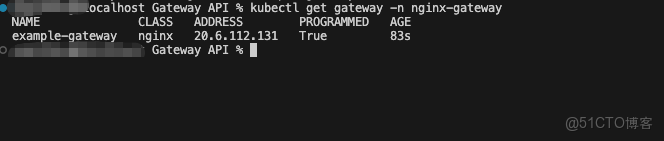
步驟 4:部署測試服務和 HTTPRoute 路由規則
接下來,我們部署兩個簡單的測試服務(http-echo-1、http-echo-2),並通過 HTTPRoute 定義路由規則,實現基於路徑的流量分發。
- 部署測試服務:
創建 nginx.yaml 文件:
apiVersion: apps/v1
kind: Deployment
metadata:
  name: nginx-deployment
spec:
  replicas: 1
  selector:
    matchLabels:
      app: nginx
  template:
    metadata:
      labels:
        app: nginx
    spec:
      containers:
      - name: nginx
        image: nginx:latest
        ports:
        - containerPort: 80
---
apiVersion: v1
kind: Service
metadata:
  name: nginx-service
spec:
  type: ClusterIP
  selector:
    app: nginx
  ports:
    - protocol: TCP
      port: 80
      targetPort: 80
應用配置:
kubectl apply -f nginx.yaml -n nginx-gateway
# 驗證服務和 Pod 狀態
kubectl get pods -n default
kubectl get svc -n default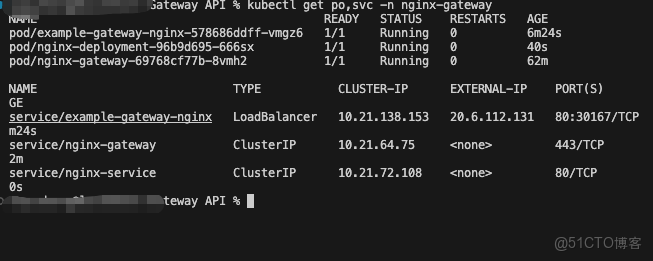
- 創建 HTTPRoute 路由規則:
創建 http-route.yaml 文件,定義路由規則:
apiVersion: gateway.networking.k8s.io/v1
kind: HTTPRoute
metadata:
  name: nginx-route
spec:
  parentRefs:
  - name: example-gateway
  hostnames:
  - "nginx1.aiorg.ltd"
  rules:
  - backendRefs:
    - name: nginx-service
      port: 80
應用配置:
kubectl apply -f httproute.yaml -n nginx-gateway
# 驗證 HTTPRoute(STATUS 為 Accepted 表示路由規則已被網關接納)
kubectl get httproutes.gateway.networking.k8s.io -n nginx-gateway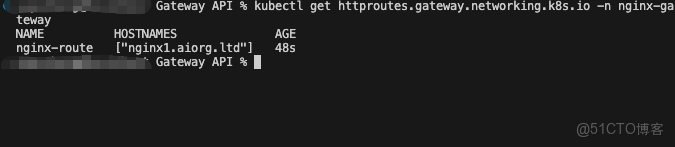
四、驗證 Gateway API 路由效果
通過 curl / 瀏覽器訪問,驗證配置效果:
curl -i http://nginx1.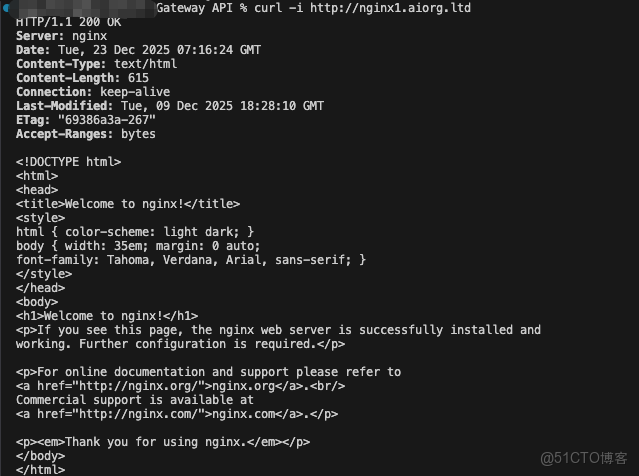
瀏覽器訪問:
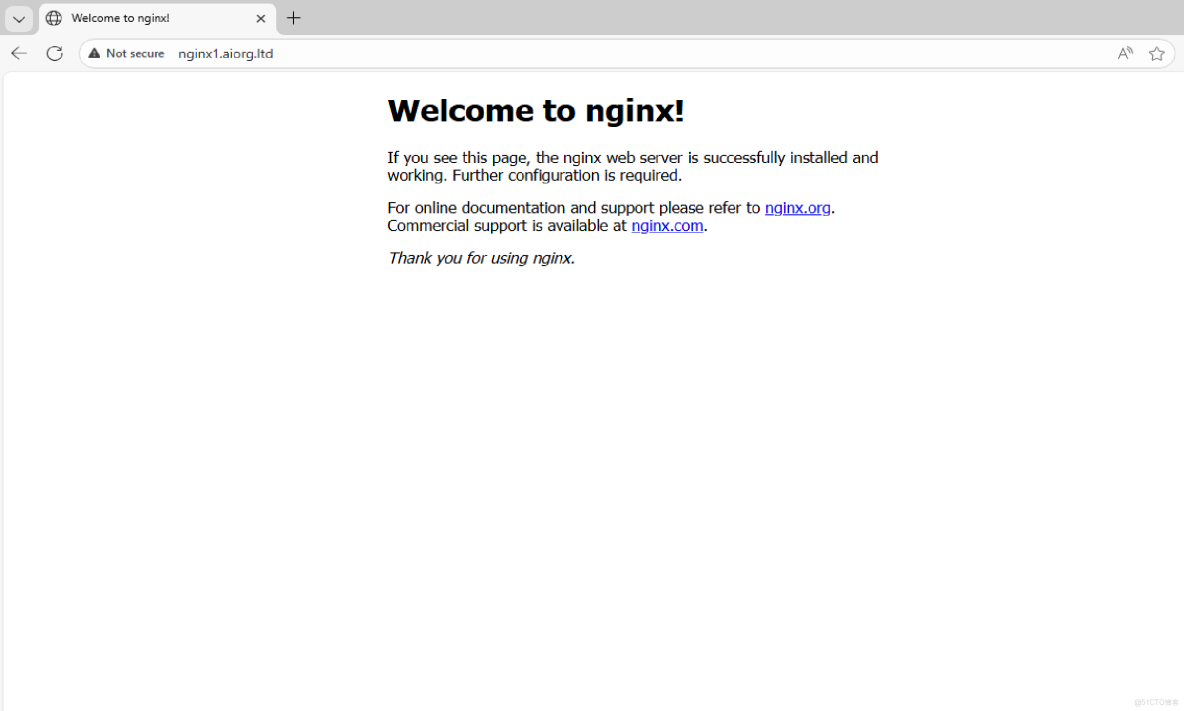
若輸出符合預期,説明 Gateway API 部署和路由配置成功!
總結
本文結合 Gateway API 的核心優勢,詳細講解了在 AKS 中部署 Gateway API 的完整流程,從集羣準備、控制器安裝到路由配置、效果驗證,覆蓋了從測試到生產的關鍵步驟。相比傳統 Ingress,Gateway API 更適合大型 AKS 集羣的多團隊協作場景,其標準化的擴展能力也能更好地集成 Azure 的雲原生服務。
如果你的 AKS 集羣還在使用傳統 Ingress,不妨嘗試遷移到 Gateway API,體驗更靈活、可管控的流量管理方案。
