

前端 undo & redo 功能是非常常見的,通常會使用命令模式來實現。
下面以一個低代碼編輯器的例子,來介紹 JavaScript 是如何使用命令模式來實現 undo & redo 功能的。
命令模式定義
首先,我們來看一下命令模式的結構示意圖。
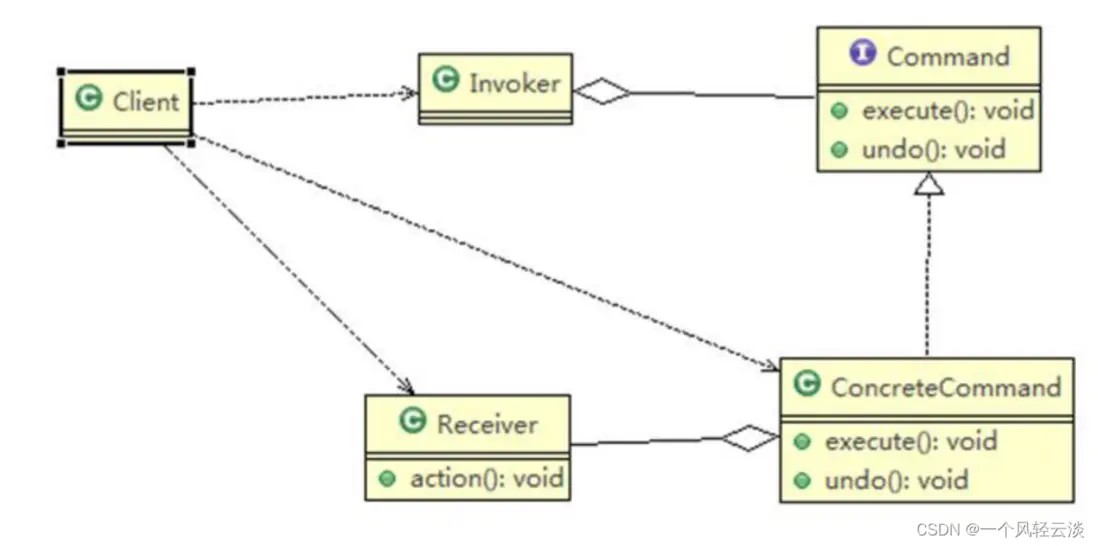
在命令模式中,關鍵是定義了一個 Command 接口,它有 execute 和 undo 兩個方法,具體的命令類都需要實現這兩個方法。調用者(Invoker)在調用命令的時候,只需要執行命令對象的 execute 和 undo 方法即可,而不用關心這兩個方法具體做了什麼。實際上這兩方法的具體實現,通常都是在接收者(Receiver)中,命令類中通常有一個接收者實例,命令類只需要調用接收者實例方法即可。
命令模式實現
OK,我們來看一下,我們的低代碼編輯器的狀態庫(簡化版的)。它是使用 zustand 定義的,它有一個組件列表 componentList,以及相關的3個方法。
import { createStore } from "zustand/vanilla";

const store = createStore((set) => ({
  componentList: [], // 組件列表
  // 添加組件
  addComponent: (comp) =>
    set((state) => ({ componentList: [...state.componentList, comp] })),
  // 刪除組件
  removeComponent: (comp) =>
    set((state) => ({
      componentList: state.componentList.filter((v) => v.id !== comp.id),
    })),
  // 更新組件屬性
  updateComponentProps: (comp, newProps) =>
    set((state) => {
      const index = state.componentList.findIndex((v) => v.id === comp.id);
      if (index > -1) {
        const list = [...state.componentList];
        return {
          componentList: [
            ...list.slice(0, index),
            { ...comp, props: newProps },
            ...list.slice(index + 1),
          ],
        };
      }
    }),
}));
// const { getState, setState, subscribe, getInitialState } = store;

export default store;
接下來,我們看一下相關命令類的實現:
// 命令基類
class Command {
  constructor() {}

  execute() {
    throw new Error("未重寫 execute 方法!");
  }

  undo() {
    throw new Error("未重寫 undo 方法!");
  }
}

export class AddComponentCommand extends Command {
  editorStore; // 狀態庫(它充當 Receiver)
  comp;

  constructor(editorStore, comp) {
    super();
    this.editorStore = editorStore;
    this.comp = comp;
  }

  execute(comp) {
    this.editorStore.getState().addComponent(this.comp);
  }

  undo() {
    this.editorStore.getState().removeComponent(this.comp);
  }
}

export class RemoveComponentCommand extends Command {
  editorStore;
  comp;

  constructor(editorStore, comp) {
    super();
    this.editorStore = editorStore;
    this.comp = comp;
  }

  execute() {
    this.editorStore.getState().removeComponent(this.comp);
  }

  undo() {
    this.editorStore.getState().addComponent(this.comp);
  }
}

export class UpdateComponentPropsCommand extends Command {
  editorStore;
  comp;
  newProps;
  prevProps; // 保存之前的屬性

  constructor(editorStore, comp, newProps) {
    super();
    this.editorStore = editorStore;
    this.comp = comp;
    this.newProps = newProps;
  }

  execute() {
    const { updateComponentProps, componentList } = this.editorStore.getState();
    this.prevProps = componentList.find((v) => v.id === this.comp.id)?.props;
    updateComponentProps(this.comp, this.newProps);
  }

  undo() {
    const { updateComponentProps } = this.editorStore.getState();
    updateComponentProps(this.comp, this.prevProps);
  }
}
我們實現了 AddComponentCommand、RemoveComponentCommand 和 UpdateComponentPropsCommand 3個命令類,在我們的命令類中都有一個 editorStore 屬性,它在這裏充當了 Receiver 接收者,因為編輯器相關操作我們都定義在狀態庫中。
其中 AddComponentCommand 和 RemoveComponentCommand 相對比較簡單,有直接的操作可以實現撤銷。UpdateComponentPropsCommand 就稍微複雜一點,我們更新了屬性之後,沒有一個直接的操作可以撤銷修改,這種情況我們通常需要增加一個屬性,記錄修改之前的狀態,用於實現撤銷功能,在 UpdateComponentPropsCommand 中就是 prevProps。
到這裏,我們的命令類都已經實現了,要實現 undo 和 redo 功能,通常我們還需要實現一個命令管理類,它需要實現 execute、undo 和 redo 三個方法。它的具體實現多種方法,我們這裏使用兩個棧(Stack)來實現,具體代碼如下:
class CommandManager {
  undoStack = []; // 撤銷棧
  redoStack = []; // 重做棧

  execute(command) {
    command.execute();
    this.undoStack.push(command);
    this.redoStack = [];
  }

  undo() {
    const command = this.undoStack.pop();
    if (command) {
      command.undo();
      this.redoStack.push(command);
    }
  }

  redo() {
    const command = this.redoStack.pop();
    if (command) {
      command.execute();
      this.undoStack.push(command);
    }
  }
}

export default new CommandManager();
有了這些,接下來我們可以進入測試環節了,下面是我們的測試代碼:
import store from "./store/editorStore";
import cmdManager from "./commands/cmdManager";

// 實時打印組件列表
store.subscribe((state) =>
  console.log(JSON.stringify(state.componentList))
);

const comp1 = {
  id: 101,
  componentName: "Comp1",
  props: {},
  children: null,
};
const comp2 = {
  id: 102,
  componentName: "Comp2",
  props: {},
  children: null,
};

cmdManager.execute(new AddComponentCommand(store, comp1));
cmdManager.execute(new AddComponentCommand(store, comp2));
cmdManager.undo();
cmdManager.redo();

cmdManager.execute(new RemoveComponentCommand(store, comp1));
cmdManager.undo();

cmdManager.execute(
  new UpdateComponentPropsCommand(store, comp1, { visible: true })
);
cmdManager.undo();
測試結果如下,説明我們的代碼正常工作了。
// [{"id":101,"componentName":"Comp1","props":{},"children":null}]
// [{"id":101,"componentName":"Comp1","props":{},"children":null},{"id":102,"componentName":"Comp2","props":{},"children":null}]
// [{"id":101,"componentName":"Comp1","props":{},"children":null}]
// [{"id":101,"componentName":"Comp1","props":{},"children":null},{"id":102,"componentName":"Comp2","props":{},"children":null}]
// [{"id":102,"componentName":"Comp2","props":{},"children":null}]
// [{"id":102,"componentName":"Comp2","props":{},"children":null},{"id":101,"componentName":"Comp1","props":{},"children":null}]
// [{"id":102,"componentName":"Comp2","props":{},"children":null},{"id":101,"componentName":"Comp1","props":{"visible":true},"children":null}]
// [{"id":102,"componentName":"Comp2","props":{},"children":null},{"id":101,"componentName":"Comp1","props":{},"children":null}]
繼續優化
上面,我們已經完成了完整的第一個版本了。但是代碼還有優化的空間,我們繼續改進一下。
1、執行命令的地方,要手動 new 命令類,傳入 store 狀態庫,有較多的模板代碼。
cmdManager.execute(new AddComponentCommand(store, comp1));
cmdManager.execute(new AddComponentCommand(store, comp2));
cmdManager.undo();
cmdManager.redo();
我們可以參考 js 原生方法 document.execCommand 實現一個 executeCommand () 方法,這樣執行命令就變成了 executeCommand(commandName, ...args) 這樣,更為方便。
import cmdManager from "./cmdManager";
import {
  AddComponentCommand,
  RemoveComponentCommand,
  UpdateComponentPropsCommand,
} from "./index";
import store from "../store/editorStore";

const commondActions = {
  addComponent(...args) {
    const cmd = new AddComponentCommand(store, ...args);
    cmdManager.execute(cmd);
  },

  removeComponent(...args) {
    const cmd = new RemoveComponentCommand(store, ...args);
    cmdManager.execute(cmd);
  },

  updateComponentProps(...args) {
    const cmd = new UpdateComponentPropsCommand(store, ...args);
    cmdManager.execute(cmd);
  },

  undo() {
    cmdManager.undo();
  },

  redo() {
    cmdManager.redo();
  },
};

const executeCommand = (cmdName, ...args) => {
  commondActions[cmdName](...args);
};

export default executeCommand;
store.subscribe((state) =>
console.log(JSON.stringify(state.componentList))
);
const comp1 = {
id: 101,
componentName: "Comp1",
props: {},
children: null,
};
const comp2 = {
id: 102,
componentName: "Comp2",
props: {},
children: null,
};
executeCommand("addComponent", comp1);
executeCommand("addComponent", comp2);
executeCommand("undo");
executeCommand("redo");
executeCommand("removeComponent", comp1);
executeCommand("undo");
executeCommand("updateComponentProps", comp1, { visible: true });
executeCommand("undo");2、CommandManager 其實使用一個棧(Stack)加上指針也可以實現,我們參考了網上的代碼(JavaScript command pattern for undo and redo),優化之後代碼如下:
class CommandManager {
  _commandsList = [];
  _currentCommand = -1;

  execute(command) {
    command.execute();
    this._currentCommand++;
    this._commandsList[this._currentCommand] = command;
    if (this._commandsList[this._currentCommand + 1]) {
      this._commandsList.splice(this._currentCommand + 1);
    }
  }

  undo() {
    const command = this._commandsList[this._currentCommand];
    if (command) {
      command.undo();
      this._currentCommand--;
    }
  }

  redo() {
    const command = this._commandsList[this._currentCommand + 1];
    if (command) {
      command.execute();
      this._currentCommand++;
    }
  }
}

export default new CommandManager();
參考資料
《Head First 設計模式 - 命令模式》
javascript - 基於Web的svg編輯器(1)——撤銷重做功能 - 個人文章 - SegmentFault 思否
JavaScript command pattern for undo and redo (s24.com)
