

這些錯覺以清晰而明確的方式告訴我們:我們並非直接體驗這個世界。
我們常常相信“眼見為實”,但知覺錯覺告訴我們:事實並非如此。
我們的大腦並非直接複製世界,而是在構建一個基於經驗與期望的“最佳猜測模型”。
今天,我們將通過 5 種經典的知覺錯覺,來探索視覺的奧秘。
前三種是靜態圖像錯覺,後兩種則是動態錯覺,我們將嘗試用Manim來重現它們的動態效果。
1. 靜態的欺騙
這三種錯覺不需要動畫,僅僅通過靜態的排列和色彩對比,就能欺騙我們的大腦。
1.1. 彩紙屑錯覺
這是David Novick創作的Munker錯覺的變體。
下面圖中所有的圓圈顏色完全相同,唯一不同的是圍繞它們的線條顏色。
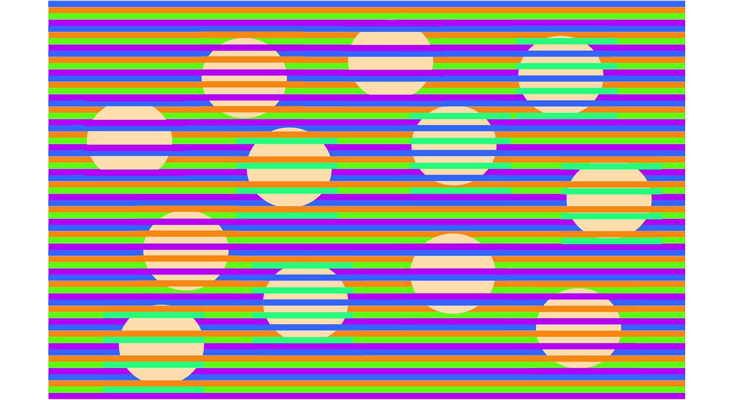
這個錯覺生動地證明:我們並非直接感知物體在現實中的顏色。相反,知覺系統會根據物體周圍的環境,做出一個有根據的"猜測"。
1.2. 米飯波浪錯覺
這看起來像是一個動態GIF,但其實不是。所有的"運動"都發生在你的大腦中。
它的作者:Akiyoshi Kitaoka。
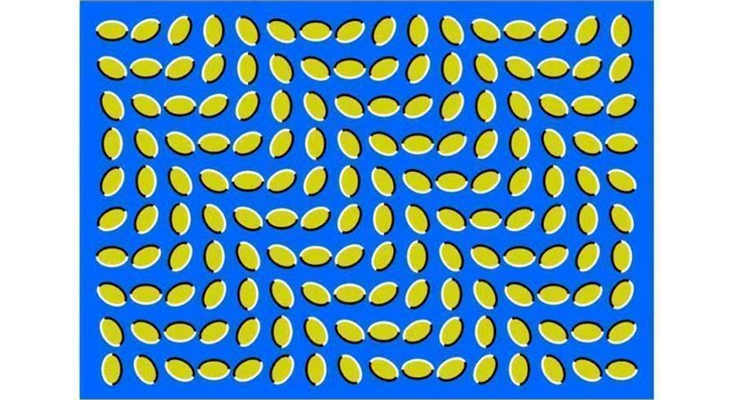
黃色斑塊的陰影和排列順序會觸發大腦的運動感知區域,從而在一個實際靜止的圖像中產生運動的知覺。有趣的是,大約5%的人似乎對這個錯覺"免疫"。
1.3. 傾斜道路錯覺
這看起來像是從不同角度拍攝的同一道路的兩張照片。但實際上,這只是同一張照片複製了兩次。
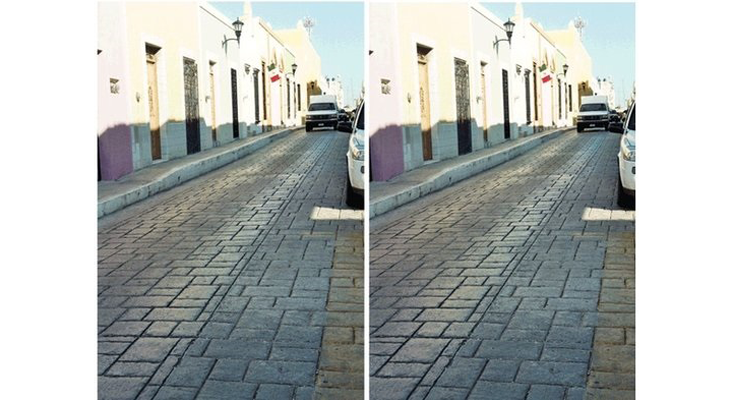
顯然,視覺系統將這張圖像當作兩張獨立道路的照片來處理。在二維圖像中,兩條道路的輪廓是相互平行的。
如果現實世界中的兩條道路在圖像中呈現這種效果,那麼它們在現實中必須是強烈地向外傾斜的。因此,視覺系統便做出了這樣的推斷。
2. 動態的魔法
接下來,我們使用 Manim 來製作後兩種動態錯覺。
2.1. 動態艾賓浩斯錯覺
圖中的橙色圓圈實際上並沒有改變大小。
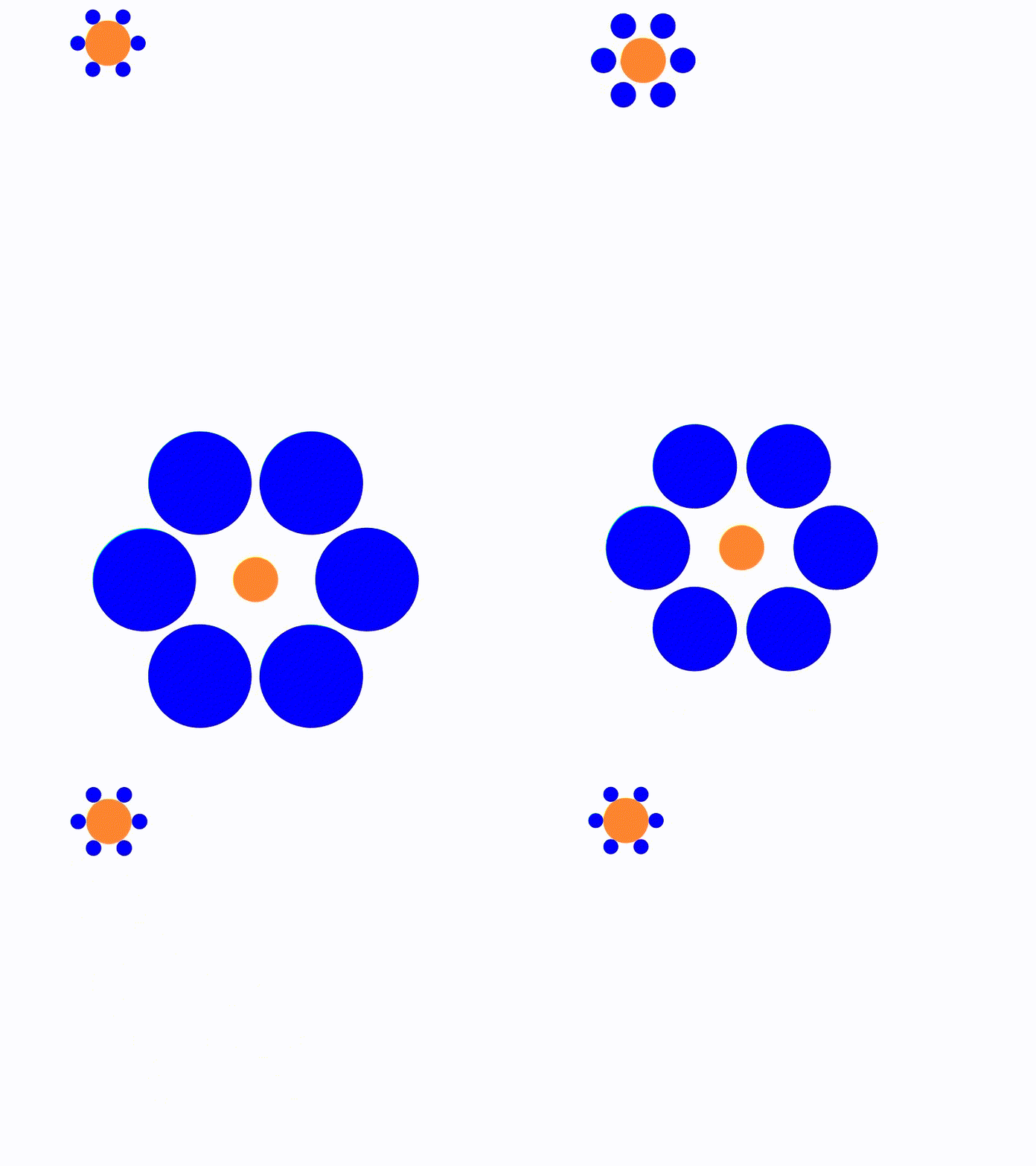
與顏色和明度一樣,我們並非直接感知物體的大小。知覺系統會根據感官數據中的線索(包括附近其他物體的相對大小)來推斷物體的尺寸。
Manim代碼:
from manim import *

config.background_color = WHITE


class DynamicEbbinghaus(Scene):
    def construct(self):
        # 中心圓圈(實際大小不變)
        center_circle = Circle(radius=0.3, color=ORANGE, fill_opacity=1)
        center_circle.set_stroke(width=0)
        center_circle.move_to(LEFT * 2 + UP * 2)

        center_circle2 = center_circle.copy()
        center_circle2.move_to(ORIGIN)

        # 周圍圓圈
        surrounding_circles = VGroup()
        surrounding_circles2 = VGroup()
        num_circles = 6
        radius = 0.1
        distance = 0.4
        radius2 = 0.7
        distance2 = 1.5

        for i in range(num_circles):
            angle = i * (360 / num_circles) * DEGREES
            circle = Circle(radius=radius, color=PURE_BLUE, fill_opacity=1)
            circle.set_stroke(width=0)
            circle.move_to(
                center_circle.get_center()
                + distance * np.array([np.cos(angle), np.sin(angle), 0])
            )
            surrounding_circles.add(circle)

            circle2 = Circle(radius=radius2, color=PURE_BLUE, fill_opacity=1)
            circle2.set_stroke(width=0)
            circle2.move_to(
                center_circle2.get_center()
                + distance2 * np.array([np.cos(angle), np.sin(angle), 0])
            )
            surrounding_circles2.add(circle2)

        self.add(center_circle, surrounding_circles)
        self.wait(0.5)

        a_group = VGroup(center_circle, surrounding_circles)
        a_group2 = a_group.copy()
        b_group = VGroup(center_circle2, surrounding_circles2)

        # 正常移動
        self.play(a_group.animate.move_to(b_group.get_center()), run_time=2)
        self.play(a_group.animate.move_to(a_group2.get_center()), run_time=2)
        self.wait(1)

        # 放大藍色小圓
        # 動畫:周圍圓圈變大,使中心圓圈看起來變小
        self.play(
            ReplacementTransform(a_group, b_group),
            run_time=2,
        )

        # 動畫:周圍圓圈變小,使中心圓圈看起來變大
        self.play(
            ReplacementTransform(b_group, a_group2),
            run_time=2,
        )
        self.wait(1)
2.2. 動態穆勒-萊爾錯覺
這是我見過最棒的錯覺之一。藍色和紅色的線條長度完全相同;沒有任何線條在移動或改變大小,它們都處於同一水平線上。只有兩端的箭頭在移動。
這個錯覺是經典"穆勒-萊爾錯覺"的新變體。關於它的原理有許多理論,但沒有人能100%確定。甚至還存在爭議:這種錯覺是適用於全人類,還是某種特定文化下的現象?
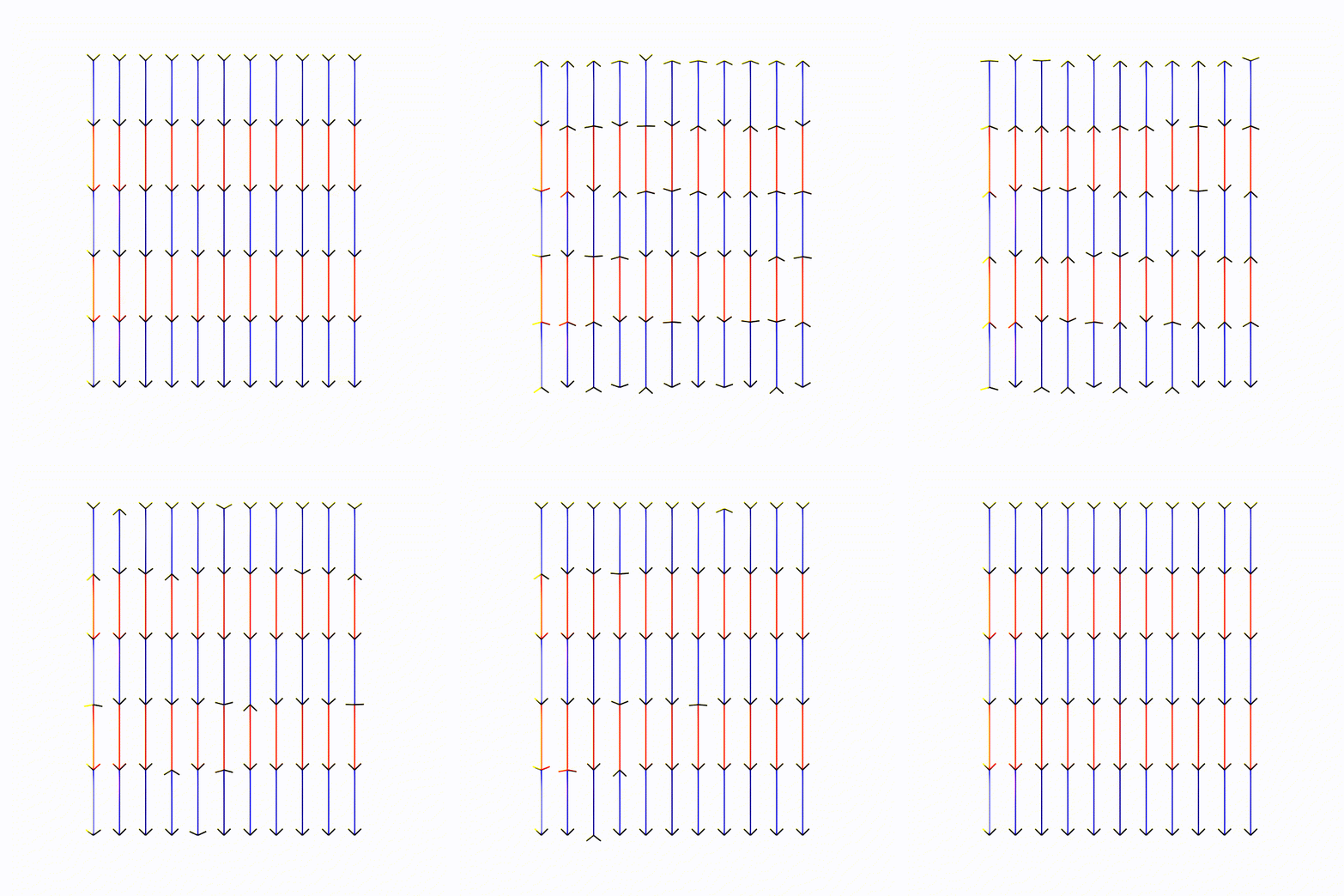
Manim代碼:
from manim import *
import numpy as np

config.background_color = WHITE


class DynamicMullerLyer(Scene):
    def construct(self):
        self.vertexes = []
        count = 11

        # 所有線都一樣長,藍色和紅色的線段也是一樣長。
        lines = self.create_lines(count)
        self.play(Create(lines))
        self.wait(1)
        self.clear()

        wings = self.create_wings(self.vertexes)
        self.add(*wings)
        self.rotate_wings(
            wings,
            self.vertexes,
            list(np.random.uniform(0.5, 1.5, len(wings))),
            repeat=4,
        )
        self.wait(1)

        # 放在一起
        self.add(lines)
        self.rotate_wings(
            wings,
            self.vertexes,
            list(np.random.uniform(0.5, 1.5, len(wings))),
            repeat=8,
        )

        self.wait(0.5)

    def create_lines(self, count=11, interval=0.4) -> VGroup:
        l_group = VGroup()

        for i in range(count // 2 + 1):
            vertical_l_group = VGroup()
            vertical_l_group.add(
                Line(UP * 2.5, UP * 1.5, stroke_width=2, color=PURE_BLUE)
            )
            vertical_l_group.add(
                Line(UP * 1.5, UP * 0.5, stroke_width=2, color=PURE_RED)
            )
            vertical_l_group.add(
                Line(UP * 0.5, DOWN * 0.5, stroke_width=2, color=PURE_BLUE)
            )
            vertical_l_group.add(
                Line(DOWN * 0.5, DOWN * 1.5, stroke_width=2, color=PURE_RED)
            )
            vertical_l_group.add(
                Line(DOWN * 1.5, DOWN * 2.5, stroke_width=2, color=PURE_BLUE)
            )
            vertical_l_group.shift(LEFT * i * interval)
            self.vertexes.append(UP * 2.5 + LEFT * i * interval)
            self.vertexes.append(UP * 1.5 + LEFT * i * interval)
            self.vertexes.append(UP * 0.5 + LEFT * i * interval)
            self.vertexes.append(DOWN * 0.5 + LEFT * i * interval)
            self.vertexes.append(DOWN * 1.5 + LEFT * i * interval)
            self.vertexes.append(DOWN * 2.5 + LEFT * i * interval)
            l_group.add(vertical_l_group)

        for i in range(1, count // 2 + 1):
            vertical_l_group = VGroup()
            vertical_l_group.add(
                Line(UP * 2.5, UP * 1.5, stroke_width=2, color=PURE_BLUE)
            )
            vertical_l_group.add(
                Line(UP * 1.5, UP * 0.5, stroke_width=2, color=PURE_RED)
            )
            vertical_l_group.add(
                Line(UP * 0.5, DOWN * 0.5, stroke_width=2, color=PURE_BLUE)
            )
            vertical_l_group.add(
                Line(DOWN * 0.5, DOWN * 1.5, stroke_width=2, color=PURE_RED)
            )
            vertical_l_group.add(
                Line(DOWN * 1.5, DOWN * 2.5, stroke_width=2, color=PURE_BLUE)
            )
            vertical_l_group.shift(RIGHT * i * interval)
            self.vertexes.append(UP * 2.5 + RIGHT * i * interval)
            self.vertexes.append(UP * 1.5 + RIGHT * i * interval)
            self.vertexes.append(UP * 0.5 + RIGHT * i * interval)
            self.vertexes.append(DOWN * 0.5 + RIGHT * i * interval)
            self.vertexes.append(DOWN * 1.5 + RIGHT * i * interval)
            self.vertexes.append(DOWN * 2.5 + RIGHT * i * interval)
            l_group.add(vertical_l_group)

        return l_group

    def create_wings(self, vertexes, wing_radio=0.1):
        groups = []
        # 創建兩條線,呈V字形
        for vertex in vertexes:
            left_line = Line(
                vertex, vertex + (UP + LEFT) * wing_radio, stroke_width=2, color=BLACK
            )
            right_line = Line(
                vertex, vertex + (UP + RIGHT) * wing_radio, stroke_width=2, color=BLACK
            )

            groups.append(VGroup(left_line, right_line))

        return groups

    def rotate_wings(self, wings, vertexes, run_times, repeat=4):

        anims = []
        for i in range(len(wings)):
            ag1 = AnimationGroup(
                Rotate(
                    wings[i][0], angle=90 * DEGREES, about_point=vertexes[i]
                ).set_run_time(run_times[i]),
                Rotate(
                    wings[i][1], angle=-90 * DEGREES, about_point=vertexes[i]
                ).set_run_time(run_times[i]),
            )
            ag2 = AnimationGroup(
                Rotate(
                    wings[i][0], angle=-90 * DEGREES, about_point=vertexes[i]
                ).set_run_time(run_times[i]),
                Rotate(
                    wings[i][1], angle=90 * DEGREES, about_point=vertexes[i]
                ).set_run_time(run_times[i]),
            )

            anim = Succession([ag1, ag2] * repeat)
            anims.append(anim)

        self.play(
            AnimationGroup(*anims),
            run_time=max(run_times) * repeat,
        )
3. 總結
這些錯覺共同揭示了一個深刻的事實——我們的知覺並非對世界的“直接複製”,而是大腦基於有限感官信息、結合經驗與期望所構建的“最佳猜測模型”。
通過 Manim 重現這些錯覺,我們不僅理解了視覺心理學,也掌握瞭如何用代碼精確控制視覺元素來傳達信息。
理解這一點,不僅能讓我們更謙遜地看待自己的認知,也能幫助我們在日常生活中更理性地判斷所見所聞。
