

ASP.NET 10 Server Sent Event
Intro
.NET 9 中我們支持了 SseItem 我們可以藉助它來解析 ServerSentEvent 的 response,在 .NET 10 進一步增加了 SseItem 並在 ASP.NET Core 中原生支持了返回 ServerSentEvent 結果,在 server 端返回 sse 結果變得更加容易
What
什麼是 Server Sent Event?
Server-Sent Events (SSE) 是一種由服務器主動向瀏覽器單向推送數據的技術。與傳統的輪詢或 WebSocket 不同,SSE 使用 HTTP 協議 建立一個持久連接,然後由服務器不斷通過這個連接發送事件數據給客户端。
|
特性
|
SSE
|
WebSocket
|
HTTP 輪詢
|
|
通信方向 |
服務器 → 客户端(單向) |
雙向 |
客户端主動請求 |
|
協議 |
基於 HTTP |
獨立的 WebSocket 協議 |
HTTP |
|
實現複雜度 |
簡單 |
相對複雜 |
簡單但效率低 |
|
兼容性 |
大多數現代瀏覽器支持 |
大多數現代瀏覽器支持 |
所有瀏覽器 |
|
重連機制 |
內置 |
需手動實現 |
無需(每次新連接) |
如果需求只是 服務端向瀏覽器實時推送數據(例如消息通知、實時數據流),SSE 通常比 WebSocket 更輕量且實現簡單。
chatgpt 之類的流式響應也都是基於 Server Sent Event 來實現的,前端使用基本示例如下:
const evtSource = new EventSource("/sse");

evtSource.onmessage = function(event) {
    console.log("收到數據:", event.data);
};

evtSource.addEventListener("customEvent", function(event) {
    console.log("收到自定義事件:", event.data);
});

evtSource.onerror = function(err) {
    console.error("連接出錯", err);
};

// 關閉連接
evtSource.close();
我們可以註冊一個 EventSource 對象,會觸發一個 HTTP GET 請求,然後後端會逐步地流式返回對應的數據,當連接異常斷開時客户端會自動嘗試重連,當不再需要時可以通過 close() 方法關閉當前 EventSource 連接
New API
新的 API 定義如下:
public static class TypedResults
{
+    public static ServerSentEventResult<string> ServerSentEvents<T>(
+        IAsyncEnumerable<string> value,
+        string? eventType = null);
+
+    public static ServerSentEventResult<T> ServerSentEvents<T>(
+        IAsyncEnumerable<T> value,
+        string? eventType = null);
+
+    public static ServerSentEventResult<T> ServerSentEvents<T>(
+        IAsyncEnumerable<SseItem<T>> value);
}

+ public sealed class ServerSentEventResult<T> : IResult, IEndpointMetadataProvider
+ {
+    static void IEndpointMetadataProvider.PopulateMetadata(MethodInfo method, EndpointBuilder builder)
+ }
Samples
我們來看一個使用示例:
var app = WebApplication.Create();
app.MapGet("/sse", (CancellationToken cancellationToken) =>
    Results.ServerSentEvents(GetSseData(cancellationToken)));
app.MapGet("/sse1", (CancellationToken cancellationToken) =>
    Results.ServerSentEvents(GetSseTypedData(cancellationToken), "heartbeat"));
app.MapGet("/sse2", (CancellationToken cancellationToken) =>
    Results.ServerSentEvents(GetSseItem(cancellationToken), "heartbeat"));
await app.RunAsync();


static async IAsyncEnumerable<string> GetSseData(
    [EnumeratorCancellation]CancellationToken cancellationToken
    )
{
    while (!cancellationToken.IsCancellationRequested)
    {
        await Task.Delay(1000, cancellationToken);
        yield return $"date: {DateTimeOffset.Now}";
    }
}

static async IAsyncEnumerable<EchoDataModel> GetSseTypedData(
    [EnumeratorCancellation]CancellationToken cancellationToken
)
{
    while (!cancellationToken.IsCancellationRequested)
    {
        await Task.Delay(1000, cancellationToken);
        yield return new EchoDataModel("test", DateTimeOffset.Now);
    }
}

static async IAsyncEnumerable<SseItem<DateTimeOffset>> GetSseItem(
    [EnumeratorCancellation]CancellationToken cancellationToken
)
{
    while (!cancellationToken.IsCancellationRequested)
    {
        await Task.Delay(1000, cancellationToken);
        yield return new SseItem<DateTimeOffset>(DateTimeOffset.Now)
        {
            EventId = Guid.CreateVersion7().ToString("N"),
            // ReconnectionInterval = TimeSpan.FromSeconds(10)
        };
    }
}

public record EchoDataModel(string Data, DateTimeOffset Date);
這裏的示例有三種使用方式,第一種方式是直接返回了一個 IAsyncEnumerable<string> 對象,會直接返回給客户端
我們從瀏覽器的網絡請求中可以看到 Server Sent Event 的一些特點,有一些特定的 response header,示例如下,並且可以看到 response 的內容,針對 Server Sent Event 還會有一個 EventStream 的 tab 可以更友好地查看收到的消息
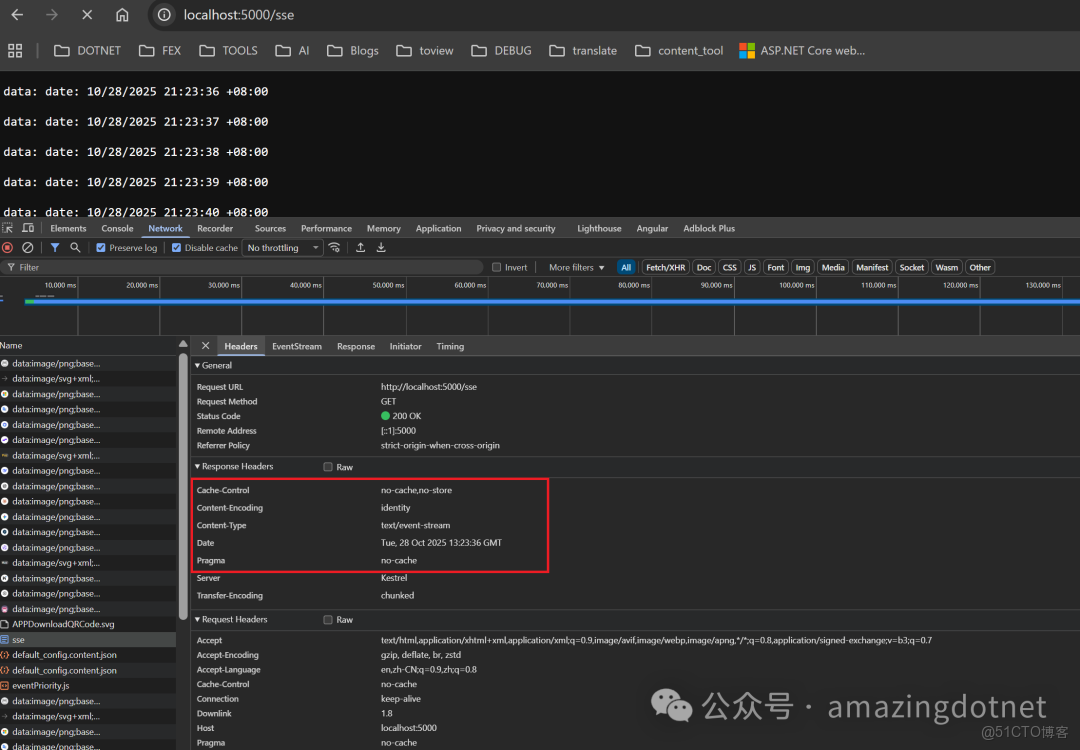
sse response headers
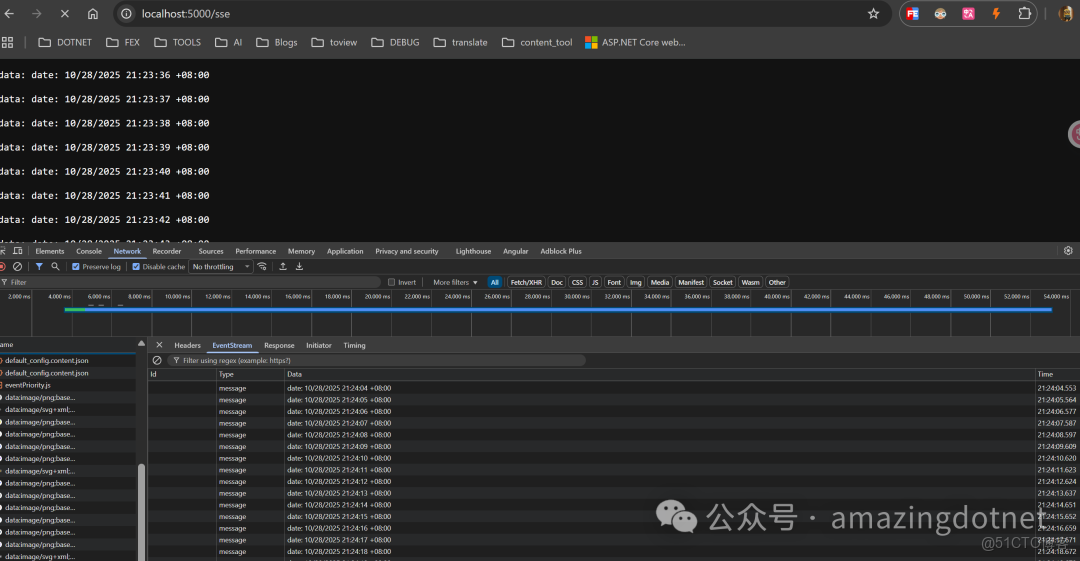
sse response
這裏我們沒有指定 eventType 可以使用前面示例的 onmessage 方法處理,示例如下:
evtSource.onmessage = (event) => {
    console.log(`Received message: ${event.data}`);
};
第二個示例指定了一個 eventType heartbeat,並且第二個示例返回一個強類型的數據模型 IAsyncEnumerable<EchoDataModel>,response 示例如下:
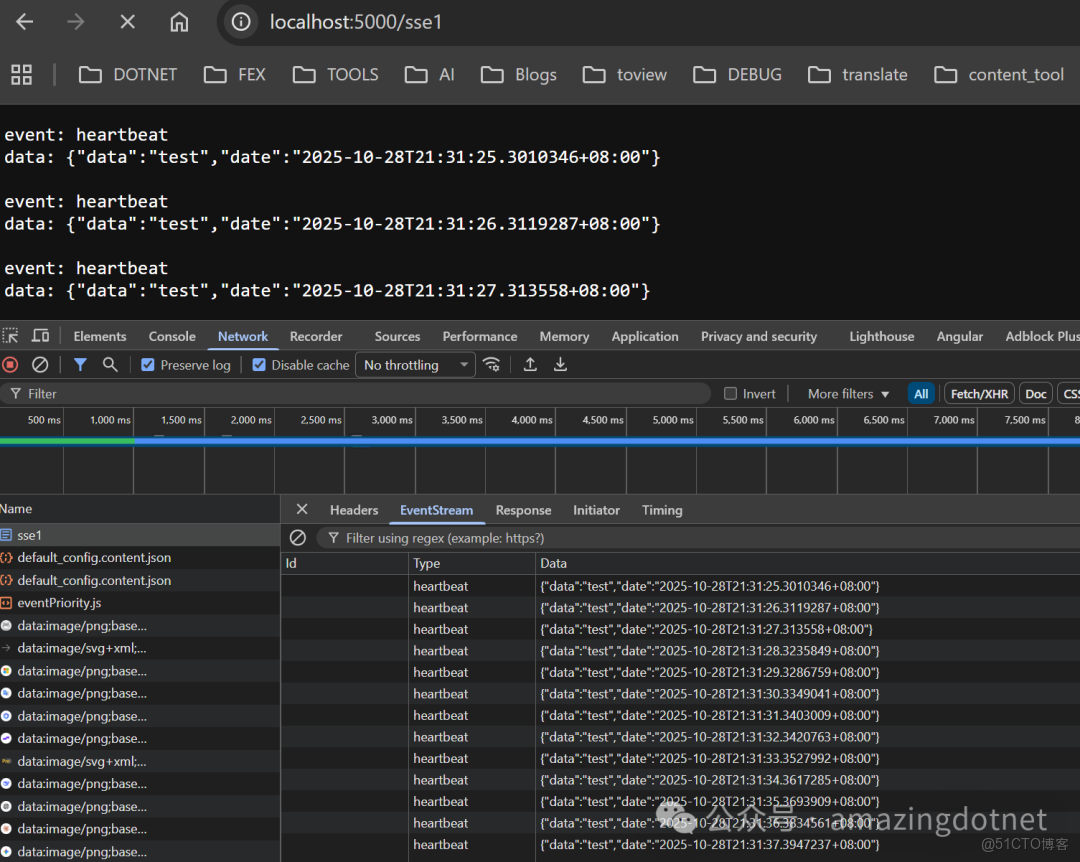
sse with eventType
可以看到此時我們 response 里加了一個 event: heartbeat 這行輸出指定了收到的數據的 eventType 為 heartbeat,在 chrome network 請求的 EventStream 中對應的 type 也從前面的 message 變成了 heartbeat,我們返回的數據被序列化成了 JSON,JSON 格式的控制是和 API 的 JSON 序列化設置保持一致的
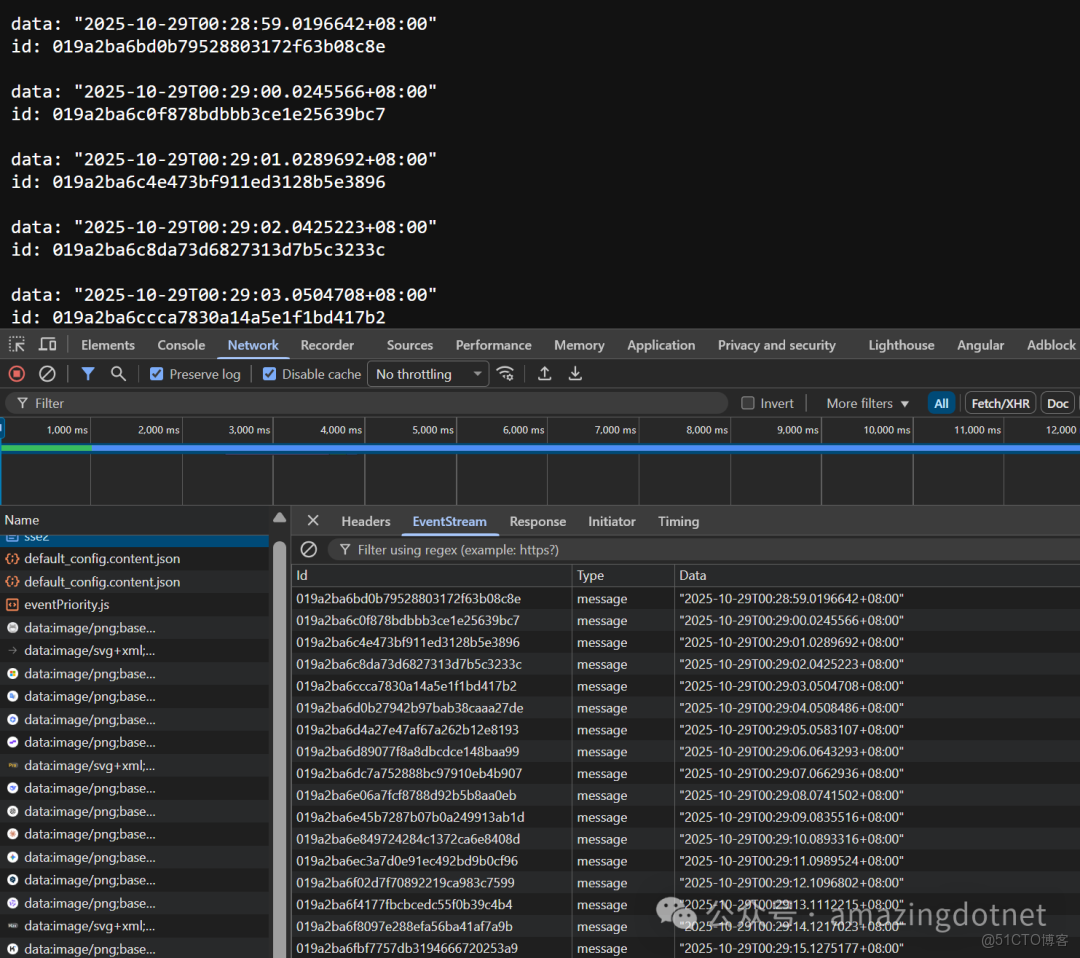
我們再來看最後一個例子,最後一個例子返回的是 IAsyncEnumerable<SseItem<DateTimeOffset>>,也指定了 eventType 為 heartbeat
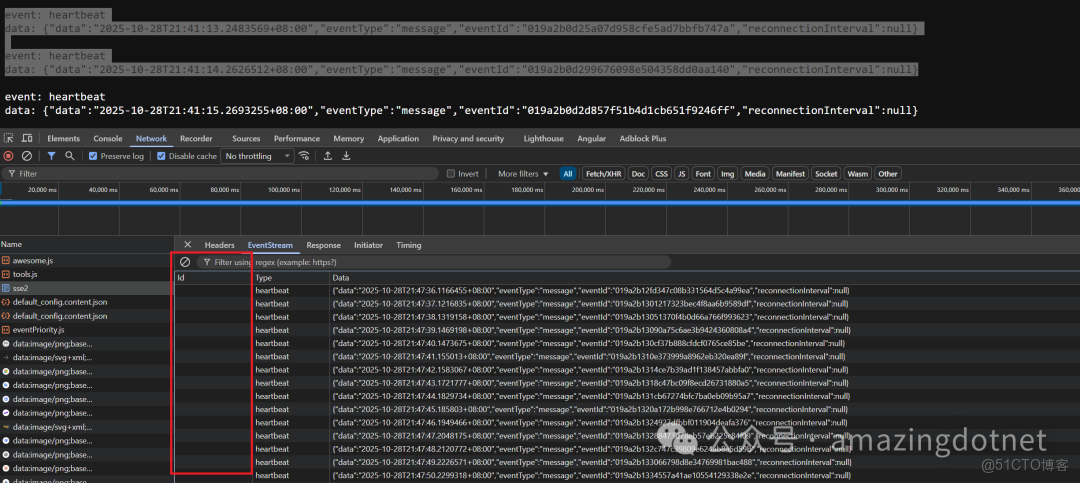
sse-SseItem-response
這裏可以看到 EventId 是空的,eventId 和 data 都在 data 裏被包了一層,感覺這裏是個 BUG,不應該是這樣的,正確的應該是正確指定了 id 的,並且指定 retry 如果指定了的話,在 GitHub 上提了一個 issue,感興趣的朋友可以關注下:https://github.com/dotnet/aspnetcore/issues/64183
根據規範,eventId 以及 retry 應該是一個獨立的一行,類似於 eventType 如下:
然後默認的 retry 時間是 3 秒,可自定義 ReconnectionInterval ,這裏出錯是因為我們調用了錯誤的方法,我們應該在構建 SseItem 時指定 event
More
這一方法不僅可以在 Minimal API 中使用,在 controller 中也是可以使用的,使用示例如下:
public class TestController : ControllerBase
{
    public IResult Sse() => Results.ServerSentEvent(...);
}
最近基於 sse 改造了我們內部的一個 load test 的工具,原來的方式是在服務器端執行一個 k6 腳本,然後讀取 process 的 output 等待讀取完成之後才會返回給客户端這就導致前端一直卡在那裏,什麼數據都不顯示,尤其是跑的 load test 時間長了的話體驗就很差,非常明顯,於是基於 sse 做了一些改造,將進程的輸出流式地保存起來,通過 sse 返回給前端,前端通過處理 sse 返回的數據流式地顯示在前端頁面上了。
References
- https://developer.mozilla.org/en-US/docs/Web/API/EventSource
- https://developer.mozilla.org/en-US/docs/Web/API/Server-sent_events/Using_server-sent_events
• https://source.dot.net/#System.Net.ServerSentEvents/System/Net/ServerSentEvents/SseItem.cs,cf62e7e50c935179
- https://www.encora.com/insights/real-time-communication-simplified-a-deep-dive-into-server-sent-events-sse
- https://github.com/WeihanLi/SamplesInPractice/blob/d99879160837c8d36c3f68eadb6c1e51c507f89c/net10sample/Net10Samples/AspNetCoreSample.cs#L29
