隨着互聯網的發展,之前的單體架構已經不滿足於解決當前的挑戰,所以一些企業開始對項目結構進行優化,分佈式,微服務等等,這些項目結構的升級確實解決了一部分的問題,但是同樣也帶來了新的挑戰,比如今天博客的主題——安全。安全,是一個隨着架構演化,越來越重要的東西。之前的單體應用,大多會採用shiro這個安全框架,而擯棄spring security,因為shiro的功能已經基本上滿足企業的要求,而spring security功能全但笨重,所有一些架構師們認為對項目架構來説是一種負擔,但是,當架構演化到分佈式以後,存在多個系統時,shiro本身的功能就受到了限制,在筆者的認知裏,shiro是基於session來做認證授權的,所以當多個子系統時,session無法共享,當然,也有部分項目採用緩存的方式,把session放到共享緩存中,多個子系統共享這個session,沒錯,這是解決了當下的問題,但僅僅是當下,因為可能這幾個子系統是一個公司的產品,他們可以很方便的使用共享緩存,但是當有別的公司的系統接入時,之前的問題又會再次產生。為了徹底解決這個問題,產生了一種單點登錄的解決方案,單點登錄中最重要的元素就是token,我今天聊到的解決方案也將用到它,今天我們先不聊單點登錄,只講前後端分離如何保證系統安全。以上言論僅代表筆者個人想法,有不同意見可以互相討論。
下面進入正題吧,之前的項目是前後一體的,頁面也是後台渲染的,所以頁面的權限完全的被後台控制,所以權限設計方面比較方便,筆者第一次做一個小項目甚至沒有使用任何的權限框架,而是用一個過濾器來控制。不過當你看過框架的原理後,其實發現和我的做法大致相似,不過是更完備罷了。首先,我先來講一下大致的思路:由於系統採用前後端分離,後端與前端只進行數據交互,後端的部分邏輯(包括權限部分)都交給了前端控制,前端三大框架中Angular就有守衞路由的概念(vue最近剛接觸,但是也看到了類似的東西),有了守衞路由,就能解決部分的權限問題,但是有些細粒度的東西還是需要具體的信息來控制(比如某個按鈕事件,不同的權限可能有不同的展示效果),所以,我們需要在登錄時從後台拿到當前用户的所有信息,這個數據可以配置成守衞路由的形式,把守衞路由利用起來,這個數據可以根據系統的安全級別進行加解密等等操作,這些信息可以放在前端的緩存中,例如瀏覽器的local storage,移動端可以使用嵌入式數據庫sqlite。至此前端的權限控制基本已經實現,但是對於後端來説,前端是不可信的,所以後端的校驗也不可缺少,雖然會損耗部分性能,但是為了安全,還是值得的。
附上項目結構圖:
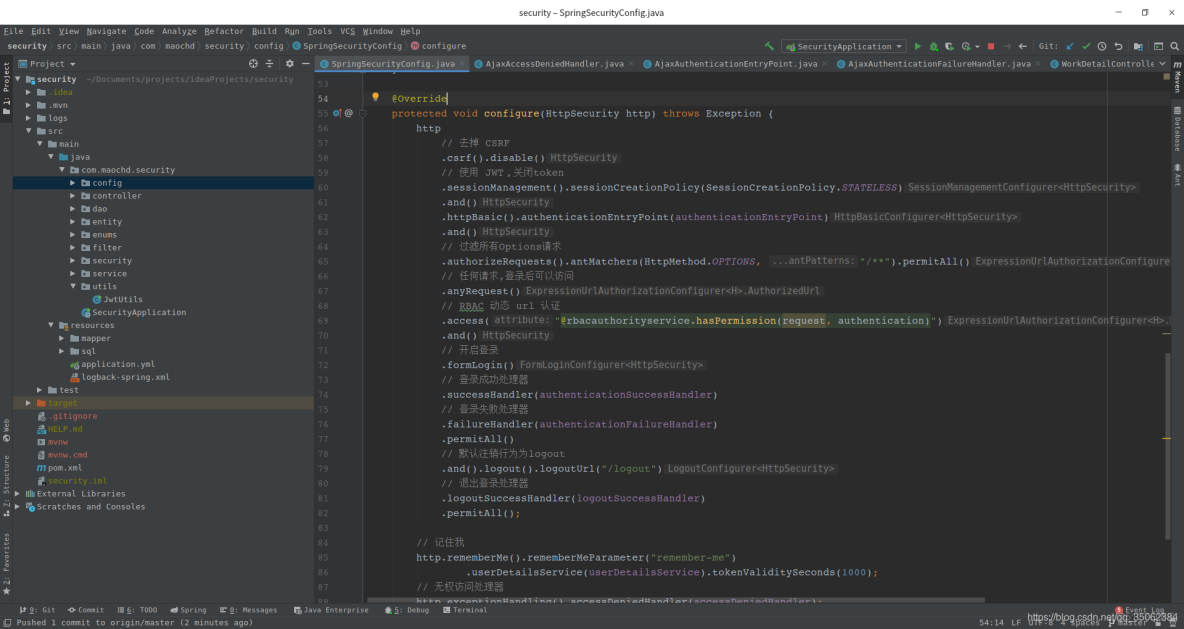
這裏我具體介紹這個方案中用到的技術棧和工具,因為是體現思路,所以前端採用postman來進行模擬,後端採用的技術棧是springboot,spring security,mybatis,jwt,fastjson,數據庫使用的是mysql。附上我的pom文件:
<?xml version="1.0" encoding="UTF-8"?>
<project xmlns="http://maven.apache.org/POM/4.0.0" xmlns:xsi="http://www.w3.org/2001/XMLSchema-instance"
         xsi:schemaLocation="http://maven.apache.org/POM/4.0.0 https://maven.apache.org/xsd/maven-4.0.0.xsd">
    <modelVersion>4.0.0</modelVersion>
    <parent>
        <groupId>org.springframework.boot</groupId>
        <artifactId>spring-boot-starter-parent</artifactId>
        <version>2.4.1</version>
        <relativePath/> <!-- lookup parent from repository -->
    </parent>
    <groupId>com.maochd</groupId>
    <artifactId>security</artifactId>
    <version>0.0.1-SNAPSHOT</version>
    <name>security</name>
    <description>Demo project for Spring Boot</description>

    <properties>
        <java.version>1.8</java.version>
        <fastjson.version>1.2.73</fastjson.version>
        <jwtt.version>0.9.0</jwtt.version>
    </properties>

    <dependencies>
        <dependency>
            <groupId>org.springframework.boot</groupId>
            <artifactId>spring-boot-starter-web</artifactId>
        </dependency>
        <dependency>
            <groupId>org.mybatis.spring.boot</groupId>
            <artifactId>mybatis-spring-boot-starter</artifactId>
            <version>2.1.4</version>
        </dependency>

        <dependency>
            <groupId>mysql</groupId>
            <artifactId>mysql-connector-java</artifactId>
            <scope>runtime</scope>
        </dependency>
        <dependency>
            <groupId>org.projectlombok</groupId>
            <artifactId>lombok</artifactId>
            <optional>true</optional>
        </dependency>
        <dependency>
            <groupId>org.springframework.boot</groupId>
            <artifactId>spring-boot-starter-test</artifactId>
            <scope>test</scope>
        </dependency>
        <dependency>
            <groupId>org.springframework.boot</groupId>
            <artifactId>spring-boot-starter-security</artifactId>
        </dependency>
        <dependency>
            <groupId>io.jsonwebtoken</groupId>
            <artifactId>jjwt</artifactId>
            <version>${jwtt.version}</version>
        </dependency>

        <dependency>
            <groupId>com.alibaba</groupId>
            <artifactId>fastjson</artifactId>
            <version>${fastjson.version}</version>
        </dependency>
    </dependencies>

    <build>
        <plugins>
            <plugin>
                <groupId>org.springframework.boot</groupId>
                <artifactId>spring-boot-maven-plugin</artifactId>
                <configuration>
                    <excludes>
                        <exclude>
                            <groupId>org.projectlombok</groupId>
                            <artifactId>lombok</artifactId>
                        </exclude>
                    </excludes>
                </configuration>
            </plugin>
        </plugins>
    </build>

</project>
springboot只是一個快速搭建項目的工具,這裏我就不過多介紹了,spring security 我這裏就不講他的原理了(本人雖然拜讀過部分源碼,但是還是有不理解的地方,等我基本理解的時候,我會出一個新的文章來詳細的介紹),現在我只講他是如何實現我們的項目的。spring security的核心在於他的過濾鏈和多個處理器,我們這裏放上他的配置文件:
package com.maochd.security.config;

import com.maochd.security.filter.JwtAuthenticationTokenFilter;
import com.maochd.security.security.*;
import com.maochd.security.service.impl.SelfUserDetailsServiceImpl;
import org.springframework.beans.factory.annotation.Autowired;
import org.springframework.context.annotation.Configuration;
import org.springframework.http.HttpMethod;
import org.springframework.security.config.annotation.authentication.builders.AuthenticationManagerBuilder;
import org.springframework.security.config.annotation.web.builders.HttpSecurity;
import org.springframework.security.config.annotation.web.configuration.WebSecurityConfigurerAdapter;
import org.springframework.security.config.http.SessionCreationPolicy;
import org.springframework.security.crypto.bcrypt.BCryptPasswordEncoder;
import org.springframework.security.web.authentication.UsernamePasswordAuthenticationFilter;


/**
 * security 配置類
 *
 * @author maochd
 */
@Configuration
public class SpringSecurityConfig extends WebSecurityConfigurerAdapter {

    @Autowired
    private AjaxAuthenticationEntryPoint authenticationEntryPoint;

    @Autowired
    private AjaxAuthenticationSuccessHandler authenticationSuccessHandler;

    @Autowired
    private AjaxAuthenticationFailureHandler authenticationFailureHandler;

    @Autowired
    private AjaxLogoutSuccessHandler logoutSuccessHandler;

    @Autowired
    private AjaxAccessDeniedHandler accessDeniedHandler;

    @Autowired
    private SelfUserDetailsServiceImpl userDetailsService;

    @Autowired
    private JwtAuthenticationTokenFilter jwtAuthenticationTokenFilter;

    @Override
    protected void configure(AuthenticationManagerBuilder auth) throws Exception {
        // 加入自定義的安全認證
        // auth.authenticationProvider(provider);

        auth.userDetailsService(userDetailsService).passwordEncoder(new BCryptPasswordEncoder());
    }

    @Override
    protected void configure(HttpSecurity http) throws Exception {
        http
            // 去掉 CSRF
            .csrf().disable()
            // 使用 JWT,關閉token
            .sessionManagement().sessionCreationPolicy(SessionCreationPolicy.STATELESS)
            .and()
            .httpBasic().authenticationEntryPoint(authenticationEntryPoint)
            .and()
            // 過濾所有Options請求
            .authorizeRequests().antMatchers(HttpMethod.OPTIONS, "/**").permitAll()
            // 任何請求,登錄後可以訪問
            .anyRequest()
            // RBAC 動態 url 認證
            .access("@rbacauthorityservice.hasPermission(request, authentication)")
            .and()
            // 開啓登錄
            .formLogin()
            // 登錄成功處理器
            .successHandler(authenticationSuccessHandler)
            // 登錄失敗處理器
            .failureHandler(authenticationFailureHandler)
            .permitAll()
            // 默認註銷行為為logout
            .and().logout().logoutUrl("/logout")
            // 退出登錄處理器
            .logoutSuccessHandler(logoutSuccessHandler)
            .permitAll();

        // 記住我
        http.rememberMe().rememberMeParameter("remember-me")
                .userDetailsService(userDetailsService).tokenValiditySeconds(1000);
        // 無權訪問處理器
        http.exceptionHandling().accessDeniedHandler(accessDeniedHandler);
        // JWT過濾器
        http.addFilterBefore(jwtAuthenticationTokenFilter, UsernamePasswordAuthenticationFilter.class);

    }
}
這裏我們完全拋棄session,改用jwt,然後加載一下處理器,這些處理器我們對他進行重寫,來滿足自己的需求,每個處理器我都加上了註釋,基本都是返回一個json串,json中包含各種結果的處理。
package com.maochd.security.security;

import com.alibaba.fastjson.JSON;
import com.maochd.security.entity.ResultInfo;
import com.maochd.security.enums.ResultEnum;
import org.springframework.security.access.AccessDeniedException;
import org.springframework.security.web.access.AccessDeniedHandler;
import org.springframework.stereotype.Component;

import javax.servlet.ServletException;
import javax.servlet.http.HttpServletRequest;
import javax.servlet.http.HttpServletResponse;
import java.io.IOException;

/**
 * 無權訪問處理器
 *
 * @author maochd
 */
@Component
public class AjaxAccessDeniedHandler implements AccessDeniedHandler {
    @Override
    public void handle(HttpServletRequest httpServletRequest, HttpServletResponse httpServletResponse, AccessDeniedException e) throws IOException {
        httpServletResponse.getWriter().write(JSON.toJSONString(ResultInfo.result(ResultEnum.USER_NO_ACCESS, false)));
    }
}
package com.maochd.security.security;
import com.alibaba.fastjson.JSON;
import com.maochd.security.entity.ResultInfo;
import com.maochd.security.enums.ResultEnum;
import org.springframework.security.core.AuthenticationException;
import org.springframework.security.web.AuthenticationEntryPoint;
import org.springframework.stereotype.Component;
import javax.servlet.ServletException;
import javax.servlet.http.HttpServletRequest;
import javax.servlet.http.HttpServletResponse;
import java.io.IOException;
/**
* 未登陸處理器
*
* @author maochd
*/
@Component
public class AjaxAuthenticationEntryPoint implements AuthenticationEntryPoint {
@Override
public void commence(HttpServletRequest httpServletRequest, HttpServletResponse httpServletResponse, AuthenticationException e) throws IOException {
httpServletResponse.getWriter().write(JSON.toJSONString(ResultInfo.result(ResultEnum.USER_NEED_AUTHORITIES, false)));
}
}package com.maochd.security.security;
import com.alibaba.fastjson.JSON;
import com.maochd.security.entity.ResultInfo;
import com.maochd.security.enums.ResultEnum;
import org.springframework.security.core.AuthenticationException;
import org.springframework.security.web.authentication.AuthenticationFailureHandler;
import org.springframework.stereotype.Component;
import javax.servlet.ServletException;
import javax.servlet.http.HttpServletRequest;
import javax.servlet.http.HttpServletResponse;
import java.io.IOException;
/**
* 登錄失敗處理器
*
* @author maochd
*/
@Component
public class AjaxAuthenticationFailureHandler implements AuthenticationFailureHandler {
@Override
public void onAuthenticationFailure(HttpServletRequest httpServletRequest, HttpServletResponse httpServletResponse, AuthenticationException e) throws IOException {
httpServletResponse.getWriter().write(JSON.toJSONString(ResultInfo.result(ResultEnum.USER_LOGIN_FAILED, false)));
}
}package com.maochd.security.security;
import com.alibaba.fastjson.JSON;
import com.maochd.security.entity.ResultInfo;
import com.maochd.security.entity.UserInfo;
import com.maochd.security.enums.ResultEnum;
import com.maochd.security.utils.JwtUtils;
import org.springframework.security.core.Authentication;
import org.springframework.security.web.authentication.AuthenticationSuccessHandler;
import org.springframework.stereotype.Component;
import javax.servlet.ServletException;
import javax.servlet.http.HttpServletRequest;
import javax.servlet.http.HttpServletResponse;
import java.io.IOException;
/**
* 登錄成功處理器
*
* @author maochd
*/
@Component
public class AjaxAuthenticationSuccessHandler implements AuthenticationSuccessHandler {
@Override
public void onAuthenticationSuccess(HttpServletRequest httpServletRequest, HttpServletResponse httpServletResponse, Authentication authentication) throws IOException {
UserInfo userDetails = (UserInfo) authentication.getPrincipal();
String jwtToken = JwtUtils.generateToken(userDetails.getUsername(), userDetails.getUserId());
httpServletResponse.getWriter().write(JSON.toJSONString(ResultInfo.result(ResultEnum.USER_LOGIN_SUCCESS, jwtToken, true)));
}
}package com.maochd.security.security;
import com.alibaba.fastjson.JSON;
import com.maochd.security.entity.ResultInfo;
import com.maochd.security.enums.ResultEnum;
import org.springframework.security.core.Authentication;
import org.springframework.security.web.authentication.logout.LogoutSuccessHandler;
import org.springframework.stereotype.Component;
import javax.servlet.ServletException;
import javax.servlet.http.HttpServletRequest;
import javax.servlet.http.HttpServletResponse;
import java.io.IOException;
/**
* 退出登錄處理器
*
* @author maochd
*/
@Component
public class AjaxLogoutSuccessHandler implements LogoutSuccessHandler {
@Override
public void onLogoutSuccess(HttpServletRequest httpServletRequest, HttpServletResponse httpServletResponse, Authentication authentication) throws IOException {
httpServletResponse.getWriter().write(JSON.toJSONString(ResultInfo.result(ResultEnum.USER_LOGOUT_SUCCESS, true)));
}
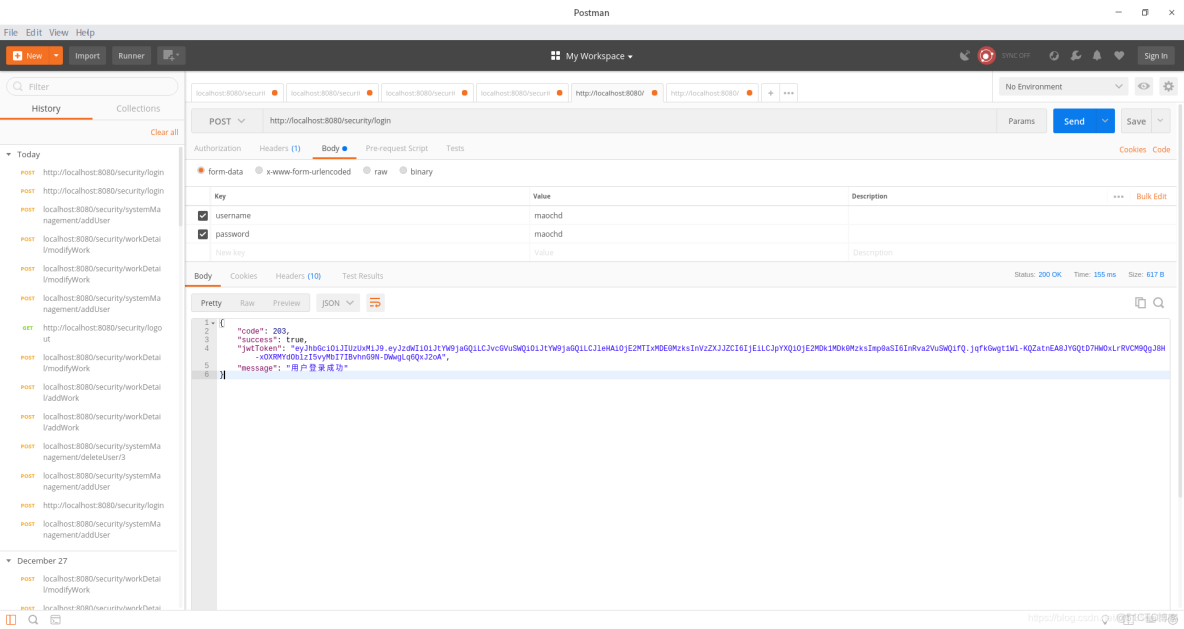
}這裏代碼可能比較多,基本都是一樣的,這裏我重點講一下登錄成功處理器AjaxAuthenticationSuccessHandler,因為登錄操作已經通過,所以我們可以拿到他的用户信息,然後我們需要把用户信息帶入新創建的token中,這裏我們還可以把權限等信息封裝進行,這裏我只是演示,所以只有用户名等信息,這裏的邏輯可以根據業務重寫。
接下來,我們來實現下自定義的認證邏輯
package com.maochd.security.service.impl;

import com.maochd.security.dao.RbacAuthorityDao;
import com.maochd.security.dao.SystemManagementDao;
import com.maochd.security.entity.UserInfo;
import org.springframework.beans.factory.annotation.Autowired;
import org.springframework.security.core.GrantedAuthority;
import org.springframework.security.core.authority.SimpleGrantedAuthority;
import org.springframework.security.core.userdetails.UserDetails;
import org.springframework.security.core.userdetails.UserDetailsService;
import org.springframework.security.core.userdetails.UsernameNotFoundException;
import org.springframework.stereotype.Component;

import java.util.HashSet;
import java.util.List;
import java.util.Set;

/**
 * security認證實現類
 *
 * @author maochd
 */
@Component
public class SelfUserDetailsService implements UserDetailsService {

    @Autowired
    private RbacAuthorityDao rbacAuthorityDao;

    @Override
    public UserDetails loadUserByUsername(String username) throws UsernameNotFoundException {

        UserInfo user = rbacAuthorityDao.getUser(username);
        if (user == null) {
            throw new UsernameNotFoundException("該用户不存在");
        }
        List<String> roles = rbacAuthorityDao.getRoles(user);

        Set<GrantedAuthority> authoritiesSet = new HashSet<>();
        roles.forEach(role -> authoritiesSet.add(new SimpleGrantedAuthority(role)));

        user.setAuthorities(authoritiesSet);

        return user;
    }
}
package com.maochd.security.filter;
import com.maochd.security.service.impl.SelfUserDetailsServiceImpl;
import com.maochd.security.utils.JwtUtils;
import org.springframework.beans.factory.annotation.Autowired;
import org.springframework.security.authentication.UsernamePasswordAuthenticationToken;
import org.springframework.security.core.context.SecurityContextHolder;
import org.springframework.security.core.userdetails.UserDetails;
import org.springframework.security.web.authentication.WebAuthenticationDetailsSource;
import org.springframework.stereotype.Component;
import org.springframework.web.filter.OncePerRequestFilter;
import javax.servlet.FilterChain;
import javax.servlet.ServletException;
import javax.servlet.http.HttpServletRequest;
import javax.servlet.http.HttpServletResponse;
import java.io.IOException;
/**
* JWT 過濾器
*
* @author maochd
*/
@Component
public class JwtAuthenticationTokenFilter extends OncePerRequestFilter {
@Autowired
SelfUserDetailsServiceImpl userDetailsService;
@Override
protected void doFilterInternal(HttpServletRequest request, HttpServletResponse response, FilterChain filterChain) throws ServletException, IOException {
String authHeader = request.getHeader("Authorization");
if (authHeader != null && authHeader.startsWith("Bearer ")) {
String authToken = authHeader.substring("Bearer ".length());
String username = JwtUtils.parseToken(authToken, "_secret");
if (username != null && SecurityContextHolder.getContext().getAuthentication() == null) {
UserDetails userDetails = userDetailsService.loadUserByUsername(username);
if (userDetails != null) {
UsernamePasswordAuthenticationToken authentication =
new UsernamePasswordAuthenticationToken(userDetails, null, userDetails.getAuthorities());
authentication.setDetails(new WebAuthenticationDetailsSource().buildDetails(request));
SecurityContextHolder.getContext().setAuthentication(authentication);
}
}
}
filterChain.doFilter(request, response);
}
}我們先來講解JwtAuthenticationTokenFilter這個過濾器,他是我們寫的代碼裏的第一道攔截,這裏會截取http請求頭中的認證信息,方式可以自定義,主要是為了拿到token,如果沒拿到,那麼就直接進入後面的流程,最後進入用户未登錄的處理器,如果拿到token,我們會對其進行解析,拿到用户名,然後把角色信息封裝到用户實體中,然後對用户實體進行包裝後放入security的上下文中,最後進入後面的流程。
SelfUserDetailsService主要是重寫security的登錄邏輯,我們這裏獲取了他實時的角色,並封裝到用户實體中,都是為了滿足自己的業務。
經過過濾器後,我們在配置文件裏重寫了權限校驗邏輯,採用動態校驗,即實時從數據庫中取出權限信息,這裏暫時使用數據庫,動態的權限信息可以保存在不同介質中,我覺得放到緩存中也是個不錯的選擇,畢竟當請求流量過大時,能減小對數據庫的壓力。
package com.maochd.security.service.impl;

import com.maochd.security.dao.RbacAuthorityDao;
import com.maochd.security.entity.UserInfo;
import com.maochd.security.service.RbacAuthorityService;
import org.springframework.beans.factory.annotation.Autowired;
import org.springframework.security.core.Authentication;
import org.springframework.security.core.userdetails.UserDetails;
import org.springframework.stereotype.Component;

import javax.servlet.http.HttpServletRequest;
import java.util.List;

/**
 * security授權實現類
 *
 * @author maochd
 */
@Component("rbacauthorityservice")
public class RbacAuthorityServiceImpl implements RbacAuthorityService {

    @Autowired
    private RbacAuthorityDao rbacAuthorityDao;

    @Override
    public boolean hasPermission(HttpServletRequest request, Authentication authentication) {
        Object userInfo = authentication.getPrincipal();
        boolean hasPermission = false;
        if (userInfo instanceof UserInfo) {
            String username = ((UserDetails) userInfo).getUsername();
            List<String> urls = rbacAuthorityDao.getUrlsByUsername(username);
            hasPermission = urls.stream().anyMatch(url -> request.getRequestURI().contains(url));
        }
        return hasPermission;
    }
}
項目中其他的文件都是業務,這裏為了方便演示,沒有把security部分抽成一個單獨的模塊,而是採用緊耦合的方式,後期可以把security抽成一個單獨的模塊,或者與網關等模塊進行緊耦合,共同完成對系統的安全保證。業務文件我就不再寫出,可以訪問我的項目地址,把代碼down到本地進行運行。項目工程地址在頂部已經給出。
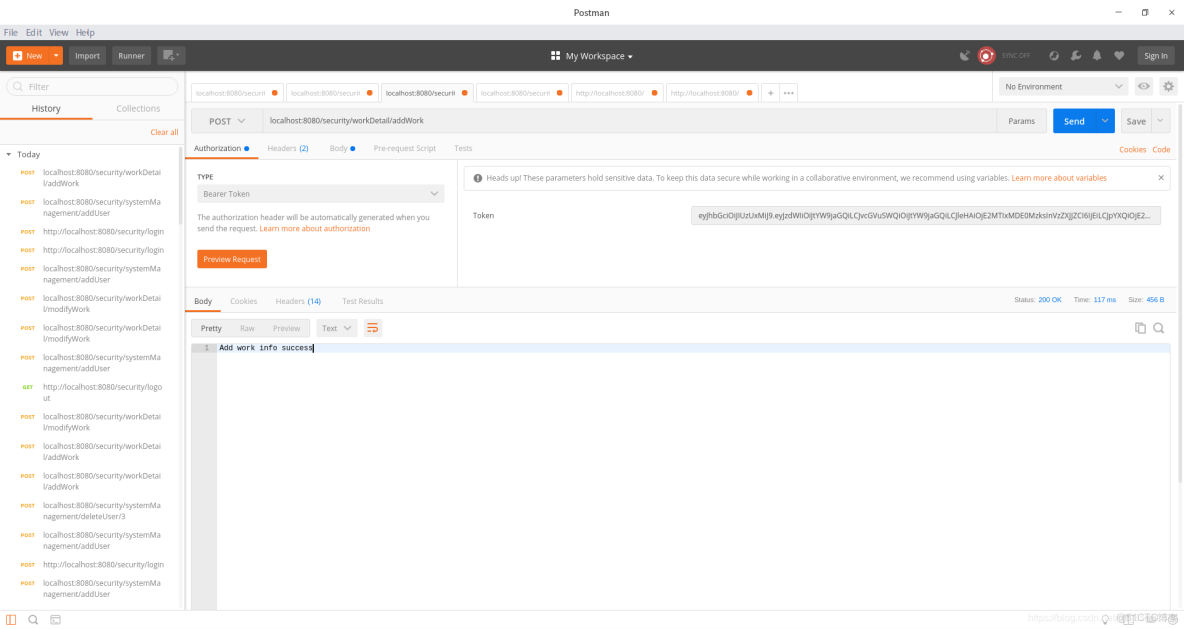
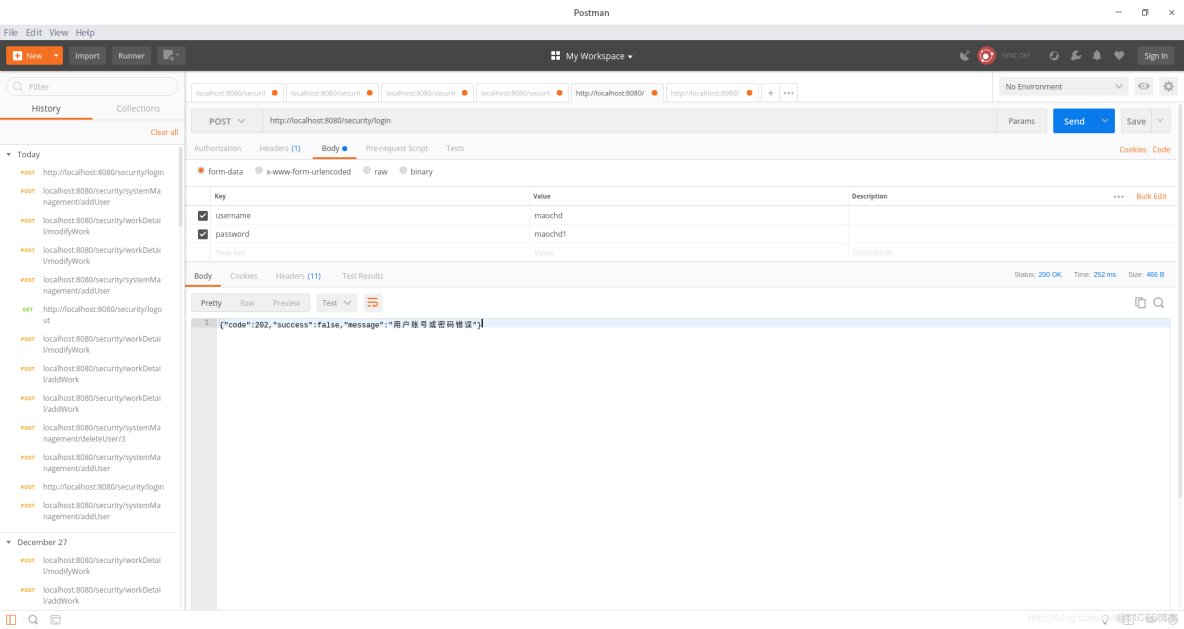
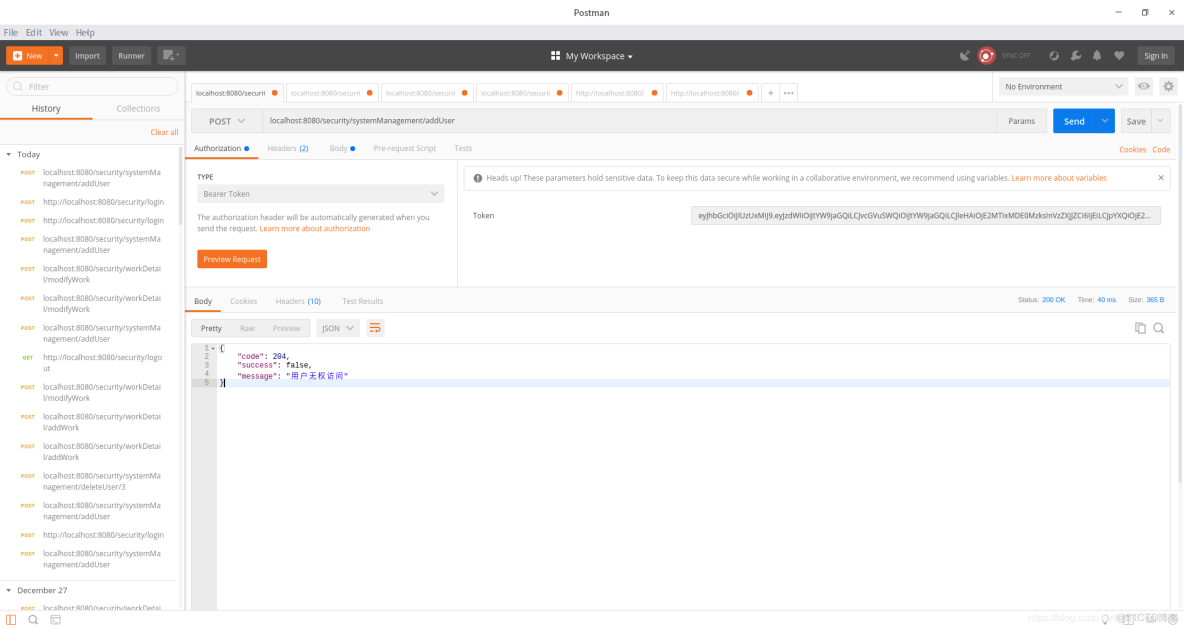
這裏就展示下在postman下的各個情況:
1.未登錄

2.登錄失敗
3. 登錄成功
4.無權訪問
5.執行業務成功