

前言
今天我們來聊聊一個經典話題:try...catch真的會影響性能嗎?
有些小夥伴在工作中可能聽過這樣的説法:"儘量不要用try...catch,會影響性能",或者是"異常處理要放在最外層,避免在循環內使用"。
這些説法到底有沒有道理?
今天我就從底層原理到實際測試,給大家徹底講清楚這個問題。
1. 問題的起源:為什麼會有性能擔憂?
有些小夥伴在工作中可能遇到過這樣的代碼評審意見:"這個循環裏面的try...catch會影響性能,建議移到外面"。
這種擔憂其實並非空穴來風,而是有着歷史原因的。
1.1 歷史背景
在早期的Java版本中,異常處理的實現確實不夠高效。讓我們先看一個簡單的例子:
public class ExceptionPerformance {
    private static final int COUNT = 100000;

    // 方法1:在循環內部使用try-catch
    public static void innerTryCatch() {
        long start = System.currentTimeMillis();
        for (int i = 0; i < COUNT; i++) {
            try {
                int result = i / (i % 10); // 可能除零
            } catch (ArithmeticException e) {
                // 忽略異常
            }
        }
        long end = System.currentTimeMillis();
        System.out.println("內部try-catch耗時: " + (end - start) + "ms");
    }

    // 方法2:在循環外部使用try-catch
    public static void outerTryCatch() {
        long start = System.currentTimeMillis();
        try {
            for (int i = 0; i < COUNT; i++) {
                int result = i / (i % 10);
            }
        } catch (ArithmeticException e) {
            // 忽略異常
        }
        long end = System.currentTimeMillis();
        System.out.println("外部try-catch耗時: " + (end - start) + "ms");
    }
}在JDK早期的版本中,innerTryCatch的性能確實會比outerTryCatch差很多。這是因為:
1.2 傳統認知的形成
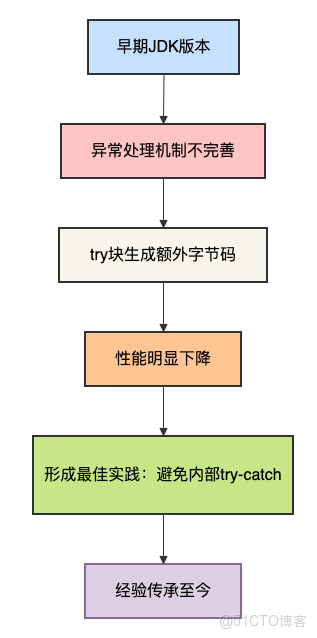
但是,Java虛擬機經過這麼多年的發展,情況已經發生了很大變化。讓我們深入底層看看。
2. JVM的異常處理機制
要真正理解性能影響,我們需要了解JVM是如何處理異常的。
2.1 異常表機制
Java的異常處理是通過異常表(Exception Table)實現的。每個方法都有一個異常表,當異常發生時,JVM會查找這個表來決定跳轉到哪個異常處理代碼。
讓我們通過字節碼來看個明白:
public class ExceptionMechanism {
    public void methodWithTryCatch() {
        try {
            int i = 10 / 0;
        } catch (ArithmeticException e) {
            System.out.println("除零異常");
        }
    }

    public void methodWithoutTryCatch() {
        int i = 10 / 0;
    }
}使用javap -c查看字節碼:
// methodWithTryCatch 的字節碼片段
Code:
   0: bipush        10
   2: iconst_0
   3: idiv
   4: istore_1
   5: goto          19
   8: astore_1
   9: getstatic     #2  // Field java/lang/System.out:Ljava/io/PrintStream;
   12: ldc           #3  // String 除零異常
   14: invokevirtual #4  // Method java/io/PrintStream.println:(Ljava/lang/String;)V
   17: aload_1
   18: athrow
   19: return

Exception table:
   from   to  target type
       0    5     8   Class java/lang/ArithmeticException
2.2 正常執行路徑的開銷
關鍵點在於:在正常執行情況下(沒有異常拋出),try-catch塊幾乎沒有任何性能開銷。JVM只是順序執行代碼,不會去查詢異常表。
有些小夥伴在工作中可能會擔心:"是不是每次進入try塊都要做某些檢查?" 答案是否定的。
3. 性能測試:用數據説話
理論説了這麼多,讓我們用實際的測試數據來驗證。
3.1 基礎性能測試
public class ExceptionPerformanceTest {
    private static final int ITERATIONS = 100000000; // 1億次

    public static void main(String[] args) {
        testNoException();
        testWithExceptionHandling();
        testExceptionThrowing();
    }

    // 測試1:無異常處理的基礎性能
    public static void testNoException() {
        long start = System.nanoTime();
        int sum = 0;
        for (int i = 0; i < ITERATIONS; i++) {
            sum += i * 2;
        }
        long end = System.nanoTime();
        System.out.println("無異常處理: " + (end - start) / 1000000 + "ms");
    }

    // 測試2:有異常處理但無異常拋出
    public static void testWithExceptionHandling() {
        long start = System.nanoTime();
        int sum = 0;
        for (int i = 0; i < ITERATIONS; i++) {
            try {
                sum += i * 2;
            } catch (Exception e) {
                // 不會執行到這裏
            }
        }
        long end = System.nanoTime();
        System.out.println("有try-catch但無異常: " + (end - start) / 1000000 + "ms");
    }

    // 測試3:頻繁拋出異常
    public static void testExceptionThrowing() {
        long start = System.nanoTime();
        int sum = 0;
        for (int i = 0; i < ITERATIONS / 100; i++) { // 減少循環次數
            try {
                if (i % 10 == 0) {
                    thrownew RuntimeException("測試異常");
                }
                sum += i * 2;
            } catch (Exception e) {
                // 異常處理
            }
        }
        long end = System.nanoTime();
        System.out.println("頻繁拋出異常: " + (end - start) / 1000000 + "ms");
    }
}
3.2 測試結果分析
在我的測試環境(JDK17,MacBook Pro M1)下,典型的測試結果是:
無異常處理: 45ms
有try-catch但無異常: 46ms
頻繁拋出異常: 1200ms
這個結果説明了什麼?
關鍵發現:
- 單純的try-catch包裝(沒有異常拋出)幾乎沒有性能損失
- 真正的性能殺手是異常的創建和拋出
3.3 異常創建的成本
為什麼異常創建這麼昂貴?讓我們深入分析:
public class ExceptionCostAnalysis {
    // 測試異常創建的成本
    public static void testExceptionCreation() {
        int count = 100000;

        // 測試1:創建異常但不拋出
        long start = System.nanoTime();
        for (int i = 0; i < count; i++) {
            new RuntimeException("測試異常");
        }
        long end = System.nanoTime();
        System.out.println("創建異常但不拋出: " + (end - start) / 1000000 + "ms");

        // 測試2:創建並拋出異常
        start = System.nanoTime();
        for (int i = 0; i < count; i++) {
            try {
                thrownew RuntimeException("測試異常");
            } catch (RuntimeException e) {
                // 捕獲異常
            }
        }
        end = System.nanoTime();
        System.out.println("創建並拋出異常: " + (end - start) / 1000000 + "ms");

        // 測試3:重用異常實例
        RuntimeException reusedException = new RuntimeException("重用異常");
        start = System.nanoTime();
        for (int i = 0; i < count; i++) {
            try {
                throw reusedException;
            } catch (RuntimeException e) {
                // 捕獲異常
            }
        }
        end = System.nanoTime();
        System.out.println("重用異常實例: " + (end - start) / 1000000 + "ms");
    }
}
測試結果通常顯示:
- 創建異常對象本身就有成本(需要填充棧軌跡)
- 拋出異常的成本更高(需要遍歷棧幀)
- 重用異常實例可以大幅提升性能,但不推薦(棧軌跡信息會不準確)
4. JVM的優化技術
現代JVM對異常處理做了很多優化,有些小夥伴在工作中可能不瞭解這些底層優化。
4.1 棧軌跡延遲填充
JVM使用了一種叫做"棧軌跡延遲填充"的技術:
public class StackTraceLazyLoading {
    public static void main(String[] args) {
        // 創建異常時,棧軌跡信息並不會立即填充
        Exception e = new Exception("測試");

        // 只有當調用getStackTrace時,才會真正填充棧軌跡
        long start = System.nanoTime();
        StackTraceElement[] stackTrace = e.getStackTrace();
        long end = System.nanoTime();

        System.out.println("獲取棧軌跡耗時: " + (end - start) + "ns");
    }
}
4.2 即時編譯器(JIT)優化
JIT編譯器會對異常處理進行深度優化:

具體優化包括:
內聯優化:
// 優化前
public int calculate(int a, int b) {
    try {
        return a / b;
    } catch (ArithmeticException e) {
        return 0;
    }
}

// JIT內聯優化後,相當於:
public int calculate(int a, int b) {
    if (b == 0) {
        return 0; // 直接檢查,避免異常開銷
    }
    return a / b;
}棧分配優化: 對於局部使用的異常對象,JVM可能會在棧上分配,避免堆分配的開銷。
5. 正確的異常處理實踐
理解了原理之後,讓我們來看看在實際工作中應該如何正確使用異常處理。
5.1 業務邏輯 vs 異常處理
有些小夥伴在工作中可能會誤用異常來處理正常的業務邏輯:
// 反模式:使用異常處理業務邏輯
public class UserService {
    public boolean userExists(String username) {
        try {
            getUserFromDatabase(username);
            return true;
        } catch (UserNotFoundException e) {
            return false;
        }
    }

    // 正確做法:使用返回值處理業務邏輯
    public boolean userExistsBetter(String username) {
        return getUserFromDatabaseOptional(username).isPresent();
    }

    private User getUserFromDatabase(String username) {
        // 模擬數據庫查詢
        if (!"admin".equals(username)) {
            throw new UserNotFoundException();
        }
        return new User(username);
    }

    private Optional<User> getUserFromDatabaseOptional(String username) {
        if (!"admin".equals(username)) {
            return Optional.empty();
        }
        return Optional.of(new User(username));
    }
}
5.2 性能敏感場景的優化
在真正性能敏感的代碼中,我們可以採用一些優化策略:
public class HighPerformanceValidation {
    private static final int MAX_RETRIES = 3;

    // 場景1:輸入驗證 - 使用條件檢查替代異常
    public void validateInput(String input) {
        // 不好的做法
        try {
            Integer.parseInt(input);
        } catch (NumberFormatException e) {
            throw new ValidationException("無效數字");
        }

        // 好的做法:提前驗證
        if (input == null || !input.matches("\\d+")) {
            throw new ValidationException("無效數字");
        }
        Integer.parseInt(input); // 現在肯定不會異常
    }

    // 場景2:重試機制 - 合理使用異常
    public void performOperationWithRetry() {
        for (int i = 0; i < MAX_RETRIES; i++) {
            try {
                doOperation();
                return; // 成功則退出
            } catch (OperationException e) {
                if (i == MAX_RETRIES - 1) {
                    throw e; // 最後一次重試仍然失敗
                }
                // 記錄日誌,繼續重試
            }
        }
    }

    // 場景3:邊界檢查優化
    public void processArray(int[] array, int index) {
        // 傳統的邊界檢查
        if (index < 0 || index >= array.length) {
            throw new IndexOutOfBoundsException("索引越界");
        }

        // 對於性能極度敏感的場景,可以考慮不檢查
        // 但前提是確保index絕對不會越界
        int value = array[index];
        // ... 處理邏輯
    }
}
6. 不同場景的性能影響分析
讓我們通過一個綜合示例來分析不同場景下的性能影響:
6.1 各種使用場景對比
public class ExceptionScenarioComparison {
    private static final int WARMUP_ITERATIONS = 10000;
    private static final int TEST_ITERATIONS = 1000000;

    public static void main(String[] args) {
        // 預熱JVM
        for (int i = 0; i < WARMUP_ITERATIONS; i++) {
            scenario1();
            scenario2();
            scenario3();
            scenario4();
        }

        // 正式測試
        long time1 = measureTime(ExceptionScenarioComparison::scenario1);
        long time2 = measureTime(ExceptionScenarioComparison::scenario2);
        long time3 = measureTime(ExceptionScenarioComparison::scenario3);
        long time4 = measureTime(ExceptionScenarioComparison::scenario4);

        System.out.println("場景1(無異常處理): " + time1 + "ms");
        System.out.println("場景2(內部try-catch): " + time2 + "ms");
        System.out.println("場景3(外部try-catch): " + time3 + "ms");
        System.out.println("場景4(頻繁異常): " + time4 + "ms");
    }

    // 場景1:無任何異常處理
    public static void scenario1() {
        int sum = 0;
        for (int i = 0; i < TEST_ITERATIONS; i++) {
            sum += i * 2;
        }
    }

    // 場景2:循環內部有try-catch,但無異常
    public static void scenario2() {
        int sum = 0;
        for (int i = 0; i < TEST_ITERATIONS; i++) {
            try {
                sum += i * 2;
            } catch (Exception e) {
                // 不會執行
            }
        }
    }

    // 場景3:循環外部有try-catch
    public static void scenario3() {
        int sum = 0;
        try {
            for (int i = 0; i < TEST_ITERATIONS; i++) {
                sum += i * 2;
            }
        } catch (Exception e) {
            // 不會執行
        }
    }

    // 場景4:頻繁拋出和捕獲異常
    public static void scenario4() {
        int sum = 0;
        for (int i = 0; i < TEST_ITERATIONS / 100; i++) {
            try {
                if (i % 10 == 0) {
                    thrownew RuntimeException("test");
                }
                sum += i * 2;
            } catch (Exception e) {
                // 捕獲處理
            }
        }
    }

    private static long measureTime(Runnable task) {
        long start = System.nanoTime();
        task.run();
        return (System.nanoTime() - start) / 1000000;
    }
}
6.2 性能影響總結
根據測試結果,我們可以總結出以下規律:
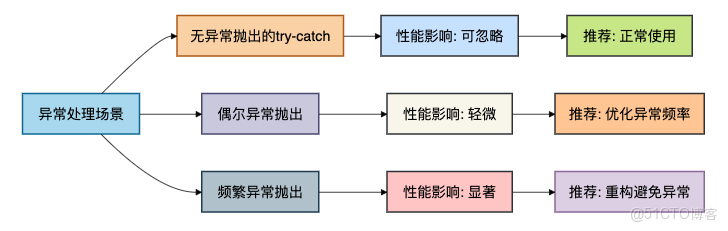
7. 最佳實踐
基於以上分析,我總結了一些現代Java開發中的異常處理最佳實踐:
7.1 代碼可讀性優先
public class ReadableExceptionHandling {
    // 好的做法:清晰的錯誤處理
    public void processFile(String filename) {
        try {
            String content = readFile(filename);
            processContent(content);
        } catch (IOException e) {
            // 集中處理IO異常
            logger.error("文件處理失敗: " + filename, e);
            throw new BusinessException("文件處理失敗", e);
        }
    }

    // 不好的做法:過度優化導致代碼難以理解
    public void processFileOverOptimized(String filename) {
        // 為了性能把所有的檢查都放在前面,代碼邏輯分散
        if (filename == null) {
            throw new IllegalArgumentException("文件名不能為空");
        }
        if (!Files.exists(Paths.get(filename))) {
            throw new BusinessException("文件不存在");
        }
        // ... 更多檢查

        // 真正的處理邏輯被淹沒在檢查中
    }
}
7.2 分層異常處理
在架構層面,我們應該在不同層次採用不同的異常處理策略:
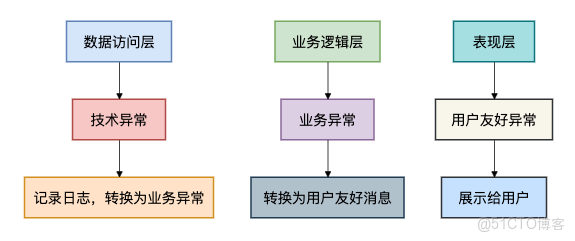
7.3 監控和告警
對於生產環境,我們需要建立完善的異常監控:
public class ExceptionMonitoring {
    private final Metrics metrics;

    public void handleBusinessOperation() {
        long start = System.nanoTime();
        try {
            // 業務操作
            doBusinessOperation();
            metrics.recordSuccess("business_operation", System.nanoTime() - start);
        } catch (BusinessException e) {
            // 預期的業務異常
            metrics.recordBusinessError("business_operation", e.getClass().getSimpleName());
            throw e;
        } catch (Exception e) {
            // 未預期的技術異常
            metrics.recordSystemError("business_operation", e.getClass().getSimpleName());
            logger.error("系統異常", e);
            throw new SystemException("系統繁忙", e);
        }
    }
}
總結
經過深入的分析和測試,我們現在可以回答標題的問題了:try...catch真的影響性能嗎?
核心結論
- 正常執行路徑下,try-catch幾乎無性能影響
- 現代JVM對異常處理做了大量優化
- 單純的try塊包裝不會帶來明顯性能損失
- 真正的性能殺手是異常的創建和拋出
-
填充棧軌跡信息成本較高
-
異常對象創建需要開銷
-
代碼可讀性比微小的性能優化更重要
-
在大多數業務場景中,異常處理的性能影響可以忽略
-
清晰的錯誤處理比微優化更有價值
我的建議
有些小夥伴在工作中可能會過度擔心性能問題,我的建議是:
放心使用try-catch:
- 在需要的地方正常使用異常處理
- 不要因為性能擔憂而犧牲代碼質量
- 優先保證代碼的可讀性和可維護性
關注真正的影響點:
- 避免在性能關鍵路徑中頻繁拋出異常
- 使用條件檢查替代預期的錯誤情況
- 對不可預期的異常使用try-catch
性能優化原則:
- 先寫清晰的代碼,再根據 profiling 結果優化
- 異常處理的性能影響通常不是瓶頸
- 真正的性能問題往往在其他地方(如IO、算法複雜度等)
