

前言
API網關在項目中非常重要。
今天這篇文章跟大家一起聊聊工作最常用的6種網關,希望對你會有所幫助。
一、為什麼需要API網關?
有些小夥伴在工作中可能會問:我們的系統直接調用微服務不是更簡單嗎?
為什麼非要引入API網關這個"中間商"呢?
讓我們先來看一個實際的例子。
沒有網關的微服務困境
// 前端直接調用多個微服務 - 問題重重
@RestController
public class FrontendController {

    // 問題1:服務地址硬編碼
    @Value("${user.service.url:http://localhost:8081}")
    private String userServiceUrl;

    @Value("${order.service.url:http://localhost:8082}")
    private String orderServiceUrl;

    @Autowired
    private RestTemplate restTemplate;

    @GetMapping("/user-dashboard")
    public UserDashboard getUserDashboard(@RequestHeader("Authorization") String token) {
        // 問題2:每個服務都要重複認證邏輯
        if (!validateToken(token)) {
            throw new UnauthorizedException("Token invalid");
        }

        // 問題3:需要手動處理服務間調用順序
        User user = restTemplate.getForObject(userServiceUrl + "/users/current", User.class);
        List<Order> orders = restTemplate.getForObject(orderServiceUrl + "/orders?userId=" + user.getId(), List.class);

        // 問題4:錯誤處理複雜
        if (user == null || orders == null) {
            throw new ServiceUnavailableException("Backend service unavailable");
        }

        return new UserDashboard(user, orders);
    }

    // 問題5:重複的認證代碼
    private boolean validateToken(String token) {
        // 每個接口都要實現的認證邏輯
        return token != null && token.startsWith("Bearer ");
    }
}
引入網關後的優雅架構
// 網關統一處理所有橫切關注點
@Configuration
public class GatewayConfig {

    @Bean
    public RouteLocator customRouteLocator(RouteLocatorBuilder builder) {
        return builder.routes()
            .route("user_service", r -> r.path("/api/users/**")
                .uri("lb://user-service"))
            .route("order_service", r -> r.path("/api/orders/**")
                .uri("lb://order-service"))
            .route("product_service", r -> r.path("/api/products/**")
                .uri("lb://product-service"))
            .build();
    }
}

// 前端只需調用網關
@RestController
public class FrontendController {

    @Autowired
    private RestTemplate restTemplate;

    @GetMapping("/api/user-dashboard")
    public UserDashboard getUserDashboard() {
        // 網關已經處理了認證、路由、負載均衡等問題
        return restTemplate.getForObject("http://gateway/api/users/current/dashboard", UserDashboard.class);
    }
}
API網關的核心價值
讓我們通過架構圖來理解網關在微服務架構中的關鍵作用:
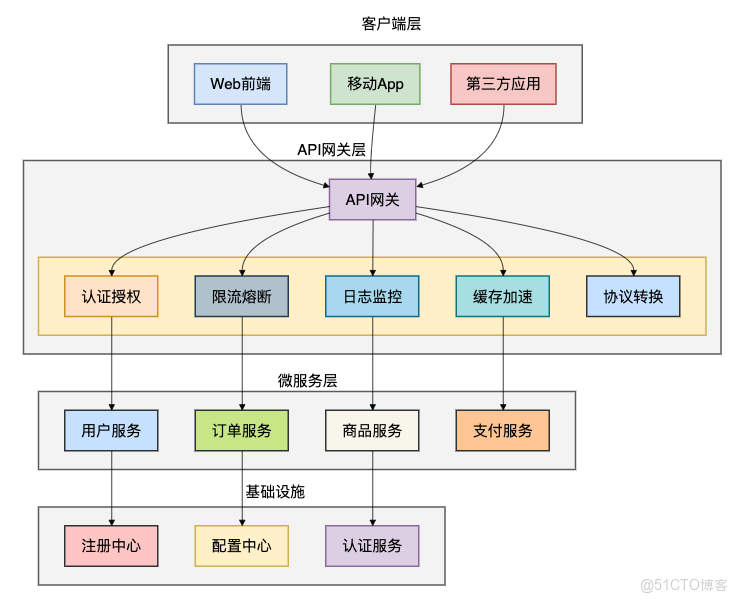
網關解決的8大核心問題:
- 統一入口:所有請求都通過網關進入系統
- 認證授權:集中處理身份驗證和權限控制
- 流量控制:限流、熔斷、降級等 resiliency 模式
- 監控統計:統一的日誌、指標收集
- 協議轉換:HTTP/1.1、HTTP/2、gRPC 等協議適配
- 緩存加速:響應緩存降低後端壓力
- 安全防護:WAF、防爬蟲
- 服務治理:服務發現、負載均衡、路由轉發
下面我們一起看看工作中最常見的6種API網關有哪些。
二、Spring Cloud Gateway
有些小夥伴在Spring技術棧中開發微服務,Spring Cloud Gateway 無疑是最自然的選擇。
作為Spring官方推出的第二代網關,它基於WebFlux響應式編程模型,性能卓越。
核心架構深度解析
@Configuration
public class AdvancedGatewayConfig {

    @Bean
    @Order(-1)
    public GlobalFilter customGlobalFilter() {
        return (exchange, chain) -> {
            // 前置處理
            long startTime = System.currentTimeMillis();
            ServerHttpRequest request = exchange.getRequest();

            // 添加追蹤ID
            String traceId = UUID.randomUUID().toString();
            ServerHttpRequest mutatedRequest = request.mutate()
                .header("X-Trace-Id", traceId)
                .build();

               return chain.filter(exchange.mutate().request(mutatedRequest).build())
                .then(Mono.fromRunnable(() -> {
                    // 後置處理
                    long duration = System.currentTimeMillis() - startTime;
                    log.info("Request {} completed in {}ms", traceId, duration);
                }));
        };
    }

    @Bean
    public RouteLocator advancedRoutes(RouteLocatorBuilder builder) {
        return builder.routes()
            // 用户服務 - 帶熔斷和重試
            .route("user_service", r -> r.path("/api/users/**")
                .filters(f -> f
                    .circuitBreaker(config -> config
                        .setName("userServiceCB")
                        .setFallbackUri("forward:/fallback/user-service"))
                    .retry(config -> config
                        .setRetries(3)
                        .setMethods(HttpMethod.GET, HttpMethod.POST)
                        .setBackoff(100L, 1000L, 2, true))
                    .requestRateLimiter(config -> config
                        .setRateLimiter(redisRateLimiter())
                        .setKeyResolver(apiKeyResolver()))
                    .modifyRequestBody(String.class, String.class,
                        (exchange, s) -> Mono.just(validateAndTransform(s))))
                .uri("lb://user-service"))

            // 訂單服務 - 帶JWT認證
            .route("order_service", r -> r.path("/api/orders/**")
                .filters(f -> f
                    .filter(jwtAuthenticationFilter())
                    .prefixPath("/v1")
                    .addResponseHeader("X-API-Version", "1.0"))
                .uri("lb://order-service"))

            // 商品服務 - 靜態資源緩存
            .route("product_service", r -> r.path("/api/products/**")
                .filters(f -> f
                    .dedupeResponseHeader("Cache-Control", "RETAIN_FIRST")
                    .setResponseHeader("Cache-Control", "public, max-age=3600"))
                .uri("lb://product-service"))
            .build();
    }

    @Bean
    public JwtAuthenticationFilter jwtAuthenticationFilter() {
        return new JwtAuthenticationFilter();
    }

    @Bean
    public RedisRateLimiter redisRateLimiter() {
        return new RedisRateLimiter(10, 20);
    }

    @Bean
    public KeyResolver apiKeyResolver() {
        return exchange -> {
            String apiKey = exchange.getRequest().getHeaders().getFirst("X-API-Key");
            return Mono.just(Optional.ofNullable(apiKey).orElse("anonymous"));
        };
    }
}

// JWT認證過濾器
@Component
class JwtAuthenticationFilter implements GatewayFilter {

    @Autowired
    private JwtUtil jwtUtil;

    @Override
    public Mono<Void> filter(ServerWebExchange exchange, GatewayFilterChain chain) {
        String token = extractToken(exchange.getRequest());

        if (token == null) {
            return onError(exchange, "Missing authentication token", HttpStatus.UNAUTHORIZED);
        }

        try {
            Claims claims = jwtUtil.parseToken(token);
            String username = claims.getSubject();

            // 將用户信息添加到header
            ServerHttpRequest mutatedRequest = exchange.getRequest().mutate()
                .header("X-User-Name", username)
                .header("X-User-Roles", String.join(",", claims.get("roles", List.class)))
                .build();

               return chain.filter(exchange.mutate().request(mutatedRequest).build());
        } catch (Exception e) {
            return onError(exchange, "Invalid token: " + e.getMessage(), HttpStatus.UNAUTHORIZED);
        }
    }

    private String extractToken(ServerHttpRequest request) {
        String bearerToken = request.getHeaders().getFirst("Authorization");
        if (StringUtils.hasText(bearerToken) && bearerToken.startsWith("Bearer ")) {
            return bearerToken.substring(7);
        }
        return null;
    }

    private Mono<Void> onError(ServerWebExchange exchange, String err, HttpStatus status) {
        exchange.getResponse().setStatusCode(status);
        DataBuffer buffer = exchange.getResponse().bufferFactory()
            .wrap(("{\"error\":\"" + err + "\"}").getBytes());
        return exchange.getResponse().writeWith(Mono.just(buffer));
    }
}
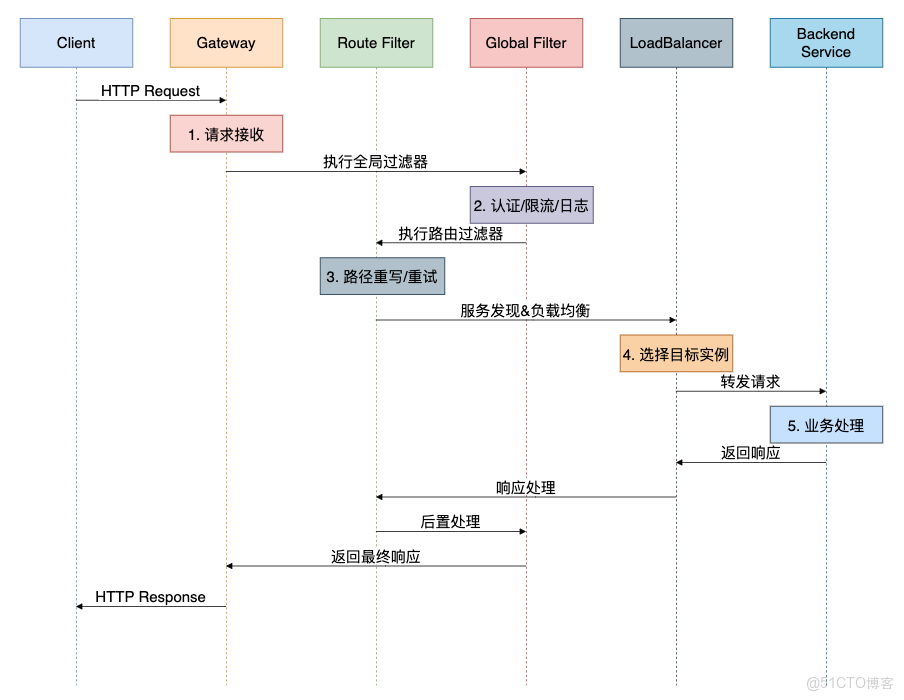
Spring Cloud Gateway 執行流程
優點:
- 與Spring Cloud生態完美集成
- 基於WebFlux,性能優秀
- 功能豐富,支持過濾器和斷言
- 配置靈活,支持代碼和配置文件兩種方式
缺點:
- 對非Spring技術棧不友好
- 學習曲線相對陡峭
- 依賴Spring Cloud組件
使用場景:
- Spring Cloud微服務架構
- 需要深度定製網關邏輯
- 團隊熟悉Spring技術棧
三、Kong:企業級API網關標杆
有些小夥伴在企業級場景中需要更高的性能和更豐富的功能,Kong就是這樣一個基於Nginx和OpenResty的高性能API網關。
Kong 配置實戰
# kong.yml - 聲明式配置
_format_version:"2.1"
_transform:true

services:
-name:user-service
    url:http://user-service:8080
    routes:
      -name:user-route
        paths:["/api/users"]
        strip_path:true
    plugins:
      -name:key-auth
        config:
          key_names:["apikey"]
          hide_credentials:true
      -name:rate-limiting
        config:
          minute:10
          policy:redis
      -name:prometheus
        enabled:true

-name:order-service
    url:http://order-service:8080
    routes:
      -name:order-route
        paths:["/api/orders"]
        methods:["GET","POST","PUT"]
    plugins:
      -name:cors
        config:
          origins:["https://example.com"]
          methods:["GET","POST","PUT"]
          headers:["Accept","Authorization","Content-Type"]
      -name:request-transformer
        config:
          add:
            headers:["X-From-Kong:true"]
          remove:
            headers: ["User-Agent"]

consumers:
-username:mobile-app
    keyauth_credentials:
      -key:mobile-key-123
-username:web-app
    keyauth_credentials:
      -key:web-key-456

plugins:
-name:ip-restriction
    config:
      allow:["192.168.0.0/16","10.0.0.0/8"]
-name:correlation-id
    config:
      header_name:"X-Request-ID"
      generator:"uuid"
自定義Kong插件開發
-- kong/plugins/request-validator/handler.lua
local BasePlugin = require"kong.plugins.base_plugin"
local cjson = require"cjson"

local RequestValidator = BasePlugin:extend()

function RequestValidator:new()
  RequestValidator.super.new(self, "request-validator")
end

function RequestValidator:access(conf)
  RequestValidator.super.access(self)

local headers = kong.request.get_headers()
local method = kong.request.get_method()
local body = kong.request.get_raw_body()

-- API Key驗證
local api_key = headers["X-API-Key"]
ifnot api_key then
    kong.response.exit(401, { message = "Missing API Key" })
end

-- 驗證API Key格式
ifnotstring.match(api_key, "^%x%x%x%-%x%x%x%-%x%x%x$") then
    kong.response.exit(401, { message = "Invalid API Key format" })
end

-- 請求體驗證
if method == "POST"or method == "PUT"then
    ifnot body or body == ""then
      kong.response.exit(400, { message = "Request body is required" })
    end

    local ok, json_body = pcall(cjson.decode, body)
    ifnot ok then
      kong.response.exit(400, { message = "Invalid JSON format" })
    end

    -- 業務規則驗證
    if json_body.amount andtonumber(json_body.amount) <= 0then
      kong.response.exit(400, { message = "Amount must be greater than 0" })
    end
end

-- 添加驗證通過標記
  kong.service.request.set_header("X-Request-Validated", "true")
  kong.service.request.set_header("X-API-Key", api_key)

-- 記錄審計日誌
  kong.log.info("Request validated for API Key: ", api_key)
end

return RequestValidator
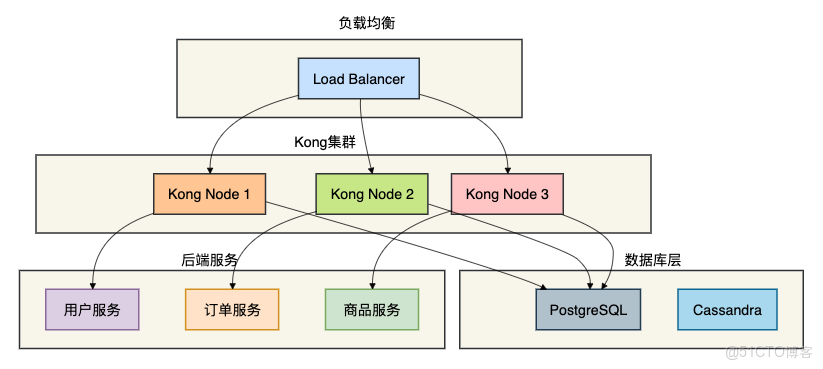
Kong 集羣架構
優點:
- 基於Nginx,性能極高
- 插件生態豐富
- 支持集羣部署
- 成熟的監控和管理界面
缺點:
- 依賴數據庫(PostgreSQL/Cassandra)
- 插件開發需要Lua知識
- 配置相對複雜
使用場景:
- 高併發企業級應用
- 需要豐富插件功能的場景
- 已有Kong技術棧的團隊
四、Nginx:經典反向代理網關
有些小夥伴在傳統架構或簡單場景中,Nginx仍然是最可靠的選擇。它雖然功能相對簡單,但性能卓越且穩定。
Nginx 配置詳解
# nginx.conf - 生產環境配置
http {
    # 基礎配置
    sendfile on;
    tcp_nopush on;
    tcp_nodelay on;
    keepalive_timeout 65;
    types_hash_max_size 2048;

    # 日誌格式
    log_format main '$remote_addr - $remote_user [$time_local] "$request" '
                    '$status $body_bytes_sent "$http_referer" '
                    '"$http_user_agent" "$http_x_forwarded_for" '
                    'rt=$request_time uct="$upstream_connect_time" '
                    'uht="$upstream_header_time" urt="$upstream_response_time"';

    # 上游服務配置
    upstream user_service {
        server user-service-1:8080 weight=3;
        server user-service-2:8080 weight=2;
        server user-service-3:8080 weight=1;

        # 健康檢查
        check interval=3000 rise=2 fall=3 timeout=1000;
    }

    upstream order_service {
        server order-service-1:8080;
        server order-service-2:8080;

        # 會話保持
        hash $cookie_jsessionid;
        hash_again 1;
    }

    upstream product_service {
        server product-service:8080;

        # 備份服務器
        server backup-product-service:8080 backup;
    }

    # API網關配置
    server {
        listen 80;
        server_name api.example.com;

        # 全侷限流
        limit_req_zone $binary_remote_addr znotallow=api:10m rate=10r/s;

        # 用户服務路由
        location /api/users/ {
            limit_req znotallow=api burst=20 nodelay;

            # 反向代理配置
            proxy_pass http://user_service;
            proxy_set_header Host $host;
            proxy_set_header X-Real-IP $remote_addr;
            proxy_set_header X-Forwarded-For $proxy_add_x_forwarded_for;
            proxy_set_header X-Forwarded-Proto $scheme;

            # 超時配置
            proxy_connect_timeout 5s;
            proxy_read_timeout 10s;
            proxy_send_timeout 10s;

            # 重試機制
            proxy_next_upstream error timeout invalid_header http_500 http_502 http_503 http_504;
            proxy_next_upstream_tries 3;
            proxy_next_upstream_timeout 10s;

            # 緩存配置
            proxy_cache api_cache;
            proxy_cache_key "$scheme$request_method$host$request_uri";
            proxy_cache_valid 200 302 5m;
            proxy_cache_valid 404 1m;

            # 添加安全頭
            add_header X-Frame-Options DENY;
            add_header X-Content-Type-Options nosniff;
            add_header X-XSS-Protection "1; mode=block";
        }

        # 訂單服務路由
        location /api/orders/ {
            # JWT驗證
            auth_request /auth;
            auth_request_set $user $upstream_http_x_user;
            proxy_set_header X-User $user;

            proxy_pass http://order_service;

            # CORS配置
            if ($request_method = 'OPTIONS') {
                add_header 'Access-Control-Allow-Origin' '*';
                add_header 'Access-Control-Allow-Methods' 'GET, POST, OPTIONS';
                add_header 'Access-Control-Allow-Headers' 'Authorization,Content-Type';
                add_header 'Access-Control-Max-Age' 86400;
                return 204;
            }
        }

        # 認證端點
        location = /auth {
            internal;
            proxy_pass http://auth_service/validate;
            proxy_pass_request_body off;
            proxy_set_header Content-Length "";
            proxy_set_header X-Original-URI $request_uri;
        }

        # 健康檢查端點
        location /health {
            access_log off;
            return 200 "healthy\n";
            add_header Content-Type text/plain;
        }

        # 監控端點
        location /nginx-status {
            stub_status on;
            access_log off;
            allow 192.168.0.0/16;
            deny all;
        }
    }
}
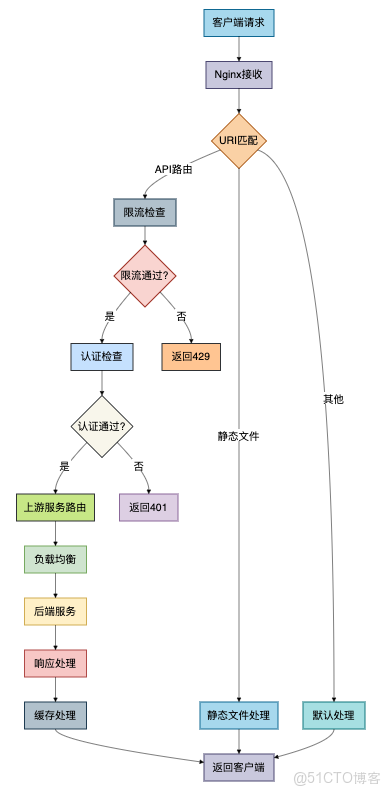
Nginx 請求處理流程
優點:
- 性能極高,C語言編寫
- 配置相對簡單
- 資源消耗低
- 社區成熟,資料豐富
缺點:
- 動態配置能力弱
- 功能相對基礎
- 需要reload生效配置變更
使用場景:
- 高性能要求的簡單路由
- 靜態資源服務
- 傳統架構升級
五、APISIX:雲原生API網關新星
有些小夥伴在雲原生環境中需要動態配置和高性能,APISIX就是這樣一個基於etcd的雲原生API網關。
APISIX 路由配置
# apisix-config.yaml
routes:
-uri:/api/users/*
    name:user-service
    methods:[GET,POST,PUT,DELETE]
    upstream:
      type:roundrobin
      nodes:
        user-service-1:8080:1
        user-service-2:8080:2
        user-service-3:8080:1
    plugins:
      proxy-rewrite:
        uri:"/users$1"
      limit-count:
        count:100
        time_window:60
        key:remote_addr
        rejected_code:503
      jwt-auth:
        key:user-service
        secret:my-secret-key
        exp:86400

-uri:/api/orders/*
    name:order-service
    upstream:
      type:chash
      key:arg_user_id
      nodes:
        order-service-1:8080:1
        order-service-2:8080:1
    plugins:
      cors:
        allow_origins:"https://example.com"
        allow_methods:"GET,POST,PUT,DELETE"
        allow_headers:"*"
      response-rewrite:
        body:'{"code": 0, "message": "success", "data": $body}'
      fault-injection:
        abort:
          http_status:500
          body:"service unavailable"
          percentage:5

-uri:/api/products/*
    name:product-service
    upstream:
      type:roundrobin
      nodes:
        product-service:8080:1
    plugins:
      proxy-cache:
        cache_key:["$uri","$args"]
        cache_zone:disk_cache_one
        cache_ttl:300
      uri-blocker:
        block_rules:["^/admin/",".php$"]
        rejected_code:403

# 全局插件
plugins:
-name:prometheus
    enable:true
-name:zipkin
    enable:true
    config:
      endpoint:http://zipkin:9411/api/v2/spans
      sample_ratio:0.001
APISIX 插件開發
-- apisix/plugins/rate-limit-advanced/init.lua
local core = require("apisix.core")
local plugin_name = "rate-limit-advanced"

local schema = {
    type = "object",
    properties = {
        rate = {type = "integer", minimum = 1},
        burst = {type = "integer", minimum = 0},
        key = {type = "string"},
        window = {type = "integer", minimum = 1},
        rejected_code = {type = "integer", default = 429},
        rejected_msg = {type = "string", default = "rate limit exceeded"}
    },
    required = {"rate", "key"}
}

local _M = {
    version = 1.0,
    priority = 1000,
    name = plugin_name,
    schema = schema,
}

function _M.check_schema(conf)
    return core.schema.check(schema, conf)
end

function _M.access(conf, ctx)
    local key = conf.key
    if key == "remote_addr"then
        key = ctx.var.remote_addr
    elseif key == "server_addr"then
        key = ctx.var.server_addr
    end

    local rate = conf.rate
    local burst = conf.burst or0
    local window = conf.window or60

    -- 使用redis進行分佈式限流
    local redis = require("resty.redis")
    local red = redis:new()

    local ok, err = red:connect("127.0.0.1", 6379)
    ifnot ok then
        core.log.error("failed to connect to redis: ", err)
        return500
    end

    local current_time = ngx.now()
    local key_name = "rate_limit:" .. key

    -- 使用令牌桶算法
    local tokens = red:get(key_name)
    if tokens then
        tokens = tonumber(tokens)
    else
        tokens = burst
    end

    local last_update = red:get(key_name .. ":time")
    if last_update then
        last_update = tonumber(last_update)
        local elapsed = current_time - last_update
        local new_tokens = elapsed * rate / window

        if new_tokens > 0then
            tokens = math.min(tokens + new_tokens, burst)
        end
    end

    if tokens < 1then
        red:setex(key_name .. ":time", window, current_time)
        return conf.rejected_code, conf.rejected_msg
    end

    tokens = tokens - 1
    red:setex(key_name, window, tokens)
    red:setex(key_name .. ":time", window, current_time)
end

return _M
優點:
- 配置熱更新,無需重啓
- 性能卓越
- 插件生態豐富
- 雲原生友好
缺點:
- 相對較新,生態不如Kong成熟
- 依賴etcd
- 學習成本較高
使用場景:
- 雲原生環境
- 需要動態配置的場景
- 高性能要求的微服務架構
六、Zuul:Netflix經典網關
有些小夥伴在傳統Spring Cloud項目中可能還在使用Zuul,雖然它已被Spring Cloud Gateway取代,但瞭解其原理仍有價值。
Zuul 過濾器實戰
// Zuul前置過濾器 - 認證和限流
@Component
public class AuthPreFilter extends ZuulFilter {

    @Autowired
    private RateLimiterService rateLimiter;

    @Autowired
    private JwtTokenProvider tokenProvider;

    @Override
    public String filterType() {
        return "pre";
    }

    @Override
    public int filterOrder() {
        return 1;
    }

    @Override
    public boolean shouldFilter() {
        return true;
    }

    @Override
    public Object run() throws ZuulException {
        RequestContext ctx = RequestContext.getCurrentContext();
        HttpServletRequest request = ctx.getRequest();

        // 1. 限流檢查
        String clientId = getClientId(request);
        if (!rateLimiter.tryAcquire(clientId)) {
            ctx.setSendZuulResponse(false);
            ctx.setResponseStatusCode(429);
            ctx.setResponseBody("{\"error\": \"Rate limit exceeded\"}");
            return null;
        }

        // 2. JWT認證
        String token = extractToken(request);
        if (token == null && requiresAuth(request)) {
            ctx.setSendZuulResponse(false);
            ctx.setResponseStatusCode(401);
            ctx.setResponseBody("{\"error\": \"Authentication required\"}");
            return null;
        }

        if (token != null) {
            try {
                Claims claims = tokenProvider.parseToken(token);
                ctx.addZuulRequestHeader("X-User-Id", claims.getSubject());
                ctx.addZuulRequestHeader("X-User-Roles",
                    String.join(",", claims.get("roles", List.class)));
            } catch (Exception e) {
                ctx.setSendZuulResponse(false);
                ctx.setResponseStatusCode(401);
                ctx.setResponseBody("{\"error\": \"Invalid token\"}");
                return null;
            }
        }

        // 3. 添加追蹤信息
        ctx.addZuulRequestHeader("X-Request-ID", UUID.randomUUID().toString());
        ctx.addZuulRequestHeader("X-Forwarded-For", request.getRemoteAddr());

        return null;
    }

    private String getClientId(HttpServletRequest request) {
        String apiKey = request.getHeader("X-API-Key");
        return apiKey != null ? apiKey : request.getRemoteAddr();
    }

    private String extractToken(HttpServletRequest request) {
        String bearerToken = request.getHeader("Authorization");
        if (bearerToken != null && bearerToken.startsWith("Bearer ")) {
            return bearerToken.substring(7);
        }
        return null;
    }

    private boolean requiresAuth(HttpServletRequest request) {
        String path = request.getRequestURI();
        return !path.startsWith("/api/public/") &&
               !path.equals("/health") &&
               !path.startsWith("/actuator/");
    }
}

// Zuul後置過濾器 - 響應處理
@Component
public class ResponsePostFilter extends ZuulFilter {

    private static final Logger logger = LoggerFactory.getLogger(ResponsePostFilter.class);

    @Override
    public String filterType() {
        return "post";
    }

    @Override
    public int filterOrder() {
        return 1000;
    }

    @Override
    public boolean shouldFilter() {
        return true;
    }

    @Override
    public Object run() throws ZuulException {
        RequestContext ctx = RequestContext.getCurrentContext();
        HttpServletRequest request = ctx.getRequest();
        HttpServletResponse response = ctx.getResponse();

        long startTime = (Long) ctx.get("startTime");
        long duration = System.currentTimeMillis() - startTime;

        // 記錄訪問日誌
        logger.info("{} {} {} {} {}ms",
            request.getRemoteAddr(),
            request.getMethod(),
            request.getRequestURI(),
            response.getStatus(),
            duration);

        // 添加響應頭
        response.setHeader("X-Response-Time", duration + "ms");
        response.setHeader("X-API-Version", "1.0");

        // 統一響應格式
        if (ctx.getResponseBody() != null &&
            response.getContentType() != null &&
            response.getContentType().contains("application/json")) {

            String originalBody = ctx.getResponseBody();
            String wrappedBody = "{\"code\": 0, \"data\": " + originalBody + ", \"timestamp\": " +
                System.currentTimeMillis() + "}";
            ctx.setResponseBody(wrappedBody);
        }

        return null;
    }
}
優點:
- 與Netflix集成良好
- 過濾器機制靈活
- 文檔資料豐富
缺點:
- 性能較差(阻塞IO)
- 已被Spring Cloud Gateway取代
- 社區活躍度下降
使用場景:
- 遺留Spring Cloud項目
- Netflix技術棧
- 非性能敏感場景
七、Traefik:雲原生動態網關
有些小夥伴在容器化環境中需要自動服務發現,Traefik就是為雲原生而生的動態網關。
Traefik 配置示例
# traefik.yaml
api:
dashboard:true
insecure:true

entryPoints:
web:
    address:":80"
    http:
      redirections:
        entryPoint:
          to:websecure
          scheme:https

websecure:
    address:":443"

certificatesResolvers:
myresolver:
    acme:
      email:admin@example.com
      storage:/etc/traefik/acme.json
      httpChallenge:
        entryPoint:web

providers:
docker:
    endpoint:"unix:///var/run/docker.sock"
    exposedByDefault:false

file:
    filename:/etc/traefik/dynamic.yaml
    watch:true

log:
level:INFO

accessLog:
filePath:"/var/log/traefik/access.log"
bufferingSize:100

metrics:
prometheus:
    entryPoint:websecure

# 動態配置
# dynamic.yaml
http:
middlewares:
    # 認證中間件
    auth-middleware:
      basicAuth:
        users:
          -"admin:$2y$05$YOUR_HASHED_PASSWORD"

    # 限流中間件
    rate-limit-middleware:
      rateLimit:
        burst:100
        period:1m

    # 重試中間件
    retry-middleware:
      retry:
        attempts:3

    # 熔斷中間件
    circuit-breaker-middleware:
      circuitBreaker:
        expression:"NetworkErrorRatio() > 0.5"

    # 壓縮中間件
    compress-middleware:
      compress:{}

routers:
    # 用户服務路由
    user-service:
      rule:"PathPrefix(`/api/users`)"
      entryPoints:
        -websecure
      middlewares:
        -rate-limit-middleware
        -compress-middleware
      service:user-service
      tls:
        certResolver:myresolver

    # 訂單服務路由
    order-service:
      rule:"PathPrefix(`/api/orders`)"
      entryPoints:
        -websecure
      middlewares:
        -auth-middleware
        -rate-limit-middleware
        -circuit-breaker-middleware
      service:order-service
      tls:
        certResolver:myresolver

services:
    user-service:
      loadBalancer:
        servers:
          -url:"http://user-service-1:8080"
          -url:"http://user-service-2:8080"
        healthCheck:
          path:/health
          interval:10s
          timeout:5s

    order-service:
      loadBalancer:
        servers:
          -url:"http://order-service-1:8080"
          -url:"http://order-service-2:8080"
優點:
- 自動服務發現
- 配置簡單
- 雲原生友好
- 內置監控和Dashboard
缺點:
- 功能相對簡單
- 性能不如Nginx系網關
- 高級功能需要企業版
使用場景:
- 容器化環境
- 需要自動服務發現的場景
- 快速原型開發
八、6大網關對比
通過前面的分析,我們現在對這六種API網關有了深入的瞭解。
讓我們通過一個全面的對比來幫助大家做出正確的技術選型。
詳細對比表格
|
特性維度
|
Spring Cloud Gateway
|
Kong
|
Nginx
|
APISIX
|
Zuul
|
Traefik
|
|
性能 |
高(WebFlux) |
極高(Nginx) |
極高(C) |
極高(Nginx) |
中(阻塞IO) |
中 |
|
配置方式 |
代碼/配置 |
聲明式YAML |
配置文件 |
動態配置 |
代碼/配置 |
動態配置 |
|
服務發現 |
Spring Cloud |
插件支持 |
需手動配置 |
支持 |
Spring Cloud |
自動發現 |
|
K8s支持 |
良好 |
良好 |
需Ingress |
優秀 |
一般 |
優秀 |
|
監控 |
Micrometer |
Prometheus |
基礎監控 |
Prometheus |
Hystrix |
內置 |
|
學習曲線 |
中 |
中高 |
低 |
中高 |
中 |
低 |
|
適用場景 |
Spring Cloud |
企業級 |
傳統架構 |
雲原生 |
傳統Spring |
容器化 |
選型決策指南
選擇Spring Cloud Gateway當:
- 技術棧以Spring為主
- 需要深度定製網關邏輯
- 已經使用Spring Cloud組件
- 團隊熟悉響應式編程
選擇Kong當:
- 企業級高併發場景
- 需要豐富插件生態
- 有專業運維團隊
- 需要成熟的管理界面
選擇Nginx當:
- 性能要求極高
- 場景相對簡單
- 團隊熟悉Nginx
- 資源受限環境
選擇APISIX當:
- 雲原生環境
- 需要動態配置
- 追求最新技術
- 高性能要求
選擇Zuul當:
- 維護遺留Spring Cloud項目
- Netflix技術棧
- 非性能敏感場景
選擇Traefik當:
- 容器化部署
- 需要自動服務發現
- 快速開發部署
- 配置簡單要求
總結
通過本文的介紹,我們對6種主流API網關有了全面的認識。
在選擇網關時需要考慮以下關鍵因素:
- 技術棧匹配:選擇與團隊技術棧最匹配的方案
- 性能要求:根據業務併發量選擇性能合適的網關
- 功能需求:評估需要的功能特性,如限流、認證、監控等
- 運維成本:考慮部署、監控、維護的複雜度
- 團隊能力:評估團隊對網關技術的掌握程度
核心建議
- 新項目優先考慮:Spring Cloud Gateway(Spring技術棧)或 APISIX(雲原生)
- 高併發場景:Kong 或 Nginx
- 快速原型:Traefik
- 遺留系統:根據現有技術棧選擇
