
文章目錄
- 前言
- 一、前後端大文件上傳
- 1.方案描述
- 2.後端代碼
- 3.驗證
- 預處理文件
- 接口調用
- 二、純後端大文件處理
- 1.方案描述
- 2.後端代碼
- 3.驗證
- 三、java文件API更替
- 新舊API對比
- 總結
前言
文件處理是業務中最常見的操作了,但對於個人來説,百兆大文件的處理還是挺少的,本文記錄下大文件處理的主流處理方案,順便更新下老舊API(File)。
一、前後端大文件上傳
1.方案描述
當前主流的大文件上傳方案以分片上傳 + 斷點續傳 + 秒傳為核心架構,以實現高效穩定上傳。
- 秒傳:根據文件的唯一標識如hash值校驗服務端是否存在此文件,若存在則是秒傳
- 分片上傳:將大文件分割為多個小文件分開上傳
- 斷點續傳:只用傳未成功的分片
前端:秒傳、文件分塊、文件相關信息上傳、獲取文件已上傳的分片、文件分片上傳、文件分片合併。
後端:提供相應的功能接口,秒傳校驗、初始化文件信息、查詢已上傳的文件分片、分片上傳、合併分片。增加批處理對規定時間範圍內未完成上傳的大文件進行郵件告警通知。
存儲:創建臨時目錄存儲各分片文件資源,數據表記錄分片上傳記錄和文件基本信息,最終合併各分片寫入指定目錄文件中,更新數據表中的文件記錄,刪除分片信息。
2.後端代碼
技術選型
java8+springboot2.0+mybatis
yaml配置
# 服務器端口
server:
  port: 8080

  # 文件上傳配置
file:
  upload:
    root-path: ./upload-files/  # 最終文件存儲根目錄
spring:
  servlet:
    multipart:
      enabled: true
      max-file-size: 20MB  # 單個分片最大大小
      max-request-size: 100MB  # 單次請求最大大小

  # 數據庫配置(使用H2內存庫,無需安裝)
  datasource:
    url: jdbc:mysql://localhost:3306/my-test?characterEncoding=UTF-8&useSSL=false
    username: root
    password: 123456
    driverClassName: com.mysql.jdbc.Driver


mybatis:
  mapperLocations: classpath:/mapper/*.xml
  typeAliasesPackage: org.example.entity
  configuration:
    mapUnderscoreToCamelCase: true

logging:
  level:
    org.example.dao: DEBUG
mysql table
CREATE TABLE `f_file_record` (
  `id` bigint(20) NOT NULL AUTO_INCREMENT COMMENT '自增ID',
  `file_id` varchar(64) NOT NULL COMMENT '文件唯一標識(UUID)',
  `file_name` varchar(255) NOT NULL COMMENT '原始文件名',
  `file_size` bigint(20) NOT NULL COMMENT '文件總大小(字節)',
  `file_hash` varchar(64) NOT NULL COMMENT '文件MD5哈希值(用於秒傳)',
  `file_path` varchar(512) DEFAULT NULL COMMENT '最終文件存儲路徑',
  `chunk_total` int(11) NOT NULL COMMENT '總分片數',
  `chunk_size` int(11) NOT NULL COMMENT '單片大小(字節)',
  `status` tinyint(4) NOT NULL COMMENT '狀態:0-上傳中,1-已完成,2-失敗',
  `create_time` datetime NOT NULL COMMENT '創建時間',
  `update_time` datetime NOT NULL COMMENT '更新時間',
  PRIMARY KEY (`id`),
  UNIQUE KEY `uk_file_id` (`file_id`) COMMENT '文件ID唯一索引',
  KEY `idx_file_hash` (`file_hash`) COMMENT '哈希索引(秒傳查詢用)'
) ENGINE=InnoDB AUTO_INCREMENT=1 DEFAULT CHARSET=utf8mb4 COMMENT='文件上傳記錄表';


CREATE TABLE `f_chunk_record` (
  `id` bigint(20) NOT NULL AUTO_INCREMENT COMMENT '自增ID',
  `file_id` varchar(64) NOT NULL COMMENT '關聯文件ID',
  `chunk_index` int(11) NOT NULL COMMENT '分片索引(從0開始)',
  `chunk_path` varchar(512) NOT NULL COMMENT '分片臨時存儲路徑',
  `chunk_size` bigint(20) NOT NULL COMMENT '分片實際大小(字節)',
  `create_time` datetime NOT NULL COMMENT '創建時間',
  PRIMARY KEY (`id`),
  UNIQUE KEY `uk_file_chunk` (`file_id`,`chunk_index`) COMMENT '文件+分片索引唯一(避免重複上傳)',
  KEY `idx_file_id` (`file_id`) COMMENT '文件ID索引(查詢分片列表用)'
) ENGINE=InnoDB DEFAULT CHARSET=utf8mb4 COMMENT='文件分片記錄表';
對應實體
@Data
public class FileRecord {

    private String fileId; // 文件唯一標識(建議用UUID)
    private String fileName; // 原始文件名
    private String fileHash; // 文件MD5哈希(用於秒傳)
    private Long fileSize; // 文件總大小(字節)
    private Integer chunkTotal; // 總分片數
    private Integer chunkSize; // 單片大小(字節)
    private String filePath; // 最終存儲路徑
    private Integer status; // 狀態:0-上傳中 1-已完成 2-失敗
    private Date createTime;
    private Date updateTime;
}

@Data
public class ChunkRecord {
    private Long id;
    private String fileId; // 關聯文件ID
    private Integer chunkIndex; // 分片索引(從0開始)
    private String chunkPath; // 分片臨時存儲路徑
    private Long chunkSize; // 分片實際大小
    private Date createTime;

}
controller
@RestController
@RequestMapping("/upload")
public class FileUploadController {

    @Autowired
    private FileUploadService uploadService;

    /**
     * 秒傳校驗接口
     */
    @PostMapping("/check")
    public ResponseEntity<Map<String, Object>> checkFile(@RequestParam String fileHash,
                                                         @RequestParam Long fileSize) {
        Map<String, Object> result = new HashMap<>();
        FileRecord file = uploadService.checkFile(fileHash);
        if (file != null && Objects.equals(fileSize, file.getFileSize())) {
            result.put("success", true);
            result.put("exists", true);
            result.put("fileId", file.getFileId());
            result.put("filePath", file.getFilePath());
        } else {
            result.put("success", true);
            result.put("exists", false);
        }
        return ResponseEntity.ok(result);
    }

    /**
     * 初始化上傳接口
     */
    @PostMapping("/init")
    public ResponseEntity<Map<String, Object>> initUpload(
            @RequestParam String fileName,
            @RequestParam Long fileSize,
            @RequestParam String fileHash,
            @RequestParam Integer chunkTotal,
            @RequestParam Integer chunkSize) {

        Map<String, Object> result = new HashMap<>();
        try {
            String fileId = uploadService.initUpload(fileName, fileSize, fileHash, chunkTotal, chunkSize);
            result.put("success", true);
            result.put("fileId", fileId);
            return ResponseEntity.ok(result);
        } catch (Exception e) {
            result.put("success", false);
            result.put("msg", e.getMessage());
            return ResponseEntity.status(HttpStatus.INTERNAL_SERVER_ERROR).body(result);
        }
    }

    /**
     * 查詢已上傳分片接口
     */
    @GetMapping("/chunks/{fileId}")
    public ResponseEntity<Map<String, Object>> getUploadedChunks(@PathVariable String fileId) {
        Map<String, Object> result = new HashMap<>();
        List<Integer> chunks = uploadService.getUploadedChunks(fileId);
        result.put("success", true);
        result.put("uploadedChunks", chunks);
        return ResponseEntity.ok(result);
    }

    /**
     * 分片上傳接口
     */
    @PostMapping("/chunk")
    public ResponseEntity<Map<String, Object>> uploadChunk(
            @RequestParam String fileId,
            @RequestParam Integer chunkIndex,
            @RequestParam MultipartFile chunk) {

        Map<String, Object> result = new HashMap<>();
        try {
            boolean success = uploadService.uploadChunk(fileId, chunkIndex, chunk);
            result.put("success", success);
            return ResponseEntity.ok(result);
        } catch (Exception e) {
            result.put("success", false);
            result.put("msg", e.getMessage());
            return ResponseEntity.status(HttpStatus.INTERNAL_SERVER_ERROR).body(result);
        }
    }

    /**
     * 合併分片接口
     */
    @PostMapping("/merge")
    public ResponseEntity<Map<String, Object>> mergeChunks(@RequestParam String fileId) {
        Map<String, Object> result = new HashMap<>();
        try {
            FileRecord file = uploadService.mergeChunks(fileId);
            if (file != null) {
                result.put("success", true);
                result.put("fileId", file.getFileId());
                result.put("filePath", file.getFilePath());
                return ResponseEntity.ok(result);
            } else {
                result.put("success", false);
                result.put("msg", "合併失敗");
                return ResponseEntity.status(HttpStatus.INTERNAL_SERVER_ERROR).body(result);
            }
        } catch (Exception e) {
            result.put("success", false);
            result.put("msg", e.getMessage());
            return ResponseEntity.status(HttpStatus.INTERNAL_SERVER_ERROR).body(result);
        }
    }
}
service
public interface FileUploadService {

    // 檢查文件是否已存在(秒傳)
    FileRecord checkFile(String fileHash);

    // 初始化上傳任務
    String initUpload(String fileName, Long fileSize, String fileHash,
                    Integer chunkTotal, Integer chunkSize);

    // 獲取已上傳的分片索引
    List<Integer> getUploadedChunks(String fileId);

    // 上傳分片
    boolean uploadChunk(String fileId, Integer chunkIndex, MultipartFile chunkFile);

    // 合併分片
    FileRecord mergeChunks(String fileId);
}

@Service
public class FileUploadServiceImpl implements FileUploadService {

    // 最終文件存儲根路徑(配置在application.properties)
    @Value("${file.upload.root-path}")
    private String rootPath;

    // 臨時分片存儲路徑
    private final Path tempChunkPath;

    @Autowired
    private FileRecordMapper fileRepo;

    @Autowired
    private ChunkRecordMapper chunkRepo;

    // 初始化臨時目錄(使用NIO)
    public FileUploadServiceImpl() throws IOException {
        // 臨時目錄路徑:系統臨時目錄 + upload-chunks
        tempChunkPath = Paths.get(System.getProperty("java.io.tmpdir"), "upload-chunks");
        // 若目錄不存在則創建(支持多級目錄)
        Files.createDirectories(tempChunkPath);
    }

    /**
     * 上傳分片:使用NIO的Files.copy替代傳統File操作
     */
    @Override
    @Transactional
    public boolean uploadChunk(String fileId, Integer chunkIndex, MultipartFile chunkFile) {
        try {
            // 檢查分片是否已存在
            ChunkRecord existing = chunkRepo.findByFileIdAndChunkIndex(fileId, chunkIndex);
            if (existing != null) {
                return true;
            }

            // 構建分片存儲路徑(NIO Path)
            Path chunkDir = Paths.get(tempChunkPath.toString(), fileId);
            Files.createDirectories(chunkDir); // 創建目錄(NIO方法)
            Path chunkPath = Paths.get(chunkDir.toString(), chunkIndex.toString());

            // 使用NIO複製文件(替代transferTo)
            try (InputStream in = chunkFile.getInputStream()) {
                Files.copy(in, chunkPath, StandardCopyOption.REPLACE_EXISTING);
            }

            // 記錄分片信息
            ChunkRecord chunk = new ChunkRecord();
            chunk.setFileId(fileId);
            chunk.setChunkIndex(chunkIndex);
            chunk.setChunkPath(chunkPath.toString()); // 存儲路徑字符串
            chunk.setChunkSize(Files.size(chunkPath)); // 使用NIO獲取文件大小
            chunk.setCreateTime(new Date());
            chunkRepo.save(chunk);

            return true;
        } catch (Exception e) {
            e.printStackTrace();
            return false;
        }
    }

    /**
     * 合併分片:使用NIO的Path處理文件路徑
     */
    @Override
    @Transactional
    public FileRecord mergeChunks(String fileId) {
        try {
            // 獲取文件信息
            FileRecord file = fileRepo.findById(fileId);
            if (file == null) {
                new RuntimeException("文件記錄不存在");
            }
            // 獲取所有分片(按索引排序)
            List<ChunkRecord> chunks = chunkRepo.findByFileIdOrderByChunkIndexAsc(fileId);
            if (chunks.size() != file.getChunkTotal()) {
                throw new RuntimeException("分片不完整,無法合併");
            }

            // 創建最終文件存儲目錄(按日期分目錄,使用NIO)
            String dateDir = new Date().toString().substring(0, 10).replace(" ", "-");
            Path saveDir = Paths.get(rootPath, dateDir);
            Files.createDirectories(saveDir); // NIO創建目錄

            // 生成最終文件名(UUID+原擴展名)
            String ext = file.getFileName().contains(".")
                    ? file.getFileName().substring(file.getFileName().lastIndexOf("."))
                    : "";
            String finalFileName = UUID.randomUUID().toString() + ext;
            Path finalPath = Paths.get(saveDir.toString(), finalFileName);

            // 合併分片(使用RandomAccessFile + NIO Path)
            try (RandomAccessFile raf = new RandomAccessFile(finalPath.toFile(), "rw")) {
                for (ChunkRecord chunk : chunks) {
                    Path chunkPath = Paths.get(chunk.getChunkPath()); // NIO Path
                    try (InputStream fis = Files.newInputStream(chunkPath)) { // NIO獲取輸入流
                        byte[] buffer = new byte[1024 * 1024]; // 1MB緩衝區
                        int len;
                        while ((len = fis.read(buffer)) != -1) {
                            raf.write(buffer, 0, len);
                        }
                    }
                }
            }

            // 更新文件記錄
            file.setFilePath(finalPath.toString());
            file.setStatus(1); // 1-已完成
            file.setUpdateTime(new Date());
            fileRepo.update(file);

            // 清理臨時分片(使用NIO刪除)
            cleanTempChunks(fileId);

            return file;
        } catch (Exception e) {
            e.printStackTrace();
            FileRecord f = fileRepo.findById(fileId);
            if (f != null) {
                f.setStatus(2); // 2-失敗
                fileRepo.update(f);
            }
            return null;
        }
    }

    /**
     * 清理臨時分片:使用NIO的Files.walk遞歸刪除
     */
    private void cleanTempChunks(String fileId) throws IOException {
        Path chunkDir = Paths.get(tempChunkPath.toString(), fileId);
        if (Files.exists(chunkDir)) {
            // 遞歸刪除目錄及內容(NIO方式)
            try (Stream<Path> stream = Files.walk(chunkDir)){
                stream.sorted(Comparator.reverseOrder())// 逆序刪除(先文件後目錄)
                        .forEach(path -> {
                            try {
                                Files.delete(path);
                            } catch (IOException e) {
                                e.printStackTrace();
                            }
                        });
            }
        }
        // 刪除數據庫分片記錄
        chunkRepo.deleteByFileId(fileId);
    }

    // 其他方法(checkFile/initUpload/getUploadedChunks)保持不變
    @Override
    public FileRecord checkFile(String fileHash) {
        return fileRepo.findByFileHashAndStatus(fileHash, 1);
    }

    @Override
    @Transactional
    public String initUpload(String fileName, Long fileSize, String fileHash,
                           Integer chunkTotal, Integer chunkSize) {
        FileRecord file = new FileRecord();
        file.setFileId(UUID.randomUUID().toString().replace("-",""));
        file.setFileName(fileName);
        file.setFileSize(fileSize);
        file.setFileHash(fileHash);
        file.setChunkTotal(chunkTotal);
        file.setChunkSize(chunkSize);
        file.setStatus(0);
        file.setCreateTime(new Date());
        file.setUpdateTime(new Date());
        fileRepo.save(file);
        return file.getFileId();
    }

    @Override
    public List<Integer> getUploadedChunks(String fileId) {
        List<ChunkRecord> chunks = chunkRepo.findByFileIdOrderByChunkIndexAsc(fileId);
        return chunks.stream()
                .map(ChunkRecord::getChunkIndex)
                .collect(Collectors.toList());
    }
}
mapper
//文件mapper
public interface FileRecordMapper {

    // 通過文件哈希查詢(用於秒傳)
    FileRecord findByFileHashAndStatus(String fileHash, Integer status);

    FileRecord findById(String fileId);

    void update(FileRecord file);

    void save(FileRecord file);
}


//分片mapper
public interface ChunkRecordMapper {

    // 查詢文件的所有分片(按索引排序)
    List<ChunkRecord> findByFileIdOrderByChunkIndexAsc(String fileId);
    // 查詢指定分片
    ChunkRecord findByFileIdAndChunkIndex(String fileId, Integer chunkIndex);
    // 刪除文件的所有分片
    void deleteByFileId(String fileId);

    void save(ChunkRecord chunk);
}
mapper-xml
------------------文件mapper------------------
<?xml version="1.0" encoding="UTF-8" ?>

<!DOCTYPE mapper
        PUBLIC "-//mybatis.org//DTD Mapper 3.0//EN"
        "http://mybatis.org/dtd/mybatis-3-mapper.dtd">

<mapper namespace="org.example.dao.FileRecordMapper">

    <select id="findByFileHashAndStatus" resultType="org.example.entity.FileRecord">
        select * from f_file_record where file_hash = #{fileHash} and status = #{status}
    </select>

    <select id="findById" resultType="org.example.entity.FileRecord">
        select * from f_file_record where file_id = #{fileId}
    </select>

    <update id="update">
        update f_file_record set status = #{status},file_path=#{filePath}  where file_id = #{fileId}
    </update>

    <insert id="save">
        insert into f_file_record (file_id,file_hash, file_name, file_size,chunk_total,chunk_size, status, create_time, update_time)
        values (#{fileId},#{fileHash},#{fileName},#{fileSize},#{chunkTotal},#{chunkSize},#{status},#{createTime},#{updateTime})
    </insert>

</mapper>

------------------分片mapper------------------

<?xml version="1.0" encoding="UTF-8" ?>

<!DOCTYPE mapper
        PUBLIC "-//mybatis.org//DTD Mapper 3.0//EN"
        "http://mybatis.org/dtd/mybatis-3-mapper.dtd">

<mapper namespace="org.example.dao.ChunkRecordMapper">

    <select id="findByFileIdOrderByChunkIndexAsc" resultType="org.example.entity.ChunkRecord">
        select * from f_chunk_record where file_id = #{fileId} order by chunk_index asc
    </select>

    <select id="findByFileIdAndChunkIndex" resultType="org.example.entity.ChunkRecord">
        select * from f_chunk_record where file_id = #{fileId} and chunk_index = #{chunkIndex}
    </select>

    <delete id="deleteByFileId">
        delete from f_chunk_record where file_id = #{fileId}
    </delete>

    <insert id="save">
        insert into f_chunk_record (file_id, chunk_index, chunk_path, chunk_size, create_time) values (#{fileId}, #{chunkIndex}, #{chunkPath}, #{chunkSize}, #{createTime})
    </insert>

</mapper>
3.驗證
這裏使用ApiPost進行模擬測試
預處理文件
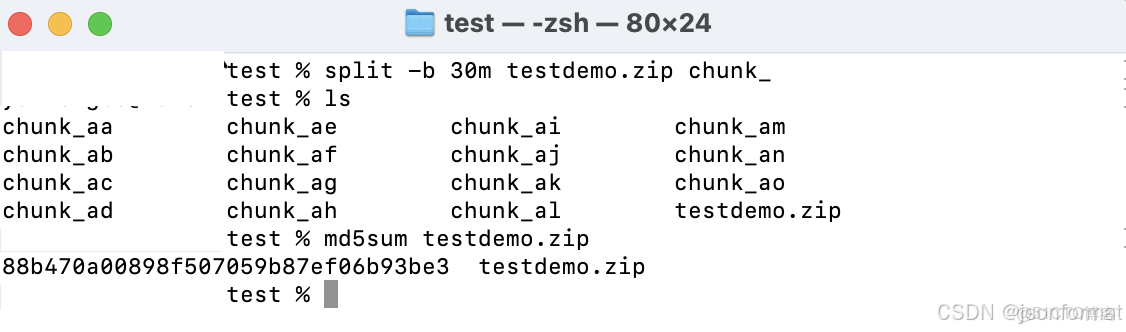
- 計算文件的hash值,用以實現秒傳(Linux/Mac:md5sum “文件路徑”)
- 計算分片:總片數=文件大小/每片大小(向上取整)
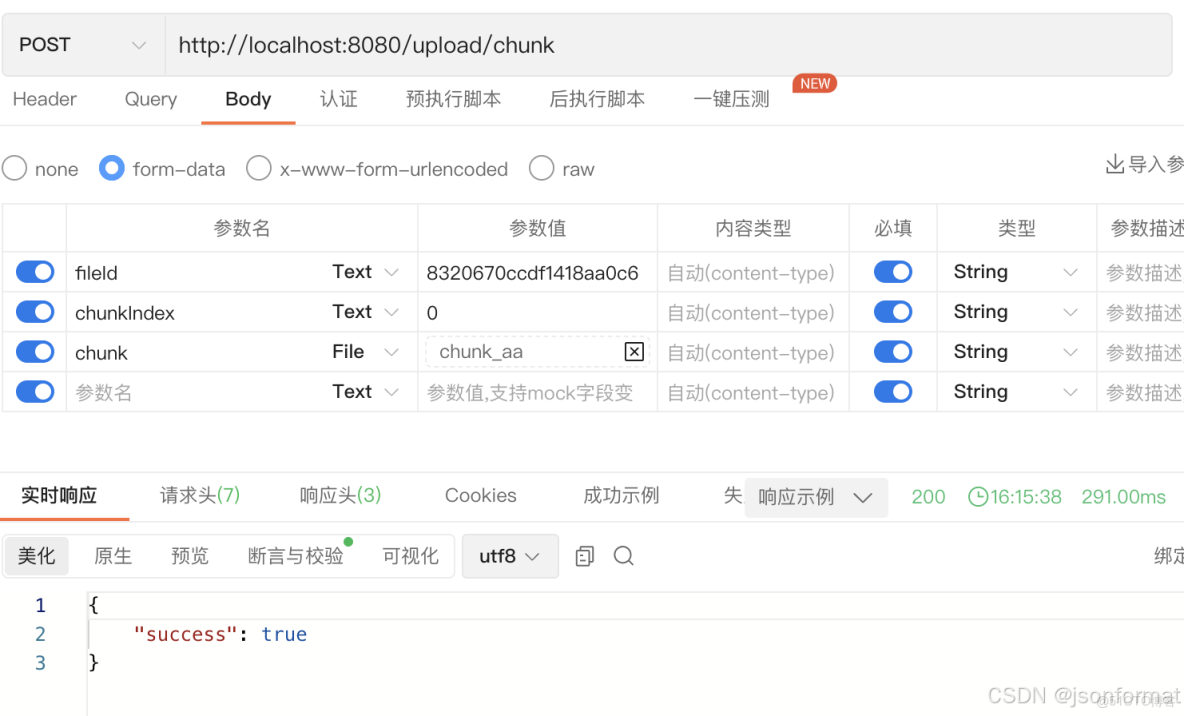
- 文件分片(Linux/Mac:split -b 10m test.zip chunk_ 將test.zip切割為10MB的分片,命名為chunk_aa、chunk_ab…)
接口調用
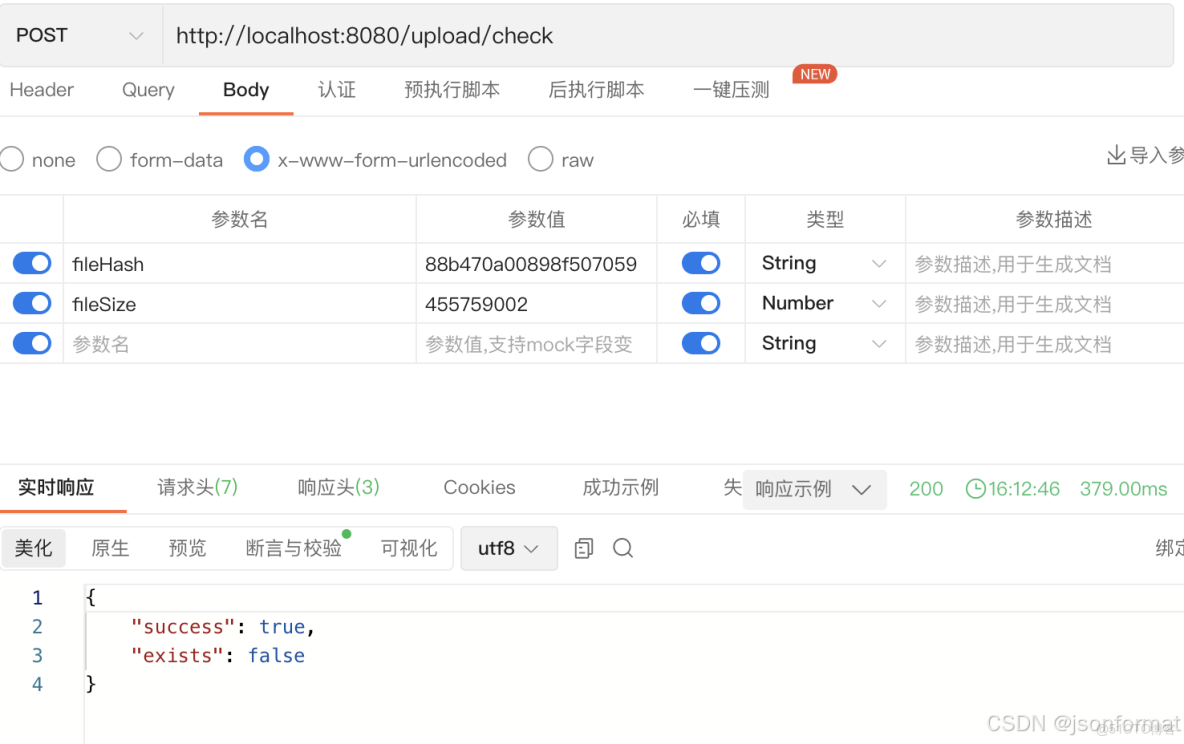
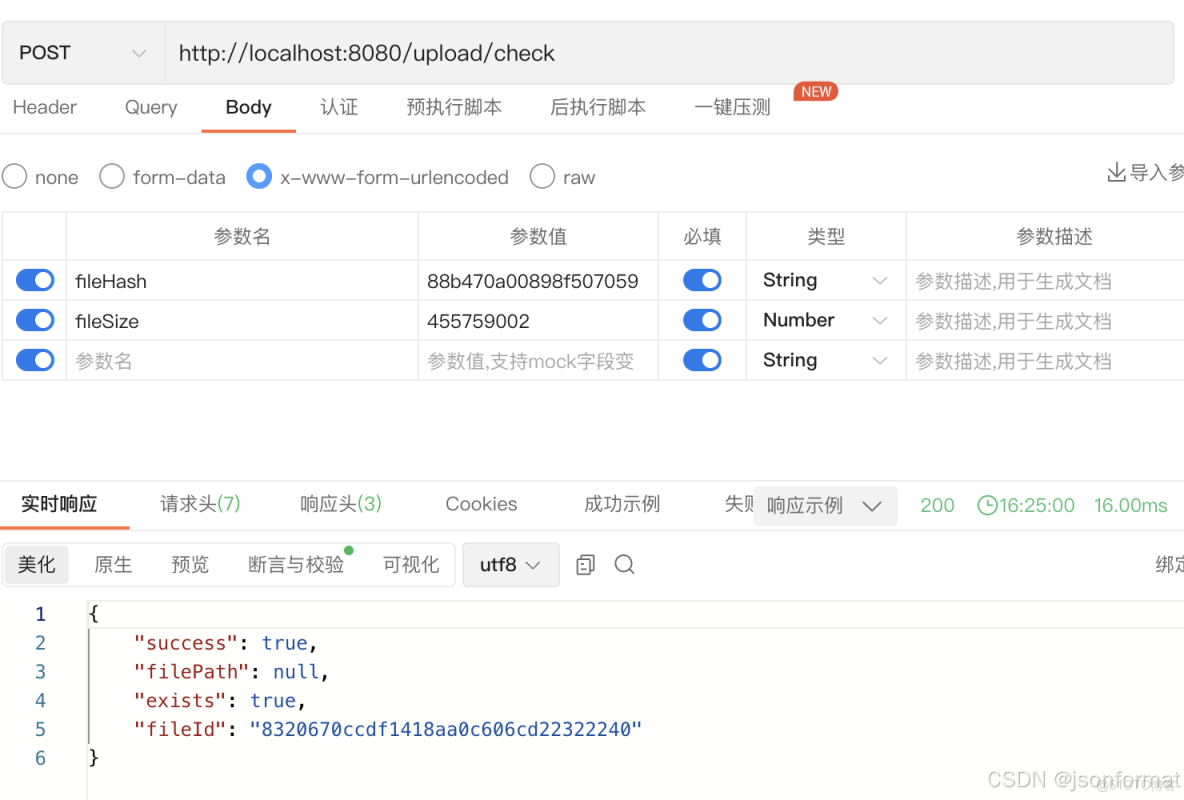
秒傳校驗
不存在
存在,秒傳成功
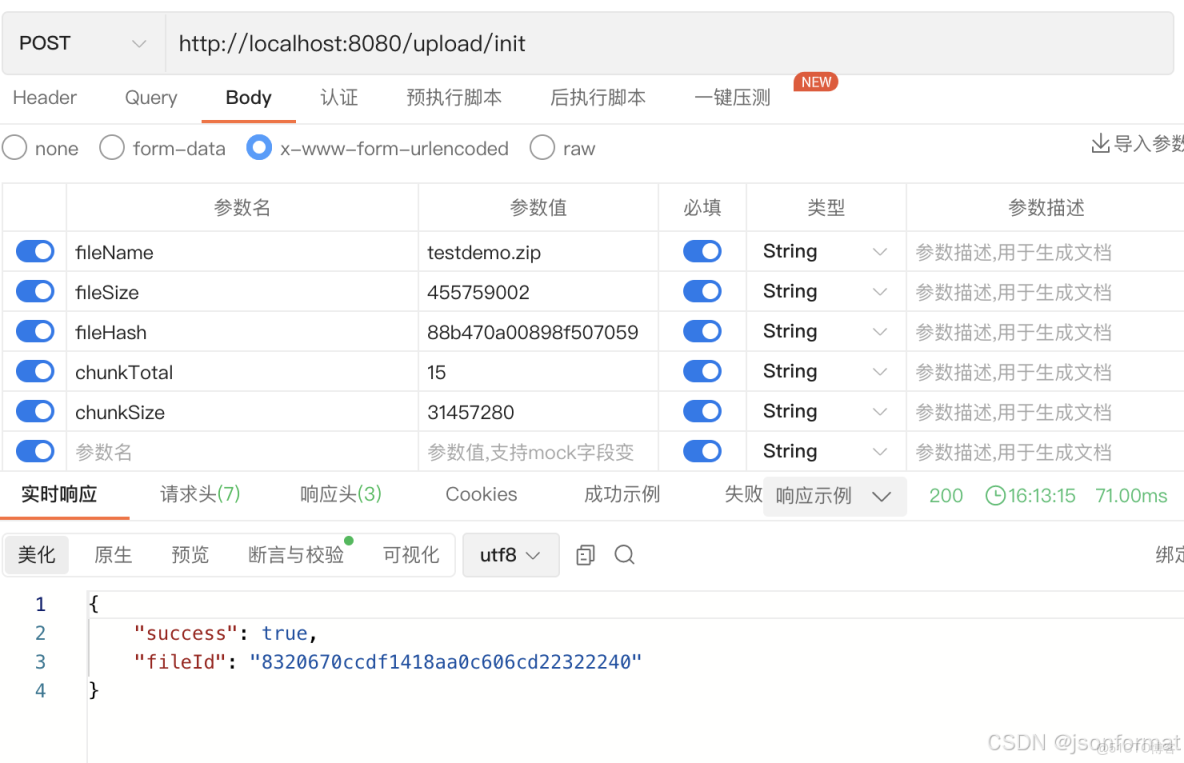
文件初始化信息
需要對文件進行預處理

查詢已上傳的分片
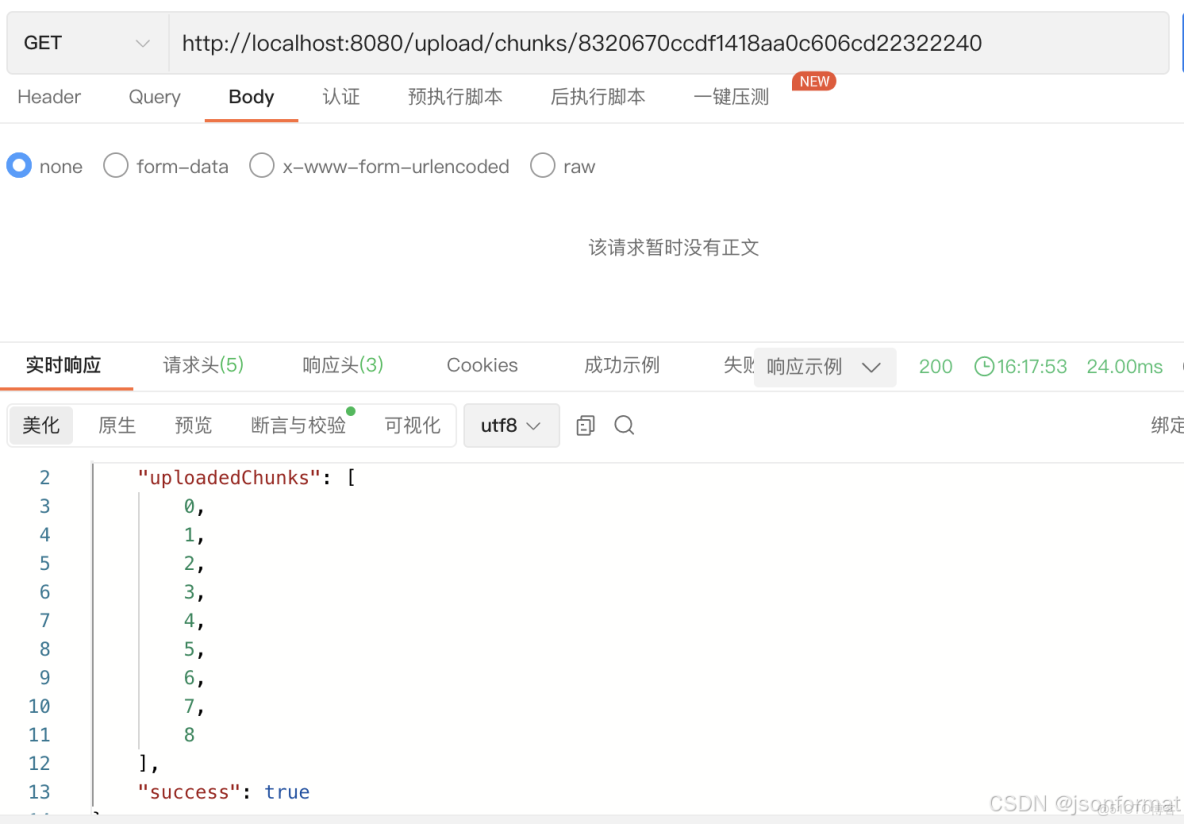
分片上傳
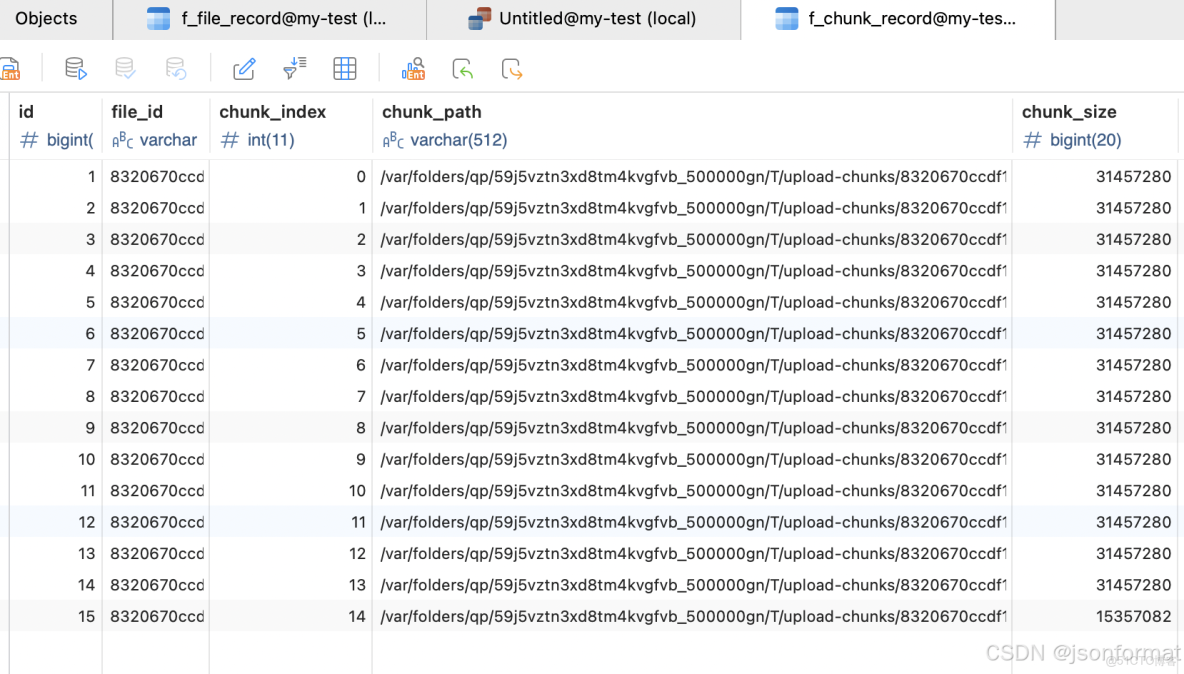
chunk表
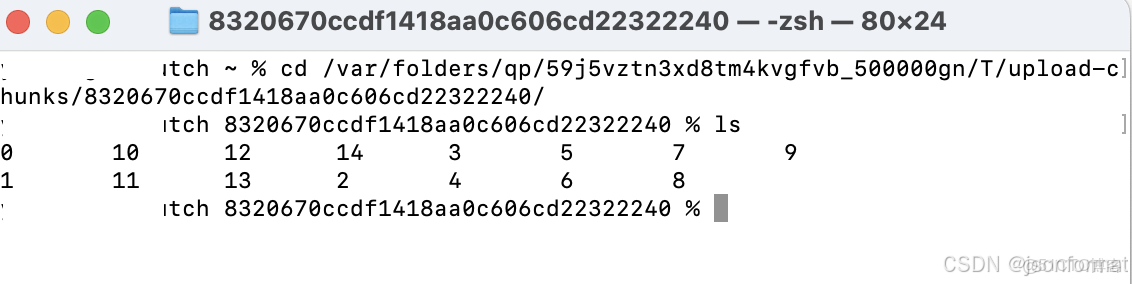
臨時目錄存放的分片文件
合併分片
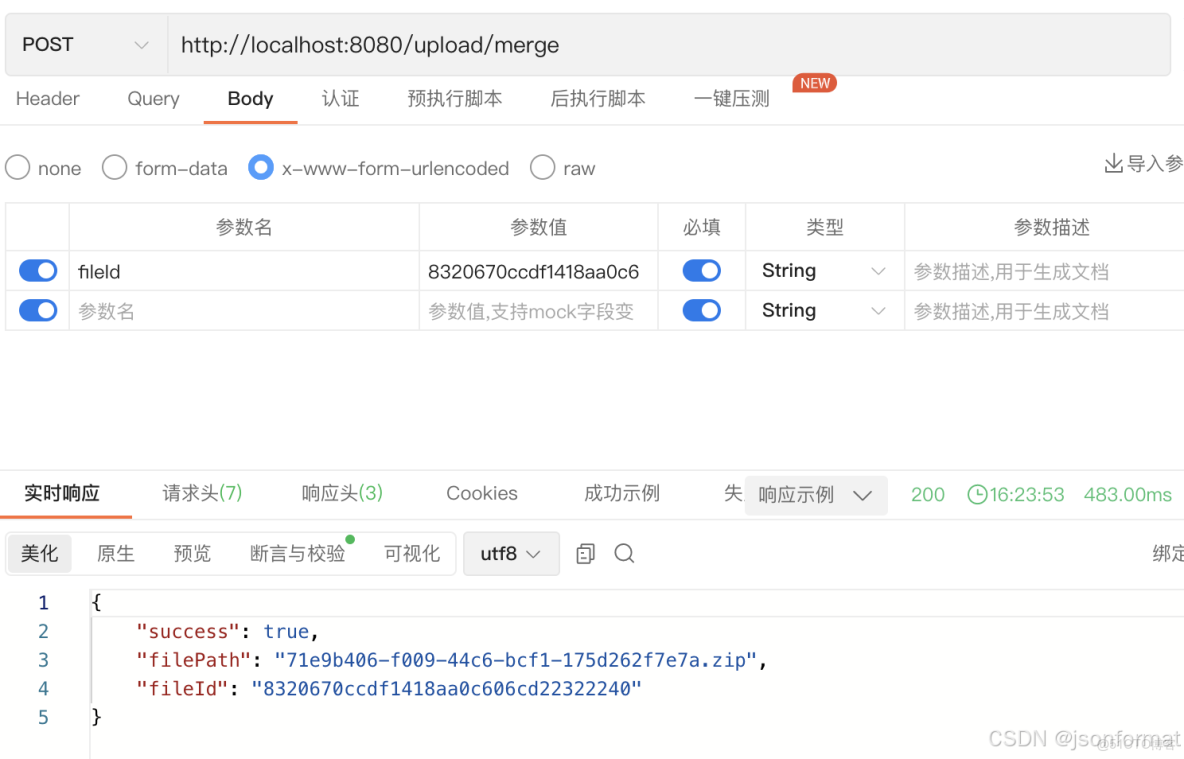
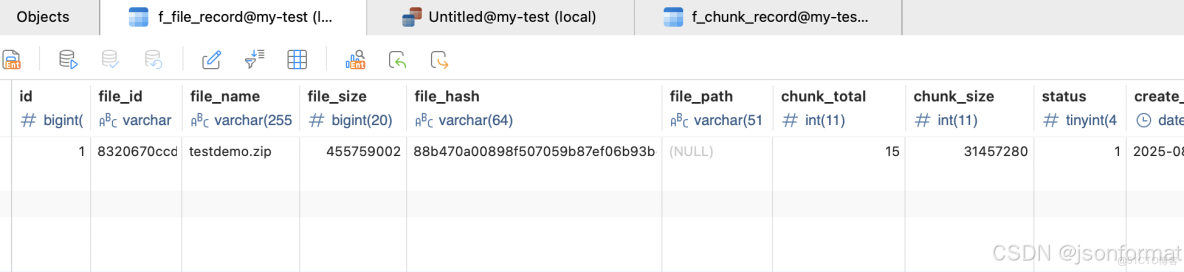
狀態已改變
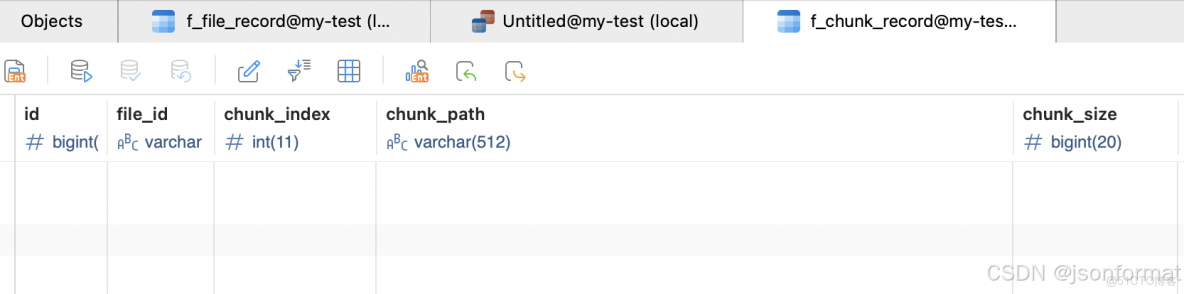
分片記錄刪除
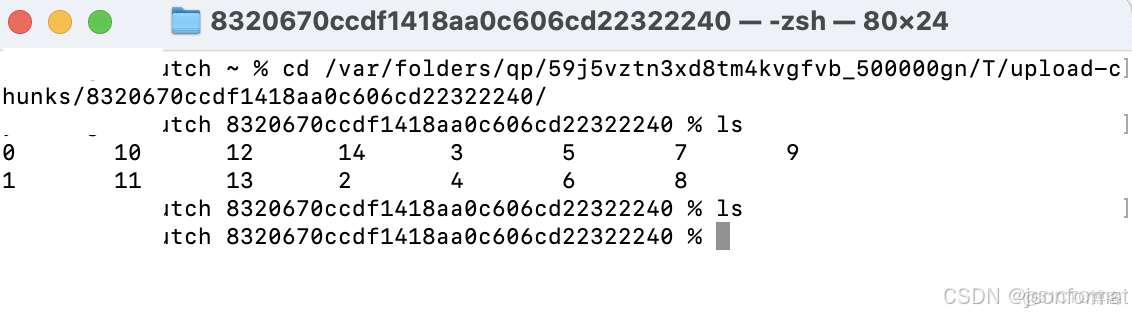
臨時目錄中的分片文件也刪除了
二、純後端大文件處理
1.方案描述
後端處理百兆級大文件,可以使用java nio包中的FileChannel和ByteBuffer使用零拷貝技術上傳,免去內核與用户態的切換節省CPU和內存資源。
2.後端代碼
零拷貝
利用FileChannel.transferTo實現內核級數據傳輸,減少用户空間拷貝次數。
//服務端
public class ZeroCopyServer {
    public static void main(String[] args) throws Exception {
        Path destination = Paths.get("./upload-files/move/testdemo.zip");
        int port = 8080;

        // 預先獲取目標文件的父目錄
        Path parentDir = destination.getParent();
        if (!Files.exists(parentDir)) {
            Files.createDirectories(parentDir);
        }

        try (ServerSocketChannel server = ServerSocketChannel.open()) {
            server.bind(new InetSocketAddress(port));
            System.out.println("Server listening on port " + port);

            try (SocketChannel client = server.accept();
                 FileChannel outChannel = FileChannel.open(
                         destination,
                         StandardOpenOption.CREATE,
                         StandardOpenOption.WRITE,
                         StandardOpenOption.TRUNCATE_EXISTING)) {

                long totalBytes = 0;
                long bytesTransferred;

                // 持續接收直到連接關閉
                do {
                    bytesTransferred = outChannel.transferFrom(client, totalBytes, Long.MAX_VALUE);
                    if (bytesTransferred > 0) {
                        totalBytes += bytesTransferred;
                        System.out.printf("Received %.2f MB%n", bytesTransferred / (1024.0 * 1024.0));
                    }
                } while (bytesTransferred > 0);

                System.out.println("File transfer completed. Total size: "
                        + totalBytes + " bytes");
            }
        }
    }
}
客户端
public static void main(String[] args) throws Exception {
        Path source = Paths.get("/Users/xxxxx/Downloads/books/testdemo.zip");
        long chunkSize = 50 * 1024 * 1024;//分片大小

        try (SocketChannel socket = SocketChannel.open();
             FileChannel inChannel = FileChannel.open(source, StandardOpenOption.READ)) {

            // 設置連接
            socket.socket().setSoTimeout(30000);
            socket.connect(new InetSocketAddress(InetAddress.getLocalHost(), 8080));

            long fileSize = inChannel.size();
            long position = 0;
            System.out.println("Starting file transfer. Total size: "
                    + fileSize + " bytes");

            while (position < fileSize) {
                long remaining = fileSize - position;
                long transferSize = Math.min(chunkSize, remaining);

                long transferred = inChannel.transferTo(position, transferSize, socket);

                if (transferred > 0) {
                    position += transferred;
                    System.out.printf("Sent %.2f MB (%.1f%%)%n",
                            transferred / (1024.0 * 1024.0),
                            (position * 100.0) / fileSize);
                }
            }

            // 優雅關閉輸出(通知服務端傳輸結束)
            socket.shutdownOutput();
            System.out.println("File upload completed");
        }
    }
3.驗證
- 啓動服務端,執行客户端發送請求(注意大文件分片)
- 這裏是簡單的本地處理實現,實際業務中常用的影像資料上傳或者日誌文件處理可以參考使用(10M以上的)。
Starting file transfer. Total size: 455759002 bytes
Sent 50.00 MB (11.5%)
Sent 50.00 MB (23.0%)
Sent 50.00 MB (34.5%)
Sent 50.00 MB (46.0%)
Sent 50.00 MB (57.5%)
Sent 50.00 MB (69.0%)
Sent 50.00 MB (80.5%)
Sent 50.00 MB (92.0%)
Sent 34.65 MB (100.0%)
File upload completed
三、java文件API更替
jdk1.7 nio包中提供的文件處理類相對於File來説更安全便捷
原來用File對於文件或目錄的操作(增、刪、讀、寫、校驗),現用Path和Files進行替換
新舊API對比
public class NioFileExamples {
    public static void main(String[] args) {
        String filePath = "./file-api/test01/test01.txt";
        String copyPath = "./file-api/test02/test01copy.txt";
        String dirPath = "./file-api-001/test01";

        // 1. 文件讀取示例
        readFileExample(filePath);

        // 2. 文件寫入示例
        writeFileExample(filePath, "Hello, NIO! This is a test.");

        // 3. 文件複製示例
        copyFileExample(filePath, copyPath);

        // 4. 目錄創建示例
        createDirectoryExample(dirPath);

        // 5. 列出目錄內容示例
        listDirectoryExample("./file-api-001");

        // 6. 文件刪除示例
        deleteFileExample(copyPath);
        deleteFileExample(filePath);
        deleteDirectoryExample(dirPath);
    }

    /**
     * 文件讀取示例:對比傳統IO和NIO方式
     */
    private static void readFileExample(String filePath) {
        System.out.println("\n--- 文件讀取示例 ---");

        // 傳統IO方式
        try (BufferedReader br = new BufferedReader(
                new InputStreamReader(new FileInputStream(filePath), StandardCharsets.UTF_8))) {
            String line;
            System.out.println("傳統IO讀取:");
            while ((line = br.readLine()) != null) {
                System.out.println(line);
            }
        } catch (IOException e) {
            System.out.println("傳統IO讀取失敗: " + e.getMessage());
        }

        // NIO方式
        try {
            // 讀取所有行
            List<String> lines = Files.readAllLines(Paths.get(filePath), StandardCharsets.UTF_8);
            System.out.println("\nNIO讀取所有行:");
            lines.forEach(System.out::println);

            // 流式讀取
            System.out.println("\nNIO流式讀取:");
            Files.lines(Paths.get(filePath), StandardCharsets.UTF_8)
                    .forEach(System.out::println);
        } catch (IOException e) {
            System.out.println("NIO讀取失敗: " + e.getMessage());
        }
    }

    /**
     * 文件寫入示例:對比傳統IO和NIO方式
     */
    private static void writeFileExample(String filePath, String content) {
        System.out.println("\n--- 文件寫入示例 ---");

        // 傳統IO方式
        try (BufferedWriter bw = new BufferedWriter(
                new OutputStreamWriter(new FileOutputStream(filePath), StandardCharsets.UTF_8))) {
            bw.write(content);
            System.out.println("傳統IO寫入成功");
        } catch (IOException e) {
            System.out.println("傳統IO寫入失敗: " + e.getMessage());
        }

        // NIO方式 - 寫入字符串
        try {
            Files.write(Paths.get(filePath), content.getBytes(StandardCharsets.UTF_8));
            System.out.println("NIO寫入字符串成功");
        } catch (IOException e) {
            System.out.println("NIO寫入字符串失敗: " + e.getMessage());
        }

        // NIO方式 - 寫入多行
        List<String> lines = Arrays.asList("第一行", "第二行", "第三行");
        try {
            Files.write(Paths.get(filePath), lines, StandardCharsets.UTF_8);
            System.out.println("NIO寫入多行成功");
        } catch (IOException e) {
            System.out.println("NIO寫入多行失敗: " + e.getMessage());
        }
    }

    /**
     * 文件複製示例:對比傳統IO和NIO方式
     */
    private static void copyFileExample(String sourcePath, String targetPath) {
        System.out.println("\n--- 文件複製示例 ---");

        // 傳統IO方式
        try (InputStream is = new FileInputStream(sourcePath);
             OutputStream os = new FileOutputStream(targetPath)) {
            byte[] buffer = new byte[1024];
            int length;
            while ((length = is.read(buffer)) > 0) {
                os.write(buffer, 0, length);
            }
            System.out.println("傳統IO複製成功");
        } catch (IOException e) {
            System.out.println("傳統IO複製失敗: " + e.getMessage());
        }

        // NIO方式
        try {
            Files.copy(Paths.get(sourcePath), Paths.get(targetPath),
                    StandardCopyOption.REPLACE_EXISTING);
            System.out.println("NIO複製成功");
        } catch (IOException e) {
            System.out.println("NIO複製失敗: " + e.getMessage());
        }
    }

    /**
     * 目錄創建示例:對比傳統IO和NIO方式
     */
    private static void createDirectoryExample(String dirPath) {
        System.out.println("\n--- 目錄創建示例 ---");

        // 傳統IO方式
        File dir = new File(dirPath);
        if (dir.mkdirs()) {
            System.out.println("傳統IO創建目錄成功");
        } else {
            System.out.println("傳統IO創建目錄失敗或目錄已存在");
        }

        // NIO方式
        try {
            Files.createDirectories(Paths.get(dirPath));
            System.out.println("NIO創建目錄成功");
        } catch (IOException e) {
            System.out.println("NIO創建目錄失敗: " + e.getMessage());
        }
    }

    /**
     * 列出目錄內容示例:對比傳統IO和NIO方式
     */
    private static void listDirectoryExample(String dirPath) {
        System.out.println("\n--- 列出目錄內容示例 ---");

        // 傳統IO方式
        File dir = new File(dirPath);
        String[] files = dir.list();
        if (files != null) {
            System.out.println("傳統IO列出目錄內容:");
            for (String file : files) {
                System.out.println(file);
            }
        }

        // NIO方式
        try (DirectoryStream<Path> stream = Files.newDirectoryStream(Paths.get(dirPath))) {
            System.out.println("\nNIO列出目錄內容:");
            for (Path path : stream) {
                System.out.println(path.getFileName());
            }
        } catch (IOException e) {
            System.out.println("NIO列出目錄內容失敗: " + e.getMessage());
        }
    }

    /**
     * 文件刪除示例:對比傳統IO和NIO方式
     */
    private static void deleteFileExample(String filePath) {
        System.out.println("\n--- 文件刪除示例 ---");

        // 傳統IO方式
        File file = new File(filePath);
        if (file.delete()) {
            System.out.println("傳統IO刪除文件成功");
        } else {
            System.out.println("傳統IO刪除文件失敗或文件不存在");
        }

        // NIO方式
        try {
            Files.deleteIfExists(Paths.get(filePath));
            System.out.println("NIO刪除文件成功");
        } catch (IOException e) {
            System.out.println("NIO刪除文件失敗: " + e.getMessage());
        }
    }

    /**
     * 目錄刪除示例:NIO方式(傳統方式需要遞歸實現)
     */
    private static void deleteDirectoryExample(String dirPath) {
        System.out.println("\n--- 目錄刪除示例 ---");

        try {
            // NIO刪除目錄(包括目錄中的內容)
            Files.walk(Paths.get(dirPath))
                    .sorted(Comparator.reverseOrder()) // 逆序排序,先刪除文件再刪除目錄
                    .forEach(path -> {
                        try {
                            Files.delete(path);
                        } catch (IOException e) {
                            System.out.println("刪除失敗: " + path + " - " + e.getMessage());
                        }
                    });
            System.out.println("NIO刪除目錄成功");
        } catch (IOException e) {
            System.out.println("NIO刪除目錄失敗: " + e.getMessage());
        }
    }
}
總結
- 大文件上傳若是用户行為,跟前端配合使用分塊上傳處理
- 大文件上傳若是後端行為,可以使用FileChannel等零拷貝技術或者直接內存映射技術
- 推薦使用java nio包中Path、Files來替代File對象進行文件操作和流操作,安全又便捷。
