一、AspectJ 框架簡介
AspectJ 是一個基於 Java 語言的 AOP 框架。在 Spring 2.0 以後,新增了對 AspectJ 框架的支持。在 Spring 框架中建議使用 AspectJ 框架開發 AOP。
1、 AspectJ 框架中的通知類型
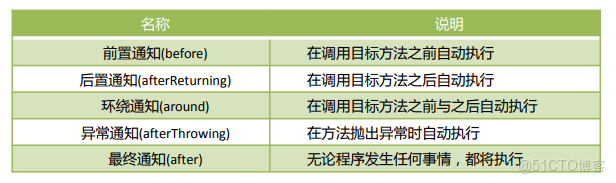
2、 AspectJ 框架配置 AOP 方式
通過 XML 文件配置 AOP
- 通過 AspectJ 配置方式
- 通過 Spring 的 Schema_based 方式
3、 AspectJ 配置方式
AspectJ 配置方式是指使用 AspectJ 框架的配置方式來配置切面。在使用 AspectJ 配置切面時,切面不需要實現一些特定的接口。
public class MyAspect {

    //前置通知   對目標對象的封裝
    public void myBefore(JoinPoint joinPoint) {
        //joinPoint.getTarget();     獲取目標對象
        //joinPoint.getSignature().getName();   獲取目標方法名
        //joinPoint.getArgs();    獲取目標方法參數列表
        //joinPoint.getThis();    獲取代理對象
        System.out.println("Before  "+joinPoint.getSignature().getName());
    }


    //後置通知
    public void myAfterReturning(JoinPoint joinPoint){
        System.out.println("After " +joinPoint.getSignature().getName());
    }


    //環繞通知
    public Object myAround(ProceedingJoinPoint proceedingJoinPoint)throws Throwable{
        System.out.println("Around Before "+proceedingJoinPoint.getSignature().getName());
        Object obj = proceedingJoinPoint.proceed();
        System.out.println("Around After "+proceedingJoinPoint.getSignature().getName());
        return obj;
    }


    //異常通知類型
    public void myAfterThrowing(Exception e){
        System.out.println("Exception " +e);
    }


    //最終通知
    public void myAfter(){
        System.out.println("最終通知");
    }
}
1.2、 Execution 表達式
Execution 是 AspectJ 框架中的一種表達式,用於配置切點。
基本語法格式為:
execution(<修飾符模式>?<返回類型模式><方法名模式>(<參數模式>)<異常模式>?)
其中<修飾符模式>與<異常模式>為可選。
execution(public * com.bjsxt.service….(…))
説明:
示例 1:
execution(public * com.bjsxt.service.impl.Student.test())
切點是 com.bjsxt.service.impl 包中 Student 類中所有 public 修飾的無參數的 test方法。
示例 2:
execution(* com.bjsxt.service.impl.Student.test(String,int))
切點是 com.bjsxt.service.impl 包中 Student 類中參數類型是 String,int 類型的 test方法。
示例 3:
execution(* com.bjsxt.service.impl.Student.test(…))
切點是 com.bjsxt.service.impl 包中 Student 類中任意參數的 test 方法。
示例 4
execution(* com.bjsxt.service..(…))
切點是 com.bjsxt.service 包中所有接口中任意參數的所有方法。
1.3、 使用 AspectJ 方式配置切面
public interface UsersService {
    void addUsers(String username);
}
public class UsersServiceImpl implements UsersService {
@Override
public void addUsers(String username) {
System.out.println("AddUsers "+username);
}
}2、開啓 aop 命名空間
<?xml version="1.0" encoding="UTF-8"?>
<beans xmlns="
http://www.springframework.org/schema/aop http://www.springframework.org/schema/aop/spring-aop.xsd">- 配置切面
<!--    配置目標對象-->
    <bean id="usersService" class="com.bjsxt.aspectj.service.impl.UsersServiceImpl"/>


<!--    配置切面對象-->
    <bean id="myAspect" class="com.bjsxt.aspectj.aop.MyAspect"/>


<!--    配置切面-->
    <aop:config>
        <aop:aspect ref="myAspect">
<!--            配置切點-->
            <aop:pointcut id="myPointcut" expression="execution(* com.bjsxt.aspectj.service.*.*(..))"/>
<!--            前置通知-->
            <aop:before method="myBefore" pointcut-ref="myPointcut"/>
<!--            後置通知-->
            <aop:after-returning method="myAfterReturning" pointcut-ref="myPointcut"/>
<!--            環繞通知-->
            <aop:around method="myAround" pointcut-ref="myPointcut"/>
<!--            配置異常通知-->
            <aop:after-throwing method="myAfterThrowing" pointcut-ref="myPointcut" throwing="e"/>
<!--            最終通知-->
            <aop:after method="myAfter" pointcut-ref="myPointcut"/>
        </aop:aspect>
    </aop:config>
</beans>
public class Test {
public static void main(String[] args) {
ApplicationContext applicationContext = new ClassPathXmlApplicationContext("applicationContextAspectj.xml");
UsersService usersService = (UsersService)applicationContext.getBean("usersService");
usersService.addUsers("Corey");
}
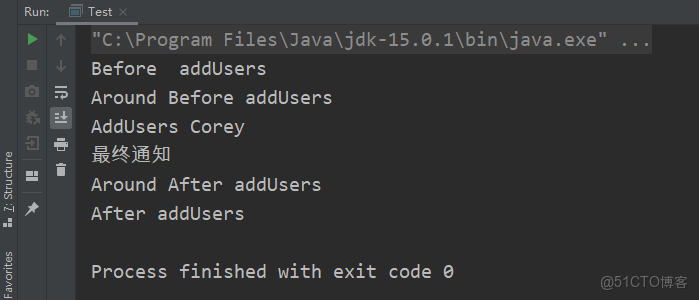
}
1.4、 多切面以及切面執行順序的配置
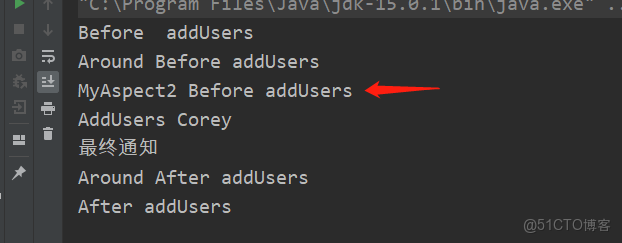
在 AspectJ 配置方式中,可以添加多個<aop:aspect>標籤實現多切面配置。在<aop:aspect>標籤中包含 order 屬性用於配置執行切面的執行順序。
public class MyAspect2 {
    public void myAspectBefore(JoinPoint joinPoint){
        //前置通知
        System.out.println("MyAspect2 Before "+joinPoint.getSignature().getName());
    }
}
2、 配置多切面
<!--    配置切面對象-->
    <bean id="myAspect" class="com.bjsxt.aspectj.aop.MyAspect"/>
<!--    配置切面對象-->
    <bean id="myAspect2" class="com.bjsxt.aspectj.aop.MyAspect2"/>


<!--    配置切面-->
    <aop:config>
        <aop:aspect id="my1" ref="myAspect" order="1">
<!--            配置切點-->
            <aop:pointcut id="myPointcut" expression="execution(* com.bjsxt.aspectj.service.*.*(..))"/>
<!--            前置通知-->
            <aop:before method="myBefore" pointcut-ref="myPointcut"/>
<!--            後置通知-->
            <aop:after-returning method="myAfterReturning" pointcut-ref="myPointcut"/>
<!--            環繞通知-->
            <aop:around method="myAround" pointcut-ref="myPointcut"/>
<!--            配置異常通知-->
            <aop:after-throwing method="myAfterThrowing" pointcut-ref="myPointcut" throwing="e"/>
<!--            最終通知-->
            <aop:after method="myAfter" pointcut-ref="myPointcut"/>
        </aop:aspect>


        <aop:aspect id="my2" ref="myAspect2" order="2">
            <aop:pointcut id="myPointcut2" expression="execution(* com.bjsxt.aspectj.service.*.*(..))"/>
            <aop:before method="myAspectBefore" pointcut-ref="myPointcut2"/>
        </aop:aspect>
    </aop:config>
測試結果
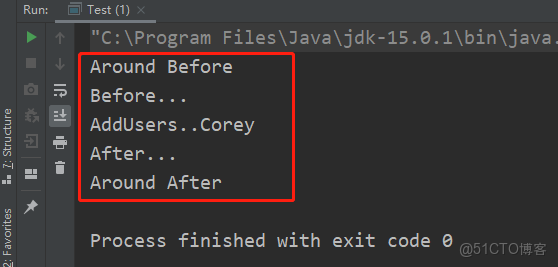
2、 Schema_based 配置方式
Schema_based(基礎模式)配置方式是指使用 Spring AOP 模塊來定義切面並在 AspectJ 框架中對該切面進行配置。要求切面在定義通知類型時,需要實現特定接口。
創建切面
public class BasedMyAspect implements MethodBeforeAdvice, AfterReturningAdvice, MethodInterceptor, ThrowsAdvice {
    //環繞通知
    @Override
    public Object invoke(MethodInvocation methodInvocation) throws Throwable {
        System.out.println("Around Before");
        Object obj = methodInvocation.proceed();
        System.out.println("Around After");
        return obj;
    }


    //後置通知
    @Override
    public void afterReturning(Object o, Method method, Object[] objects, Object o1) throws Throwable {
        System.out.println("After...");
    }


    //前置通知
    @Override
    public void before(Method method, Object[] objects, Object o) throws Throwable {
        System.out.println("Before...");
    }


    //異常通知
    public void afterThrowing(Exception ex){
        System.out.println("Exception: "+ ex);
    }
}
2、 使用 Schema_based 配置方式配置切面
2.1、 創建目標對象
public interface BasedUsersService {
    void addUsers(String username);
}
public class BasedUsersServiceImpl implements BasedUsersService {
@Override
public void addUsers(String username) {
System.out.println("AddUsers.." +username);
}
}開啓aop命名空間
<?xml version="1.0" encoding="UTF-8"?>


<!--    配置目標對象-->
    <bean id="basedUsersService" class="com.bjsxt.schema_based.service.impl.BasedUsersServiceImpl"/>

<!--    配置切面對象-->
    <bean id="basedMyAspect" class="com.bjsxt.schema_based.aop.BasedMyAspect"/>


<!--    配置切面-->
    <aop:config>
<!--        配置切點-->
        <aop:pointcut id="basedMyPointcut" expression="execution(* com.bjsxt.schema_based.service.*.*(..))"/>
<!--        配置切面-->
        <aop:advisor advice-ref="basedMyAspect" pointcut-ref="basedMyPointcut"/>
    </aop:config>
</beans>
配置切面
public class BasedMyAspect implements MethodBeforeAdvice, AfterReturningAdvice, MethodInterceptor, ThrowsAdvice {
    //環繞通知
    @Override
    public Object invoke(MethodInvocation methodInvocation) throws Throwable {
        System.out.println("Around Before");
        Object obj = methodInvocation.proceed();
        System.out.println("Around After");
        return obj;
    }


    //後置通知
    @Override
    public void afterReturning(Object o, Method method, Object[] objects, Object o1) throws Throwable {
        System.out.println("After...");
    }


    //前置通知
    @Override
    public void before(Method method, Object[] objects, Object o) throws Throwable {
        System.out.println("Before...");
    }


    //異常通知
    public void afterThrowing(Exception ex){
        System.out.println("Exception: "+ ex);
    }
}
創建測試類
public class Test {
    public static void main(String[] args) {
        ApplicationContext applicationContext = new ClassPathXmlApplicationContext("applicationContextBased.xml");
        BasedUsersService basedUsersService = (BasedUsersService)applicationContext.getBean("basedUsersService");
        basedUsersService.addUsers("Corey");
    }
}