
概述
在全球化的數字時代,為Three.js應用提供多語言支持至關重要。國際化(i18n)不僅僅是文本翻譯,還涉及佈局適配、文化敏感性、日期時間格式等多個方面。本節將全面探討如何為3D應用實現完整的國際化解決方案。
國際化架構體系:
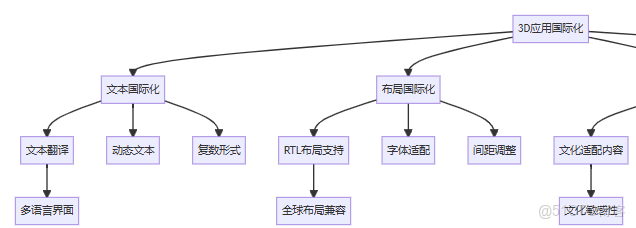
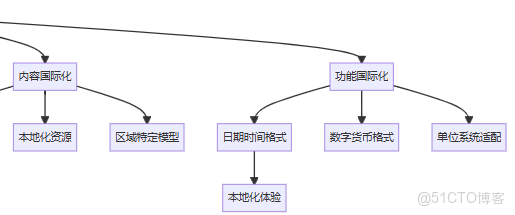
核心國際化概念
國際化 vs 本地化
|
方面
|
國際化 (i18n)
|
本地化 (l10n)
|
|
目標 |
使應用支持多語言
|
為特定區域定製應用
|
|
範圍 |
架構設計、字符串外部化
|
翻譯、文化適配、本地標準
|
|
時機 |
開發階段 |
部署到不同市場時
|
|
責任 |
開發團隊
|
翻譯團隊、本地化專家
|
3D應用國際化挑戰
- 文本渲染挑戰
- 3D空間中的文本佈局
- 字體支持和回退機制
- 動態文本更新和性能
- 文化適配
- 顏色和符號的文化含義
- 3D模型的文化敏感性
- 交互模式的地域差異
- 佈局複雜性
- 從右到左(RTL)語言支持
- 文本長度變化對UI的影響
- 多語言下的3D場景組織
完整國際化實現
1. 國際化核心框架
// I18nManager.js
class I18nManager {
    constructor(config = {}) {
        this.config = Object.assign({
            defaultLocale: 'en',
            fallbackLocale: 'en',
            supportedLocales: ['en', 'zh-CN', 'zh-TW', 'ja', 'ko', 'ar', 'de', 'fr', 'es'],
            storageKey: 'threejs-app-locale',
            autoDetect: true,
            loaders: {}
        }, config);

        this.currentLocale = this.config.defaultLocale;
        this.translations = new Map();
        this.formatters = new Map();
        this.loadingPromises = new Map();

        this.init();
    }

    async init() {
        // 檢測用户偏好
        await this.detectUserLocale();

        // 初始化格式化器
        this.initFormatters();

        // 預加載默認語言
        await this.loadLocale(this.currentLocale);

        // 設置事件監聽
        this.setupEventListeners();
    }

    // 檢測用户語言偏好
    async detectUserLocale() {
        if (!this.config.autoDetect) return;

        // 1. 檢查本地存儲
        const storedLocale = localStorage.getItem(this.config.storageKey);
        if (storedLocale && this.config.supportedLocales.includes(storedLocale)) {
            this.currentLocale = storedLocale;
            return;
        }

        // 2. 檢查瀏覽器語言
        const browserLocales = this.getBrowserLocales();
        for (const locale of browserLocales) {
            const matchedLocale = this.findBestMatch(locale);
            if (matchedLocale) {
                this.currentLocale = matchedLocale;
                return;
            }
        }

        // 3. 使用默認語言
        this.currentLocale = this.config.defaultLocale;
    }

    // 獲取瀏覽器語言列表
    getBrowserLocales() {
        const locales = [];

        // navigator.languages (最準確)
        if (navigator.languages) {
            locales.push(...navigator.languages);
        }

        // navigator.language (主語言)
        if (navigator.language) {
            locales.push(navigator.language);
        }

        // navigator.userLanguage (IE)
        if (navigator.userLanguage) {
            locales.push(navigator.userLanguage);
        }

        return locales.map(locale => locale.trim());
    }

    // 查找最佳匹配語言
    findBestMatch(requestedLocale) {
        // 精確匹配
        if (this.config.supportedLocales.includes(requestedLocale)) {
            return requestedLocale;
        }

        // 語言代碼匹配 (如: zh-CN -> zh)
        const languageCode = requestedLocale.split('-')[0];
        for (const supportedLocale of this.config.supportedLocales) {
            if (supportedLocale.startsWith(languageCode)) {
                return supportedLocale;
            }
        }

        return null;
    }

    // 初始化格式化器
    initFormatters() {
        // 數字格式化器
        this.formatters.set('number', new Map());

        // 日期時間格式化器
        this.formatters.set('datetime', new Map());

        // 貨幣格式化器
        this.formatters.set('currency', new Map());

        // 相對時間格式化器
        this.formatters.set('relative', new Map());
    }

    // 加載語言包
    async loadLocale(locale) {
        // 檢查是否已加載
        if (this.translations.has(locale)) {
            return this.translations.get(locale);
        }

        // 檢查是否正在加載
        if (this.loadingPromises.has(locale)) {
            return this.loadingPromises.get(locale);
        }

        // 開始加載
        const loadPromise = this.loadLocaleData(locale);
        this.loadingPromises.set(locale, loadPromise);

        try {
            const translations = await loadPromise;
            this.translations.set(locale, translations);
            this.loadingPromises.delete(locale);
            return translations;
        } catch (error) {
            this.loadingPromises.delete(locale);
            console.error(`Failed to load locale ${locale}:`, error);

            // 嘗試回退語言
            if (locale !== this.config.fallbackLocale) {
                return this.loadLocale(this.config.fallbackLocale);
            }

            throw error;
        }
    }

    // 加載語言數據
    async loadLocaleData(locale) {
        // 檢查自定義加載器
        if (this.config.loaders[locale]) {
            return await this.config.loaders[locale]();
        }

        // 默認加載方式:從服務器獲取
        const response = await fetch(`/locales/${locale}.json`);
        if (!response.ok) {
            throw new Error(`HTTP ${response.status}: ${response.statusText}`);
        }

        return await response.json();
    }

    // 翻譯文本
    t(key, variables = {}, options = {}) {
        const {
            locale = this.currentLocale,
            fallback = true,
            default: defaultValue = key
        } = options;

        // 獲取翻譯
        let translation = this.getTranslation(key, locale);

        // 回退機制
        if (!translation && fallback && locale !== this.config.fallbackLocale) {
            translation = this.getTranslation(key, this.config.fallbackLocale);
        }

        // 使用默認值
        if (!translation) {
            translation = defaultValue;
        }

        // 變量替換
        if (variables && typeof translation === 'string') {
            translation = this.replaceVariables(translation, variables);
        }

        return translation;
    }

    // 獲取翻譯
    getTranslation(key, locale) {
        const translations = this.translations.get(locale);
        if (!translations) return null;

        // 支持嵌套鍵 (如: "header.title")
        const keys = key.split('.');
        let value = translations;

        for (const k of keys) {
            if (value && typeof value === 'object' && k in value) {
                value = value[k];
            } else {
                return null;
            }
        }

        return value;
    }

    // 替換變量
    replaceVariables(text, variables) {
        return text.replace(/\{\{(\w+)\}\}/g, (match, variableName) => {
            return variables[variableName] !== undefined ?
                   String(variables[variableName]) : match;
        });
    }

    // 複數形式支持
    tc(key, count, variables = {}, options = {}) {
        const pluralKey = this.getPluralKey(key, count, options.locale);
        const translation = this.t(pluralKey, { ...variables, count }, options);

        if (translation === pluralKey) {
            // 如果沒有找到複數形式,回退到默認鍵
            return this.t(key, { ...variables, count }, options);
        }

        return translation;
    }

    // 獲取複數鍵
    getPluralKey(key, count, locale = this.currentLocale) {
        const rules = this.getPluralRules(locale);
        const pluralForm = rules(count);

        return `${key}_${pluralForm}`;
    }

    // 獲取複數規則
    getPluralRules(locale) {
        // 簡化實現 - 實際需要完整的CLDR規則
        const rules = {
            // 英語:單數、複數
            en: (count) => count === 1 ? 'one' : 'other',

            // 中文:沒有複數形式
            zh: () => 'other',
            'zh-CN': () => 'other',
            'zh-TW': () => 'other',

            // 日語:沒有複數形式
            ja: () => 'other',

            // 阿拉伯語:6種複數形式
            ar: (count) => {
                if (count === 0) return 'zero';
                if (count === 1) return 'one';
                if (count === 2) return 'two';
                if (count >= 3 && count <= 10) return 'few';
                if (count >= 11 && count <= 99) return 'many';
                return 'other';
            },

            // 默認規則
            default: (count) => count === 1 ? 'one' : 'other'
        };

        const languageCode = locale.split('-')[0];
        return rules[locale] || rules[languageCode] || rules.default;
    }

    // 格式化數字
    formatNumber(value, options = {}) {
        const locale = options.locale || this.currentLocale;

        if (!this.formatters.get('number').has(locale)) {
            this.formatters.get('number').set(locale,
                new Intl.NumberFormat(locale, options)
            );
        }

        const formatter = this.formatters.get('number').get(locale);
        return formatter.format(value);
    }

    // 格式化日期
    formatDate(date, options = {}) {
        const locale = options.locale || this.currentLocale;

        if (!this.formatters.get('datetime').has(locale)) {
            this.formatters.get('datetime').set(locale,
                new Intl.DateTimeFormat(locale, options)
            );
        }

        const formatter = this.formatters.get('datetime').get(locale);
        return formatter.format(date);
    }

    // 格式化貨幣
    formatCurrency(amount, currency, options = {}) {
        const locale = options.locale || this.currentLocale;
        const formatOptions = {
            style: 'currency',
            currency: currency,
            ...options
        };

        const cacheKey = `${locale}-${currency}`;
        if (!this.formatters.get('currency').has(cacheKey)) {
            this.formatters.get('currency').set(cacheKey,
                new Intl.NumberFormat(locale, formatOptions)
            );
        }

        const formatter = this.formatters.get('currency').get(cacheKey);
        return formatter.format(amount);
    }

    // 切換語言
    async changeLocale(locale) {
        if (!this.config.supportedLocales.includes(locale)) {
            console.warn(`Locale ${locale} is not supported`);
            return false;
        }

        if (locale === this.currentLocale) {
            return true;
        }

        try {
            // 加載新語言包
            await this.loadLocale(locale);

            // 更新當前語言
            const oldLocale = this.currentLocale;
            this.currentLocale = locale;

            // 保存偏好
            localStorage.setItem(this.config.storageKey, locale);

            // 觸發語言改變事件
            this.emitLocaleChange(locale, oldLocale);

            return true;
        } catch (error) {
            console.error(`Failed to change locale to ${locale}:`, error);
            return false;
        }
    }

    // 觸發語言改變事件
    emitLocaleChange(newLocale, oldLocale) {
        const event = new CustomEvent('localechange', {
            detail: {
                newLocale,
                oldLocale,
                timestamp: Date.now()
            }
        });

        window.dispatchEvent(event);
    }

    // 設置事件監聽
    setupEventListeners() {
        window.addEventListener('localechange', (event) => {
            this.handleLocaleChange(event.detail);
        });
    }

    // 處理語言改變
    handleLocaleChange({ newLocale, oldLocale }) {
        console.log(`Locale changed from ${oldLocale} to ${newLocale}`);

        // 更新所有動態文本
        this.updateDynamicTexts();

        // 更新佈局方向
        this.updateLayoutDirection(newLocale);

        // 更新3D文本
        this.update3DTexts();
    }

    // 更新動態文本
    updateDynamicTexts() {
        // 查找所有需要更新的文本元素
        const elements = document.querySelectorAll('[data-i18n]');

        elements.forEach(element => {
            const key = element.getAttribute('data-i18n');
            const variables = this.getElementVariables(element);
            const translatedText = this.t(key, variables);

            this.updateElementText(element, translatedText);
        });
    }

    // 獲取元素變量
    getElementVariables(element) {
        const variables = {};
        const attributes = element.attributes;

        for (let i = 0; i < attributes.length; i++) {
            const attr = attributes[i];
            if (attr.name.startsWith('data-i18n-var-')) {
                const varName = attr.name.replace('data-i18n-var-', '');
                variables[varName] = attr.value;
            }
        }

        return variables;
    }

    // 更新元素文本
    updateElementText(element, text) {
        if (element.tagName === 'INPUT' || element.tagName === 'TEXTAREA') {
            element.placeholder = text;
        } else if (element.hasAttribute('data-i18n-html')) {
            element.innerHTML = text;
        } else {
            element.textContent = text;
        }
    }

    // 更新佈局方向
    updateLayoutDirection(locale) {
        const isRTL = this.isRTL(locale);
        document.documentElement.dir = isRTL ? 'rtl' : 'ltr';
        document.documentElement.lang = locale;
    }

    // 檢查是否是RTL語言
    isRTL(locale) {
        const rtlLocales = ['ar', 'he', 'fa', 'ur'];
        const languageCode = locale.split('-')[0];
        return rtlLocales.includes(languageCode);
    }

    // 更新3D文本
    update3DTexts() {
        // 在實際應用中,這裏會更新所有3D文本幾何體
        // 觸發場景中所有文本對象的更新
        if (window.threeApp && window.threeApp.updateTexts) {
            window.threeApp.updateTexts(this.currentLocale);
        }
    }

    // 獲取當前語言信息
    getCurrentLocaleInfo() {
        return {
            locale: this.currentLocale,
            isRTL: this.isRTL(this.currentLocale),
            language: this.currentLocale.split('-')[0],
            region: this.currentLocale.split('-')[1] || ''
        };
    }

    // 銷燬清理
    dispose() {
        this.translations.clear();
        this.formatters.clear();
        this.loadingPromises.clear();
    }
}
2. 3D文本國際化系統
// I18nText3D.js
class I18nText3D {
    constructor(i18nManager) {
        this.i18nManager = i18nManager;
        this.textObjects = new Map();
        this.fonts = new Map();

        this.init();
    }

    async init() {
        // 加載默認字體
        await this.loadDefaultFonts();

        // 監聽語言變化
        window.addEventListener('localechange', () => {
            this.updateAllTexts();
        });
    }

    // 加載默認字體
    async loadDefaultFonts() {
        const fontLoader = new THREE.FontLoader();
        const fontPromises = [];

        // 為不同語言加載相應字體
        const fontConfig = {
            'zh-CN': '/fonts/noto_sans_sc_regular.json',
            'zh-TW': '/fonts/noto_sans_tc_regular.json',
            'ja': '/fonts/noto_sans_jp_regular.json',
            'ko': '/fonts/noto_sans_kr_regular.json',
            'ar': '/fonts/noto_sans_arabic_regular.json',
            'default': '/fonts/helvetiker_regular.json'
        };

        for (const [locale, fontUrl] of Object.entries(fontConfig)) {
            const promise = this.loadFont(fontUrl).then(font => {
                this.fonts.set(locale, font);
            });
            fontPromises.push(promise);
        }

        await Promise.all(fontPromises);
    }

    // 加載字體
    loadFont(url) {
        return new Promise((resolve, reject) => {
            const loader = new THREE.FontLoader();
            loader.load(url, resolve, undefined, reject);
        });
    }

    // 創建3D文本
    createText(key, options = {}) {
        const {
            position = new THREE.Vector3(0, 0, 0),
            size = 1,
            height = 0.1,
            curveSegments = 12,
            bevelEnabled = false,
            color = 0xffffff,
            material = null,
            locale = this.i18nManager.currentLocale
        } = options;

        // 獲取翻譯文本
        const text = this.i18nManager.t(key, options.variables, {
            locale: locale,
            default: key
        });

        // 獲取合適字體
        const font = this.getFontForLocale(locale);

        // 創建文本幾何體
        const geometry = new THREE.TextGeometry(text, {
            font: font,
            size: size,
            height: height,
            curveSegments: curveSegments,
            bevelEnabled: bevelEnabled,
            bevelThickness: 0.02,
            bevelSize: 0.01,
            bevelOffset: 0,
            bevelSegments: 3
        });

        // 創建材質
        const textMaterial = material || new THREE.MeshPhongMaterial({ color: color });

        // 創建網格
        const textMesh = new THREE.Mesh(geometry, textMaterial);
        textMesh.position.copy(position);

        // 居中文本
        geometry.computeBoundingBox();
        const boundingBox = geometry.boundingBox;
        const center = new THREE.Vector3();
        boundingBox.getCenter(center);
        textMesh.position.x -= center.x;
        textMesh.position.y -= center.y;

        // 存儲文本信息
        this.textObjects.set(textMesh.uuid, {
            key: key,
            variables: options.variables || {},
            options: options,
            originalText: text
        });

        return textMesh;
    }

    // 獲取適合語言的字體
    getFontForLocale(locale) {
        // 精確匹配
        if (this.fonts.has(locale)) {
            return this.fonts.get(locale);
        }

        // 語言代碼匹配
        const languageCode = locale.split('-')[0];
        if (this.fonts.has(languageCode)) {
            return this.fonts.get(languageCode);
        }

        // 默認字體
        return this.fonts.get('default');
    }

    // 更新文本內容
    updateText(textMesh, newKey = null, newVariables = null) {
        const textInfo = this.textObjects.get(textMesh.uuid);
        if (!textInfo) return;

        // 更新鍵和變量
        if (newKey) textInfo.key = newKey;
        if (newVariables) textInfo.variables = { ...textInfo.variables, ...newVariables };

        // 獲取新文本
        const newText = this.i18nManager.t(textInfo.key, textInfo.variables, {
            default: textInfo.key
        });

        // 如果文本沒有變化,直接返回
        if (newText === textInfo.originalText) return;

        // 更新幾何體
        this.updateTextGeometry(textMesh, newText, textInfo.options);
        textInfo.originalText = newText;
    }

    // 更新文本幾何體
    updateTextGeometry(textMesh, newText, options) {
        const oldGeometry = textMesh.geometry;
        const font = this.getFontForLocale(this.i18nManager.currentLocale);

        // 創建新幾何體
        const newGeometry = new THREE.TextGeometry(newText, {
            font: font,
            size: options.size || 1,
            height: options.height || 0.1,
            curveSegments: options.curveSegments || 12,
            bevelEnabled: options.bevelEnabled || false,
            bevelThickness: 0.02,
            bevelSize: 0.01,
            bevelOffset: 0,
            bevelSegments: 3
        });

        // 計算新位置以保持居中
        newGeometry.computeBoundingBox();
        const boundingBox = newGeometry.boundingBox;
        const center = new THREE.Vector3();
        boundingBox.getCenter(center);

        // 更新網格
        textMesh.geometry = newGeometry;
        textMesh.position.x += oldGeometry.boundingBox.getCenter(new THREE.Vector3()).x - center.x;
        textMesh.position.y += oldGeometry.boundingBox.getCenter(new THREE.Vector3()).y - center.y;

        // 清理舊幾何體
        oldGeometry.dispose();
    }

    // 更新所有文本
    updateAllTexts() {
        for (const [uuid, textInfo] of this.textObjects) {
            const textMesh = this.findMeshByUUID(uuid);
            if (textMesh) {
                this.updateText(textMesh);
            }
        }
    }

    // 通過UUID查找網格
    findMeshByUUID(uuid) {
        // 在實際應用中,需要遍歷場景查找對象
        // 這裏簡化實現
        return null;
    }

    // 創建動態文本生成器
    createDynamicTextGenerator(scene) {
        return {
            addText: (key, options) => {
                const textMesh = this.createText(key, options);
                scene.add(textMesh);
                return textMesh;
            },

            updateText: (textMesh, newKey, newVariables) => {
                this.updateText(textMesh, newKey, newVariables);
            },

            removeText: (textMesh) => {
                this.textObjects.delete(textMesh.uuid);
                scene.remove(textMesh);

                // 清理幾何體和材質
                textMesh.geometry.dispose();
                if (textMesh.material) {
                    if (Array.isArray(textMesh.material)) {
                        textMesh.material.forEach(material => material.dispose());
                    } else {
                        textMesh.material.dispose();
                    }
                }
            }
        };
    }
}
3. RTL佈局支持系統
// RTLSupport.js
class RTLSupport {
    constructor(i18nManager) {
        this.i18nManager = i18nManager;
        this.rtlEnabled = false;
        this.originalPositions = new Map();

        this.init();
    }

    init() {
        // 檢測初始RTL狀態
        this.rtlEnabled = this.i18nManager.isRTL(this.i18nManager.currentLocale);

        // 監聽語言變化
        window.addEventListener('localechange', (event) => {
            this.handleLocaleChange(event.detail);
        });

        // 初始應用RTL佈局
        if (this.rtlEnabled) {
            this.applyRTLLayout();
        }
    }

    // 處理語言變化
    handleLocaleChange({ newLocale }) {
        const wasRTL = this.rtlEnabled;
        this.rtlEnabled = this.i18nManager.isRTL(newLocale);

        if (wasRTL && !this.rtlEnabled) {
            // RTL -> LTR
            this.revertToLTR();
        } else if (!wasRTL && this.rtlEnabled) {
            // LTR -> RTL
            this.applyRTLLayout();
        }
    }

    // 應用RTL佈局
    applyRTLLayout() {
        // 保存原始位置
        this.saveOriginalPositions();

        // 鏡像場景對象
        this.mirrorSceneObjects();

        // 調整UI佈局
        this.adjustUILayout();

        // 更新文本對齊
        this.updateTextAlignment();

        console.log('RTL layout applied');
    }

    // 保存原始位置
    saveOriginalPositions() {
        this.originalPositions.clear();

        // 遍歷場景對象
        if (window.threeApp && window.threeApp.scene) {
            window.threeApp.scene.traverse(object => {
                if (object.isObject3D) {
                    this.originalPositions.set(object.uuid, {
                        position: object.position.clone(),
                        rotation: object.rotation.clone(),
                        scale: object.scale.clone()
                    });
                }
            });
        }
    }

    // 鏡像場景對象
    mirrorSceneObjects() {
        if (!window.threeApp || !window.threeApp.scene) return;

        window.threeApp.scene.traverse(object => {
            if (object.isObject3D && this.shouldMirrorObject(object)) {
                // 鏡像X軸位置
                object.position.x = -object.position.x;

                // 調整旋轉(鏡像Y軸旋轉)
                object.rotation.y = -object.rotation.y;

                // 標記為已鏡像
                object.userData.rtlMirrored = true;
            }
        });
    }

    // 檢查是否應該鏡像對象
    shouldMirrorObject(object) {
        // 不鏡像標記為不需要鏡像的對象
        if (object.userData.rtlExclude) return false;

        // 鏡像UI元素和對稱性不重要的對象
        if (object.userData.isUIElement) return true;
        if (object.userData.isText) return true;
        if (object.userData.mirrorInRTL !== false) return true;

        return false;
    }

    // 調整UI佈局
    adjustUILayout() {
        // 調整CSS佈局
        document.documentElement.classList.add('rtl');

        // 調整2D UI元素位置
        this.adjust2DUIElements();

        // 調整3D UI面板
        this.adjust3DUIPanels();
    }

    // 調整2D UI元素
    adjust2DUIElements() {
        const uiElements = document.querySelectorAll('[data-rtl-adjust]');

        uiElements.forEach(element => {
            const adjustment = element.getAttribute('data-rtl-adjust');

            switch (adjustment) {
                case 'swap-sides':
                    this.swapElementSides(element);
                    break;
                case 'reverse-order':
                    this.reverseElementOrder(element);
                    break;
                case 'text-align-right':
                    element.style.textAlign = 'right';
                    break;
            }
        });
    }

    // 交換元素邊距
    swapElementSides(element) {
        const left = element.style.left;
        const right = element.style.right;

        if (left && right) {
            element.style.left = right;
            element.style.right = left;
        } else if (left) {
            element.style.right = left;
            element.style.left = 'auto';
        } else if (right) {
            element.style.left = right;
            element.style.right = 'auto';
        }
    }

    // 反轉元素順序
    reverseElementOrder(element) {
        if (element.parentNode) {
            const children = Array.from(element.parentNode.children);
            const reversed = children.reverse();

            reversed.forEach(child => {
                element.parentNode.appendChild(child);
            });
        }
    }

    // 調整3D UI面板
    adjust3DUIPanels() {
        // 在實際應用中,調整3D空間中的UI面板位置
        if (window.threeApp && window.threeApp.uiPanels) {
            window.threeApp.uiPanels.forEach(panel => {
                if (panel.userData.rtlAdjustable) {
                    panel.position.x = -panel.position.x;
                    panel.rotation.y = Math.PI - panel.rotation.y;
                }
            });
        }
    }

    // 更新文本對齊
    updateTextAlignment() {
        // 更新2D文本
        this.update2DTextAlignment();

        // 更新3D文本
        this.update3DTextAlignment();
    }

    // 更新2D文本對齊
    update2DTextAlignment() {
        const textElements = document.querySelectorAll('[data-i18n]');

        textElements.forEach(element => {
            if (this.shouldAdjustTextAlignment(element)) {
                element.style.textAlign = 'right';
                element.style.direction = 'rtl';
            }
        });
    }

    // 檢查是否應該調整文本對齊
    shouldAdjustTextAlignment(element) {
        // 不調整明確設置了對齊的元素
        if (element.style.textAlign) return false;

        // 調整大多數文本元素
        return ['P', 'DIV', 'SPAN', 'H1', 'H2', 'H3', 'H4', 'H5', 'H6'].includes(element.tagName);
    }

    // 更新3D文本對齊
    update3DTextAlignment() {
        if (!window.threeApp || !window.threeApp.scene) return;

        window.threeApp.scene.traverse(object => {
            if (object.isMesh && object.userData.isText) {
                this.adjust3DTextObject(object);
            }
        });
    }

    // 調整3D文本對象
    adjust3DTextObject(textObject) {
        // 對於RTL語言,可能需要調整文本幾何體
        // 這裏可以重新生成文本幾何體或調整位置

        if (textObject.userData.i18nKey) {
            // 強制更新文本以應用RTL佈局
            if (window.i18nText3D) {
                window.i18nText3D.updateText(textObject);
            }
        }
    }

    // 恢復到LTR佈局
    revertToLTR() {
        // 恢復場景對象位置
        this.restoreOriginalPositions();

        // 恢復UI佈局
        this.restoreUILayout();

        // 恢復文本對齊
        this.restoreTextAlignment();

        console.log('RTL layout reverted to LTR');
    }

    // 恢復原始位置
    restoreOriginalPositions() {
        if (!window.threeApp || !window.threeApp.scene) return;

        window.threeApp.scene.traverse(object => {
            if (object.isObject3D && this.originalPositions.has(object.uuid)) {
                const original = this.originalPositions.get(object.uuid);
                object.position.copy(original.position);
                object.rotation.copy(original.rotation);
                object.scale.copy(original.scale);

                delete object.userData.rtlMirrored;
            }
        });

        this.originalPositions.clear();
    }

    // 恢復UI佈局
    restoreUILayout() {
        document.documentElement.classList.remove('rtl');

        // 恢復2D UI元素
        this.restore2DUIElements();

        // 恢復3D UI面板
        this.restore3DUIPanels();
    }

    // 恢復2D UI元素
    restore2DUIElements() {
        const uiElements = document.querySelectorAll('[data-rtl-adjust]');

        uiElements.forEach(element => {
            const adjustment = element.getAttribute('data-rtl-adjust');

            switch (adjustment) {
                case 'swap-sides':
                    this.swapElementSides(element); // 再次交換恢復原狀
                    break;
                case 'reverse-order':
                    this.reverseElementOrder(element); // 再次反轉恢復原狀
                    break;
                case 'text-align-right':
                    element.style.textAlign = '';
                    break;
            }
        });
    }

    // 恢復3D UI面板
    restore3DUIPanels() {
        if (window.threeApp && window.threeApp.uiPanels) {
            window.threeApp.uiPanels.forEach(panel => {
                if (panel.userData.rtlAdjustable) {
                    panel.position.x = -panel.position.x;
                    panel.rotation.y = Math.PI - panel.rotation.y;
                }
            });
        }
    }

    // 恢復文本對齊
    restoreTextAlignment() {
        const textElements = document.querySelectorAll('[data-i18n]');

        textElements.forEach(element => {
            if (this.shouldAdjustTextAlignment(element)) {
                element.style.textAlign = '';
                element.style.direction = '';
            }
        });
    }

    // 註冊需要RTL調整的對象
    registerObjectForRTL(object, options = {}) {
        object.userData.rtlAdjustable = true;
        object.userData.rtlExclude = options.exclude || false;
        object.userData.rtlOptions = options;
    }

    // 檢查當前是否是RTL模式
    isRTL() {
        return this.rtlEnabled;
    }
}
4. 語言資源文件示例
// locales/en.json
{
  "app": {
    "title": "3D Visualization App",
    "description": "An interactive 3D visualization experience"
  },
  "ui": {
    "buttons": {
      "start": "Start Experience",
      "reset": "Reset Scene",
      "save": "Save Progress",
      "load": "Load Previous"
    },
    "navigation": {
      "previous": "Previous",
      "next": "Next",
      "back": "Back to Menu"
    },
    "labels": {
      "quality": "Quality Settings",
      "language": "Language",
      "volume": "Volume"
    }
  },
  "scene": {
    "objects": {
      "cube": "Cube",
      "sphere": "Sphere",
      "light": "Light Source",
      "camera": "Camera"
    },
    "actions": {
      "rotate": "Rotate",
      "move": "Move",
      "scale": "Scale",
      "select": "Select Object"
    }
  },
  "messages": {
    "loading": "Loading...",
    "saving": "Saving your progress...",
    "error": "An error occurred",
    "success": "Operation completed successfully"
  },
  "plural": {
    "objects_selected": {
      "one": "{{count}} object selected",
      "other": "{{count}} objects selected"
    },
    "points_earned": {
      "one": "You earned {{count}} point",
      "other": "You earned {{count}} points"
    }
  }
}

// locales/zh-CN.json
{
  "app": {
    "title": "3D可視化應用",
    "description": "交互式3D可視化體驗"
  },
  "ui": {
    "buttons": {
      "start": "開始體驗",
      "reset": "重置場景",
      "save": "保存進度",
      "load": "加載記錄"
    },
    "navigation": {
      "previous": "上一個",
      "next": "下一個",
      "back": "返回菜單"
    },
    "labels": {
      "quality": "畫質設置",
      "language": "語言",
      "volume": "音量"
    }
  },
  "scene": {
    "objects": {
      "cube": "立方體",
      "sphere": "球體",
      "light": "光源",
      "camera": "相機"
    },
    "actions": {
      "rotate": "旋轉",
      "move": "移動",
      "scale": "縮放",
      "select": "選擇對象"
    }
  },
  "messages": {
    "loading": "加載中...",
    "saving": "正在保存進度...",
    "error": "發生錯誤",
    "success": "操作成功完成"
  },
  "plural": {
    "objects_selected": "已選擇 {{count}} 個對象",
    "points_earned": "獲得了 {{count}} 分"
  }
}

// locales/ar.json
{
  "app": {
    "title": "تطبيق التصور ثلاثي الأبعاد",
    "description": "تجربة تصور ثلاثية الأبعاد تفاعلية"
  },
  "ui": {
    "buttons": {
      "start": "بدء التجربة",
      "reset": "إعادة تعيين المشهد",
      "save": "حفظ التقدم",
      "load": "تحميل السابق"
    },
    "navigation": {
      "previous": "السابق",
      "next": "التالي",
      "back": "العودة إلى القائمة"
    },
    "labels": {
      "quality": "إعدادات الجودة",
      "language": "اللغة",
      "volume": "الصوت"
    }
  },
  "scene": {
    "objects": {
      "cube": "مكعب",
      "sphere": "كرة",
      "light": "مصدر ضوء",
      "camera": "كاميرا"
    },
    "actions": {
      "rotate": "تدوير",
      "move": "نقل",
      "scale": "تحجيم",
      "select": "اختر الكائن"
    }
  },
  "messages": {
    "loading": "جاري التحميل...",
    "saving": "جاري حفظ تقدمك...",
    "error": "حدث خطأ",
    "success": "تمت العملية بنجاح"
  },
  "plural": {
    "objects_selected": {
      "zero": "لم يتم اختيار أي كائن",
      "one": "تم اختيار كائن واحد",
      "two": "تم اختيار كائنين",
      "few": "تم اختيار {{count}} كائنات",
      "many": "تم اختيار {{count}} كائنًا",
      "other": "تم اختيار {{count}} كائن"
    },
    "points_earned": {
      "zero": "لم تحصل على أي نقاط",
      "one": "لقد حصلت على نقطة واحدة",
      "two": "لقد حصلت على نقطتين",
      "few": "لقد حصلت على {{count}} نقاط",
      "many": "لقد حصلت على {{count}} نقطة",
      "other": "لقد حصلت على {{count}} نقطة"
    }
  }
}
國際化最佳實踐
性能優化策略
// 語言包懶加載和緩存
class TranslationCache {
    constructor() {
        this.cache = new Map();
        this.maxSize = 50; // 最大緩存語言包數量
    }

    async get(locale, loader) {
        if (this.cache.has(locale)) {
            return this.cache.get(locale);
        }

        const translations = await loader();
        this.set(locale, translations);
        return translations;
    }

    set(locale, translations) {
        // LRU緩存策略
        if (this.cache.size >= this.maxSize) {
            const firstKey = this.cache.keys().next().value;
            this.cache.delete(firstKey);
        }

        this.cache.set(locale, translations);
    }

    preload(locales) {
        locales.forEach(locale => {
            if (!this.cache.has(locale)) {
                this.get(locale, () => this.loadLocaleData(locale));
            }
        });
    }
}
文化適配建議
- 顏色含義
- 紅色:西方-危險,東方-吉祥
- 白色:西方-純潔,東方-喪事
- 符號使用
- 手勢和圖標的文化差異
- 動物象徵的不同含義
- 日期時間
- 日曆系統差異
- 時間格式(12/24小時制)
通過實施完整的國際化解決方案,Three.js應用可以為全球用户提供真正本地化的體驗,顯著提升用户滿意度和應用的可訪問性。
