
適用人羣:剛接觸鴻蒙混合開發,希望基於
@magongshou/harmony-cordova快速搭建工程、跑通示例,但經常遇到“白屏、資源 404、Hostname 配錯”等問題的同學。文章以“問題解決”為主,代碼佔比約 3/10,更多篇幅用於解釋工程結構和排錯思路。
1. 整體框架先搞清楚
在排查任何問題之前,先要知道 工程裏有哪些層、誰加載誰:
- 原生層(ArkTS / Harmony 工程)
EntryAbility:應用入口,初始化 Web 引擎,加載首屏pages/Index。Index.ets:ArkUI 首屏,承載MainPageCordova 容器。
- 容器層(Cordova ArkTS 實現)
MainPage.ets:封裝 ArkWeb WebView + Cordova 初始化 + 資源攔截。- Cordova 插件體系:
CordovaPlugin、PluginEntry等。
- Web 前端層(rawfile 靜態資源)
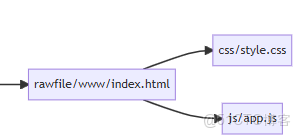
rawfile/www/index.html:2048 入口頁。css/、js/:樣式與遊戲邏輯。
1.1 框架結構圖

1.2 目錄結構速覽(簡化)
entry/
  src/main/ets/
    entryability/EntryAbility.ets
    pages/Index.ets
cordova/
  src/main/ets/components/MainPage.ets
  src/main/ets/components/CordovaPlugin.ets
  src/main/resources/rawfile/www/
    index.html
    css/style.css
    js/app.js
理解這張圖後,很多“找不到文件”“白屏”問題就有了排查順序:
- 先看 原生是否加載到 Index。
- 再看 Index 是否渲染了 MainPage。
- 再看 MainPage 是否計算出正確的 src URL。
- 最後看 rawfile/www 是否有對應資源。
2. 工程搭建中的典型問題一覽
2.1 問題:啓動後直接白屏,日誌裏幾乎沒 Web 輸出
現象:
- App 能啓動,但始終是純色背景。
- Logcat/IDE 日誌中能看到
EntryAbility.onCreate,但很少有 Web 相關日誌。
排查思路(整體 Flow):
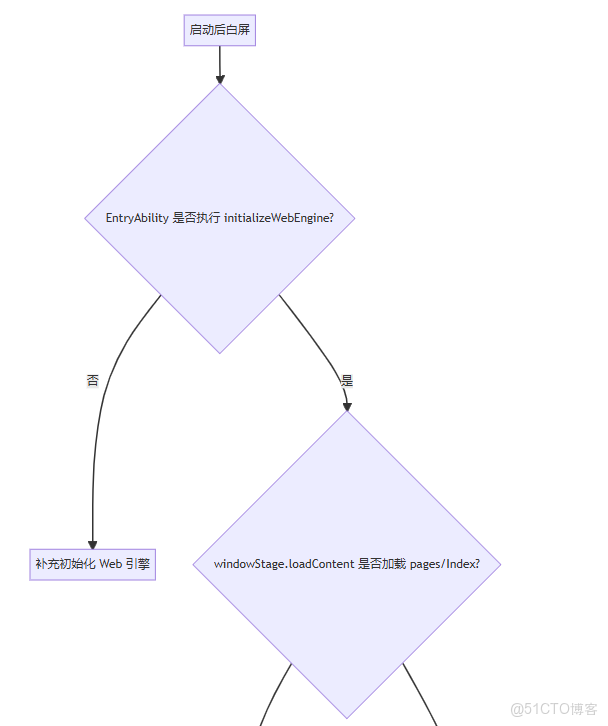
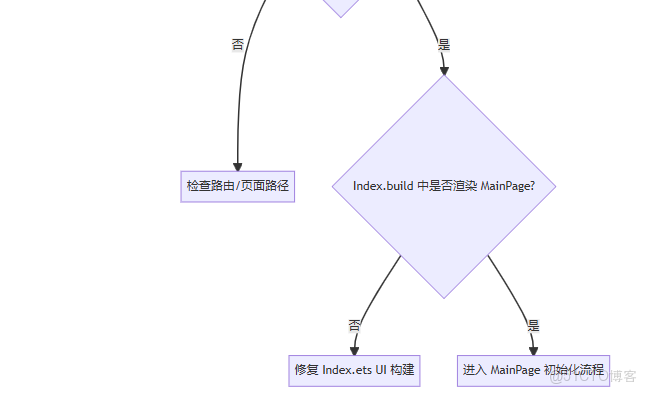
2.2 關鍵代碼:EntryAbility 正確初始化 Web 引擎
// entry/src/main/ets/entryability/EntryAbility.ets
import { AbilityConstant, UIAbility, Want } from '@kit.AbilityKit';
import { window } from '@kit.ArkUI';
import { webview } from '@kit.ArkWeb';

export default class EntryAbility extends UIAbility {
  onCreate(want: Want, launchParam: AbilityConstant.LaunchParam): void {
    // 初始化 ArkWeb 引擎
    webview.WebviewController.initializeWebEngine();
  }

  onWindowStageCreate(windowStage: window.WindowStage): void {
    windowStage.loadContent('pages/Index', (err) => {
      if (err.code) {
        // 這裏可以增加日誌,方便排查
        return;
      }
    });
  }
}排查要點:
- 確認
initializeWebEngine()是否被調用。 - 確認
loadContent('pages/Index')的 路徑大小寫 無誤(ArkTS 區分大小寫)。
3. Hostname / indexPage 配置導致的“資源 404”
在本項目的 Cordova 實現中,MainPage 會根據 Cordova 配置來計算最終加載 URL:
// 邏輯示意(簡化版)
aboutToAppear() {
  // ... InitCordova 返回 JSON 字符串
  let preferences: string = cordova.InitCordova(/* 參數省略 */);
  let jsonConfig: object = JSON.parse(preferences) as object;
  let arrayObject: Array<object> = jsonConfig['preferences'];

  arrayObject.forEach((obj: object) => {
    if (obj['name'] === 'Hostname') {
      this.strTmpUrl = obj['value'];
    }
  });

  if (this.indexPage == '') {
    this.src = 'https://' + this.strTmpUrl + '/www/index.html';
  } else {
    // 自定義入口
  }
}
3.1 常見錯誤 1:Hostname 與實際不匹配
症狀:
- 運行時控制枱裏出現類似:
GET https://example.com/www/index.html 404
- 但你的實際 Hostname 並不是
example.com。
解決步驟:
- 找到 Cordova 的配置(通常在
config.xml或等效配置)中:
- 確認
Hostname與代碼一致,例如localhost、harmony.cordova.local等。
- 若不確定,可在
MainPage.aboutToAppear中臨時打印this.src:
console.log('[MainPage] final src = ' + this.src);最佳實踐:開發階段可以統一用類似:
Hostname = "harmony.cordova.local",方便識別。
3.2 常見錯誤 2:誤以為可以直接改 this.src 為本地 file URL
錯誤示例:
// ❌ 錯誤示意:直接寫 file://
this.src = 'file:///data/storage/el2/base/files/www/index.html';
在 Cordova 實現中,已經通過自定義協議 + 資源攔截 幫你處理了 rawfile 映射,直接使用 https://{Hostname}/www/index.html 即可,不需要手動拼 file 路徑。
4. rawfile 目錄與資源路徑檢查
若 URL 是正確的 https://{Hostname}/www/index.html,但仍報 404 或部分資源丟失,通常出在 rawfile 目錄結構。
4.1 檢查最終打包路徑
構建後,Web 靜態資源應位於:
cordova/src/main/resources/rawfile/www/
  index.html
  css/style.css
js/app.js容易出錯的點:
www目錄層級錯了,比如:rawfile/index.html而不是rawfile/www/index.html。- CSS/JS 的相對路徑寫成了絕對路徑,導致找不到資源。
4.2 index.html 中的資源路徑寫法
推薦寫法(來自項目實際代碼):
<link rel="stylesheet" href="css/style.css" />
...
<script src="js/app.js"></script>
不要寫成類似:
<!-- ❌ 容易出錯的寫法 -->
<link rel="stylesheet" href="/css/style.css" />
<script src="/js/app.js"></script>
因為 /css/style.css 會被當成根路徑,而不是相對於 www/。
5. Index.ets 未正確渲染 MainPage 的問題
即使 EntryAbility 和資源路徑都 OK,如果 Index.ets 沒有渲染 MainPage,Web 仍然不會出現。
5.1 正確的 Index.ets 寫法(節選)
// entry/src/main/ets/pages/Index.ets
import {
  MainPage,
  pageBackPress,
  pageHideEvent,
  pageShowEvent,
  PluginEntry
} from '@magongshou/harmony-cordova/Index';

@Entry
@Component
struct Index {
  cordovaPlugs: Array<PluginEntry> = [];

  onPageShow() { pageShowEvent(); }
  onBackPress() { pageBackPress(); return true; }
  onPageHide() { pageHideEvent(); }

  build() {
    RelativeContainer() {
      MainPage({
        isWebDebug: false,
        cordovaPlugs: this.cordovaPlugs
      });
    }
    .height('100%')
    .width('100%')
  }
}
排查 checklist:
- 是否導入了
MainPage? build()中是否真的調用了MainPage?- 是否給
MainPage足夠的寬高(100%)?
6. 總結:從框架到問題排查的路線圖
我們把本文的排查路徑整理成一張圖,方便你在遇到問題時快速定位:
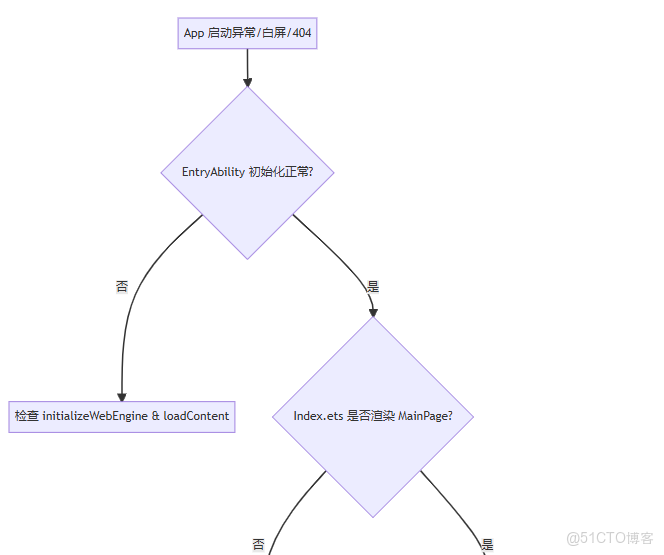
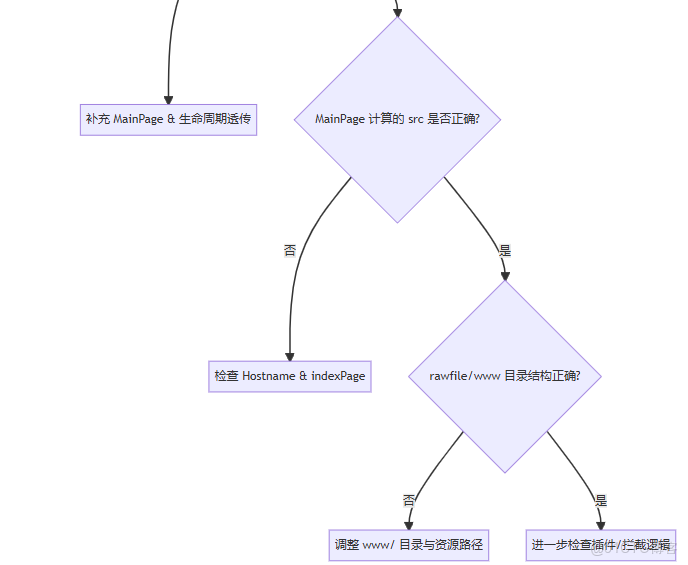
建議用法:
- 新建工程或遷移舊 Web 項目時,對照本文一節一節檢查。
- 遇到白屏時,按“入口 → Index → MainPage → rawfile”順序排查,不要一上來就懷疑 Web 代碼。
有了這篇“地基”文章,你在閲讀本倉庫其他高級主題(自定義插件、性能優化等)時,會更清楚每一層到底在幹什麼,也更容易在出現問題時快速定位到具體環節。
