
1 配置
export SCALA_HOME=/Users/zhaoshuai11/work/scala-2.12.14
export JAVA_HOME=/Library/Java/JavaVirtualMachines/jdk1.8.0_192.jdk/Contents/Home

## 指定spark老大Master的IP和提交任務的通信端口
export SPARK_MASTER_IP=localhost
export SPARK_MASTER_PORT=7077

export SPARK_MASTER_WEBUI=8080

export SPARK_WORKER_CORES=1
export SPARK_MEMORY=1g

export HADOOP_CONF_DIR=/Users/zhaoshuai11/work/hadoop-2.7.3
export YARN_CONF_DIR=/Users/zhaoshuai11/work/hadoop-2.7.3/etc/hadoop

export PATH=$SPARK_HOME/bin:$PATH
1 配置Yarn歷史服務器並關閉資源檢查
➜  /Users/zhaoshuai11/work/hadoop-2.7.3/etc/hadoop vim mapred-site.xml

<!-- Put site-specific property overrides in this file. -->
<configuration>
  <property>
        <name>mapreduce.framework.name</name>
        <value>yarn</value>
    </property>
<!-- 歷史服務器端地址 -->
<property>
        <name>mapreduce.jobhistory.address</name>
        <value>localhost:10020</value>
</property>
<!-- 歷史服務器web端地址 -->
<property>
    <name>mapreduce.jobhistory.webapp.address</name>
    <value>localhost:19888</value>
</property>

</configuration>
➜ /Users/zhaoshuai11/work/hadoop-2.7.3/etc/hadoop vim yarn-site.xml
<configuration>
<!-- Site specific YARN configuration properties -->
<property>
<name>yarn.nodemanager.aux-services</name>
<value>mapreduce_shuffle</value>
</property>
<!--是否啓動一個線程檢查每個任務正使用的物理內存量,如果任務超出分配值,則直接將其殺掉,默認是true -->
<property>
<name>yarn.nodemanager.pmem-check-enabled</name>
<value>false</value>
</property>
<!--是否啓動一個線程檢查每個任務正使用的虛擬內存量,如果任務超出分配值,則直接將其殺掉,默認是true -->
<property>
<name>yarn.nodemanager.vmem-check-enabled</name>
<value>false</value>
</property>
<!-- 配置yarn的歷史服務器-->
<property>
<name>yarn.log.server.url</name>
<value>http://localhost:19888/jobhistory/logs</value>
</property>
<!--配置yarn主節點的位置-->
<property>
<name>yarn.resourcemanager.hostname</name>
<value>localhost</value>
</property>
<!-- 日誌聚集功能使能 -->
<property>
<name>yarn.log-aggregation-enable</name>
<value>true</value>
</property>
<!-- 日誌保留時間設置 7 天 -->
<property>
<name>yarn.log-aggregation.retain-seconds</name>
<value>604800</value>
</property>
<property>
<name>yarn.scheduler.minimum-allocation-mb</name>
<value>2048</value>
</property>
<property>
<name>yarn.nodemanager.resource.memory-mb</name>
<value>20480</value>
</property>
</configuration>2 配置Spark的實例服務器和Yarn的整合
➜  /Users/zhaoshuai11/work/spark-3.0.1-bin-hadoop2.7/conf vim spark-defaults.conf

spark.eventLog.enabled           true
spark.eventLog.dir               hdfs://localhost:8020/sparklog/
spark.eventLog.compress          true
spark.yarn.historyServer.address localhost:18080
➜ /Users/zhaoshuai11/work/spark-3.0.1-bin-hadoop2.7/conf vim spark-env.sh
export SPARK_HISTORY_OPTS="
-Dspark.history.fs.logDirectory=hdfs://localhost:8020/sparklog
-Dspark.history.fs.cleaner.enabled=true"手動創建 sparklog
hadoop fs -mkdir /sparklog修改日誌級別
➜  /Users/zhaoshuai11/work/spark-3.0.1-bin-hadoop2.7/conf cp log4j.properties.template log4j.properties
➜  /Users/zhaoshuai11/work/spark-3.0.1-bin-hadoop2.7/conf vim log4j.properties

log4j.rootCategory=WARN, console
3 配置依賴的jar包
➜  /Users/zhaoshuai11/work/spark-3.0.1-bin-hadoop2.7/jars hadoop fs -mkdir -p /spark/jars/

➜  /Users/zhaoshuai11/work/spark-3.0.1-bin-hadoop2.7/conf vim spark-defaults.conf
spark.yarn.jars  hdfs://localhost:8020/spark/jars/*
(base) ➜  /Users/zhaoshuai11/work/spark-3.0.1-bin-hadoop2.7 hadoop fs -put $SPARK_HOME/jars/* /spark/jars/
➜ /Users/zhaoshuai11/work/hadoop-2.7.3/sbin mr-jobhistory-daemon.sh start historyserver
starting historyserver, logging to /Users/zhaoshuai11/work/hadoop-2.7.3/logs/mapred-zhaoshuai11-historyserver-localhost.out➜ /Users/zhaoshuai11/work/spark-3.0.1-bin-hadoop2.7/sbin ./start-history-server.sh
starting org.apache.spark.deploy.history.HistoryServer, logging to /Users/zhaoshuai11/work/spark-3.0.1-bin-hadoop2.7/logs/spark-zhaoshuai11-org.apache.spark.deploy.history.HistoryServer-1-localhost.out
➜ /Users/zhaoshuai11/work/spark-3.0.1-bin-hadoop2.7/sbin➜ /Users/zhaoshuai11/work/spark-3.0.1-bin-hadoop2.7/sbin jps
38419 Jps
37731 NodeManager
38227 JobHistoryServer
37524 SecondaryNameNode
37334 NameNode
38311 HistoryServer
37639 ResourceManager
37421 DataNode
2 操作兩種模式-client&cluster
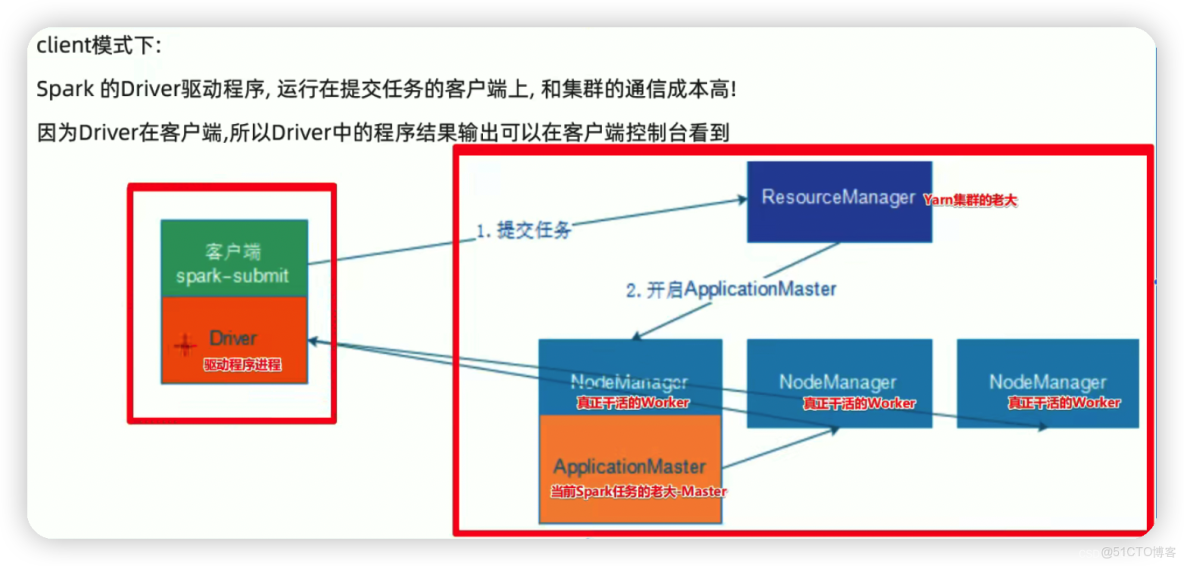

➜  /Users/zhaoshuai11/work/spark-3.0.1-bin-hadoop2.7/bin spark-submit --class org.apache.spark.examples.SparkPi --master yarn --deploy-mode client --executor-memory 512M --num-executors 2 /Users/zhaoshuai11/work/spark-3.0.1-bin-hadoop2.7/examples/jars/spark-examples_2.12-3.0.1.jar 100

22/07/31 08:38:47 WARN Utils: Your hostname, localhost resolves to a loopback address: 127.0.0.1; using 192.168.199.241 instead (on interface en0)
22/07/31 08:38:47 WARN Utils: Set SPARK_LOCAL_IP if you need to bind to another address
22/07/31 08:38:48 WARN NativeCodeLoader: Unable to load native-hadoop library for your platform... using builtin-java classes where applicable
Pi is roughly 3.1413315141331513
➜  /Users/zhaoshuai11/work/spark-3.0.1-bin-hadoop2.7/bin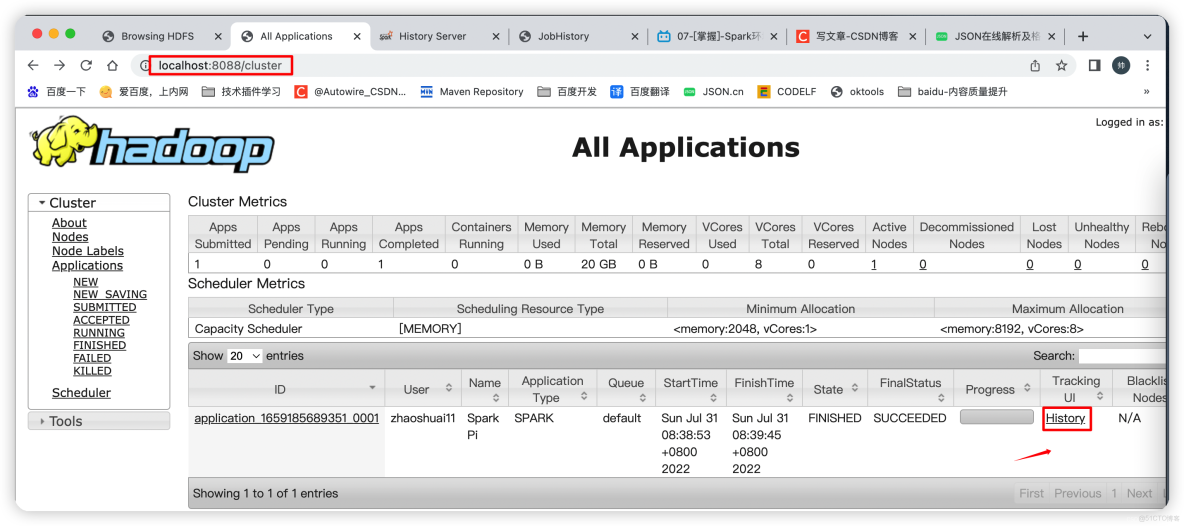
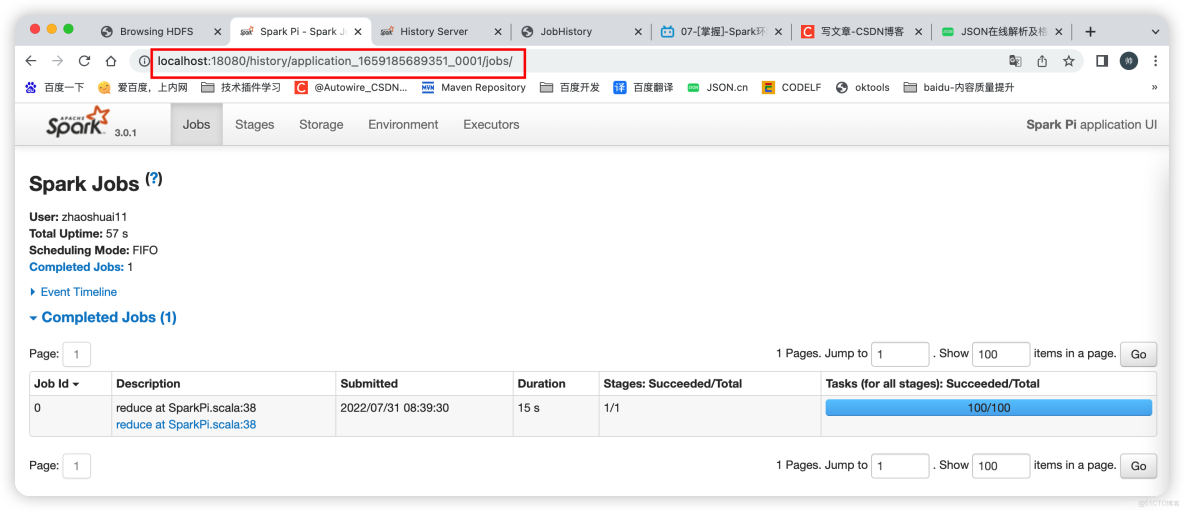
➜  /Users/zhaoshuai11/work/spark-3.0.1-bin-hadoop2.7/bin spark-submit --class org.apache.spark.examples.SparkPi --master yarn --deploy-mode cluster --executor-memory 512M --num-executors 2 /Users/zhaoshuai11/work/spark-3.0.1-bin-hadoop2.7/examples/jars/spark-examples_2.12-3.0.1.jar 100
22/07/31 08:43:46 WARN Utils: Your hostname, localhost resolves to a loopback address: 127.0.0.1; using 192.168.199.241 instead (on interface en0)
22/07/31 08:43:46 WARN Utils: Set SPARK_LOCAL_IP if you need to bind to another address
22/07/31 08:43:47 WARN NativeCodeLoader: Unable to load native-hadoop library for your platform... using builtin-java classes where applicable
➜  /Users/zhaoshuai11/work/spark-3.0.1-bin-hadoop2.7/bin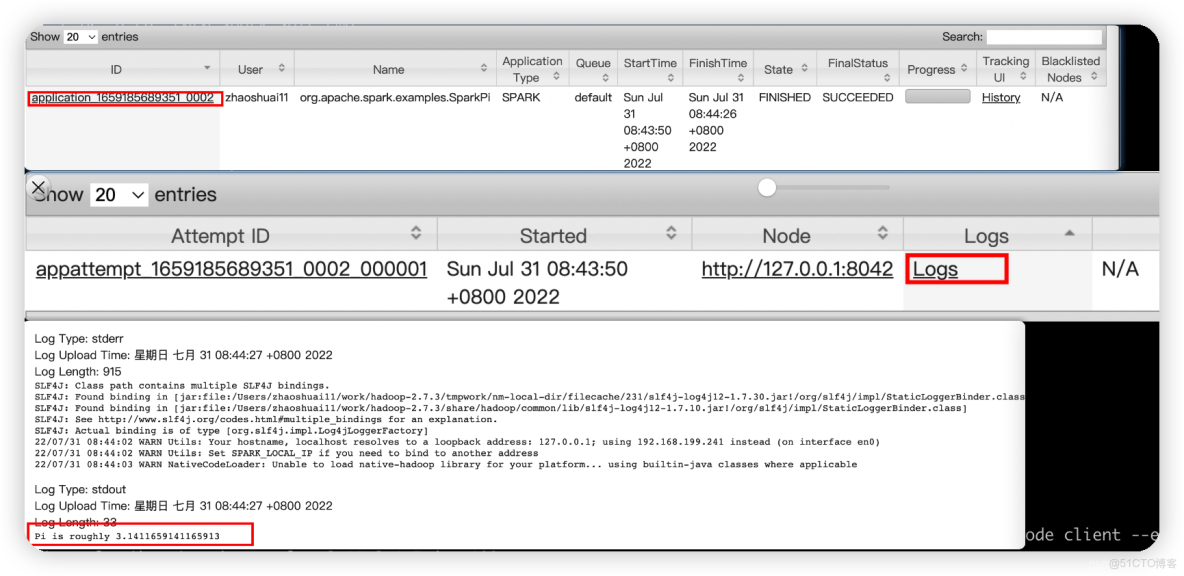
3 spark-shell && spark-submit
spark-shell: spark應用交互式窗口,啓動後可以直接編寫spark代碼,即時運行,一般在學習測試時使用
spark-submit: 用來將spark任務/程序的jar包提交到spark集羣(一般都是提交到Yarn集羣)
–master 【參數如下】:
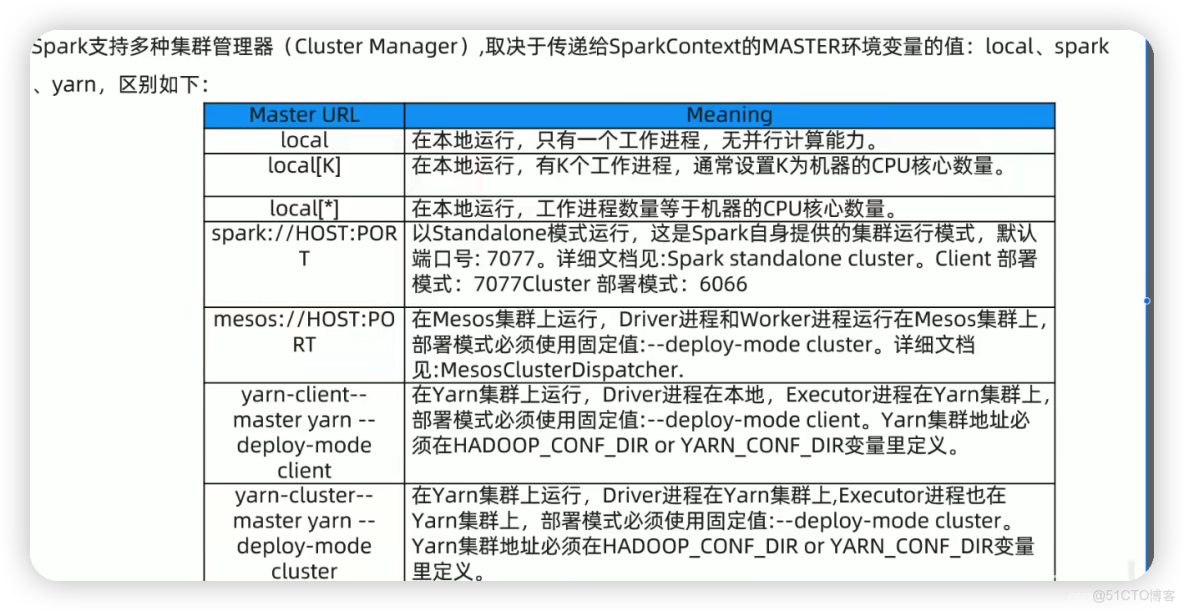
➜  /Users/zhaoshuai11/work/spark-3.0.1-bin-hadoop2.7/bin ./spark-shell --help
Usage: ./bin/spark-shell [options]

Scala REPL options:
  -I <file>                   preload <file>, enforcing line-by-line interpretation

Options:
  --master MASTER_URL         spark://host:port, mesos://host:port, yarn,
                              k8s://https://host:port, or local (Default: local[*]).
  --deploy-mode DEPLOY_MODE   Whether to launch the driver program locally ("client") or
                              on one of the worker machines inside the cluster ("cluster")
                              (Default: client).
  --class CLASS_NAME          Your application's main class (for Java / Scala apps).
  --name NAME                 A name of your application.
  --jars JARS                 Comma-separated list of jars to include on the driver
                              and executor classpaths.
  --packages                  Comma-separated list of maven coordinates of jars to include
                              on the driver and executor classpaths. Will search the local
                              maven repo, then maven central and any additional remote
                              repositories given by --repositories. The format for the
                              coordinates should be groupId:artifactId:version.
  --exclude-packages          Comma-separated list of groupId:artifactId, to exclude while
                              resolving the dependencies provided in --packages to avoid
                              dependency conflicts.
  --repositories              Comma-separated list of additional remote repositories to
                              search for the maven coordinates given with --packages.
  --py-files PY_FILES         Comma-separated list of .zip, .egg, or .py files to place
                              on the PYTHONPATH for Python apps.
  --files FILES               Comma-separated list of files to be placed in the working
                              directory of each executor. File paths of these files
                              in executors can be accessed via SparkFiles.get(fileName).

  --conf, -c PROP=VALUE       Arbitrary Spark configuration property.
  --properties-file FILE      Path to a file from which to load extra properties. If not
                              specified, this will look for conf/spark-defaults.conf.

  --driver-memory MEM         Memory for driver (e.g. 1000M, 2G) (Default: 1024M).
  --driver-java-options       Extra Java options to pass to the driver.
  --driver-library-path       Extra library path entries to pass to the driver.
  --driver-class-path         Extra class path entries to pass to the driver. Note that
                              jars added with --jars are automatically included in the
                              classpath.

  --executor-memory MEM       Memory per executor (e.g. 1000M, 2G) (Default: 1G).

  --proxy-user NAME           User to impersonate when submitting the application.
                              This argument does not work with --principal / --keytab.

  --help, -h                  Show this help message and exit.
  --verbose, -v               Print additional debug output.
  --version,                  Print the version of current Spark.

 Cluster deploy mode only:
  --driver-cores NUM          Number of cores used by the driver, only in cluster mode
                              (Default: 1).

 Spark standalone or Mesos with cluster deploy mode only:
  --supervise                 If given, restarts the driver on failure.

 Spark standalone, Mesos or K8s with cluster deploy mode only:
  --kill SUBMISSION_ID        If given, kills the driver specified.
  --status SUBMISSION_ID      If given, requests the status of the driver specified.

 Spark standalone, Mesos and Kubernetes only:
  --total-executor-cores NUM  Total cores for all executors.

 Spark standalone, YARN and Kubernetes only:
  --executor-cores NUM        Number of cores used by each executor. (Default: 1 in
                              YARN and K8S modes, or all available cores on the worker
                              in standalone mode).

 Spark on YARN and Kubernetes only:
  --num-executors NUM         Number of executors to launch (Default: 2).
                              If dynamic allocation is enabled, the initial number of
                              executors will be at least NUM.
  --principal PRINCIPAL       Principal to be used to login to KDC.
  --keytab KEYTAB             The full path to the file that contains the keytab for the
                              principal specified above.

 Spark on YARN only:
  --queue QUEUE_NAME          The YARN queue to submit to (Default: "default").
  --archives ARCHIVES         Comma separated list of archives to be extracted into the
                              working directory of each executor.
➜ /Users/zhaoshuai11/work/spark-3.0.1-bin-hadoop2.7/bin ./spark-submit --help
Usage: spark-submit [options] <app jar | python file | R file> [app arguments]
Usage: spark-submit --kill [submission ID] --master [spark://...]
Usage: spark-submit --status [submission ID] --master [spark://...]
Usage: spark-submit run-example [options] example-class [example args]
Options:
--master MASTER_URL spark://host:port, mesos://host:port, yarn,
k8s://https://host:port, or local (Default: local[*]).
--deploy-mode DEPLOY_MODE Whether to launch the driver program locally ("client") or
on one of the worker machines inside the cluster ("cluster")
(Default: client).
--class CLASS_NAME Your application's main class (for Java / Scala apps).
--name NAME A name of your application.
--jars JARS Comma-separated list of jars to include on the driver
and executor classpaths.
--packages Comma-separated list of maven coordinates of jars to include
on the driver and executor classpaths. Will search the local
maven repo, then maven central and any additional remote
repositories given by --repositories. The format for the
coordinates should be groupId:artifactId:version.
--exclude-packages Comma-separated list of groupId:artifactId, to exclude while
resolving the dependencies provided in --packages to avoid
dependency conflicts.
--repositories Comma-separated list of additional remote repositories to
search for the maven coordinates given with --packages.
--py-files PY_FILES Comma-separated list of .zip, .egg, or .py files to place
on the PYTHONPATH for Python apps.
--files FILES Comma-separated list of files to be placed in the working
directory of each executor. File paths of these files
in executors can be accessed via SparkFiles.get(fileName).
--conf, -c PROP=VALUE Arbitrary Spark configuration property.
--properties-file FILE Path to a file from which to load extra properties. If not
specified, this will look for conf/spark-defaults.conf.
--driver-memory MEM Memory for driver (e.g. 1000M, 2G) (Default: 1024M).
--driver-java-options Extra Java options to pass to the driver.
--driver-library-path Extra library path entries to pass to the driver.
--driver-class-path Extra class path entries to pass to the driver. Note that
jars added with --jars are automatically included in the
classpath.
--executor-memory MEM Memory per executor (e.g. 1000M, 2G) (Default: 1G).
--proxy-user NAME User to impersonate when submitting the application.
This argument does not work with --principal / --keytab.
--help, -h Show this help message and exit.
--verbose, -v Print additional debug output.
--version, Print the version of current Spark.
Cluster deploy mode only:
--driver-cores NUM Number of cores used by the driver, only in cluster mode
(Default: 1).
Spark standalone or Mesos with cluster deploy mode only:
--supervise If given, restarts the driver on failure.
Spark standalone, Mesos or K8s with cluster deploy mode only:
--kill SUBMISSION_ID If given, kills the driver specified.
--status SUBMISSION_ID If given, requests the status of the driver specified.
Spark standalone, Mesos and Kubernetes only:
--total-executor-cores NUM Total cores for all executors.
Spark standalone, YARN and Kubernetes only:
--executor-cores NUM Number of cores used by each executor. (Default: 1 in
YARN and K8S modes, or all available cores on the worker
in standalone mode).
Spark on YARN and Kubernetes only:
--num-executors NUM Number of executors to launch (Default: 2).
If dynamic allocation is enabled, the initial number of
executors will be at least NUM.
--principal PRINCIPAL Principal to be used to login to KDC.
--keytab KEYTAB The full path to the file that contains the keytab for the
principal specified above.
Spark on YARN only:
--queue QUEUE_NAME The YARN queue to submit to (Default: "default").
--archives ARCHIVES Comma separated list of archives to be extracted into the
working directory of each executor.4 spark 程序開發案例
http://localhost:50070/explorer.html#/ http://localhost:8088/cluster/
http://localhost:18080/
http://localhost:19888/jobhistory
spark-submit \
--class com.baidu.sparkcodetest.wordCount \
--master yarn \
--deploy-mode cluster \
--executor-memory 512M \
--num-executors 2  \
/Users/zhaoshuai11/work/spark-3.0.1-bin-hadoop2.7/myJars/wordcount.jar \
hdfs://localhost:8020/itcast/hello.txt \
hdfs://localhost:8020/itcast/wordcount/output_1
<?xml version="1.0" encoding="UTF-8"?>
<project xmlns="http://maven.apache.org/POM/4.0.0"
xmlns:xsi="http://www.w3.org/2001/XMLSchema-instance"
xsi:schemaLocation="http://maven.apache.org/POM/4.0.0 http://maven.apache.org/xsd/maven-4.0.0.xsd">
<modelVersion>4.0.0</modelVersion>
<groupId>com.baidu.cpd</groupId>
<artifactId>stu-scala</artifactId>
<version>1.0-SNAPSHOT</version>
<properties>
<maven.compiler.source>8</maven.compiler.source>
<maven.compiler.target>8</maven.compiler.target>
</properties>
<dependencies>
<dependency>
<groupId>mysql</groupId>
<artifactId>mysql-connector-java</artifactId>
<version>8.0.22</version>
</dependency>
<!-- https://mvnrepository.com/artifact/org.scala-lang/scala-library -->
<dependency>
<groupId>org.scala-lang</groupId>
<artifactId>scala-library</artifactId>
<version>2.12.14</version>
</dependency>
<!-- https://mvnrepository.com/artifact/org.apache.spark/spark-core -->
<dependency>
<groupId>org.apache.spark</groupId>
<artifactId>spark-core_2.12</artifactId>
<version>3.0.1</version>
</dependency>
<!-- https://mvnrepository.com/artifact/org.apache.spark/spark-streaming -->
<dependency>
<groupId>org.apache.spark</groupId>
<artifactId>spark-streaming_2.12</artifactId>
<version>3.0.1</version>
</dependency>
<!-- https://mvnrepository.com/artifact/org.apache.spark/spark-sql -->
<dependency>
<groupId>org.apache.spark</groupId>
<artifactId>spark-sql_2.12</artifactId>
<version>3.0.1</version>
</dependency>
<!-- https://mvnrepository.com/artifact/org.apache.spark/spark-hive -->
<dependency>
<groupId>org.apache.spark</groupId>
<artifactId>spark-hive_2.12</artifactId>
<version>3.0.1</version>
</dependency>
<!-- https://mvnrepository.com/artifact/org.apache.spark/spark-hive-thriftserver -->
<dependency>
<groupId>org.apache.spark</groupId>
<artifactId>spark-hive-thriftserver_2.12</artifactId>
<version>3.0.1</version>
</dependency>
<!-- https://mvnrepository.com/artifact/org.apache.spark/spark-streaming-kafka-0-10 -->
<dependency>
<groupId>org.apache.spark</groupId>
<artifactId>spark-streaming-kafka-0-10_2.12</artifactId>
<version>3.0.1</version>
</dependency>
<!-- https://mvnrepository.com/artifact/org.apache.spark/spark-sql-kafka-0-10 -->
<dependency>
<groupId>org.apache.spark</groupId>
<artifactId>spark-sql-kafka-0-10_2.12</artifactId>
<version>3.0.1</version>
</dependency>
<!-- https://mvnrepository.com/artifact/org.apache.hadoop/hadoop-client -->
<dependency>
<groupId>org.apache.hadoop</groupId>
<artifactId>hadoop-client</artifactId>
<version>2.7.3</version>
</dependency>
<!-- https://mvnrepository.com/artifact/org.apache.spark/spark-mllib -->
<dependency>
<groupId>org.apache.spark</groupId>
<artifactId>spark-mllib_2.12</artifactId>
<version>3.0.1</version>
</dependency>
<!-- https://mvnrepository.com/artifact/com.hankcs/hanlp -->
<dependency>
<groupId>com.hankcs</groupId>
<artifactId>hanlp</artifactId>
<version>portable-1.7.7</version>
</dependency>
<!-- https://mvnrepository.com/artifact/com.alibaba/fastjson -->
<dependency>
<groupId>com.alibaba</groupId>
<artifactId>fastjson</artifactId>
<version>1.2.47</version>
</dependency>
<!-- https://mvnrepository.com/artifact/org.projectlombok/lombok -->
<dependency>
<groupId>org.projectlombok</groupId>
<artifactId>lombok</artifactId>
<version>1.18.22</version>
</dependency>
</dependencies>
<build>
<sourceDirectory>src/main/java</sourceDirectory>
<testSourceDirectory>src/test/java</testSourceDirectory>
<extensions>
<extension>
<groupId>kr.motd.maven</groupId>
<artifactId>os-maven-plugin</artifactId><!--引入操作系統os設置的屬性插件,否則${os.detected.classifier} 操作系統版本會找不到 -->
<version>1.5.0.Final</version>
</extension>
</extensions>
<plugins>
<plugin>
<!-- see http://davidb.github.com/scala-maven-plugin -->
<groupId>net.alchim31.maven</groupId>
<artifactId>scala-maven-plugin</artifactId>
<version>3.3.1</version>
<executions>
<execution>
<id>scala-compile-first</id>
<phase>process-resources</phase>
<goals>
<goal>add-source</goal>
<goal>compile</goal>
</goals>
</execution>
<execution>
<phase>compile</phase>
<goals>
<goal>compile</goal>
<goal>testCompile</goal>
</goals>
<configuration>
<args>
<!--<arg>-make:transitive</arg>-->
<arg>-dependencyfile</arg>
<arg>${project.build.directory}/.scala_dependencies</arg>
</args>
</configuration>
</execution>
</executions>
<configuration>
<scalaVersion>2.12.14</scalaVersion>
</configuration>
</plugin>
<plugin>
<groupId>org.apache.maven.plugins</groupId>
<artifactId>maven-surefire-plugin</artifactId>
<version>2.18.1</version>
<configuration>
<useFile>false</useFile>
<disableXmlReport>true</disableXmlReport>
<!-- If you have classpath issue like NoDefClassError,... -->
<!-- useManifestOnlyJar>false</useManifestOnlyJar -->
<includes>
<include>**/*Test.*</include>
<include>**/*Suite.*</include>
</includes>
</configuration>
</plugin>
<plugin>
<groupId>org.apache.maven.plugins</groupId>
<artifactId>maven-compiler-plugin</artifactId>
<configuration>
<source>8</source>
<target>8</target>
<encoding>UTF8</encoding>
</configuration>
</plugin>
<plugin>
<groupId>org.apache.maven.plugins</groupId>
<artifactId>maven-assembly-plugin</artifactId>
<version>2.6</version>
<configuration>
<!-- package with project dependencies -->
<descriptorRefs>
<descriptorRef>jar-with-dependencies</descriptorRef>
</descriptorRefs>
</configuration>
<executions>
<execution>
<id>make-assembly</id>
<phase>package</phase>
<goals>
<goal>single</goal>
</goals>
</execution>
</executions>
</plugin>
</plugins>
</build>
</project>package com.baidu.sparkcodetest
import org.apache.spark.rdd.RDD
import org.apache.spark.{SparkConf, SparkContext}
object wordCount {
def main(args: Array[String]): Unit = {
if (args.length < 2) {
println("請指定input & output")
System.exit(1) // 非0 - 非正常退出
}
// 1 準備sc-SparkContext上下文執行環境
val sc = new SparkContext(new SparkConf().setAppName("wordCount"))
// 2 source 讀取數據
val lines: RDD[String] = sc.textFile(args(0))
// 3 業務處理
val words = lines.flatMap(_.split(" "))
val wordAndOnes: RDD[(String, Int)] = words.map((_, 1))
val result: RDD[(String, Int)] = wordAndOnes.reduceByKey(_ + _)
// 4 輸出文件
System.setProperty("HADOOP_USER_NAME", "root")
result.repartition(1).saveAsTextFile(args(1))
sc.stop()
}
}
本文章為轉載內容,我們尊重原作者對文章享有的著作權。如有內容錯誤或侵權問題,歡迎原作者聯繫我們進行內容更正或刪除文章。
