
在前後端分離的項目中,前端使用AbortController取消請求,實際上只是前端的fetch或XMLHttpRequest請求被取消,而後端的任務並不會自動停止。這是因為HTTP協議本身沒有提供從客户端取消服務器端操作的機制。
在Vue3+TypeScript+Spring Boot項目中實現前端取消請求後後端也停止執行任務,需要通過前後端協作來實現。以下是完整的解決方案:
1. 前端實現 (Vue3 + TypeScript)
創建請求工具類
typescript
// utils/request.ts
import axios, { AxiosRequestConfig } from 'axios';

// 存儲所有請求的AbortController
const pendingRequests = new Map<string, AbortController>();

// 生成請求key
function generateReqKey(config: AxiosRequestConfig): string {
  const { method, url, params, data } = config;
  return [method, url, JSON.stringify(params), JSON.stringify(data)].join('&');
}

// 添加請求到pending列表
function addPendingRequest(config: AxiosRequestConfig) {
  const requestKey = generateReqKey(config);
  const controller = new AbortController();
  config.signal = controller.signal;
  pendingRequests.set(requestKey, controller);
}

// 移除請求
function removePendingRequest(config: AxiosRequestConfig) {
  const requestKey = generateReqKey(config);
  if (pendingRequests.has(requestKey)) {
    pendingRequests.delete(requestKey);
  }
}

// 取消請求
export function cancelRequest(config: AxiosRequestConfig) {
  const requestKey = generateReqKey(config);
  if (pendingRequests.has(requestKey)) {
    const controller = pendingRequests.get(requestKey);
    controller?.abort();
    pendingRequests.delete(requestKey);
  }
}

// 取消所有請求
export function cancelAllRequests() {
  pendingRequests.forEach(controller => {
    controller.abort();
  });
  pendingRequests.clear();
}

// 創建axios實例
const request = axios.create({
  baseURL: process.env.VUE_APP_BASE_API,
  timeout: 30000,
});

// 請求攔截器
request.interceptors.request.use(
  (config) => {
    removePendingRequest(config);
    addPendingRequest(config);

    // 添加請求ID,用於後端識別
    const requestId = generateRequestId();
    config.headers['X-Request-ID'] = requestId;

    return config;
  },
  (error) => {
    return Promise.reject(error);
  }
);

// 響應攔截器
request.interceptors.response.use(
  (response) => {
    removePendingRequest(response.config);
    return response;
  },
  (error) => {
    removePendingRequest(error.config);
    return Promise.reject(error);
  }
);

// 生成唯一請求ID
function generateRequestId(): string {
  return `${Date.now()}-${Math.random().toString(36).substr(2, 9)}`;
}

export default request;
在組件中使用
vue
<template>
  <div>
    <button @click="fetchData">獲取數據</button>
    <button @click="cancelFetch">取消請求</button>
    <div>{{ data }}</div>
  </div>
</template>

<script setup lang="ts">
import { ref } from 'vue';
import request, { cancelRequest } from '@/utils/request';

const data = ref<any>(null);
let currentRequestConfig: any = null;

const fetchData = async () => {
  try {
    const config = {
      method: 'GET',
      url: '/api/long-running-task',
      params: { taskType: 'export' }
    };

    currentRequestConfig = config;

    const response = await request(config);
    data.value = response.data;
  } catch (error: any) {
    if (error.name === 'CanceledError') {
      console.log('請求已被取消');
    } else {
      console.error('請求錯誤:', error);
    }
  }
};

const cancelFetch = () => {
  if (currentRequestConfig) {
    cancelRequest(currentRequestConfig);
    console.log('已發送取消請求');
  }
};
</script>
2. 後端實現 (Spring Boot)
創建請求上下文管理
java
// service/RequestContextService.java
@Service
public class RequestContextService {

    private final Map<String, AtomicBoolean> cancelFlags = new ConcurrentHashMap<>();
    private final Map<String, Thread> requestThreads = new ConcurrentHashMap<>();

    public void registerRequest(String requestId) {
        cancelFlags.put(requestId, new AtomicBoolean(false));
        requestThreads.put(requestId, Thread.currentThread());
    }

    public boolean isCancelled(String requestId) {
        AtomicBoolean flag = cancelFlags.get(requestId);
        return flag != null && flag.get();
    }

    public void cancelRequest(String requestId) {
        AtomicBoolean flag = cancelFlags.get(requestId);
        if (flag != null) {
            flag.set(true);

            // 中斷線程
            Thread thread = requestThreads.get(requestId);
            if (thread != null && thread.isAlive()) {
                thread.interrupt();
            }
        }
    }

    public void completeRequest(String requestId) {
        cancelFlags.remove(requestId);
        requestThreads.remove(requestId);
    }

    public void checkCancellation(String requestId) {
        if (isCancelled(requestId)) {
            throw new RequestCancelledException("請求已被用户取消");
        }
    }
}
自定義異常
java
// exception/RequestCancelledException.java
public class RequestCancelledException extends RuntimeException {
    public RequestCancelledException(String message) {
        super(message);
    }
}
創建控制器
java
// controller/TaskController.java
@RestController
@RequestMapping("/api")
public class TaskController {

    @Autowired
    private RequestContextService requestContextService;

    @Autowired
    private TaskService taskService;

    @GetMapping("/long-running-task")
    public ResponseEntity<?> executeLongRunningTask(
            @RequestParam String taskType,
            HttpServletRequest request) {

        String requestId = request.getHeader("X-Request-ID");
        if (requestId == null) {
            return ResponseEntity.badRequest().body("缺少請求ID");
        }

        try {
            requestContextService.registerRequest(requestId);

            // 執行長時間運行的任務
            String result = taskService.executeTask(taskType, requestId);

            return ResponseEntity.ok(result);

        } catch (RequestCancelledException e) {
            return ResponseEntity.status(499).body("請求已被取消"); // 499: Client Closed Request
        } catch (InterruptedException e) {
            Thread.currentThread().interrupt();
            return ResponseEntity.status(499).body("請求已被取消");
        } catch (Exception e) {
            return ResponseEntity.internalServerError().body("任務執行失敗: " + e.getMessage());
        } finally {
            requestContextService.completeRequest(requestId);
        }
    }

    @PostMapping("/cancel-task")
    public ResponseEntity<?> cancelTask(@RequestHeader("X-Request-ID") String requestId) {
        try {
            requestContextService.cancelRequest(requestId);
            return ResponseEntity.ok("取消請求已發送");
        } catch (Exception e) {
            return ResponseEntity.badRequest().body("取消請求失敗: " + e.getMessage());
        }
    }
}
任務服務
java
// service/TaskService.java
@Service
public class TaskService {

    @Autowired
    private RequestContextService requestContextService;

    public String executeTask(String taskType, String requestId) throws InterruptedException {

        // 模擬長時間運行的任務
        for (int i = 0; i < 100; i++) {
            // 檢查是否被取消
            requestContextService.checkCancellation(requestId);

            // 模擬工作
            Thread.sleep(1000);
            System.out.println("任務進度: " + i + "%");

            // 如果是可中斷的操作,定期檢查中斷狀態
            if (Thread.currentThread().isInterrupted()) {
                throw new InterruptedException("任務被中斷");
            }
        }

        return "任務完成: " + taskType;
    }
}
全局異常處理
java
// config/GlobalExceptionHandler.java
@ControllerAdvice
public class GlobalExceptionHandler {

    @ExceptionHandler(RequestCancelledException.class)
    public ResponseEntity<?> handleRequestCancelled(RequestCancelledException e) {
        return ResponseEntity.status(499).body(e.getMessage());
    }

    @ExceptionHandler(InterruptedException.class)
    public ResponseEntity<?> handleInterrupted(InterruptedException e) {
        Thread.currentThread().interrupt();
        return ResponseEntity.status(499).body("請求已被取消");
    }
}
3. 高級實現 - 使用DeferredResult
對於更復雜的場景,可以使用Spring的DeferredResult:
java
// controller/AsyncTaskController.java
@RestController
@RequestMapping("/api/async")
public class AsyncTaskController {

    @Autowired
    private TaskExecutionService taskExecutionService;

    private final Map<String, DeferredResult<ResponseEntity<?>>> deferredResults = new ConcurrentHashMap<>();

    @GetMapping("/task")
    public DeferredResult<ResponseEntity<?>> executeAsyncTask(
            @RequestParam String taskType,
            HttpServletRequest request) {

        String requestId = request.getHeader("X-Request-ID");
        DeferredResult<ResponseEntity<?>> deferredResult = new DeferredResult<>(30000L);

        deferredResults.put(requestId, deferredResult);

        // 在超時或錯誤時清理
        deferredResult.onTimeout(() -> {
            deferredResults.remove(requestId);
            deferredResult.setResult(ResponseEntity.status(408).body("請求超時"));
        });

        deferredResult.onError((throwable) -> {
            deferredResults.remove(requestId);
        });

        deferredResult.onCompletion(() -> {
            deferredResults.remove(requestId);
        });

        // 異步執行任務
        CompletableFuture.runAsync(() -> {
            try {
                String result = taskExecutionService.executeTask(taskType, requestId);
                deferredResult.setResult(ResponseEntity.ok(result));
            } catch (Exception e) {
                deferredResult.setResult(ResponseEntity.internalServerError().body(e.getMessage()));
            }
        });

        return deferredResult;
    }

    @PostMapping("/cancel")
    public ResponseEntity<?> cancelAsyncTask(@RequestHeader("X-Request-ID") String requestId) {
        DeferredResult<ResponseEntity<?>> deferredResult = deferredResults.get(requestId);
        if (deferredResult != null) {
            deferredResult.setResult(ResponseEntity.status(499).body("請求已被取消"));
            return ResponseEntity.ok("任務已取消");
        }
        return ResponseEntity.badRequest().body("未找到對應任務");
    }
}
4. 使用説明
- 前端發送請求時會自動添加唯一請求ID
- 需要取消時調用
cancelRequest方法 - 後端任務執行過程中定期檢查取消狀態
- 支持線程中斷和自定義取消邏輯
5. 應用實例
技術原理:
前端
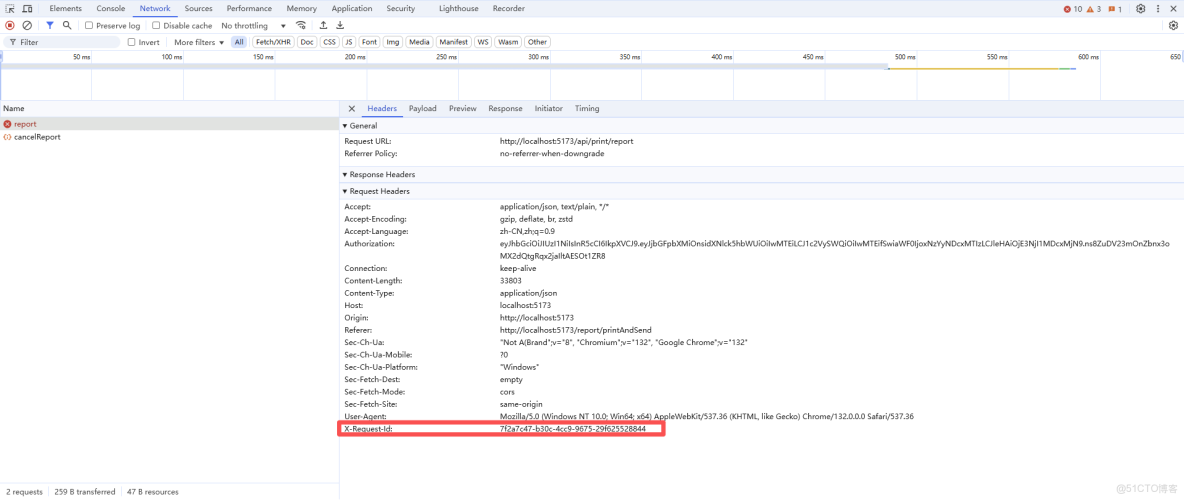
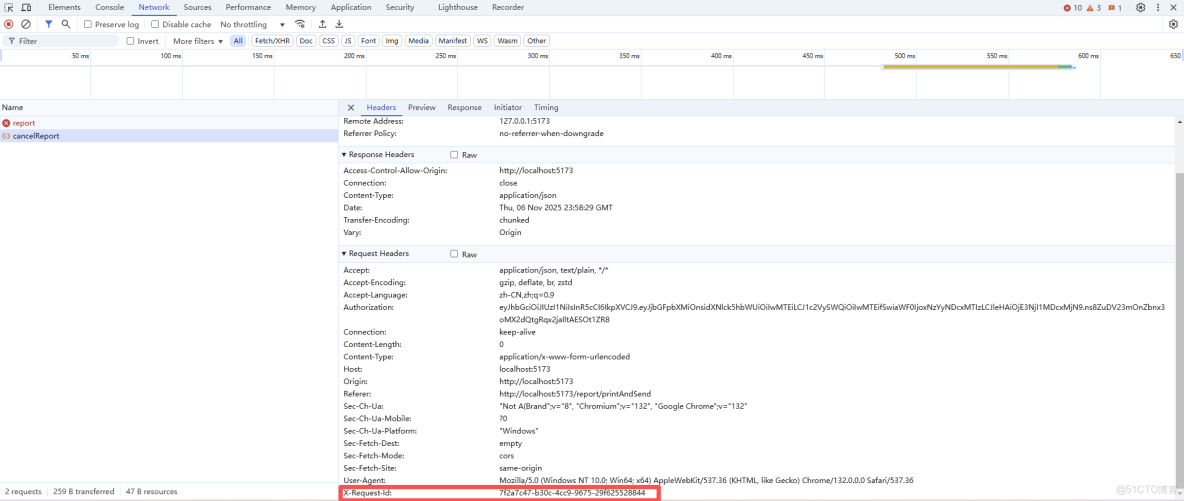
- 兩次請求攜帶相同的請求唯一id:前端發送兩次請求,請求頭的擴展屬性(X-Requst-Id)都帶上相同的請求唯一id。
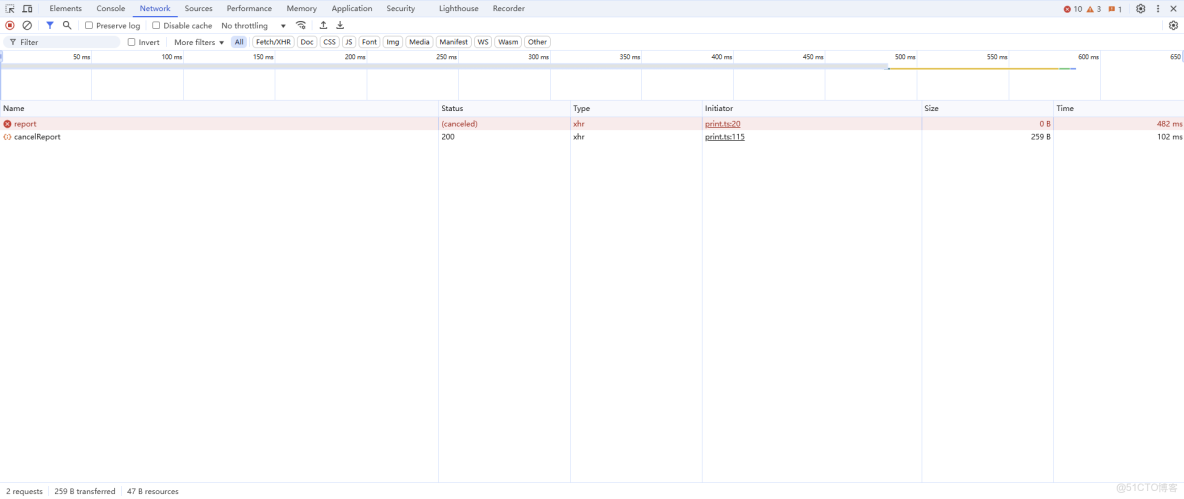
- 取消打印的時機:點擊【打印】彈出抽屜發送請求開始加載數據,數據尚未加載完成,關閉抽屜發送請求取消打印,如果數據加載完成則跳過不需要額外處理。
- 取消打印:controller?.abort() 用於打印請求不再接收響應 + 發送取消打印請求,用於通過後端中斷獲取數據的任務。、
後端
請求上下文服務實現
- 後端存儲管理兩個Map映射:請求唯一id + 取消標識,請求唯一id + 線程(Thread.currentThread())
- 取消請求,通過請求唯一id在Map中查找,查找到就中斷打印請求線程
控制層 Controller
- 接收打印請求時,Map增加記錄,執行獲取打印數據的任務,最終Map刪除記錄
- 接收取消請求時,取消請求
服務實現層 ServiceImpl
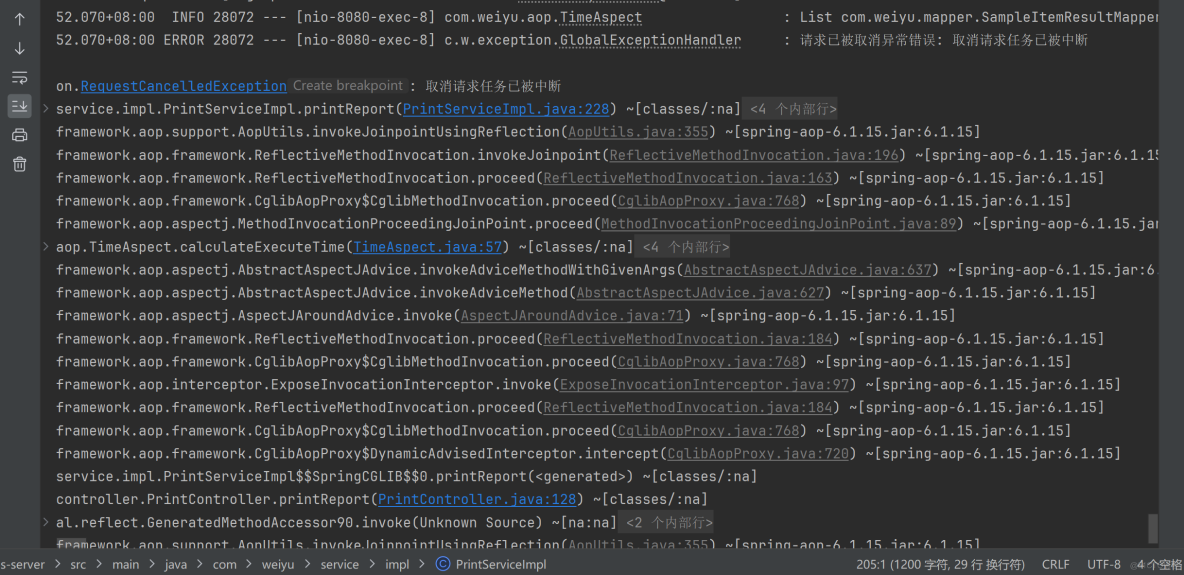
- 在獲取打印數據的任務中,每次循環都檢查打印請求是否被取消,已被取消則拋出異常中斷返回;檢查當前線程是否被中斷,已被中斷則拋出異常中斷返回;
前端
PrintDrawer.vue
<script setup lang="ts">
/**
 * 打印抽屜
 *
 * 使用示例:
 * <PrintDrawer :show-print-drawer="printDrawerVisible" print-type="ckd" :print-selection="printData" is-print-data @close-print-drawer="closePrintDrawer" />
 */
defineOptions({
  name: "PrintDrawer"
});
import { printCancelService, printService } from "@/api/print";
import PrintContainer from "@/components/PrintContainer.vue";
import { v4 as uuidv4 } from "uuid";
import { computed, nextTick, provide, ref, watch } from "vue";

interface Props {
  /**
   * 打印抽屜顯隱
   */
  showPrintDrawer: boolean;
  /**
   * 打印類型,如:report,testReport,wspjReport,cover,sample,accept,jjd,record,other
   */
  printType: string;
  /**
   * 打印模板
   */
  printTemplate?: string;
  /**
   * 打印方向,縱向 portrait(默認)、橫向 landscape
   */
  printDirection?: string;
  /**
   * 打印選集
   */
  printSelection: any[];
  /**
   * 是否打印數據
   */
  isPrintData?: boolean;
  /**
   * 類型
   */
  type?: string;
}
const props = withDefaults(defineProps<Props>(), {
  showPrintDrawer: false,
  printType: "",
  printTemplate: "",
  printDirection: "portrait",
  printSelection: () => [],
  isPrintData: false,
  type: "print"
});

interface Emits {
  /**
   * 關閉打印抽屜的回調
   */
  (e: "close-print-drawer"): void;
}
const emit = defineEmits<Emits>();

// 抽屜顯示標識
const drawerVisible = ref(false);
// 打印標識
const printFlag = ref(false);
// 打印按鈕禁用標識
const buttonPrintDisabled = ref(true);
// 進度值
const progressValue = ref(0);
// 打印數據,這裏使用泛型數組 any[] ,可以靈活接收後端返回的各類打印數據,進行批量打印,從而實現打印組件通用
const printData = ref<any[]>([]);
// 先定義響應式數據,用於接收父組件傳遞過來的數據,再向後代組件傳遞數據,這樣就會保持響應式
// 打印類型
const printType = ref("");
// 打印模板
const printTemplate = ref("");
// 打印方向
const printDirection = ref("");
// 打印類名
const printClassName = ref("");
// 打印按鈕的寬度(也是打印頁面的寬度),
// 縱向打印的寬度為 210mm(793.698px)
// 橫向打印的寬度為 297mm(1122.520px)
const printBtnWidth = computed(() => {
  return props.printDirection === "landscape" ? "1122.520px" : "793.698px";
});
// 抽屜尺寸大小
// 縱向打印抽屜尺寸大小為 210mm(793.698px) + 18(0左邊距 + 0右邊距 + 18右邊滾動條的寬度) = 811.698px
// 橫向打印抽屜尺寸大小為 297mm(1122.520px) + 18(0左邊距 + 0右邊距 + 18右邊滾動條的寬度)= 1140.520px
const drawerSize = computed(() => {
  return props.printDirection === "landscape" ? "1140.520px" : "811.698px";
});
// 創建請求控制器 AbortController,用於取消請求
let controller: AbortController | null = null;
// 請求唯一ID,用於發送請求讓後端取消獲取打印數據
const requestId = ref("");

// 通過 provide 向所有後代組件傳遞數據(數據、對象、方法),無需逐層傳遞,後代組件通過 inject 接收數據(數據、對象、方法)
// 提供打印類型
// 【注意:】,直接傳遞 props.printTemplate 會失去響應式,需要先定義響應式數據,用於接收父組件傳遞過來的數據,再向後代組件傳遞該定義的響應式數據
// provide("printType", props.printType);
provide("printType", printType);
// 提供打印模板
// 【注意:】,直接傳遞 props.printTemplate 會失去響應式,需要先定義響應式數據,用於接收父組件傳遞過來的數據,再向後代組件傳遞該定義的響應式數據
// provide("printTemplate", props.printTemplate);
provide("printTemplate", printTemplate);
// 提供打印方向
provide("printDirection", printDirection);
// 提供打印數據
// 【注意:printData 不帶.value】,這裏 printData 是由 ref 定義的,這裏需要提供的是該響應對象 printData,而 printData.value 是響應對象的值了
// provide("printData", printData.value);
provide("printData", printData);

// 監聽父組件傳遞過來的showDrawer值,控制抽屜的顯示與隱藏
watch(
  () => props.showPrintDrawer,
  async (value) => {
    // 接收父組件傳遞過來的showDrawer值
    drawerVisible.value = value;
    if (drawerVisible.value) {
      // 獲取父組件傳遞過來的打印類型 printType 和 打印模板 printTemplate 和 打印方向 printDirection
      printType.value = props.printType;
      printTemplate.value = props.printTemplate;
      // console.log("props.printDirection = ", props.printDirection);
      printDirection.value = props.printDirection ? props.printDirection : "portrait";
      if (printTemplate.value === "jjd-sample-item-list") {
        printDirection.value = "landscape";
      }
      printClassName.value = printType.value + " " + printDirection.value;
      // console.log("printClassName = ", printClassName.value);
      // 打印按鈕禁用
      buttonPrintDisabled.value = true;
      progressValue.value = 0;

      // 開啓進度條的定時器
      // 進度增加1%的時間與printSelection長度成正比,但確保最小是100毫秒
      const baseTime = 3; // 基礎時間(毫秒)
      const eachProgress = Math.max(100, baseTime * props.printSelection.length);
      const timerID = setInterval(() => {
        // 進度值從0開始遞增到95,每eachProgress毫秒增加1,當到95時停止,防止下面還沒有獲取到打印數據,進度條就顯示為100%,從而觸發隱藏起來,影響使用體驗。
        progressValue.value = progressValue.value < 95 ? progressValue.value + 1 : progressValue.value;
      }, eachProgress);

      // 獲取打印數據
      printData.value = [];
      // 父組件傳遞過來的 printSelection,如果就是打印數據,不需要處理,直接使用即可打印
      if (props.isPrintData) {
        printData.value = props.printSelection;
      }
      // 父組件傳遞過來的 printSelection,只是打印數據的前置條件,需要通過後端接口獲取打印數據(根據傳遞的參數不同,返回各種打印數據)
      // 再把各種打印數據傳遞給子組件打印容器 PrintContainer,再由打印容器 PrintContainer 調度各個打印模板進行渲染,完成打印
      else {
        // 為當前新請求創建新的控制器
        controller = new AbortController();
        requestId.value = uuidv4();
        const result = await printService(
          props.printType,
          props.printType === "report" ? requestId.value : props.printTemplate,
          props.printSelection,
          controller?.signal
        );
        printData.value = result.data;
      }

      // 清除定時器並設置進度值
      clearInterval(timerID);
      if (progressValue.value < 80) {
        progressValue.value = 80;
      }

      // 打印標識為true,開始渲染報告模板DOM
      printFlag.value = true;
      // 確保報告模板DOM渲染完成
      await nextTick();

      // 獲取數據完成,進度值設置為100,觸發隱藏進度條
      progressValue.value = 100;
      // 打印按鈕解除禁用
      buttonPrintDisabled.value = false;
    }
  },
  { immediate: true }
);

// 格式化進度顯示的內容
const progressFormat = (val: number) => {
  return `正在加載數據 ${val.toFixed(0)}%`;
};

// 關閉打印抽屜
const onClosePrintDrawerClick = () => {
  // 打印數據尚未獲取完成
  if (!printFlag.value) {
    // 取消打印
    cancelPrint(requestId.value);
  }

  // 通知父組件關閉打印抽屜
  emit("close-print-drawer");
  printFlag.value = false;
};

// 取消打印
const cancelPrint = (requestId: string) => {
  // 前端取消請求,取消後不會接收響應,避免資源佔用
  controller?.abort();
  // 後端取消執行請求任務
  printCancelService(requestId);
};

// 打印對象,vue3-print-nb,v-print="printObj"
const printObj = ref({
  id: "print-content",
  closeCallback() {
    // 關閉打印抽屜
    onClosePrintDrawerClick();
  }
});
</script>

<template>
  <div>
    <el-drawer v-model="drawerVisible" :with-header="true" :size="drawerSize" @close="onClosePrintDrawerClick">
      <div class="drawer-div">
        <el-button
          v-if="props.type === `print`"
          class="print-btn"
          type="primary"
          :disabled="buttonPrintDisabled"
          v-print="printObj"
          >打印</el-button
        >
        <el-button
          v-else
          class="print-btn"
          type="primary"
          :disabled="buttonPrintDisabled"
          @click="onClosePrintDrawerClick"
          >關閉</el-button
        >
        <el-progress
          v-show="progressValue !== 100"
          :text-inside="true"
          :stroke-width="20"
          :percentage="progressValue"
          status="success"
          :format="progressFormat">
        </el-progress>
      </div>
      <!-- 打印 -->
      <!-- 這裏的 class 是動態值 -->
      <div id="print-content" :class="printDirection">
        <!-- 這裏使用 :print-data="printData" 主要是為了驗證:父傳子 :print-data="printData" 和 祖先傳後代 provide("printData", printData); 這兩種數據傳遞方式可以共存 -->
        <PrintContainer :print-data="printData" v-if="printFlag" />
      </div>
    </el-drawer>
  </div>
</template>

<style scoped lang="scss">
// 抽屜頭部
:deep(.el-drawer__header) {
  margin-bottom: 0;
  padding: 0;
  height: 32px;
  // background-color: #ccc;
}
// 抽屜內容
:deep(.el-drawer__body) {
  padding: 0;
  // padding-top: 0;
  // background-color: #ccc;
}
// 抽屜關閉按鈕
:deep(.el-drawer__close-btn) {
  padding: 0;
}
.drawer-div {
  // 固定定位,固定在頂部
  position: fixed;
  // 與【瀏覽器可視區】頂部的垂直距離
  top: 0;
  .print-btn {
    width: v-bind("printBtnWidth");
  }
}

@media print {
  /* 打印通用樣式 */
  @page {
    margin: 10mm;
  }

  /* 設定打印方向 */
  /* 縱向打印 */
  /* 通過 CSS 的 命名頁面(Named Pages) 技術實現作用域隔離,實現 @page 樣式僅影響當前組件 */
  /* 這裏的 portrait 對應的是 <div id="print-content" :class="printClassName"> 的 class,是動態值 */
  .portrait {
    page: portrait-page; /* 綁定頁面名稱 */
  }
  /* 通過媒體樣式 @media print 的 @page 設置打印方向, @page portrait-page 這樣就不是影響全局了,而是指定的範圍 portrait-page */
  @page portrait-page {
    /* 僅影響綁定了portrait-page 的元素 */
    size: A4 portrait;
  }
  /* 橫向打印 */
  /* 通過 CSS 的 命名頁面(Named Pages) 技術實現作用域隔離,實現 @page 樣式僅影響當前組件 */
  /* 這裏的 landscape 對應的是 <div id="print-content" :class="printClassName"> 的 class,是動態值 */
  .landscape {
    page: landscape-page; /* 綁定頁面名稱 */
  }
  /* 通過媒體樣式 @media print 的 @page 設置打印方向, @page landscape-page 這樣就不是影響全局了,而是指定的範圍 landscape-page */
  @page landscape-page {
    /* 僅影響綁定了landscape-page 的元素 */
    size: A4 landscape;
  }
}
</style>
print.ts
import request from "@/utils/request";

/**
 * 打印服務,獲取打印數據
 * @param printType 打印類型
 * @param printTemplate 打印模板
 * @param printSelectionDTO 打印選集對象
 * @param signal 取消請求信號
 * @returns 打印數據
 */
export const printService = (
  printType: string,
  printTemplate: string,
  printSelectionDTO: any,
  signal?: AbortSignal
) => {
  switch (printType) {
    // 報告打印
    case "report":
      return request.post("/print/report", printSelectionDTO, {
        // 設置 signal 信號屬性,後續就可以通過 abort 取消請求
        signal: signal,
        headers: {
          "X-Request-Id": printTemplate
        }
      });
    // 其他打印
    default:
      return request.post("/print/other", printSelectionDTO, {
        params: {
          printTemplate: printTemplate
        },
        // 設置 signal 信號屬性,後續就可以通過 abort 取消請求
        signal: signal
      });
  }
};

/**
 * 取消打印服務,後端線程會取消工作任務
 * @param requestId 請求唯一id
 */
export const printCancelService = async (requestId: string) => {
  return request.post("/print/cancelReport", null, {
    headers: {
      "X-Request-Id": requestId
    }
  });
};
後端
RequestContextService.java
package com.weiyu.service;

/**
 * 請求上下文 Service 接口
 */
public interface RequestContextService {
    // 註冊請求
    void registerRequest(String requestId);

    // 取消請求
    void cancelRequest(String requestId);

    // 完成請求
    void completeRequest(String requestId);

    // 檢查是否已被取消
    void checkCancellation(String requestId);
}
RequestContextServiceImpl.java
package com.weiyu.service.impl;

import com.weiyu.exception.RequestCancelledException;
import com.weiyu.service.RequestContextService;
import org.springframework.stereotype.Service;

import java.util.Map;
import java.util.concurrent.ConcurrentHashMap;
import java.util.concurrent.atomic.AtomicBoolean;

/**
 * 請求上下文 Service 接口實現
 */
@Service
public class RequestContextServiceImpl implements RequestContextService {

    private final Map<String, AtomicBoolean> cancelFlags = new ConcurrentHashMap<>();
    private final Map<String, Thread> requestThreads = new ConcurrentHashMap<>();

    // 註冊請求
    @Override
    public void registerRequest(String requestId) {
        cancelFlags.put(requestId, new AtomicBoolean(false));
        requestThreads.put(requestId, Thread.currentThread());
    }

    // 取消請求
    @Override
    public void cancelRequest(String requestId) {
        // 通過請求唯一id獲取取消標識
        AtomicBoolean flag = cancelFlags.get(requestId);
        if (flag != null) {
            // 設置為已被取消
            flag.set(true);

            // 通過請求唯一id獲取線程
            Thread thread = requestThreads.get(requestId);
            if (thread != null && thread.isAlive()) {
                // 中斷線程
                thread.interrupt();
            }
        }
    }

    // 完成請求
    @Override
    public void completeRequest(String requestId) {
        cancelFlags.remove(requestId);
        requestThreads.remove(requestId);
    }

    // 檢查是否已被取消
    @Override
    public void checkCancellation(String requestId) {
        if (isCancelled(requestId)) {
            throw new RequestCancelledException("請求已被取消");
        }
    }

    // 判斷是否已經取消
    private boolean isCancelled(String requestId) {
        AtomicBoolean flag = cancelFlags.get(requestId);
        return flag != null && flag.get();
    }
}
RequestCancelledException.java
package com.weiyu.exception;

import lombok.Getter;

/**
 * 請求已被取消異常
 */
@Getter
public class RequestCancelledException extends RuntimeException {

    // 狀態碼
    private final int code;

    public RequestCancelledException(String message) {
        super(message);
        // 設置狀態碼為 499
        this.code = 499;
    }
}
GlobalExceptionHandler.java
package com.weiyu.exception;

import com.weiyu.pojo.Result;                   // 自定義的統一響應對象
import com.weiyu.utils.ErrorFileResponseUtils;  // 處理錯誤文件響應的工具類
import jakarta.servlet.http.HttpServletRequest; // 獲取HTTP請求信息
import lombok.extern.slf4j.Slf4j;               // Lombok日誌註解
import org.springframework.http.HttpStatus;     // HTTP狀態碼枚舉
import org.springframework.util.StringUtils;    // Spring字符串工具類
import org.springframework.web.bind.annotation.ExceptionHandler;        // 異常處理器註解
import org.springframework.web.bind.annotation.RestControllerAdvice;    // 控制器增強註解

/**
 * 全局異常處理器
 * 作用:集中處理整個應用程序中控制器層拋出的異常
 */
@RestControllerAdvice // 組合註解:包含 @ControllerAdvice + @ResponseBody,使返回值自動轉為JSON
@SuppressWarnings("unused") // 使用這個註解來抑制警告 或 使用 @Component
@Slf4j
public class GlobalExceptionHandler {

    /**
     * 處理防抖異常(DebounceException),同時支持普通請求和文件下載請求
     * 適用場景:當檢測到重複/頻繁請求時拋出的自定義異常
     *
     * @param e 捕獲的防抖異常對象
     * @param request HTTP請求對象
     * @return 根據請求類型返回不同響應:文件下載請求返回錯誤文件,普通請求返回JSON錯誤信息
     */
    @ExceptionHandler(DebounceException.class) // 指定處理的異常類型
    public Object handleDebounceException(DebounceException e, HttpServletRequest request) {
        // 1. 檢查是否為文件下載請求
        if (ErrorFileResponseUtils.isFileDownloadRequest(request)) {
            // 生成包含錯誤信息的文件響應(如txt)
            return ErrorFileResponseUtils.createErrorFileResponse(e);
        }

        // 2. 普通請求返回統一JSON錯誤格式
        return Result.error(e.getMessage(), e.getCode());
    }

    /**
     * 處理請求已被取消異常(RequestCancelledException)
     *
     * @param e 捕獲的請求已被取消異常對象
     * @return 返回JSON錯誤信息
     */
    @ExceptionHandler(RequestCancelledException.class)
    public Object handleRequestCancelledException(RequestCancelledException e) {
        log.error("請求已被取消異常錯誤: {}", e.getMessage(), e);    // 記錄錯誤消息和詳細堆棧跟蹤信息
        return Result.error(e.getMessage(), e.getCode());
    }

    /**
     * 處理線程中斷異常(InterruptedException)
     *
     * @param e 捕獲的線程中斷異常對象
     * @return 返回JSON錯誤信息
     */
    @ExceptionHandler(InterruptedException.class)
    public Object handleInterruptedException(InterruptedException e) {
        log.error("線程已被中斷異常錯誤: {}", e.getMessage(), e);    // 記錄錯誤消息和詳細堆棧跟蹤信息
        Thread.currentThread().interrupt();
        return Result.error(e.getMessage(), 499);
    }

    /**
     * 處理所有其他未明確指定的異常(頂級異常處理器)
     * 作用:作為異常處理的兜底方案,確保所有異常都被處理
     */
    @ExceptionHandler(Exception.class) // 捕獲所有未被處理的異常
    public Object handleException(Exception e, HttpServletRequest request) {

        // ❌ 禁止使用 printStackTrace 在控制枱輸出異常的詳細堆棧跟蹤信息
        // e.printStackTrace();
        // ✅ 規範日誌記錄:使用日誌框架記錄完整異常堆棧(參數 e 包含異常的詳細堆棧跟蹤信息)
        log.error("異常錯誤: {}", e.getMessage(), e);    // 記錄錯誤消息和詳細堆棧跟蹤信息

        // 1. 處理文件下載請求的異常
        if (ErrorFileResponseUtils.isFileDownloadRequest(request)) {
            // 確保錯誤消息不為空,使用默認消息兜底
            String message = StringUtils.hasLength(e.getMessage()) ? e.getMessage() : "下載文件失敗";
            // 生成包含錯誤信息的文件響應,使用500狀態碼
            return ErrorFileResponseUtils.createErrorFileResponse(message, HttpStatus.INTERNAL_SERVER_ERROR);
        }

        // 2. 普通請求的異常處理
        return Result.error(
                StringUtils.hasLength(e.getMessage()) ? e.getMessage() : "操作失敗",    // 消息處理
                500 // 統一返回500服務器錯誤狀態碼
        );
    }
}
PrintController.java
package com.weiyu.controller;

import com.weiyu.exception.RequestCancelledException;
import com.weiyu.pojo.*;
import com.weiyu.service.PrintService;
import com.weiyu.service.RequestContextService;
import jakarta.servlet.http.HttpServletRequest;
import lombok.extern.slf4j.Slf4j;
import org.springframework.beans.factory.annotation.Autowired;
import org.springframework.web.bind.annotation.*;

import java.util.List;

/**
 * 打印控制器
 */
@RestController
@RequestMapping("/print")
@Slf4j
public class PrintController {

    @Autowired
    private PrintService printService;

    @Autowired
    private RequestContextService requestContextService;

    /**
     * 獲取報告打印數據
     *
     * @param reportList    報告列表
     * @param printTemplate 打印模板,可以根據不同的模板生成不同的打印數據
     * @param request       請求對象,可以訪問請求頭屬性,獲取請求唯一id(X-Request-Id)
     * @return 報告打印數據列表 {@link Result}<{@link List}<{@link ReportPrintDataVO}>>
     */
    @PostMapping("/report")
    public Result<?> printReport(
            @RequestBody List<Report> reportList,
            @RequestParam(required = false) String printTemplate,
            HttpServletRequest request
    ) {
        log.info("【報告編制/打印發放/查詢】,打印/查看報告,/print/report," +
                 "reportList = {}, printTemplate = {}, request = {}", reportList, printTemplate, request);
        String requestId = request.getHeader("X-Request-Id");
        log.info("請求唯一id,requestId = {}", requestId);
        if (requestId == null || requestId.isEmpty()) {
            return Result.error("缺少請求唯一id");
        }

        try {
            requestContextService.registerRequest(requestId);

            // 執行長時間運行的報告打印任務
            List<ReportPrintDataVO> printDatas = printService.printReport(reportList, requestId);
            log.info("報告打印數據 = {}", printDatas);
            return Result.success(printDatas);

        } finally {
            requestContextService.completeRequest(requestId);
        }
    }

    /**
     * 取消獲取報告打印數據
     *
     * @param requestId 請求唯一id,直接通過 @RequestHeader("X-Request-Id") 獲取
     * @return 統一結果
     */
    @PostMapping("cancelReport")
    public Result<?> cancelPringReport(@RequestHeader("X-Request-Id") String requestId) {
        log.info("【取消獲取報告打印數據】,/print/cancelReport,requestId = {}", requestId);
        try {
            requestContextService.cancelRequest(requestId);
            return Result.success();
        } catch (Exception e) {
            return Result.error("請求取消失敗");
        }
    }
}
PrintServiceImpl.java
package com.weiyu.service.impl;

import com.weiyu.mapper.*;
import com.weiyu.pojo.*;
import com.weiyu.service.PrintService;
import com.weiyu.service.RequestContextService;
import com.weiyu.utils.LinkedHashMapKeyConverter;
import org.springframework.beans.factory.annotation.Autowired;
import org.springframework.stereotype.Service;
import org.springframework.transaction.annotation.Transactional;

import java.util.*;
import java.util.stream.Collectors;
import java.util.stream.Stream;

/**
 * 打印 Servive 接口實現
 */
@Service
public class PrintServiceImpl implements PrintService {
    @Autowired
    private JJDMapper jjdMapper;

    @Autowired
    private ApplyMapper applyMapper;

    @Autowired
    private ApplyItemMapper applyItemMapper;

    @Autowired
    private ReportMapper reportMapper;

    @Autowired
    private SampleItemResultMapper sampleItemResultMapper;

    @Autowired
    private ApplyBasicInfoMapper applyBasicInfoMapper;

    @Autowired
    private TestReportMapper testReportMapper;

    @Autowired
    private WspjReporMapper wspjReporMapper;

    @Autowired
    private RequestContextService requestContextService;


    /**
     * 獲取報告打印數據
     */
    @Override
    public List<ReportPrintDataVO> printReport(List<Report> reportList, String requestId) {
        List<ReportPrintDataVO> printDatas = new ArrayList<>();

        // 檢查錨點1和2均勻分佈,之前檢查錨點1設在循環體最上面,基本上都是由檢查錨點2拋出異常
        for (Report report : reportList) {
            // 獲取評價報告打印數據
            List<WspjReport> wspjReports = wspjReporMapper.selectByOuterApplyId(report.getOuterApplyId());
            List<WspjReportPrintDataVO> wspjReportPrintDatas = printWspjReport(wspjReports, null);

            // 檢查錨點1:檢查當前請求是否已被取消
            requestContextService.checkCancellation(requestId);

            // 獲取檢驗報告打印數據
            List<TestReport> testReports = testReportMapper.selectByOuterApplyId(report.getOuterApplyId());
            List<TestReportPrintDataVO> testReportPrintDatas = printTestReport(testReports, null);

            printDatas.add(new ReportPrintDataVO(wspjReportPrintDatas, testReportPrintDatas));

            // 檢查錨點2:檢查當前請求線程是否已被中斷,多加一層檢查,雙重檢查機制,雙重保障
            if (Thread.currentThread().isInterrupted()) {
                throw new RequestCancelledException("取消請求任務已被中斷");
            }
        }

        return printDatas;
    }
}
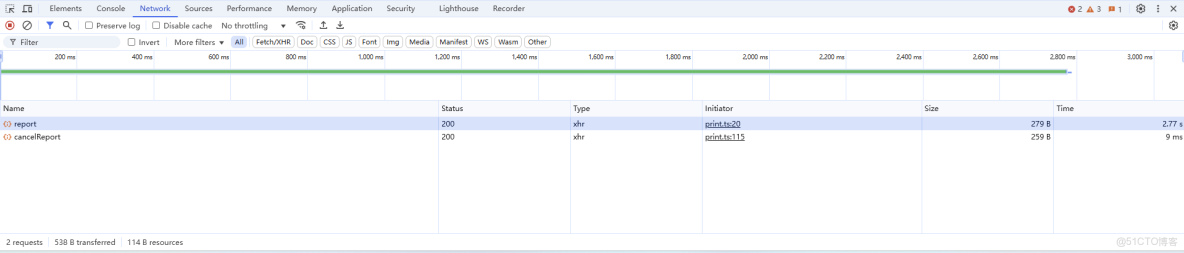
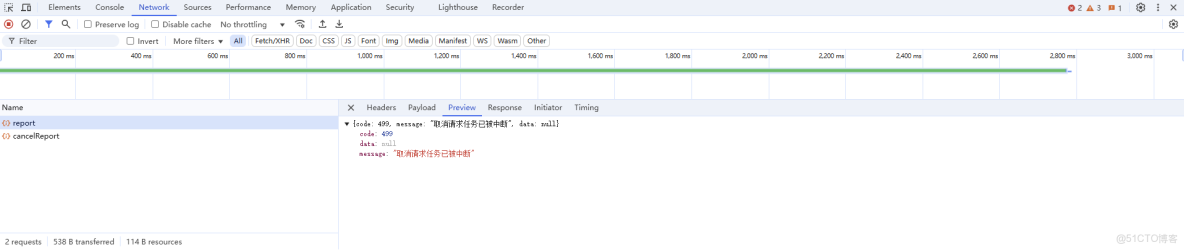
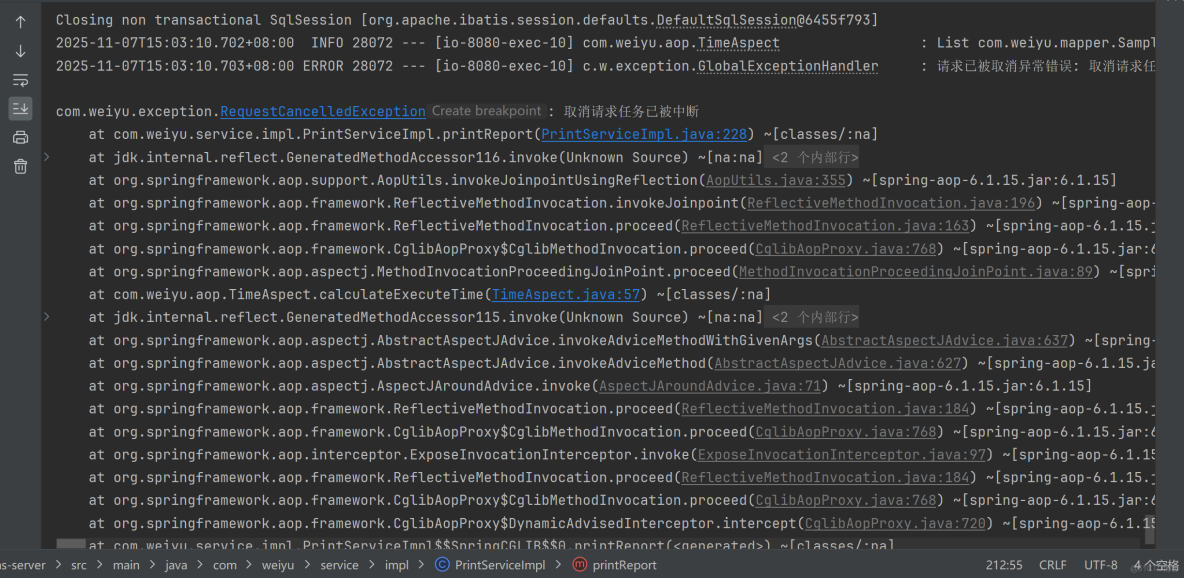
應用效果:
有取消請求的情況
無取消請求的情況
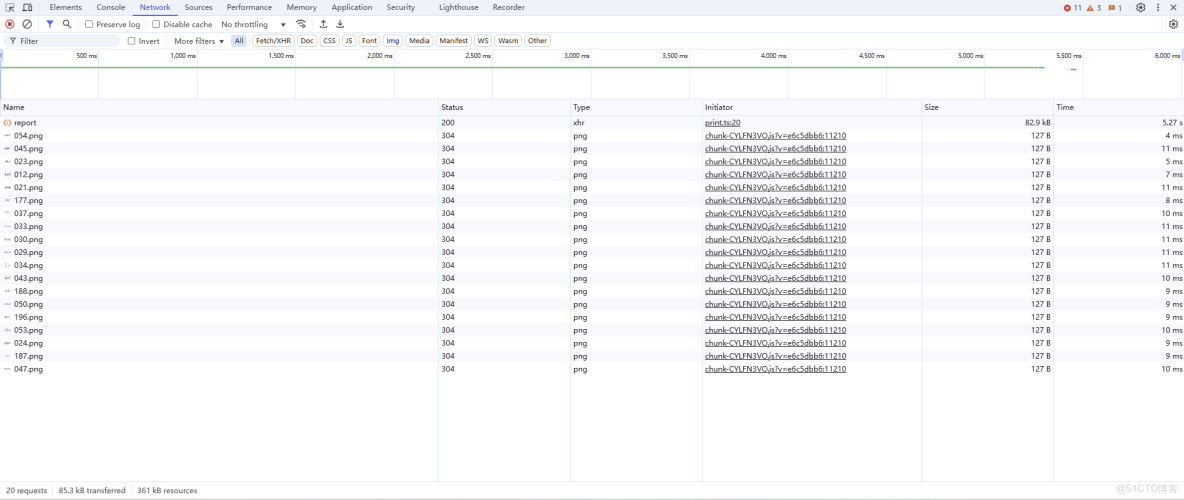
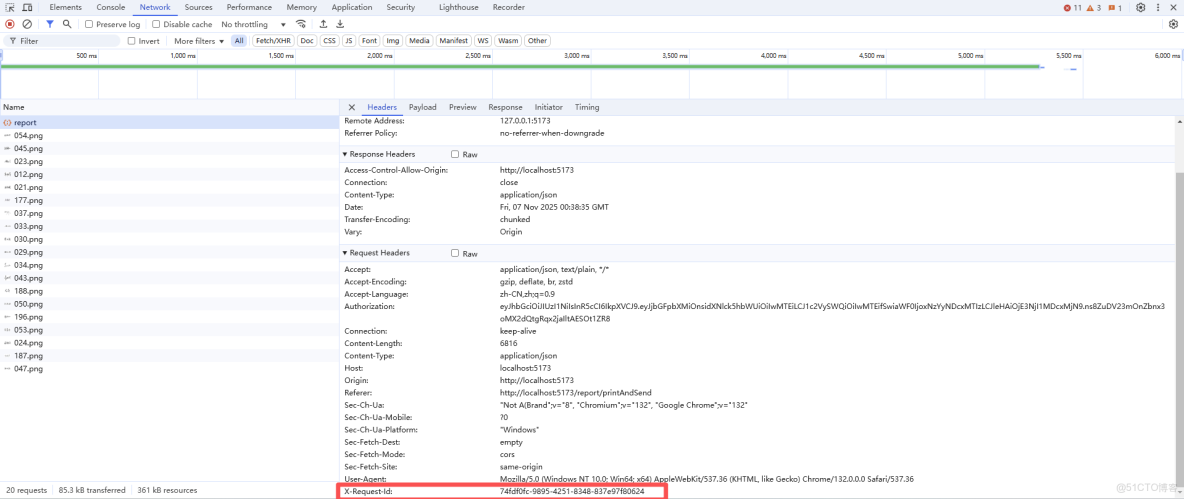
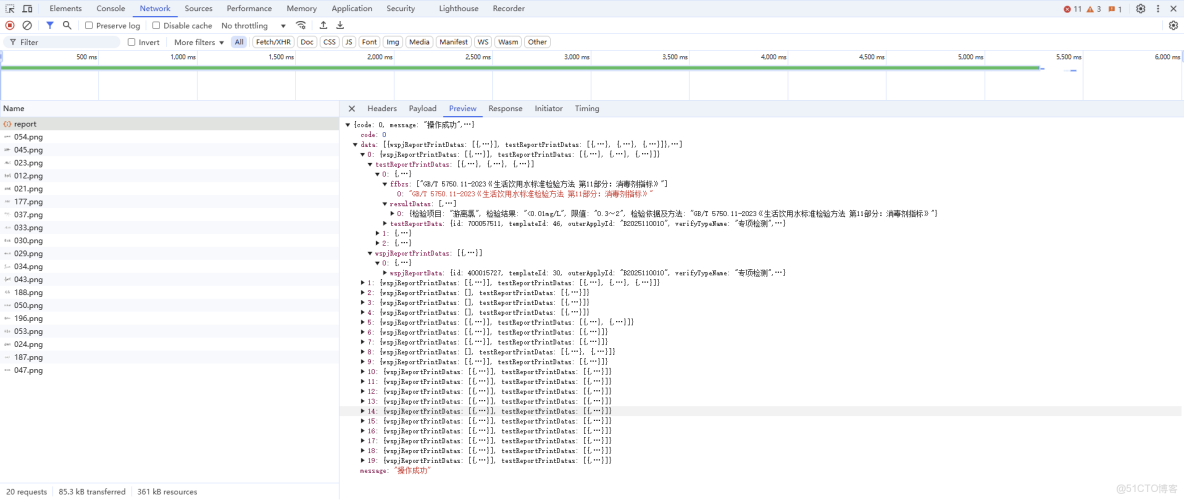
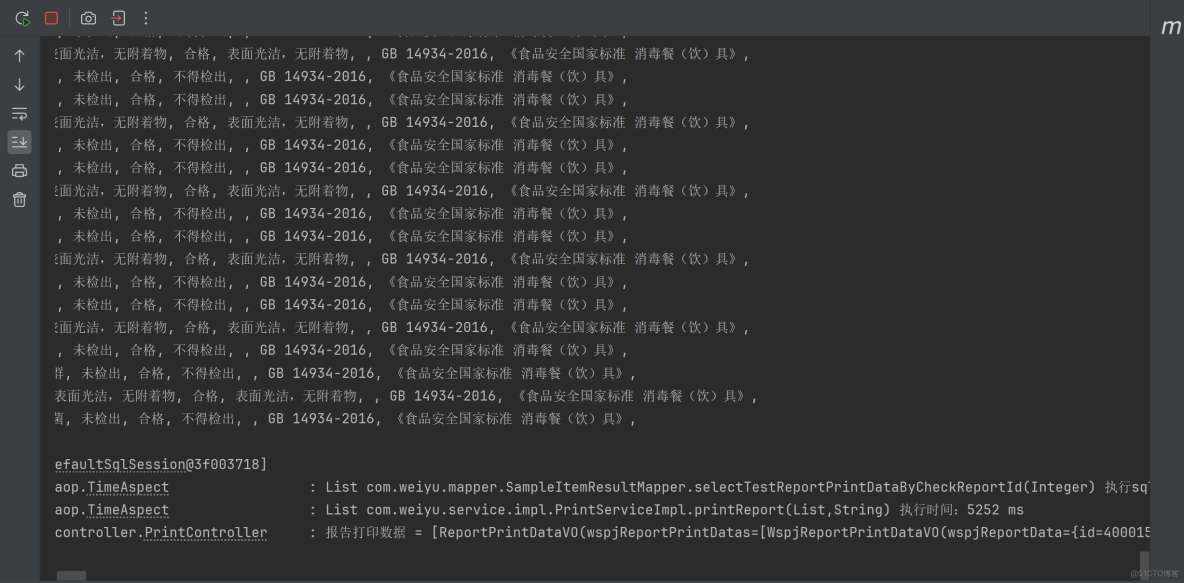
如果前端不使用controller?.abort(),前端發送取消打印請求,後端接收到取消請求,中斷線程任務,前面的打印請求還是會接收響應,如下所示:
// 取消打印
const cancelPrint = (requestId: string) => {
  // 前端取消請求,取消後不會接收響應,避免資源佔用
  // controller?.abort();
  // 後端取消執行請求任務
  printCancelService(requestId);
};
本文章為轉載內容,我們尊重原作者對文章享有的著作權。如有內容錯誤或侵權問題,歡迎原作者聯繫我們進行內容更正或刪除文章。
