
1、安裝pipeline
docker run -d -p 9099:9099 --add-host=host.docker.internal:host-gateway -v pipelines:/app/pipelines --name pipelines --restart always ghcr.io/open-webui/pipelines:main2、對接OpenWebUI(密碼:0p3n-w3bu!)
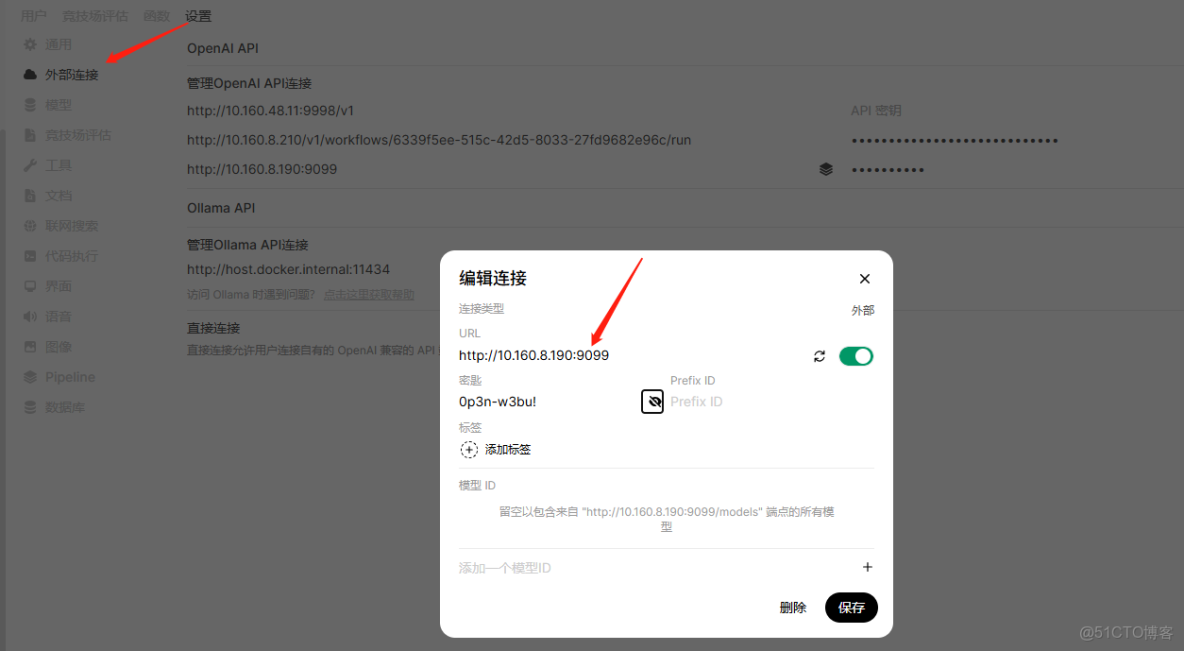
3、進入pipeline容器配置
只需幾個簡單的步驟即可開始使用 Pipelines:

1、確保已安裝 Python 3.11。它是唯一官方支持的 Python 版本
2、克隆管道存儲庫
git clone https://github.com/open-webui/pipelines.git
cd pipelines
3、安裝所需的依賴項
pip install -r requirements.txt
4、啓動 Pipelines 服務器
sh ./start.sh

服務器運行後,將客户端上的 OpenAI URL 設置為 Pipelines URL。這解鎖了 Pipelines 的全部功能,集成了任何 Python 庫並創建了適合您需求的自定義工作流程。
4、上傳dify的python腳本(url,key,輸入輸出變量名都需要更改)
#####塊輸出
from typing import List, Union, Generator, Iterator, Optional
from pprint import pprint
import requests, json, warnings

# Uncomment to disable SSL verification warnings if needed.
# warnings.filterwarnings('ignore', message='Unverified HTTPS request')

class Pipeline:
    def __init__(self):
        self.name = "IT_AI智能知識平台"  # 平台名稱
        self.api_url = "http://10.160.8.210/v1/workflows/run"  # Dify API 地址
        self.api_key = "app-raqQgGRuLSCKxatmFy8S0JmD"          # Dify API Key
        self.api_request_stream = True                         # 啓用流式響應(但僅取最終結果)
        self.verify_ssl = True                                 # 自部署 Dify 可設為 False
        self.debug = True                                      # 開啓調試日誌(必須保留!)

    async def on_startup(self):
        print(f"on_startup: {self.name} 初始化完成")

    async def on_shutdown(self):
        print(f"on_shutdown: {self.name} 已停止")

    async def inlet(self, body: dict, user: Optional[dict] = None) -> dict:
        if self.debug:
            print(f"inlet: body={body}, user={user}")
        return body

    async def outlet(self, body: dict, user: Optional[dict] = None) -> dict:
        if self.debug:
            print(f"outlet: body={body}, user={user}")
        return body

    def pipe(self, user_message: str, model_id: str, messages: List[dict], body: dict) -> Union[str, Generator, Iterator]:
        print(f"pipe: {self.name} - 開始處理用户消息")

        if self.debug:
            print(f"pipe: 用户輸入: {user_message}")
            print(f"pipe: body內容: {body}")

        # 1. 構建請求參數
        response_mode = "streaming" if self.api_request_stream else "blocking"
        headers = {
            'Authorization': f'Bearer {self.api_key}',
            'Content-Type': 'application/json'
        }
        data = {
            "inputs": {"user_message_text": user_message},  # Dify 輸入變量名(與工作流定義一致)
            "response_mode": response_mode,
            "user": body.get("user", {}).get("email", "default_user")
        }

        # 2. 發送請求到 Dify
        try:
            response = requests.post(
                self.api_url,
                headers=headers,
                json=data,
                stream=self.api_request_stream,
                verify=self.verify_ssl
            )

            # 3. 處理響應(核心修正:僅返回最終完整文本)
            if response.status_code == 200:
                full_text = ""
                final_output = False  # 標記是否已獲取最終結果
                for line in response.iter_lines():
                    if not line or final_output:
                        continue  # 空行或已獲取最終結果,跳過
                    line = line.decode('utf-8').strip()
                    if self.debug:
                        print(f"pipe: Dify 原始響應行: {line}")

                    # 解析流式響應(僅處理 workflow_finished 事件)
                    if line.startswith("data: "):
                        json_str = line[len("data: "):]
                        try:
                            json_data = json.loads(json_str)
                            # 關鍵:僅處理最終完成事件(event: workflow_finished)
                            if json_data.get("event") == "workflow_finished":
                                outputs = json_data.get("data", {}).get("outputs", {})
                                full_text = outputs.get("summary", "")  # Dify 輸出變量名(summary)
                                if full_text:
                                    final_output = True  # 標記已獲取最終結果
                                    yield full_text  # 僅返回一次完整文本
                                    break  # 退出循環,避免重複處理
                        except json.JSONDecodeError:
                            error_msg = f"[JSON解析錯誤] {json_str[:100]}"
                            print(f"pipe: {error_msg}")
                            yield error_msg
                # 容錯:若未觸發 workflow_finished,但有累積文本(極端情況)
                if not final_output and full_text:
                    yield full_text
            else:
                error_details = response.text[:500]
                yield f"請求失敗: 狀態碼 {response.status_code},詳情: {error_details}"

        except Exception as e:
            yield f"執行錯誤: {str(e)}"
#####流式輸出
from typing import List, Union, Generator, Iterator, Optional
from pprint import pprint
import requests, json, warnings
# Uncomment to disable SSL verification warnings if needed.
# warnings.filterwarnings('ignore', message='Unverified HTTPS request')
class Pipeline:
def __init__(self):
self.name = "IT_AI智能知識平台" # 平台名稱
self.api_url = "http://10.160.8.210/v1/workflows/run" # Dify API 地址
self.api_key = "app-N5aBftQwzEvbdla0KhAljB5E" # Dify API Key
self.api_request_stream = True # 啓用流式響應
self.verify_ssl = True # 自部署 Dify 可設為 False
self.debug = True # 開啓調試日誌(必須保留!)
async def on_startup(self):
print(f"on_startup: {self.name} 初始化完成")
async def on_shutdown(self):
print(f"on_shutdown: {self.name} 已停止")
async def inlet(self, body: dict, user: Optional[dict] = None) -> dict:
if self.debug:
print(f"inlet: body={body}, user={user}")
return body
async def outlet(self, body: dict, user: Optional[dict] = None) -> dict:
if self.debug:
print(f"outlet: body={body}, user={user}")
return body
def pipe(self, user_message: str, model_id: str, messages: List[dict], body: dict) -> Union[str, Generator, Iterator]:
print(f"pipe: {self.name} - 開始處理用户消息")
if self.debug:
print(f"pipe: 用户輸入: {user_message}")
print(f"pipe: body內容: {body}")
# 1. 構建請求參數
response_mode = "streaming" if self.api_request_stream else "blocking"
headers = {
'Authorization': f'Bearer {self.api_key}',
'Content-Type': 'application/json'
}
data = {
"inputs": {"user_message_text": user_message}, # Dify 輸入變量名(與工作流定義一致)
"response_mode": response_mode,
"user": body.get("user", {}).get("email", "default_user")
}
# 2. 發送請求到 Dify
try:
response = requests.post(
self.api_url,
headers=headers,
json=data,
stream=self.api_request_stream,
verify=self.verify_ssl
)
# 3. 處理流式響應
if response.status_code == 200:
for line in response.iter_lines():
if not line: # 跳過空行
continue
line = line.decode('utf-8').strip()
if self.debug:
print(f"pipe: Dify 原始響應行: {line}")
# 只處理包含"data: "的行
if line.startswith("data: "):
json_str = line[len("data: "):]
try:
json_data = json.loads(json_str)
# 處理text_chunk事件
if json_data.get("event") == "text_chunk":
chunk = json_data.get("data", {}).get("text", "")
if chunk:
yield chunk # 實時輸出每個文本塊
# 可選:處理workflow_finished事件作為結束標誌
elif json_data.get("event") == "workflow_finished" and self.debug:
print("pipe: 工作流已完成")
except json.JSONDecodeError:
error_msg = f"[JSON解析錯誤] {json_str[:100]}"
print(f"pipe: {error_msg}")
yield error_msg
else:
error_details = response.text[:500]
yield f"請求失敗: 狀態碼 {response.status_code},詳情: {error_details}"
except requests.exceptions.RequestException as e:
yield f"請求異常: {str(e)}"
except Exception as e:
yield f"執行錯誤: {str(e)}"5、將上述腳本上傳到下圖所在位置

另:
這些示例展示瞭如何集成不同的功能,為構建您自己的自定義管道奠定基礎。https://github.com/open-webui/pipelines/blob/main/examples
本文章為轉載內容,我們尊重原作者對文章享有的著作權。如有內容錯誤或侵權問題,歡迎原作者聯繫我們進行內容更正或刪除文章。
