
目錄
- 0、準備
- 1、Spark 讀寫 Doris
- 1.1 準備 Spark 環境
- 1.2 使用 Spark Doris Connector
- 1.2.1 SQL 方式讀寫數據
- 1.2.2 DataFrame 方式讀寫數據(batch)
- 1.2.3 RDD 方式讀取數據
- 1.2.4 配置和字段類型映射
- 1.3 使用 JDBC 的方式(不推薦)
- 2、Flink Doris Connector
- 2.1、準備 Flink 環境
- 2.2 SQL 方式讀寫
- 2.3 DataStream 讀寫
- 2.3.1 Source
- 2.3.2 Sink
- 2.4 通用配置項和字段類型映射
- 3 DataX doriswriter
- 3.1 編譯
- 3.2 使用
- 3.3 參數説明
- 4 ODBC 外部表
- 4.1 使用方式
- 4.2 使用 ODBC 的 MySQL 外表
- 4.3 使用ODBC的Oracle外表
- 5 Doris On ES
- 5.1 原理
- 5.2 使用方式
- 5.2.1 Doris 中創建 ES 外表
- 5.2.2 啓用列式掃描優化查詢速度
- 5.2.3 探測 keyword 類型字段
- 5.2.4 開啓節點自動發現,
- 5.2.5 配置 https 訪問模式
- 5.2.6 查詢用法
- 5.3 最佳實踐
- 5.3.1 時間類型字段使用建議
- 5.3.2 獲取 ES 元數據字段_id
0、準備
CREATE TABLE table1
(
 siteid INT DEFAULT '10',
 citycode SMALLINT,
 username VARCHAR(32) DEFAULT '',
 pv BIGINT SUM DEFAULT '0'
)
AGGREGATE KEY(siteid, citycode, username)
DISTRIBUTED BY HASH(siteid) BUCKETS 10
PROPERTIES("replication_num" = "1");
insert into table1 values
(1,1,'jim',2),
(2,1,'grace',2),
(3,2,'tom',2),
(4,3,'bush',3),
(5,3,'helen',3);
1、Spark 讀寫 Doris
1.1 準備 Spark 環境
創建 maven 工程,編寫 pom.xml 文件
<?xml version="1.0" encoding="UTF-8"?>
<project xmlns="http://maven.apache.org/POM/4.0.0"
 xmlns:xsi="http://www.w3.org/2001/XMLSchema-instance"
 xsi:schemaLocation="http://maven.apache.org/POM/4.0.0
http://maven.apache.org/xsd/maven-4.0.0.xsd">
 <modelVersion>4.0.0</modelVersion>
 <groupId>com.atguigu.doris</groupId>
 <artifactId>spark-demo</artifactId>
 <version>1.0-SNAPSHOT</version>
 <properties>
 <scala.binary.version>2.12</scala.binary.version>
 <spark.version>3.0.0</spark.version>
 <maven.compiler.source>8</maven.compiler.source>
 <maven.compiler.target>8</maven.compiler.target>
 </properties>
 <dependencies>
 <!-- Spark 的依賴引入 -->
 <dependency>
 <groupId>org.apache.spark</groupId>
 <artifactId>sparkcore_${scala.binary.version}</artifactId>
 <scope>provided</scope>
 <version>${spark.version}</version>
 </dependency>
 <dependency>
 <groupId>org.apache.spark</groupId>
 <artifactId>sparksql_${scala.binary.version}</artifactId>
 <scope>provided</scope>
 <version>${spark.version}</version>
 </dependency>
 <dependency>
 <groupId>org.apache.spark</groupId>
 <artifactId>sparkhive_${scala.binary.version}</artifactId>
 <scope>provided</scope>
 <version>${spark.version}</version>
 </dependency>
 <!-- 引入 Scala -->
 <dependency>
 <groupId>org.scala-lang</groupId>
 <artifactId>scala-library</artifactId>
 <version>2.12.10</version>
 </dependency>
<dependency>
 <groupId>com.alibaba</groupId>
 <artifactId>fastjson</artifactId>
 <version>1.2.47</version>
 </dependency>
 <dependency>
 <groupId>mysql</groupId>
 <artifactId>mysql-connector-java</artifactId>
 <version>5.1.49</version>
 </dependency>
 <!--spark-doris-connector-->
 <dependency>
 <groupId>org.apache.doris</groupId>
 <artifactId>spark-doris-connector-3.1_2.12</artifactId>
 <!--<artifactId>spark-doris-connector-
2.3_2.11</artifactId>-->
 <version>1.0.1</version>
 </dependency>
 </dependencies>
 <build>
 <plugins>
 <!--編譯 scala 所需插件-->
 <plugin>
 <groupId>org.scala-tools</groupId>
 <artifactId>maven-scala-plugin</artifactId>
 <version>2.15.1</version>
 <executions>
 <execution>
 <id>compile-scala</id>
 <goals>
 <goal>add-source</goal>
 <goal>compile</goal>
 </goals>
 </execution>
 <execution>
 <id>test-compile-scala</id>
 <goals>
 <goal>add-source</goal>
 <goal>testCompile</goal>
 </goals>
 </execution>
 </executions>
 </plugin>
 <plugin>
 <groupId>net.alchim31.maven</groupId>
 <artifactId>scala-maven-plugin</artifactId>
 <version>3.2.2</version>
 <executions>
 <execution>
 <!-- 聲明綁定到 maven 的 compile 階段 -->
 <goals>
 <goal>compile</goal>
<goal>testCompile</goal>
 </goals>
 </execution>
 </executions>
 </plugin>
 <!-- assembly 打包插件 -->
 <plugin>
 <groupId>org.apache.maven.plugins</groupId>
 <artifactId>maven-assembly-plugin</artifactId>
 <version>3.0.0</version>
 <executions>
 <execution>
 <id>make-assembly</id>
 <phase>package</phase>
 <goals>
 <goal>single</goal>
 </goals>
 </execution>
 </executions>
 <configuration>
 <archive>
 <manifest>
 </manifest>
 </archive>
 <descriptorRefs>
 <descriptorRef>jar-withdependencies</descriptorRef>
 </descriptorRefs>
 </configuration>
 </plugin>
 <!-- <plugin>
 <groupId>org.apache.maven.plugins</groupId>
 <artifactId>maven-compiler-plugin</artifactId>
 <version>3.6.1</version>
 <!– 所有的編譯都依照 JDK1.8 –>
 <configuration>
 <source>1.8</source>
 <target>1.8</target>
 </configuration>
 </plugin>-->
 </plugins>
 </build>
</project>
1.2 使用 Spark Doris Connector
Spark Doris Connector 可以支持通過 Spark 讀取 Doris 中存儲的數據,也支持通過
Spark 寫入數據到 Doris。
1.2.1 SQL 方式讀寫數據
package com.atuigu.doris.spark
import org.apache.spark.SparkConf
import org.apache.spark.sql.SparkSession
/**
 * TODO
 *
 * @version 1.0
 * @author cjp
 */
object SQLDemo {
 def main( args: Array[String] ): Unit = {
 val sparkConf = new SparkConf().setAppName("SQLDemo")
 .setMaster("local[*]") //TODO 要打包提交集羣執行,註釋掉
 val sparkSession =
SparkSession.builder().config(sparkConf).getOrCreate()
 sparkSession.sql(
 """
 |CREATE TEMPORARY VIEW spark_doris
 |USING doris
 |OPTIONS(
 | "table.identifier"="test_db.table1",
 | "fenodes"="hadoop1:8030",
 | "user"="test",
 | "password"="test"
 |);
 """.stripMargin)
 //讀取數據
 // sparkSession.sql("select * from spark_doris").show()
 //寫入數據
 sparkSession.sql("insert into spark_doris
values(99,99,'haha',5)")
 }
}
1.2.2 DataFrame 方式讀寫數據(batch)
package com.atuigu.doris.spark
import org.apache.spark.SparkConf
import org.apache.spark.sql.SparkSession
/**
 * TODO
 *
 * @version 1.0
 * @author cjp
 */
object DataFrameDemo {
 def main( args: Array[String] ): Unit = {
 val sparkConf = new SparkConf().setAppName("DataFrameDemo")
 .setMaster("local[*]") //TODO 要打包提交集羣執行,註釋掉
 val sparkSession =
SparkSession.builder().config(sparkConf).getOrCreate()
// 讀取數據
 // val dorisSparkDF = sparkSession.read.format("doris")
 // .option("doris.table.identifier", "test_db.table1")
 // .option("doris.fenodes", "hadoop1:8030")
 // .option("user", "test")
 // .option("password", "test")
 // .load()
 // dorisSparkDF.show()
 // 寫入數據
 import sparkSession.implicits._
 val mockDataDF = List(
 (11,23, "haha", 8),
 (11, 3, "hehe", 9),
 (11, 3, "heihei", 10)
 ).toDF("siteid", "citycode", "username","pv")
 mockDataDF.show(5)
 mockDataDF.write.format("doris")
 .option("doris.table.identifier", "test_db.table1")
 .option("doris.fenodes", "hadoop1:8030")
 .option("user", "test")
 .option("password", "test")
 //指定你要寫入的字段
// .option("doris.write.fields", "user")
 .save()
 }
}
1.2.3 RDD 方式讀取數據
package com.atuigu.doris.spark
import org.apache.spark.{SparkConf, SparkContext}
import org.apache.spark.sql.SparkSession
/**
 * TODO
 *
 * @version 1.0
 * @author cjp
 */
object RDDDemo {
 def main( args: Array[String] ): Unit = {
 val sparkConf = new SparkConf().setAppName("RDDDemo")
 .setMaster("local[*]") //TODO 要打包提交集羣執行,註釋掉
 val sc = new SparkContext(sparkConf)
 import org.apache.doris.spark._
 val dorisSparkRDD = sc.dorisRDD(
 tableIdentifier = Some("test_db.table1"),
 cfg = Some(Map(
 "doris.fenodes" -> "hadoop1:8030",
 "doris.request.auth.user" -> "test",
 "doris.request.auth.password" -> "test"
 ))
 )
 dorisSparkRDD.collect().foreach(println)
 }
}
1.2.4 配置和字段類型映射
1)通用配置項
|
Key
|
Default Value
|
Comment
|
|
doris.fenodes
|
–
|
Doris FE http 地址,支持多個地址,使用逗號分隔
|
|
doris.table.identifier
|
–
|
Doris 表名,如:db1.tbl1
|
|
doris.request.retries
|
3
|
向 Doris 發送請求的重試次數
|
|
doris.request.connect.timeout.ms
|
30000
|
向 Doris 發送請求的連接超時時間
|
|
doris.request.read.timeout.ms
|
30000
|
向 Doris 發送請求的讀取超時時間
|
|
doris.request.query.timeout.s
|
3600
|
查詢 doris 的超時時間,默認值為 1 小時,-1 表示無超時限制
|
|
doris.request.tablet.size
|
Integer.MAX_VALUE
|
一個 RDD Partition 對應的Doris Tablet 個數。此數值設置越小,則會生成越多的Partition。從而提升 Spark 側的並行度,但同時會對 Doris造成更大的壓力。
|
|
doris.batch.size
|
1024
|
一次從 BE 讀取數據的最大行數。增大此數值可減少Spark 與 Doris 之間建立連接的次數。從而減輕網絡延遲所帶來的的額外時間開銷。
|
|
doris.exec.mem.limit
|
2147483648
|
單個查詢的內存限制。默認為 2GB,單位為字節
|
|
doris.deserialize.arrow.async
|
false
|
是否支持異步轉換 Arrow 格式 到 spark-doris-connector迭代所需的 RowBatch
|
|
doris.deserialize.queue.size
|
64
|
異步轉換 Arrow 格式的內部處理隊列,當doris.deserialize.arrow.async為 true 時生效
|
|
doris.write.fields
|
–
|
指定寫入 Doris 表的字段或者字段順序,多列之間使用逗號分隔。默認寫入時要按照 Doris 表字段順序寫入全部字段。
|
|
sink.batch.size
|
10000
|
單次寫 BE 的最大行數
|
|
sink.max-retries
|
1
|
寫 BE 失敗之後的重試次數
|
2)SQL 和 Dataframe 專有配置
|
Key
|
Default Value
|
Comment
|
|
user
|
–
|
訪問 Doris 的用户名
|
|
password
|
–
|
訪問 Doris 的密碼
|
|
doris.filter.query.in.max.count
|
100
|
謂詞下推中,in 表達式 value列表元素最大數量。超過此數量,則 in 表達式條件過濾在 Spark 側處理。
|
3)RDD 專有配置
|
Key
|
Default Value
|
Comment
|
|
doris.request.auth.user
|
–
|
訪問 Doris 的用户名
|
|
doris.request.auth.password
|
–
|
訪問 Doris 的密碼
|
|
doris.read.field
|
–
|
讀取 Doris 表的列名列表,多列之間使用逗號分隔
|
|
doris.filter.query
|
–
|
過濾讀取數據的表達式,此表達式透傳給 Doris。Doris使用此表達式完成源端數據過濾
|
4)Doris 和 Spark 列類型映射關係:
|
Doris Type
|
Spark Type
|
|
NULL_TYPE
|
DataTypes.NullType
|
|
BOOLEAN
|
DataTypes.BooleanType
|
|
TINYINT
|
DataTypes.ByteType
|
|
SMALLINT
|
DataTypes.ShortType
|
|
INT
|
DataTypes.IntegerType
|
|
BIGINT
|
DataTypes.LongType
|
|
FLOAT
|
DataTypes.FloatType
|
|
DOUBLE
|
DataTypes.DoubleType
|
|
DATE
|
DataTypes.StringType1
|
|
DATETIME
|
DataTypes.StringType1
|
|
BINARY
|
DataTypes.BinaryType
|
|
DECIMAL
|
DecimalType
|
|
CHAR
|
DataTypes.StringType
|
|
LARGEINT
|
DataTypes.StringType
|
|
VARCHAR
|
DataTypes.StringType
|
|
DECIMALV2
|
DecimalType
|
|
TIME
|
DataTypes.DoubleType
|
|
HLL
|
Unsupported datatype
|
注:Connector 中,將 DATE 和 DATETIME 映射為 String。由於 Doris 底層存儲引擎處
理邏輯,直接使用時間類型時,覆蓋的時間範圍無法滿足需求。所以使用 String 類型直接返回對應的時間可讀文本。
1.3 使用 JDBC 的方式(不推薦)
這種方式是早期寫法,Spark 無法感知 Doris 的數據分佈,會導致打到 Doris 的查詢壓力
非常大。
package com.atuigu.doris.spark
import java.util.Properties
import org.apache.spark.SparkConf
import org.apache.spark.sql.{SaveMode, SparkSession}
object JDBCDemo {
 def main(args: Array[String]): Unit = {
 val sparkConf = new
SparkConf().setAppName("JDBCDemo").setMaster("local[*]")
 val sparkSession =
SparkSession.builder().config(sparkConf).getOrCreate()
 // 讀取數據
// val df=sparkSession.read.format("jdbc")
// .option("url","jdbc:mysql://hadoop1:9030/test_db")
// .option("user","test")
// .option("password","test")
// .option("dbtable","table1")
// .load()
//
// df.show()
 // 寫入數據
 import sparkSession.implicits._
 val mockDataDF = List(
 (11,23, "haha", 8),
 (11, 3, "hehe", 9),
 (11, 3, "heihei", 10)
 ).toDF("siteid", "citycode", "username","pv")
 val prop = new Properties()
 prop.setProperty("user", "root")
 prop.setProperty("password", "123456")
 df.write.mode(SaveMode.Append)
 .jdbc("jdbc:mysql://hadoop1:9030/test_db", "table1", prop)
 }
}
2、Flink Doris Connector
Flink Doris Connector 可以支持通過 Flink 操作(讀取、插入、修改、刪除) Doris 中
存儲的數據。
Flink Doris Connector Sink 的內部實現是通過 Stream load 服務向 Doris 寫入數據, 同時
也支持 Stream load 請求參數的配置設定。
版本兼容如下:
|
Connector
|
Flink
|
Doris
|
Java
|
Scala
|
|
1.11.6-2.12-xx
|
1.11.x
|
0.13+
|
8
|
2.12
|
|
1.12.7-2.12-xx
|
1.12.x
|
0.13.+
|
8
|
2.12
|
|
1.13.5-2.12-xx
|
1.13.x
|
0.13.+
|
8
|
2.12
|
|
1.14.4-2.12-xx
|
1.14.x
|
0.13.+
|
8
|
2.12
|
2.1、準備 Flink 環境
創建 maven 工程,編寫 pom.xml 文件
<?xml version="1.0" encoding="UTF-8"?>
<project xmlns="http://maven.apache.org/POM/4.0.0"
 xmlns:xsi="http://www.w3.org/2001/XMLSchema-instance"
 xsi:schemaLocation="http://maven.apache.org/POM/4.0.0
http://maven.apache.org/xsd/maven-4.0.0.xsd">
 <modelVersion>4.0.0</modelVersion>
 <groupId>com.atguigu.doris</groupId>
 <artifactId>flink-demo</artifactId>
 <version>1.0-SNAPSHOT</version>
 <properties>
 <maven.compiler.source>8</maven.compiler.source>
 <maven.compiler.target>8</maven.compiler.target>
 <flink.version>1.13.1</flink.version>
 <java.version>1.8</java.version>
 <scala.binary.version>2.12</scala.binary.version>
 <slf4j.version>1.7.30</slf4j.version>
 </properties>
 <dependencies>
 <dependency>
 <groupId>org.apache.flink</groupId>
 <artifactId>flink-java</artifactId>
 <version>${flink.version}</version>
 <scope>provided</scope> <!--不會打包到依賴中,只參與編譯,不
參與運行 -->
 </dependency>
 <dependency>
<groupId>org.apache.flink</groupId>
 <artifactId>flink-streamingjava_${scala.binary.version}</artifactId>
 <version>${flink.version}</version>
 <scope>provided</scope>
 </dependency>
 <dependency>
 <groupId>org.apache.flink</groupId>
 <artifactId>flinkclients_${scala.binary.version}</artifactId>
 <version>${flink.version}</version>
 <scope>provided</scope>
 </dependency>
 <dependency>
 <groupId>org.apache.flink</groupId>
 <artifactId>flink-table-plannerblink_${scala.binary.version}</artifactId>
 <version>${flink.version}</version>
 <scope>provided</scope>
 </dependency>
 <!---->
 <dependency>
 <groupId>org.apache.flink</groupId>
 <artifactId>flink-runtimeweb_${scala.binary.version}</artifactId>
 <version>${flink.version}</version>
 <scope>provided</scope>
 </dependency>
 <dependency>
 <groupId>org.slf4j</groupId>
 <artifactId>slf4j-api</artifactId>
 <version>${slf4j.version}</version>
 <scope>provided</scope>
 </dependency>
 <dependency>
 <groupId>org.slf4j</groupId>
 <artifactId>slf4j-log4j12</artifactId>
 <version>${slf4j.version}</version>
 <scope>provided</scope>
 </dependency>
 <dependency>
 <groupId>org.apache.logging.log4j</groupId>
 <artifactId>log4j-to-slf4j</artifactId>
 <version>2.14.0</version>
 <scope>provided</scope>
 </dependency>
 <dependency>
 <groupId>mysql</groupId>
 <artifactId>mysql-connector-java</artifactId>
 <version>5.1.49</version>
 </dependency>
 <dependency>
 <groupId>org.apache.flink</groupId>
 <artifactId>flink-statebackendrocksdb_${scala.binary.version}</artifactId>
 <version>${flink.version}</version>
 </dependency>
 <dependency>
 <groupId>org.apache.flink</groupId>
 <artifactId>flink-sequence-file</artifactId>
 <version>${flink.version}</version>
 </dependency>
 <dependency>
 <groupId>com.ververica</groupId>
 <artifactId>flink-connector-mysql-cdc</artifactId>
 <version>2.0.0</version>
 </dependency>
 <!--flink-doris-connector-->
 <dependency>
 <groupId>org.apache.doris</groupId>
 <!--<artifactId>flink-doris-connector-
1.14_2.12</artifactId>-->
 <artifactId>flink-doris-connector-1.13_2.12</artifactId>
 <!--<artifactId>flink-doris-connector-
1.12_2.12</artifactId>-->
 <!--<artifactId>flink-doris-connector-
1.11_2.12</artifactId>-->
 <version>1.0.3</version>
 </dependency>
 </dependencies>
 <build>
 <plugins>
 <plugin>
 <groupId>org.apache.maven.plugins</groupId>
 <artifactId>maven-shade-plugin</artifactId>
 <version>3.2.4</version>
 <executions>
 <execution>
 <phase>package</phase>
 <goals>
 <goal>shade</goal>
 </goals>
 <configuration>
 <artifactSet>
 <excludes>

<exclude>com.google.code.findbugs:jsr305</exclude>
 <exclude>org.slf4j:*</exclude>
 <exclude>log4j:*</exclude>

<exclude>org.apache.hadoop:*</exclude>
</excludes>
 </artifactSet>
 <filters>
 <filter>
 <!-- Do not copy the signatures in
the META-INF folder.
 Otherwise, this might cause
SecurityExceptions when using the JAR. -->
 <artifact>*:*</artifact>
 <excludes>
 <exclude>META-INF/*.SF</exclude>
 <exclude>META-INF/*.DSA</exclude>
 <exclude>META-INF/*.RSA</exclude>
 </excludes>
 </filter>
 </filters>
 <transformers combine.children="append">
 <transformer
implementation="org.apache.maven.plugins.shade.resource.ServicesR
esourceTransformer">
 </transformer>
 </transformers>
 </configuration>
 </execution>
 </executions>
 </plugin>
 </plugins>
 </build>
</project>
2.2 SQL 方式讀寫
package com.atuigu.doris.flink;
import
org.apache.flink.streaming.api.environment.StreamExecutionEnviron
ment;
import
org.apache.flink.table.api.bridge.java.StreamTableEnvironment;
/**
* TODO
*
* @author cjp
* @version 1.0
*/
public class SQLDemo {
 public static void main(String[] args) {
 StreamExecutionEnvironment env =
StreamExecutionEnvironment.getExecutionEnvironment();
 env.setParallelism(1);
 StreamTableEnvironment tableEnv =
StreamTableEnvironment.create(env);
 tableEnv.executeSql("CREATE TABLE flink_doris (\n" +
 " siteid INT,\n" +
" citycode SMALLINT,\n" +
 " username STRING,\n" +
 " pv BIGINT\n" +
 " ) \n" +
 " WITH (\n" +
 " 'connector' = 'doris',\n" +
 " 'fenodes' = 'hadoop1:8030',\n" +
 " 'table.identifier' = 'test_db.table1',\n" +
 " 'username' = 'test',\n" +
 " 'password' = 'test'\n" +
 ")\n");
 // 讀取數據
// tableEnv.executeSql("select * from flink_doris").print();
 // 寫入數據
 tableEnv.executeSql("insert into
flink_doris(siteid,username,pv) values(22,'wuyanzu',3)");
 }
}
2.3 DataStream 讀寫
2.3.1 Source
package com.atuigu.doris.flink;
import org.apache.doris.flink.cfg.DorisStreamOptions;
import org.apache.doris.flink.datastream.DorisSourceFunction;
import
org.apache.doris.flink.deserialization.SimpleListDeserializationS
chema;
import
org.apache.flink.streaming.api.environment.StreamExecutionEnviron
ment;
import
org.apache.flink.table.api.bridge.java.StreamTableEnvironment;
import java.util.Properties;
/**
* TODO
*
* @author cjp
* @version 1.0
*/
public class DataStreamSourceDemo {
 public static void main(String[] args) throws Exception {
 StreamExecutionEnvironment env =
StreamExecutionEnvironment.getExecutionEnvironment();
 env.setParallelism(1);
 Properties properties = new Properties();
 properties.put("fenodes","hadoop1:8030");
 properties.put("username","test");
 properties.put("password","test");
 properties.put("table.identifier","test_db.table1");
 env.addSource(new DorisSourceFunction(
 new DorisStreamOptions(properties),
 new SimpleListDeserializationSchema()
 )
 ).print();
 env.execute();
 }
}
2.3.2 Sink
1)Json 數據流寫法一
package com.atuigu.doris.flink;
import org.apache.doris.flink.cfg.*;
import org.apache.doris.flink.datastream.DorisSourceFunction;
import
org.apache.doris.flink.deserialization.SimpleListDeserializationS
chema;
import
org.apache.flink.streaming.api.environment.StreamExecutionEnviron
ment;
import java.util.Properties;
/**
* TODO
*
* @author cjp
* @version 1.0
*/
public class DataStreamJsonSinkDemo {
 public static void main(String[] args) throws Exception {
 StreamExecutionEnvironment env =
StreamExecutionEnvironment.getExecutionEnvironment();
 env.setParallelism(1);
 Properties pro = new Properties();
 pro.setProperty("format", "json");
 pro.setProperty("strip_outer_array", "true");
 env
 .fromElements(
 "{\"longitude\": \"116.405419\", \"city\": \"
北京\", \"latitude\": \"39.916927\"}"
 )
 .addSink(
 DorisSink.sink(
 DorisReadOptions.builder().build(),
 DorisExecutionOptions.builder()
 .setBatchSize(3)
 .setBatchIntervalMs(0L)
 .setMaxRetries(3)
 .setStreamLoadProp(pro).build(),
 DorisOptions.builder()
 .setFenodes("FE_IP:8030")
 .setTableIdentifier("db.table")
 .setUsername("root")
 .setPassword("").build()
 ));
// .addSink(
// DorisSink.sink(
// DorisOptions.builder()
// .setFenodes("FE_IP:8030")
// .setTableIdentifier("db.table")
// .setUsername("root")
// .setPassword("").build()
// ));
 env.execute();
 }
}
2)RowData 數據流
package com.atuigu.doris.flink;
import org.apache.doris.flink.cfg.DorisExecutionOptions;
import org.apache.doris.flink.cfg.DorisOptions;
import org.apache.doris.flink.cfg.DorisReadOptions;
import org.apache.doris.flink.cfg.DorisSink;
import org.apache.flink.api.common.functions.MapFunction;
import org.apache.flink.streaming.api.datastream.DataStream;
import
org.apache.flink.streaming.api.environment.StreamExecutionEnviron
ment;
import org.apache.flink.table.data.GenericRowData;
import org.apache.flink.table.data.RowData;
import org.apache.flink.table.data.StringData;
import org.apache.flink.table.types.logical.*;
/**
* TODO
*
* @author cjp
* @version 1.0
*/
public class DataStreamRowDataSinkDemo {
 public static void main(String[] args) throws Exception {
 StreamExecutionEnvironment env =
StreamExecutionEnvironment.getExecutionEnvironment();
 env.setParallelism(1);
 DataStream<RowData> source = env.fromElements("")
 .map(new MapFunction<String, RowData>() {
 @Override
 public RowData map(String value) throws Exception
{
 GenericRowData genericRowData = new
GenericRowData(4);
 genericRowData.setField(0, 33);
 genericRowData.setField(1, new Short("3"));
 genericRowData.setField(2,
StringData.fromString("flink-stream"));
 genericRowData.setField(3, 3L);
 return genericRowData;
 }
 });
 LogicalType[] types = {new IntType(), new SmallIntType(),
new VarCharType(32), new BigIntType()};
 String[] fields = {"siteid", "citycode", "username", "pv"};
 source.addSink(
 DorisSink.sink(
 fields,
 types,
 DorisReadOptions.builder().build(),
 DorisExecutionOptions.builder()
 .setBatchSize(3)
 .setBatchIntervalMs(0L)
 .setMaxRetries(3)
 .build(),
 DorisOptions.builder()
 .setFenodes("hadoop1:8030")
 .setTableIdentifier("test_db.table1")
 .setUsername("test")
 .setPassword("test").build()
 ));
 env.execute();
 }
}
2.4 通用配置項和字段類型映射
1)通用配置項:
|
Key
|
Default Value
|
Comment
|
|
fenodes
|
–
|
Doris FE http 地址
|
|
table.identifier
|
–
|
Doris 表名,如:db1.tbl1
|
|
username
|
–
|
訪問 Doris 的用户名
|
|
password
|
–
|
訪問 Doris 的密碼
|
|
doris.request.retries
|
3
|
向 Doris 發送請求的重試次數
|
|
doris.request.connect.timeout.ms
|
30000
|
向 Doris 發送請求的連接超時時間
|
|
doris.request.read.timeout.ms
|
30000
|
向 Doris 發送請求的讀取超時時間
|
|
doris.request.query.timeout.s
|
3600
|
查詢 doris 的超時時間,默認值為 1 小時,-1 表示無超時限制
|
|
doris.request.tablet.size
|
Integer. MAX_VALUE
|
一個 Partition 對應的 Doris Tablet 個數。此數值設置越小,則會生成越多的 Partition。從而提升 Flink 側的並行度,但同時會對Doris 造成更大的壓力。
|
|
doris.batch.size
|
1024
|
一次從 BE 讀取數據的最大行數。增大此數值可減少 flink 與 Doris 之間建立連接的次數。從而減輕網絡延遲所帶來的的額外時間開銷。
|
|
doris.exec.mem.limit
|
2147483648
|
單個查詢的內存限制。默認為 2GB,單位為字節
|
|
doris.deserialize.arrow.async
|
false
|
是否支持異步轉換 Arrow 格式到 flink-dorisconnector 迭代所需的 RowBatch
|
|
doris.deserialize.queue.size
|
64
|
異步轉換 Arrow 格式的內部處理隊列,當doris.deserialize.arrow.async 為 true 時生效
|
|
doris.read.field
|
–
|
讀取 Doris 表的列名列表,多列之間使用逗號分隔
|
|
doris.filter.query
|
–
|
過濾讀取數據的表達式,此表達式透傳給Doris。Doris 使用此表達式完成源端數據過濾。
|
|
sink.batch.size
|
10000
|
單次寫 BE 的最大行數
|
|
sink.max-retries
|
1
|
寫 BE 失敗之後的重試次數
|
|
sink.batch.interval
|
10s
|
flush 間隔時間,超過該時間後異步線程將緩存中數據寫入 BE。 默認值為 10 秒,支持時間單位 ms、s、min、h 和 d。設置為 0表示關閉定期寫入。
|
|
sink.properties.*
|
–
|
Stream load 的導入參數例如’sink.properties.column_separator’ = ‘, ‘定義列分隔符’sink.properties.escape_delimiters’ = ‘true’特殊字符作為分隔符,’\x01’會被轉換為二進制的 0x01’sink.properties.format’ = ‘json’‘sink.properties.strip_outer_array’ = 'true’JSON 格式導入
|
|
sink.enable-delete
|
true
|
是否啓用刪除。此選項需要 Doris 表開啓批量刪除功能(0.15+版本默認開啓),只支持Uniq 模型。
|
|
sink.batch.bytes
|
10485760
|
單次寫 BE 的最大數據量,當每個 batch 中記錄的數據量超過該閾值時,會將緩存數據寫入 BE。默認值為 10MB
|
2)Doris 和 Flink 列類型映射關係:
|
Doris Type
|
Flink Type
|
|
NULL_TYPE
|
NULL
|
|
BOOLEAN
|
BOOLEAN
|
|
TINYINT
|
TINYINT
|
|
SMALLINT
|
SMALLINT
|
|
INT
|
INT
|
|
BIGINT
|
BIGINT
|
|
FLOAT
|
FLOAT
|
|
DOUBLE
|
DOUBLE
|
|
DATE
|
STRING
|
|
DATETIME
|
STRING
|
|
DECIMAL
|
DECIMAL
|
|
CHAR
|
STRING
|
|
LARGEINT
|
STRING
|
|
VARCHAR
|
STRING
|
|
DECIMALV2
|
DECIMAL
|
|
TIME
|
DOUBLE
|
|
HLL
|
Unsupported datatype
|
3 DataX doriswriter
DorisWriter 支持將大批量數據寫入 Doris 中。DorisWriter 通過 Doris 原生支持 Stream
load 方式導入數據, DorisWriter 會將 reader 讀取的數據進行緩存在內存中,拼接成 Json 文本,然後批量導入至 Doris。
3.1 編譯
可以自己編譯,也可以直接使用我們編譯好的包。
1)進入之前的容器環境
docker run -it \
-v /opt/software/.m2:/root/.m2 \
-v /opt/software/apache-doris-0.15.0-incubating-src/:/root/apachedoris-0.15.0-incubating-src/ \
apache/incubator-doris:build-env-for-0.15.0
2)運行 init-env.sh
cd /root/apache-doris-0.15.0-incubating-src/extension/DataX
sh init-env.sh
3)手動上傳依賴
上傳 alibaba-datax-maven-m2-20210928.tar.gz,解壓:
tar -zxvf alibaba-datax-maven-m2-20210928.tar.gz -C /opt/software拷貝解壓後的文件到 maven 倉庫
sudo cp -r /opt/software/alibaba/datax/
/opt/software/.m2/repository/com/alibaba/
4)編譯 doriswriter:
(1)單獨編譯 doriswriter 插件:
cd /root/apache-doris-0.15.0-incubating-src/extension/DataX/DataX
mvn clean install -pl plugin-rdbms-util,doriswriter -DskipTests
(2)編譯整個 DataX 項目:
cd /root/apache-doris-0.15.0-incubating-src/extension/DataX/DataX
mvn package assembly:assembly -Dmaven.test.skip=true
產出在 target/datax/datax/.
hdfsreader, hdfswriter and oscarwriter 這三個插件需要額外的 jar 包。如果你並不需要這
些插件,可以在 DataX/pom.xml 中刪除這些插件的模塊。
5)拷貝編譯好的插件到 DataX
Sudo cp -r /opt/software/apache-doris-0.15.0-incubating-src/extension/DataX/doriswriter/target/datax/plugin/writer/dorisw
riter /opt/module/datax/plugin/writer
3.2 使用
1)準備測試表
MySQL 建表、插入測試數據
CREATE TABLE `sensor` (
 `id` varchar(255) NOT NULL,
 `ts` bigint(255) DEFAULT NULL,
 `vc` int(255) DEFAULT NULL,
 PRIMARY KEY (`id`)
)
insert into sensor values('s_2',3,3),('s_9',9,9);
Doris 建表
CREATE TABLE `sensor` (
 `id` varchar(255) NOT NULL,
 `ts` bigint(255) DEFAULT NULL,
 `vc` int(255) DEFAULT NULL
)
DISTRIBUTED BY HASH(`id`) BUCKETS 10;
2)編寫 json 文件
vim mysql2doris.json
{
 "job": {
 "setting": {
 "speed": {
 "channel": 1
 },
 "errorLimit": {
 "record": 0,
 "percentage": 0
 }
 },
 "content": [
 {
 "reader": {
 "name": "mysqlreader",
 "parameter": {
 "column": [
 "id",
 "ts",
 "vc"
 ],
 "connection": [
 {
 "jdbcUrl": [
 "jdbc:mysql://hadoop1:3306/test"
 ],
 "table": [
 "sensor"
 ]
 }
 ],
 "username": "root",
 "password": "000000"
 }
 },
 "writer": {
 "name": "doriswriter",
 "parameter": {
 "feLoadUrl": ["hadoop1:8030", "hadoop2:8030",
"hadoop3:8030"],
 "beLoadUrl": ["hadoop1:8040", "hadoop2:8040",
"hadoop3:8040"],
 "jdbcUrl": "jdbc:mysql://hadoop1:9030/",
 "database": "test_db",
 "table": "sensor",
 "column": ["id", "ts", "vc"],
 "username": "test",
 "password": "test",
 "postSql": [],
 "preSql": [],
 "loadProps": {
 },
 "maxBatchRows" : 500000,
 "maxBatchByteSize" : 104857600,
 "labelPrefix": "my_prefix",
 "lineDelimiter": "\n"
 }
 }
 }
 ]
 }
}
3)運行 datax 任務
bin/datax.py job/mysql2doris.json3.3 參數説明
⚫ jdbcUrl
描述:Doris 的 JDBC 連接串,用户執行 preSql 或 postSQL。
必選:是
默認值:無
⚫ feLoadUrl
描述:和 beLoadUrl 二選一。作為 Stream Load 的連接目標。格式為 “ip:port”。其中
IP 是 FE 節點 IP,port 是 FE 節點的 http_port。可以填寫多個,doriswriter 將以輪詢的方式訪問。
必選:否
默認值:無
⚫ beLoadUrl
描述:和 feLoadUrl 二選一。作為 Stream Load 的連接目標。格式為 “ip:port”。其中 IP
是 BE 節點 IP,port 是 BE 節點的 webserver_port。可以填寫多個,doriswriter 將以輪詢的方式訪問。
必選:否
默認值:無
⚫ username
描述:訪問 Doris 數據庫的用户名
必選:是
默認值:無
⚫ password
描述:訪問 Doris 數據庫的密碼
必選:否
默認值:空
⚫ database
描述:需要寫入的 Doris 數據庫名稱。
必選:是
默認值:無
⚫ table
描述:需要寫入的 Doris 表名稱。
必選:是
默認值:無
⚫ column
描述:目的表需要寫入數據的字段,這些字段將作為生成的 Json 數據的字段名。字段之間用英文逗號分隔。例如: “column”: [“id”,“name”,“age”]。
必選:是
默認值:否
⚫ preSql
描述:寫入數據到目的表前,會先執行這裏的標準語句。
必選:否
默認值:無
⚫ postSql
描述:寫入數據到目的表後,會執行這裏的標準語句。
必選:否
默認值:無
⚫ maxBatchRows
描述:每批次導入數據的最大行數。和 maxBatchByteSize 共同控制每批次的導入數量。
每批次數據達到兩個閾值之一,即開始導入這一批次的數據。
必選:否
默認值:500000
⚫ maxBatchByteSize
描述:每批次導入數據的最大數據量。和 ** maxBatchRows** 共同控制每批次的導入
數量。每批次數據達到兩個閾值之一,即開始導入這一批次的數據。
必選:否
默認值:104857600
⚫ labelPrefix
描述:每批次導入任務的 label 前綴。最終的 label 將有 labelPrefix + UUID + 序號 組
成
必選:否
默認值:datax_doris_writer_
⚫ lineDelimiter
描述:每批次數據包含多行,每行為 Json 格式,每行的的分隔符即為 lineDelimiter。
支持多個字節, 例如’\x02\x03’。
必選:否
默認值:\n
⚫ loadProps
描述:StreamLoad 的請求參數,詳情參照 StreamLoad 介紹頁面。
必選:否
默認值:無
⚫ connectTimeout
描述:StreamLoad 單次請求的超時時間, 單位毫秒(ms)。
必選:否
默認值:-1
4 ODBC 外部表
ODBC External Table Of Doris 提供了 Doris 通過數據庫訪問的標準接口(ODBC)來訪問
外部表,外部表省去了繁瑣的數據導入工作,讓 Doris 可以具有了訪問各式數據庫的能力,並藉助 Doris 本身的 OLAP 的能力來解決外部表的數據分析問題:
(1)支持各種數據源接入 Doris
(2)支持 Doris 與各種數據源中的表聯合查詢,進行更加複雜的分析操作
(3)通過 insert into 將 Doris 執行的查詢結果寫入外部的數據源
4.1 使用方式
1)Doris 中創建 ODBC 的外表
方式一:不使用 Resource 創建 ODBC 的外表。
CREATE EXTERNAL TABLE `baseall_oracle` (
 `k1` decimal(9, 3) NOT NULL COMMENT "",
 `k2` char(10) NOT NULL COMMENT "",
 `k3` datetime NOT NULL COMMENT "",
 `k5` varchar(20) NOT NULL COMMENT "",
 `k6` double NOT NULL COMMENT ""
) ENGINE=ODBC
COMMENT "ODBC"
PROPERTIES (
"host" = "192.168.0.1",
"port" = "8086",
"user" = "test",
"password" = "test",
"database" = "test",
"table" = "baseall",
"driver" = "Oracle 19 ODBC driver",
"odbc_type" = "oracle"
);
方式二:通過 ODBC_Resource 來創建 ODBC 外表(推薦使用的方式)。
CREATE EXTERNAL RESOURCE `oracle_odbc`
PROPERTIES (
"type" = "odbc_catalog",
"host" = "192.168.0.1",
"port" = "8086",
"user" = "test",
"password" = "test",
"database" = "test",
"odbc_type" = "oracle",
"driver" = "Oracle 19 ODBC driver"
);

CREATE EXTERNAL TABLE `baseall_oracle` (
 `k1` decimal(9, 3) NOT NULL COMMENT "",
 `k2` char(10) NOT NULL COMMENT "",
 `k3` datetime NOT NULL COMMENT "",
 `k5` varchar(20) NOT NULL COMMENT "",
 `k6` double NOT NULL COMMENT ""
) ENGINE=ODBC
COMMENT "ODBC"
PROPERTIES (
"odbc_catalog_resource" = "oracle_odbc",
"database" = "test",
"table" = "baseall"
);
參數説明:
|
參數
|
説明
|
|
hosts
|
外表數據庫的 IP 地址
|
|
driver
|
ODBC 外表 Driver 名,需要和 be/conf/odbcinst.ini 中的 Driver 名一致。
|
|
odbc_type
|
外表數據庫的類型,當前支持 oracle, mysql, postgresql
|
|
user
|
外表數據庫的用户名
|
|
password
|
對應用户的密碼信息
|
2)ODBC Driver 的安裝和配置
各大主流數據庫都會提供 ODBC 的訪問 Driver,用户可以執行參照各數據庫官方推薦
的方式安裝對應的 ODBC Driver LiB 庫。
安裝完成之後,查找對應的數據庫的 Driver Lib 庫的路徑,並且修改 be/conf/odbcinst.ini
的配置:
[MySQL Driver]
Description = ODBC for MySQL
Driver = /usr/lib64/libmyodbc8w.so
FileUsage = 1
上述配置[]裏的對應的是 Driver 名,在建立外部表時需要保持外部表的 Driver 名和配置
文件之中的一致。
Driver= 這個要根據實際 BE 安裝 Driver 的路徑來填寫,本質上就是一個動態庫的路徑,
這裏需要保證該動態庫的前置依賴都被滿足。
切記,這裏要求所有的 BE 節點都安裝上相同的 Driver,並且安裝路徑相同,同時有相
同的 be/conf/odbcinst.ini 的配置
4.2 使用 ODBC 的 MySQL 外表
CentOS 數據庫 ODBC 版本對應關係:
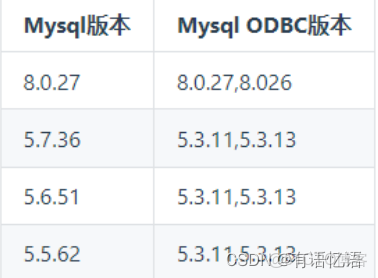
MySQL 與 Doris 的數據類型匹配:
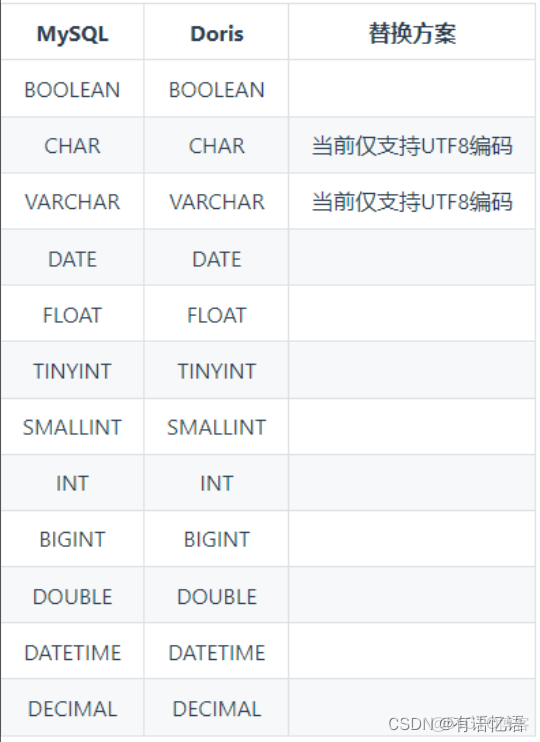
1)安裝 unixODBC
安裝
yum install -y unixODBC unixODBC-devel libtool-ltdl libtool-ltdl-devel
查看是否安裝成功
odbcinst -j
2)安裝 MySQL 對應版本的 ODBC(每個 BE 節點都要)
下載
wget https://downloads.mysql.com/archives/get/p/10/file/mysqlconnector-odbc-5.3.11-1.el7.x86_64.rpm
安裝
yum install -y mysql-connector-odbc-5.3.11-1.el7.x86_64.rpm
查看是否安裝成功
myodbc-installer -d -l
3)配置 unixODBC,驗證通過 ODBC 訪問 Mysql
編輯 ODBC 配置文件
vim /etc/odbc.ini
[mysql]
Description = Data source MySQL
Driver = MySQL ODBC 5.3 Unicode Driver
Server = hadoop1
Host = hadoop1
Database = test
Port = 3306
User = root
Password = 000000
測試鏈接
isql -v mysql
4)準備 MySQL 表
CREATE TABLE `test_cdc` (
 `id` int NOT NULL AUTO_INCREMENT,
 `name` varchar(255) DEFAULT NULL,
 PRIMARY KEY (`id`)
) ENGINE=InnoDB AUTO_INCREMENT=91234 DEFAULT CHARSET=utf8mb4;
INSERT INTO `test_cdc` VALUES (123, 'this is a update');
INSERT INTO `test_cdc` VALUES (1212, '測試 flink CDC');
INSERT INTO `test_cdc` VALUES (1234, '這是測試');
INSERT INTO `test_cdc` VALUES (11233, 'zhangfeng_1');
INSERT INTO `test_cdc` VALUES (21233, 'zhangfeng_2');
INSERT INTO `test_cdc` VALUES (31233, 'zhangfeng_3');
INSERT INTO `test_cdc` VALUES (41233, 'zhangfeng_4');
INSERT INTO `test_cdc` VALUES (51233, 'zhangfeng_5');
INSERT INTO `test_cdc` VALUES (61233, 'zhangfeng_6');
INSERT INTO `test_cdc` VALUES (71233, 'zhangfeng_7');
INSERT INTO `test_cdc` VALUES (81233, 'zhangfeng_8');
INSERT INTO `test_cdc` VALUES (91233, 'zhangfeng_9');
5)修改 Doris 的配置文件(每個 BE 節點都要,不用重啓 BE)
在 BE 節點的 conf/odbcinst.ini,添加我們的剛才註冊的的 ODBC 驅動([MySQL ODBC
5.3.11]這部分)。
# Driver from the postgresql-odbc package
# Setup from the unixODBC package
[PostgreSQL]
Description = ODBC for PostgreSQL
Driver = /usr/lib/psqlodbc.so
Setup = /usr/lib/libodbcpsqlS.so
FileUsage = 1
# Driver from the mysql-connector-odbc package
# Setup from the unixODBC package
[MySQL ODBC 5.3.11]
Description = ODBC for MySQL
Driver= /usr/lib64/libmyodbc5w.so
FileUsage = 1
# Driver from the oracle-connector-odbc package
# Setup from the unixODBC package
[Oracle 19 ODBC driver]
Description=Oracle ODBC driver for Oracle 19
Driver=/usr/lib/libsqora.so.19.1
6)Doris 建 Resource
通過 ODBC_Resource 來創建 ODBC 外表,這是推薦的方式,這樣 resource 可以複用。
CREATE EXTERNAL RESOURCE `mysql_5_3_11`
PROPERTIES (
"host" = "hadoop1",
"port" = "3306",
"user" = "root",
"password" = "000000",
"database" = "test",
"table" = "test_cdc",
"driver" = "MySQL ODBC 5.3.11", --名稱要和上面[]裏的名稱一致
"odbc_type" = "mysql",
"type" = "odbc_catalog")
7)基於 Resource 創建 Doris 外表
CREATE EXTERNAL TABLE `test_odbc_5_3_11` (
 `id` int NOT NULL ,
 `name` varchar(255) null
) ENGINE=ODBC
COMMENT "ODBC"
PROPERTIES (
"odbc_catalog_resource" = "mysql_5_3_11", --名稱就是 resource 的名稱
"database" = "test",
"table" = "test_cdc"
);
8)查詢 Doris 外表
select * from `test_odbc_5_3_11`;4.3 使用ODBC的Oracle外表
CentOS 數據庫 ODBC 版本對應關係:
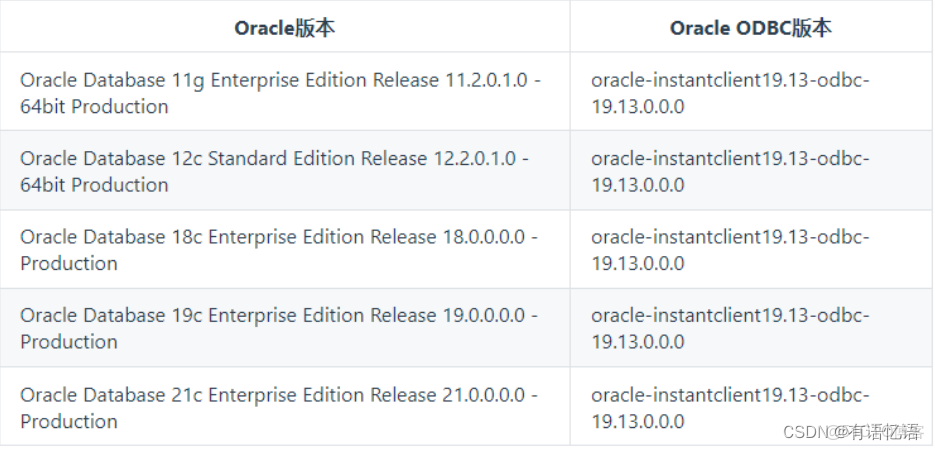
與 Doris 的數據類型匹配:
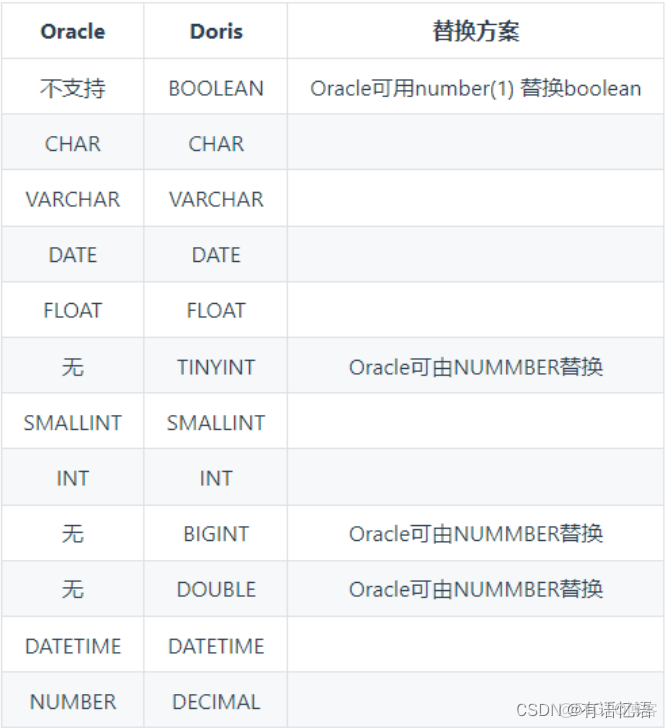
1)安裝 unixODBC
安裝
yum install -y unixODBC unixODBC-devel libtool-ltdl libtool-ltdldevel
查看是否安裝成功
odbcinst -j
2)安裝 Oracle 對應版本的 ODBC(每個 BE 節點都要)
下載 4 個安裝包
wget
https://download.oracle.com/otn_software/linux/instantclient/1913
000/oracle-instantclient19.13-sqlplus-19.13.0.0.0-2.x86_64.rpm
wget
https://download.oracle.com/otn_software/linux/instantclient/1913
000/oracle-instantclient19.13-devel-19.13.0.0.0-2.x86_64.rpm
wget
https://download.oracle.com/otn_software/linux/instantclient/1913
000/oracle-instantclient19.13-odbc-19.13.0.0.0-2.x86_64.rpm
wget
https://download.oracle.com/otn_software/linux/instantclient/1913
000/oracle-instantclient19.13-basic-19.13.0.0.0-2.x86_64.rpm
安裝 4 個安裝包
rpm -ivh oracle-instantclient19.13-basic-19.13.0.0.0-2.x86_64.rpm
rpm -ivh oracle-instantclient19.13-devel-19.13.0.0.0-2.x86_64.rpm
rpm -ivh oracle-instantclient19.13-odbc-19.13.0.0.0-2.x86_64.rpm
rpm -ivh oracle-instantclient19.13-sqlplus-19.13.0.0.0-
2.x86_64.rpm
3)驗證 ODBC 驅動動態鏈接庫是否正確
ldd /usr/lib/oracle/19.13/client64/lib/libsqora.so.19.14)配置 unixODBC,驗證通過 ODBC 連接 Oracle
vim /etc/odbcinst.ini
添加如下內容:
[Oracle 19 ODBC driver]
Description = Oracle ODBC driver for Oracle 19
Driver =
/usr/lib/oracle/19.13/client64/lib/libsqora.so.19.1
vim /etc/odbc.ini
添加如下內容:
[oracle]
Driver = Oracle 19 ODBC driver ---名稱是上面 oracle 部分用[]括起來的內容
ServerName =hadoop2:1521/orcl --oracle 數據 ip 地址,端口及 SID
UserID = atguigu
Password = 000000
驗證
isql oracle
5)修改 Doris 的配置(每個 BE 節點都要,不用重啓)
修改 BE 節點 conf/odbcinst.ini 文件,加入剛才/etc/odbcinst.ini 添加的一樣內容,並刪除原先的 Oracle 配置。
[Oracle 19 ODBC driver]
Description = Oracle ODBC driver for Oracle 19
Driver =
/usr/lib/oracle/19.13/client64/lib/libsqora.so.19.1
6)創建 Resource
CREATE EXTERNAL RESOURCE `oracle_19`
PROPERTIES (
 "host" = "hadoop2",
 "port" = "1521",
 "user" = "atguigu",
 "password" = "000000",
 "database" = "orcl", --數據庫示例名稱,也就是 ORACLE_SID
 "driver" = "Oracle 19 ODBC driver", --名稱一定和 be odbcinst.ini
裏的 oracle 部分的[]裏的內容一樣
 "odbc_type" = "oracle",
 "type" = "odbc_catalog"
);
7)基於 Resource 創建 Doris 外表
CREATE EXTERNAL TABLE `oracle_odbc` (
 id int,
 name VARCHAR(20) NOT NULL
) ENGINE=ODBC
COMMENT "ODBC"
PROPERTIES (
 "odbc_catalog_resource" = "oracle_19",
 "database" = "orcl",
 "table" = "student"
);
8)查詢 Doris 外表
select * from oracle_odbc;5 Doris On ES
Doris-On-ES 將 Doris 的分佈式查詢規劃能力和 ES(Elasticsearch)的全文檢索能力相結合,提供更完善的 OLAP 分析場景解決方案:
(1)ES 中的多 index 分佈式 Join 查詢
(2)Doris 和 ES 中的表聯合查詢,更復雜的全文檢索過濾
5.1 原理
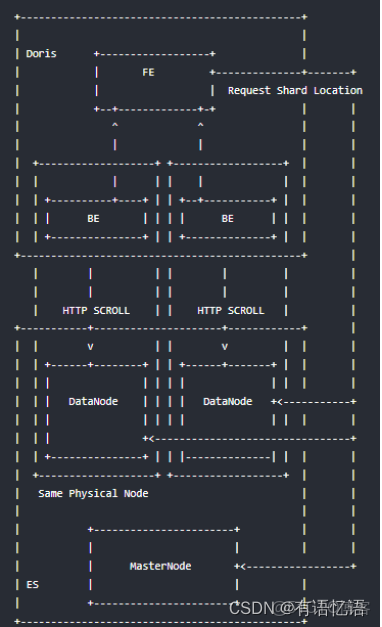
(1)創建 ES 外表後,FE 會請求建表指定的主機,獲取所有節點的 HTTP 端口信息以
及 index 的 shard 分佈信息等,如果請求失敗會順序遍歷 host 列表直至成功或完全失敗
(2)查詢時會根據 FE 得到的一些節點信息和 index 的元數據信息,生成查詢計劃併發
給對應的 BE 節點
(3)BE 節點會根據就近原則即優先請求本地部署的 ES 節點,BE 通過 HTTP Scroll 方
式流式的從 ES index 的每個分片中併發的從_source 或 docvalue 中獲取數據
(4)Doris 計算完結果後,返回給用户
5.2 使用方式
5.2.1 Doris 中創建 ES 外表
1)創建 ES 索引
PUT test
{
 "settings": {
 "index": {
 "number_of_shards": "1",
 "number_of_replicas": "0"
 }
 },
 "mappings": {
 "doc": { // ES 7.x 版本之後創建索引時不需要指定 type,會有一個默認且唯
一的`_doc` type
 "properties": {
 "k1": {
 "type": "long"
 },
 "k2": {
 "type": "date"
 },
 "k3": {
 "type": "keyword"
 },
 "k4": {
 "type": "text",
 "analyzer": "standard"
 },
 "k5": {
 "type": "float"
 }
 }
 }
 }
}
2)ES 索引導入數據
POST /_bulk
{"index":{"_index":"test","_type":"doc"}}
{ "k1" : 100, "k2": "2020-01-01", "k3": "Trying out Elasticsearch",
"k4": "Trying out Elasticsearch", "k5": 10.0}
{"index":{"_index":"test","_type":"doc"}}
{ "k1" : 100, "k2": "2020-01-01", "k3": "Trying out Doris", "k4":
"Trying out Doris", "k5": 10.0}
{"index":{"_index":"test","_type":"doc"}}
{ "k1" : 100, "k2": "2020-01-01", "k3": "Doris On ES", "k4": "Doris
On ES", "k5": 10.0}
{"index":{"_index":"test","_type":"doc"}}
{ "k1" : 100, "k2": "2020-01-01", "k3": "Doris", "k4": "Doris",
"k5": 10.0}
{"index":{"_index":"test","_type":"doc"}}
{ "k1" : 100, "k2": "2020-01-01", "k3": "ES", "k4": "ES", "k5":
10.0}
3)Doris 中創建 ES 外表
CREATE EXTERNAL TABLE `es_test` (
 `k1` bigint(20) COMMENT "",
 `k2` datetime COMMENT "",
 `k3` varchar(20) COMMENT "",
 `k4` varchar(100) COMMENT "",
 `k5` float COMMENT ""
) ENGINE=ELASTICSEARCH // ENGINE 必須是 Elasticsearch
PROPERTIES (
"hosts" =
"http://hadoop1:9200,http://hadoop2:9200,http://hadoop3:9200",
"index" = "test",
"type" = "doc",
"user" = "",
"password" = ""
);
參數説明:
|
參數
|
説明
|
|
hosts
|
ES 集羣地址,可以是一個或多個,也可以是 ES 前端的負載均衡地址
|
|
index
|
對應的 ES 的 index 名字,支持 alias,如果使用 doc_value,需要使用真實的名稱
|
|
type
|
index 的 type,不指定的情況會使用_doc
|
|
user
|
ES 集羣用户名
|
|
password
|
對應用户的密碼信息
|
➢ ES 7.x 之前的集羣請注意在建表的時候選擇正確的索引類型 type
➢ 認證方式目前僅支持 Http Basic 認證,並且需要確保該用户有訪問: /_cluster/state/、
_nodes/http 等路徑和 index 的讀權限; 集羣未開啓安全認證,用户名和密碼不需要
設置
➢ Doris 表中的列名需要和 ES 中的字段名完全匹配,字段類型應該保持一致
➢ ENGINE 必須是 Elasticsearch
Doris On ES 一個重要的功能就是過濾條件的下推: 過濾條件下推給 ES,這樣只有真正
滿足條件的數據才會被返回,能夠顯著的提高查詢性能和降低 Doris 和 Elasticsearch 的 CPU、memory、IO 使用量
下面的操作符(Operators)會被優化成如下 ES Query:
|
SQL syntax
|
ES 5.x+ syntax
|
|
=
|
term query
|
|
in
|
terms query
|
, < , >= , ⇐ | range query
and | bool.filter
or | bool.should
not | bool.must_not
not in | bool.must_not + terms query
is_not_null | exists query
is_null | bool.must_not + exists query
esquery | ES 原生 json 形式的 QueryDSL
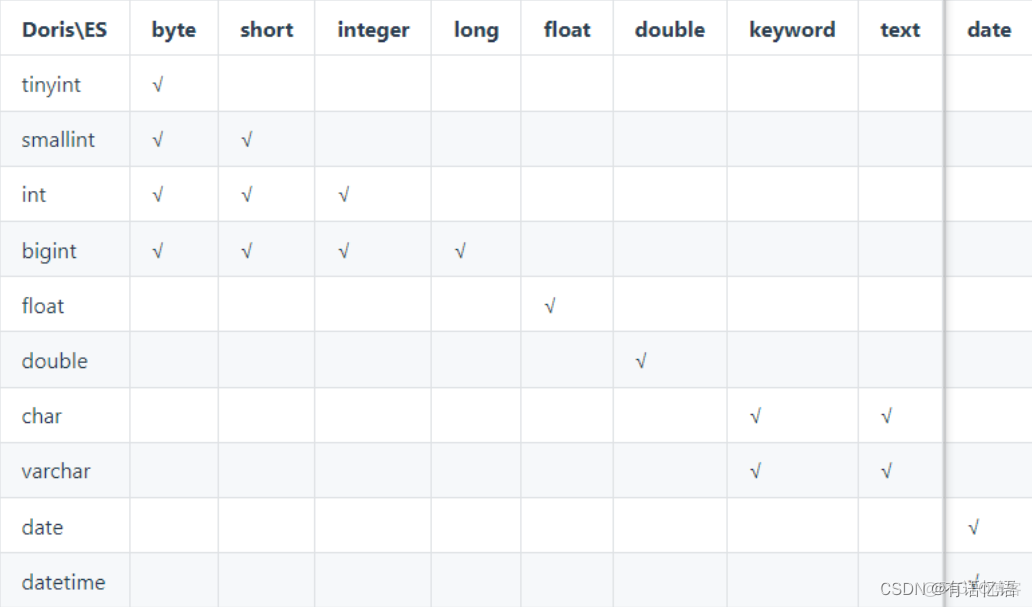
數據類型映射:
5.2.2 啓用列式掃描優化查詢速度
"enable_docvalue_scan" = "true"1)參數説明
是否開啓通過 ES/Lucene 列式存儲獲取查詢字段的值,默認為 false。開啓後 Doris 從 ES中獲取數據會遵循以下兩個原則:
(1)盡力而為: 自動探測要讀取的字段是否開啓列式存儲(doc_value: true),如果獲取的
字段全部有列存,Doris 會從列式存儲中獲取所有字段的值
(2)自動降級: 如果要獲取的字段只要有一個字段沒有列存,所有字段的值都會從行
存_source 中解析獲取
2)優勢:
默認情況下,Doris On ES 會從行存也就是_source 中獲取所需的所有列,_source 的存
儲採用的行式+json 的形式存儲,在批量讀取性能上要劣於列式存儲,尤其在只需要少數列的情況下尤為明顯,只獲取少數列的情況下,docvalue 的性能大約是_source 性能的十幾倍。
3)注意
text 類型的字段在 ES 中是沒有列式存儲,因此如果要獲取的字段值有 text 類型字段會
自動降級為從_source 中獲取.
在獲取的字段數量過多的情況下(>= 25),從 docvalue中獲取字段值的性能會和從_source中獲取字段值基本一樣。
5.2.3 探測 keyword 類型字段
"enable_keyword_sniff" = "true"參數説明:
是否對 ES 中字符串類型分詞類型(text) fields 進行探測,獲取額外的未分詞(keyword)字
段名(multi-fields 機制)
在 ES 中可以不建立 index 直接進行數據導入,這時候 ES 會自動創建一個新的索引,
針對字符串類型的字段 ES 會創建一個既有 text 類型的字段又有 keyword 類型的字段,這就是 ES 的 multi fields 特性,mapping 如下:
"k4": {
 "type": "text",
 "fields": {
 "keyword": {
 "type": "keyword",
 "ignore_above": 256
 }
 }
}
對 k4 進行條件過濾時比如=,Doris On ES 會將查詢轉換為 ES 的 TermQuery。
SQL 過濾條件:
k4 = "Doris On ES"
轉換成 ES 的 query DSL 為:
"term" : {
 "k4": "Doris On ES"
}
因為 k4 的第一字段類型為 text,在數據導入的時候就會根據 k4 設置的分詞器(如果沒
有設置,就是 standard 分詞器)進行分詞處理得到 doris、on、es 三個 Term,如下 ES analyze
API 分析:
POST /_analyze
{
 "analyzer": "standard",
 "text": "Doris On ES"
}
分詞的結果是:
{
 "tokens": [
 {
 "token": "doris",
 "start_offset": 0,
 "end_offset": 5,
 "type": "<ALPHANUM>",
 "position": 0
 },
 {
 "token": "on",
 "start_offset": 6,
 "end_offset": 8,
 "type": "<ALPHANUM>",
 "position": 1
 },
 {
 "token": "es",
 "start_offset": 9,
 "end_offset": 11,
 "type": "<ALPHANUM>",
 "position": 2
 }
 ]
}
查詢時使用的是:
"term" : {
 "k4": "Doris On ES"
}
Doris On ES 這個 term 匹配不到詞典中的任何 term,不會返回任何結果,而啓用
enable_keyword_sniff: true 會自動將 k4 = "Doris On ES"轉換成 k4.keyword = "Doris On ES"來完全匹配 SQL 語義,轉換後的 ES query DSL 為:
"term" : {
 "k4.keyword": "Doris On ES"
}
k4.keyword 的類型是 keyword,數據寫入 ES 中是一個完整的 term,所以可以匹配。
5.2.4 開啓節點自動發現,
"nodes_discovery" = "true"參數説明:
是否開啓 es 節點發現,默認為 true。
當配置為 true 時,Doris 將從 ES 找到所有可用的相關數據節點(在上面分配的分片)。
如果 ES 數據節點的地址沒有被 Doris BE 訪問,則設置為 false。ES 集羣部署在與公共 Internet隔離的內網,用户通過代理訪問。
5.2.5 配置 https 訪問模式
"http_ssl_enabled" = "true"參數説明:
ES 集羣是否開啓 https 訪問模式。
目前 fe/be 實現方式為信任所有,這是臨時解決方案,後續會使用真實的用户配置證書。
5.2.6 查詢用法
完成在 Doris 中建立 ES 外表後,除了無法使用 Doris 中的數據模型(rollup、預聚合、
物化視圖等)外並無區別。
1)基本查詢
select * from es_table where k1 > 1000 and k3 ='term' or k4 like
'fu*z_'
2)擴展的 esquery(field, QueryDSL)
通過 esquery(field, QueryDSL)函數將一些無法用 sql 表述的 query 如 match_phrase、geoshape 等下推給 ES 進行過濾處理,esquery 的第一個列名參數用於關聯 index,第二個參數是 ES 的基本 Query DSL 的 json 表述,使用花括號{}包含,json 的 root key 有且只能有一個,如 match_phrase、geo_shape、bool 等。
(1)match_phrase 查詢:
select * from es_table where esquery(k4, '{
 "match_phrase": {
 "k4": "doris on es"
 }
 }');
(2)geo 相關查詢:
select * from es_table where esquery(k4, '{
 "geo_shape": {
 "location": {
 "shape": {
 "type": "envelope",
 "coordinates": [
 [
 13,
 53
 ],
 [
 14,
 52
 ]
 ]
 },
 "relation": "within"
 }
 }
 }');
(3)bool 查詢:
select * from es_table where esquery(k4, ' {
 "bool": {
 "must": [
 {
 "terms": {
 "k1": [
 11,
 12
 ]
 }
 },
 {
 "terms": {
 "k2": [
 100
 ]
 }
 }
 ]
 }
 }');
5.3 最佳實踐
5.3.1 時間類型字段使用建議
在 ES 中,時間類型的字段使用十分靈活,但是在 Doris On ES 中如果對時間類型字段
的類型設置不當,則會造成過濾條件無法下推。
創建索引時對時間類型格式的設置做最大程度的格式兼容:
"dt": {
 "type": "date",
 "format": "yyyy-MM-dd HH:mm:ss||yyyy-MM-dd||epoch_millis"
}
在 Doris 中建立該字段時建議設置為 date 或 datetime,也可以設置為 varchar 類型, 使用
如下 SQL 語句都可以直接將過濾條件下推至 ES:
select * from doe where k2 > '2020-06-21';
select * from doe where k2 < '2020-06-21 12:00:00';
select * from doe where k2 < 1593497011;
select * from doe where k2 < now();
select * from doe where k2 < date_format(now(), '%Y-%m-%d');
注意:
(1)在 ES 中如果不對時間類型的字段設置 format, 默認的時間類型字段格式為
strict_date_optional_time||epoch_millis
(2)導入到 ES 的日期字段如果是時間戳需要轉換成 ms, ES 內部處理時間戳都是按照
ms 進行處理的, 否則 Doris On ES 會出現顯示錯誤。
5.3.2 獲取 ES 元數據字段_id
導入文檔在不指定_id 的情況下 ES 會給每個文檔分配一個全局唯一的_id 即主鍵, 用户
也可以在導入時為文檔指定一個含有特殊業務意義的_id; 如果需要在 Doris On ES 中獲取該字段值,建表時可以增加類型為 varchar 的_id 字段:
CREATE EXTERNAL TABLE `doe` (
 `_id` varchar COMMENT "",
 `city` varchar COMMENT ""
) ENGINE=ELASTICSEARCH
PROPERTIES (
"hosts" = "http://127.0.0.1:8200",
"user" = "root",
"password" = "root",
"index" = "doe",
"type" = "doc"
}
注意:
(1)_id 字段的過濾條件僅支持=和 in 兩種
(2)_id 字段只能是 varchar 類型
