一. 快速入門
1. 使用步驟
1. 添加依賴
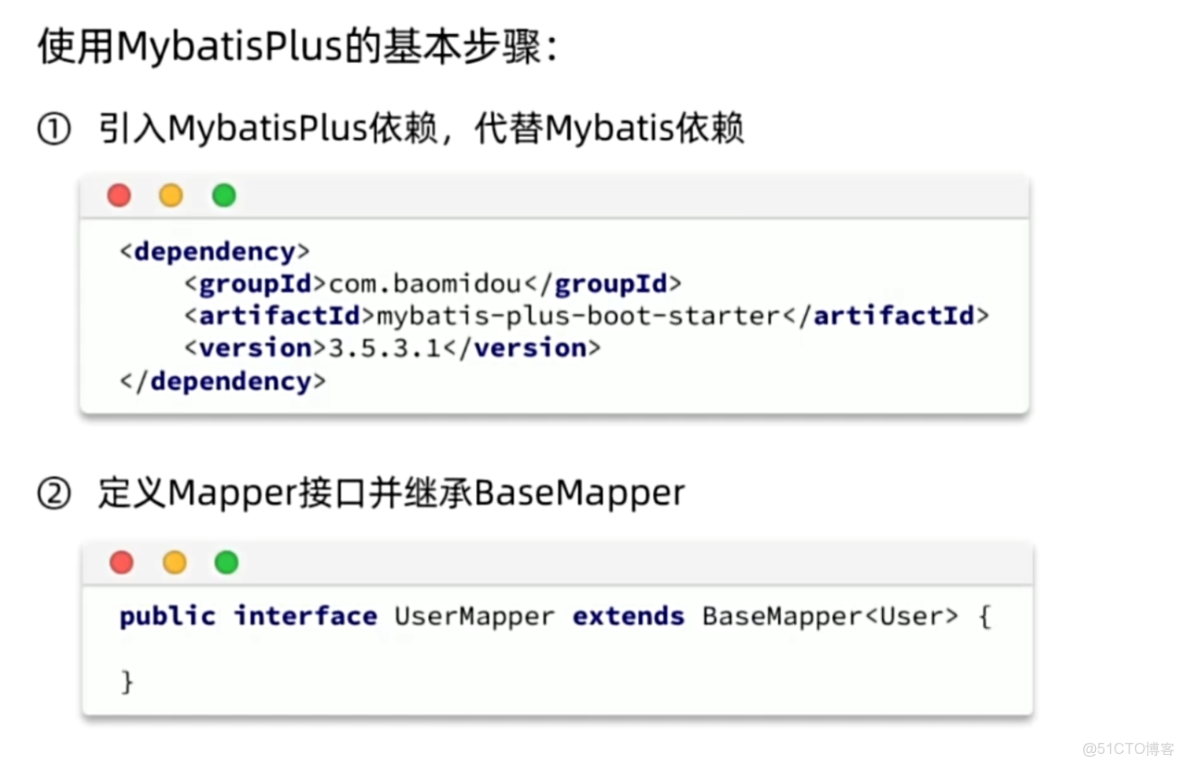
<!-- MyBatis-Plus 核心依賴 -->
<dependency>
    <groupId>com.baomidou</groupId>
    <artifactId>mybatis-plus-boot-starter</artifactId>
    <version>3.5.3.1</version> <!-- 最新版本可到官網查詢 -->
</dependency>
<!-- 數據庫驅動(根據實際數據庫選擇) -->
<dependency>
    <groupId>mysql</groupId>
    <artifactId>mysql-connector-java</artifactId>
    <scope>runtime</scope>
</dependency>
2. 配置數據庫連接
spring:
  datasource:
    driver-class-name: com.mysql.cj.jdbc.Driver
    url: jdbc:mysql://localhost:3306/your_db?useSSL=false&serverTimezone=UTC
    username: root
    password: your_password
# MyBatis-Plus 配置(可選)
mybatis-plus:
  mapper-locations: classpath:mapper/*.xml # Mapper XML 路徑
  type-aliases-package: com.example.entity # 實體類包路徑
3. 啓動類添加註解
@SpringBootApplication
@MapperScan("com.example.mapper") // 掃描 Mapper 接口包
public class MyApplication {
    public static void main(String[] args) {
        SpringApplication.run(MyApplication.class, args);
    }
}
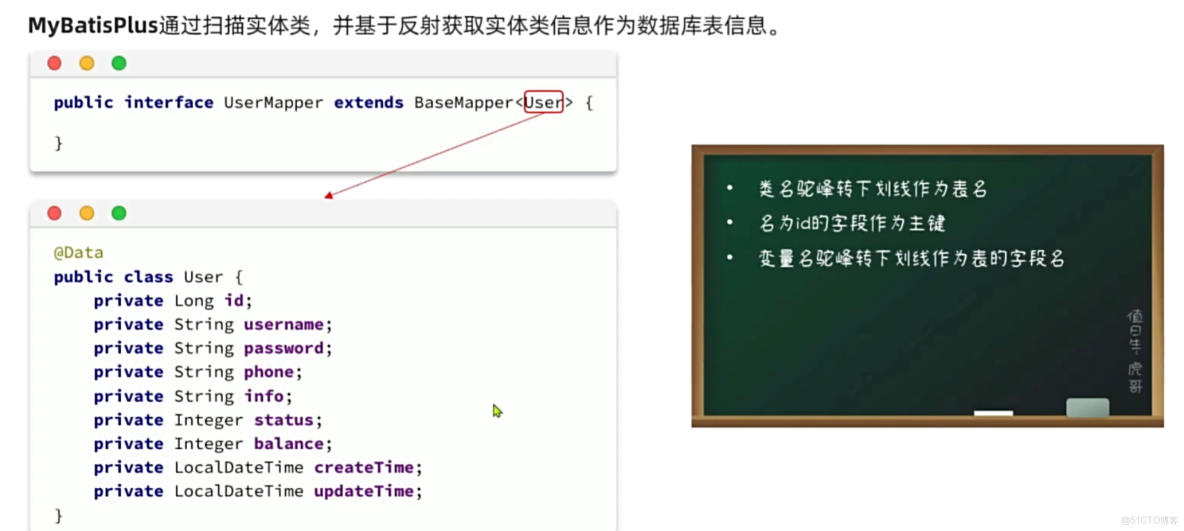
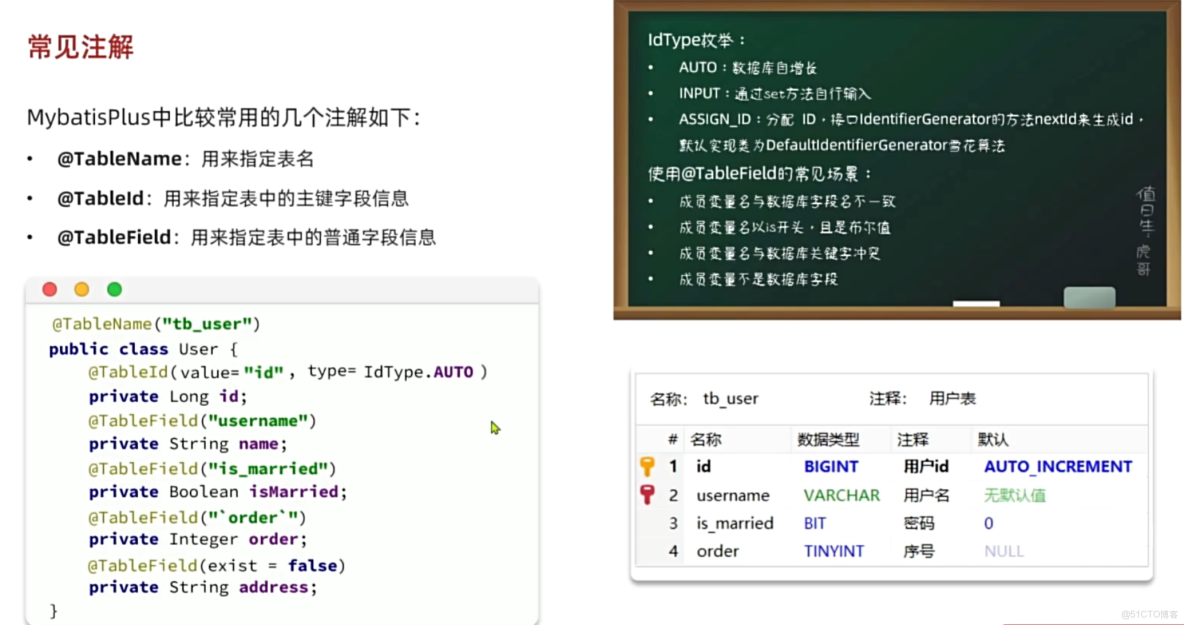
2. 常用註解
3. 常見配置
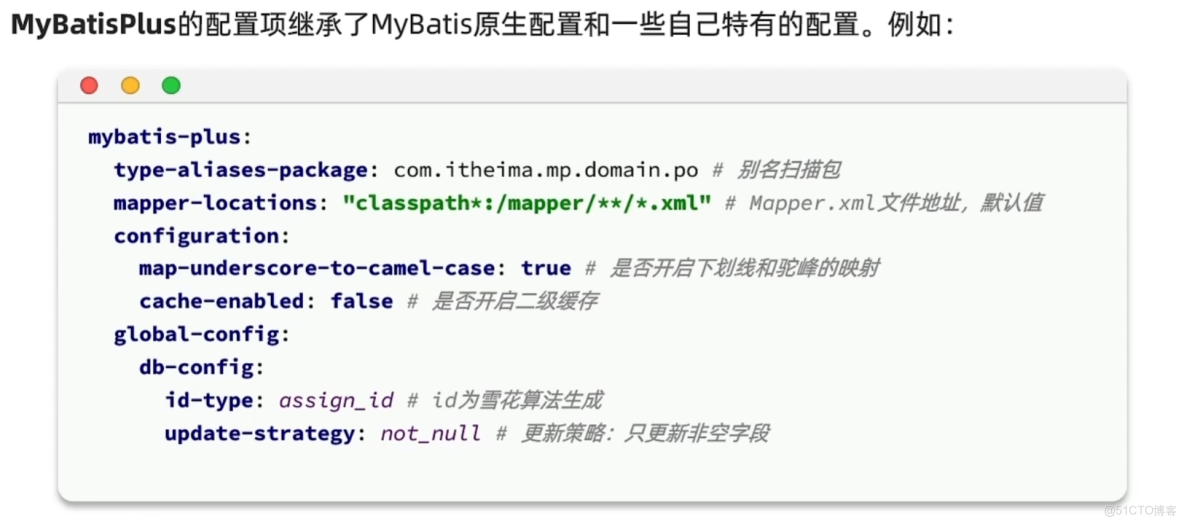
二. 核心功能
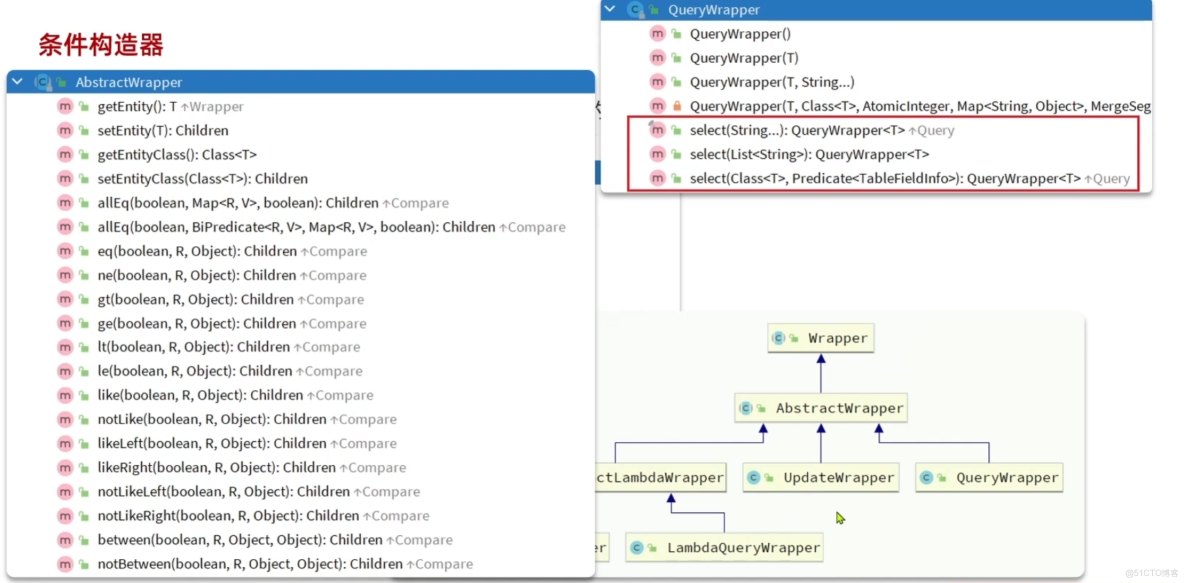
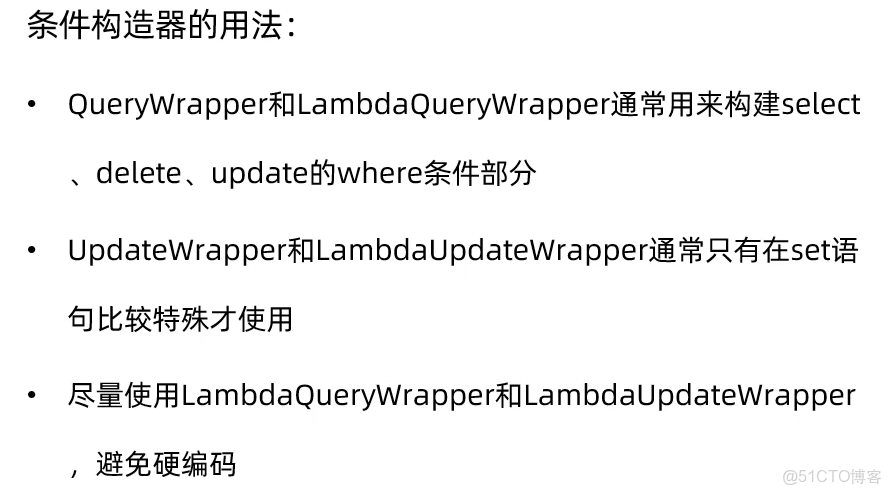
1. 條件構造器
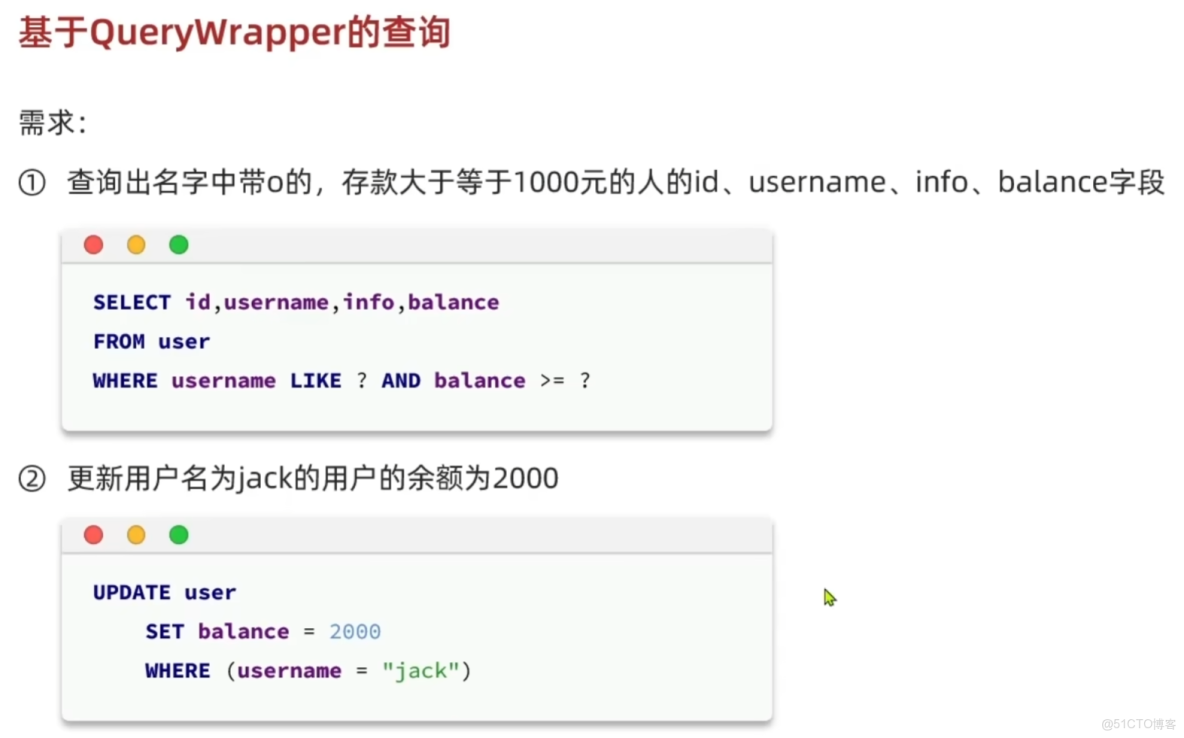
案例:
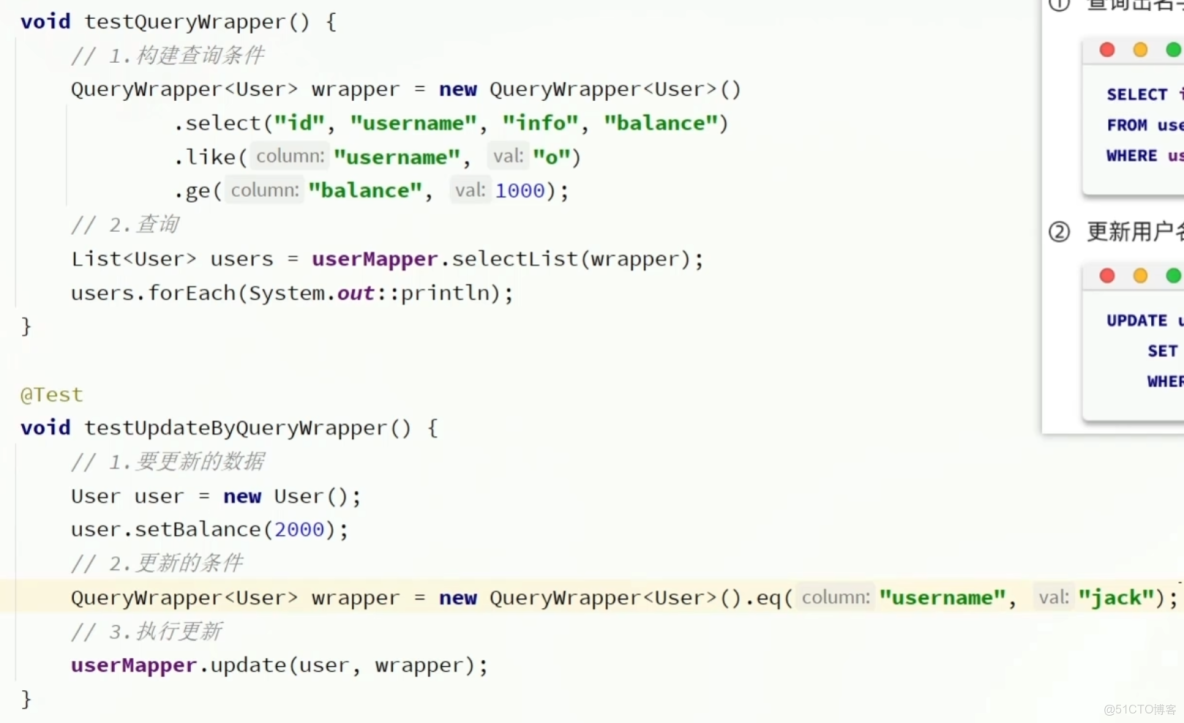
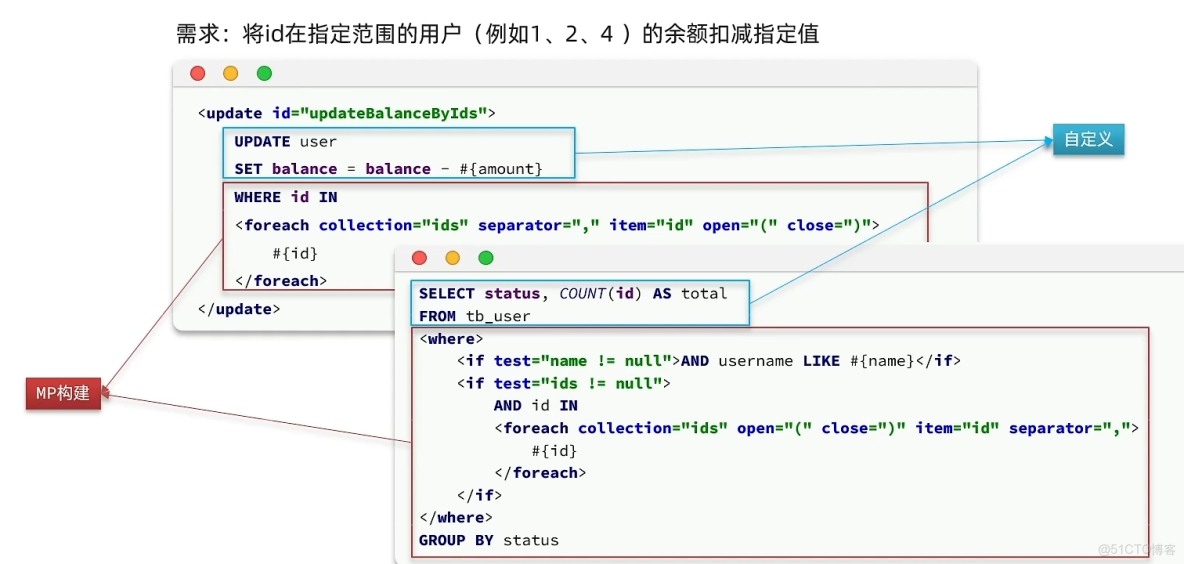
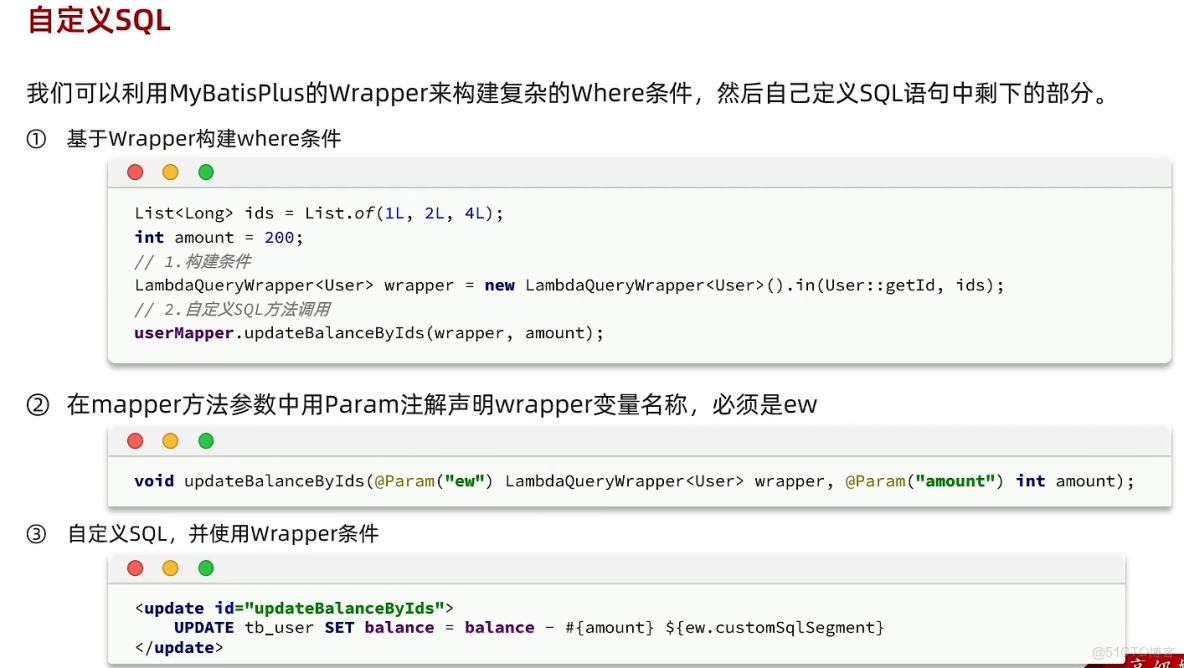
2. 自定義SQL
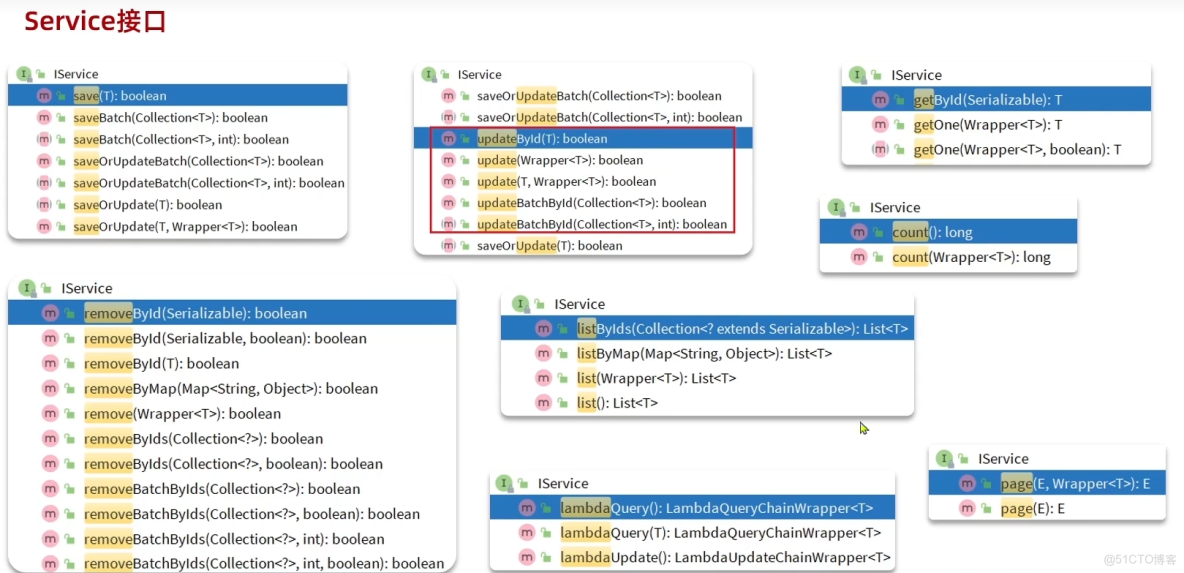
3. Service接口
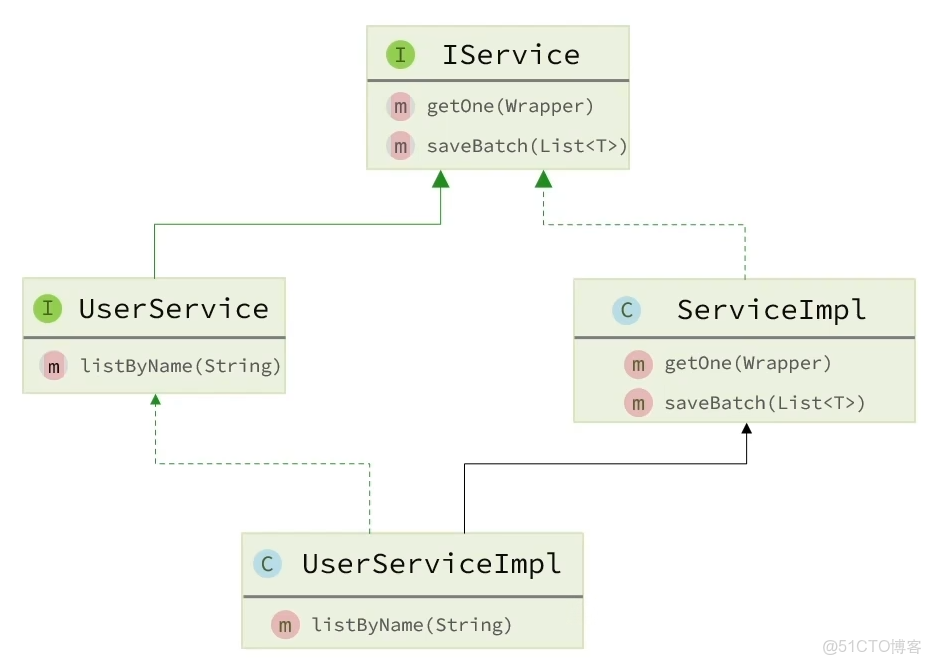
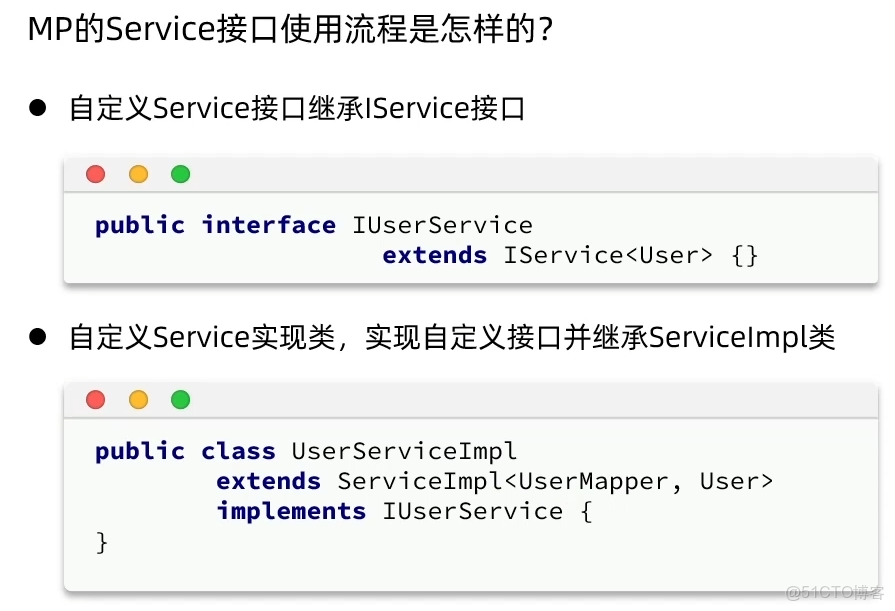
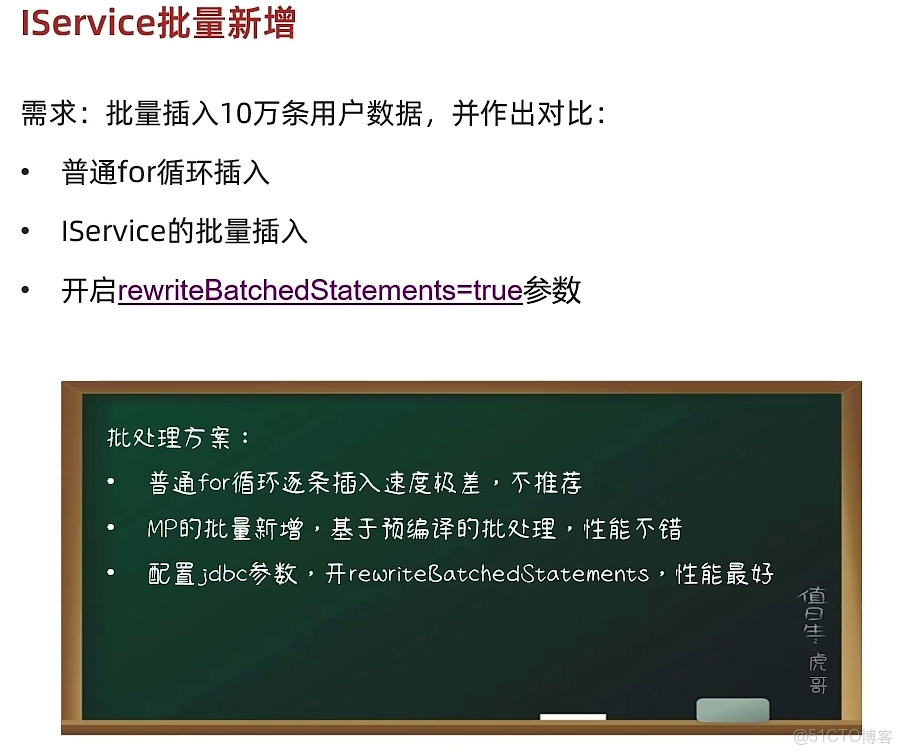
三. 擴展功能
1. 代碼生成器
MyBatis-Plus 的代碼生成器(Generator)是一個高效的代碼自動生成工具,能根據數據庫表結構快速生成 實體類(Entity)、Mapper 接口、Service 層、Controller 層 等代碼,甚至包括基礎的 CRUD 方法和 XML 映射文件,極大減少重複編碼工作,尤其適合快速開發和標準化項目結構。
1.1 核心功能
- 多數據源支持:適配 MySQL、Oracle、SQL Server 等主流數據庫。
- 自定義模板:支持 Freemarker、Velocity、Beetl 等模板引擎,可自定義代碼生成規則(如類名格式、方法註釋等)。
- 分層生成:自動生成 Entity、Mapper、Service(接口 + 實現類)、Controller 等分層代碼。
- 關聯生成:根據表字段自動生成實體類的註解(如
@TableName、@TableId)、字段映射關係,以及 Mapper XML 中的基礎 SQL。 - 配置靈活:可指定生成目錄、過濾不需要的表、設置命名策略(如駝峯命名)等。
1.2 使用步驟(以 Spring Boot + MySQL 為例)
(1)添加依賴
在 pom.xml 中引入代碼生成器和模板引擎(以 Freemarker 為例):
<!-- MyBatis-Plus 代碼生成器 -->
<dependency>
    <groupId>com.baomidou</groupId>
    <artifactId>mybatis-plus-generator</artifactId>
    <version>3.5.3.1</version> <!-- 與 MyBatis-Plus 版本保持一致 -->
</dependency>
<!-- 模板引擎(必須引入,否則無法生成代碼) -->
<dependency>
    <groupId>org.freemarker</groupId>
    <artifactId>freemarker</artifactId>
    <version>2.3.31</version>
</dependency>(2)編寫生成代碼
創建一個 CodeGenerator 類,配置生成規則並執行:
import com.baomidou.mybatisplus.generator.FastAutoGenerator;
import com.baomidou.mybatisplus.generator.config.OutputFile;
import com.baomidou.mybatisplus.generator.engine.FreemarkerTemplateEngine;

import java.util.Collections;

public class CodeGenerator {
    public static void main(String[] args) {
        // 1. 配置數據庫連接
        FastAutoGenerator.create("jdbc:mysql://localhost:3306/your_db?useSSL=false&serverTimezone=UTC", "root", "your_password")
                // 2. 全局配置
                .globalConfig(builder -> {
                    builder.author("your_name") // 設置作者
                            .outputDir(System.getProperty("user.dir") + "/src/main/java") // 生成文件輸出目錄(項目的 src/main/java)
                            .commentDate("yyyy-MM-dd") // 註釋日期格式
                            .disableOpenDir(); // 生成後不自動打開文件夾
                })
                // 3. 包配置(指定各層代碼的包路徑)
                .packageConfig(builder -> {
                    builder.parent("com.example.demo") // 父包名
                            .moduleName("user") // 模塊名(可選,如多模塊項目)
                            .entity("entity") // 實體類包名
                            .mapper("mapper") // Mapper 接口包名
                            .service("service") // Service 接口包名
                            .serviceImpl("service.impl") // Service 實現類包名
                            .controller("controller") // Controller 包名
                            .xml("mapper.xml") // Mapper XML 存放目錄(默認 resources/mapper/xml)
                            .pathInfo(Collections.singletonMap(OutputFile.xml,
                                    System.getProperty("user.dir") + "/src/main/resources/mapper")); // XML 輸出路徑
                })
                // 4. 策略配置(表和字段的生成規則)
                .strategyConfig(builder -> {
                    builder.addInclude("user") // 指定要生成的表名(多表用逗號分隔)
                            .addTablePrefix("t_", "sys_") // 過濾表前綴(如 t_user 生成 User 實體)
                            // 實體類策略
                            .entityBuilder()
                            .enableLombok() // 開啓 Lombok 註解(@Data 等)
                            .enableTableFieldAnnotation() // 為字段添加 @TableField 註解
                            .idType(com.baomidou.mybatisplus.generator.config.rules.IdType.AUTO) // 主鍵策略(自增)
                            // Mapper 策略
                            .mapperBuilder()
                            .enableBaseResultMap() // 生成基本的 ResultMap
                            .enableBaseColumnList() // 生成基本的 ColumnList
                            // Service 策略
                            .serviceBuilder()
                            .formatServiceFileName("%sService") // Service 接口名格式(如 UserService)
                            .formatServiceImplFileName("%sServiceImpl") // Service 實現類名格式
                            // Controller 策略
                            .controllerBuilder()
                            .enableRestStyle(); // 開啓 RESTful 風格(生成 @RestController)
                })
                // 5. 模板引擎配置(使用 Freemarker)
                .templateEngine(new FreemarkerTemplateEngine())
                // 6. 執行生成
                .execute();
    }
}
生成代碼後,需手動在啓動類添加 @MapperScan("com.example.demo.mapper") 掃描 Mapper 接口。
(3)關鍵配置説明
|
配置項
|
作用
|
|
數據庫連接
|
通過 |
|
全局配置
|
作者、輸出目錄、註釋格式等, |
|
包配置
|
定義各層代碼的包路徑(如實體類放 |
|
策略配置
|
- |
|
模板引擎
|
選擇 Freemarker 或其他引擎,需與依賴對應。
|
(4)生成結果
執行 CodeGenerator.main() 後,會在指定目錄生成以下文件:
src/main/java/com/example/demo/user/
├─ entity/User.java                // 實體類(帶 Lombok 和 MyBatis-Plus 註解)
├─ mapper/UserMapper.java          // Mapper 接口(繼承 BaseMapper)
├─ service/UserService.java        // Service 接口(繼承 IService)
├─ service/impl/UserServiceImpl.java // Service 實現類(繼承 ServiceImpl)
└─ controller/UserController.java  // Controller 類(REST 風格)

src/main/resources/mapper/
└─ UserMapper.xml                  // Mapper XML(基礎 CRUD 語句)
1.3 更多用法
(1)自定義模板:如果默認生成的代碼不符合需求,可複製 MyBatis-Plus 的默認模板(參考官方模板)到項目的 src/main/resources/templates 目錄,修改後通過 templateConfig 指定自定義模板路徑。
(2)過濾字段或表
忽略某些表:strategyConfig.builder().addExclude("table_name")
忽略某些字段:entityBuilder().addIgnoreColumns("column_name")
(3)批量生成多張表:在 addInclude 中傳入多個表名,如 addInclude("user", "order", "product")。
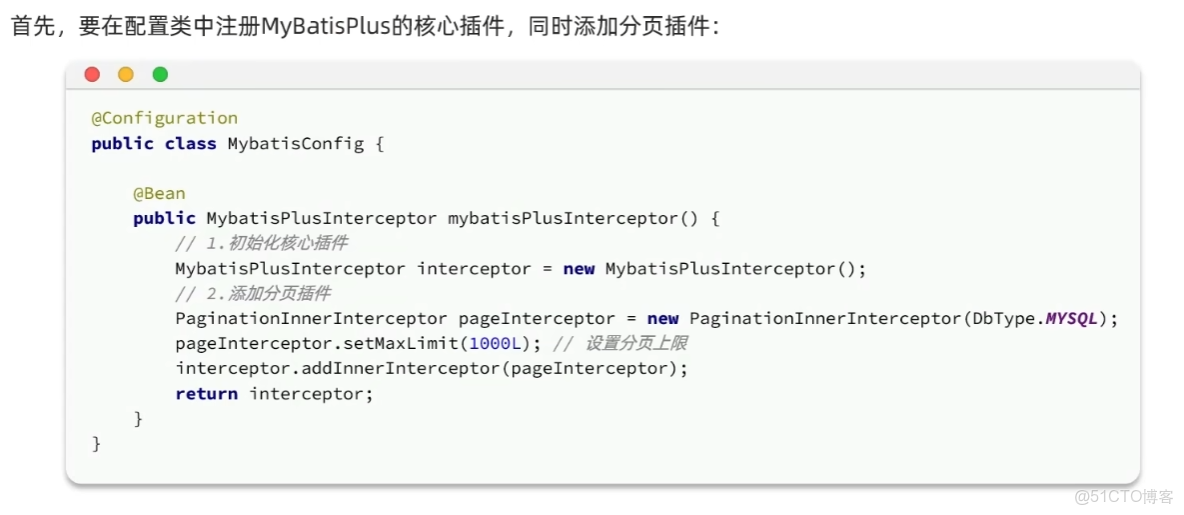
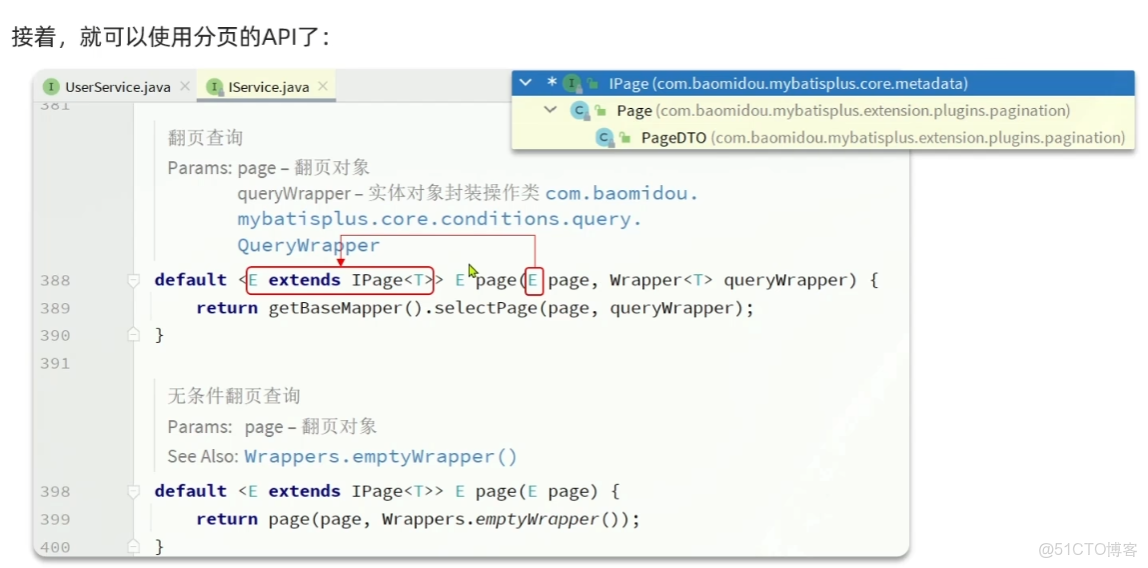
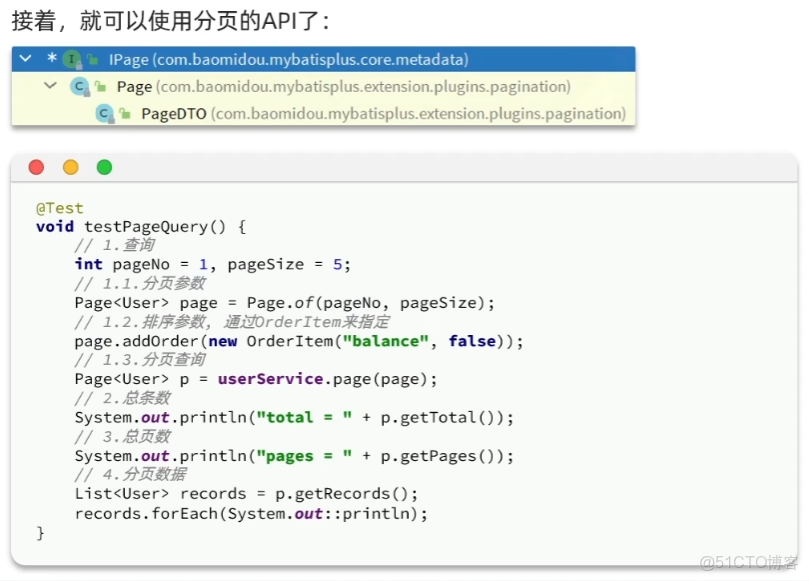
2. 分頁插件
簡單使用
1.
2.
3.
3. 邏輯刪除
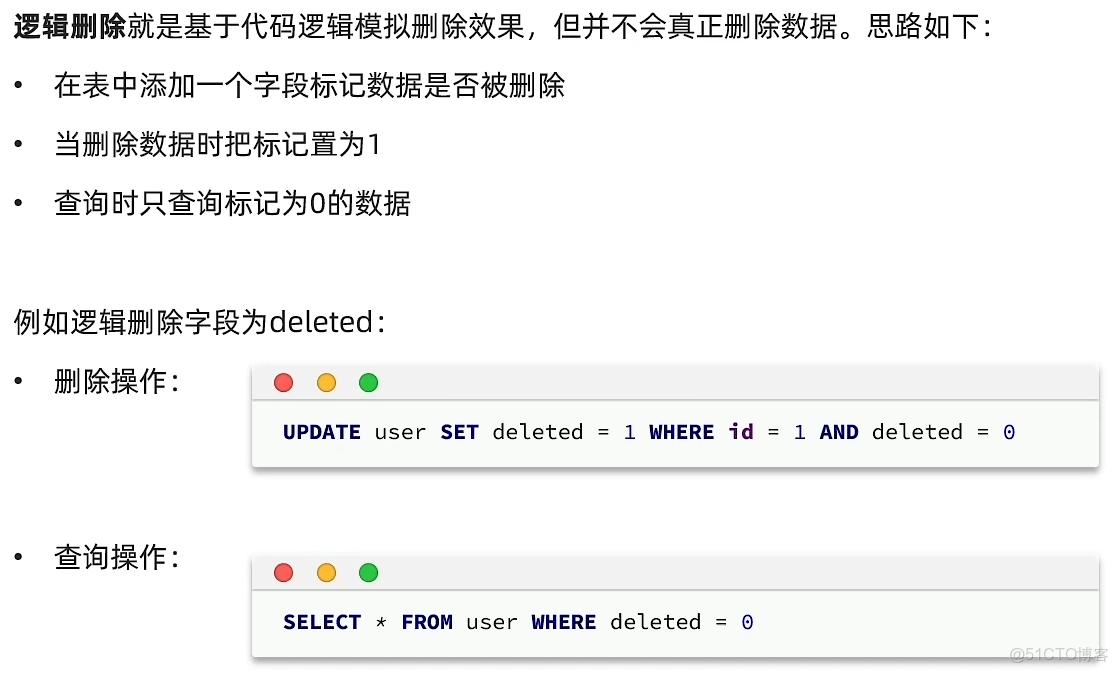
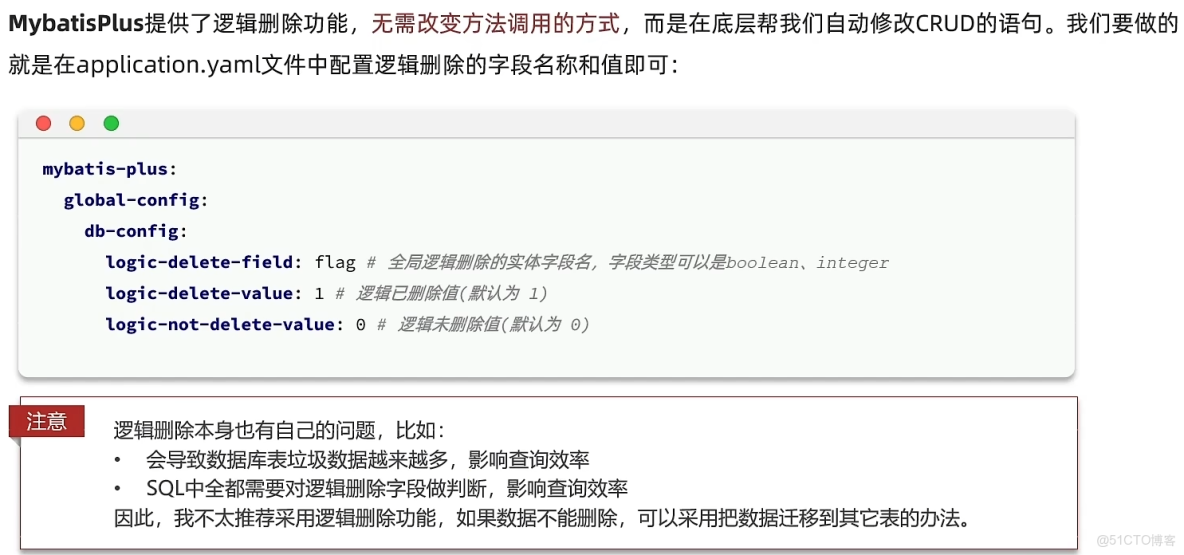
有了刪除邏輯字段後,每次的更新或查詢都要在where後加上這個字段