
一、概述
Hive由Facebook開源,是一個構建在Hadoop之上的數據倉庫工具
將結構化的數據映射成表
支持類SQL查詢,Hive中稱為HQL
1.讀模式
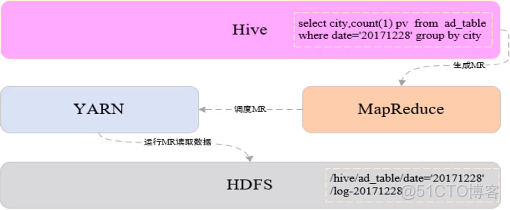
2.Hive架構
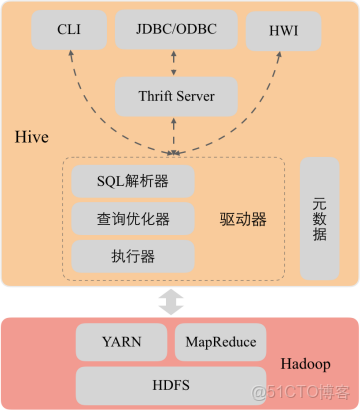
3.使用Hive的原因
Hadoop數據分析的問題:
MapReduce實現複雜查詢邏輯開發難度大,週期長
開發速度無法快速滿足業務發展
使用Hive原因
類似SQL語法,使用靈活方便,開發速度快
統一的元數據管理
易擴展
人員培養容易、學習成本低
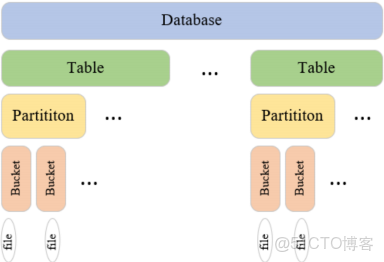
4.數據模型
二、Hive配置安裝
1.創建HDFS數據倉庫目錄
hadoop fs -mkdir -p /user/hive/warehouse
2.為所有用户添加數據倉庫目錄的寫權限
hadoop fs -chmod a+w /user/hive/warehouse
3.開放HDFS 中tmp臨時目錄的權限
hadoop fs -chmod -R 777 /tmp
5.將Hive安裝包解壓到/bigdata/安裝目錄
tar -zxvf apache-hive-1.2.2-bin.tar.gz -C /bigdata
6.創建軟鏈接
ln -s /bigdata/apache-hive-1.2.2-bin /usr/local/hive
7.設置環境變量
vim /etc/profile
添加如下內容:
export HIVE_HOME=/usr/local/hive
export PATH=$PATH:${HIVE_HOME}/bin
8.重新編譯使環境變量生效
source /etc/profile
9.hive-site.xml配置文件上傳到hive/conf目錄中,添加用於存儲元數據的MySQL數據庫配置信息
<?xml version="1.0" encoding="UTF-8" standalone="no"?>
<?xml-stylesheet type="text/xsl" href="configuration.xsl"?>
<!--
   Licensed to the Apache Software Foundation (ASF) under one or more
   contributor license agreements.  See the NOTICE file distributed with
   this work for additional information regarding copyright ownership.
   The ASF licenses this file to You under the Apache License, Version 2.0
   (the "License"); you may not use this file except in compliance with
   the License.  You may obtain a copy of the License at

       http://www.apache.org/licenses/LICENSE-2.0

   Unless required by applicable law or agreed to in writing, software
   distributed under the License is distributed on an "AS IS" BASIS,
   WITHOUT WARRANTIES OR CONDITIONS OF ANY KIND, either express or implied.
   See the License for the specific language governing permissions and
   limitations under the License.
-->
<configuration>
    <property>
        <name>javax.jdo.option.ConnectionURL</name>
        <value>jdbc:mysql://node01:3306/hive?createDatabaseIfNotExist=true&useSSL=false</value>
    </property>
    <property>
        <name>javax.jdo.option.ConnectionDriverName</name>
        <value>com.mysql.jdbc.Driver</value>
    </property>
    <property>
        <name>javax.jdo.option.ConnectionUserName</name>
        <value>hive</value>
    </property>
    <property>
        <name>javax.jdo.option.ConnectionPassword</name>
        <value>hive1234</value>
    </property>
</configuration>
10.將mysql驅動jar文件拷貝到${HIVE_HOME}/lib目錄下
11.登錄MySQL創建用户hive
登錄MySQL:mysql -u root -p
創建用户:create user 'hive'@'%' identified by 'hive1234';
查詢用户表確定用户創建成功:select user,host from mysql.user;
為用户授權:grant all privileges on *.* to 'hive'@'%';
刷新權限:flush privileges;
12.啓動hive
/usr/local/hive/bin/hive
三、數據類型和文件格式
hive常用文件格式
1.TEXTFILE
默認文件格式,建表時用户需要顯示指定分隔符
存儲方式:行存儲
優點:最簡單的數據格式,便於和其他工具(Pig, grep, sed, awk)共享數據,便於查看和編輯;加載較快。
缺點:耗費存儲空間,I/O性能較低;Hive不進行數據切分合並,不能進行並行操作,查詢效率低。
適用場景:適用於小型查詢,查看具體數據內容的測試操作。
2.SequenceFile
二進制鍵值對序列化文件格式
存儲方式:行存儲
優點:可壓縮、可分割,優化磁盤利用率和I/O;可並行操作數據,查詢效率高。
缺點:存儲空間消耗最大;對於Hadoop生態系統之外的工具不適用,需要通過text文件轉化加載。
適用場景:適用於數據量較小、大部分列的查詢。
3.RCFILE
RCFile是Hive推出的一種專門面向列的數據格式,它遵循“先按列劃分,再垂直劃分”的設計理念。
存儲方式:行列式存儲
優點:可壓縮,高效的列存取;查詢效率較高。
缺點:加載時性能消耗較大,需要通過text文件轉化加載;讀取全量數據性能低。
4.ORCFILE
優化後的rcfile
存儲方式:行列式存儲。
優缺點:優缺點與rcfile類似,查詢效率最高。
適用場景:適用於Hive中大型的存儲、查詢。
hive基本數據類型
1.整數類型
TINYINT、SMALLINT、INT、BIGINT
空間佔用分別是1字節、2字節、4字節、8字節
2.浮點類型
FLOAT、DOUBLE
空間佔用分別是32位和64位浮點數
3.布爾類型
BOOLEAN
用於存儲true和false
4.字符串文本類型
STRING
存儲變長字符串,對類型長度沒有限制
5.時間戳類型
TIMESTAMP
存儲精度為納秒的時間戳
hive複雜數據類型
1.ARRAY
存儲相同類型的數據,可以通過下標獲取數據
定義:ARRAY<STRING>
查詢:array[index]
2.MAP
存儲鍵值對數據,鍵或者值的類型必須相同,通過鍵獲取值
定義:MAP<STRING,INT>
查詢:map[‘key’]
3.STRUCT
可以存儲多種不同的數據類型,一旦聲明好結構,各字段的位置不能改變
定義:STRUCT<city:STRING,address :STRING,door_num:STRING>
查詢:struct.fieldname
四、Hive演示
1.查看數據庫
show databases;
默認只有default庫

2.創建用户表:user_info
字段信息:用户id,地域id,年齡,職業
create table user_info(
user_id string,
area_id string,
age int,
occupation string
)
 row format delimited fields terminated by '\t'
 lines terminated by '\n'
 stored as textfile;

2.1 查看default庫中的表,發現新建的user_info表在default庫中
use default;
show tables;

3.刪除user_info表,user_info表在hdfs的目錄也會被同時刪除
drop table user_info;

4.創建數據庫rel,用於存儲維度表
create database rel;
查看hdfs路徑
hadoop fs -ls /user/hive/warehouse/
會增加rel.db目錄

***************創建內部管理表*********
1.在數據庫rel中創建學生信息表
字段信息:學號、姓名、年齡、地域
切換使用rel數據庫:
use rel;
create table student_info(
student_id string comment '學號',
name string comment '姓名',
age int comment '年齡',
origin string comment '地域'
)
comment '學生信息表'
row format delimited
fields terminated by '\t'
lines terminated by '\n'
stored as textfile;

1.1 使用load從本地加載數據到表student_info
load data local inpath '/home/hadoop/apps/hive_test_data/student_info_data.txt' into table student_info;

1.2 查看student_info表在hdfs路徑,新增加了student_info_data.txt文件
hadoop fs -ls /user/hive/warehouse/rel.db/student_info

1.3 查詢北京(代碼11)的學生信息
select * from student_info where origin='11'

1.4 使用load從hdfs加載數據到表student_info
1.4.1 刪除student_info表已經存在的hdfs文件
hadoop fs -rm -f /user/hive/warehouse/rel.db/student_info/student_info_data.txt
查詢student_info沒有數據了
select * from student_info

1.4.2 將本地文件上傳到hdfs根目錄下
hadoop fs -put /home/hadoop/apps/hive_test_data/student_info_data.txt /

1.4.3 使用load將hdfs文件加載到student_info表中
load data inpath '/student_info_data.txt' into table student_info;

load data inpath '/student_info_data.txt' overwrite into table student_info;

1.4.4查詢student_info,新加載的數據已經生效
select * from student_info

原hdfs根目錄下的student_info_data.txt已經被剪切到student_info表的hdfs路徑下/user/hive/warehouse/rel.db/student_info


***************數據類型*********
2.創建員工表:employee
字段信息:用户id,工資,工作過的城市,社保繳費情況(養老,醫保),福利(吃飯補助(float),是否轉正(boolean),商業保險(float))
create table rel.employee(
user_id string,
salary int,
worked_citys array<string>,
social_security map<string,float>,
welfare struct<meal_allowance:float,if_regular:boolean,commercial_insurance:float>
)
row format delimited fields terminated by '\t'
collection items terminated by ','
map keys terminated by ':'
lines terminated by '\n'
stored as textfile;

2.1 從本地加載數據到表employee

load data local inpath '/home/hadoop/apps/hive_test_data/employee_data.txt' into table employee;
查詢employee表
select * from employee;

2.2 修改employees_data.txt文件中的某些值,第二次向表中加載數據,會在原表數據後追加,不會覆蓋
load data local inpath '/home/hadoop/apps/hive_test_data/employee_data.txt' into table employee;

查看HDFS路徑
hadoop fs -ls /user/hive/warehouse/rel.db/employee
會出現employees_data_copy_1.txt文件
查詢employee表
select * from employee;

2.3 使用overwrite方式加載,覆蓋原表數據
load data local inpath '/home/hadoop/apps/hive_test_data/employee_data.txt' overwrite into table employee;

查看HDFS路徑
hadoop fs -ls /user/hive/warehouse/rel.db/employee
只有employee_data.txt文件
查詢employee表
select * from employee;

2.4 查詢已轉正的員工編號,工資,工作過的第一個城市,社保養老繳費情況,福利餐補金額
select user_id,
salary,
worked_citys[0],
social_security['養老'],
welfare.meal_allowance
from rel.employee
where welfare.if_regular=true;

***************創建外部表*************
可以提前創建好hdfs路徑
hadoop fs -mkdir -p /user/hive/warehouse/data/student_school_info
如果沒有提前創建好,在創建外部表的時候會根據指定路徑自動創建

創建外部表學生入學信息
字段信息:
學號、姓名、學院id、專業id、入學年份
HDFS數據路徑:/user/hive/warehouse/data/student_school_info
create external table rel.student_school_info(
student_id string,
name string,
institute_id string,
major_id string,
school_year string
)
row format delimited
fields terminated by '\t'
lines terminated by '\n'
stored as textfile
location '/user/hive/warehouse/data/student_school_info';

上傳本地數據文件到hdfs
hadoop fs -put /home/hadoop/apps/hive_test_data/student_school_info_external_data.txt /user/hive/warehouse/data/student_school_info/

查詢
select * from student_school_info

***************創建內部分區表*************
1.創建學生入學信息表
字段信息:學號、姓名、學院id、專業id
分區字段:入學年份
create table student_school_info_partition(
student_id string,
name string,
institute_id string,
major_id string
)
partitioned by(school_year string)
row format delimited
fields terminated by '\t'
lines terminated by '\n'
stored as textfile;

1.1 使用insert into從student_school_info表將2017年入學的學籍信息導入到student_school_info_partition分區表中

insert into table student_school_info_partition partition(school_year='2017')
select t1.student_id,t1.name,t1.institute_id,t1.major_id
from student_school_info t1
where t1.school_year=2017;

1.2 查看分區
show partitions student_school_info_partition;

1.3 查看hdfs路徑
hadoop fs -ls /user/hive/warehouse/rel.db/student_school_info_partition/
會增加school_year='2017'目錄

1.4 查詢student_school_info_partition
select * from student_school_info_partition where school_year='2017';

1.5 刪除分區
alter table student_school_info_partition drop partition (school_year='2017');

查看hadoop fs -ls /user/hive/warehouse/rel.db/student_school_info_partition/路徑,
school_year='2017'目錄已經被刪除

1.6 使用動態分區添加數據
set hive.exec.dynamic.partition=true;
set hive.exec.dynamic.partition.mode=nonstrict;
insert overwrite table student_school_info_partition partition(school_year)
select t1.student_id,t1.name,t1.institute_id,t1.major_id,t1.school_year
from student_school_info t1

1.7 查看分區
show partitions student_school_info_partition;

1.8 查看hdfs路徑
hadoop fs -ls /user/hive/warehouse/rel.db/student_school_info_partition/
會增加school_year='2017'目錄

1.9 查詢
select * from student_school_info_partition where school_year='2017';


***************創建外部分區表*************
1.創建學生入學信息表
字段信息:學號、姓名、學院id、專業id
分區字段:入學年份
create external table rel.student_school_info_external_partition(
student_id string,
name string,
institute_id string,
major_id string
)
partitioned by(school_year string)
row format delimited
fields terminated by '\t'
lines terminated by '\n'
stored as textfile
location '/user/hive/warehouse/data/student_school_info_external_partition';

1.2 在分區表的hdfs路徑中添加school_year=2017目錄
hadoop fs -mkdir /user/hive/warehouse/data/student_school_info_external_partition/school_year=2017

1.3 將student_school_external_partition_data.txt文件上傳到school_year=2017文件夾下
hadoop fs -put student_school_external_partition_data.txt /user/hive/warehouse/data/student_school_info_external_partition/school_year=2017

1.4 查詢student_school_info_external_partition表,雖然數據已經添加到了分區對應的hdfs路徑,
但是表還沒有添加分區,所以查詢的時候沒有數據

select * from student_school_info_external_partition;

查詢分區,也沒有分區信息
show partitions student_school_info_external_partition;

1.5 手動添加分區

alter table student_school_info_external_partition add partition(school_year='2017');

再次查詢分區和數據已經添加上了

1.6 刪除分區
alter table student_school_info_external_partition drop partition(school_year='2017');

查看分區,分區已經被刪除
show partitions student_school_info_external_partition;

查看hdfs分區數據,分區數據還在
hadoop fs -ls /user/hive/warehouse/data/student_school_info_external_partition/school_year=2017

***************使用LIKE、AS創建表,表重命名,添加、修改、刪除列*************
1. 根據已存在的表結構,使用like關鍵字,複製一個表結構一模一樣的新表
create table student_info2 like student_info;

2. 根據已經存在的表,使用as關鍵字,創建一個與查詢結果字段一致的表,同時將查詢結果數據插入到新表
create table student_info3 as select * from student_info;
只有student_id,name兩個字段的表
create table student_info4 as select student_id,name from student_info;

3.student_info4表重命名為student_id_name
alter table student_info4 rename to student_id_name;

4.給student_info3表添加性別列,新添加的字段會在所有列最後,分區列之前,在添加新列之前已經存在的數據文件中
如果沒有新添加列對應的數據,在查詢的時候顯示為空。添加多個列用逗號隔開。
alter table student_info3 add columns (gender string comment '性別');

5.刪除列或修改列
5.1 修改列,將繼續存在的列再定義一遍,需要替換的列重新定義
alter table student_info3 replace columns(student_id string,name string,age int,origin string,gender2 int);

5.2 刪除列,將繼續存在的列再定義一遍,需要刪除的列不再定義
alter table student_info3 replace columns(student_id string,name string,age int,origin string);

***************創建分桶表*************
1. 按照指定字段取它的hash散列值分桶
創建學生入學信息分桶表
字段信息:學號、姓名、學院ID、專業ID
分桶字段:學號,4個桶,桶內按照學號升序排列

create table rel.student_info_bucket(
student_id string,
name string,
age int,
origin string
)
clustered by (student_id) sorted by (student_id asc) into 4 buckets
row format delimited
fields terminated by '\t'
lines terminated by '\n'
stored as textfile;

2. 向student_info_bucket分桶表插入數據

set hive.enforce.bucketing = true;
set mapreduce.job.reduces=4;
insert overwrite table student_info_bucket
select student_id,name,age,origin
from student_info
cluster by(student_id);

查看hdfs分桶文件
hadoop fs -ls /user/hive/warehouse/rel.db/student_info_bucket


分桶表一般不使用load向分桶表中導入數據,因為load導入數據只是將數據複製到表的數據存儲目錄下,hive並不會
在load的時候對數據進行分析然後按照分桶字段分桶,load只會將一個文件全部導入到分桶表中,並沒有分桶。一般
採用insert從其他表向分桶表插入數據。
分桶表在創建表的時候只是定義表的模型,插入的時候需要做如下操作:
在每次執行分桶插入的時候在當前執行的session會話中要設置hive.enforce.bucketing = true;聲明本次執行的是一次分桶操作。
需要指定reduce個數與分桶的數量相同set mapreduce.job.reduces=4,這樣才能保證有多少桶就生成多少個文件。
如果定義了按照分桶字段排序,需要在從其他表查詢數據過程中將數據按照分區字段排序之後插入各個桶中,分桶表並不會將各分桶中的數據排序。
排序和分桶的字段相同的時候使用Cluster by(字段),cluster by 默認按照分桶字段在桶內升序排列,如果需要在桶內降序排列,
使用distribute by (col) sort by (col desc)組合實現。
作業練習:
set hive.enforce.bucketing = true;
set mapreduce.job.reduces=4;
insert overwrite table student_info_bucket
select student_id,name,age,origin
from student_info
distribute by (student_id) sort by (student_id desc);


********************導出數據**************
使用insert將student_info表數據導出到本地指定路徑

insert overwrite local directory '/home/hadoop/apps/hive_test_data/export_data'
row format delimited  fields terminated by '\t' select * from student_info;

導出數據到本地的常用方法
hive -e "select * from rel.student_info" > ./student_info_data.txt

默認結果分隔符:'\t'


***************各種join關聯**************
create table rel.a(
id int,
name string
)
row format delimited
fields terminated by '\t'
lines terminated by '\n'
stored as textfile;

create table rel.b(
id int,
name string
)
row format delimited
fields terminated by '\t'
lines terminated by '\n'
stored as textfile;


load data local inpath '/home/hadoop/apps/hive_test_data/a_join_data' into table a;
load data local inpath '/home/hadoop/apps/hive_test_data/b_join_data' into table b;


****join或inner join
兩個表通過id關聯,只把id值相等的數據查詢出來。join的查詢結果與inner join的查詢結果相同。

select * from a join b on a.id=b.id;
等同於
select * from a inner join b on a.id=b.id;

****full outer join或full join
兩個表通過id關聯,把兩個表的數據全部查詢出來
select * from a full join b on a.id=b.id;

****left join
左連接時,左表中出現的join字段都保留,右表沒有連接上的都為空
select * from a left join b on a.id=b.id;

****right join
右連接時,右表中出現的join字段都保留,左表沒有連接上的都是空
select * from a right join b on a.id=b.id;

****left semi join
左半連接實現了類似IN/EXISTS的查詢語義,輸出符合條件的左表內容。
hive不支持in …exists這種關係型數據庫中的子查詢結構,hive暫時不支持右半連接。
例如:
select a.id, a.name from a where a.id in (select b.id from b);
使用Hive對應於如下語句:
select a.id,a.name from a left semi join b on a.id = b.id;

****map side join
使用分佈式緩存將小表數據加載都各個map任務中,在map端完成join,map任務輸出後,不需要將數據拷貝到reducer階段再進行join,
降低的數據在網絡節點之間傳輸的開銷。多表關聯數據傾斜優化的一種手段。多表連接,如果只有一個表比較大,其他表都很小,
則join操作會轉換成一個只包含map的Job。運行日誌中會出現Number of reduce tasks is set to 0 since there's no reduce operator
沒有reduce的提示。
例如:
select /*+ mapjoin(b) */ a.id, a.name from a join b on a.id = b.id


***************hive內置函數**************

創建用户評分表
create table rel.user_core_info(
user_id string,
age int,
gender string,
core int
)
row format delimited fields terminated by '\t'
lines terminated by '\n'
stored as textfile;

load data local inpath '/home/hadoop/apps/hive_test_data/user_core.txt' into table rel.user_core_info;

1. 條件函數 case when
語法1:CASE a WHEN b THEN c [WHEN d THEN e]* [ELSE f] END
説明:如果a等於b,那麼返回c;如果a等於d,那麼返回e;否則返回f
例如:
hive> select case 1 when 2 then 'two' when 1 then 'one' else 'zero' end;
one
語法2:CASE WHEN a THEN b [WHEN c THEN d]* [ELSE e] END
説明:如果a為TRUE,則返回b;如果c為TRUE,則返回d;否則返回e
例如:
hive> select case when 1=2 then 'two' when 1=1 then 'one' else 'zero' end;
one

查詢用户評分表,每個年齡段的最大評分值
select gender,
case when age<=20 then 'p0' when age>20 and age<=50 then 'p1' when age>=50 then 'p3' else 'p0' end,
max(core) max_core
from rel.user_core_info
group by gender,
case when age<=20 then 'p0' when age>20 and age<=50 then 'p1' when age>=50 then 'p3' else 'p0' end;


2. 自定義UDF函數
當Hive提供的內置函數無法滿足你的業務處理需要時,此時就可以考慮使用用户自定義函數(UDF:user-defined function)。
UDF 作用於單個數據行,產生一個數據行作為輸出。
步驟:
1. 先開發一個java類,繼承UDF,並重載evaluate方法
2. 打成jar包上傳到服務器
3. 在使用的時候將jar包添加到hive的classpath
hive>add jar /home/hadoop/apps/hive_test_data/HiveUdfPro-1.0-SNAPSHOT.jar;
4. 創建臨時函數與開發好的java class關聯
hive>create temporary function age_partition as 'cn.chinahadoop.udf.AgePartitionFunction';
5. 即可在hql中使用自定義的函數
select gender,
age_partition(age),
max(core) max_core
from rel.user_core_info
group by gender,
age_partition(age);
五、數據倉庫項目
1.數據倉庫
數據倉庫之父”Bill Inmon在Building the Data Warehouse一書中給出了數據倉庫的定義,數據倉庫是一個面向主題的、集成的、非易失的且隨時間變化的數據集合,用來支持管理人員的決策。
特點:
- 面向主題的
- 集成的
- 相對穩定的
- 反映歷史變化
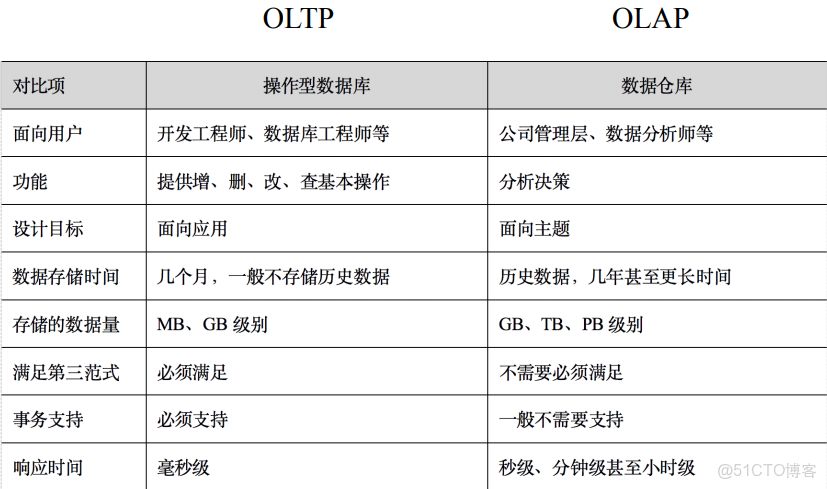
操作型數據庫與數據倉庫對比
分層架構
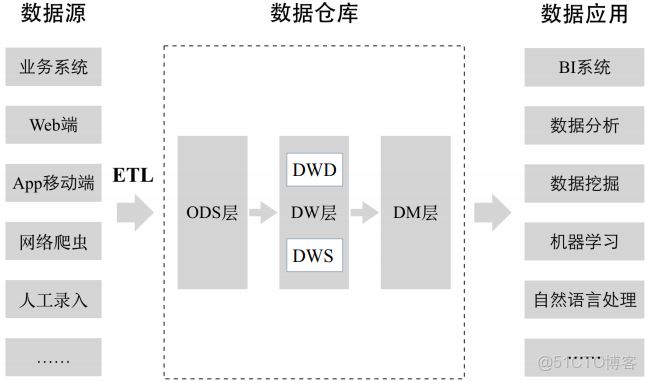
ODS層是臨時存儲層,是原始的數據或進行了比較簡單加工的數據
DW ODS層經過數據倉庫裏的ETL加工後的數據(上圖沒有標註)導入DW層,DW層的數據一定是經過清洗過的,並且是乾淨的、一致的、準確的、規範的。 DW層進一步劃分:
DWD 數據倉庫明細層
DWS 數據倉庫彙總層,在明細層基礎之上構建一個數據彙總層,根據明細數據中的不同維度,一般按最細的粒度,把所有相關的維度做一個聚合,把一些關鍵指標提前聚合出來。
DM層 數據集市層,也可以稱為應用層,DM層可以有多個數據集市,每一個數據集市對應不同的部門或業務團隊。是數據倉庫裏的數據二次加工得到的,和具體業務部門關聯起來了。
為什麼要對數據倉庫進行分層?
1.用空間換時間。每一層進行大量預處理,提升用户應用體驗。數據可能會有大量冗餘。
2.
3.簡化數據清洗過程,將複雜工作拆分,每一層就比較簡單、容易理解。
維度建模法
由“商業智能之父”Ralph Kimball提出,採用自上而下的建模方法,先構建數據集市,適用於項目早期和互聯網領域
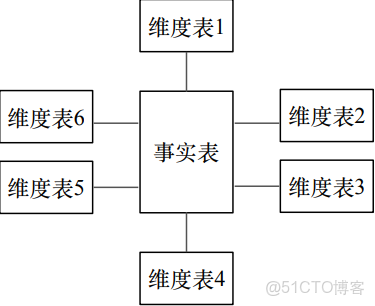
星型模型
由事實表和維度表組成:
- 事實表:記錄細粒度的事實數據,通常以數值形式存儲
- 維度表:對事實表數據屬性的描述
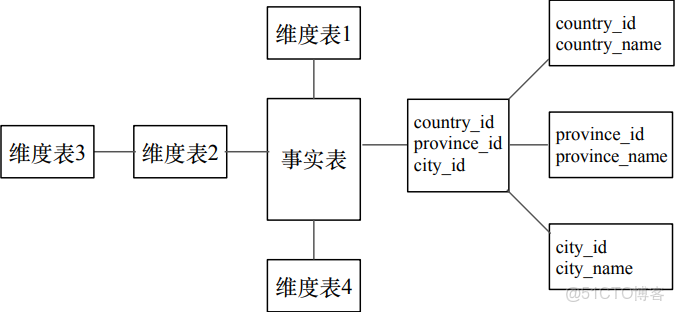
雪花模型
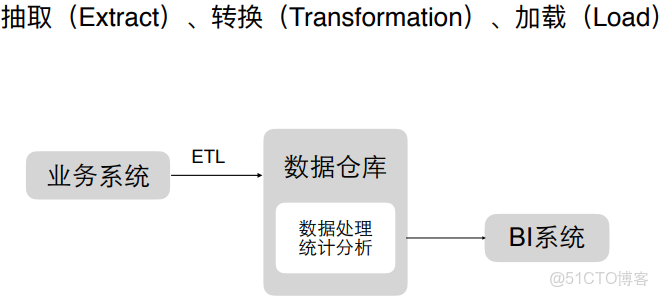
ETL過程
2.sqoop
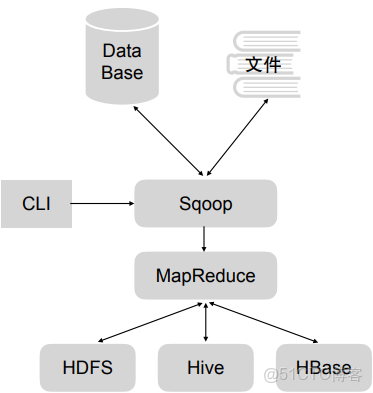
用於關係數據庫,轉化到HDFS、Hive、HBase裏等存儲或導出到關係型數據庫和文件裏,只有map階段,沒有reduce階段
安裝
Sqoop 的安裝方法非常簡單, 可以使用官方提供的已經編譯好的安裝包進行安裝, 也可以從 github 下載 Sqoop 源碼(源碼地址: https://github.com/apache/sqoop) 自行編譯安裝包進行安裝。
1)下載 Sqoop 安裝包
Sqoop 下載地址:
http://www.apache.org/dyn/closer.lua/sqoop/1.4.7
Sqoop 官方文檔:
http://sqoop.apache.org/docs/1.4.7/SqoopUserGuide.html
2)解壓和配置 Sqoop
2.1 下載完安裝包後, 將壓縮文件加壓到安裝目錄下, 本例將 Sqoop 安裝到/bigdata 下
tar -zxvf sqoop-1.4.7.bin__hadoop-2.6.0.tar.gz2.2 創建Sqoop的軟連接,並將Sqoop添加到/etc/profile環境變量中
[root@node01 /]# ln -s /bigdata/sqoop-1.4.7.bin__hadoop-2.6.0 /usr/local/sqoop
[root@node01 /]# vim /etc/profile
[root@node01 /]# source /etc/profile2.3 Sqoop 在運行過程中,會涉及到 Hive、Hadoop、MySQL 等工具的使用,所以在運行 Sqoop之前需要對 Sqoop 進行配置
進入到${SQOOP_HOME}/conf 目錄中, 拷貝 sqoop-env-template.sh 腳本文件並且重命名為 sqoop-env.sh。 Sqoop 在運行過程中會自動加載 sqoop-env.sh 文件, 讀取配置文件中的配置項。
cp sqoop-env-template.sh sqoop-env.sh2.4 在 sqoop-env.sh 中設置三個配置項
export HADOOP_COMMON_HOME=/usr/local/hadoop #Hadoop 安裝路徑
export HADOOP_MAPRED_HOME=/usr/local/hadoop #MapReduce 安裝路徑
export HIVE_HOME=/usr/local/hive
2.5 使用 Sqoop 的過程中, 會涉及到操作關係型數據庫, 要將相關數據庫的驅動包拷貝到${SQOOP_HOME}/lib 目錄中
例如: 使用 Sqoop 操作 MySQL 數據庫時, Sqoop 通過 JDBC 連接到 MySQL, 需要將JDBC 連接 MySQL 的驅動包 mysql-connector-java-5.1.45-bin.jar 拷貝到${SQOOP_HOME}/lib目錄中。
cp ${HIVE_HOME}/lib/mysql-connector-java-5.1.45-bin.jar ${SQOOP_HOME}/lib2.6 將 Hive 的 配 置 文 件 路 徑 HIVE_CONF_DIR 和 Hive 運 行 時 依 賴 的 工 具 包 路 徑HIVE_CLASSPATH 添加到環境變量/etc/profile 中
export HIVE_CONF_DIR=${HIVE_HOME}/conf
export HIVE_CLASSPATH=${HIVE_HOME}/lib
否則使用 Sqoop 從 MySQL 向 Hive 表中導入數據時會報:
“ERROR hive.HiveConfig:Could not load org.apache.hadoop.hive.conf.HiveConf”
2.7 將 Hive 的配置文件 hive-site.xml 拷貝到${SQOOP_HOME}/conf 文件夾中。
否則使用Sqoop 從 MySQL 向 Hive 指定的數據庫中導入數據時, 會報“Database does not exists”數據庫不存在的錯誤。
3) 驗證 Sqoop 是否安裝成功
通過${SQOOP_HOME}/bin/sqoop version 命令查看 Sqoop 版本號,版本號顯示正常表示安裝配置成功。
[root@node01 ~]# sqoop version
19/03/01 16:27:09 INFO sqoop.Sqoop: Running Sqoop version: 1.4.7
Sqoop 1.4.7
git commit id 2328971411f57f0cb683dfb79d19d4d19d185dd8
Compiled by maugli on Thu Dec 21 15:59:58 STD 2017
4)查看 Sqoop 命令使用方法
執行${SQOOP_HOME}/bin/sqoop 命令時傳入 help 參數可以查看 sqoop 命令的詳細使用方法。 Sqoop 命令的使用方法和相關參數解釋如下圖所示:
3.數據倉庫項目
確定主題:廣告曝光主題
對接的部門:銷售、運營
1)在mysql中創建relation數據庫
創建三張表
**************************mysql********************

# 創建地域關係表
CREATE TABLE IF NOT EXISTS rel_area_detail(
   id INT UNSIGNED AUTO_INCREMENT,
   area_id VARCHAR(100) NOT NULL,
   area_name VARCHAR(40) NOT NULL,
   PRIMARY KEY (id)
)ENGINE=InnoDB DEFAULT CHARSET=utf8;

load data infile "/var/lib/mysql-files/area_info.txt" into table rel_area_detail fields terminated by '\t' lines terminated by '\n';


# 創建終端信息關係表
CREATE TABLE IF NOT EXISTS rel_terminal_detail(
   id INT UNSIGNED AUTO_INCREMENT,
   terminal_id VARCHAR(100) NOT NULL,
   terminal_name VARCHAR(100) NOT NULL,
   terminal_type VARCHAR(100) NOT NULL,
   PRIMARY KEY (id)
)ENGINE=InnoDB DEFAULT CHARSET=utf8;

load data infile "/var/lib/mysql-files/terminal_info.txt" into table rel_terminal_detail fields terminated by '\t' lines terminated by '\n';


# 創建廣告主信息關係表
CREATE TABLE IF NOT EXISTS rel_advertiser_detail(
   id INT UNSIGNED AUTO_INCREMENT,
   advertiser_id VARCHAR(100) NOT NULL,
   advertiser_name VARCHAR(100) NOT NULL,
   PRIMARY KEY (id)
)ENGINE=InnoDB DEFAULT CHARSET=utf8;

load data infile "/var/lib/mysql-files/advertiser_info.txt" into table rel_advertiser_detail fields terminated by '\t' lines terminated by '\n';

**************************hive********************
## ods層
#創建地域關係表(天粒度)
create table ods.ods_rel_area_detail_d(
area_id string,
area_name string
)
row format delimited
fields terminated by '\t'
lines terminated by '\n'
stored as textfile;

#創建終端信息關係表(天粒度)
create table ods.ods_rel_terminal_detail_d(
terminal_id string,
terminal_name string,
terminal_type string
)
row format delimited
fields terminated by '\t'
lines terminated by '\n'
stored as textfile;

#創建廣告主信息關係表(天粒度)
create table ods.ods_rel_advertiser_detail_d(
advertiser_id string,
advertiser_name string
)
row format delimited
fields terminated by '\t'
lines terminated by '\n'
stored as textfile;

#創建原始廣告曝光日誌表(天粒度)
create external table ods.ods_ad_log_d(
id bigint,
advertiser_id string,
duration int,
position int,
area_id string,
terminal_id string,
view_type int,
device_id string
)
partitioned by(dt string)
row format delimited
fields terminated by '\t'
lines terminated by '\n'
stored as textfile
location '/user/hive/warehouse/data/ods/ods_ad_log_d';


## dwd明細層
#創建數據倉庫明細層的廣告曝光日誌表,表存儲的文件類型為RCFILE(天粒度)
#dwd_ad_log_rc_d表比ods_ad_log_d表增加了terminal_type終端類型字段

create external table dwd.dwd_ad_log_rc_d(
id bigint,
advertiser_id string,
duration int,
position int,
area_id string,
terminal_id string,
terminal_type string,
view_type int,
device_id string
)
partitioned by(dt string)
row format delimited
fields terminated by '\t'
lines terminated by '\n'
stored as RCFILE
location '/user/hive/warehouse/data/dwd/dwd_ad_log_rc_d';

## dws彙總層
#dws_ad_summary_rc_d沒有統計device_id維度,設備id通常用於計算新增用户數、累計用户數等指標,可以歸屬到用户主題
create external table dws.dws_ad_summary_rc_d(
advertiser_id string,
duration int,
position int,
area_id string,
terminal_id string,
terminal_type string,
pv bigint,
click bigint
)
partitioned by(dt string)
row format delimited
fields terminated by '\t'
lines terminated by '\n'
stored as RCFILE
location '/user/hive/warehouse/data/dws/dws_ad_summary_rc_d';

##dm數據集市(針對銷售部門)

#各廣告主每天在不同地域投放的廣告的曝光量、點擊量
create external table dm.dm_sls_ad_advertiser_report_rc_d(
advertiser_id string,
advertiser_name string,
area_id string,
area_name string,
pv bigint,
click bigint
)
partitioned by(dt string)
row format delimited
fields terminated by '\t'
lines terminated by '\n'
stored as RCFILE
location '/user/hive/warehouse/data/dm/dm_sls_ad_advertiser_report_rc_d';

#每天在不同地域,不同終端上投放的廣告的曝光量、點擊量
create external table dm.dm_opt_ad_terminal_report_rc_d(
area_id string,
area_name string,
terminal_id string,
terminal_name string,
terminal_type string,
pv bigint,
click bigint
)
partitioned by(dt string)
row format delimited
fields terminated by '\t'
lines terminated by '\n'
stored as RCFILE
location '/user/hive/warehouse/data/dm/dm_opt_ad_terminal_report_rc_d';
執行load data infile "/var/lib/mysql-files/area_info.txt" into table rel_area_detail fields terminated by '\t' lines terminated by '\n';
必須是/var/lib/mysql-files/目錄,否則會報錯
MySQL 5.7向表導入數據時報錯:
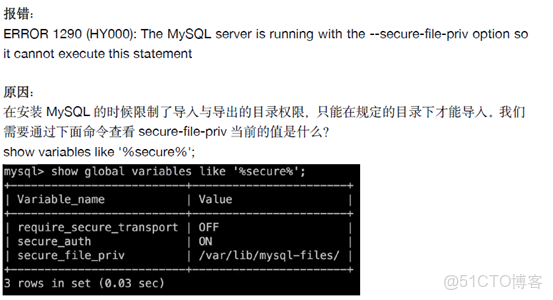
MySQL 5.7向表導入數據時報錯:
mysql> load data infile '/var/lib/mysql-files/ADDSubscribers_MSISDN.txt' into table tmp_Subscribers_01 fields enclosed by '"';
ERROR 13 (HY000): Can't get stat of '/var/lib/mysql-files/ADDSubscribers_MSISDN.txt' (Errcode: 13 - Permission denied)
解決方法:
在load語句中加上local參數
mysql> load data local infile '/tmp/ADDSubscribers_MSISDN.txt' into table tmp_Subscribers_01 fields enclosed by '"';
Query OK, 0 rows affected, 10 warnings (0.00 sec)
Records: 10  Deleted: 0  Skipped: 10  Warnings: 10
2)hive中創建ods、dwd、dm、ods等數據庫
創建下面的表
**************************hive********************
## ods層
#創建地域關係表(天粒度)
create table ods.ods_rel_area_detail_d(
area_id string,
area_name string
)
row format delimited
fields terminated by '\t'
lines terminated by '\n'
stored as textfile;

#創建終端信息關係表(天粒度)
create table ods.ods_rel_terminal_detail_d(
terminal_id string,
terminal_name string,
terminal_type string
)
row format delimited
fields terminated by '\t'
lines terminated by '\n'
stored as textfile;

#創建廣告主信息關係表(天粒度)
create table ods.ods_rel_advertiser_detail_d(
advertiser_id string,
advertiser_name string
)
row format delimited
fields terminated by '\t'
lines terminated by '\n'
stored as textfile;

#創建原始廣告曝光日誌表(天粒度)
create external table ods.ods_ad_log_d(
id bigint,
advertiser_id string,
duration int,
position int,
area_id string,
terminal_id string,
view_type int,
device_id string
)
partitioned by(dt string)
row format delimited
fields terminated by '\t'
lines terminated by '\n'
stored as textfile
location '/user/hive/warehouse/data/ods/ods_ad_log_d';


## dwd明細層
#創建數據倉庫明細層的廣告曝光日誌表,表存儲的文件類型為RCFILE(天粒度)
#dwd_ad_log_rc_d表比ods_ad_log_d表增加了terminal_type終端類型字段

create external table dwd.dwd_ad_log_rc_d(
id bigint,
advertiser_id string,
duration int,
position int,
area_id string,
terminal_id string,
terminal_type string,
view_type int,
device_id string
)
partitioned by(dt string)
row format delimited
fields terminated by '\t'
lines terminated by '\n'
stored as RCFILE
location '/user/hive/warehouse/data/dwd/dwd_ad_log_rc_d';

## dws彙總層
#dws_ad_summary_rc_d沒有統計device_id維度,設備id通常用於計算新增用户數、累計用户數等指標,可以歸屬到用户主題
create external table dws.dws_ad_summary_rc_d(
advertiser_id string,
duration int,
position int,
area_id string,
terminal_id string,
terminal_type string,
pv bigint,
click bigint
)
partitioned by(dt string)
row format delimited
fields terminated by '\t'
lines terminated by '\n'
stored as RCFILE
location '/user/hive/warehouse/data/dws/dws_ad_summary_rc_d';

##dm數據集市(針對銷售部門)

#各廣告主每天在不同地域投放的廣告的曝光量、點擊量
create external table dm.dm_sls_ad_advertiser_report_rc_d(
advertiser_id string,
advertiser_name string,
area_id string,
area_name string,
pv bigint,
click bigint
)
partitioned by(dt string)
row format delimited
fields terminated by '\t'
lines terminated by '\n'
stored as RCFILE
location '/user/hive/warehouse/data/dm/dm_sls_ad_advertiser_report_rc_d';

#每天在不同地域,不同終端上投放的廣告的曝光量、點擊量
create external table dm.dm_opt_ad_terminal_report_rc_d(
area_id string,
area_name string,
terminal_id string,
terminal_name string,
terminal_type string,
pv bigint,
click bigint
)
partitioned by(dt string)
row format delimited
fields terminated by '\t'
lines terminated by '\n'
stored as RCFILE
location '/user/hive/warehouse/data/dm/dm_opt_ad_terminal_report_rc_d';
3)數據從mysql中導入到hive中
#######################################################################################
#同步mysq relation庫的rel_advertiser_detail表數據到hive ods庫ods_rel_advertiser_detail_d表
#######################################################################################
MYSQL_HOSTNAME="192.168.196.130"
MYSQL_PORT="3306"
MYSQL_USERNAME="sqoop"
MYSQL_PASSWORD="sqoop1234"
DBNAME="relation"

/usr/local/sqoop/bin/sqoop import \
-Dorg.apache.sqoop.splitter.allow_text_splitter=true \
--connect jdbc:mysql://${MYSQL_HOSTNAME}:${MYSQL_PORT}/${DBNAME} --username ${MYSQL_USERNAME} --password ${MYSQL_PASSWORD} \
--query "select advertiser_id,advertiser_name from rel_advertiser_detail where \$CONDITIONS" \
--target-dir '/tmp/sqoop/rel_advertiser_detail' \
--hive-import \
--hive-overwrite \
--hive-database ods \
--hive-table ods_rel_advertiser_detail_d \
--delete-target-dir \
--split-by advertiser_id \
--fields-terminated-by '\t'


#######################################################################################
#同步mysq relation庫的rel_area_detail表數據到hive ods庫ods_rel_area_detail_d表
#######################################################################################

MYSQL_HOSTNAME="192.168.196.130"
MYSQL_PORT="3306"
MYSQL_USERNAME="sqoop"
MYSQL_PASSWORD="sqoop1234"
DBNAME="relation"

/usr/local/sqoop/bin/sqoop import \
-Dorg.apache.sqoop.splitter.allow_text_splitter=true \
--connect jdbc:mysql://${MYSQL_HOSTNAME}:${MYSQL_PORT}/${DBNAME} --username ${MYSQL_USERNAME} --password ${MYSQL_PASSWORD} \
--query "select area_id,area_name from rel_area_detail where \$CONDITIONS" \
--target-dir '/tmp/sqoop/rel_area_detail' \
--hive-import \
--hive-overwrite \
--hive-database ods \
--hive-table ods_rel_area_detail_d \
--delete-target-dir \
--split-by area_id \
--fields-terminated-by '\t'
#######################################################################################
#同步mysq relation庫的rel_area_detail表數據到hive ods庫ods_rel_area_detail_d表
#######################################################################################

MYSQL_HOSTNAME="192.168.196.130"
MYSQL_PORT="3306"
MYSQL_USERNAME="sqoop"
MYSQL_PASSWORD="sqoop1234"
DBNAME="relation"

/usr/local/sqoop/bin/sqoop import \
-Dorg.apache.sqoop.splitter.allow_text_splitter=true \
--connect jdbc:mysql://${MYSQL_HOSTNAME}:${MYSQL_PORT}/${DBNAME} --username ${MYSQL_USERNAME} --password ${MYSQL_PASSWORD} \
--query "select area_id,area_name from rel_area_detail where \$CONDITIONS" \
--target-dir '/tmp/sqoop/rel_area_detail' \
--hive-import \
--hive-overwrite \
--hive-database ods \
--hive-table ods_rel_area_detail_d \
--delete-target-dir \
--split-by area_id \
--fields-terminated-by '\t'
#######################################################################################
#同步mysq relation庫的rel_terminal_detail表數據到hive ods庫ods_rel_terminal_detail_d表
#######################################################################################
MYSQL_HOSTNAME="192.168.196.130"
MYSQL_PORT="3306"
MYSQL_USERNAME="sqoop"
MYSQL_PASSWORD="sqoop1234"
DBNAME="relation"

/usr/local/sqoop/bin/sqoop import \
-Dorg.apache.sqoop.splitter.allow_text_splitter=true \
--connect jdbc:mysql://${MYSQL_HOSTNAME}:${MYSQL_PORT}/${DBNAME} --username ${MYSQL_USERNAME} --password ${MYSQL_PASSWORD} \
--query "select terminal_id,terminal_name,terminal_type from rel_terminal_detail where \$CONDITIONS" \
--target-dir '/tmp/sqoop/rel_terminal_detail' \
--hive-import \
--hive-overwrite \
--hive-database ods \
--hive-table ods_rel_terminal_detail_d \
--delete-target-dir \
--split-by terminal_id \
--fields-terminated-by '\t'
--query "select terminal_id,terminal_name,terminal_type from rel_terminal_detail where \$CONDITIONS" \
不管有沒有where條件都要加 \$CONDITIONS" \
--target-dir '/tmp/sqoop/rel_terminal_detail'
會現在hadoop上創建一個臨時目錄,數據先放在該臨時路徑再加載到目標路徑
--delete-target-dir 上面定義了臨時路徑,下面可刪除臨時路徑
--hive-overwrite 覆蓋表裏的數據
--hive-database ods \
--hive-table ods_rel_terminal_detail_d \
導入的hive數據庫和表
--split-by terminal_id 指定id字段,map任務通過指定的id進行劃分的
--fields-terminated-by '\t' 不同字段間的分隔符
-Dorg.apache.sqoop.splitter.allow_text_splitter=true 如果上面指定的id是字符串類型,必須有該參數,否則會報錯
sqoop是mysql中新創建的只有查詢權限的用户
否則會報錯
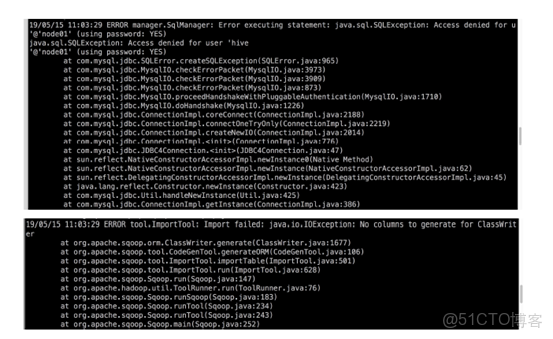
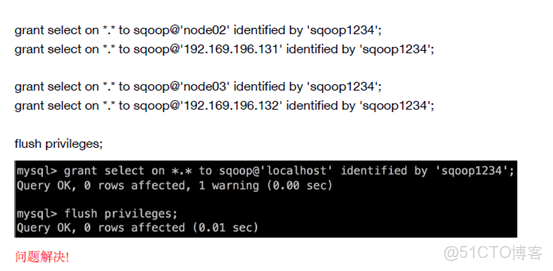
解決方法1:mysql用户權限問題
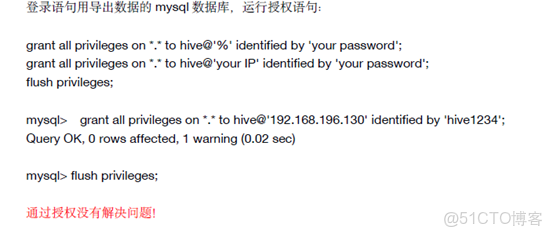

grant select on *.* to username@'yourSqooplp' identified by 'yourPassword';
flush privileges;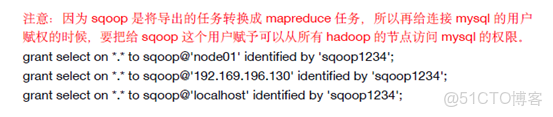
grant select on *.* to sqoop@'node01' identified by 'sqoop1234';
grant select on *.* to sqoop@'192.168.99.151' identified by 'sqoop1234';
grant select on *.* to sqoop@'localhost' identified by 'sqoop1234';

grant select on *.* to sqoop@'node02' identified by 'sqoop1234';
grant select on *.* to sqoop@'192.168.99.152' identified by 'sqoop1234';

grant select on *.* to sqoop@'node03' identified by 'sqoop1234';
grant select on *.* to sqoop@'192.168.99.153' identified by 'sqoop1234';
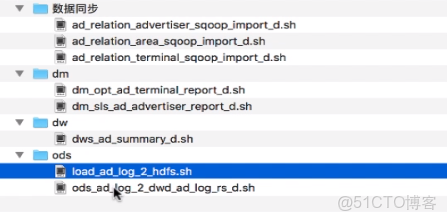
4)ods層腳本
#!/bin/bash

######################################################################
# 每天將廣告日誌服務器本地的日誌數據上傳到HDFS
######################################################################

#日誌存放的位置,最後一級目錄不用加
ad_log_local="/bigdata/work/hive_dw/ad_log"

#時間間隔
interval=$1

dt=`date --date "$interval days ago" '+%Y%m%d'`

filename="ad_log_${dt}.txt"

#hive表hdfs數據路徑
ad_log_hive_hdfs_path="/user/hive/warehouse/data/ods/ods_ad_log_d/dt=${dt}"


echo "開始將本地廣告日誌文件${filename}上傳到${ad_log_hive_hdfs_path}..."

#首先檢測文件是否存在,存在返回0
hdfs dfs -test -e ad_log_hive_hdfs_path
if [ $? != 0 ];then
    #創建hdfs文件路徑
    hdfs dfs -mkdir -p $ad_log_hive_hdfs_path
fi

#開始上傳日誌
echo -e "hdfs dfs -put ${ad_log_local}/${filename} ${ad_log_hive_hdfs_path}"

hdfs dfs -put ${ad_log_local}/${filename} ${ad_log_hive_hdfs_path}

echo "上傳結束!"


#!/bin/bash

#####################################################################
#每天凌晨將ods庫ods_ad_log_d表前一天的數據同步到dwd庫的dwd_ad_log_rc_d表
#author:xiaoguanyu
#####################################################################

#獲取計算所需的日期
dt=`date --date "$1 days ago" '+%Y%m%d'`

echo "開始將ods庫ods_ad_log_d表$dt的數據同步到dwd庫的dwd_ad_log_rc_d表中..."

#刷新hive分區表的分區元數據信息,使手動添加的hdfs分區生效
hive -e "msck repair table ods.ods_ad_log_d"

hive -e"
set hive.exec.dynamic.partition=true;
set hive.exec.dynamic.partition.mode=nonstrict;
insert overwrite table dwd.dwd_ad_log_rc_d partition(dt='$dt')
select a1.id,
a1.advertiser_id,
a1.duration,
a1.position,
a1.area_id,
a1.terminal_id,
a2.terminal_type,
a1.view_type,
a1.device_id
from ods.ods_ad_log_d a1 left join ods.ods_rel_terminal_detail_d a2 on a1.terminal_id=a2.terminal_id
where a1.dt='$dt'
"
if [ $? -ne 0 ]; then
    exit 1
    echo "將ods庫ods_ad_log_d表$dt的數據同步到dwd庫的dwd_ad_log_rc_d表失敗!"
fi

echo "已成功將ods庫ods_ad_log_d表$dt的數據同步到dwd庫的dwd_ad_log_rc_d表!"
5)dw層腳本
#!/bin/sh

##########################################################################
#按照最細粒度進行預聚合計算,提高數據集市的查詢性能
##########################################################################
#author:xiaoguanyu

dt=`date --date "$1 days ago" '+%Y%m%d'`

hive -e"
set hive.exec.dynamic.partition=true;
set hive.exec.dynamic.partition.mode=nonstrict;
insert overwrite table dws.dws_ad_summary_rc_d partition(dt='$dt')
select advertiser_id,
duration,
position,
area_id,
terminal_id,
terminal_type,
sum(case when view_type=1 then 1 else 0 end) pv,
sum(case when view_type=2 then 1 else 0 end) click
from dwd.dwd_ad_log_rc_d
where dt='$dt'
group by advertiser_id,
duration,
position,
area_id,
terminal_id,
terminal_type,
device_id
"

if [ $? -ne 0 ]; then
  echo "dws_ad_summary_rc_d計算失敗!"
  exit 1
fi
6)dm層腳本
#!/bin/sh

##########################################################################
#需求方:運營部
#根據dws層廣告曝光聚合數據,每天計算不同地域各終端的廣告投放情況
##########################################################################
#author:xiaoguanyu

dt=`date --date "$1 days ago" '+%Y%m%d'`

hive -e"
set hive.exec.dynamic.partition=true;
set hive.exec.dynamic.partition.mode=nonstrict;
insert overwrite table dm.dm_opt_ad_terminal_report_rc_d partition(dt='$dt')
select a1.area_id,
rel1.area_name,
a1.terminal_id,
rel2.terminal_name,
a1.terminal_type,
sum(a1.pv) pv,
sum(a1.click) click
from dws.dws_ad_summary_rc_d a1
left join ods.ods_rel_area_detail_d rel1 on a1.area_id=rel1.area_id
left join ods.ods_rel_terminal_detail_d rel2 on a1.terminal_id=rel2.terminal_id
where dt='$dt'
group by a1.area_id,
rel1.area_name,
a1.terminal_id,
rel2.terminal_name,
a1.terminal_type
"

if [ $? -ne 0 ]; then
  echo "dm_opt_ad_terminal_report_rc_d 計算失敗!"
  exit 1
fi


#!/bin/sh

##########################################################################
#需求方:銷售部
#根據dws層廣告曝光聚合數據,每天計算各廣告主在不同地域的投放情況
##########################################################################
#author:xiaoguanyu
source /etc/profile

dt=`date --date "$1 days ago" '+%Y%m%d'`

echo "date=${dt}"
echo "start......"
/usr/local/hive/bin/hive -e"
set hive.exec.dynamic.partition=true;
set hive.exec.dynamic.partition.mode=nonstrict;
insert overwrite table dm.dm_sls_ad_advertiser_report_rc_d partition(dt='$dt')
select a1.advertiser_id,
rel1.advertiser_name,
a1.area_id,
rel2.area_name,
sum(a1.pv) pv,
sum(a1.click) click
from dws.dws_ad_summary_rc_d a1
left join ods.ods_rel_advertiser_detail_d rel1 on a1.advertiser_id=rel1.advertiser_id
left join ods.ods_rel_area_detail_d rel2 on a1.area_id=rel2.area_id
where dt='$dt'
group by a1.advertiser_id,
rel1.advertiser_name,
a1.area_id,
rel2.area_name
"

if [ $? -ne 0 ]; then
  echo "dm_sls_ad_advertiser_report_rc_d 計算失敗!"
  exit 1
fi

echo "finished!"
