
一、pdfmake介紹
pdfmake是一款純 JavaScript 的 PDF 文檔生成庫,支持服務器端和客户端使用。
1.1 核心功能
- 基礎排版: 支持自動換行、多對齊方式(左 / 右 / 居中 / 兩端對齊)、編號 / 項目符號列表、自定義邊距。
- 樣式與結構: 支持便捷樣式設置、樣式繼承、自定義樣式字典,可構建複雜嵌套結構。
- 表格與列: 支持多種列寬模式(自動 / 固定 / 比例 / 百分比)、合併單元格,表頭自動分頁重複,支持非斷裂行和章節。
- 頁面控制: 可自定義頁面尺寸和方向,設置靜態 / 動態頁眉頁腳,包含頁碼和總頁數,支持自定義分頁符。
- 其他特性: 支持圖片、矢量圖形、背景層、字體嵌入、PDF 元數據設置(作者 / 主題等)、目錄生成、平鋪圖案。
二、實踐
2.1 目標
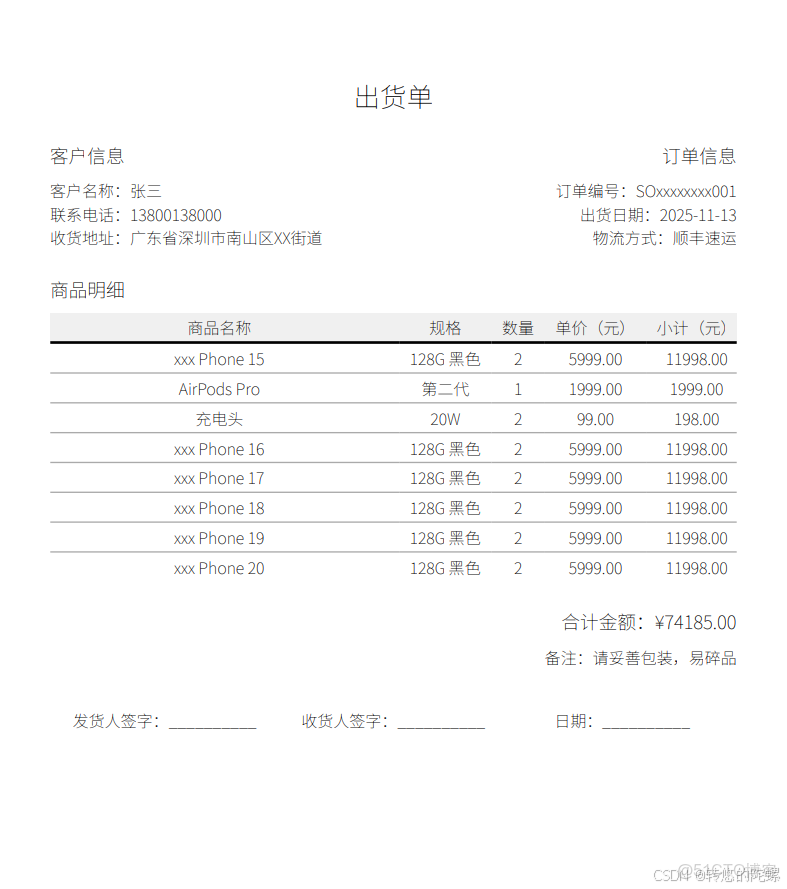
2.2 代碼
在
react項目中建立個測試客户端頁面文件(page.tsx)
2.2.1 基礎環境
- react:
^18.3.1 - pdfmake:
^0.2.20
- 添加到項目中:
pnpm add -D @types/pdfmake+pnpm add pdfmake
2.2.2 最小mvp模型(基本運行示例)
⚠️ 默認情況下,不支持中文內容
// 1.引入文檔配置聲明
import type { TDocumentDefinitions } from "pdfmake/interfaces";
// 1-2.引入依賴
import pdfMake from "pdfmake/build/pdfmake";
// 2.文檔內容定義
const docDefinition: TDocumentDefinitions = {
content: [
// 正文第一行
'First paragraph',
// 正文第二行
'Another paragraph, this time a little bit longer to make sure, this line will be divided into at least two lines'
]
};
// 3.創建Pdf實例
const make = pdfMake.createPdf(docDefinition)
// 4.在新窗口中打開PDF(預覽)
make.open()
// 4.下載PDF文件
make.download()
2.2.3 增加中文兼容
增加對中文內容的支持有兩種方法:字體文件Url路徑、
1、通過 虛擬文件系統(VFS): 將字體文件轉為base64 - 後面文章內容針對這個方法
2、通過 URL 協議:可通過地址(https:// 或 http:// 協議)訪問
2.2.3.1 虛擬文件系統(VFS)
- 下載
思源黑體(NotoSansSC-xxx.ttf),放在項目 public/fonts 目錄;
- 字體文件獲取:https://fonts.google.com/noto/specimen/Noto+Sans
- 用
pdfmake提供的工具將字體轉換為base64(或直接用在線工具轉換);
- 安裝工具:
pdfmake-font-generator(僅轉化字體時用到 |pnpm add -D pdfmake-font-generator) - 轉化字體文件為
js文件:pnpm pdfmakefg [字體目錄路徑] [存儲路徑]
- 例如:
pnpm pdfmakefg public/fonts/ public/vfs_fonts_cn.js
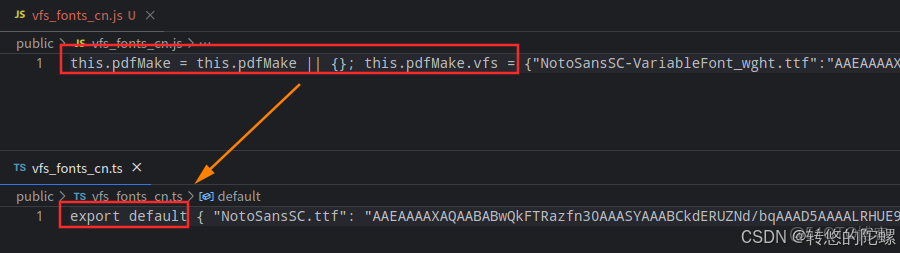
- 改造
vfs_fonts_cn.js文件 ->vfs_fonts_cn.ts -
- 引入並註冊字體
```javascript
 import pdfFonts from "pdfmake/build/vfs_fonts";
 // 引入`vfs_fonts_cn.ts`
 import chineseFonts from "@/public/vfs_fonts_cn";
 // 註冊字體
 const vfs = { ...pdfFonts.vfs, ...chineseFonts };
 const fonts = {
     NotoSansSC: {
         normal: "NotoSansSC.ttf",
         bold: "NotoSansSC.ttf",
     },
 };
 // 調用時
 // 在docDefinition中使用:defaultStyle: { font: 'NotoSansSC' }
 // 構建實例中使用:pdfMake.createPdf(docDefinition, undefined, fonts, vfs)
 ```
2.2.4 定義文檔結構(出貨單模板)
{
// 頁面設置(紙張大小、邊距)
pageSize: 'A4',
pageMargins: [40, 60, 40, 60],
// 內容(按出貨單順序排列)
content: [
// 1. 標題
{ text: '出貨單', fontSize: 20, bold: true, alignment: 'center', margin: [0, 0, 0, 20] },
// 2. 基礎信息(客户、訂單號、日期等,用2列布局)
{
columns: [
{
// 左列:客户信息
stack: [
{ text: '客户信息', fontSize: 14, bold: true, margin: [0, 0, 0, 8] },
{ text: `客户名稱:${orderData.customerName}` },
{ text: `聯繫電話:${orderData.customerPhone}` },
{ text: `收貨地址:${orderData.shippingAddress}` },
]
},
{
// 右列:訂單信息
stack: [
{ text: '訂單信息', fontSize: 14, bold: true, margin: [0, 0, 0, 8] },
{ text: `訂單編號:${orderData.orderNo}` },
{ text: `出貨日期:${orderData.shippingDate}` },
{ text: `物流方式:${orderData.logistics}` },
],
alignment: 'right'
}
],
margin: [0, 0, 0, 20]
},
// 3. 商品表格(核心部分)
{
text: '商品明細', fontSize: 14, bold: true, margin: [0, 0, 0, 8]
},
{
table: {
// 表頭
headerRows: 1,
widths: ['*', 'auto', 'auto', 'auto', 'auto'], // 列寬(*=自適應,auto=內容寬度)
body: [
// 表頭行
[
{ text: '商品名稱', bold: true, alignment: 'center', fillColor: '#f0f0f0' },
{ text: '規格', bold: true, alignment: 'center', fillColor: '#f0f0f0' },
{ text: '數量', bold: true, alignment: 'center', fillColor: '#f0f0f0' },
{ text: '單價(元)', bold: true, alignment: 'center', fillColor: '#f0f0f0' },
{ text: '小計(元)', bold: true, alignment: 'center', fillColor: '#f0f0f0' },
],
// 以下後期結合代碼動態填充商品數據
[
{ text: '充電頭', alignment: 'center' },
{ text: '128G 黑色', alignment: 'center' },
{ text: '2', alignment: 'center' },
{ text: '5999.00', alignment: 'center' },
{ text: '11998', alignment: 'center' },
]
]
},
margin: [0, 0, 0, 20],
layout: 'lightHorizontalLines' // 表格邊框樣式
},
// 4. 合計金額(右對齊)
{
columns: [
{ text: '', width: '*' }, // 空列佔位
{
stack: [
{ text: `合計金額:¥${orderData.totalAmount.toFixed(2)}`, fontSize: 14, bold: true },
{ text: `備註:${orderData.remark || '無'}`, margin: [0, 8, 0, 0] }
],
alignment: 'right'
}
],
margin: [0, 0, 0, 30]
},
// 5. 簽名欄(底部)
{
columns: [
{ text: '發貨人簽字:__________', alignment: 'center' },
{ text: '收貨人簽字:__________', alignment: 'center' },
{ text: '日期:__________', alignment: 'center' }
]
}
],
// 全局樣式(可選)
defaultStyle: {
fontSize: 12,
font: 'NotoSansSC' // 可替換為自定義中文字體(如思源黑體)
}
}
2.2.5 結合頁面實戰
"use client";
import type { TDocumentDefinitions } from "pdfmake/interfaces";
import { Button } from "antd";
import pdfMake from "pdfmake/build/pdfmake";
import pdfFonts from "pdfmake/build/vfs_fonts";
import chineseFonts from "@/public/vfs_fonts_cn";
import logger from "@/lib/logger";
const vfs = { ...pdfFonts.vfs, ...chineseFonts };
const fonts = {
NotoSansSC: {
normal: "NotoSansSC.ttf",
bold: "NotoSansSC.ttf",
},
};
// 生成出貨單PDF
const generateShippingOrder = (orderData: any) => {
// 1. 定義文檔結構(出貨單模板)
const docDefinition: TDocumentDefinitions = {
// 頁面設置(紙張大小、邊距)
pageSize: 'A4',
pageMargins: [40, 60, 40, 60],
// 內容(按出貨單順序排列)
content: [
// 1. 標題
{ text: '出貨單', fontSize: 20, bold: true, alignment: 'center', margin: [0, 0, 0, 20] },
// 2. 基礎信息(客户、訂單號、日期等,用2列布局)
{
columns: [
{
// 左列:客户信息
stack: [
{ text: '客户信息', fontSize: 14, bold: true, margin: [0, 0, 0, 8] },
{ text: `客户名稱:${orderData.customerName}` },
{ text: `聯繫電話:${orderData.customerPhone}` },
{ text: `收貨地址:${orderData.shippingAddress}` },
]
},
{
// 右列:訂單信息
stack: [
{ text: '訂單信息', fontSize: 14, bold: true, margin: [0, 0, 0, 8] },
{ text: `訂單編號:${orderData.orderNo}` },
{ text: `出貨日期:${orderData.shippingDate}` },
{ text: `物流方式:${orderData.logistics}` },
],
alignment: 'right'
}
],
margin: [0, 0, 0, 20]
},
// 3. 商品表格(核心部分)
{
text: '商品明細', fontSize: 14, bold: true, margin: [0, 0, 0, 8]
},
{
table: {
// 表頭
headerRows: 1,
widths: ['*', 'auto', 'auto', 'auto', 'auto'], // 列寬(*=自適應,auto=內容寬度)
body: [
// 表頭行
[
{ text: '商品名稱', bold: true, alignment: 'center', fillColor: '#f0f0f0' },
{ text: '規格', bold: true, alignment: 'center', fillColor: '#f0f0f0' },
{ text: '數量', bold: true, alignment: 'center', fillColor: '#f0f0f0' },
{ text: '單價(元)', bold: true, alignment: 'center', fillColor: '#f0f0f0' },
{ text: '小計(元)', bold: true, alignment: 'center', fillColor: '#f0f0f0' },
],
// 動態填充商品數據(從orderData獲取)
...orderData.products.map((product: any) => [
{ text: product.name, alignment: 'center' },
{ text: product.spec, alignment: 'center' },
{ text: product.quantity, alignment: 'center' },
{ text: product.price.toFixed(2), alignment: 'center' },
{ text: (product.quantity * product.price).toFixed(2), alignment: 'center' },
])
]
},
margin: [0, 0, 0, 20],
layout: 'lightHorizontalLines' // 表格邊框樣式
},
// 4. 合計金額(右對齊)
{
columns: [
{ text: '', width: '*' }, // 空列佔位
{
stack: [
{ text: `合計金額:¥${orderData.totalAmount.toFixed(2)}`, fontSize: 14, bold: true },
{ text: `備註:${orderData.remark || '無'}`, margin: [0, 8, 0, 0] }
],
alignment: 'right'
}
],
margin: [0, 0, 0, 30]
},
// 5. 簽名欄(底部)
{
columns: [
{ text: '發貨人簽字:__________', alignment: 'center' },
{ text: '收貨人簽字:__________', alignment: 'center' },
{ text: '日期:__________', alignment: 'center' }
]
}
],
// 全局樣式(可選)
defaultStyle: {
fontSize: 12,
font: 'NotoSansSC' // 可替換為自定義中文字體(如思源黑體)
}
};
// 2. 導出PDF(瀏覽器端直接下載)
let make = pdfMake
.createPdf(docDefinition, undefined, fonts, vfs);
logger.log('導出PDF', make);
make.open()
// make.download(`出貨單_${orderData.orderNo}.pdf`);
};
export default function TestPage() {
function build() {
const demoData = {
customerName: '張三',
customerPhone: '13800138000',
shippingAddress: '廣東省深圳市南山區XX街道',
orderNo: 'SOxxxxxxxx001',
shippingDate: '2025-11-13',
logistics: '順豐速運',
products: [
{ name: 'xxx Phone 15', spec: '128G 黑色', quantity: 2, price: 5999 },
{ name: 'AirPods Pro', spec: '第二代', quantity: 1, price: 1999 },
{ name: '充電頭', spec: '20W', quantity: 2, price: 99 }
],
totalAmount: 0,
remark: '請妥善包裝,易碎品'
};
demoData.products = [
...demoData.products,
...Array.from({ length: 5 }).map((_, i) => ({
name: 'xxx Phone ' + (16 + i), spec: '128G 黑色', quantity: 2, price: 5999
}))
]
let _price = 0;
demoData.products.forEach((product) => {
_price += product.price * product.quantity;
})
demoData.totalAmount = _price;
generateShippingOrder(demoData);
}
return (
<>
  <Button onClick={build}>測試</Button>
    </>
      )
      }
本文章為轉載內容,我們尊重原作者對文章享有的著作權。如有內容錯誤或侵權問題,歡迎原作者聯繫我們進行內容更正或刪除文章。
