
在Win7為HOST的環境下,安裝VirtualBox,在其中安裝CentOS7,以Bridge的方式搭建網絡環境。
在Win7為HOST的環境下,安裝VirtualBox,在其中安裝CentOS7,以Bridge的方式搭建網絡環境。
主要配置包括VirtualBox中的網絡設置,以及CentOS中的網絡配置。另外還有個重要的注意點就是如果HOST使用的是無線網,那麼即使bridge配置成功了,虛擬機能夠與主機互相ping通,虛擬機也無法訪問外網。
VirtualBox網絡配置
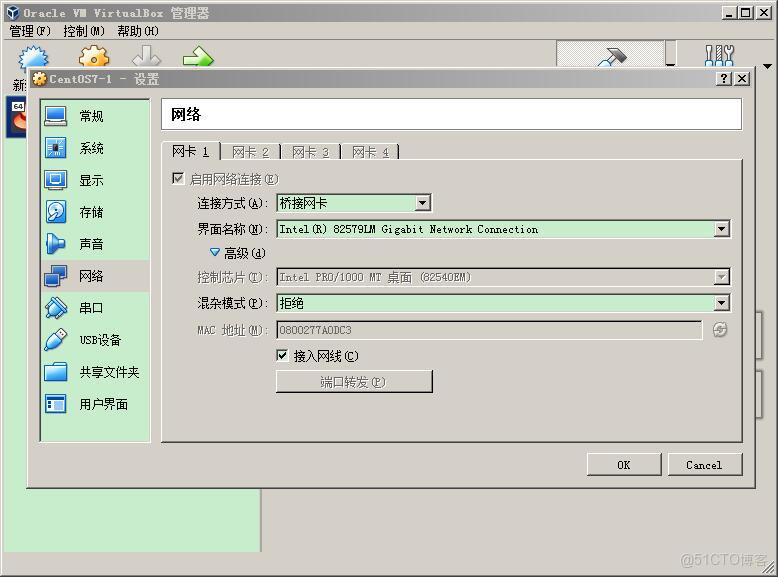
CentOS網絡配置
修改網絡配置文件:
vi /etc/sysconfig/network-scripts/ifcfg-enp0s3修改後內容:
TYPE=Ethernet
PROXY_METHOD=none
BROWSER_ONLY=no
BOOTPROTO=static
DEFROUTE=yes
IPV4_FAILURE_FATAL=no
IPV6INIT=yes
IPV6_AUTOCONF=yes
IPV6_DEFROUTE=yes
IPV6_FAILURE_FATAL=no
IPV6_ADDR_GEN_MODE=stable-privacy
NAME=enp0s3
UUID=6ce977fe-843a-4fb3-8bda-40b7ae4fc4f5
DEVICE=enp0s3
ONBOOT=yes
HWADDR=08:00:27:7a:0d:c3
IPADDR=192.168.0.150
NETMASK=255.255.255.0
GATEWAY=192.168.0.1
DNS1=192.168.0.1
安裝VirtualBox Guest Additational
安裝依賴:
yum install kernel-headers
yum install kernel-devel
yum install gcc*
yum install make
安裝完成之後重啓一下,然後點擊虛擬機窗口上的安裝增強(如果guest中已經加在過了鏡像,就將其退出),然後稍等一會就安裝完成了。
如果報以下錯誤:
this system is currently not set up to build kernel modules則有可能是kernel的幾個包的版本不一致,使用命令:
rpm -qa kernel* |sort -V |tail -n 5查看幾個包的版本是否一致:
kernel-3.10.0-693.el7.x86_64
kernel-devel-3.10.0-693.5.2.el7.x86_64
kernel-headers-3.10.0-693.5.2.el7.x86_64
kernel-tools-3.10.0-693.el7.x86_64
kernel-tools-libs-3.10.0-693.el7.x86_64
如果不一致,可以使用以下命令進行更新:
yum -y upgrade kernel kernel-devel kernel-devel更新完重啓後,再次安裝增強控件。
CentOS分辨率問題(存在問題)
以下過程是參照網絡上的資料執行的,不過在執行過程中報了一個錯,可能是缺少驅動的問題,此處我沒有再進一步解決,就此打住了,因為是打算設置一個Linux的Java開發環境,因此打算換一個比較容易操作的版本,換成Ubuntu了。
下面的操作直接導致系統卡在啓動界面了,解決方法可以參考日誌:
CentOS7——卡在在啓動界面
執行命令:
Xorg :1 -configure執行結果:
X.Org X Server 1.19.3
Release Date: 2017-03-15
X Protocol Version 11, Revision 0
Build Operating System:  3.10.0-514.16.1.el7.x86_64
Current Operating System: Linux localhost.localdomain 3.10.0-693.5.2.el7.x86_64 #1 SMP Fri Oct 20 20:32:50 UTC 2017 x86_64
Kernel command line: BOOT_IMAGE=/vmlinuz-3.10.0-693.5.2.el7.x86_64 root=/dev/mapper/centos-root ro crashkernel=auto rd.lvm.lv=centos/root rd.lvm.lv=centos/swap rhgb quiet LANG=zh_CN.UTF-8
Build Date: 05 August 2017  06:19:43AM
Build ID: xorg-x11-server 1.19.3-11.el7
Current version of pixman: 0.34.0
    Before reporting problems, check http://wiki.x.org
    to make sure that you have the latest version.
Markers: (--) probed, (**) from config file, (==) default setting,
    (++) from command line, (!!) notice, (II) informational,
    (WW) warning, (EE) error, (NI) not implemented, (??) unknown.
(==) Log file: "/var/log/Xorg.1.log", Time: Tue Nov  7 16:08:43 2017
List of video drivers:
    ati
    dummy
    intel
    nouveau
    qxl
    radeon
    v4l
    vmware
    modesetting
    vesa
    fbdev
(++) Using config file: "/root/xorg.conf.new"
(==) Using config directory: "/etc/X11/xorg.conf.d"
(==) Using system config directory "/usr/share/X11/xorg.conf.d"
(EE)
(EE) Backtrace:
(EE) 0: Xorg (xorg_backtrace+0x55) [0x55b8bcdb6655]
(EE) 1: Xorg (0x55b8bcc0a000+0x1b0369) [0x55b8bcdba369]
(EE) 2: /lib64/libpthread.so.0 (0x7fcf0c3ca000+0xf5e0) [0x7fcf0c3d95e0]
(EE)
(EE) Segmentation fault at address 0x0
(EE)
Fatal server error:
(EE) Caught signal 11 (Segmentation fault). Server aborting
(EE)
(EE)
Please consult the The X.Org Foundation support
     at http://wiki.x.org
 for help.
(EE) Please also check the log file at "/var/log/Xorg.1.log" for additional information.
(EE)
(EE) Server terminated with error (1). Closing log file.
已放棄(吐核)
然後將生成的配置文件拷貝到目標路徑下:
cp /root/xorg.conf.new /etc/X11/xorg.conf該文件中的原始內容為:
Section "ServerLayout"
    Identifier     "X.org Configured"
    Screen      0  "Screen0" 0 0
    InputDevice    "Mouse0" "CorePointer"
    InputDevice    "Keyboard0" "CoreKeyboard"
EndSection

Section "Files"
    ModulePath   "/usr/lib64/xorg/modules"
    FontPath     "catalogue:/etc/X11/fontpath.d"
    FontPath     "built-ins"
EndSection

Section "Module"
    Load  "glx"
EndSection

Section "InputDevice"
    Identifier  "Keyboard0"
    Driver      "kbd"
EndSection

Section "InputDevice"
    Identifier  "Mouse0"
    Driver      "mouse"
    Option        "Protocol" "auto"
    Option        "Device" "/dev/input/mice"
    Option        "ZAxisMapping" "4 5 6 7"
EndSection

Section "Monitor"
    Identifier   "Monitor0"
    VendorName   "Monitor Vendor"
    ModelName    "Monitor Model"
EndSection

Section "Device"
        ### Available Driver options are:-
        ### Values: <i>: integer, <f>: float, <bool>: "True"/"False",
        ### <string>: "String", <freq>: "<f> Hz/kHz/MHz",
        ### <percent>: "<f>%"
        ### [arg]: arg optional
        #Option     "SWcursor"               # [<bool>]
        #Option     "kmsdev"                 # <str>
        #Option     "ShadowFB"               # [<bool>]
        #Option     "AccelMethod"            # <str>
        #Option     "PageFlip"               # [<bool>]
        #Option     "ZaphodHeads"            # <str>
        #Option     "DoubleShadow"           # [<bool>]
    Identifier  "Card0"
    Driver      "modesetting"
    BusID       "PCI:0:2:0"
EndSection

Section "Screen"
    Identifier "Screen0"
    Device     "Card0"
    Monitor    "Monitor0"
    SubSection "Display"
        Viewport   0 0
        Depth     1
    EndSubSection
    SubSection "Display"
        Viewport   0 0
        Depth     4
    EndSubSection
    SubSection "Display"
        Viewport   0 0
        Depth     8
    EndSubSection
    SubSection "Display"
        Viewport   0 0
        Depth     15
    EndSubSection
    SubSection "Display"
        Viewport   0 0
        Depth     16
    EndSubSection
    SubSection "Display"
        Viewport   0 0
        Depth     24
    EndSubSection
EndSection
在其中的:
SubSection "Display"
    Viewport   0 0
    Depth     24
EndSubSection
插入內容後形成:
SubSection "Display"
    Viewport   0 0
    Depth     24
    Models    "800x600" "1366x768" "1440x900"
EndSubSection
其中分辨率根據子集的屏幕來設置。
本文章為轉載內容,我們尊重原作者對文章享有的著作權。如有內容錯誤或侵權問題,歡迎原作者聯繫我們進行內容更正或刪除文章。
