
1 設定當前的vim編譯器
- 設定文件夾的<tab>鍵默認四格,操作如下圖:
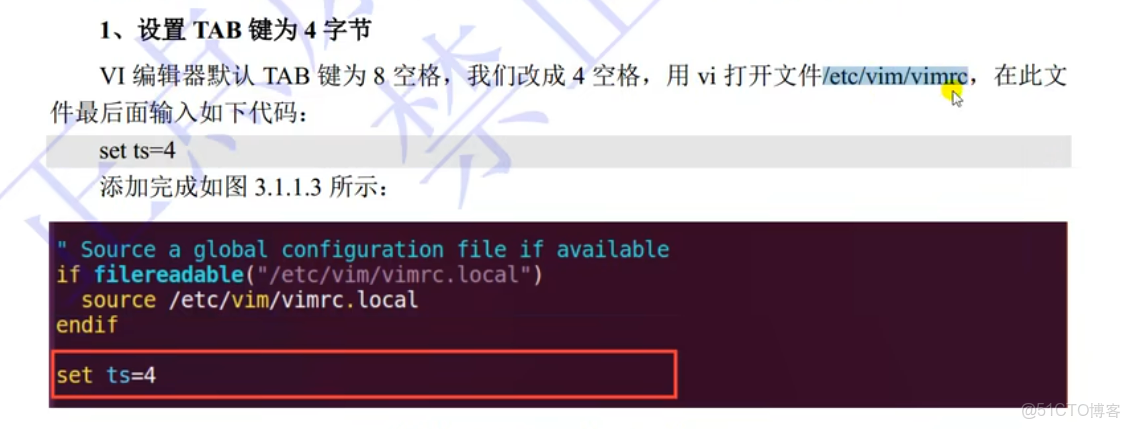
sudo vi /etc/vim/vimrc
#在最後一行輸入
set ts =4- 設定當前的vim編譯器顯示行號
同上在最後一行加上
set nu2 開始第一個C文件
編寫一個簡單輸出為hello world的C文件並且通過編譯鏈接的方式輸出可執行文件。
sudo touch main.c

sudo vi main.c
#include <stdio.h>
int main(int argc,char *argv[])
{
printf("hello world!\r\n");
return 0;
}
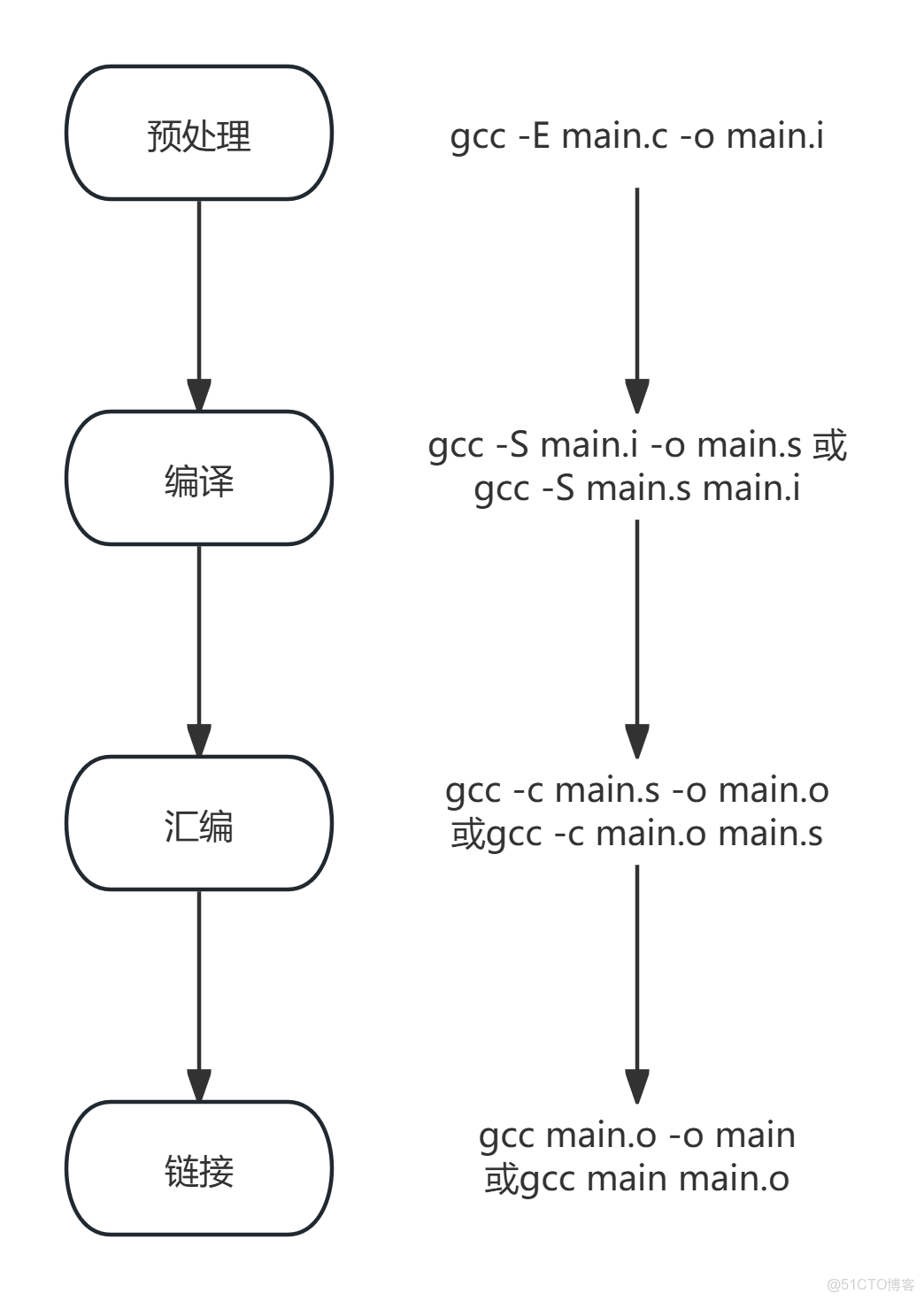
gcc -E main.i main.c不會輸出main.i文件而是在窗口中直接輸出轉換後文件,如果想要輸出.i文件必須使用gcc -E main.c -o main.i理由如下:
gcc -E:默認將預處理結果輸出到標準輸出,不會自動創建.i文件。如果需要生成.i文件,需要顯式指定輸出文件。gcc -S:默認會生成一個.s文件,包含彙編代碼
gcc編譯器也支持一步到位即gcc hello.c -o hello 或者 gcc hello.c會直接輸出同名文件;並且上述的步驟也可以跳過,不用順序執行,比如可以直接gcc -c hello.c -o hello.o
或者 gcc -c hello.c均會輸出 hello.o文件。
通過如下命令可以看到每個產生的文件
gcc -E main.c -o main.i
gcc -S main.i -o main.s
gcc -c main.s -o main.o
gcc main.o -o main如果執行多個.c文件時需要鏈接多個,例如實現三個文件main.c input.c cal.c實現兩數相加,分別如下
main.c
#include <stdio.h>
int main(int argc,char *argv[])
{
    printf("hello world!\r\n");
    return 0;
}cal.c
#include <stdio.h>
int cal(int a, int b) {
    return a + b;
}
cal.h
#ifndef _CAL_H_
#define _CAL_H_
int cal(int a, int b);
#endif
input.c
#include <stdio.h>
void input(int *x, int *y) {
    scanf("%d,%d", x, y);
}
input.h
#ifndef _INPUT_H_
#define _INPUT_H_
void input(int *x, int *y);
#endif為了方便可以直接使用gcc -c main.c input.c cal.c會得到3個同名的.o文件
則main.o input.o cal.o,再將這三個文件鏈接gcc main.o input.o cal.o -o main 或者
gcc -o main main.o input.o cal.o都行。
3 Makefile的使用
Makefile可以用於簡化或更加方便上述編譯步驟,當你使用第一個輸出為hello world時想要完整的輸出步驟中的全部文件可以按如下步驟
sudo touch Makefile

sudo vi Makefile
main: main.o
gcc main.o -o main
main.o: main.s
gcc -c main.s -o main.o
main.s: main.i
gcc -S main.i -o main.s
main.i: main.c
gcc -E main.c -o main.i
clean:
rm -f main main.o main.s main.i後直接用下面命令即可,且makefile只對更改了的文件進行編譯,大幅降低編譯所需時間。
make當你想鏈接三個文件時Makefile可以按如下編寫
main:main.o input.o cal.o
    gcc -o main main.o input.o cal.o #gcc main.o input.o cal.o -o main
main.o:main.c
    gcc -c main.o main.c #gcc -c main.c -o main.o
input.o:input.c
    gcc -c input.o input.c #gcc -c input.c -o input.o
cal.o:cal.c
    gcc -c cal.o cal.c #gcc -c cal.c -o cal.o
如果發生確實分隔符的報錯,請檢查是否用了<tab>鍵,如果用了則沒問題,沒用則將改行前面空格刪除用<tab>替代。
為了更加方便可以用變量代替上面所需內容
target = main.o input.o cal.o
depend = main.c input.c cal.c
main: $(target)
    gcc -o main main.o input.o cal.o
$(target): $(depend)
gcc -c $(depend)- Makefile中“=”,":=","?="和"+="的區別”=“會索引到該變量最後一次的更改賦值,而”:=“則將之前的最後一次更改賦值,”?=“則判斷該變量是否被賦值如果沒有則此次賦值如果有則不賦值,"+="則將當前等於號後的值加入當前變量
例如
name = xiaobai
current_time = $(name)
name = xiaohong
print:
    @echo "Current user: $(current_time)"
其輸出值為(會自動索引該name變量的最後一次更改)
xiaobai@xiaobai:~/桌面/C_program/first_project$ make print
Current user: xiaohong
如果不加”@“則輸出值為
xiaobai@xiaobai:~/桌面/C_program/first_project$ make print
echo "Current user: xiaohong"
Current user: xiaohong
當你發生更改改為:=如下
name = xiaobai
current_time := $(name)
name = xiaohong
print:
    @echo "Current user: $(current_time)"
其輸出值如下:(則實現賦值效果)
xiaobai@xiaobai:~/桌面/C_program/first_project$ make print
Current user: xiaobai
當你改為?=如下
name = xiaobai
current_time ?= xiaohe
print:
    @echo "Current user: $(current_time)"
輸出為
xiaobai@xiaobai:~/桌面/C_program/first_project$ make print
Current user: xiaohe
如果為
name = xiaobai
current_time := $(name)
current_time ?= xiaohe
print:
    @echo "Current user: $(current_time)"
輸出為
xiaobai@xiaobai:~/桌面/C_program/first_project$ make print
Current user: xiaobai
使用+=如下
name = xiaobai
current_time := $(name)
current_time += xiaohe
print:
    @echo "Current user: $(current_time)"
則輸出為
xiaobai@xiaobai:~/桌面/C_program/first_project$ make print
Current user: xiaobai xiaohe%的使用模式規則中,至少在規則的目標定定義中要包涵%,否則就是一般規則,(就是冒號前那個必須要包含%否則就只能用類似於gcc -o main main.o input.o cal.o這種的一般規則)"目標中的%表示對文件名的匹配,%表示長度任意的非空字符串,比如%.c就是所有的以.c結尾的文件,類似與通配符,a.%.c就表示以a.開頭,以.c結束的所有文件。
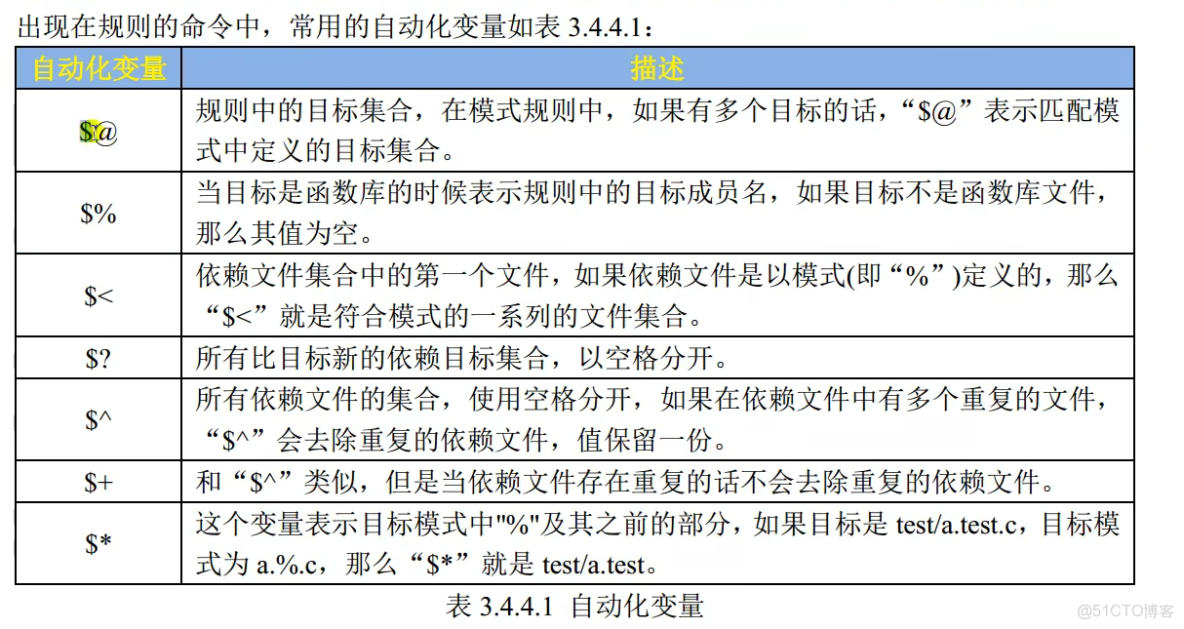
- 自動化變量的使用
例如
target = main.o input.o cal.o
depend = main.c input.c cal.c
main: $(target)
    gcc -o main $(target)
$(target): $(depend)
    gcc -c $(depend)
clean:
    rm -f *.o
rm -f main例如在$(target): $(depend) 其中$@表示$(target),如果沒用%模式,則$<僅僅表示main.c,你使用下面代碼可以測試,但$^會表示所有依賴。
- 代碼1
target = main.o input.o cal.o
depend = main.c input.c cal.c
main: $(target)
    gcc -o main $(target)
$(target): $(depend)
    gcc -c $<
clean:
    rm -f *.o
rm -f main- 代碼2
target = main.o input.o cal.o
depend = main.c input.c cal.c
main: $(target)
    gcc -o main $(target)
$(target): $(depend)
    gcc -c $^
clean:
    rm -f *.o
    rm -f main
make clean
make代碼1則會報出如下錯誤,代碼2正常
xiaobai@xiaobai:~/桌面/C_program/first_project$ make
gcc -c main.c
gcc -c main.c
gcc -c main.c
gcc -o main main.o input.o cal.o
/usr/bin/ld: 找不到 input.o: 沒有那個文件或目錄
/usr/bin/ld: 找不到 cal.o: 沒有那個文件或目錄
collect2: error: ld returned 1 exit status
make: *** [Makefile:4:main] 錯誤 1通過%規則和自動化變量規則可以將代碼簡化
target = main.o input.o cal.o
depend = main.c input.c cal.c
main: $(target)
    gcc -o main $(target)
$(target): $(depend)
    gcc -c $(depend)
clean:
    rm -f *.o
    rm -f main
更改為下面
target = main.o input.o cal.o
main: $(target)
    gcc -o main $(target)
%.o: %.c
    gcc -c $< #gcc -c $^
clean:
    rm -f *.o
rm -f main- 偽目標的使用
Makefile有一種特殊的目標——偽目標,一般的目標名都是要生成的文件,而偽目標不代表真正的目標名,在執行make命令的時候通過指定這個偽目標來執行其所在規則的定義的命令。使用偽目標的主要是為了避免Makefile中定義的只執行命令的目標和工作目錄下的實際文件出現名字衝突,有時候我們需要編寫一個規則用來執行一些命令,但是這個規則不是用來創建文件的。
如果你創建了一個clean文件則make clean將不發生作用,如果你想其發生作用就需要偽目標.PHONY: clean。
綜上完整的代碼可以如下:
target = main.o input.o cal.o
.PHONY: clean
main: $(target)
    gcc -o main $(target)
%.o: %.c
    gcc -c $<
clean:
    rm -f *.o
    rm -f main
4 shell的簡單使用
shell文件相當於一個打在終端的命令集合,通過如下命令可以創建一個shell文件
vi my.sh如果想打印一個hello world 可以輸入
#!/bin/bash
echo "hello world"
然後通過命令變為可執行權限,並執行
sudo chmod 0777 my.sh
./my.sh- 如何獲取鍵盤輸入值
#!/bin/bash
echo "you should input two param, the first is your name and the next is your age"
read -p "your name:" name
read -p "your age:" age
echo "your name is $name,your age is $age"
通過上述文件可以獲取name 和 age的值並打印。$name為取name的值,
- 如何運算(要求輸入兩個整形變量進行加法運算)注意sum=中間不能有空格
read -p "the first number:" num1
read -p "the second number:" num2
sum=$(($num1 + $num2))  #此處不能有空格
echo "the sum of $num1 and $num2 is $sum"
輸出為
the first number:29
the second number:90
the sum of 29 and 90 is 119- &&和||的使用
&&:A && B 表示 A執行併成功則B執行,否則B不執行
||:A || B 表示 A執行併成功則B不執行,否則B執行
A && B || C 由於其自左向右運算,表示A 執行成功則B執行,且C不執行或者A執行失敗
- 可以看Shell test 命令 | 菜鳥教程學習test
可以編寫一個程序用於判斷文件是否存在於當前路徑下
#!/bin/bash
echo "Please enter a filename to check if it exists:"
read -p "filename:" filename
test -e $filename && echo "the file $filename is exist" || echo "the file $filename is not exist"
# A && B || C A若為真則執行B否則執行C
#可以理解為A如果為True則執行B且由於||左邊為True所以不執行C,A如果為False則不執行B且由於||左邊為False所以執行C
#首先判斷文件是否存在存在則輸出存在否則輸出不存在
輸出如下:
xiaobai@xiaobai:~/桌面/C_program$ ./first.sh
Please enter a filename to check if it exists:
filename:main.c
the file main.c is exist- == 和!=的使用
實現兩個字符串的輸入,判斷兩個字符串是否相同
#!/bin/bash
echo "you should input two str to compare"
read -p "first string:" str1
read -p "second string:" str2
test "$str1" == "$str2" && echo "the two strings are equal" || echo "the two strings are not equal"
注意 &str1和&str2必須用雙引號包含不然就會出現如下錯誤
xiaobai@xiaobai:~/桌面/C_program$ ./first.sh
you should input two str to compare
first string:a p
second string:a p
./first.sh: 第 5 行: test: 參數太多
the two strings are not equal
分析原因 進行test判斷時會出現 a p==a p而不是(a p)==(a p)則會判斷錯誤。
- []的使用和test類似但是支持
regex匹配
將最後一行改為[ "$str1" == "$str2" ] && echo "the two strings are equal" || echo "the two strings are not equal"也可以實現類似效果。
- 默認變量

如下可以看到所有變量
#!/bin/bash
echo "file nmame:"$0
echo "total number of arguments:"$#
echo "whole arguments:"$@
echo "first argument:"$1
echo "second argument:"$2
輸出如下:
xiaobai@xiaobai:~/桌面/C_program$ ./first.sh 1 2
file nmame:./first.sh
total number of arguments:2
whole arguments:1 2
first argument:1- if的使用實現判斷時輸入y或者n
#!/bin/bash
read -p "please input a param(Y/N):" param #注意這裏param前面有空格

if [ "$param" == "Y" ] || [ "$param" == "y" ]; then
#[空格"$param"空格==空格"y"空格]||[空格"$param"空格==空格"y"空格];空格then
    echo "you input Y"
    exit 0
fi

if [ "$param" == "N" ] || [ "$param" == "n" ]; then
    echo "you input N"
    exit 0
fi
或者
#!/bin/bash
read -p "please input a param(Y/N):" param

if [ "$param" == "Y" ] || [ "$param" == "y" ]; then
    echo "you input Y"
    exit 0
elif [ "$param" == "N" ] || [ "$param" == "n" ]; then
        echo "you input N"
        exit 0
else
    echo "your input is invalid"
    exit 1
fi- case的用法
實現數字的識別
#!/bin/bash
read -p "please you input a value:" value
case $value in
    "1")
        echo "param is: 1"
        ;;
    "2")
        echo "param is: 2"
        ;;
    *)
        echo "can not identify!!!!"#注意這個*為通配符不能加引號
esac
輸出如下:
xiaobai@xiaobai:~/桌面/C_program$ ./first.sh
please you input a value:1
param is: 1
xiaobai@xiaobai:~/桌面/C_program$ ./first.sh
please you input a value:2
param is: 2
xiaobai@xiaobai:~/桌面/C_program$ ./first.sh
please you input a value:3
can not identify!!!!
xiaobai@xiaobai:~/桌面/C_program$- 函數的使用
實現簡單的-h和-c
#!/bin/bash

function help(){
    echo "this is help"
}
function close(){
    echo "this is close"
}

case $1 in
    "-h")
        help
        ;;
    "-c")
        close
        ;;
esac
輸出如下:
xiaobai@xiaobai:~/桌面/C_program$ ./first.sh -h
this is help
xiaobai@xiaobai:~/桌面/C_program$ ./first.sh -c
this is close
函數傳參
#!/bin/bash

function print(){
    echo "the first param is $1"
    echo "the seciond param is $2"
}

print a b
輸出如下
xiaobai@xiaobai:~/桌面/C_program$ ./first.sh
the first param is a
the seciond param is b- 循環結構
無線輸入值知道value=“close”
value="1" #注意變量賦值時不能有空格
while [ "$value" != "close" ]
do
    read -p "please input a value:" value
done
輸出如下:
xiaobai@xiaobai:~/桌面/C_program$ ./first.sh
please input a value:12938
please input a value:asdjkaoas
please input a value:0kasdj
please input a value:close- for循環的兩種形式
for name in xi xiao xiaobai
do
    echo "name is:$name"
done
第二種
read -p "please you input a count:" count
for((i=0;i<=count;i=i+1))#注意沒有空格
do
    sum=$(( $sum + $i))
done

echo "1+2+...+$count=$sum"