
1 安裝前準備
1.1 安裝環境
1.1.1 安裝説明
Redis Sentinel 在不使用Redis Cluster時為 Redis 提供高可用性。Redis Sentinel 還提供其他附帶任務,例如監控、通知並充當客户端的配置提供程序。
1.1.2 操作系統
CentOS 7.5(64位)
1.1.3 主機規劃
|
服務類型
|
IP地址
|
端口
|
|
Redis
|
192.168.140.11
|
6379
|
|
Redis
|
192.168.140.12
|
6379
|
|
Redis
|
192.168.140.13
|
6379
|
|
Sentinel
|
192.168.140.11
|
26379
|
|
Sentinel
|
192.168.140.12
|
26379
|
|
Sentinel
|
192.168.140.13
|
26379
|
1.1.4 系統配置説明
Redis服務和哨兵服務需要佔用端口,請先按照上面主機規劃設置防火牆開放端口
1.1.5 Redis版本號説明
Redis版本為5.0.5。
2 主從配置
Redis的安裝步驟為:下載、解壓、編譯、配置、啓動。
2.1 Redis服務安裝
以下以11服務器安裝為例,其他類似。
2.1.1 SSH登錄Redis主機
ssh root@192.168.140.112.1.2 安裝所需環境和工具
yum -y install wget vim tcl gcc make2.1.3 下載Redis
cd /opt/itmrl/srclib/
wget http://download.redis.io/releases/redis-5.0.5.tar.gz
或者通過FTP將redis-5.0.5.tar.gz上傳
2.1.4 解壓
tar -zxvf redis-5.0.5.tar.gz2.1.5 編譯
cd redis-5.0.5/
make install PREFIX=/opt/itmrl/redis/redis-5.0.5
拷貝配置文件到Redis程序目錄
cp redis.conf /opt/itmrl/redis/redis-5.0.5/bin
cp sentinel.conf /opt/itmrl/redis/redis-5.0.5/bin
redis.conf是Redis服務的配置文件;sentinel.conf是哨兵服務的配置文件。
2.1.6 配置內核參數
內核參數overcommit_memory
它是 內存分配策略
可選值:0,1,2。
0,:表示內核將檢查是否有足夠的可用內存供應用進程使用;如果有足夠的可用內存,內存申請允許;否則,內存申請失敗,並把錯誤返回給應用進程。
1:表示內核允許分配所有的物理內存,而不管當前的內存狀態如何。
2: 表示內核允許分配超過所有物理內存和交換空間總和的內存。
配置 vm.overcommit_memory 為1,這可以避免數據被截斷
編輯vim /etc/sysctl.conf ,修改如下:
vm.overcommit_memory=1sysctl -p2.1.7 修改配置文件
mkdir -p /opt/itmrl/redis/redis-5.0.5/run
mkdir -p /opt/itmrl/redis/redis-5.0.5/log
mkdir -p /opt/itmrl/redis/redis-5.0.5/working
vim /opt/itmrl/redis/redis-5.0.5/bin/redis.conf
通用配置
# 工作目錄
dir /opt/itmrl/redis/redis-5.0.5/working
# 需要不同服務器的節點連通,就不能設置為 127.0.0.1
bind 0.0.0.0
# 需要不同服務器的節點連通,這個就要設置為 no
protected-mode no
# 設置後台運行redis
daemonize yes
# 端口
port 6379
# 密碼
requirepass itmrl@123qwe
# PID文件
pidfile /opt/itmrl/redis/redis-5.0.5/run/redis_6379.pid
# LOG文件
logfile /opt/itmrl/redis/redis-5.0.5/log/redis.log
# RDB文件名
dbfilename dump.rdb
# 開啓AOF
appendonly yes
# AOF文件名
appendfilename "appendonly.aof"
# 主節點認證,主從節點均需要配置
masterauth itmrl@123qwe
從節點配置
replicaof 192.168.140.11 63792.1.9 啓動服務
cd /opt/itmrl/redis/redis-5.0.5/bin
./redis-server redis.conf
使用 ps -ef|grep redis 查看是否都啓動成功,IP和端口號都正確

使用info replication查看主從複製狀態
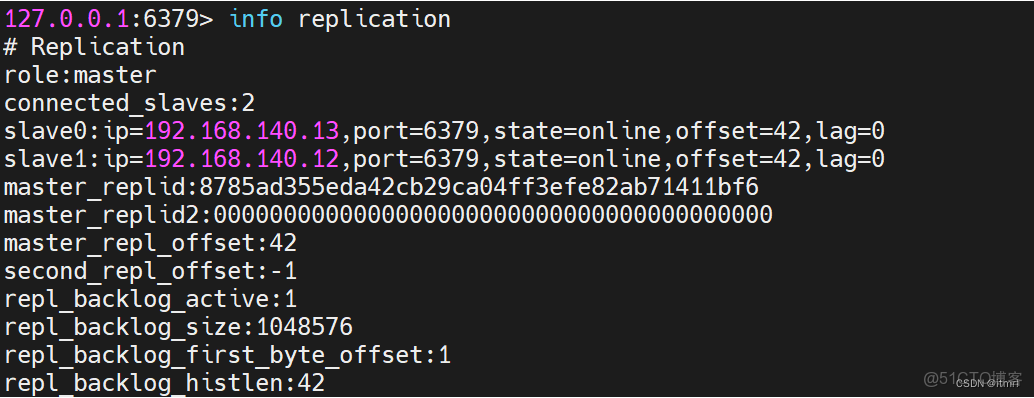
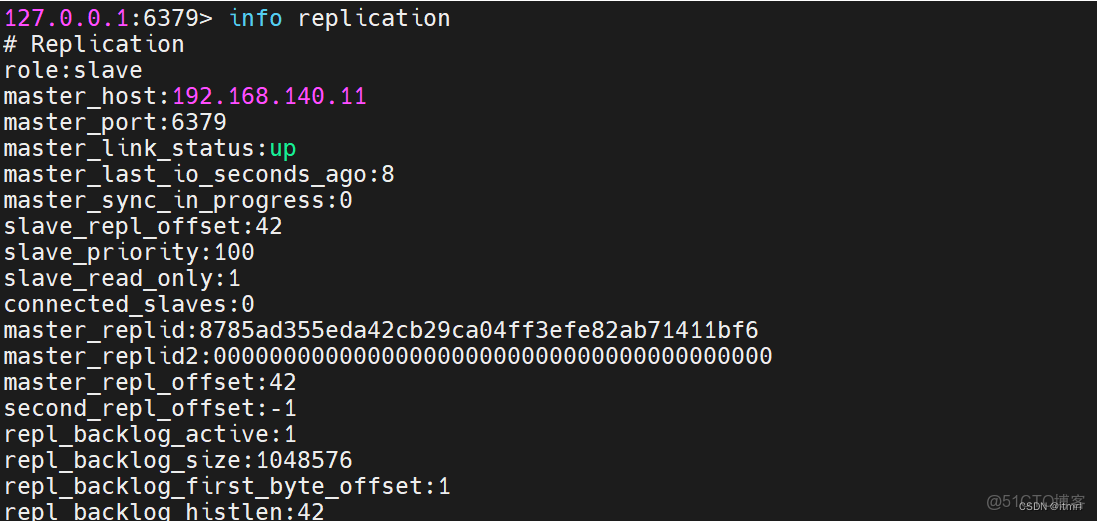
2.1.11 防火牆開通端口號策略
必須開哨兵總線端口,哨兵總線端口=端口號+20000
例:6379的哨兵總線端口是26379。這個哨兵總線端口不開放,部署的時候外部服務器的節點添加不進來
firewall-cmd --zone=public --add-port=6379/tcp --permanent
firewall-cmd --zone=public --add-port=26379/tcp --permanent
firewall-cmd --reload
3 哨兵配置
哨兵模式採用一主二從三哨兵模式。
3.1 修改配置
cd /opt/itmrl/redis/redis-5.0.5/bin
vi sentine.conf
# 保護模式默認關閉
protected-mode no
# 哨兵端口
port 26379
# 後台運行
daemonize yes
# pid
pidfile /opt/itmrl/redis/redis-5.0.5/run/redis-sentinel.pid
# log
logfile /opt/itmrl/redis/redis-5.0.5/log/redis-sentinel.log
# 工作目錄
dir /opt/itmrl/redis/redis-5.0.5/working
# 監控Redis主服務
sentinel monitor redis-master 192.168.140.11 6379 2
# 配置認證密碼
sentinel auth-pass redis-master itmrl@123qwe
# S_DOWN時間
sentinel down-after-milliseconds redis-master 30000
# 設置在故障轉移後可以重新配置以同時使用新主服務器的副本數
sentinel parallel-syncs redis-master 1
# 故障轉移超時時間
sentinel failover-timeout redis-master 1800003.2 啓動
./redis-sentinel sentinel.conf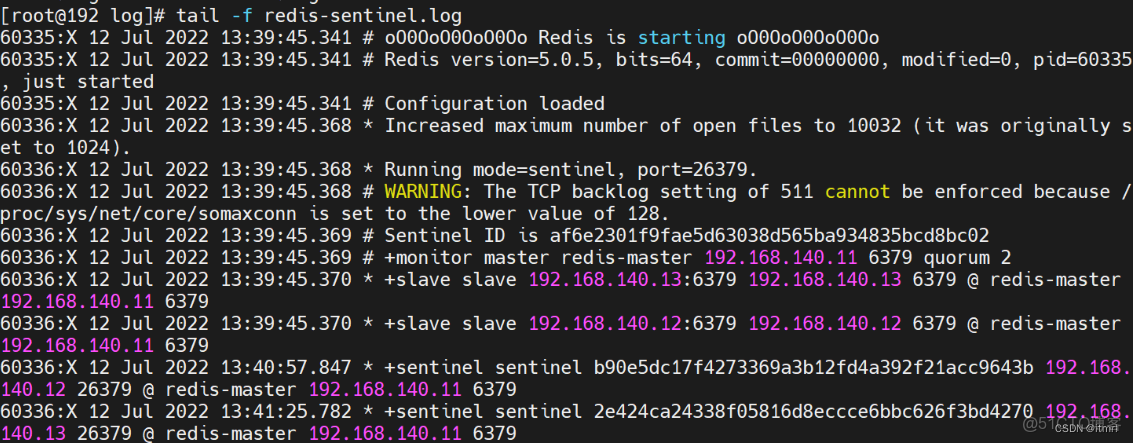
4 驗證
4.1 查看信息
隨意登錄一台主機執行 info命令,下面以連接41機器為例。
cd /opt/itmrl/redis/redis-5.0.5/bin
./redis-cli -p 26379 info
輸出信息如下:
# Server
redis_version:5.0.5
redis_git_sha1:00000000
redis_git_dirty:0
redis_build_id:dd4fc568347dd241
redis_mode:sentinel
os:Linux 3.10.0-957.el7.x86_64 x86_64
arch_bits:64
multiplexing_api:epoll
atomicvar_api:atomic-builtin
gcc_version:4.8.5
process_id:60336
run_id:1ee2ed34a11d346c61f5d591bb82837da098496c
tcp_port:26379
uptime_in_seconds:839
uptime_in_days:0
hz:11
configured_hz:10
lru_clock:13438056
executable:/opt/itmrl/redis/redis-5.0.5/bin/./redis-sentinel
config_file:/opt/itmrl/redis/redis-5.0.5/bin/sentinel.conf
# Clients
connected_clients:3
client_recent_max_input_buffer:2
client_recent_max_output_buffer:0
blocked_clients:0
# CPU
used_cpu_sys:1.875286
used_cpu_user:0.071192
used_cpu_sys_children:0.000000
used_cpu_user_children:0.000000
# Stats
total_connections_received:10
total_commands_processed:2196
instantaneous_ops_per_sec:2
total_net_input_bytes:128865
total_net_output_bytes:24810
instantaneous_input_kbps:0.17
instantaneous_output_kbps:0.02
rejected_connections:0
sync_full:0
sync_partial_ok:0
sync_partial_err:0
expired_keys:0
expired_stale_perc:0.00
expired_time_cap_reached_count:0
evicted_keys:0
keyspace_hits:0
keyspace_misses:0
pubsub_channels:0
pubsub_patterns:0
latest_fork_usec:0
migrate_cached_sockets:0
slave_expires_tracked_keys:0
active_defrag_hits:0
active_defrag_misses:0
active_defrag_key_hits:0
active_defrag_key_misses:0
# Sentinel
sentinel_masters:1
sentinel_tilt:0
sentinel_running_scripts:0
sentinel_scripts_queue_length:0
sentinel_simulate_failure_flags:0
master0:name=redis-master,status=ok,address=192.168.140.11:6379,slaves=2,sentinels=3
4.2 查看哨兵信息
隨意登錄一台主機執行 cluster info命令,下面以連接41機器為例。
cd /opt/itmrl/redis/redis-5.0.5/bin
./redis-cli -p 26379 info Sentinel
輸出信息如下:
# Sentinel
sentinel_masters:1
sentinel_tilt:0
sentinel_running_scripts:0
sentinel_scripts_queue_length:0
sentinel_simulate_failure_flags:0
master0:name=redis-master,status=ok,address=192.168.140.11:6379,slaves=2,sentinels=3
4.3 停止Master服務,查看故障轉移狀態
4.3.1 刪掉redis主服務進程

4.3.2 查看信息
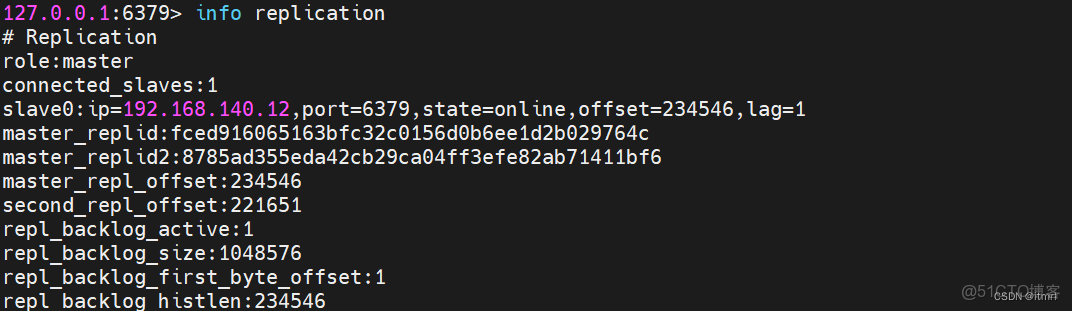
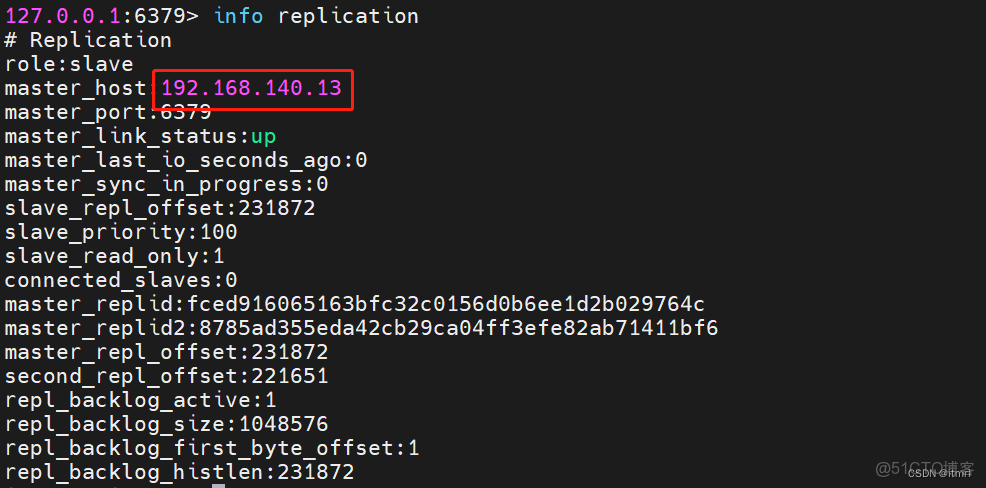
可以看出13已經正為Master。
4.4 回覆原Master服務,查看故障轉移狀態
4.4.1 啓動服務

4.4.2 查看信息
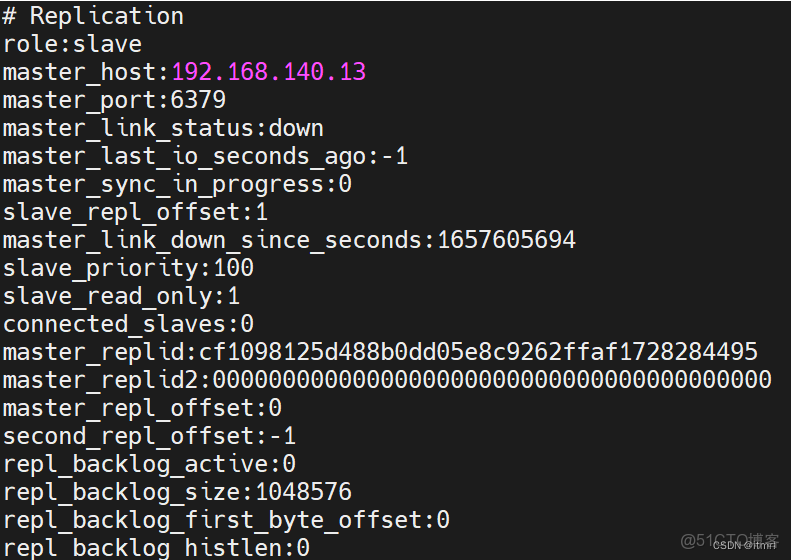
當前是down的狀態
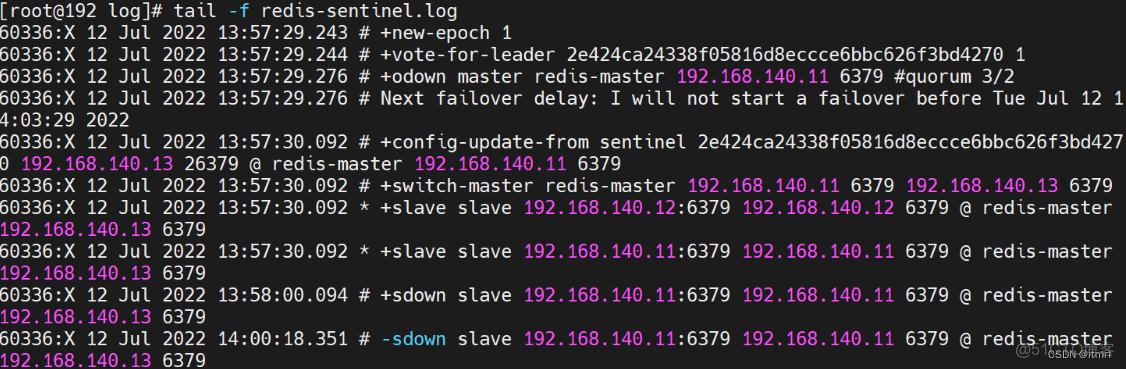
查看sentinel日誌,發現當前11節點沒有啓動成功。
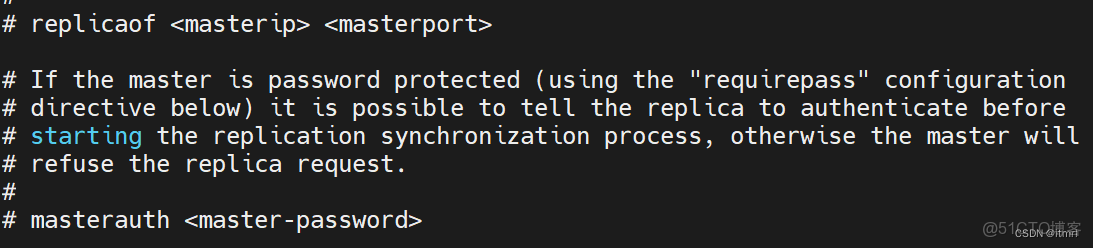
經過排查發現主服務的配置文件沒有配置認證
5 SpringBoot配置Redis哨兵模式
application.yml 添加Redis配置
spring:
redis:
database: 1
password: itmrl@123qwe
# 哨兵模式
sentinel:
master: redis-master
nodes: 192.168.140.11:26379,192.168.140.12:26379,192.168.140.13:26379