
一、創建接口
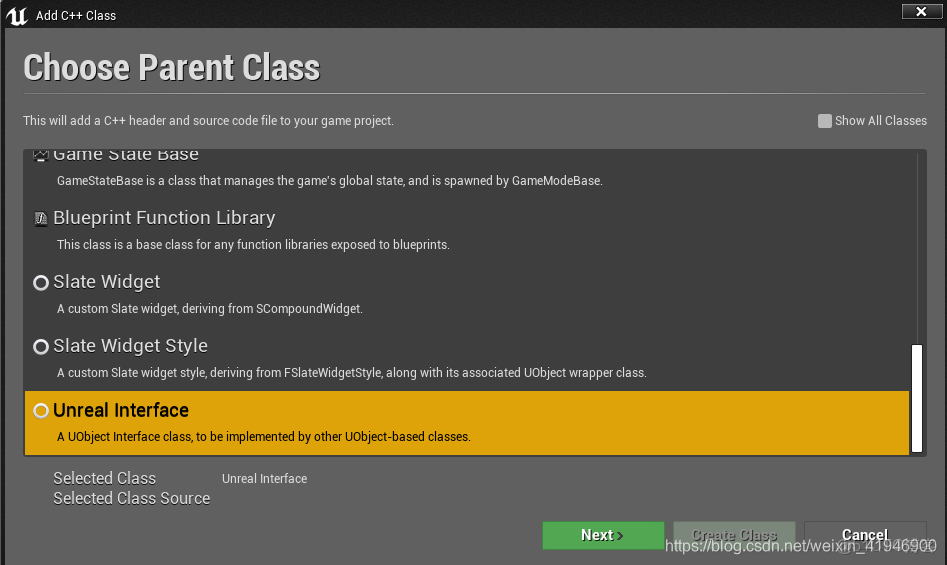
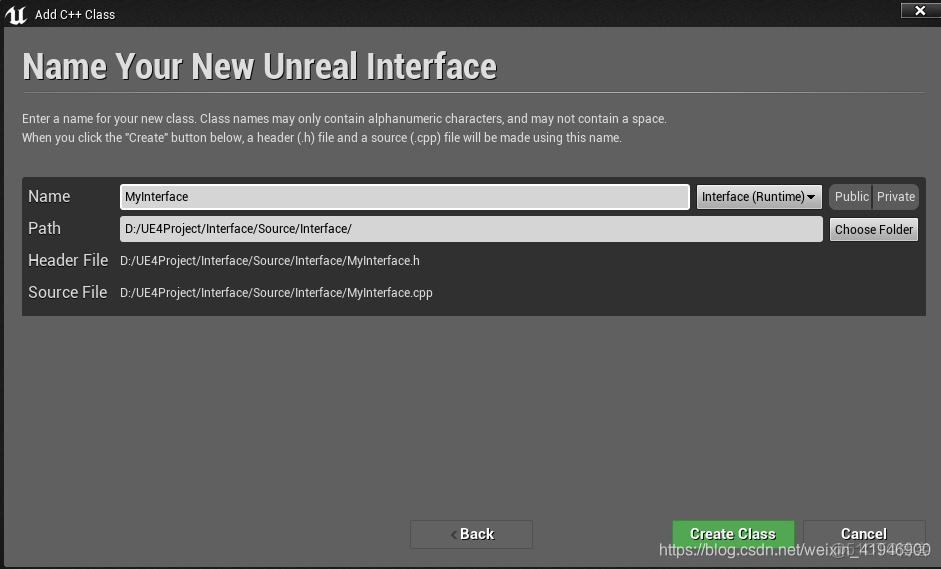
二、創建C++類
三、實現接口
// Fill out your copyright notice in the Description page of Project Settings.

#pragma once

#include "CoreMinimal.h"
#include "UObject/Interface.h"
#include "ReactToTriggerInterface.generated.h"

/*
	聲明接口類與聲明普通的類相似,但是任有兩個主要區別。
	1、接口類使用UINTERFACE()而不是UCLASS()。
	2、直接從UInterface而不是UObject繼承。

	接口分為四種:
	無返回值	無參數	  被藍圖當做事件	不能被實現
	無返回值	帶參數	  被藍圖當做事件	不能被實現
	有返回值	無參數	  不能被當做事件	可以被實現
	有返回值	帶參數	  不能備當做事件	可以被實現

	説明符:
	BlueprintCallable	           可以在藍圖中調用
	BlueprintImplementableEvent    在C++可以聲明函數(不能定義,藍圖重載),在C++裏調用該函數,藍圖重載實現該函數
	BlueprintNativeEvent	       在C++可以聲明和定義函數,在C++裏調用該函數,藍圖重載實現該函數(藍圖可以重載或不重載C++父類函數)
*/
// This class does not need to be modified.
UINTERFACE(MinimalAPI)
class UReactToTriggerInterface : public UInterface
{
	GENERATED_BODY()
};

/**
 *
 */
class INTERFACE_API IReactToTriggerInterface
{
	GENERATED_BODY()

	// Add interface functions to this class. This is the class that will be inherited to implement this interface.
public:
	//不能當做事件接口定義
	UFUNCTION(BlueprintCallable, BlueprintNativeEvent, Category = "LVCate")
		bool ReactToHighNoon();
	//不能當做事件接口定義
	UFUNCTION(BlueprintCallable, BlueprintImplementableEvent, Category = "LVCate")
		bool ReactToMidnight();
	//可以當做事件接口實現
	UFUNCTION(BlueprintCallable, BlueprintImplementableEvent, Category = "LVCate")
		void FuncAsImplementableEvent();
	//可以當做事件接口實現
	UFUNCTION(BlueprintCallable, BlueprintNativeEvent, Category = "LVCate")
		void FuncAsNativeEvent();
	//可以當做事件接口實現
	UFUNCTION(BlueprintCallable, BlueprintNativeEvent, Category = "LVCate")
		void FuncAsNativeEventWithParam(int value);
};
// Fill out your copyright notice in the Description page of Project Settings.
#pragma once
#include "CoreMinimal.h"
#include "GameFramework/Actor.h"
#include "ReactToTriggerInterface.h"
#include "AReactToTriggerCPPImp.generated.h"
UCLASS()
class INTERFACE_API AAReactToTriggerCPPImp : public AActor, public IReactToTriggerInterface
{
GENERATED_BODY()
public:
// Sets default values for this actor's properties
AAReactToTriggerCPPImp();
protected:
// Called when the game starts or when spawned
virtual void BeginPlay() override;
public:
// Called every frame
virtual void Tick(float DeltaTime) override;
//實現接口
UFUNCTION(BlueprintCallable, BlueprintNativeEvent, Category = "LVCate")
bool ReactToHighNoon();
virtual bool ReactToHighNoon_Implementation() override; //必須定義和實現這個函數
UFUNCTION(BlueprintCallable, BlueprintNativeEvent, Category = "LVCate")
void FuncAsNativeEvent();
virtual void FuncAsNativeEvent_Implementation() override;
UFUNCTION(BlueprintCallable, BlueprintNativeEvent, Category = "LVCate")
void FuncAsNativeEventWithParam(int value);
virtual void FuncAsNativeEventWithParam_Implementation(int value) override;
//自己定義的函數
UFUNCTION(BlueprintCallable, BlueprintImplementableEvent, Category = "LVCate")
void FuncAsImplementableEventCPPImp();
UFUNCTION(BlueprintCallable, BlueprintNativeEvent, Category = "LVCate")
void FuncAsNativeEventCPPImp();
void FuncAsNativeEventCPPImp_Implementation();
UFUNCTION(BlueprintCallable, BlueprintNativeEvent, Category = "LVCate")
void FuncAsNativeEventWithParamCPPImp(int value);
void FuncAsNativeEventWithParamCPPImp_Implementation(int value);
};// Fill out your copyright notice in the Description page of Project Settings.
#include "AReactToTriggerCPPImp.h"
// Sets default values
AAReactToTriggerCPPImp::AAReactToTriggerCPPImp()
{
// Set this actor to call Tick() every frame. You can turn this off to improve performance if you don't need it.
PrimaryActorTick.bCanEverTick = true;
}
// Called when the game starts or when spawned
void AAReactToTriggerCPPImp::BeginPlay()
{
Super::BeginPlay();
}
// Called every frame
void AAReactToTriggerCPPImp::Tick(float DeltaTime)
{
Super::Tick(DeltaTime);
}
bool AAReactToTriggerCPPImp::ReactToHighNoon_Implementation()
{
this->FuncAsNativeEventCPPImp();
return true;
}
void AAReactToTriggerCPPImp::FuncAsNativeEvent_Implementation()
{
}
void AAReactToTriggerCPPImp::FuncAsNativeEventWithParam_Implementation(int value)
{
}
void AAReactToTriggerCPPImp::FuncAsNativeEventCPPImp_Implementation()
{
}
void AAReactToTriggerCPPImp::FuncAsNativeEventWithParamCPPImp_Implementation(int value)
{
}四、在藍圖中調用接口
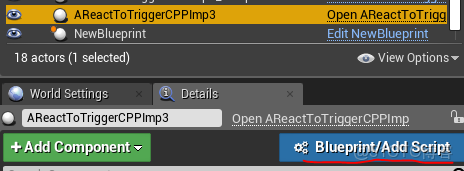
將新建的C++類拖到場景當中,選中添加藍圖,命名為AReactToTriggerCPPImp1_Blueprint。
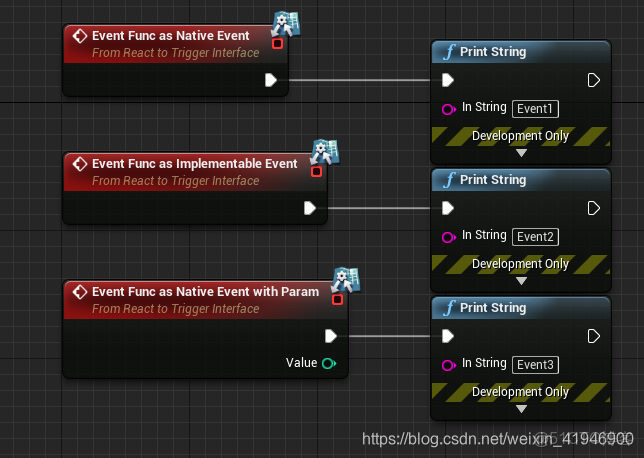
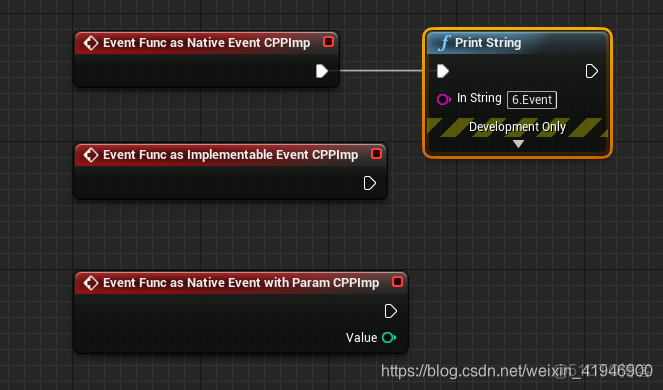
打開AReactToTriggerCPPImp1_Blueprint,可以看到無返回值函數作為事件,不能被實現。
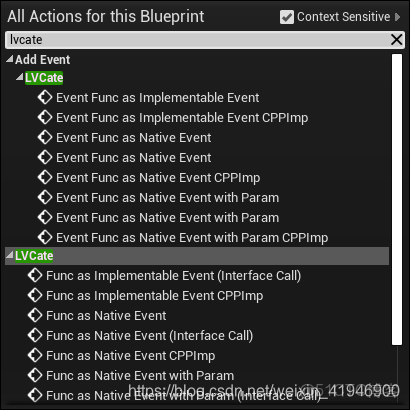
可以看到不能被當做事件,但是可以被實現的函數。
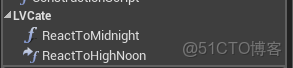
添加事件
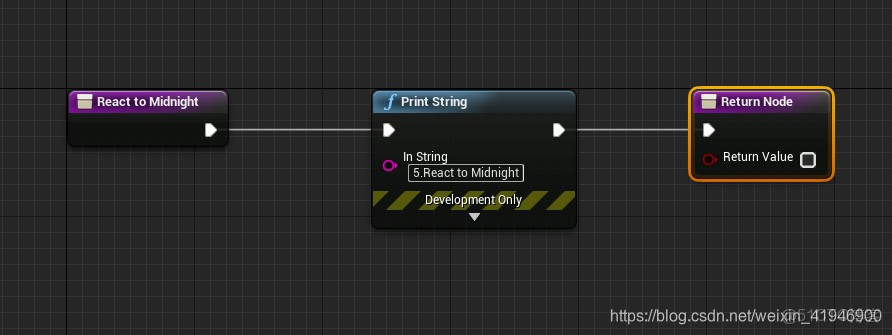
實現ReactToMidnight、ReactToHighNoon
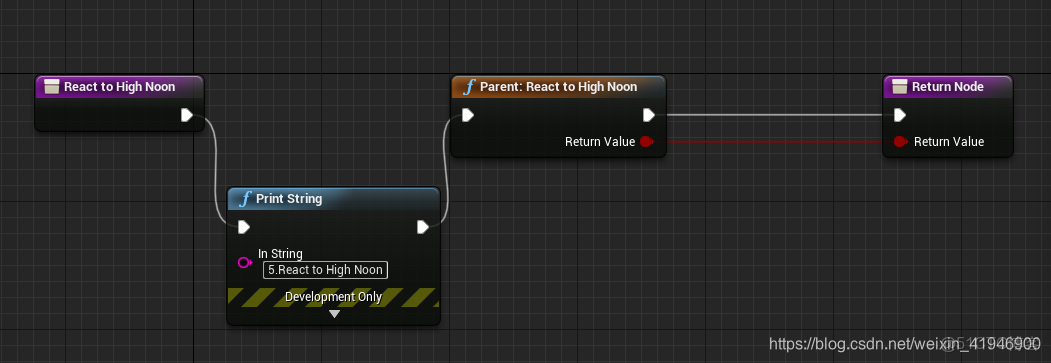
新建一個新的藍圖命名為NewBlueprint,拖入場景中,並打開藍圖。
新建一個變量React

點擊場景中的NewBlueprint
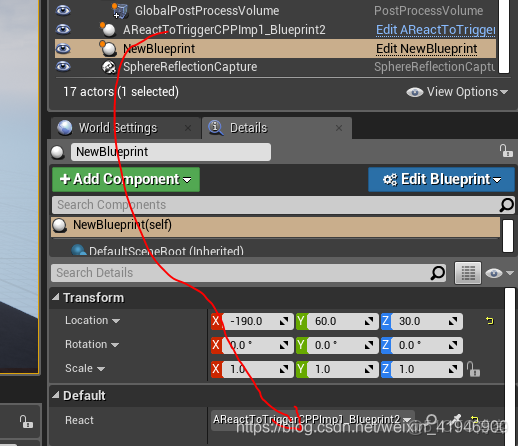
返回藍圖中
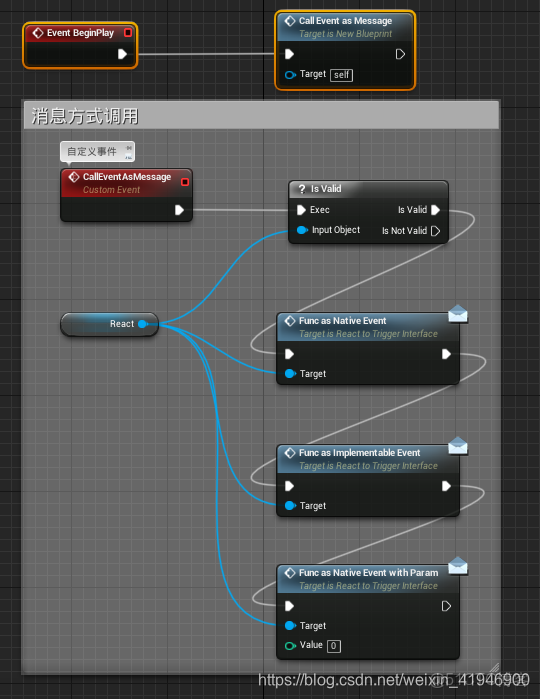
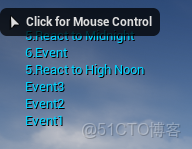
運行可以看到屏幕上的打印
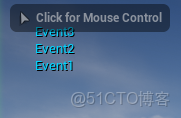
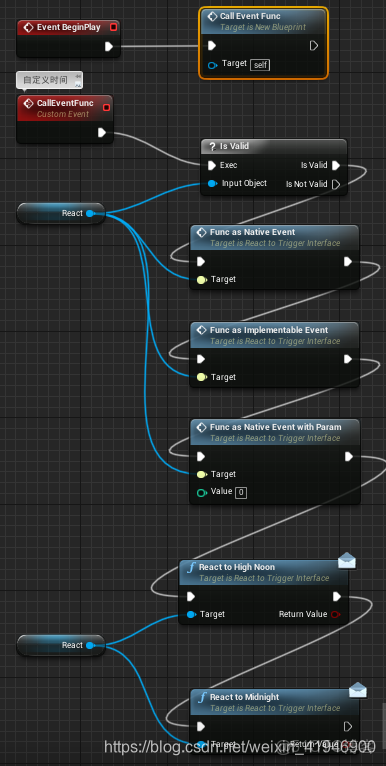
運行結果
在C++類中調用接口
在AAReactToTriggerCPPImp.cpp中添加代碼
// Fill out your copyright notice in the Description page of Project Settings.


#include "AReactToTriggerCPPImp.h"
#include "Misc\AssertionMacros.h"
#include <Engine.h>

DEFINE_LOG_CATEGORY_STATIC(LV, Log, All);
// Sets default values
AAReactToTriggerCPPImp::AAReactToTriggerCPPImp()
{
 	// Set this actor to call Tick() every frame.  You can turn this off to improve performance if you don't need it.
	PrimaryActorTick.bCanEverTick = true;

}

// Called when the game starts or when spawned
void AAReactToTriggerCPPImp::BeginPlay()
{
	Super::BeginPlay();
	GEngine->AddOnScreenDebugMessage(-1, 5.f, FColor::Red, "BeginPlay");
	this->Execute_ReactToHighNoon(this);//運行藍圖中的ReactToHighNoon函數
}

// Called every frame
void AAReactToTriggerCPPImp::Tick(float DeltaTime)
{
	Super::Tick(DeltaTime);

}

bool AAReactToTriggerCPPImp::ReactToHighNoon_Implementation()
{
	UE_LOG(LV, Warning, TEXT("ReactToHighNoon_Implementation"));
	GEngine->AddOnScreenDebugMessage(-1, 5.f, FColor::Red, "ReactToHighNoon_Implementation");
	this->Execute_ReactToMidnight(this);//運行藍圖中的ReactToMidnight函數
	//this->FuncAsNativeEventCPPImp();
	return true;
}

void AAReactToTriggerCPPImp::FuncAsNativeEvent_Implementation()
{

}

void AAReactToTriggerCPPImp::FuncAsNativeEventWithParam_Implementation(int value)
{

}

void AAReactToTriggerCPPImp::FuncAsNativeEventCPPImp_Implementation()
{

}

void AAReactToTriggerCPPImp::FuncAsNativeEventWithParamCPPImp_Implementation(int value)
{

}
編譯完後運行結果如下
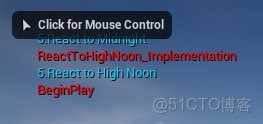
創建C++類,命名MyActor。
// Fill out your copyright notice in the Description page of Project Settings.

#pragma once

#include "CoreMinimal.h"
#include "GameFramework/Actor.h"
#include "AReactToTriggerCPPImp.h"
#include "MyActor.generated.h"

UCLASS()
class INTERFACE_API AMyActor : public AActor
{
	GENERATED_BODY()

public:
	// Sets default values for this actor's properties
	AMyActor();

protected:
	// Called when the game starts or when spawned
	virtual void BeginPlay() override;

public:
	// Called every frame
	virtual void Tick(float DeltaTime) override;
	void IteratorCall(); //迭代調用
};
// Fill out your copyright notice in the Description page of Project Settings.


#include "MyActor.h"
#include <Engine.h>
#include <EngineUtils.h>

// Sets default values
AMyActor::AMyActor()
{
 	// Set this actor to call Tick() every frame.  You can turn this off to improve performance if you don't need it.
	PrimaryActorTick.bCanEverTick = true;

}

// Called when the game starts or when spawned
void AMyActor::BeginPlay()
{
	Super::BeginPlay();
	IteratorCall();
}

// Called every frame
void AMyActor::Tick(float DeltaTime)
{
	Super::Tick(DeltaTime);

}

void AMyActor::IteratorCall()
{
	TActorIterator<AAReactToTriggerCPPImp> actorIt = TActorIterator<AAReactToTriggerCPPImp>(GetWorld()); //獲得迭代器
	//遍歷迭代器
	for (actorIt; actorIt; ++actorIt)
	{
		if (!actorIt)
		{
			continue;
		}
		AAReactToTriggerCPPImp* actor = *actorIt;
		bool isImplementation = actor->GetClass()->ImplementsInterface(UReactToTriggerInterface::StaticClass());
		if (isImplementation)
		{
			IReactToTriggerInterface* inter = Cast<IReactToTriggerInterface>(actor);
			inter->Execute_ReactToHighNoon(actor);
		}
	}
}
將MyActor拖入場景中並運行,結果如下。
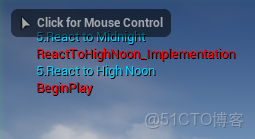
本文章為轉載內容,我們尊重原作者對文章享有的著作權。如有內容錯誤或侵權問題,歡迎原作者聯繫我們進行內容更正或刪除文章。
